

PIN Lists Module Documentation
Table of Contents
Section titled “Table of Contents”- Navigation & Access
- Screenshots & Visual Interface
- Module Overview (Technical)
- Module Overview (Commercial/Business)
- Module Overview (End User/Administrator)
- Configuration Fields Reference
- Call Flow / Logic Explanation
- Import/Export Feature
- Common Scenarios & Examples
- Model Context Protocol (MCP) AI Integration
- Limitations & Important Notes
- Troubleshooting Tips
- Glossary
Navigation & Access
Section titled “Navigation & Access”To access the PIN Lists module:
- Log in to the Ring2All Web Portal.
- In the left navigation sidebar, expand PBX Engine.
- Under Call Routing, click PIN List (
/pbx/calls-routing/pin-list).
Screenshots & Visual Interface
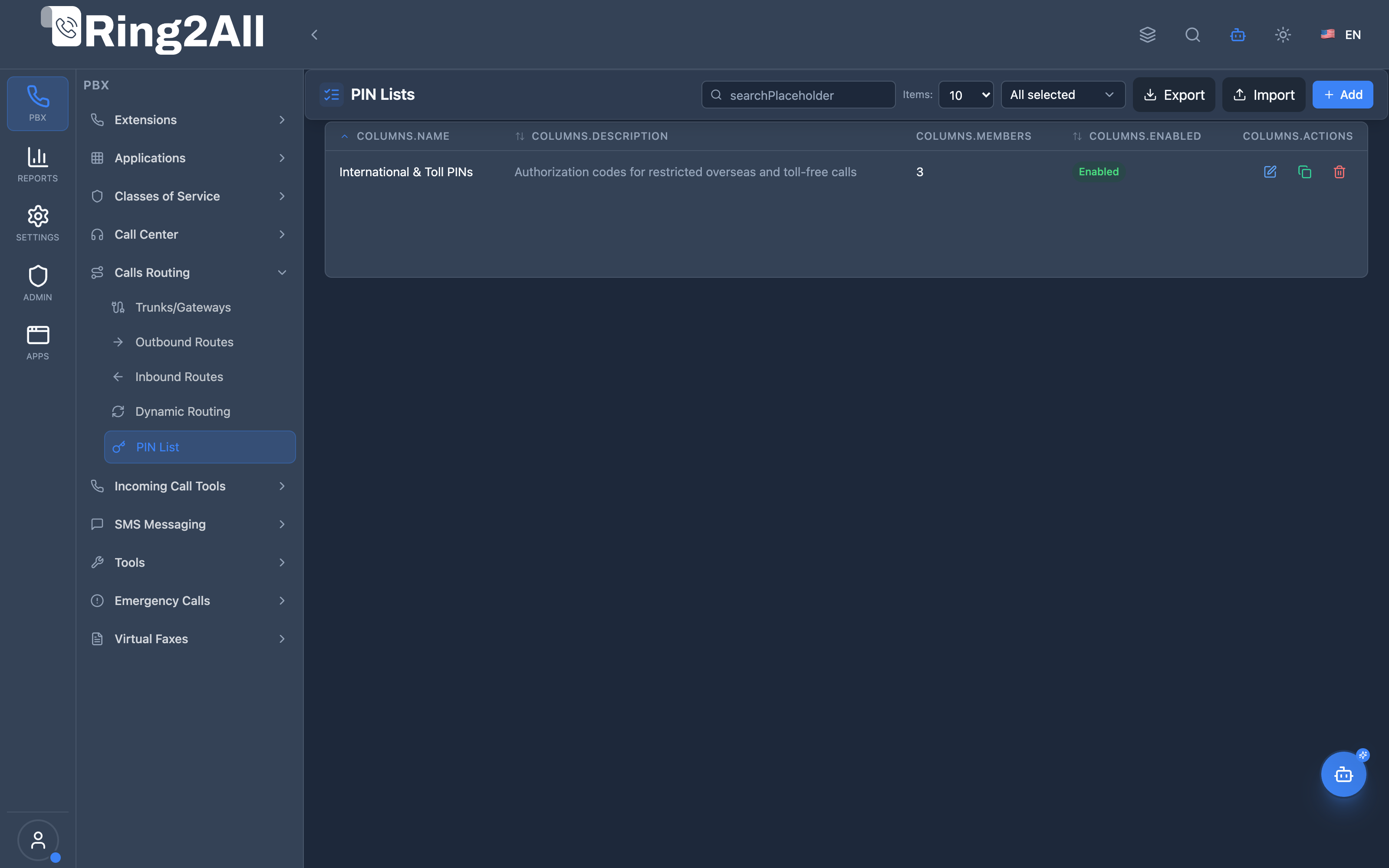
Section titled “Screenshots & Visual Interface”PIN Lists Overview
Section titled “PIN Lists Overview”Displays all authorization PIN lists, their enabled status, total member count, and direct management shortcuts.
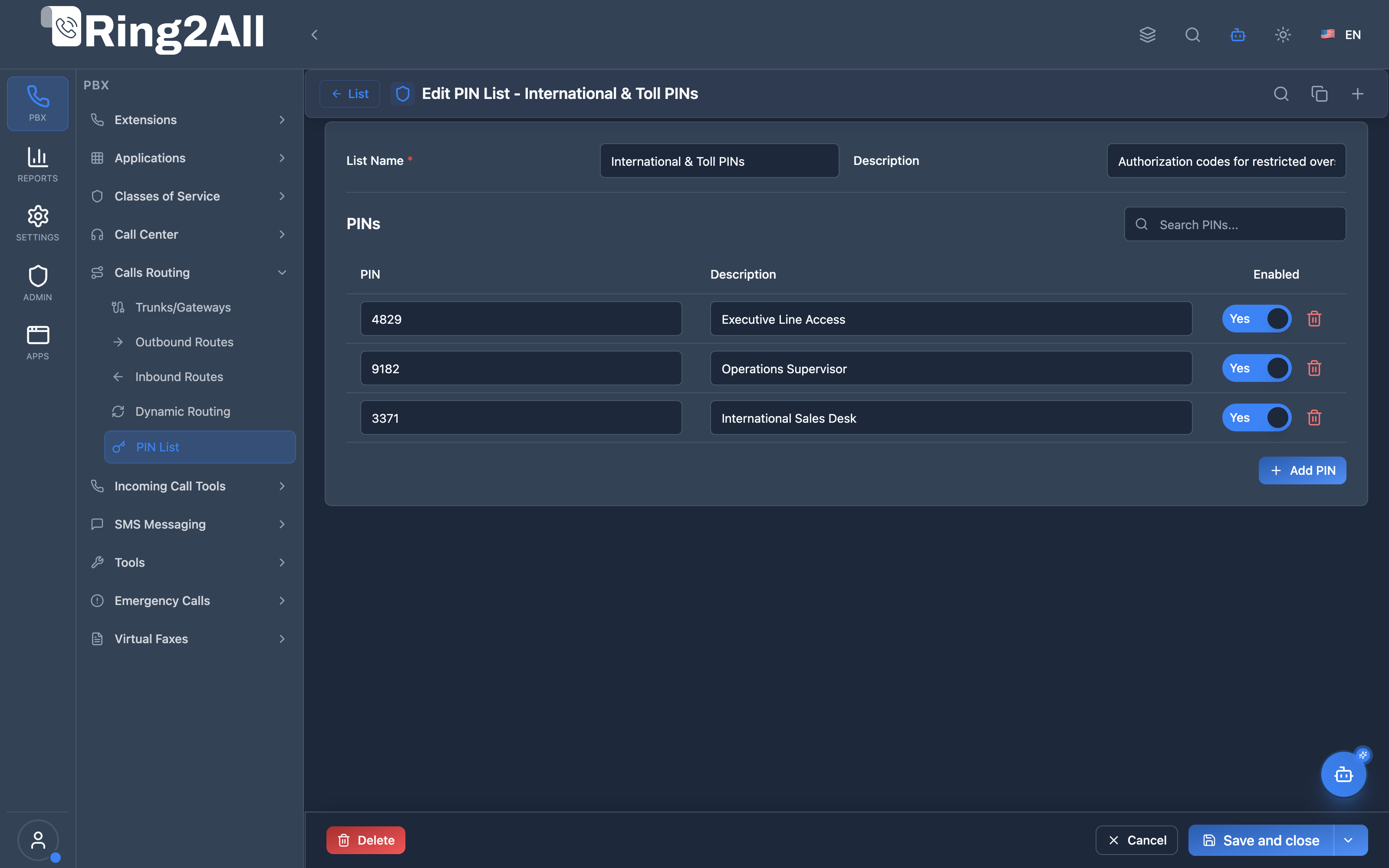
PIN List Configuration Form
Section titled “PIN List Configuration Form”Allows configuring the list name, description, and the inline PIN members table (PIN code, label/description, and status toggle).
1. Module Overview (Technical)
Section titled “1. Module Overview (Technical)”What Are PIN Lists?
Section titled “What Are PIN Lists?”PIN Lists provide authorization codes for controlled access to specific telephony features. Users must enter a valid PIN from the list to proceed with protected actions like international calls, DISA access, or restricted outbound routes.
Architecture
Section titled “Architecture”┌─────────────────────────────────────────────────────────────────┐│ PIN List Validation System │├─────────────────────────────────────────────────────────────────┤│ ││ Feature requests PIN validation (e.g., international call) ││ │ ││ ▼ ││ ┌──────────────────────────────────────────────────────────┐ ││ │ Dialplan sets pin_list variable │ ││ │ session:setVariable("pin_list", "international") │ ││ └──────────────────────────────────────────────────────────┘ ││ │ ││ ▼ ││ ┌──────────────────────────────────────────────────────────┐ ││ │ validate_pin.lua │ ││ │ │ ││ │ 1. Look up PIN list by name and domain │ ││ │ SELECT id FROM public.pin_lists │ ││ │ WHERE name = 'international' AND enabled = TRUE │ ││ │ │ ││ │ 2. Prompt user: "Enter your access PIN" │ ││ │ │ ││ │ 3. Validate entered PIN against members │ ││ │ SELECT 1 FROM public.pin_list_members │ ││ │ WHERE pin = [input] AND enabled = TRUE │ ││ │ │ ││ │ 4. Set result variable │ ││ │ session:setVariable("pin_list_valid", "true/false") │ ││ │ │ ││ └──────────────────────────────────────────────────────────┘ ││ │ ││ ▼ ││ Dialplan continues or blocks based on pin_list_valid ││ │└─────────────────────────────────────────────────────────────────┘2. Module Overview (Commercial/Business)
Section titled “2. Module Overview (Commercial/Business)”Business Value
Section titled “Business Value”PIN Lists enable controlled access to premium or restricted features:
| Without PIN Lists | With PIN Lists |
|---|---|
| All users can dial international | Only authorized users |
| No accountability | Track who used which PIN |
| No cost control | Limit expensive calls |
| No department segregation | Department-specific access |
Use Cases
Section titled “Use Cases”-
International Dialing Authorization
- Only managers or authorized personnel can dial international numbers
- PIN required before outbound route bridges call
-
DISA Security Layer
- Additional PIN after DISA authentication
- Two-factor validation for extra security
-
Toll-Free Bypass
- Require PIN for toll-free abuse prevention
- Track usage by individual code
-
Department Budgets
- Different PIN lists per department
- Track call costs by department code
Feature Highlights
Section titled “Feature Highlights”| Feature | Benefit |
|---|---|
| Multiple PINs per List | Share list with many users |
| PIN Descriptions | Track owner or department per PIN |
| Enable/Disable | Temporarily revoke access without deletion |
| Import/Export | Bulk management via CSV |
| Multi-tenant | Full isolation per tenant domain |
3. Module Overview (End User/Administrator)
Section titled “3. Module Overview (End User/Administrator)”What Can You Do?
Section titled “What Can You Do?”- Create PIN lists for different purposes (Outbound, DISA, Features)
- Add multiple PINs to each list
- Enable/disable individual PINs
- Import/export PINs via CSV
- Search and filter PINs
🎯 User Roles & Key Capabilities
Section titled “🎯 User Roles & Key Capabilities”| Role | Key Capabilities |
|---|---|
| Super Admin | Configures global telephony security policies, tenant isolation, and audits system-wide PIN authorization patterns. |
| Tenant Admin | Creates, enables, and manages domain-specific PIN lists, imports/exports CSV PIN batches, and links PIN lists to Outbound Routes or DISA. |
| Department Manager | Requests and monitors PIN lists assigned to specific teams or cost centers to prevent unauthorized long-distance or toll calls. |
| End User / Extension | Enters assigned authorization PINs upon DTMF prompt (enter_pin.wav) when dialing restricted routes or services. |
Administrator Workflow
Section titled “Administrator Workflow”┌─────────────────────────────────────────────────────────────────┐│ Creating a PIN List │├─────────────────────────────────────────────────────────────────┤│ ││ Step 1: General Information ││ ├─ List Name: "International & Toll PINs" ││ ├─ Description: "PINs for international dialing" ││ └─ Enabled: ✓ ││ ││ Step 2: Add PINs ││ ├─ PIN: 4829 | Description: "Executive Team" | Enabled: ✓ ││ ├─ PIN: 9182 | Description: "Operations" | Enabled: ✓ ││ ├─ PIN: 3371 | Description: "Finance Support" | Enabled: ✓ ││ └─ PIN: 0044 | Description: "Guest Access" | Enabled: ✗ ││ ││ Step 3: Save ││ ││ Result: Users entering active PINs pass validation ││ Users entering disabled PINs fail validation ││ │└─────────────────────────────────────────────────────────────────┘User Workflow (Using PIN)
Section titled “User Workflow (Using PIN)”1. User dials international number (or enters protected route)2. System prompt: "Please enter your access PIN followed by pound"3. User enters: 4829#4. PIN validated against assigned PIN List5. If valid → Outbound route bridges call6. If invalid → "Invalid PIN entered" → HangupQuick Tips
Section titled “Quick Tips”[!TIP] Unique PINs: Use distinct PINs per department or employee for precise CDR accountability.
[!TIP] PIN Length: Recommend 4 to 8 digits for maximum security and ease of dialing.
[!CAUTION] Temporary Revocation: Toggle PIN status to Disabled rather than deleting it to keep historical records intact.
4. Configuration Fields Reference
Section titled “4. Configuration Fields Reference”PIN List Fields
Section titled “PIN List Fields”| Field | Description | Example | Required |
|---|---|---|---|
| List Name | Unique identifier for the PIN set | International & Toll PINs |
Yes |
| Description | Administrative notes and scope | Authorized outbound PINs |
No |
| Enabled | Master list active status | On/Off | Yes |
PIN Member Fields
Section titled “PIN Member Fields”| Field | Description | Example | Required |
|---|---|---|---|
| PIN | Access code entered by user | 4829 |
Yes |
| Description | Owner, department, or purpose label | Executive Team |
No |
| Enabled | Individual PIN active status | On/Off | Yes |
5. Call Flow / Logic Explanation
Section titled “5. Call Flow / Logic Explanation”PIN Validation Flow
Section titled “PIN Validation Flow”Dialplan Trigger │ ▼Look up PIN List by Name + Domain │ ├─ List not found / disabled ──→ REJECT CALL │ ▼Play Prompt & Collect DTMF (PIN) │ ▼Hash/Match against PIN List Members │ ├─ Match found & Member Enabled ──→ ALLOW CALL │ └─ Match not found / Member Disabled ──→ REJECT CALL6. Import/Export Feature
Section titled “6. Import/Export Feature”Bulk Import via CSV
Section titled “Bulk Import via CSV”Administrators can import large numbers of PINs simultaneously via CSV file:
pin,description,enabled4829,Executive Team,true9182,Operations,true3371,Finance Support,true7. Common Scenarios & Examples
Section titled “7. Common Scenarios & Examples”Scenario 1: Restrict International Outbound Route
Section titled “Scenario 1: Restrict International Outbound Route”- Configure Outbound Route matching
^011.* - Assign PIN List
International & Toll PINsto the Outbound Route - Anyone attempting to dial international destinations must enter a valid PIN before the call connects to the carrier gateway.
Scenario 2: High-Value Customer Support Line
Section titled “Scenario 2: High-Value Customer Support Line”- Restrict special routing destination using PIN List verification.
8. Model Context Protocol (MCP) AI Integration
Section titled “8. Model Context Protocol (MCP) AI Integration”Ring2All exposes native Model Context Protocol (MCP) tools for PIN Lists, empowering AI agents, security bots, and PBX Copilots to inspect authorization code registries, provision dial security PIN pools, manage member PIN authorizations dynamically, and enforce strict dependency guards before deletion.
Available MCP Tools
Section titled “Available MCP Tools”| Tool Name | Description | Key Parameters |
|---|---|---|
list_pin_lists |
Lists all authorization PIN lists in the domain, including member counts and enabled states. | search (optional string) |
get_pin_list_status |
Retrieves full configuration and active member PIN codes (including labels and status) for a specific PIN list. | name (required string) |
create_pin_list |
Provisions a new PIN list with an initial set of authorization codes. Enforces PIN list name uniqueness per domain. | name, pins (array of numeric PIN strings), description, enabled |
add_pin_to_list |
Adds a new authorization PIN code and optional user/owner description to an existing PIN list. | pinListName, pin, description |
delete_pin_from_list |
Removes an individual PIN code from a PIN list, revoking dialing privileges immediately. | pinListName, pin |
delete_pin_list |
Safely removes an entire PIN list after verifying via assertCanDeletePinList that no outbound routes or DISA profiles currently depend on it. |
name (required string) |
Protection Guards & Integrity
Section titled “Protection Guards & Integrity”- Dependency Guard (
assertCanDeletePinList): When an AI agent attempts to delete a PIN list, Ring2All checks alloutbound_routesanddisaconfigurations. If any active route or DISA service relies on this PIN list, deletion is rejected with the exact names of the dependent modules. - Name Uniqueness: PIN list names must be unique within each tenant domain.
- Instant Revocation: Adding or deleting PIN members takes effect in PostgreSQL immediately and is checked on the next call evaluation without needing Telephony Server restarts.
AI Agent Operational Examples
Section titled “AI Agent Operational Examples”Querying PIN List Members and Status
Section titled “Querying PIN List Members and Status”{ "tool": "get_pin_list_status", "arguments": { "name": "Manager Outbound PINs" }}Granting a Temporary Authorization PIN to an Employee
Section titled “Granting a Temporary Authorization PIN to an Employee”{ "tool": "add_pin_to_list", "arguments": { "pinListName": "International Calling PINs", "pin": "7492", "description": "Sales Rep Juan Perez (Temporary)" }}Revoking an Authorization PIN
Section titled “Revoking an Authorization PIN”{ "tool": "delete_pin_from_list", "arguments": { "pinListName": "International Calling PINs", "pin": "7492" }}Recommended Natural Language Prompts
Section titled “Recommended Natural Language Prompts”- “List all PIN lists and how many PINs each contains.”
- “Show me all authorization codes inside the ‘Executive PINs’ list.”
- “Add PIN 8831 to the ‘International & Toll PINs’ list for marketing director.”
- “Remove PIN 4829 from the ‘Manager Outbound PINs’ list.”
9. Limitations & Important Notes
Section titled “9. Limitations & Important Notes”- PIN lists are strictly isolated per tenant domain.
- Telephony Server captures DTMF input terminating with
#or upon hitting maximum digits.
10. Troubleshooting Tips
Section titled “10. Troubleshooting Tips”| Issue | Likely Cause | Solution |
|---|---|---|
| PIN rejected despite correct entry | Individual PIN or master list disabled | Check status toggle in PIN List editor |
| Call connects without prompt | Outbound route does not have PIN list assigned | Verify PIN List dropdown on the Outbound Route |
| DTMF tones not recognized | Inband DTMF mismatch on SIP phone | Ensure extension uses RFC2833 DTMF mode |
11. Glossary
Section titled “11. Glossary”- PIN (Personal Identification Number): Numeric code used for access control.
- PIN List: A named collection of valid PINs.
- DISA (Direct Inward System Access): Allows external callers to access internal PBX services.