

Firewall Global Settings & Intrusion Detection
Table of Contents
Section titled “Table of Contents”- Overview & Security Architecture
- Business & Operational Significance
- 🎯 User Roles & Key Capabilities
- Visual Interface & Layout
- Field Reference & Firewall Parameters
- Kernel Filtering & Fail2Ban Daemon Integration
- Operational Security Hardening & Best Practices
- Verification & Diagnostics
- Model Context Protocol (MCP) AI Integration
- Glossary
1. Overview & Security Architecture
Section titled “1. Overview & Security Architecture”In Ring2All SBC, the Firewall Settings module serves as the primary control center for host-level packet filtering and automated host intrusion prevention. It bridges high-level web administration with Linux kernel networking technologies—specifically modern nftables packet filtering chains and the Fail2Ban intrusion defense framework.
┌─────────────────────────────────────────────────────────────┐ │ RING2ALL SBC FIREWALL SETTINGS ENGINE │ │ (Stored in sbc_admin.firewall_settings) │ └──────────────────────────────┬──────────────────────────────┘ │ ┌───────────────────────┴───────────────────────┐ ▼ ▼ ┌──────────────────────────────┐ ┌──────────────────────────────┐ │ GLOBAL PACKET FILTER │ │ INTRUSION DETECTION (F2B) │ │ (Linux nftables) │ │ (System Fail2Ban) │ ├──────────────────────────────┤ ├──────────────────────────────┤ │ • Master Firewall Toggle │ │ • Master Intrusion Toggle │ │ • Default Chain Policy (DROP)│ │ • Max Failed Attempts │ │ • Established State Tracking │ │ • Findtime Monitoring Window │ │ • Loopback & ICMP Filtering │ │ • Bantime Duration │ │ • WireGuard / SIP Tunneling │ │ • Alert Dispatch Email │ └──────────────────────────────┘ └──────────────────────────────┘ │ ▼ ┌─────────────────────────────────────────────────────────────┐ │ LINUX HOST KERNEL RUNTIME │ │ (/etc/nftables.conf & /etc/fail2ban/jail.local) │ └─────────────────────────────────────────────────────────────┘The system ensures that even if application-layer services experience unforeseen edge conditions, the underlying operating system kernel remains fortified against unauthorized network access, brute force attacks against administrative interfaces, and port scanning.
2. Business & Operational Significance
Section titled “2. Business & Operational Significance”- Host-Level Zero Trust: Guarantees that only explicitly permitted administrative and telecom ports (HTTPS, SSH, SIP, RTP, WireGuard) are accessible from untrusted networks.
- Automated Brute-Force Neutralization: Protects SSH and Web API administrative access points by dynamically calculating authentication failure rates and banning hostile IPs at the socket level.
- Carrier Resilience & Compliance: Satisfies telecommunications security audits (SOC 2, ISO 27001) by providing auditable host-level firewall governance with strict logging and notification capabilities.
- Single-Pane-of-Glass Governance: Eliminates the need for manual, error-prone editing of
/etc/nftables.confor/etc/fail2ban/jail.localfiles across SBC cluster instances.
3. 🎯 User Roles & Key Capabilities
Section titled “3. 🎯 User Roles & Key Capabilities”| Role | Primary Use Case | Key Capabilities |
|---|---|---|
| SBC Security Administrator | Perimeter & Host Defense Policy | Toggle master firewall filtering, adjust Fail2Ban brute-force thresholds, and configure incident notification recipients. |
| DevOps & Infrastructure Lead | Kernel Network Synchronization | Verify nftables rule persistence, coordinate cluster firewall baseline deployments, and monitor connection tracking table states. |
| NOC Systems Operator | Service Availability Auditing | Inspect firewall operational statuses, monitor intrusion detection alerts, and verify system responsiveness. |
| Compliance Auditor | Regulatory Verification | Audit failure windows, ban durations, and alert delivery destinations against corporate security baselines. |
| AI Host Security Analyst / Automation Copilot | Policy Audit & Hardening Compliance | Inspect global firewall switches, audit intrusion detection metrics (failed attempts, findtime, bantime), and apply security baseline updates programmatically via MCP. |
4. Visual Interface & Layout
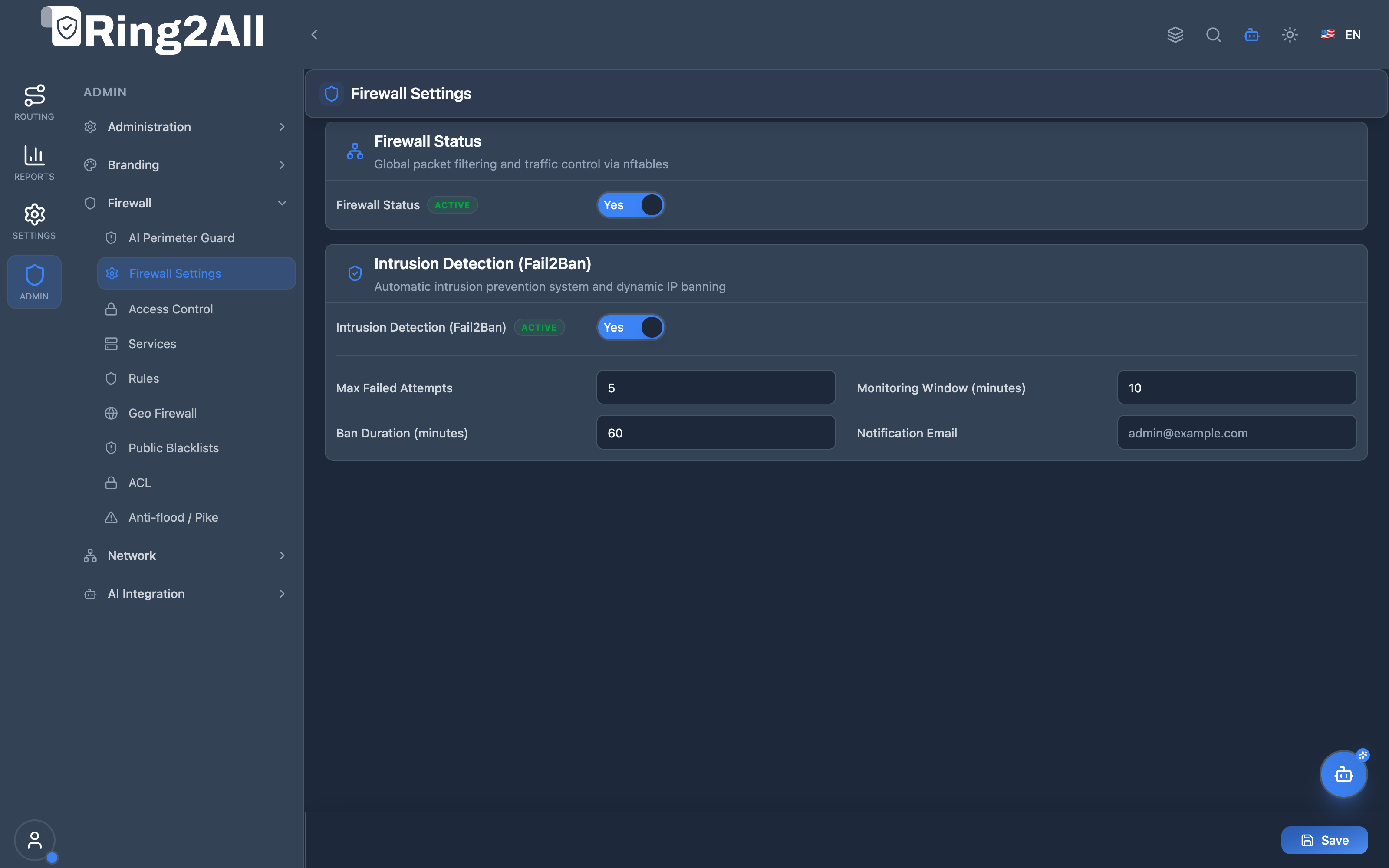
Section titled “4. Visual Interface & Layout”The Firewall Settings view provides clean card-based controls for both the global packet filter status and the Fail2Ban intrusion detection subsystem.
4.1 Global Firewall & Intrusion Settings
Section titled “4.1 Global Firewall & Intrusion Settings”Configures master operational switches, authentication thresholds, monitoring windows, ban duration, and notification routing.
5. Field Reference & Firewall Parameters
Section titled “5. Field Reference & Firewall Parameters”5.1 Firewall Status Parameters
Section titled “5.1 Firewall Status Parameters”| Field | Type | Default | Description |
|---|---|---|---|
| Firewall Status | Switch Toggle | Yes (Active) |
Master toggle controlling Linux nftables packet filtering. When disabled, standard ACCEPT policies are applied across all input chains. |
5.2 Intrusion Detection (Fail2Ban) Parameters
Section titled “5.2 Intrusion Detection (Fail2Ban) Parameters”| Field | Type | Default | Description |
|---|---|---|---|
| Intrusion Detection | Switch Toggle | Yes (Active) |
Master toggle enabling the fail2ban-server monitoring daemon across SSH, API, and Web login journals. |
| Max Failed Attempts | Number | 5 |
Maximum number of failed authentication attempts permitted from a single IP before an automatic ban is triggered. |
| Monitoring Window | Number (Minutes) | 10 |
The evaluation window (findtime) during which failed authentication attempts are accumulated. |
| Ban Duration | Number (Minutes) | 60 |
The duration (bantime) during which an offending IP remains blocked in the firewall ban set before automatic unbanning. |
| Notification Email | Email String | admin@example.com |
Destination email address to receive immediate automated alert dispatches whenever an intrusion ban is executed. |
6. Kernel Filtering & Fail2Ban Daemon Integration
Section titled “6. Kernel Filtering & Fail2Ban Daemon Integration”When changes are committed in the Firewall Settings module, the backend orchestrator updates the database and applies configuration to the host environment:
6.1 Database Transaction
Section titled “6.1 Database Transaction”Parameters are saved to sbc_admin.firewall_settings:
UPDATE firewall_settingsSET firewall_enabled = TRUE, fail2ban_enabled = TRUE, max_failed_attempts = 5, find_time = 600, ban_time = 3600, notification_email = 'admin@example.com', updated_at = NOW()WHERE id = 1;6.2 Service Synchronization
Section titled “6.2 Service Synchronization”The backend executes non-blocking system calls to reconfigure the daemons:
# Update Fail2Ban jail parametersfail2ban-client set sshd maxretry 5fail2ban-client set sshd findtime 600fail2ban-client set sshd bantime 3600
# Ensure nftables service is activesystemctl is-active nftables || systemctl start nftables
7. Operational Security Hardening & Best Practices
Section titled “7. Operational Security Hardening & Best Practices”- Retain Conservative Thresholds: A
Max Failed Attemptsof 5 andMonitoring Windowof 10 minutes balances legitimate operator typos with rapid defense against automated credential stuffing. - Notification Email Verification: Ensure the
Notification Emailpoints to a monitored distribution list or SecOps ticket system rather than an individual engineer’s personal inbox. - Avoid Disabling Master Firewall: The master
Firewall Statusshould only be disabled in emergency maintenance scenarios or isolated lab environments; never disable it on public carrier-facing SBCs. - Monitor Conntrack Tables: On high-capacity SBCs handling tens of thousands of simultaneous RTP streams, ensure the Linux kernel
net.netfilter.nf_conntrack_maxis tuned appropriately.
8. Verification & Diagnostics
Section titled “8. Verification & Diagnostics”8.1 Inspect Firewall Daemon Status
Section titled “8.1 Inspect Firewall Daemon Status”Verify that nftables and fail2ban are operational on the host:
systemctl status nftables fail2ban --no-pager8.2 Verify Active Fail2Ban Jails
Section titled “8.2 Verify Active Fail2Ban Jails”Inspect active jails and current ban counts:
fail2ban-client statusfail2ban-client status sshd8.3 Query Database Settings
Section titled “8.3 Query Database Settings”Verify parameters stored in the database:
sudo -u postgres psql -d sbc_admin -c "SELECT * FROM firewall_settings;"9. Model Context Protocol (MCP) AI Integration
Section titled “9. Model Context Protocol (MCP) AI Integration”The Ring2All SBC MCP Server exposes dedicated host defense tools under the firewall_settings category. Autonomous SecOps agents and the Ring2All SBC NOC Copilot can audit the current host firewall state, verify Fail2Ban operational parameters, and execute controlled policy adjustments.
9.1 Available MCP Tools
Section titled “9.1 Available MCP Tools”| Tool Name | Operation Type | Risk Level | Description |
|---|---|---|---|
get_sbc_firewall_settings |
Read-only | read_only |
Retrieves global packet filter and intrusion detection parameters, including fail threshold, findtime, bantime, and notification routing. |
update_sbc_firewall_settings |
Mutating / Operational | critical |
Adjusts master firewall enablement, intrusion prevention status, brute force thresholds, ban durations, or alert recipient email. |
9.2 Tool Schemas & Parameter Definitions
Section titled “9.2 Tool Schemas & Parameter Definitions”get_sbc_firewall_settings
Section titled “get_sbc_firewall_settings”- Description: Retrieve current global firewall and host intrusion detection settings.
- Input Schema:
{ "type": "object", "properties": {}}update_sbc_firewall_settings
Section titled “update_sbc_firewall_settings”- Description: Update host firewall master switch, intrusion detection (Fail2Ban), threshold counters, ban timers, or notification email.
- Input Schema:
{ "type": "object", "properties": { "firewallEnabled": { "type": "boolean", "description": "Master switch to enable or disable Linux nftables packet filtering" }, "intrusionDetectionEnabled": { "type": "boolean", "description": "Master switch to enable or disable Fail2Ban intrusion detection" }, "failedAttemptsAllowed": { "type": "number", "description": "Max failed authentication attempts permitted before an automated host ban" }, "findTime": { "type": "number", "description": "Monitoring evaluation window in minutes" }, "banTime": { "type": "number", "description": "Ban duration in minutes" }, "notificationEmail": { "type": "string", "description": "Target email address to receive immediate security breach notifications" } }}9.3 Sample Tool Execution Payloads
Section titled “9.3 Sample Tool Execution Payloads”Example 1: Retrieving Firewall Settings
Section titled “Example 1: Retrieving Firewall Settings”Request Payload:
{ "tool": "get_sbc_firewall_settings", "parameters": {}}Response Payload:
{ "success": true, "data": { "firewallEnabled": true, "intrusionDetectionEnabled": true, "failedAttemptsAllowed": 5, "findTime": 10, "banTime": 60, "notificationEmail": "secops@ring2all.com" }}Example 2: Updating Ban Duration and Notification Email
Section titled “Example 2: Updating Ban Duration and Notification Email”Request Payload:
{ "tool": "update_sbc_firewall_settings", "parameters": { "banTime": 120, "notificationEmail": "alerts-sbc@ring2all.com" }}Response Payload:
{ "success": true, "data": { "message": "Firewall settings updated successfully", "settings": { "firewallEnabled": true, "intrusionDetectionEnabled": true, "failedAttemptsAllowed": 5, "findTime": 10, "banTime": 120, "notificationEmail": "alerts-sbc@ring2all.com" } }}9.4 Bilingual Natural Language Copilot Prompts
Section titled “9.4 Bilingual Natural Language Copilot Prompts”English Prompts
Section titled “English Prompts”- “Check if the SBC host firewall and intrusion detection are currently active.”
→ Agent calls
get_sbc_firewall_settings(). - “Increase the Fail2Ban duration to 120 minutes and update notification email to alerts-sbc@ring2all.com.”
→ Agent calls
update_sbc_firewall_settings({"banTime": 120, "notificationEmail": "alerts-sbc@ring2all.com"}).
Spanish Prompts (Español)
Section titled “Spanish Prompts (Español)”- “Verifica si el firewall del host y la detección de intrusos están habilitados en el SBC.”
→ Agente invoca
get_sbc_firewall_settings(). - “Aumenta la duración del bloqueo a 120 minutos y cambia el correo de notificación a alerts-sbc@ring2all.com.”
→ Agente invoca
update_sbc_firewall_settings({"banTime": 120, "notificationEmail": "alerts-sbc@ring2all.com"}).
9.5 Enterprise Security & Execution Safeguards
Section titled “9.5 Enterprise Security & Execution Safeguards”- Strict Role Authorization: Changing global firewall state (
firewallEnabled: false) or altering security thresholds requiressuperadminor explicitfirewall_settingsadministrative clearance. - Email Syntax Sanitation: The
notificationEmailfield must pass strict RFC 5322 validation to prevent command injection in mail delivery pipelines. - Fail-Safe Disabling Confirmation: Autonomous agents are programmed to prompt human operators with a confirmation warning whenever attempting to disable
firewallEnabled.
10. Glossary
Section titled “10. Glossary”- nftables: Modern Linux kernel packet classification framework that replaces legacy
iptables, providing superior performance and atomic rule updates. - Fail2Ban: Intrusion prevention software framework that scans log files and bans IPs that show malicious signs like too many password failures.
- Findtime: The time window in seconds or minutes during which consecutive failed login attempts are evaluated.
- Bantime: The duration for which an offending host is denied network access after exceeding maximum failure counts.
- Model Context Protocol (MCP): An open standard enabling autonomous AI assistants and NOC copilots to securely discover and invoke SBC operational tools.