

Caller ID Lookup Sources Module Documentation
Table of Contents
Section titled “Table of Contents”- Navigation & Access
- Screenshots & Visual Interface
- Module Overview (Technical)
- Module Overview (Commercial/Business)
- Module Overview (End User/Administrator)
- User Roles & Key Capabilities
- Configuration Fields Reference
- Source Types
- Common Scenarios & Examples
- Model Context Protocol (MCP) AI Integration
- Limitations & Important Notes
- Troubleshooting Tips
- Glossary
Navigation & Access
Section titled “Navigation & Access”To access the Caller ID Lookup Sources module:
- Log in to the Ring2All Web Portal.
- In the left navigation sidebar, expand PBX Engine.
- Under Incoming Call Tools, click Caller ID Lookup Sources (
/pbx/incoming-tools/callerid-lookup-sources).
Screenshots & Visual Interface
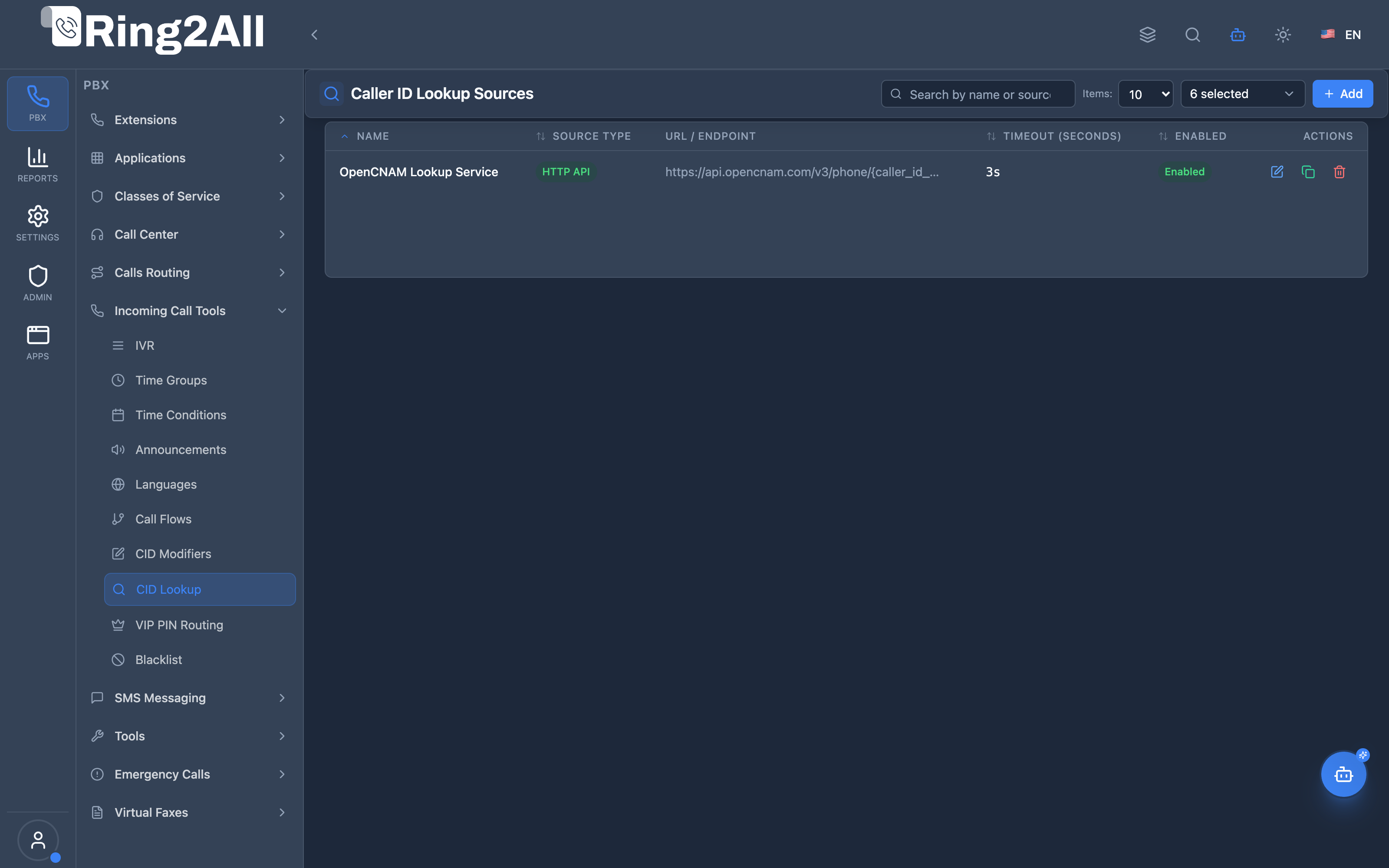
Section titled “Screenshots & Visual Interface”Caller ID Lookup Sources Overview
Section titled “Caller ID Lookup Sources Overview”Displays all configured external and internal lookup connectors, source types (HTTP, OpenCNAM, Database), cache TTL, and status.
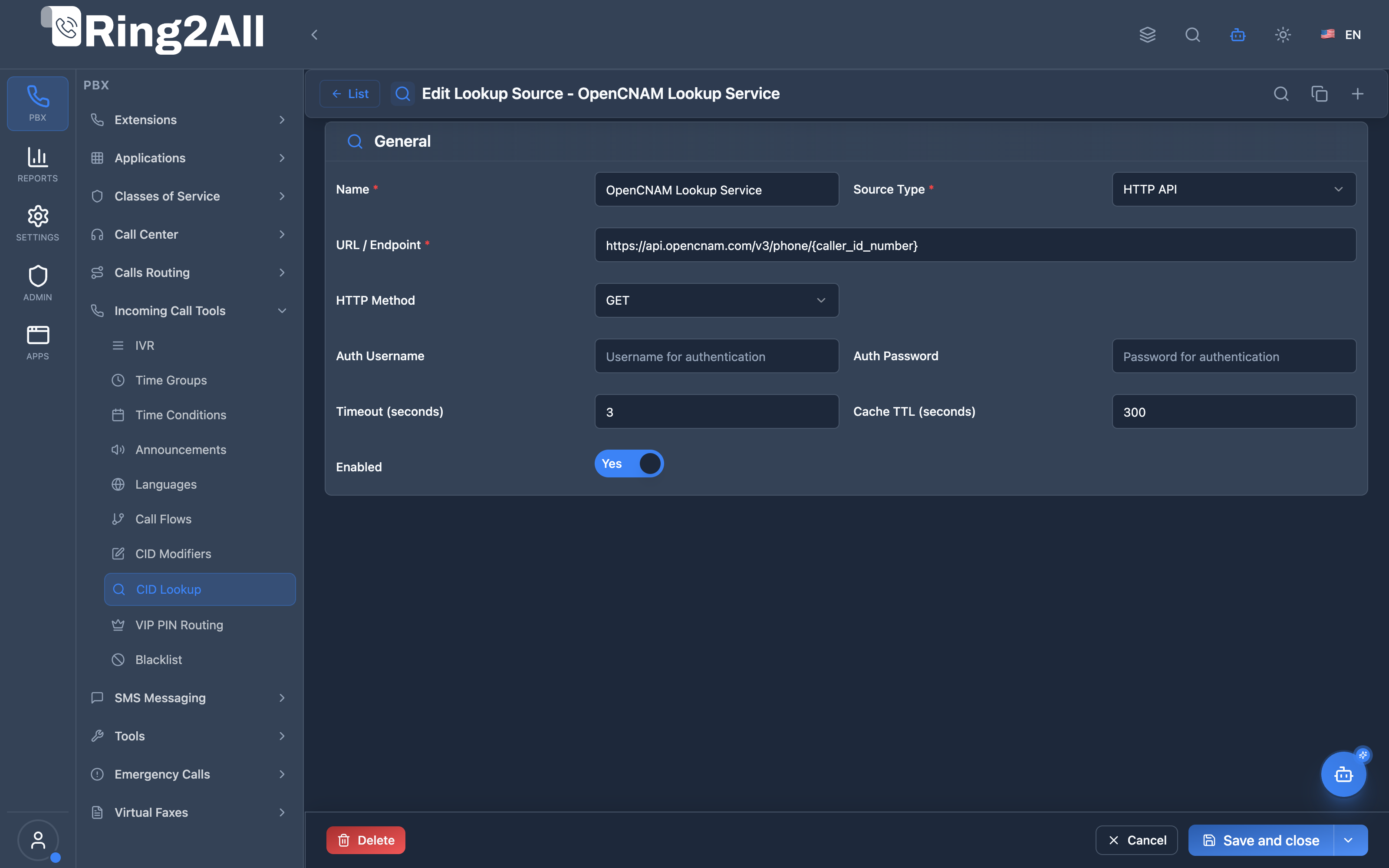
Caller ID Lookup Source Configuration Form
Section titled “Caller ID Lookup Source Configuration Form”Configures API endpoints, authentication credentials, request method, timeout thresholds, and response JSON path mapping.
1. Module Overview (Technical)
Section titled “1. Module Overview (Technical)”What Are Caller ID Lookup Sources?
Section titled “What Are Caller ID Lookup Sources?”Caller ID Lookup Sources define external data sources used to enrich incoming caller information. When a call arrives, the system queries these sources to look up the caller’s name, company, or other details based on their phone number.
Architecture
Section titled “Architecture”┌─────────────────────────────────────────────────────────────────┐│ Caller ID Lookup Flow │├─────────────────────────────────────────────────────────────────┤│ ││ Incoming Call: +15058881234, WIRELESS CALLER ││ │ ││ ▼ ││ ┌──────────────────────────────────────────────────────────┐ ││ │ Lookup Sources (by priority) │ ││ │ │ ││ │ Source 1: Internal Directory │ ││ │ Type: internal │ ││ │ → Query public.contacts │ ││ │ → Match: John Smith, ABC Company │ ││ │ │ ││ │ Source 2: CRM API (fallback) │ ││ │ Type: http │ ││ │ → GET https://crm.example.com/api/lookup?phone=... │ ││ │ → (skipped - Source 1 matched) │ ││ │ │ ││ │ Source 3: OpenCNAM (last resort) │ ││ │ Type: opencnam │ ││ │ → (skipped - Source 1 matched) │ ││ │ │ ││ └──────────────────────────────────────────────────────────┘ ││ │ ││ ▼ ││ Enriched Call: ││ ├─ Caller ID Number: +15058881234 ││ └─ Caller ID Name: John Smith - ABC Company ││ │└─────────────────────────────────────────────────────────────────┘2. Module Overview (Commercial/Business)
Section titled “2. Module Overview (Commercial/Business)”Business Value
Section titled “Business Value”Caller ID Lookup Sources enable caller identification:
| Without Lookup Sources | With Lookup Sources |
|---|---|
| “WIRELESS CALLER” | Customer name from CRM |
| No context | Company information |
| Manual lookup | Automatic enrichment |
| Generic display | Personalized greeting |
Use Cases
Section titled “Use Cases”-
CRM Integration
- Look up customer name
- Display account status
-
Internal Directory
- Match against employee list
- Show department info
-
OpenCNAM/CNAM
- Public CNAM database
- Unknown caller identification
-
LDAP Directory
- Enterprise directory lookup
- Active Directory integration
Feature Highlights
Section titled “Feature Highlights”| Feature | Benefit |
|---|---|
| Multiple Sources | Fallback cascade |
| Source Types | HTTP, LDAP, Database, OpenCNAM |
| Caching | Reduce lookup time |
| Timeout Control | Prevent call delays |
| Priority Order | Control lookup sequence |
3. Module Overview (End User/Administrator)
Section titled “3. Module Overview (End User/Administrator)”What Can You Do?
Section titled “What Can You Do?”- Configure lookup sources
- Choose source types (HTTP, LDAP, Database, etc.)
- Set authentication credentials
- Configure timeouts
- Enable caching
- Prioritize sources
Administrator Workflow
Section titled “Administrator Workflow”┌─────────────────────────────────────────────────────────────────┐│ Creating a Lookup Source │├─────────────────────────────────────────────────────────────────┤│ ││ Tab: General ││ ├─ Name: "CRM Customer Lookup" ││ ├─ Source Type: HTTP API ││ ├─ URL: https://crm.example.com/api/caller?phone=${caller_id} ││ ├─ HTTP Method: GET ││ └─ Enabled: ✓ ││ ││ Tab: Advanced Settings ││ ├─ Auth Username: api_user ││ ├─ Auth Password: ******** ││ ├─ API Token: (optional) ││ ├─ Timeout: 3 seconds ││ └─ Cache TTL: 3600 seconds ││ │└─────────────────────────────────────────────────────────────────┘Quick Tips
Section titled “Quick Tips”[!TIP] Cache Results: Enable caching to reduce repeated lookups and speed up call setup.
[!TIP] Low Timeouts: Keep timeouts under 3 seconds to avoid call delays.
[!CAUTION] Authentication: Secure your API credentials properly.
🎯 User Roles & Key Capabilities
Section titled “🎯 User Roles & Key Capabilities”| Role | Permissions & Responsibilities | Key Capabilities |
|---|---|---|
| Tenant Administrator | Full write access to Caller ID lookup sources | Create, edit, and configure HTTP/OpenCNAM/LDAP/Database CID lookup connectors, adjust timeouts, caching, and token credentials |
| Call Center Supervisor / Operator | Read-only access | View configured lookup sources, inspect resolution sources for incoming CRM caller ID enrichment |
| Platform / System Engineer | Telephony and FreeSWITCH engine access | Monitor FreeSWITCH Lua CID lookup performance, inspect cache hits/misses, troubleshoot API latencies |
4. Configuration Fields Reference
Section titled “4. Configuration Fields Reference”General Fields
Section titled “General Fields”| Field | Description | Example |
|---|---|---|
| Name | Source identifier | CRM Lookup |
| Source Type | Type of source | HTTP API |
| URL / Endpoint | Connection string | https://api.example.com/lookup |
| HTTP Method | GET or POST | GET |
| Enabled | Source active | On/Off |
Authentication Fields
Section titled “Authentication Fields”| Field | Description |
|---|---|
| Auth Username | Username for auth |
| Auth Password | Password for auth |
| API Token | Token for OpenCNAM or token-based APIs |
Performance Fields
Section titled “Performance Fields”| Field | Description | Range |
|---|---|---|
| Timeout | Max wait time | 1-30 seconds |
| Cache TTL | Cache duration | 0-3600 seconds |
5. Source Types
Section titled “5. Source Types”Internal
Section titled “Internal”Look up in local database:
| Setting | Description |
|---|---|
| Endpoint | Not required |
| Auth | Not required |
| Usage | Query internal contacts/directory |
HTTP API
Section titled “HTTP API”Call external REST API:
| Setting | Description |
|---|---|
| URL | API endpoint with phone placeholder |
| Method | GET or POST |
| Auth | Basic auth or token |
| Response | JSON with caller name/info |
Expected Response Format:
{ "cidname": "John Smith", "cidnumber": "+15058881234", "company": "ABC Company"}Query LDAP/Active Directory:
| Setting | Description |
|---|---|
| URL | ldap://ldap.example.com:389 |
| Username | Bind DN |
| Password | Bind password |
| Usage | Search user by phone attribute |
Database
Section titled “Database”Query external database:
| Setting | Description |
|---|---|
| URL | Connection string (PostgreSQL, MySQL) |
| Username | Database user |
| Password | Database password |
| Usage | Execute SQL query |
OpenCNAM
Section titled “OpenCNAM”Public CNAM lookup service:
| Setting | Description |
|---|---|
| Token | OpenCNAM API key |
| Timeout | Request timeout |
| Usage | CNAM database lookup |
Custom
Section titled “Custom”Lua script for custom logic:
| Setting | Description |
|---|---|
| Script | Path to Lua script |
| Usage | Custom lookup logic |
6. Common Scenarios & Examples
Section titled “6. Common Scenarios & Examples”Scenario 1: CRM API Lookup
Section titled “Scenario 1: CRM API Lookup”Source: “CRM Lookup”
| Setting | Value |
|---|---|
| Type | HTTP API |
| URL | https://crm.example.com/api/caller?phone=[CIDNUM] |
| Method | GET |
| Timeout | 3 |
| Cache TTL | 3600 |
Scenario 2: Internal Directory
Section titled “Scenario 2: Internal Directory”Source: “Employee Directory”
| Setting | Value |
|---|---|
| Type | Internal |
| Enabled | ✓ |
Queries public.contacts for matching phone numbers.
Scenario 3: OpenCNAM Fallback
Section titled “Scenario 3: OpenCNAM Fallback”Source: “OpenCNAM”
| Setting | Value |
|---|---|
| Type | OpenCNAM |
| Token | your-opencnam-api-key |
| Timeout | 3 |
| Cache TTL | 86400 |
Scenario 4: LDAP/Active Directory
Section titled “Scenario 4: LDAP/Active Directory”Source: “Corporate Directory”
| Setting | Value |
|---|---|
| Type | LDAP |
| URL | ldap://ad.company.com:389 |
| Username | CN=lookup,DC=company,DC=com |
| Password | ******** |
| Timeout | 2 |
7. Model Context Protocol (MCP) AI Integration
Section titled “7. Model Context Protocol (MCP) AI Integration”Ring2All exposes native Model Context Protocol (MCP) tools for Caller ID Lookup Sources (CNAM & CRM Lookup), allowing AI Copilots, CRM automation engines, and telephony administrators to inspect external data connector endpoints, configure HTTP/OpenCNAM lookups, tune cache TTL thresholds, and provision or adjust caller enrichment connectors programmatically with domain-level isolation.
Available MCP Tools
Section titled “Available MCP Tools”| Tool Name | Description | Key Parameters |
|---|---|---|
list_cid_lookup_sources |
Lists all Caller ID Lookup Sources defined in the domain, displaying connector type, target URL, timeout, and enabled state. | search (optional string) |
get_cid_lookup_source_status |
Retrieves full configuration, HTTP headers, authentication tokens, timeout thresholds, and response JSON mapping of a specific lookup source. | name (required string) |
create_cid_lookup_source |
Provisions a new external caller enrichment connector querying HTTP REST APIs, OpenCNAM, or internal databases. Enforces source name uniqueness per domain. | name, sourceType (http, opencnam, internal, database, ldap, custom), url, httpMethod (GET, POST), token, timeout, cacheTtl |
update_cid_lookup_source |
Updates query endpoint URLs, API tokens, lookup timeouts, or enabled status. | name, newName, url, timeout, enabled |
delete_cid_lookup_source |
Removes a Caller ID Lookup Source connector from the PBX domain. | name (required string) |
Protection Guards & Integrity
Section titled “Protection Guards & Integrity”- Name Uniqueness: Every lookup source name must be unique within its tenant domain.
- Latency Protection: MCP tools enforce timeout thresholds (typically 2-3 seconds) to ensure that slow third-party CRM APIs do not degrade inbound call setup times.
- Dynamic In-Memory Caching: Resolved caller names are automatically persisted in
public.caller_id_lookup_cache, eliminating redundant external API queries for recurrent callers.
AI Agent Operational Examples
Section titled “AI Agent Operational Examples”Querying Active Lookup Source Configuration
Section titled “Querying Active Lookup Source Configuration”{ "tool": "get_cid_lookup_source_status", "arguments": { "name": "HubSpot CRM Caller Lookup" }}Provisioning an OpenCNAM Enrichment Connector
Section titled “Provisioning an OpenCNAM Enrichment Connector”{ "tool": "create_cid_lookup_source", "arguments": { "name": "OpenCNAM Production", "sourceType": "opencnam", "url": "https://api.opencnam.com/v3/phone/{number}?format=text", "timeout": 2, "cacheTtl": 86400 }}Recommended Natural Language Prompts
Section titled “Recommended Natural Language Prompts”- “List all Caller ID lookup connectors configured in this domain.”
- “Create an HTTP Caller ID lookup source named ‘Salesforce CRM’ pointing to our webhook endpoint.”
- “Reduce the timeout on ‘OpenCNAM’ to 2 seconds to speed up call connection times.”
- “Check if the OpenCNAM lookup source is currently enabled.”
8. Limitations & Important Notes
Section titled “8. Limitations & Important Notes”Technical Notes
Section titled “Technical Notes”[!NOTE] Cache Saves Time: Caching reduces lookup latency on repeated calls.
[!WARNING] Timeout Impact: Long timeouts delay call setup. Keep under 3 seconds.
[!WARNING] External Dependencies: API outages can affect lookup availability.
Best Practices
Section titled “Best Practices”- Low Timeouts: 2-3 seconds maximum
- Enable Caching: Reduce repeated lookups
- Priority Order: Put fastest sources first
- Fallback Sources: Configure backup sources
- Monitor Failures: Track lookup success rates
9. Troubleshooting Tips
Section titled “9. Troubleshooting Tips”Common Issues
Section titled “Common Issues”| Symptom | Possible Cause | Solution |
|---|---|---|
| No lookup results | Source disabled | Enable source |
| Timeout errors | Slow API | Reduce timeout, check API |
| Auth failures | Wrong credentials | Verify username/password |
| Empty name | No match found | Add fallback source |
| Slow calls | Long timeout | Reduce timeout value |
Diagnostic SQL
Section titled “Diagnostic SQL”List lookup sources:
SELECT id, name, source_type, url, timeout, cache_ttl, enabledFROM public.caller_id_lookup_sourcesWHERE domain_id = [domain_id];Check cache:
SELECT phone_number, caller_name, cached_atFROM public.caller_id_lookup_cacheWHERE domain_id = [domain_id]ORDER BY cached_at DESCLIMIT 20;Telephony Server Logs
Section titled “Telephony Server Logs”# Check CID lookup operationsgrep "caller_id" /var/log/freeswitch/freeswitch.loggrep "lookup" /var/log/freeswitch/freeswitch.log10. Glossary
Section titled “10. Glossary”| Term | Definition |
|---|---|
| CNAM | Caller Name - name associated with phone number |
| OpenCNAM | Public CNAM lookup service |
| LDAP | Lightweight Directory Access Protocol |
| Cache TTL | Time-to-live for cached results |
| Lookup Source | External system for caller info |
| Fallback | Backup source if primary fails |
Documentation last updated: January 2026