

Emergency Numbers Module Documentation
Table of Contents
Section titled “Table of Contents”- Navigation & Access
- Screenshots & Visual Interface
- Module Overview (Technical)
- Module Overview (Commercial/Business)
- Module Overview (End User/Administrator)
- Configuration Fields Reference
- Compliance Requirements
- Common Scenarios & Examples
- Limitations & Important Notes
- Model Context Protocol (MCP) AI Integration
- Troubleshooting Tips
- Glossary
Navigation & Access
Section titled “Navigation & Access”To access the Emergency Numbers configuration module:
- Log in to the Ring2All Web Portal (
https://<domain-or-ip>/login). - In the left navigation sidebar, expand PBX Engine.
- Under Emergency Calls, click Emergency Numbers (
/pbx/emergency/numbers). - To configure global E911 notifications, use the settings card at the top, or click + Add Emergency Number (
/pbx/emergency/numbers/new) to define a new emergency routing profile.
Screenshots & Visual Interface
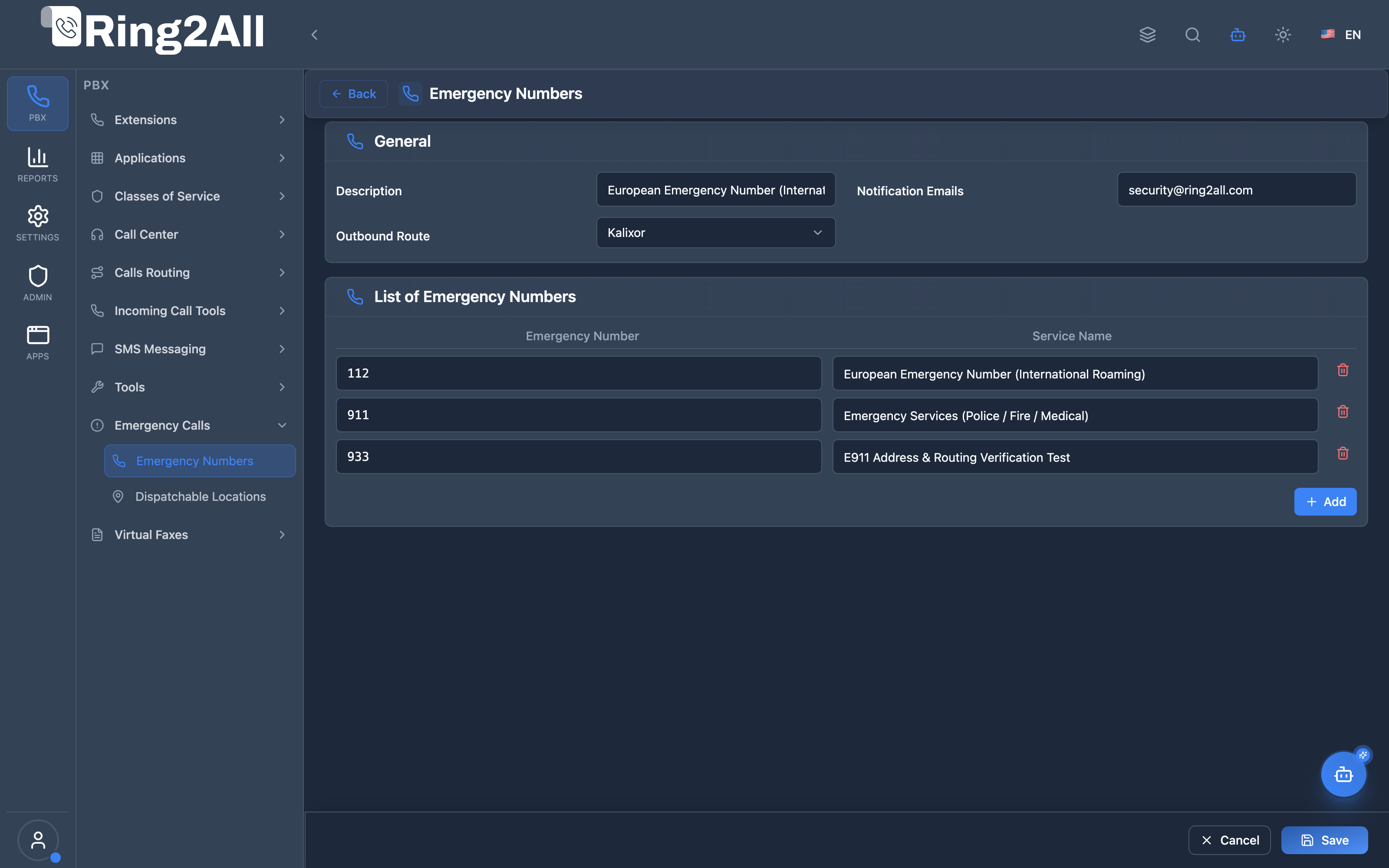
Section titled “Screenshots & Visual Interface”Emergency Numbers Directory & Global Settings
Section titled “Emergency Numbers Directory & Global Settings”Centralized interface showing registered emergency dialing patterns (e.g., 911, 933, 112), associated outbound routes, override caller IDs, and real-time active status.
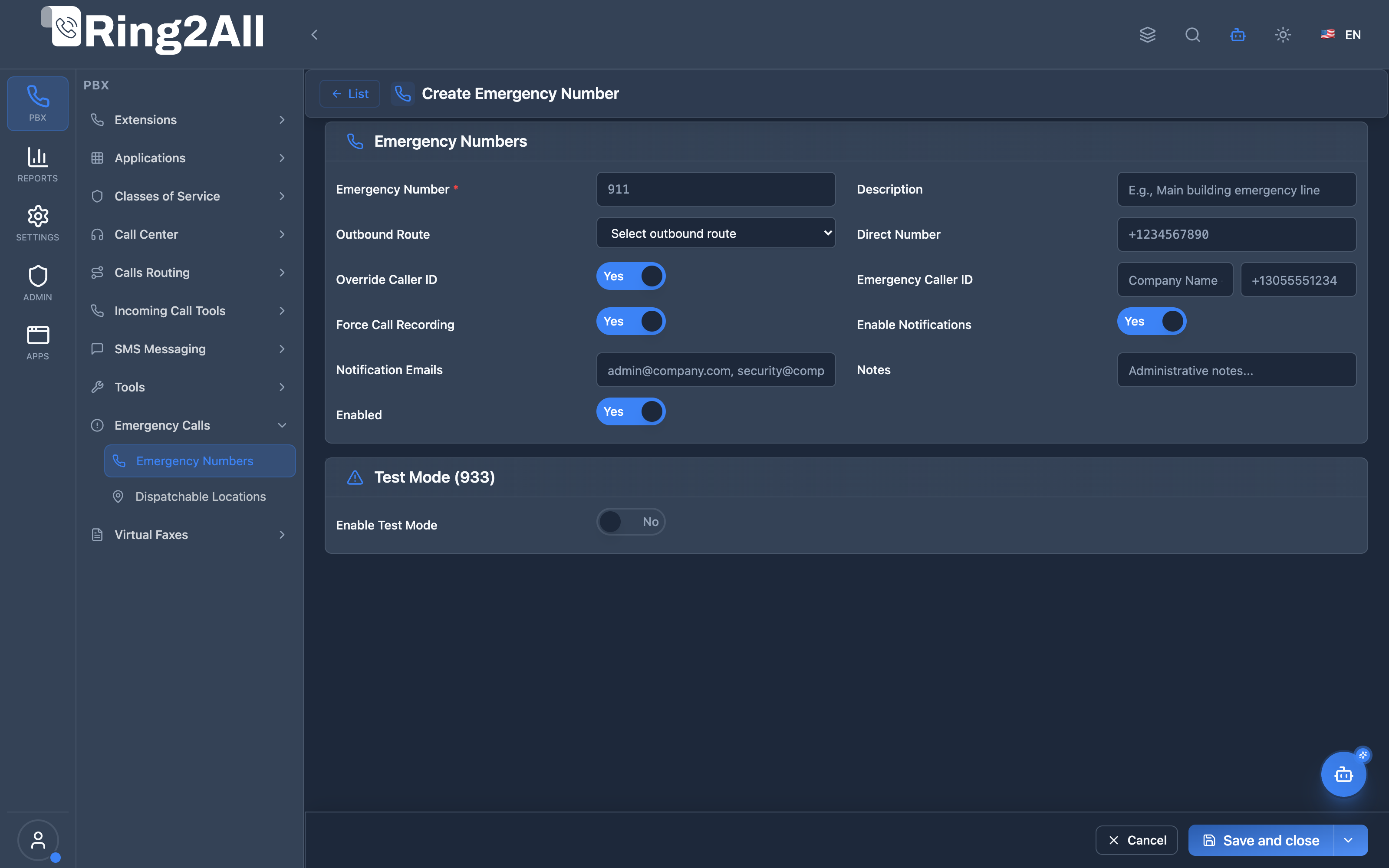
Emergency Number Provisioning & E911 Compliance Form
Section titled “Emergency Number Provisioning & E911 Compliance Form”Dedicated creation and edit form to configure emergency number patterns, PSAP routing, Emergency CID override, forced call recording, and instant multi-channel alert notifications.
1. Module Overview (Technical)
Section titled “1. Module Overview (Technical)”What Are Emergency Numbers?
Section titled “What Are Emergency Numbers?”Emergency Numbers is an E911 compliance module that configures how emergency calls (911, 933, 112, etc.) are routed. It ensures compliance with Kari’s Law and RAY BAUM’s Act, providing proper caller ID, notifications, and call recording for emergency calls.
Architecture
Section titled “Architecture”┌─────────────────────────────────────────────────────────────────┐│ Emergency Number Routing │├─────────────────────────────────────────────────────────────────┤│ ││ Extension dials 911 ││ │ ││ ▼ ││ ┌──────────────────────────────────────────────────────────┐ ││ │ routing/emergency.lua │ ││ │ │ ││ │ 1. Check if common emergency number (911, 933, etc.) │ ││ │ 2. Query public.emergency_numbers for configuration │ ││ │ 3. Generate dialplan XML │ ││ │ 4. Route to e911_handler.lua │ ││ │ │ ││ └──────────────────────────────────────────────────────────┘ ││ │ ││ ▼ ││ ┌──────────────────────────────────────────────────────────┐ ││ │ e911_handler.lua │ ││ │ │ ││ │ - Override Caller ID with E911 location info │ ││ │ - Start call recording (if enabled) │ ││ │ - Send notifications (email, webhook) │ ││ │ - Route via configured gateway/trunk │ ││ │ │ ││ └──────────────────────────────────────────────────────────┘ ││ │ ││ ▼ ││ Emergency Services (PSAP) ││ │└─────────────────────────────────────────────────────────────────┘2. Module Overview (Commercial/Business)
Section titled “2. Module Overview (Commercial/Business)”Business Value
Section titled “Business Value”Emergency Numbers provides E911 compliance:
| Without E911 Config | With E911 Config |
|---|---|
| No location info | E911 CID with location |
| No notifications | Email/webhook alerts |
| No recording | Automatic recording |
| Non-compliant | Kari’s Law compliant |
Regulatory Compliance
Section titled “Regulatory Compliance”| Regulation | Description |
|---|---|
| Kari’s Law | Requires direct 911 dialing, notification to on-site personnel |
| RAY BAUM’s Act | Requires dispatchable location info with 911 calls |
Use Cases
Section titled “Use Cases”-
Enterprise E911
- Multi-location offices
- Location-based caller ID
-
Test Mode (933)
- Verify E911 routing
- Test without calling actual 911
-
Notification Alerts
- Alert security when 911 dialed
- Webhook to monitoring system
-
Call Recording
- Record all emergency calls
- Compliance documentation
Feature Highlights
Section titled “Feature Highlights”| Feature | Benefit |
|---|---|
| E911 CID Override | Location info to PSAP |
| Forced Recording | Compliance documentation |
| Notifications | Alert on-site personnel |
| Test Mode | 933 for testing |
| Multi-Country | 911, 112, 999, 000 support |
3. Module Overview (End User/Administrator)
Section titled “3. Module Overview (End User/Administrator)”What Can You Do?
Section titled “What Can You Do?”- Configure emergency numbers (911, 112, etc.)
- Set location-based caller ID
- Enable automatic recording
- Configure notifications
- Set up test mode (933)
- Route via specific gateway/trunk
🎯 User Roles & Key Capabilities
Section titled “🎯 User Roles & Key Capabilities”| Role | Key Capabilities |
|---|---|
| Super Admin | Configures platform-wide emergency dialing standards, oversees multi-tenant E911 compliance, and audits system-level emergency route logs. |
| Tenant Admin | Defines domain-specific emergency numbers (e.g., 911, 933), binds emergency outbound routes, sets up location-based E911 Caller IDs, and configures security email alerts. |
| Security Officer / On-site Personnel | Receives real-time automated email and webhook notifications whenever an emergency call is initiated within the enterprise. |
| End User / Extension | Dials emergency numbers (e.g., 911, 112) without requiring any access codes or prefixes, with automatic dispatchable location transmission and forced call recording. |
Emergency Number Configuration
Section titled “Emergency Number Configuration”┌─────────────────────────────────────────────────────────────────┐│ Configure Emergency Number │├─────────────────────────────────────────────────────────────────┤│ ││ Section: Basic Configuration ││ ├─ Emergency Number: 911 ││ ├─ Description: US Emergency Services ││ ├─ Country Code: US ││ └─ Enabled: ✓ ││ ││ Section: Routing Configuration ││ ├─ Route Type: Gateway ││ └─ Gateway: [Primary SIP Trunk ▼] ││ ││ Section: Caller ID Override ││ ├─ Override Caller ID: ✓ ││ ├─ Emergency CID Number: +13055551234 ││ └─ Emergency CID Name: Acme Corp - Main Building ││ ││ Section: Recording & Notifications ││ ├─ Force Call Recording: ✓ ││ ├─ Enable Notifications: ✓ ││ ├─ Notification Emails: security@acme.com ││ └─ Notify Extensions: 1001, 1002 ││ ││ Section: Test Mode (933) ││ ├─ Enable Test Mode: ☐ ││ └─ Test Number: 933 ││ ││ [Save] [Cancel] ││ │└─────────────────────────────────────────────────────────────────┘Quick Tips
Section titled “Quick Tips”[!TIP] Test First: Use 933 test mode before going live with 911.
[!TIP] Include Location: E911 CID Name should include building/floor info.
[!CAUTION] Critical Module: Misconfiguration can affect emergency services.
4. Configuration Fields Reference
Section titled “4. Configuration Fields Reference”Basic Configuration
Section titled “Basic Configuration”| Field | Description | Example |
|---|---|---|
| Emergency Number | Number to route | 911 |
| Description | Purpose description | US Emergency |
| Country Code | Country | US |
| Enabled | Active status | On/Off |
Routing Configuration
Section titled “Routing Configuration”| Field | Description |
|---|---|
| Route Type | Gateway, Trunk, or Direct |
| Gateway | SIP gateway for routing |
| Trunk ID | Specific trunk ID |
| Direct Number | Direct dial number |
Caller ID Override
Section titled “Caller ID Override”| Field | Description | Example |
|---|---|---|
| Override Caller ID | Enable E911 CID | On/Off |
| Emergency CID Number | Number sent to PSAP | +13055551234 |
| Emergency CID Name | Name with location | Acme - Floor 3 |
Recording & Notifications
Section titled “Recording & Notifications”| Field | Description |
|---|---|
| Force Call Recording | Record all 911 calls |
| Enable Notifications | Send alerts |
| Notification Emails | Email recipients |
| Notify Extensions | Extensions to alert |
| Webhooks | External notification URLs |
Test Mode
Section titled “Test Mode”| Field | Description |
|---|---|
| Enable Test Mode | Use test number instead |
| Test Number | Test destination (933) |
5. Compliance Requirements
Section titled “5. Compliance Requirements”Kari’s Law Requirements
Section titled “Kari’s Law Requirements”| Requirement | Implementation |
|---|---|
| Direct dialing | No prefix needed for 911 |
| Notification | Email/webhook on 911 dial |
| On-site alert | Notify extensions |
RAY BAUM’s Act Requirements
Section titled “RAY BAUM’s Act Requirements”| Requirement | Implementation |
|---|---|
| Dispatchable location | E911 CID includes address |
| Multi-line systems | Per-location caller ID |
| VoIP systems | Location-based routing |
Best Practices
Section titled “Best Practices”- Location Info: Include building/floor/room in CID name
- Regular Testing: Test 933 quarterly
- Multiple Notifications: Email + on-site + webhook
- Recording: Keep recordings for compliance
- Documentation: Maintain E911 records
6. Common Scenarios & Examples
Section titled “6. Common Scenarios & Examples”Scenario 1: Single Office E911
Section titled “Scenario 1: Single Office E911”Emergency Number: 911
| Setting | Value |
|---|---|
| Route Type | Gateway |
| Gateway | Primary SIP Trunk |
| Override CID | ✓ |
| CID Number | +13055551234 |
| CID Name | Acme Corp - Miami Office |
| Force Recording | ✓ |
| Notify Emails | security@acme.com |
Scenario 2: Multi-Location E911
Section titled “Scenario 2: Multi-Location E911”Per-Location Configuration:
| Location | CID Name |
|---|---|
| Main Building | Acme - Main Bldg 1st Fl |
| Warehouse | Acme - Warehouse |
| Remote Office | Acme - Remote Site |
Scenario 3: Test Mode Configuration
Section titled “Scenario 3: Test Mode Configuration”For Testing:
| Setting | Value |
|---|---|
| Enable Test Mode | ✓ |
| Test Number | 933 |
Users dial 911 → routed to 933 for testing.
Scenario 4: International Emergency
Section titled “Scenario 4: International Emergency”Emergency Number: 112 (Europe)
| Setting | Value |
|---|---|
| Number | 112 |
| Country Code | EU |
| Route Type | Gateway |
7. Limitations & Important Notes
Section titled “7. Limitations & Important Notes”Technical Notes
Section titled “Technical Notes”[!IMPORTANT] Critical System: Emergency number configuration must be tested and verified.
[!WARNING] Location Updates: Update E911 CID when moving locations.
[!WARNING] Gateway Availability: Emergency routes should use highly available gateways.
Supported Emergency Numbers
Section titled “Supported Emergency Numbers”| Number | Region |
|---|---|
| 911 | USA, Canada |
| 933 | USA (Test) |
| 112 | Europe, Asia |
| 999 | UK, Asia |
| 000 | Australia |
Best Practices
Section titled “Best Practices”- Test Regularly: Use 933 test mode
- Redundant Routes: Failover gateways
- Update CID: When location changes
- Train Users: Emergency procedures
- Document: Keep compliance records
8. Model Context Protocol (MCP) AI Integration
Section titled “8. Model Context Protocol (MCP) AI Integration”The Ring2All Platform Copilot integrates with the Emergency Routing subsystem via the Model Context Protocol (MCP) to audit E911 compliance, configure PSAP emergency numbers, verify dispatch notification contacts, and manage emergency route parameters.
Exposed MCP Tools
Section titled “Exposed MCP Tools”| Tool Name | Operation | Primary Parameters | Description |
|---|---|---|---|
list_emergency_numbers |
Directory Query | search (string, optional) |
Lists all configured emergency numbers (e.g., 911, 933, 112) in the active domain, including caller ID override and notification flags. |
get_emergency_number_status |
Configuration Inspection | number (string) |
Retrieves detailed configuration, emergency Caller ID override, test mode flag, and alert recipient lists for a specific emergency number. |
create_emergency_number |
Number Provisioning | number (string), description (string), emergencyCidNumber (string), notifyEmails (string), notifyExtensions (string) |
Creates a new emergency routing profile. Enforces strict domain number uniqueness and E911 compliance. |
update_emergency_number |
Parameter Update | number (string), emergencyCidNumber (string), notifyEmails (string), enabled (boolean) |
Modifies emergency caller ID, alert recipients, or activation status of an emergency route. |
delete_emergency_number |
Number Removal | number (string) |
Safely removes an emergency routing rule from the domain (protected against deleting mandatory system routes). |
Number Uniqueness & Telephony Collision Safeguards
Section titled “Number Uniqueness & Telephony Collision Safeguards”- Domain-Level Uniqueness Enforcement: Emergency numbers are verified atomically on creation and modification (
SELECT id FROM emergency_numbers WHERE domain_id = :domain_id AND number = :number). Creating duplicate emergency numbers within the same domain is strictly blocked. - Dialplan Precedence (Kari’s Law): Dialplan routing scripts (
routing/emergency.lua) evaluate emergency numbers before general extensions, ring groups, and star codes. When an emergency number is dialed, no prefix (e.g.9) is required, and all internal extension conflicts are bypassed. - Mandatory Caller ID Validation: Outbound emergency calls to Public Safety Answering Points (PSAPs) automatically enforce verified 10-digit DID caller IDs tied to registered physical dispatch locations (RAY BAUM’s Act).
Example MCP Payloads
Section titled “Example MCP Payloads”1. Provisioning a Compliant 911 Emergency Route (create_emergency_number)
Section titled “1. Provisioning a Compliant 911 Emergency Route (create_emergency_number)”{ "number": "911", "description": "National Emergency Dispatch - US Headquarters", "countryCode": "US", "emergencyCidNumber": "+13055550100", "notifyOnCall": true, "notifyEmails": "security@company.com,hr@company.com", "notifyExtensions": "1001,1002"}Response:
{ "success": true, "data": { "message": "Emergency number \"911\" created successfully!", "number": "911", "id": 14 }}2. Inspecting Emergency Status & Alert Channels (get_emergency_number_status)
Section titled “2. Inspecting Emergency Status & Alert Channels (get_emergency_number_status)”{ "number": "911"}Copilot Natural Language Prompts
Section titled “Copilot Natural Language Prompts”- “Verify our 911 emergency call configuration and notification email list.”
- “Add 933 as a test emergency route pointing to our carrier’s E911 verification service.”
- “Update the emergency caller ID on 911 to +13055550199 for our new building.”
- “Audit whether our PBX complies with Kari’s Law direct dialing requirements.”
9. Troubleshooting Tips
Section titled “9. Troubleshooting Tips”Common Issues
Section titled “Common Issues”| Symptom | Possible Cause | Solution |
|---|---|---|
| 911 not routed | Not configured | Add emergency number config |
| Wrong location | Old CID | Update E911 CID |
| No notifications | Not enabled | Enable notifications |
| Test mode active | Forgot to disable | Disable test mode |
| Gateway failure | Down gateway | Configure failover |
Diagnostic SQL
Section titled “Diagnostic SQL”List emergency numbers:
SELECT id, number, enabled, test_mode, emergency_cid_number, emergency_cid_nameFROM public.emergency_numbersWHERE domain_id = [domain_id];Telephony Server Logs
Section titled “Telephony Server Logs”# Check emergency routinggrep "Emergency Routing" /var/log/freeswitch/freeswitch.loggrep "911\|933" /var/log/freeswitch/freeswitch.log10. Glossary
Section titled “10. Glossary”| Term | Definition |
|---|---|
| E911 | Enhanced 911 with location |
| PSAP | Public Safety Answering Point |
| Kari’s Law | US 911 direct dial law |
| RAY BAUM’s Act | US location requirements |
| CID | Caller ID |
| 933 | 911 test number |
Documentation last updated: January 2026