

Access Control Lists (ACL) Module Documentation
Table of Contents
Section titled “Table of Contents”- Navigation & Access
- Screenshots & Visual Interface
- Module Overview (Technical)
- Module Overview (Commercial/Business)
- Module Overview (End User/Administrator)
- User Roles & Key Capabilities
- Configuration Sections
- Settings Reference
- Common Scenarios & Examples
- Limitations & Important Notes
- Model Context Protocol (MCP) AI Integration
- Troubleshooting Tips
- Glossary
Navigation & Access
Section titled “Navigation & Access”To access the Access Control Lists (ACL) module:
- Log in to the Ring2All Web Portal (
https://<domain-or-ip>/login) with administrative privileges. - In the left navigation sidebar, locate and expand the Admin section.
- Click on the Firewall subsection.
- Select Access Control Lists (
/admin/firewall/acl). - To create a new ACL rule, click the + Add button at the top right corner of the toolbar.
- To modify an existing rule, click the Edit button in the corresponding table row.
- To remove a rule, click the Delete button and confirm the modal prompt.
Screenshots & Visual Interface
Section titled “Screenshots & Visual Interface”Access Control Lists (ACL) Table View
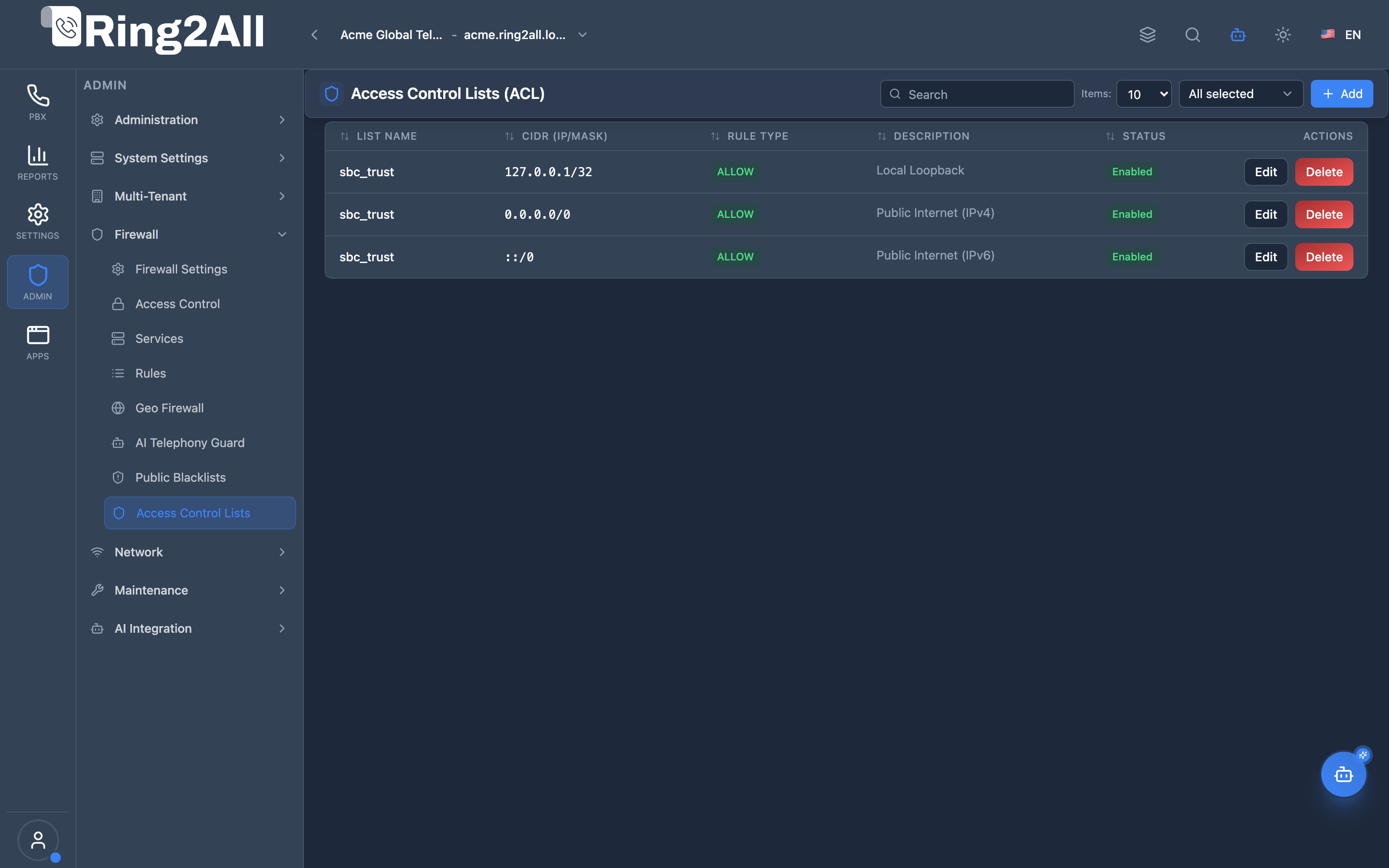
Section titled “Access Control Lists (ACL) Table View”The main ACL view displays all configured Telephony Server network access lists (e.g., sbc_trust, lan, domains), showing the target CIDR masks, rule actions (ALLOW or DENY), descriptions, operational statuses, and quick management actions.
Add / Edit ACL Rule Modal
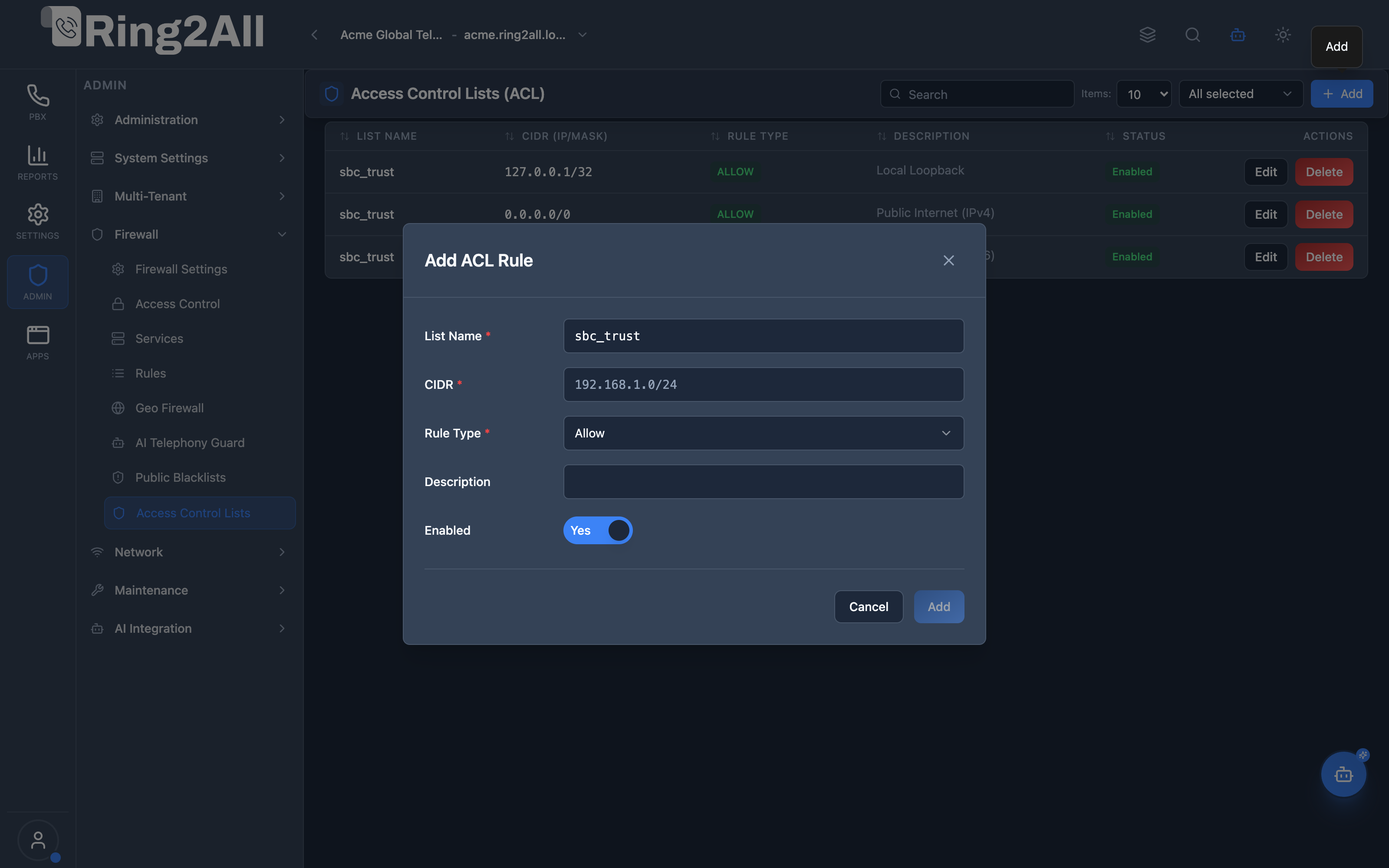
Section titled “Add / Edit ACL Rule Modal”The modal dialog allows administrators to specify the target access list name, CIDR network address (IPv4 or IPv6 subnet), rule type policy (Allow / Deny), description, and whether the rule is actively enabled.
1. Module Overview (Technical)
Section titled “1. Module Overview (Technical)”What Is the Access Control Lists (ACL) Module?
Section titled “What Is the Access Control Lists (ACL) Module?”The Access Control Lists (ACL) module manages Telephony Server’s internal IP-level access control system. Unlike operating system firewall rules (managed via nftables in the Firewall Rules module), Telephony Server ACLs operate directly within the SIP signaling stack (Sofia SIP engine) and Event Socket Layer (ESL).
This mechanism allows the PBX to:
- Enforce granular IP access on specific SIP profiles (
internal,external,sbc_trust). - Permit trusted Session Border Controllers (Ring2All SBC) or carrier SIP trunks to send traffic without requiring SIP digest authentication (
auth-calls = falsecombined withapply-inbound-acl). - Block unauthorized or rogue endpoints from attempting SIP registration before consuming media engine or worker thread resources.
- Synchronize database configurations (
ss_telephony.acl_nodes) with Telephony Server memory via atomicreloadaclcommands.
Architecture
Section titled “Architecture”┌─────────────────────────────────────────────────────────────────┐│ Telephony Server ACL Architecture in Ring2All │├─────────────────────────────────────────────────────────────────┤│ ││ Web Admin UI (/admin/firewall/acl) ││ ┌─────────────────────────────────────────────────────────┐ ││ │ ACL Editor: list_name, cidr, rule_type (allow/deny) │ ││ └────────────────────────────┬────────────────────────────┘ ││ │ REST API / Fastify 5 ││ ▼ ││ PostgreSQL Telephony DB (`ss_telephony.acl_nodes`) ││ ┌─────────────────────────────────────────────────────────┐ ││ │ id | list_name | cidr | rule_type | enabled │ ││ │ 1 | sbc_trust | 127.0.0.1/32 | allow | true │ ││ │ 2 | sbc_trust | 192.168.10.0/24| allow | true │ ││ │ 3 | carrier_gw | 198.51.100.25 | allow | true │ ││ └────────────────────────────┬────────────────────────────┘ ││ │ Event Socket Library (ESL) ││ ▼ ││ Telephony Core Engine ││ ┌─────────────────────────────────────────────────────────┐ ││ │ Dynamic XML Handler / `acl.conf.xml` │ ││ │ └─ Command: `reloadacl` (Hot reload in <10ms) │ ││ │ │ ││ │ Sofia SIP Profiles Enforcement: │ ││ │ ├─ `apply-inbound-acl`: Check incoming INVITE/OPTIONS │ ││ │ ├─ `apply-register-acl`: Check REGISTER source IP │ ││ │ └─ `apply-proxy-acl`: Trust SBC/Proxy X-Forwarded headers│ ││ └─────────────────────────────────────────────────────────┘ │└─────────────────────────────────────────────────────────────────┘2. Module Overview (Commercial/Business)
Section titled “2. Module Overview (Commercial/Business)”Business Value & Compliance
Section titled “Business Value & Compliance”- Zero-Trust Telephony Security: Prevents unauthorized PBX registration and illicit toll fraud by verifying endpoint IP source before any dialplan routing logic is triggered.
- Carrier Interconnect Reliability: Enables seamless, dedicated SIP trunk peering with telecommunication carriers without digest credential exchange, reducing latency and signaling overhead.
- Multi-Site Corporate Integration: Safely connects enterprise branch offices, remote gateways, and data center Session Border Controllers into the corporate voice mesh.
- Sub-second Security Updates: Rules update immediately in live memory without call drops, server restarts, or downtime.
3. Module Overview (End User/Administrator)
Section titled “3. Module Overview (End User/Administrator)”Daily Operations for System Administrators
Section titled “Daily Operations for System Administrators”- Whitelisting Carrier Gateways: When provisioning new inbound DIDs from a SIP provider, add the provider’s IP subnets into the carrier ACL list to allow inbound traffic without authentication challenges.
- SBC Trunk Peering: Configure
sbc_trustlists with internal IP addresses of Ring2All SBC clusters so the PBX treats pre-scrubbed traffic as authenticated and secure. - Office IP Restrictions: Restrict extension registrations to known corporate VPN or office IP blocks to prevent credential brute-forcing from public internet vectors.
🎯 User Roles & Key Capabilities
Section titled “🎯 User Roles & Key Capabilities”The Access Control Lists (ACL) module delineates Telephony Server signaling access controls across technical roles:
| User Role | Key Permissions & Responsibilities | Common Tasks & Workflows |
|---|---|---|
| System Super Administrator | Global authority over Telephony Server ACL definitions, node creation, XML generation, and runtime daemon synchronization. | Define core network access lists (sbc_trust, domains, lan), add trusted carrier subnets, trigger system-wide reloadacl, audit inter-node access. |
| VoIP / SIP Systems Engineer | Configuration of Sofia SIP profile bindings (apply-inbound-acl, auth-calls = false) and carrier IP interconnects. |
Authorize Session Border Controller (Ring2All SBC) media interfaces, configure private branch exchange subnets, troubleshoot SIP 403 Forbidden signaling errors. |
| Tenant Administrator | Scoped visibility into trusted domain CIDRs and registered office subnets. | Review which IP subnets are authorized to register endpoints without password challenges, submit subnet additions for newly opened corporate branch offices. |
| Information Security Auditor | Independent verification of SIP signaling perimeter controls and digest authentication bypasses. | Verify that public internet addresses (0.0.0.0/0) cannot bypass SIP authentication, ensure strict adherence to default-deny policies on unlisted CIDR blocks. |
4. Configuration Sections
Section titled “4. Configuration Sections”The Access Control List module consists of the following operational sections:
1. ACL Rule Data Grid
Section titled “1. ACL Rule Data Grid”Displays all existing nodes with quick search, multi-column sorting, and immediate status indicators:
- List Name: The identifier of the access list (e.g.,
sbc_trust,lan,wan). - CIDR (IP/Mask): The IPv4 or IPv6 subnet mask in Classless Inter-Domain Routing notation.
- Rule Type: The policy action (
ALLOWorDENY). - Description: Human-readable note documenting the purpose or owner of the IP block.
- Status: Operational toggle indicator (
EnabledorDisabled). - Actions: Edit rule parameters or delete from database.
2. Rule Creation & Editing Modal
Section titled “2. Rule Creation & Editing Modal”A focused form box containing input validation for:
- List Name (Required): Dropdown or custom string defining the target Telephony Server ACL category.
- CIDR (Required): Validated IP address with network prefix mask (e.g.,
10.0.0.0/8,192.168.10.50/32,2001:db8::/32). - Rule Type (Required): Selection between
Allow(permit traffic matching CIDR) andDeny(explicitly reject traffic matching CIDR). - Description (Optional): Administrative notes and change management reference.
- Enabled (Toggle): Switch between active enforcement and temporary suspension.
5. Settings Reference
Section titled “5. Settings Reference”| Field | Type | Default | Permitted Values | Description |
|---|---|---|---|---|
list_name |
String | sbc_trust |
Alphanumeric, underscores ([a-zA-Z0-9_]+) |
Identifier of the Telephony Server ACL group referenced by Sofia SIP profiles. |
cidr |
String | None | Valid IPv4/IPv6 CIDR (x.x.x.x/yy or xxxx::/yy) |
Network address and subnet mask to match against incoming packets. |
rule_type |
Enum | allow |
allow, deny |
Security disposition executed when an incoming IP matches the CIDR mask. |
description |
String | None | Text (up to 255 chars) | Contextual documentation describing the origin or carrier association. |
enabled |
Boolean | true |
true, false |
When disabled, the rule node is ignored during reloadacl compilation. |
6. Common Scenarios & Examples
Section titled “6. Common Scenarios & Examples”Scenario A: Whitelisting Ring2All SBC Signaling Nodes
Section titled “Scenario A: Whitelisting Ring2All SBC Signaling Nodes”To establish trusted connectivity between the perimetral SBC and the PBX:
- Open Access Control Lists (
/admin/firewall/acl). - Click + Add.
- Set List Name:
sbc_trust. - Set CIDR:
192.168.10.15/32(SBC internal signaling interface). - Set Rule Type:
Allow. - Set Description:
Ring2All SBC Cluster Node A. - Click Add.
Scenario B: Rejecting High-Risk Subnet from SIP Signaling
Section titled “Scenario B: Rejecting High-Risk Subnet from SIP Signaling”To immediately block a compromised subnet identified by security scans:
- Click + Add.
- Set List Name:
sbc_trustorwan. - Set CIDR:
198.51.100.0/24. - Set Rule Type:
Deny. - Set Description:
Malicious automated scanning botnet. - Click Add. Place this rule before broad allow statements.
7. Limitations & Important Notes
Section titled “7. Limitations & Important Notes”[!IMPORTANT] Telephony Server Memory Synchronization: Whenever an ACL node is created, modified, or removed, the platform triggers a background
reloadaclvia Telephony Event Socket. Existing active calls remain connected while new SIP requests are immediately evaluated against the updated list.
[!WARNING] Order of Evaluation: Telephony Server evaluates ACL rules within a list sequentially. If a broad
Allow 0.0.0.0/0is placed above a specificDenyentry, the deny rule will never be triggered. Ensure specific deny rules or subnet restrictions are properly sequenced.
Model Context Protocol (MCP) AI Integration
Section titled “Model Context Protocol (MCP) AI Integration”The Access Control Lists (ACL) module interfaces directly with the Ring2All Platform Copilot MCP Server, enabling natural language inspection of Telephony Server SIP-level signaling access rules:
🛠️ Available MCP Tools
Section titled “🛠️ Available MCP Tools”| Tool Name | Operation | Access Level | Description | Key Parameters |
|---|---|---|---|---|
list_acl_nodes |
Read | SuperAdmin / Auditor | Lists Telephony Server Access Control List (ACL) nodes (list_name: domains, lan, rfc1918; node_type: allow/deny; CIDR; domain ID). | search (string), listName (string), nodeType (allow, deny), enabled (boolean) |
get_acl_status |
Read | SuperAdmin / Auditor | Retrieves overall Telephony Server ACL summary, total node counts, distinct list names, default actions, and sync target status. | None |
list_firewall_rules |
Read | SuperAdmin / Auditor | Inspects host-level firewall rules that interact with or precede Telephony Server ACL evaluations. | search (string, optional) |
📋 JSON Tool Schemas & Sample Executions
Section titled “📋 JSON Tool Schemas & Sample Executions”get_acl_status
Section titled “get_acl_status”{ "name": "get_acl_status", "arguments": {}}Sample Successful Response:
{ "success": true, "data": { "totalNodes": 6, "enabledNodes": 6, "lists": [ { "listName": "domains", "defaultAction": "deny", "totalNodes": 3, "enabledNodes": 3 }, { "listName": "lan", "defaultAction": "deny", "totalNodes": 2, "enabledNodes": 2 }, { "listName": "sbc_trust", "defaultAction": "deny", "totalNodes": 1, "enabledNodes": 1 } ], "syncTarget": "Telephony Server acl.conf.xml" }}list_acl_nodes
Section titled “list_acl_nodes”{ "name": "list_acl_nodes", "arguments": { "listName": "sbc_trust" }}Sample Successful Response:
{ "success": true, "data": { "total": 1, "nodes": [ { "id": 4, "listName": "sbc_trust", "defaultAction": "deny", "nodeType": "allow", "cidr": "10.10.20.15/32", "description": "Ring2All SBC Perimeter SBC Primary VIP", "enabled": true } ] }}💬 Natural Language Prompt Examples
Section titled “💬 Natural Language Prompt Examples”English Prompts
Section titled “English Prompts”- “What is the current status of Telephony Server ACL lists and total active nodes?”
- “List all ACL nodes configured under the ‘sbc_trust’ list.”
- “Check if IP subnet ‘192.168.1.0/24’ is allowed in the ‘lan’ ACL list.”
- “Show all ACL rules with a default action of ‘deny’.”
Ejemplos en Español (Spanish Prompts)
Section titled “Ejemplos en Español (Spanish Prompts)”- “¿Cuál es el estado actual de las listas ACL de Telephony Server y el total de nodos activos?”
- “Lista todos los nodos ACL configurados bajo la lista ‘sbc_trust’.”
- “Comprueba si la subred ‘192.168.1.0/24’ está permitida en la lista ACL ‘lan’.”
- “Muestra todas las reglas de ACL con acción por defecto ‘deny’.”
🛡️ Enterprise Safeguards & Best Practices
Section titled “🛡️ Enterprise Safeguards & Best Practices”- Sofia Profile Digest Protection: Telephony Server profiles configured with
auth-calls = falsemust strictly bind an inbound ACL; open0.0.0.0/0entries are prohibited to prevent unauthenticated trunk hijacking. - Atomic
reloadaclSync: Updating ACL configurations in the database automatically triggers atomicfs_cli -x "reloadxml" && fs_cli -x "reloadacl", ensuring in-memory Telephony Server rules reflect changes without call drops. - Sequential Rule Evaluation: Because Telephony Server evaluates ACL CIDRs sequentially and terminates on the first match, narrower
/32host rules should precede broad subnet masks.
8. Troubleshooting Tips
Section titled “8. Troubleshooting Tips”Problem: Inbound Calls from Provider Rejected with 403 Forbidden
Section titled “Problem: Inbound Calls from Provider Rejected with 403 Forbidden”- Cause: The carrier may be sending INVITE requests from a secondary media gateway IP that is not included in the PBX ACL.
- Solution: Check the carrier’s IP interconnect documentation and add all signaling subnets (e.g.,
/29or/28blocks) withrule_type: allow.
Problem: Changes Do Not Seem to Take Effect Immediately
Section titled “Problem: Changes Do Not Seem to Take Effect Immediately”- Cause: ESL socket communication delay or temporary database connection blip.
- Solution: Verify telephony engine connectivity via Maintenance > Telephony Servers or issue manual
reloadaclfrom the System Console.
9. Glossary
Section titled “9. Glossary”- ACL: Access Control List, a rule set defining network permissions based on IP addresses and masks.
- CIDR: Classless Inter-Domain Routing notation specifying an IP address and its associated routing prefix (e.g.,
/32for a single host,/24for 256 hosts). - ESL: Event Socket Layer, Telephony Server’s TCP interface for management commands and event streaming.
- Sofia SIP: The SIP user agent engine embedded in Telephony Server responsible for call signaling and profile-level ACL enforcement.
- SBC: Session Border Controller, perimetral voice firewall and topology-hiding gateway protecting the core PBX.