

Class of Services Module Documentation
Table of Contents
Section titled “Table of Contents”- Module Overview (Technical)
- Module Overview (Commercial/Business)
- Module Overview (End User/Administrator)
- Configuration Fields Reference
- Permission System
- Common Scenarios & Examples
- Model Context Protocol (MCP) AI Integration
- Limitations & Important Notes
- Troubleshooting Tips
- Glossary
1. Module Overview (Technical)
Section titled “1. Module Overview (Technical)”What Is Class of Service?
Section titled “What Is Class of Service?”Class of Service (CoS) is the central permission system that controls what features and calling capabilities are available to extensions. It aggregates three key components:
- Feature Code Category → Which dialpad features (*XX) are available
- Dial Rule Restrictions → Which numbers can/cannot be dialed
- ARS Profile → Which outbound routes are used
Architecture
Section titled “Architecture”┌─────────────────────────────────────────────────────────────────┐│ Class of Service System │├─────────────────────────────────────────────────────────────────┤│ ││ ┌───────────────────────────────────────────────────────────┐ ││ │ Class of Service │ ││ │ "Executive" │ ││ ├───────────────────────────────────────────────────────────┤ ││ │ │ ││ │ Feature Code Category ─────────► Advanced Features │ ││ │ (What *XX can they dial?) *67, *69, *72, *92... │ ││ │ │ ││ │ Dial Rule Restrictions ─────────► Executive │ ││ │ (What numbers can they call?) Allow international │ ││ │ │ ││ │ ARS Profile ────────────────────► Primary Routing │ ││ │ (Which carriers/routes?) Best rate routing │ ││ │ │ ││ └───────────────────────────────────────────────────────────┘ ││ │ ││ ▼ ││ ┌───────────────────────────────────────────────────────────┐ ││ │ Extensions │ ││ │ │ ││ │ 101 (CEO) ─────────────────────────► Executive CoS │ ││ │ 102 (CFO) ─────────────────────────► Executive CoS │ ││ │ 200 (Sales Manager) ───────────────► Manager CoS │ ││ │ 201-220 (Sales Team) ──────────────► Standard CoS │ ││ │ 300-320 (Support Team) ────────────► Standard CoS │ ││ │ │ ││ └───────────────────────────────────────────────────────────┘ ││ │└─────────────────────────────────────────────────────────────────┘🎯 User Roles & Key Capabilities
Section titled “🎯 User Roles & Key Capabilities”| Role | Key Capabilities & Permissions |
|---|---|
| Super Admin | Global management across all domains; establish master Class of Service templates, define tenant overrides, and inspect underlying Lua engine hooks (cos_utils.lua). |
| Tenant Admin | Create, duplicate, and modify Class of Service profiles within their domain; assign Feature Categories, Dial Rule Restrictions, and ARS routing rules; designate default domain CoS. |
| PBX Operator | View active CoS profiles and inspect assigned extension tiers; verify routing and restriction mappings during call troubleshooting. |
| End User | Inherits calling privileges, feature code access, and dial restrictions associated with their assigned CoS profile automatically without administrative intervention. |
Lua Integration
Section titled “Lua Integration”CoS is referenced in 40+ Lua scripts for permission checks:
-- Example: Check if feature code is allowedlocal sql = string.format([[    SELECT class_of_services_id FROM public.sip_extensions    WHERE extension = '%s' AND domain_id = %s]], extension, domain_id)dbh:query(sql, function(row)    cos_id = row.class_of_services_idend)
-- Then check if feature is in allowed category for this CoS
2. Module Overview (Commercial/Business)
Section titled “2. Module Overview (Commercial/Business)”Business Value
Section titled “Business Value”Class of Service enables tiered permission management:
| Without CoS | With CoS |
|---|---|
| Same permissions for all | Role-based access |
| Per-extension configuration | Template-based configuration |
| Manual updates everywhere | Update once, apply everywhere |
| No feature control | Granular feature access |
Use Cases
Section titled “Use Cases”-
Role-Based Access
- Executive: Full access
- Manager: Advanced features
- Employee: Standard features
- Lobby/Guest: Basic only
-
Cost Control
- Block premium numbers by tier
- Limit international to approvers
- Route to cheapest carriers
-
Compliance
- Restrict call recording by role
- Block spy features to authorized users
- Audit trail per permission level
Feature Highlights
Section titled “Feature Highlights”| Feature | Benefit |
|---|---|
| Feature Categories | Control dialpad features |
| Dial Restrictions | Control destination access |
| ARS Profiles | Control carrier routing |
| Default Class | Auto-assign to new extensions |
| Enable/Disable | Suspend without deletion |
3. Module Overview (End User/Administrator)
Section titled “3. Module Overview (End User/Administrator)”What Can You Do?
Section titled “What Can You Do?”- Create permission profiles (CoS)
- Link Feature Categories for feature access
- Link Dial Restrictions for call control
- Link ARS Profiles for routing
- Set default CoS for new extensions
- Assign CoS to extensions
Navigation
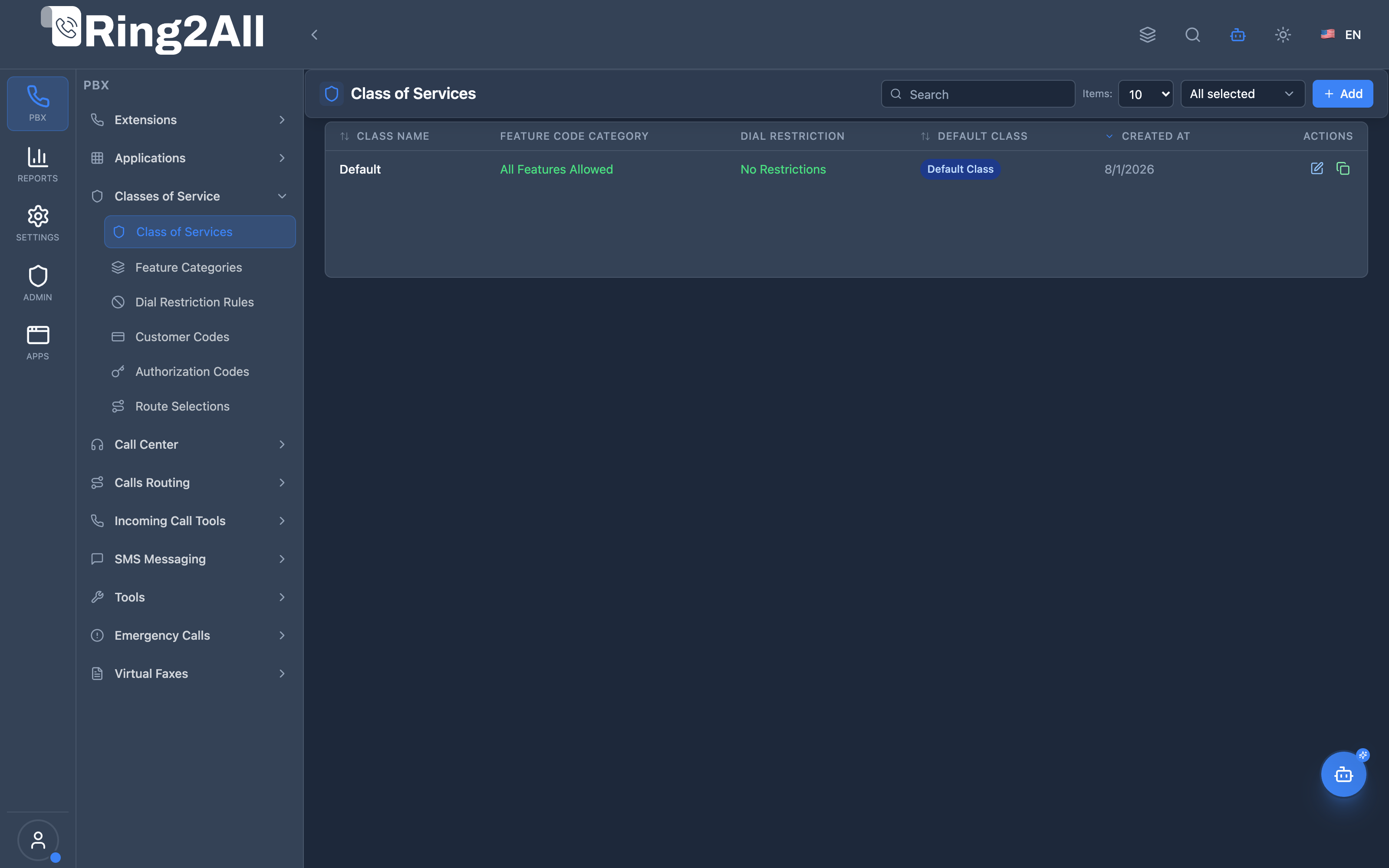
Section titled “Navigation”- Navigate to PBX Engine → Class of Services → Class of Services in the main navigation menu.
- The list view displays all configured Class of Services profiles, detailing their Name, linked Feature Code Category, Dial Rule Restriction, ARS Selection, Default (Main) designation, and Enabled status.
- Click the + Add button in the upper toolbar to configure a new Class of Service profile.
- Click any existing profile row or the edit action to adjust feature boundaries, restrictions, or failover routing.
Administrator Workflow
Section titled “Administrator Workflow”┌─────────────────────────────────────────────────────────────────┐│ Creating a Class of Service │├─────────────────────────────────────────────────────────────────┤│ ││ Step 1: Basic Information ││ ├─ Name: "Standard Employee" ││ ├─ Description: "Standard calling permissions for staff" ││ └─ Default Class: ✓ (optional - for new extensions) ││ ││ Step 2: Permissions & Restrictions ││ ││ ┌───────────────────────────────────────────────────────────┐ ││ │ Feature Code Category │ ││ │ └─ "Basic Features" (caller ID, DND, call return) │ ││ │ │ ││ │ Dial Rule Restrictions │ ││ │ └─ "Standard Restrictions" (block premium/intl) │ ││ │ │ ││ │ ARS Profile │ ││ │ └─ "Standard Routing" (default carriers) │ ││ └───────────────────────────────────────────────────────────┘ ││ ││ Step 3: Save and Enable ││ ││ Step 4: Assign to Extensions ││ └─ Edit Extensions → Select CoS: "Standard Employee" ││ │└─────────────────────────────────────────────────────────────────┘Quick Tips
Section titled “Quick Tips”[!TIP] Default Class: Set one CoS as default (Is Main) for automatic assignment to new extensions.
[!TIP] Descriptive Names: Use role-based names (Executive, Manager, Standard).
[!CAUTION] Cascading Changes: Modifying a CoS affects all extensions assigned to it.
4. Configuration Fields Reference
Section titled “4. Configuration Fields Reference”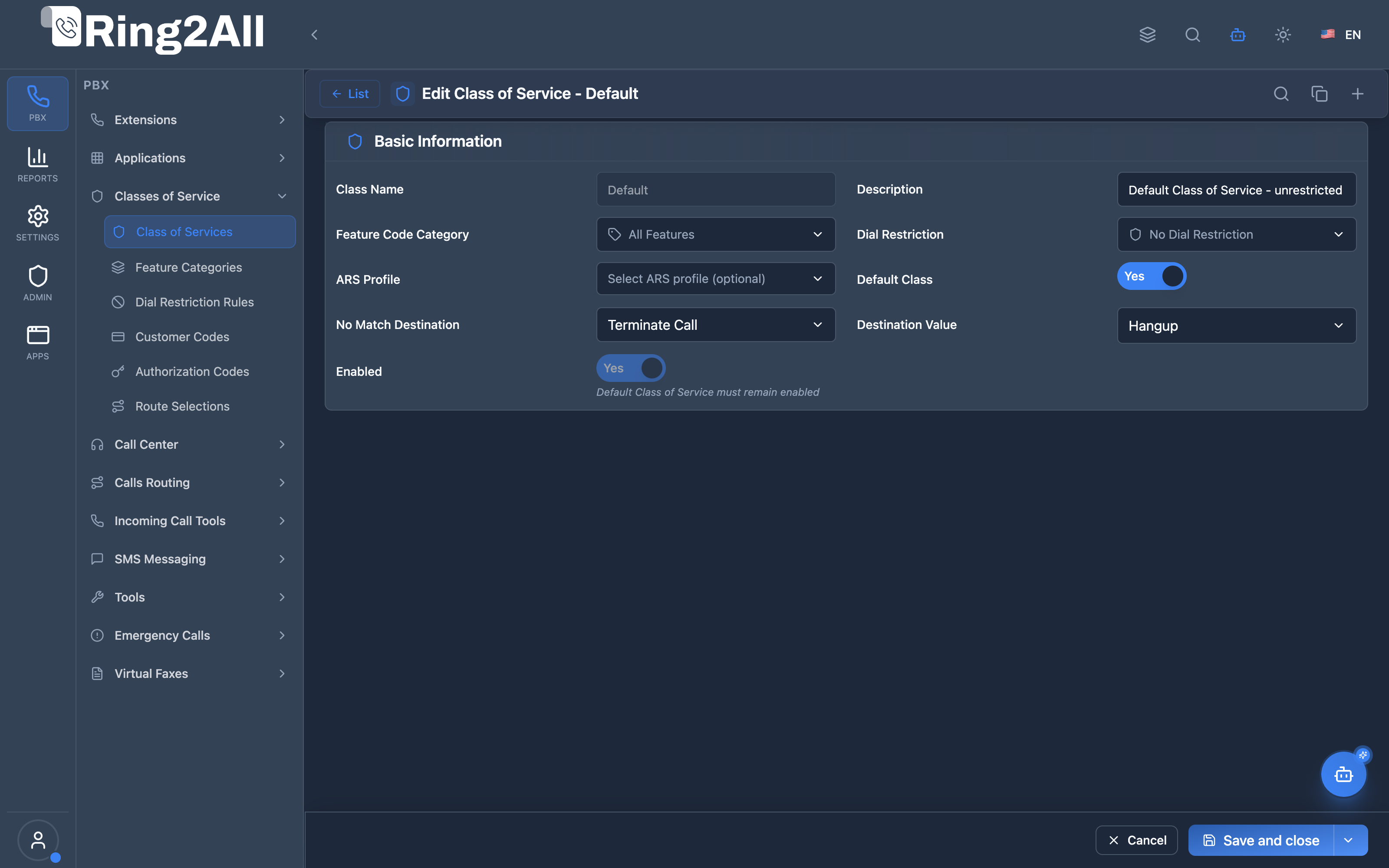
Basic Information Fields
Section titled “Basic Information Fields”| Field | Description | User-Friendly Tooltip | Example | Notes |
|---|---|---|---|---|
| Name * | Unique identifier for the Class of Service profile | A descriptive name for the Class of Service | Executive, Standard Staff |
Required. Unique per domain. Cannot be edited if marked as Main system profile. |
| Description | Contextual notes and operational scope | Detailed description of the profile’s purpose and permissions | Executive level outbound routing & unrestricted features |
Optional. |
| Feature Code Category | Grouping of dialpad feature codes (*XX) permitted | Select which feature codes (*XX) are accessible by this class | Advanced Features, All Features |
Dropdown. If unselected, all feature codes are allowed. |
| Dial Rule Restriction | Pattern-based call destination filter | Select dial rules and destination restrictions for this profile | International & Premium Barring |
Dropdown. If unselected, no dial restrictions are applied. |
| ARS Selection | Automatic Route Selection profile controlling carriers | Select the outbound ARS route profile for carrier routing | Standard Outbound PSTN ARS |
Dropdown. Controls carrier routing and LCR rules. |
| Default Class (Is Main) | Automatically assigned to new extensions | Set as the default Class of Service for newly created extensions | Toggle (On/Off) |
Only one profile per domain can be the primary default. |
| Failover Destination Module | Module triggered if a dialed call is blocked | Routing module executed when a call is rejected by restrictions | Terminate Call, IVR, Extension |
Dropdown. Default: Terminate Call. |
| Failover Destination Target | Specific target data for failover module | Destination parameter or target ID for rejected call handling | Congestion tone, Extension 100 |
Dynamic selection based on chosen module. |
| Enabled * | Operational status of the Class of Service | Whether this Class of Service profile is currently active | Toggle (On/Off) |
Inactive profiles reject calls or fallback to system defaults. Cannot disable the Main profile. |
Field Relationships
Section titled “Field Relationships”| Field | Null / Unassigned Behavior |
|---|---|
| Feature Code Category = NULL | All system feature codes (*XX) are accessible without restriction. |
| Dial Restriction = NULL | No dial restrictions are enforced; all outbound destinations are permitted. |
| ARS Selection = NULL | Calls use standard default outbound routing rules. |
| Failover Module = Terminate | Blocked calls are immediately terminated with standard congestion/busy tone. |
5. Permission System
Section titled “5. Permission System”Permission Hierarchy
Section titled “Permission Hierarchy”┌─────────────────────────────────────────────────────────────────┐│ Permission Check Flow │├─────────────────────────────────────────────────────────────────┤│ ││ User dials a number/feature code ││ │ ││ ▼ ││ 1. Get user's Class of Service ││ SELECT class_of_services_id FROM public.sip_extensions ││ │ ││ ▼ ││ 2. Is it a feature code (*XX)? ││ ├─ YES: Check Feature Code Category ││ │ └─ Is feature in assigned category? ││ │ ├─ YES → Allow feature ││ │ └─ NO → "Feature not allowed" ││ │ ││ └─ NO: It's an outbound number ││ │ ││ ▼ ││ 3. Check Dial Rule Restrictions ││ ├─ Pattern blocked? → Block call ││ ├─ Pattern allowed with limit? → Allow with duration ││ └─ Pattern allowed? → Proceed ││ │ ││ ▼ ││ 4. Get ARS Profile for routing ││ └─ Select carrier/route based on ARS rules ││ │└─────────────────────────────────────────────────────────────────┘6. Common Scenarios & Examples
Section titled “6. Common Scenarios & Examples”Scenario 1: Corporate Hierarchy
Section titled “Scenario 1: Corporate Hierarchy”| CoS | Feature Category | Dial Restrictions | ARS Profile |
|---|---|---|---|
| Executive | All Features | No Restrictions | Premium Routing |
| Manager | Advanced | International Allowed | Standard Routing |
| Employee | Basic | Domestic Only | Standard Routing |
| Lobby | Minimal | Emergency Only | Standard Routing |
Scenario 2: Call Center Tiers
Section titled “Scenario 2: Call Center Tiers”| CoS | Features | Restrictions | Notes |
|---|---|---|---|
| Agent Tier 1 | Basic calling | Local only | New agents |
| Agent Tier 2 | + Transfers | + Long distance | Experienced |
| Supervisor | + Spy modes | Full access | Team leads |
Scenario 3: Multi-Location
Section titled “Scenario 3: Multi-Location”| CoS | Features | Restrictions | ARS Profile |
|---|---|---|---|
| NYC Office | Standard | - | NYC Carriers |
| LA Office | Standard | - | LA Carriers |
| Remote | Standard | Limited | VoIP Only |
7. Model Context Protocol (MCP) AI Integration
Section titled “7. Model Context Protocol (MCP) AI Integration”Ring2All exposes native Model Context Protocol (MCP) tools for Class of Service (CoS), allowing AI agents and Copilots to query telephony permission profiles, inspect bindings across ARS route selections and feature categories, audit extension memberships, and provision or assign CoS profiles programmatically with domain-level isolation and deletion safeguards.
Available MCP Tools
Section titled “Available MCP Tools”| Tool Name | Description | Key Parameters |
|---|---|---|
list_class_of_services |
Lists all Class of Service profiles defined in the domain, including attached ARS, feature categories, dial restrictions, and active extension counts. | search (optional string) |
get_class_of_service_status |
Retrieves complete configuration, linked policy profiles, failover destination action, and extension count for a specific CoS profile. | name (required) |
create_class_of_service |
Provisions a new Class of Service profile binding Route Selection (ARS), Feature Categories, and Dial Restrictions. | name, description, routeSelectionName, featureCategoryName, dialRestrictionName, isMain, failoverDestinationModule, failoverDestinationData |
update_class_of_service |
Updates an existing CoS profile name, attached routing or restriction profiles, or default status. | name, newName, description, routeSelectionName, featureCategoryName, dialRestrictionName, isMain, enabled |
assign_extension_class_of_service |
Binds an extension to a specific Class of Service profile, immediately updating its dialing privileges. | extension, classOfServiceName |
diagnose_call_permission |
Performs deep operational diagnostic on call permissions for an extension dialing a specific destination number: evaluates assigned Class of Service (CoS), dial rule restrictions (blacklisted prefixes, international, premium numbers), toll-allow flags, and matching outbound routes. | extension (required string), destinationNumber (required string) |
delete_class_of_service |
Safely removes a Class of Service profile after verifying it is not marked as default and has no extensions assigned (assertCanDeleteClassOfService). |
name (required) |
Protection Guards & Integrity
Section titled “Protection Guards & Integrity”When an AI agent invokes delete_class_of_service, Ring2All runs assertCanDeleteClassOfService. Deletion is prevented if the profile is the system default (is_default: true) or if any extensions are actively assigned to it, ensuring dialplan stability.
AI Agent Operational Examples
Section titled “AI Agent Operational Examples”Querying Active Class of Service Profiles
Section titled “Querying Active Class of Service Profiles”{ "tool": "list_class_of_services", "arguments": { "search": "Executive" }}Assigning a High-Privilege Class of Service to an Extension
Section titled “Assigning a High-Privilege Class of Service to an Extension”{ "tool": "assign_extension_class_of_service", "arguments": { "extension": "2001", "classOfServiceName": "Executive COS" }}Diagnosing Outbound Call Permissions for an Extension
Section titled “Diagnosing Outbound Call Permissions for an Extension”{ "tool": "diagnose_call_permission", "arguments": { "extension": "2001", "destinationNumber": "011442071234567" }}Recommended Natural Language Prompts
Section titled “Recommended Natural Language Prompts”- “List all Class of Service profiles configured on this domain and how many extensions are assigned to each.”
- “Create a Class of Service named ‘Support Agents’ with Standard ARS and Basic Feature Category.”
- “Assign extension 105 to the ‘International Allowed’ Class of Service.”
8. Limitations & Important Notes
Section titled “8. Limitations & Important Notes”Technical Limitations
Section titled “Technical Limitations”[!WARNING] One CoS Per Extension: Each extension can only have one Class of Service.
[!WARNING] Cascading Impact: Changes to a CoS affect all assigned extensions.
Best Practices
Section titled “Best Practices”- Plan First: Design CoS structure before creating
- Document Purpose: Use clear descriptions
- Test Thoroughly: Verify permissions work correctly
- Minimize Classes: Use as few as needed
- Set Default: Always have a default CoS
Default CoS Rules
Section titled “Default CoS Rules”[!IMPORTANT] Only One Default: Only one CoS can be marked as default. Default Must Be Enabled: The default CoS cannot be disabled.
9. Troubleshooting Tips
Section titled “9. Troubleshooting Tips”Common Issues
Section titled “Common Issues”| Symptom | Possible Cause | Solution |
|---|---|---|
| Feature not working | Not in Feature Category | Add to category |
| Call blocked | Dial Restriction triggered | Check pattern rules |
| Wrong carrier | ARS Profile misconfigured | Review ARS routes |
| New ext no CoS | No default set | Set default CoS |
Diagnostic SQL
Section titled “Diagnostic SQL”List CoS with assignments:
SELECT c.id, c.name, c.enabled, c.is_main, fc.name as feature_category, dr.name as dial_restriction, (SELECT COUNT(*) FROM public.sip_extensions WHERE class_of_services_id = c.id) as extension_countFROM public.class_of_services cLEFT JOIN public.feature_code_categories fc ON c.feature_code_cos_id = fc.idLEFT JOIN public.dial_rule_restrictions dr ON c.dial_rule_restriction_id = dr.idWHERE c.domain_id = [domain_id];Check extension CoS:
SELECT e.extension, e.name, c.name as class_of_serviceFROM public.sip_extensions eLEFT JOIN public.class_of_services c ON e.class_of_services_id = c.idWHERE e.domain_id = [domain_id]ORDER BY e.extension;10. Glossary
Section titled “10. Glossary”| Term | Definition |
|---|---|
| Class of Service (CoS) | Permission profile assigned to extensions |
| Feature Code Category | Group of allowed dialpad features |
| Dial Rule Restriction | Pattern-based call control |
| ARS Profile | Outbound route selection rules |
| Default Class | CoS automatically assigned to new extensions |
Documentation last updated: January 2026