

Firewall Services Module Documentation
Table of Contents
Section titled “Table of Contents”- Navigation & Access
- Screenshots & Visual Interface
- Module Overview (Technical)
- Module Overview (Commercial/Business)
- Module Overview (End User/Administrator)
- User Roles & Key Capabilities
- Configuration Sections
- Settings Reference
- Common Scenarios & Examples
- Model Context Protocol (MCP) AI Integration
- Limitations & Important Notes
- Troubleshooting Tips
- Glossary
Navigation & Access
Section titled “Navigation & Access”To access the Firewall Services module:
- Log in to the Ring2All Web Portal (
https://<domain-or-ip>/login) with administrative credentials. - In the left navigation sidebar, locate and expand Admin.
- Under the Firewall section, click Services (
/admin/firewall/services). - To define a new network service definition, click the + Add button at the top right of the toolbar.
- To edit an existing service port or protocol, click the edit icon in the table row.
- To delete a custom service, click the trash icon and confirm.
Screenshots & Visual Interface
Section titled “Screenshots & Visual Interface”Firewall Services List View
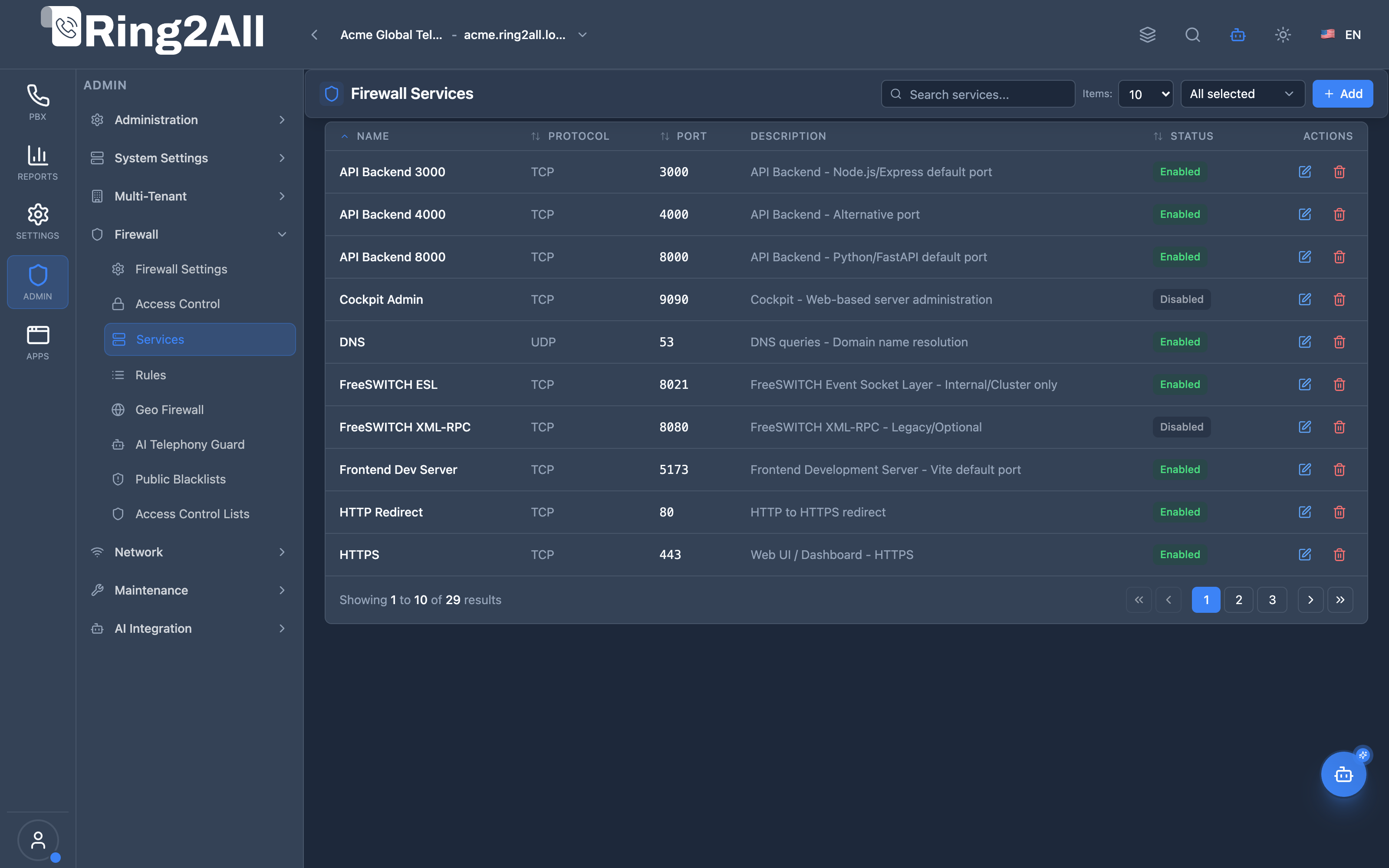
Section titled “Firewall Services List View”The Firewall Services list defines standard and customized networking ports, transport protocols (TCP, UDP, ICMP), and port ranges (e.g., SIP 5060, HTTP 80, HTTPS 443, ESL 8021, RTP ranges) utilized as reusable targets by the Firewall Rules engine.
Add / Edit Firewall Service Modal
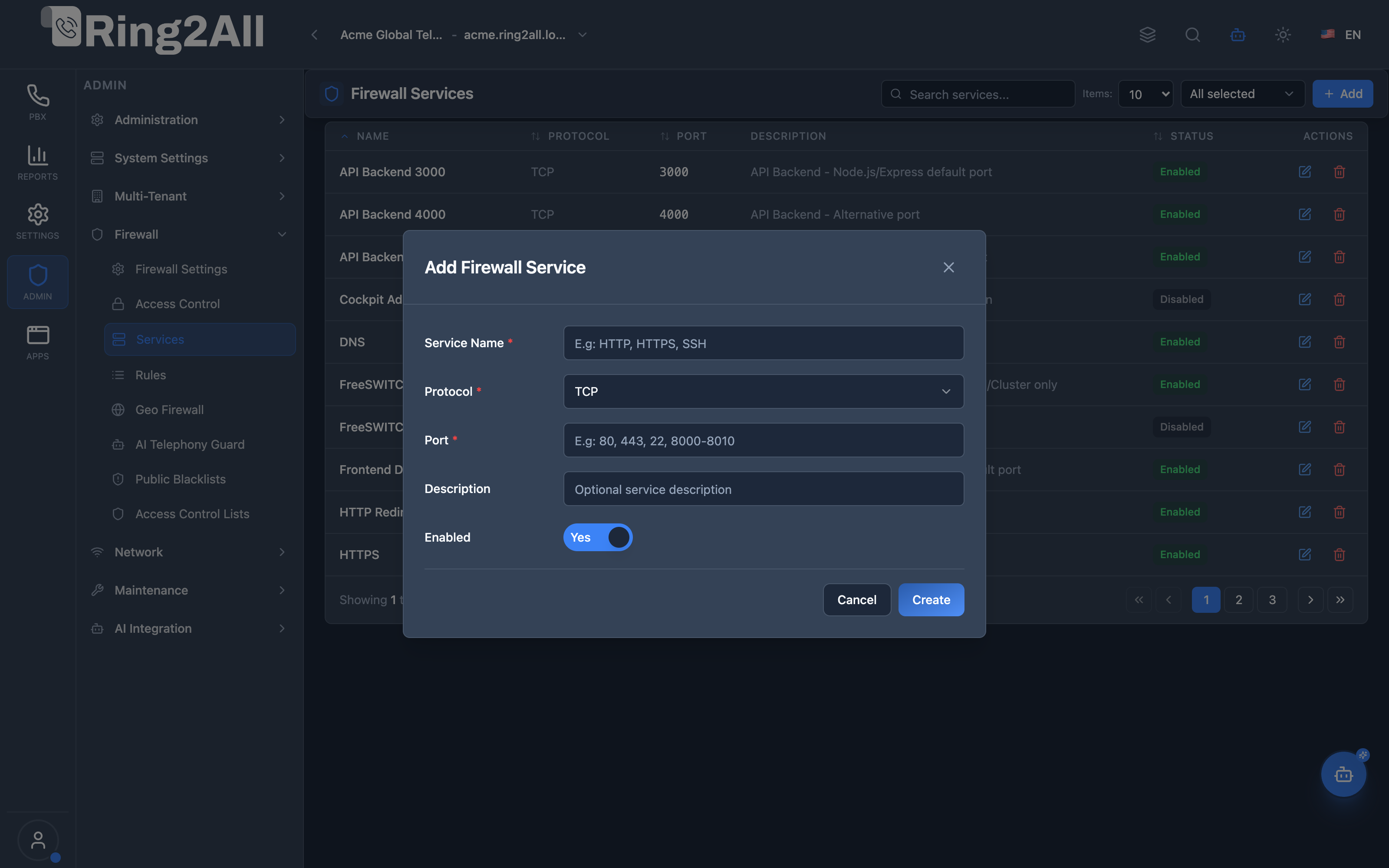
Section titled “Add / Edit Firewall Service Modal”The service editor modal allows administrators to name the service, select the network transport protocol, specify port numbers or ranges (e.g., 80, 443, 8000-8010), provide a description, and toggle its operational status.
1. Module Overview (Technical)
Section titled “1. Module Overview (Technical)”What Are Firewall Services?
Section titled “What Are Firewall Services?”Firewall Services is a service definition module that creates reusable protocol/port templates for use in Firewall Rules. Services define the network protocol and port(s) that rules will match against.
Architecture
Section titled “Architecture”┌─────────────────────────────────────────────────────────────────┐│ Firewall Services Architecture │├─────────────────────────────────────────────────────────────────┤│ ││ Service Definitions ││ ┌──────────────────────────────────────────────────────────┐ ││ │ │ ││ │ ┌─────────────┐ ┌─────────────┐ ┌─────────────┐ │ ││ │ │ HTTP │ │ HTTPS │ │ SSH │ │ ││ │ │ TCP/80 │ │ TCP/443 │ │ TCP/22 │ │ ││ │ └─────────────┘ └─────────────┘ └─────────────┘ │ ││ │ │ ││ │ ┌─────────────┐ ┌─────────────┐ ┌─────────────┐ │ ││ │ │ SIP │ │ SIP-TLS │ │ RTP │ │ ││ │ │ UDP/5060 │ │ TCP/5061 │ │ UDP/16384- │ │ ││ │ │ │ │ │ │ 32768 │ │ ││ │ └─────────────┘ └─────────────┘ └─────────────┘ │ ││ │ │ ││ └──────────────────────────────────────────────────────────┘ ││ │ ││ ▼ Used by Firewall Rules ││ ┌──────────────────────────────────────────────────────────┐ ││ │ Firewall Rules │ ││ │ │ ││ │ Rule: "Allow HTTP" │ ││ │ ├─ Service: HTTP ← (TCP/80) │ ││ │ ├─ Action: Accept │ ││ │ └─ Direction: Input │ ││ │ │ ││ │ Rule: "Allow SIP from LAN" │ ││ │ ├─ Service: SIP ← (UDP/5060) │ ││ │ ├─ Action: Accept │ ││ │ └─ Source: 192.168.1.0/24 │ ││ │ │ ││ └──────────────────────────────────────────────────────────┘ ││ │ ││ ▼ Applied to nftables ││ ┌──────────────────────────────────────────────────────────┐ ││ │ Linux Firewall (nftables) │ ││ │ │ ││ │ chain input { │ ││ │ tcp dport 80 accept # HTTP │ ││ │ tcp dport 443 accept # HTTPS │ ││ │ udp dport 5060 accept # SIP │ ││ │ } │ ││ │ │ ││ └──────────────────────────────────────────────────────────┘ ││ │└─────────────────────────────────────────────────────────────────┘2. Module Overview (Commercial/Business)
Section titled “2. Module Overview (Commercial/Business)”Business Value
Section titled “Business Value”Firewall Services provides reusable port definitions:
| Without Services | With Services |
|---|---|
| Repeat port numbers | Define once, use many |
| Prone to errors | Consistent definitions |
| Hard to maintain | Easy updates |
| No documentation | Named services |
Use Cases
Section titled “Use Cases”-
Standard Services
- HTTP, HTTPS, SSH
- Named port definitions
-
Telephony Services
- SIP, SIP-TLS, RTP
- Voice-specific ports
-
Custom Applications
- Custom port ranges
- Non-standard services
-
Maintenance
- Change port once
- Update all rules
Feature Highlights
Section titled “Feature Highlights”| Feature | Benefit |
|---|---|
| Named Services | Human-readable |
| Port Ranges | Range support (8000-8010) |
| Multi-Protocol | TCP, UDP, ICMP, All |
| Reusable | Use in multiple rules |
| Enable/Disable | Toggle without delete |
| Description | Documentation |
3. Module Overview (End User/Administrator)
Section titled “3. Module Overview (End User/Administrator)”What Can You Do?
Section titled “What Can You Do?”- Create service definitions
- Define protocol (TCP, UDP, ICMP, All)
- Set port or port range
- Add descriptions
- Enable/disable services
- Use in Firewall Rules
Firewall Services Interface
Section titled “Firewall Services Interface”┌─────────────────────────────────────────────────────────────────┐│ Firewall Services │├─────────────────────────────────────────────────────────────────┤│ ││ Manage firewall services for nftables (Debian 13) ││ ││ [+ Add Service] ││ ││ [🔍 Search services...] ││ ││ ┌───────────────────────────────────────────────────────────┐ ││ │ Name │ Protocol │ Port │ Description │ Status│ ││ ├────────────┼──────────┼─────────────┼─────────────┼───────┤ ││ │ HTTP │ TCP │ 80 │ Web traffic │ ● │ ││ │ HTTPS │ TCP │ 443 │ Secure web │ ● │ ││ │ SSH │ TCP │ 22 │ Remote admin│ ● │ ││ │ SIP │ UDP │ 5060 │ SIP signal │ ● │ ││ │ SIP-TLS │ TCP │ 5061 │ Secure SIP │ ● │ ││ │ RTP │ UDP │ 16384-32768 │ Voice media │ ● │ ││ │ STUN │ UDP │ 3478 │ NAT travers │ ● │ ││ │ TURN TLS │ TCP │ 5349 │ NAT travers │ ● │ ││ │ Custom API │ TCP │ 8000-8010 │ API ports │ ○ │ ││ └───────────────────────────────────────────────────────────┘ ││ │└─────────────────────────────────────────────────────────────────┘Add/Edit Service
Section titled “Add/Edit Service”┌─────────────────────────────────────────────────────────────────┐│ Add Firewall Service │├─────────────────────────────────────────────────────────────────┤│ ││ Service Name: [SIP-UDP ] ││ Descriptive name for the service (e.g., HTTP, HTTPS, SSH) ││ Must be unique ││ ││ Protocol: [UDP ▼] ││ Network protocol used by the service ││ TCP | UDP | TCP/UDP | ICMP | ICMPv6 | All ││ ││ Port: [5060 ] ││ Port or port range for the service ││ Single port (e.g., 80) or range (e.g., 8000-8010) ││ ││ Description: [SIP signaling over UDP ] ││ Optional description for documentation ││ ││ Enabled: ✓ ││ Disabled services cannot be used in rules ││ ││ [Save] [Cancel] ││ │└─────────────────────────────────────────────────────────────────┘Quick Tips
Section titled “Quick Tips”[!TIP] Port Ranges: Use hyphen for ranges (16384-32768).
[!TIP] Descriptive Names: Use clear names like “SIP-UDP”, “RTP-Media”.
[!NOTE] Used in Rules: Services are referenced by Firewall Rules.
🎯 User Roles & Key Capabilities
Section titled “🎯 User Roles & Key Capabilities”The Firewall Services module defines reusable transport and port objects, delegating capabilities across technical and operational roles:
| User Role | Key Permissions & Responsibilities | Common Tasks & Workflows |
|---|---|---|
| System Super Administrator | Authority to create, update, or remove standard and custom service templates across the platform. | Define core SIP (5060/UDP), TLS (5061/TCP), HTTPS (443), and RTP media range (16384-32768) services for reference by firewall rules. |
| VoIP / Infrastructure Engineer | Tailoring non-standard service port definitions to accommodate carrier requirements or SBC topologies. | Create alternative SIP transport ports (e.g. 5080, 5090), register WebRTC signaling ports (7443, 8089), and specify custom Telephony Event Socket (ESL) ports. |
| Tenant Administrator | Read-only inspection of configured firewall services and associated port mappings. | Review standard service ports to properly configure on-premise IP phones, remote softphones, and edge routers. |
| Security & Compliance Auditor | Service inventory auditing to ensure no insecure or unmapped listening ports exist. | Verify that cleartext services (e.g. unencrypted HTTP 80 or Telnet 23) are disabled or restricted exclusively to local management subnets. |
4. Configuration Sections
Section titled “4. Configuration Sections”Service Fields
Section titled “Service Fields”| Field | Description |
|---|---|
| Service Name | Unique identifier |
| Protocol | Network protocol |
| Port | Port or range |
| Description | Optional notes |
| Enabled | Active/Inactive |
5. Settings Reference
Section titled “5. Settings Reference”Protocols
Section titled “Protocols”| Protocol | Description | Common Use |
|---|---|---|
| TCP | Connection-oriented | HTTP, SSH, SIP-TLS |
| UDP | Connectionless | SIP, RTP, DNS |
| TCP/UDP | Both protocols | DNS |
| ICMP | Internet control | Ping |
| ICMPv6 | IPv6 control | IPv6 ping |
| All | Any protocol | Broad rules |
Port Format
Section titled “Port Format”| Format | Example | Description |
|---|---|---|
| Single | 80 | One port |
| Range | 8000-8010 | Port range |
| Multiple | 80,443 | List (if supported) |
Common PBX Services
Section titled “Common PBX Services”| Service | Protocol | Port(s) | Description |
|---|---|---|---|
| HTTP | TCP | 80 | Web (redirect) |
| HTTPS | TCP | 443 | Secure web + WebRTC WSS proxy |
| SSH | TCP | 22 | Remote admin |
| SIP | UDP | 5060 | SIP signaling |
| SIP-TLS | TCP | 5061 | Secure SIP |
| RTP | UDP | 16384-32768 | Voice media |
| STUN | UDP | 3478 | NAT traversal |
| TURN TLS | TCP | 5349 | NAT traversal (TLS) |
| Provisioning | TCP | 80, 443 | Phone config |
[!NOTE] WebRTC Architecture: WebRTC WebSocket (WSS) traffic is proxied through Nginx on port 443 (path
/ws). Telephony Server plain WebSocket (port 5066) listens only on localhost and is not exposed to the firewall. Port 7443 (direct WSS) has been deprecated.
6. Common Scenarios & Examples
Section titled “6. Common Scenarios & Examples”Scenario 1: Create SIP Service
Section titled “Scenario 1: Create SIP Service”- Click Add Service
- Name = “SIP”
- Protocol = UDP
- Port = 5060
- Description = “SIP signaling”
- Enabled = ✓
- Save
Scenario 2: Create RTP Range
Section titled “Scenario 2: Create RTP Range”- Add Service
- Name = “RTP-Media”
- Protocol = UDP
- Port = 16384-32768
- Description = “Voice/Video media”
- Save
Scenario 3: Create Custom API Service
Section titled “Scenario 3: Create Custom API Service”- Add Service
- Name = “Custom-API”
- Protocol = TCP
- Port = 8000-8010
- Description = “Internal API ports”
- Save
Scenario 4: Update Port Range
Section titled “Scenario 4: Update Port Range”- Edit existing service
- Change port range
- Save
- All rules using this service update automatically
- Apply Rules in Firewall Rules module
7. Limitations & Important Notes
Section titled “7. Limitations & Important Notes”Technical Notes
Section titled “Technical Notes”[!NOTE] Unique Names: Service names must be unique.
[!NOTE] Used in Rules: Services are referenced by Firewall Rules.
[!WARNING] Disable Carefully: Disabling breaks rules using the service.
Best Practices
Section titled “Best Practices”- Standard Names: Use industry-standard names (HTTP, SSH)
- Clear Descriptions: Document what each service is for
- Group Related: Create separate services for clarity
- Port Ranges: Use ranges for RTP, not individual ports
- Enable Check: Ensure service is enabled before use
Pre-defined vs. Custom
Section titled “Pre-defined vs. Custom”| Pre-defined | Custom |
|---|---|
| HTTP, HTTPS, SSH | Custom-API |
| SIP, RTP | App-specific |
| Standard ports | Non-standard |
Model Context Protocol (MCP) AI Integration
Section titled “Model Context Protocol (MCP) AI Integration”The Firewall Services module interfaces directly with the Ring2All Platform Copilot MCP Server, enabling automated querying of defined network protocols and ports:
🛠️ Available MCP Tools
Section titled “🛠️ Available MCP Tools”| Tool Name | Operation | Access Level | Description | Key Parameters |
|---|---|---|---|---|
list_firewall_services |
Read | SuperAdmin / Auditor | Lists predefined and custom PBX network services (SIP, HTTP, HTTPS, WebRTC, RTP, SSH) with port and protocol specifications. | search (string), protocol (tcp, udp, both), enabled (boolean) |
list_firewall_rules |
Read | SuperAdmin / Auditor | Cross-references which active firewall rules reference specific network service ports. | search (string, optional) |
get_firewall_settings |
Read | SuperAdmin / Auditor | Inspects the overarching host firewall daemon state and intrusion detection parameters. | None |
📋 JSON Tool Schemas & Sample Executions
Section titled “📋 JSON Tool Schemas & Sample Executions”list_firewall_services
Section titled “list_firewall_services”{ "name": "list_firewall_services", "arguments": { "protocol": "udp" }}Sample Successful Response:
{ "success": true, "data": { "total": 3, "services": [ { "id": 1, "name": "SIP-UDP", "protocol": "udp", "port": "5060", "description": "Standard SIP signaling", "enabled": true }, { "id": 2, "name": "RTP-Audio", "protocol": "udp", "port": "16384:32768", "description": "Voice media RTP stream range", "enabled": true }, { "id": 5, "name": "SIP-Alternative", "protocol": "udp", "port": "5080", "description": "Inbound external gateway port", "enabled": true } ] }}💬 Natural Language Prompt Examples
Section titled “💬 Natural Language Prompt Examples”English Prompts
Section titled “English Prompts”- “List all UDP services defined in the PBX firewall services table.”
- “What port range is configured for RTP voice media streams?”
- “Find all enabled network services matching ‘SIP’ or ‘WebRTC’.”
- “Check if SSH port 22 is defined as an active firewall service.”
Ejemplos en Español (Spanish Prompts)
Section titled “Ejemplos en Español (Spanish Prompts)”- “Lista todos los servicios UDP definidos en la tabla de servicios del firewall de la centralita.”
- “¿Cuál es el rango de puertos configurado para el tráfico de voz RTP?”
- “Encuentra todos los servicios de red activos que coincidan con ‘SIP’ o ‘WebRTC’.”
- “Verifica si el puerto SSH 22 está registrado como un servicio de firewall activo.”
🛡️ Enterprise Safeguards & Best Practices
Section titled “🛡️ Enterprise Safeguards & Best Practices”- Core Service Protection: Predefined system services (SIP 5060, HTTPS 443, RTP 16384:32768) cannot be deleted if active firewall rules depend on them, preventing accidental rule invalidation.
- Port Syntax Validation: Single ports (
5060), lists (80,443), and ranges (16384:32768or16384-32768) are parsed and validated against POSIX port bounds (1-65535). - Protocol Isolation: Tools enforce strict network protocol checks (
tcp,udp, orboth) to ensure precise packet matching in nftables.
8. Troubleshooting Tips
Section titled “8. Troubleshooting Tips”Common Issues
Section titled “Common Issues”| Symptom | Possible Cause | Solution |
|---|---|---|
| Service not in dropdown | Disabled | Enable service |
| Rule not working | Wrong protocol | Check TCP vs UDP |
| Port not matching | Wrong range | Verify port format |
| Can’t delete | Used in rules | Remove from rules first |
Check Services
Section titled “Check Services”SELECT name, protocol, port, description, is_enabledFROM public.firewall_servicesORDER BY name;Check Service Usage
Section titled “Check Service Usage”SELECT r.name as rule_name, s.name as service_name, s.protocol, s.portFROM public.firewall_rules rJOIN public.firewall_services s ON r.service_id = s.idORDER BY r.priority;9. Glossary
Section titled “9. Glossary”| Term | Definition |
|---|---|
| Service | Protocol/port template |
| Protocol | Network communication type |
| Port | Network endpoint number |
| Port Range | Consecutive ports |
| nftables | Linux firewall |
Documentation last updated: January 2026