

PBX Voice Guide Module Documentation
Table of Contents
Section titled “Table of Contents”- Navigation & Access
- Screenshots & Visual Interface
- Module Overview (Technical)
- Module Overview (Commercial/Business)
- Module Overview (End User/Administrator)
- User Roles & Key Capabilities
- Interface Features
- Voice Guide Generation
- Model Context Protocol (MCP) AI Integration
- Common Scenarios & Examples
- Limitations & Important Notes
- Troubleshooting Tips
- Glossary
Navigation & Access
Section titled “Navigation & Access”To access the PBX Voice Guide configuration module:
- Log in to the Ring2All Web Portal (
https://<domain-or-ip>/login). - In the left navigation sidebar, expand Settings.
- Under Voice Prompts, click PBX Voice Guide (
/settings/voice-prompts/pbx-guide). - To register or generate a new system voice prompt pack, click + Add Voice Guide. To preview or edit an existing voice guide, click on the row or the Edit action button.
Screenshots & Visual Interface
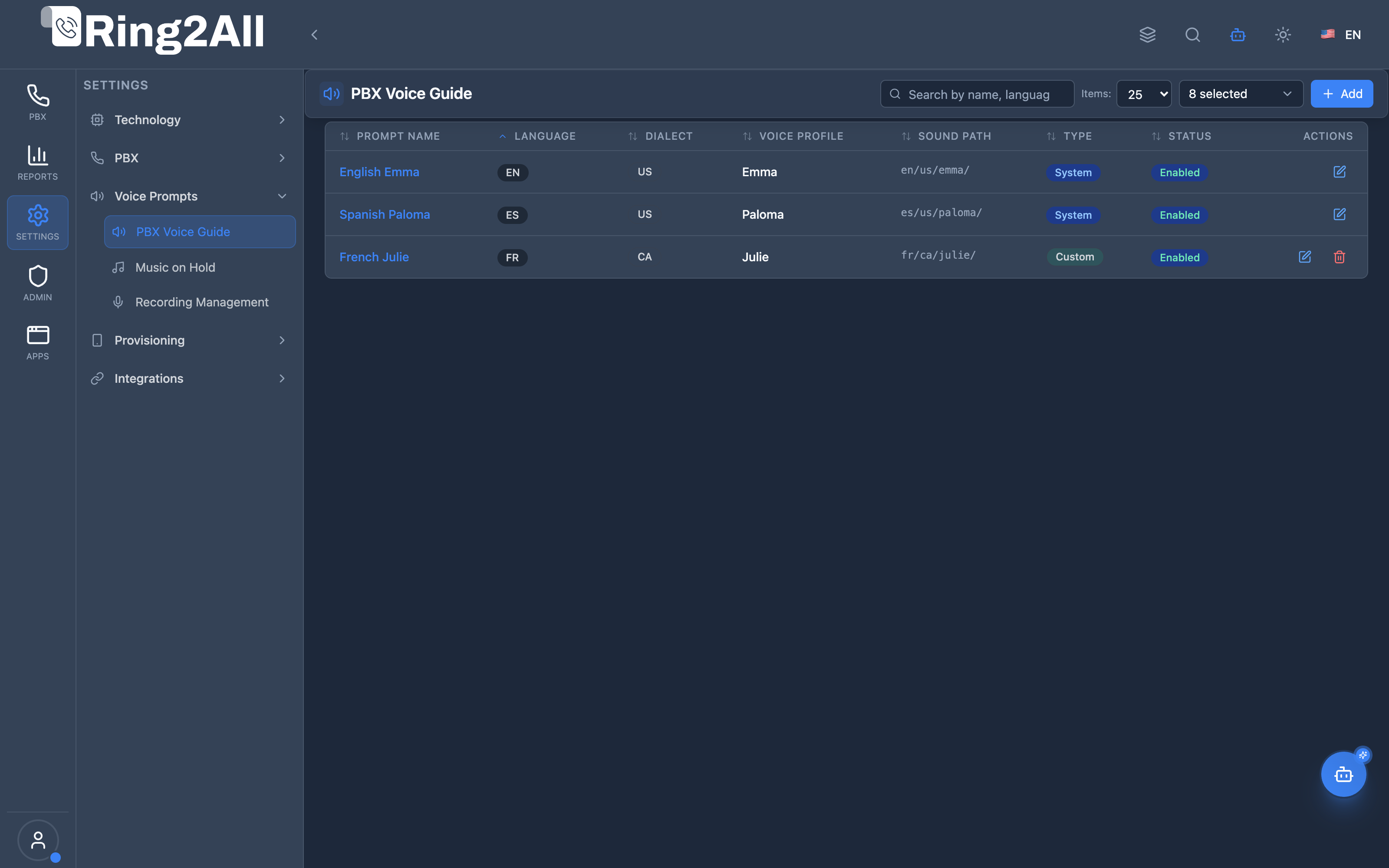
Section titled “Screenshots & Visual Interface”PBX Voice Guide Catalog & Inventory
Section titled “PBX Voice Guide Catalog & Inventory”Interactive directory of Telephony Server telephony prompt packages, showing language code, dialect, voice persona, sound directory paths, AI TTS generator integrations, and system-wide fallback flags.
1. Module Overview (Technical)
Section titled “1. Module Overview (Technical)”What Is PBX Voice Guide?
Section titled “What Is PBX Voice Guide?”PBX Voice Guide is a voice prompts management system that allows administrators to view, create, and manage Telephony Services voice prompts. It supports both viewing existing prompt catalogs and generating new voice guides using AI TTS (Text-to-Speech) with OpenAI, Azure, or Google voices.
Architecture
Section titled “Architecture”┌─────────────────────────────────────────────────────────────────┐│ PBX Voice Guide Architecture │├─────────────────────────────────────────────────────────────────┤│ ││ Admin Panel ││ ┌──────────────────────────────────────────────────────────┐ ││ │ PBX Voice Guide │ ││ │ │ ││ │ Catalog View: │ ││ │ ┌───────────────────────────────────────────────────┐ │ ││ │ │ Prompt Name │ Lang │ Voice │ Type │ Actions │ │ ││ │ ├───────────────┼──────┼───────┼────────┼─────────┤ │ ││ │ │ English Emma │ EN │ emma │ System │ ✏️ │ │ ││ │ │ Spanish Paloma│ ES │ paloma│ System │ ✏️ │ │ ││ │ │ English Maria│ EN │ maria │ Custom │ ✏️ 🗑️ │ │ ││ │ └───────────────────────────────────────────────────┘ │ ││ │ │ ││ │ [+ Create Voice Guide] │ ││ │ │ ││ └──────────────────────────────────────────────────────────┘ ││ │ ││ ▼ Reads/Writes ││ ┌──────────────────────────────────────────────────────────┐ ││ │ Voice Prompts Storage │ ││ │ │ ││ │ /usr/share/freeswitch/sounds/ │ ││ │ ├─ en/us/emma/ │ ││ │ │ ├─ ivr/ │ ││ │ │ ├─ voicemail/ │ ││ │ │ └─ digits/ │ ││ │ ├─ es/us/paloma/ │ ││ │ └─ (custom voices) │ ││ │ │ ││ └──────────────────────────────────────────────────────────┘ ││ │ ││ ▼ AI TTS Generation ││ ┌──────────────────────────────────────────────────────────┐ ││ │ AI Profile Integration │ ││ │ ┌─────────────┬─────────────┬─────────────┐ │ ││ │ │ OpenAI │ Azure │ Google │ │ ││ │ │ TTS-1 │ TTS │ TTS │ │ ││ │ └─────────────┴─────────────┴─────────────┘ │ ││ └──────────────────────────────────────────────────────────┘ ││ │└─────────────────────────────────────────────────────────────────┘Database Schema
Section titled “Database Schema”CREATE TABLE public.voice_guides ( id SERIAL PRIMARY KEY, uuid UUID NOT NULL DEFAULT uuid_generate_v4(), name TEXT NOT NULL, description TEXT, language_code VARCHAR(2) NOT NULL, dialect_code VARCHAR(2) NOT NULL, voice_name VARCHAR(50) NOT NULL, sound_path TEXT NOT NULL, is_fallback BOOLEAN NOT NULL DEFAULT FALSE, is_system BOOLEAN NOT NULL DEFAULT FALSE, enabled BOOLEAN NOT NULL DEFAULT TRUE, created_at TIMESTAMPTZ NOT NULL DEFAULT NOW(), updated_at TIMESTAMPTZ);2. Module Overview (Commercial/Business)
Section titled “2. Module Overview (Commercial/Business)”Business Value
Section titled “Business Value”PBX Voice Guide provides voice prompt management and AI generation:
| Without Voice Guide | With Voice Guide |
|---|---|
| Manual file creation | AI-powered generation |
| SSH to upload files | Web-based management |
| No inventory tracking | Complete catalog view |
| Limited languages | Unlimited AI voices |
| Manual discovery | Filtered search |
Use Cases
Section titled “Use Cases”-
Custom Voice Prompts
- Generate AI voice prompts in any language
- Use OpenAI, Azure, or Google TTS
-
Language Expansion
- Add new language support
- Create regional dialects
-
Brand Voice
- Create custom voice identities
- Consistent voice across IVR, voicemail, etc.
-
Rapid Deployment
- Bulk generate prompts from CSV
- Batch processing with progress tracking
Feature Highlights
Section titled “Feature Highlights”| Feature | Benefit |
|---|---|
| AI TTS Generation | Create prompts using AI voices |
| Batch Processing | Generate multiple prompts at once |
| Progress Tracking | Real-time progress bar with count |
| CSV Import | Bulk prompt definition |
| System Protection | System guides cannot be deleted |
| Edit Mode | Add prompts to existing guides |
| Fallback Config | Identify fallback voices |
3. Module Overview (End User/Administrator)
Section titled “3. Module Overview (End User/Administrator)”What Can You Do?
Section titled “What Can You Do?”- View all available voice guides
- Create new voice guides with AI TTS
- Edit existing guides (add more prompts)
- Delete custom voice guides (system guides protected)
- Filter by language, status, type
- Search for specific guides
- Track generation progress in real-time
Voice Guide List Interface
Section titled “Voice Guide List Interface”┌─────────────────────────────────────────────────────────────────┐│ PBX Voice Guide │├─────────────────────────────────────────────────────────────────┤│ ││ [🔍 Search by name, language, dialect or voice...] ││ ││ [+ Create Voice Guide] [🔄 Refresh] ││ ││ ┌───────────────────────────────────────────────────────────┐ ││ │ Prompt Name │ Lang │ Voice │ Type │ Status│Actions│ ││ ├─────────────────┼──────┼─────────┼────────┼───────┼───────┤ ││ │ English Emma │ EN │ Emma │ System │Enabled│ ✏️ │ ││ │ Spanish Paloma │ ES │ Paloma │ System │Enabled│ ✏️ │ ││ │ English Maria │ EN │ Maria │ Custom │Enabled│ ✏️ 🗑 │ ││ └───────────────────────────────────────────────────────────┘ ││ ││ Showing 3 voice guides ││ │└─────────────────────────────────────────────────────────────────┘Voice Guide Types
Section titled “Voice Guide Types”| Type | Badge Color | Deletable | Description |
|---|---|---|---|
| System | Blue | ❌ No | Pre-installed, protected guides |
| Custom | Green | ✅ Yes | User-created guides |
Quick Tips
Section titled “Quick Tips”[!TIP] Edit Mode: Click the edit icon on any guide to add more prompts to it.
[!TIP] CSV Format: Use
path,filename,textformat for bulk prompt definition.
🎯 User Roles & Key Capabilities
Section titled “🎯 User Roles & Key Capabilities”| Role | Key Capabilities & Permissions | Operational Scope |
|---|---|---|
| PBX Super Administrator | • Global catalog audit across all languages, dialects, and sound paths • System voice guide protection flag ( is_system) enforcement• Fallback voice guide designation and Telephony Server sound directory root path configuration • AI TTS profile configuration and batch token rate limit orchestration |
Full Platform Scope |
| Tenant Administrator | • Custom domain voice guide creation and prompt review • Multilingual audio prompt batch generation via AI voice models • Custom phrase library management and prompt preview playback • Domain-level prompt selection for IVRs, queues, and announcements |
Domain Scope |
| Call Center Supervisor | • Read-only inspection of active prompt packages • Audio phrase playback verification for customer greeting compliance • Audio guide preview and request submission for queue waiting audio |
Supervised Queues |
| AI Copilot / MCP Agent | • Automated voice guide inventory query (list_voice_guides)• Diagnostic inspection of prompt paths and dialects ( get_voice_guide_status)• Dynamic prompt synthesis for automated IVR expansions |
Autonomous Assistant |
4. Interface Features
Section titled “4. Interface Features”List Columns
Section titled “List Columns”| Column | Description |
|---|---|
| Prompt Name | Display name of the voice guide |
| Language | ISO language code (EN, ES, FR) |
| Dialect | Regional variant (US, UK, MX) |
| Voice Profile | Voice name (emma, paloma) |
| Sound Path | Telephony Server sound path |
| Type | System (protected) or Custom |
| Status | Enabled/Disabled |
| Actions | Edit, Delete (custom only) |
Filters
Section titled “Filters”| Filter | Options |
|---|---|
| Language | All, English, Spanish, etc. |
| Status | All, Enabled, Disabled |
| Fallback Only | Show only fallback voices |
Type Values
Section titled “Type Values”| Type | Description |
|---|---|
| System | Pre-installed, cannot be deleted |
| Custom | User-created, can be deleted |
5. Voice Guide Generation
Section titled “5. Voice Guide Generation”Create Voice Guide Form
Section titled “Create Voice Guide Form”┌─────────────────────────────────────────────────────────────────┐│ 🔊 Create Voice Guide │├─────────────────────────────────────────────────────────────────┤│ ││ ┌─ Configuration ─────────────────────────────────────────┐ ││ │ Name: [English Custom Voice ] │ ││ │ Description: [Custom IVR prompts for... ] (optional)│ ││ └─────────────────────────────────────────────────────────┘ ││ ││ ┌─ Language & Voice ──────────────────────────────────────┐ ││ │ Language: [English ▼] Dialect: [US ▼] │ ││ │ Voice Name: [custom_voice ] │ ││ │ TTS Profile: [OpenAI TTS-1 HD - alloy ▼] │ ││ │ │ ││ │ 📁 Output Path: en/us/custom_voice/ │ ││ └─────────────────────────────────────────────────────────┘ ││ ││ ┌─ Prompt Definitions ────────────────────────────────────┐ ││ │ CSV Content (path,filename,text): │ ││ │ ┌─────────────────────────────────────────────────────┐│ ││ │ │ ivr,welcome,Welcome to our company ││ ││ │ │ ivr,goodbye,Thank you for calling ││ ││ │ │ voicemail,greeting,Please leave a message ││ ││ │ └─────────────────────────────────────────────────────┘│ ││ │ [📁 Upload CSV File] or paste directly │ ││ └─────────────────────────────────────────────────────────┘ ││ ││ ┌─ Prompts Preview (3 items) ─────────────────────────────┐ ││ │ Path │ Filename │ Text │ Status │ ││ │ ivr │ welcome │ Welcome to our company │ ⏳ │ ││ │ ivr │ goodbye │ Thank you for calling │ ⏳ │ ││ │ voicemail │ greeting │ Please leave a message │ ⏳ │ ││ └─────────────────────────────────────────────────────────┘ ││ │├─────────────────────────────────────────────────────────────────┤│ [Stop] ████████████░░░░ 2/3 (67%) [🔄 Generating...] │└─────────────────────────────────────────────────────────────────┘CSV Format
Section titled “CSV Format”path,filename,textivr,welcome,Welcome to our company. How may I help you today?ivr,goodbye,Thank you for calling. Goodbye!ivr,hold,Please hold while we connect you.voicemail,greeting,You have reached the voicemail ofvoicemail,instructions,Please leave a message after the beepdigits,0,zerodigits,1,onedigits,2,twoGeneration Features
Section titled “Generation Features”| Feature | Description |
|---|---|
| Batch Processing | Processes prompts in batches of 10 |
| Progress Bar | Real-time visual progress indicator |
| Count Display | Shows “X / Y (Z%)” during generation |
| Auto-scroll | Table scrolls to show current batch |
| Status Tracking | Each prompt shows ⏳ pending, ✅ completed, ❌ failed |
| Stop Button | Shows “Stop” during generation to abort batch processing |
| Cancel Button | Restores original values in edit mode, resets form in create mode |
| Completion Modal | Summary of generated vs failed prompts |
Edit Mode
Section titled “Edit Mode”When editing an existing voice guide:
- Language, Dialect, Voice Name are read-only (defines the path)
- Can add new prompts to the existing guide
- New prompts are appended or overwrite existing files
Model Context Protocol (MCP) AI Integration
Section titled “Model Context Protocol (MCP) AI Integration”The PBX Voice Guide module exposes native Model Context Protocol (MCP) tools allowing AI Copilots, automated speech orchestration agents, and diagnostic assistants to discover, inspect, and verify telephony voice prompt packages and sound directory structures across all configured languages.
Available MCP Telephony Tools
Section titled “Available MCP Telephony Tools”| Tool Name | Action Type | Access Level | Description |
|---|---|---|---|
list_voice_guides |
READ |
Read-Only |
Lists all installed voice guide prompt suites, displaying language code, dialect, voice persona, sound directory path, and default fallback status. |
get_voice_guide_status |
READ |
Read-Only |
Retrieves detailed metadata, prompt path, fallback state, and system flags of a specific multilingual voice guide by ID or name. |
Tool Schemas & Input Parameters
Section titled “Tool Schemas & Input Parameters”list_voice_guides
Section titled “list_voice_guides”{ "name": "list_voice_guides", "description": "List system Voice Guides and multilingual telephony prompt suites installed in the PBX.", "inputSchema": { "type": "object", "properties": { "search": { "type": "string", "description": "Filter voice guides by name or language code (e.g. 'Spanish', 'en-US')." } } }}get_voice_guide_status
Section titled “get_voice_guide_status”{ "name": "get_voice_guide_status", "description": "Get configuration and prompt path details of a specific multilingual voice guide.", "inputSchema": { "type": "object", "properties": { "id": { "type": "number", "description": "Unique numerical ID of the voice guide." }, "name": { "type": "string", "description": "Name of the voice guide (e.g. 'Spanish Mexican Standard')." } } }}Natural Language AI Copilot Prompts
Section titled “Natural Language AI Copilot Prompts”English Prompts
Section titled “English Prompts”- “List all installed voice guides in the PBX and show which one is designated as the system default fallback.”
- “Check the prompt directory path and status for voice guide ‘Spanish Mexican Standard’.”
- “Are there any English UK voice prompt packs available for our IVR menus?”
Spanish Prompts
Section titled “Spanish Prompts”- “Lista todas las guías de voz configuradas y verifica cuál está marcada como fallback predeterminado.”
- “Muestra el estado detallado y la ruta de archivos de sonido de la guía de voz ‘Spanish Paloma’.”
- “¿Qué paquetes de audio en inglés y español tenemos disponibles para el conmutador?”
Enterprise Safeguards & Multi-Tenant Isolation
Section titled “Enterprise Safeguards & Multi-Tenant Isolation”- Domain Scoping: Read operations are filtered to the authenticated tenant/domain context, preventing cross-tenant leakage of proprietary custom brand audio files.
- System Guide Protection: System voice guides (
is_system = true) are protected from automated deletion or accidental overwrite by AI agents. - Audio File Integrity: Paths returned by
get_voice_guide_statusare sanitized to prevent directory traversal outside/usr/share/freeswitch/sounds/.
6. Common Scenarios & Examples
Section titled “6. Common Scenarios & Examples”Scenario 1: Create Custom IVR Prompts
Section titled “Scenario 1: Create Custom IVR Prompts”- Click “Create Voice Guide”
- Enter name: “Custom IVR English”
- Select Language: English, Dialect: US
- Enter Voice Name: “custom_ivr”
- Select TTS Profile (e.g., OpenAI alloy)
- Paste or upload CSV with prompts:
ivr,main_menu,Press 1 for sales, 2 for supportivr,sales_queue,Connecting you to salesivr,support_queue,Connecting you to support
- Click “Generate Voice Guide”
- Watch progress bar fill up
- Review completion summary
Scenario 2: Add Prompts to Existing Guide
Section titled “Scenario 2: Add Prompts to Existing Guide”- Find the voice guide in the list
- Click the Edit (pencil) icon
- Form opens with existing configuration (read-only)
- Paste new prompts in CSV format
- Click “Generate Voice Guide”
- New prompts are added to existing directory
Scenario 3: Identify System vs Custom Guides
Section titled “Scenario 3: Identify System vs Custom Guides”- View the Type column in the list
- Blue “System” badge = Protected, cannot delete
- Green “Custom” badge = User-created, can delete
- System guides have no delete button in Actions
Scenario 4: Generate Multilingual Prompts
Section titled “Scenario 4: Generate Multilingual Prompts”- Create separate voice guides for each language:
- “Spanish Mexico Prompts” (es/mx/custom)
- “French Canada Prompts” (fr/ca/custom)
- Use appropriate TTS profiles for each language
- Use same prompt structure (path/filename) for consistency
7. Limitations & Important Notes
Section titled “7. Limitations & Important Notes”Technical Notes
Section titled “Technical Notes”[!NOTE] Audio Format: Generated files are WAV format, 8kHz mono (telephony optimized).
[!NOTE] File Location: Files are saved to
/usr/share/freeswitch/sounds/{language}/{dialect}/{voice_name}/.
[!WARNING] Overwrite Behavior: Generating a prompt with the same path/filename overwrites the existing file.
[!CAUTION] System Guides: Deleting system voice guides (is_system=true) is blocked at both UI and API level.
Best Practices
Section titled “Best Practices”- Use Descriptive Names: Name guides clearly (e.g., “Custom IVR English HD”)
- Plan Voice Names: Use lowercase, no spaces (e.g., “custom_ivr” not “Custom IVR”)
- Consistent Structure: Use same path/filename patterns across languages
- Test Prompts: Generate a few prompts first before bulk generation
- Backup Before Overwrite: System won’t backup existing files
Supported TTS Providers
Section titled “Supported TTS Providers”| Provider | Voices | Quality |
|---|---|---|
| OpenAI | alloy, echo, fable, onyx, nova, shimmer | HD available |
| Azure | Multiple per language | Neural voices |
| Multiple per language | Neural voices |
8. Troubleshooting Tips
Section titled “8. Troubleshooting Tips”Common Issues
Section titled “Common Issues”| Symptom | Possible Cause | Solution |
|---|---|---|
| “Generating…” stuck | TTS API issue | Check AI Profile credentials |
| Prompts fail | Invalid text or path | Check CSV format, remove special characters |
| No TTS profiles | Profiles not configured | Create AI Profiles with type=TTS |
| Cannot delete guide | System guide | System guides are protected |
| Edit button opens empty | Guide data issue | Refresh the list |
| Progress bar not moving | Batch failure | Check browser console for errors |
Verify Generated Files
Section titled “Verify Generated Files”# Check generated filesls -la /usr/share/freeswitch/sounds/en/us/custom_voice/
# Check specific pathls -la /usr/share/freeswitch/sounds/en/us/custom_voice/ivr/
# Verify file formatfile /usr/share/freeswitch/sounds/en/us/custom_voice/ivr/welcome.wavCheck Voice Guide in Database
Section titled “Check Voice Guide in Database”-- List all voice guidesSELECT name, language_code, dialect_code, voice_name, is_system, is_fallbackFROM public.voice_guides;
-- Check contents of a specific guideSELECT vg.name, vgc.path, vgc.name as filename, vgc.phraseFROM public.voice_guides vgJOIN public.voice_guide_contents vgc ON vgc.voice_guide_id = vg.idWHERE vg.name = 'English Emma';9. Glossary
Section titled “9. Glossary”| Term | Definition |
|---|---|
| Voice Guide | Collection of voice prompts with a specific language/dialect/voice |
| Dialect | Regional language variant (US, UK, MX) |
| Voice Name | Identifier for the voice directory (e.g., “emma”, “custom_ivr”) |
| TTS Profile | AI profile configured for text-to-speech generation |
| is_system | Flag indicating protected system voice guides |
| is_fallback | Flag indicating the default fallback voice guide |
| Batch Processing | Generating prompts in groups of 10 for efficiency |
| Sound Path | Telephony Server directory path for voice files |
Documentation last updated: January 2026