

Role Profiles Module Documentation
Table of Contents
Section titled “Table of Contents”- Module Overview (Technical)
- Module Overview (Commercial & Business Value)
- 🎯 User Roles & Key Capabilities
- Visual Interface & Form Structure
- Permissions Matrix & Evaluation Engine
- Common Scenarios & Operational Playbooks
- Troubleshooting & Diagnostic Commands
- Model Context Protocol (MCP) AI Integration
- Glossary
1. Module Overview (Technical)
Section titled “1. Module Overview (Technical)”The Role Profiles module (public.role_profiles) manages the Role-Based Access Control (RBAC) governance framework within Ring2All Billing. It abstracts low-level API route permissions and UI view authorizations into cohesive, reusable profiles that can be assigned to multiple administrative users.
Data Model & Matrix Representation
Section titled “Data Model & Matrix Representation” ┌────────────────────────────────────────────────────────────────────────┐ │ Role Profile Entity (public.role_profiles) │ │ • id: bigint (Canonical Invariant Numeric Primary Key) │ │ • uuid: uuid (Public API Identifier) │ │ • name: VARCHAR(100) (e.g. "Billing Manager", "Auditor") │ │ • description: TEXT (Profile Scope & Operational Intent) │ │ • permissions: JSONB (Structured Module Permission Mapping) │ │ • is_system: BOOLEAN (Protected Pre-Seeded Profile Flag) │ │ • is_default: BOOLEAN (Auto-Assignment Flag for New Staff) │ │ • is_active: BOOLEAN (Operational State Flag) │ └───────────────────────────────────┬────────────────────────────────────┘ │ ▼ ┌────────────────────────────────────────────────────────────────────────┐ │ JSONB Permissions Specification (`permissions`) │ │ { │ │ "rates": "FULL", // Full CRUD on Rate Cards & Tariffs │ │ "plans": "FULL", // Full CRUD on Product Catalog │ │ "invoices": "READ", // Read-Only inspection of Invoices │ │ "accounting": "NONE", // Completely hidden from Navigation & API │ │ "users": "NONE" // Administrative user management hidden │ │ } │ └────────────────────────────────────────────────────────────────────────┘PostgreSQL Schema Architecture (public.role_profiles)
Section titled “PostgreSQL Schema Architecture (public.role_profiles)”- Primary Key: Numeric
idguarantees invariant foreign key relationships withpublic.users.role_profile_id. - Dynamic JSONB Hierarchy: Permissions are stored as structured JSONB key-value pairs matching module identifiers to one of three access tiers:
FULL(Create, Read, Update, Delete),READ(View & Export only), orNONE(Strictly Forbidden). - System Immutability Protection: Profiles flagged with
is_system = true(such asAdministrator) cannot be deleted, ensuring there is always at least one functioning full-access profile.
2. Module Overview (Commercial & Business Value)
Section titled “2. Module Overview (Commercial & Business Value)”- Zero-Trust Administrative Access: Adheres to the principle of least privilege (PoLP), ensuring staff only access modules directly necessary for their functional obligations.
- Risk Reduction in Financial & Tariff Operations: Prevents tier-1 support representatives or sales staff from accidentally altering wholesale LCR tables, manipulating customer wallet balances, or deleting historical billing invoices.
- Rapid Workforce Onboarding: Reduces provisioning overhead; new hires are instantly granted the exact required permissions by simply selecting their standardized role profile.
3. 🎯 User Roles & Key Capabilities
Section titled “3. 🎯 User Roles & Key Capabilities”| User Role | Key Permissions | Core Responsibilities & Workflows |
|---|---|---|
| Super Administrator | Full Control (CRUD on Role Profiles) |
Creates custom organizational role profiles, defines category-level permission overrides, sets default onboarding profiles, and maintains system security boundaries. |
| Security Officer / Compliance Lead | Read & Audit | Audits the permissions matrix across all active profiles, verifies that sensitive modules (like Accounting, API Keys, and Firewalls) have restricted access, and validates periodic access reviews. |
| Billing Manager | Read-Only | Inspects the capabilities of team members to confirm that appropriate operational scopes are assigned to billing analysts and rate administrators. |
4. Visual Interface & Form Structure
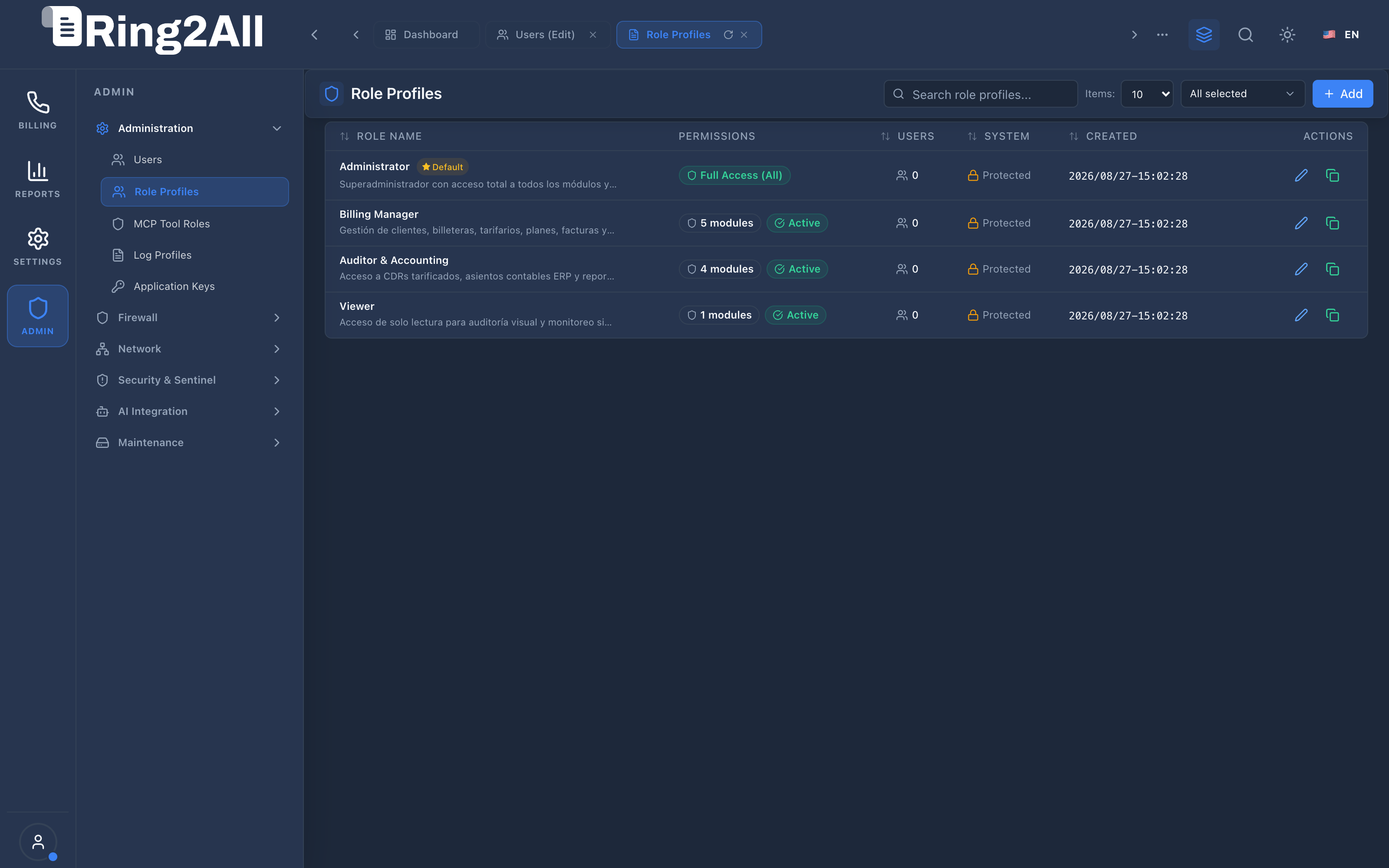
Section titled “4. Visual Interface & Form Structure”Level 1 — Role Profiles List View
Section titled “Level 1 — Role Profiles List View”The list view displays all configured role profiles, their permission scopes (Full Access vs. custom module counts), assigned user counts, protection badges, and creation dates.
Level 2 — Role Profile Creation & Edit Form
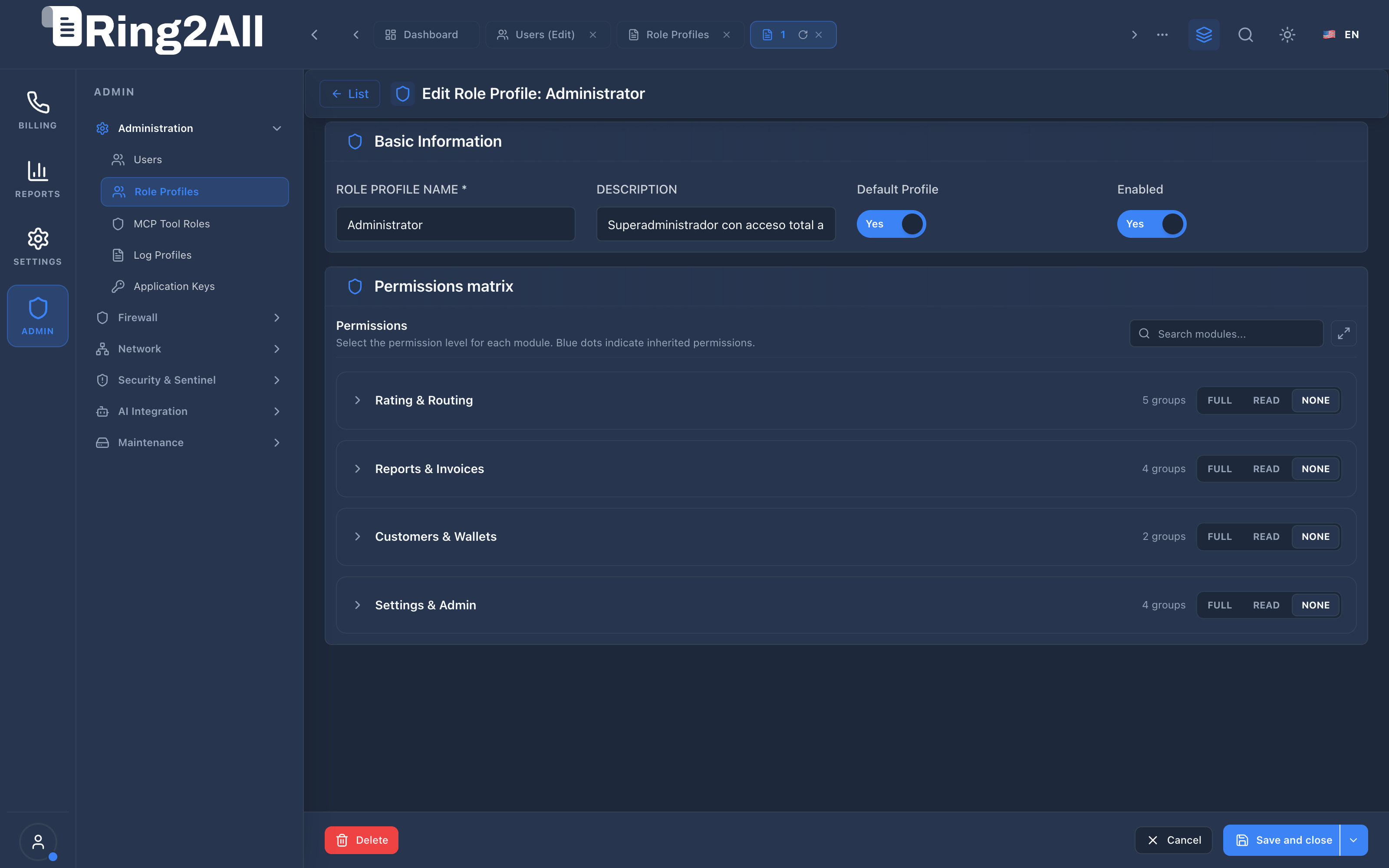
Section titled “Level 2 — Role Profile Creation & Edit Form”The form view combines standard metadata inputs with an interactive Permissions Matrix featuring expandable module categories, batch selectors, and search filtering.
Sections & Interactive Controls
Section titled “Sections & Interactive Controls”- Basic Information Box:
- Role Profile Name: Alphanumeric identifier (e.g.,
Billing Manager,Telecom Auditor). - Description: Comprehensive narrative explaining the profile’s intended operational tier.
- Default Profile Switch: Marks the profile for automatic selection when onboarding new users.
- Enabled Switch: Toggles the active status of the profile.
- Role Profile Name: Alphanumeric identifier (e.g.,
- Permissions Matrix Box:
- Search Filter: Instant real-time filtering of modules across all functional categories.
- Category Accordions: Grouped by operational domains (
Rating & Routing,Reports & Invoices,Customers & Wallets,Settings & Admin). - Access Level Pills: Quick toggles for
FULL,READ, orNONEper module or applied in batch across entire categories.
5. Permissions Matrix & Evaluation Engine
Section titled “5. Permissions Matrix & Evaluation Engine”When an administrative user authenticates and initiates an API request, the Fastify RBAC pre-handler evaluates the user’s role profile against the requested route and HTTP method:
┌───────────────────────────────┐ │ Incoming API Request │ │ (e.g., POST /api/v1/rates) │ └───────────────┬───────────────┘ │ ▼ ┌───────────────────────────────┐ │ Extract User Token & Role │ │ (public.users.role_profile)│ └───────────────┬───────────────┘ │ ▼ ┌───────────────────────────────┐ │ Evaluate Module Scope: "rates"│ └───────────────┬───────────────┘ │ ┌───────────────────────┼───────────────────────┐ │ Permission = "FULL" │ Permission = "READ" │ Permission = "NONE" ▼ ▼ ▼ ┌───────────────────┐ ┌───────────────────┐ ┌───────────────────┐ │ Allow GET, POST, │ │ Allow GET Only; │ │ Reject Request │ │ PUT, DELETE │ │ Reject Mutations │ │ with HTTP 403 │ │ (HTTP 200/201) │ │ with HTTP 403 │ │ Forbidden │ └───────────────────┘ └───────────────────┘ └───────────────────┘6. Common Scenarios & Operational Playbooks
Section titled “6. Common Scenarios & Operational Playbooks”Playbook 1: Creating a “Financial Auditor” Profile
Section titled “Playbook 1: Creating a “Financial Auditor” Profile”- Navigate to ADMIN > Administration > Role Profiles.
- Click + Add to launch the profile creation form.
- Set Role Profile Name to
Financial Auditor. - Enter Description:
Read-only access to Invoices, CDRs, MDRs, and accounting ledgers for external audit review. - In the Permissions Matrix:
- Set
Reports & InvoicestoREAD(all child modules inherit read-only rights). - Set
Customers & WalletstoREAD. - Set
Rating & RoutingtoNONE. - Set
Settings & AdmintoNONE.
- Set
- Click Save and close.
Playbook 2: Modifying an Existing Profile’s Access Scope
Section titled “Playbook 2: Modifying an Existing Profile’s Access Scope”- In the Role Profiles list, locate the profile to adjust (e.g.,
Billing Manager). - Click the edit icon to open the configuration form.
- Expand the target category accordion (e.g.,
Rating & Routing). - Upgrade or downgrade specific module pills (e.g., set
Least Cost RoutingtoREAD). - Click Save and close.
- Result: All users assigned to this role profile immediately operate under the updated permissions matrix without requiring session re-authentication.
7. Troubleshooting & Diagnostic Commands
Section titled “7. Troubleshooting & Diagnostic Commands”Querying Configured Role Profiles
Section titled “Querying Configured Role Profiles”# Query all role profiles and assigned user countssu - postgres -c "psql -d ss_billing -c 'SELECT r.id, r.name, r.is_system, r.is_default, COUNT(u.id) AS active_usersFROM public.role_profiles rLEFT JOIN public.users u ON u.role_profile_id = r.idGROUP BY r.id, r.name, r.is_system, r.is_defaultORDER BY r.id ASC;'"Inspecting Granular JSONB Permissions for a Role
Section titled “Inspecting Granular JSONB Permissions for a Role”# Inspect JSONB permission payload for Role ID 2su - postgres -c "psql -d ss_billing -c \"SELECT jsonb_pretty(permissions)FROM public.role_profilesWHERE id = 2;\""8. Model Context Protocol (MCP) AI Integration
Section titled “8. Model Context Protocol (MCP) AI Integration”The Role Profiles module connects directly to the Ring2All BSS MCP Server, enabling security administrators and governance copilots to audit active RBAC matrices and user distribution programmatically.
Available MCP Tools
Section titled “Available MCP Tools”| Tool Name | Access Role | Description & Primary Function | Example Arguments |
|---|---|---|---|
list_role_profiles |
Super Administrator |
Lists RBAC role profiles with permissions summary, system/default flags, and user counts. | {} |
Sample MCP Tool Execution: list_role_profiles
Section titled “Sample MCP Tool Execution: list_role_profiles”Request Payload
Section titled “Request Payload”{ "name": "list_role_profiles", "arguments": {}}Response Payload
Section titled “Response Payload”[ { "id": 1, "name": "Super Administrator", "description": "Unrestricted administrative access to all modules and engines", "isSystem": true, "isDefault": false, "usersCount": 1 }, { "id": 2, "name": "Billing Operations", "description": "Standard customer management, invoicing, and rate card maintenance", "isSystem": false, "isDefault": true, "usersCount": 3 }]Conversational AI Prompts for Copilot
Section titled “Conversational AI Prompts for Copilot”- “List all defined role profiles and how many active users belong to each.”
- “Show which roles are marked as protected system profiles.”
- “What is the default role assigned to new operators?”
9. Glossary
Section titled “9. Glossary”- RBAC (Role-Based Access Control): Security mechanism that restricts system access based on user organizational roles rather than individual user identities.
- Principle of Least Privilege (PoLP): Information security standard requiring that users be granted only the minimum access necessary to perform authorized duties.
- JSONB: Binary structured JSON format native to PostgreSQL offering indexed querying and high-performance read evaluation.
- System Profile: Pre-configured baseline profile protected against accidental modification or deletion.
- Model Context Protocol (MCP): Open protocol standard that enables secure, controlled integration between Large Language Models and external tools, databases, and telecom rating engines.