

AI Providers Module Documentation
Table of Contents
Section titled “Table of Contents”- Navigation & Access
- Screenshots & Visual Interface
- 🎯 User Roles & Key Capabilities
- Module Overview (Technical)
- Module Overview (Commercial/Business)
- Module Overview (End User/Administrator)
- Configuration Sections
- Settings Reference
- Model Context Protocol (MCP) AI Integration
- Common Scenarios & Examples
- Limitations & Important Notes
- Troubleshooting Tips
- Glossary
Navigation & Access
Section titled “Navigation & Access”To access the AI Providers module:
- Log in to the Ring2All Web Portal (
https://<domain-or-ip>/login). - In the left navigation sidebar, expand Administration.
- Under AI Integration, click AI Providers (
/admin/ai-integration/providers). - Review configured cloud engines (OpenAI, Anthropic, Azure, ElevenLabs) and on-premises local LLM nodes (LM Studio, Ollama).
- Click + Add to register a new AI engine credential (
/admin/ai-integration/providers/new), or edit existing endpoints and API tokens.
Screenshots & Visual Interface
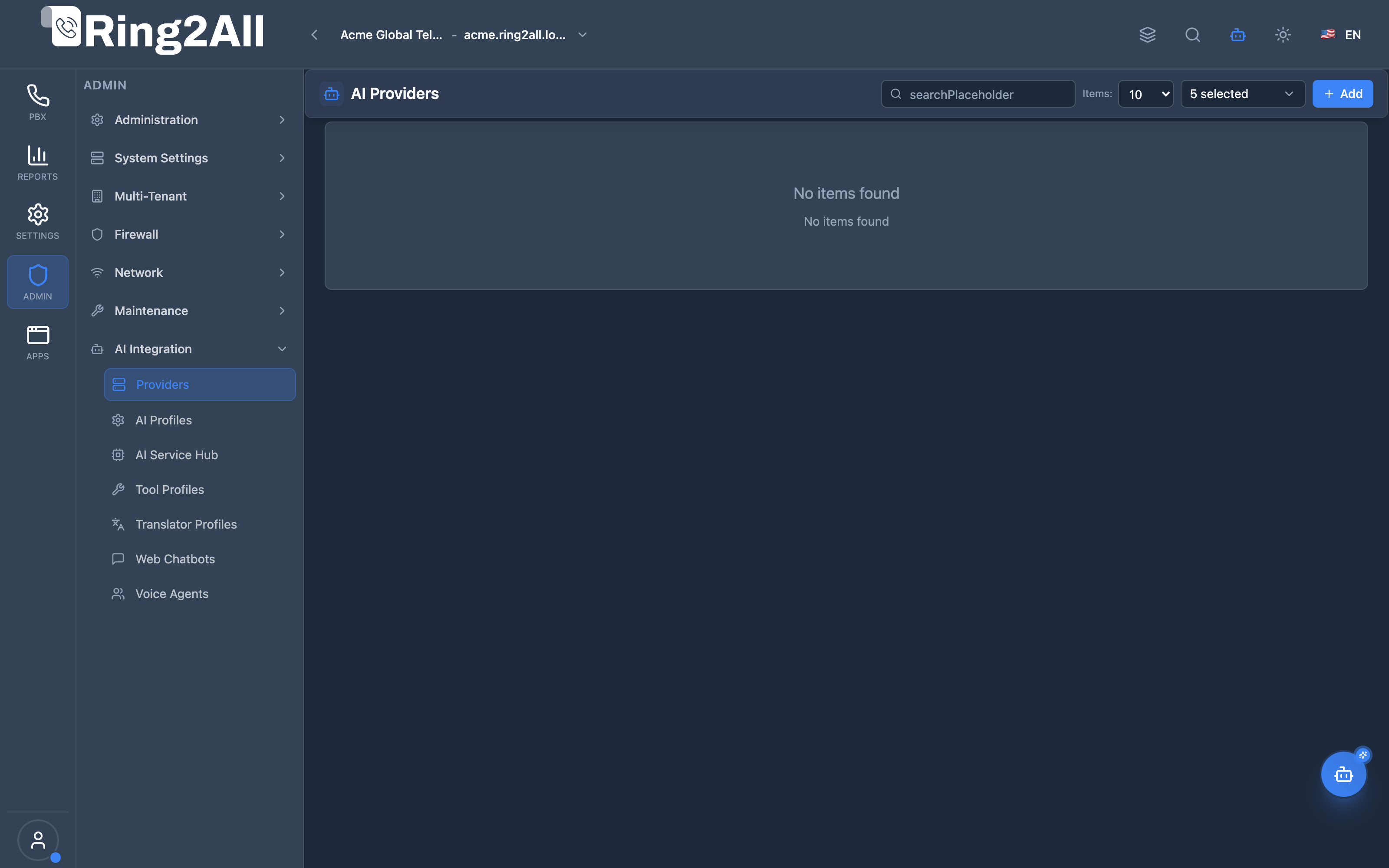
Section titled “Screenshots & Visual Interface”AI Providers Directory
Section titled “AI Providers Directory”Central management console listing active AI API provider integrations, base URL endpoints, provider types, and operational health statuses.
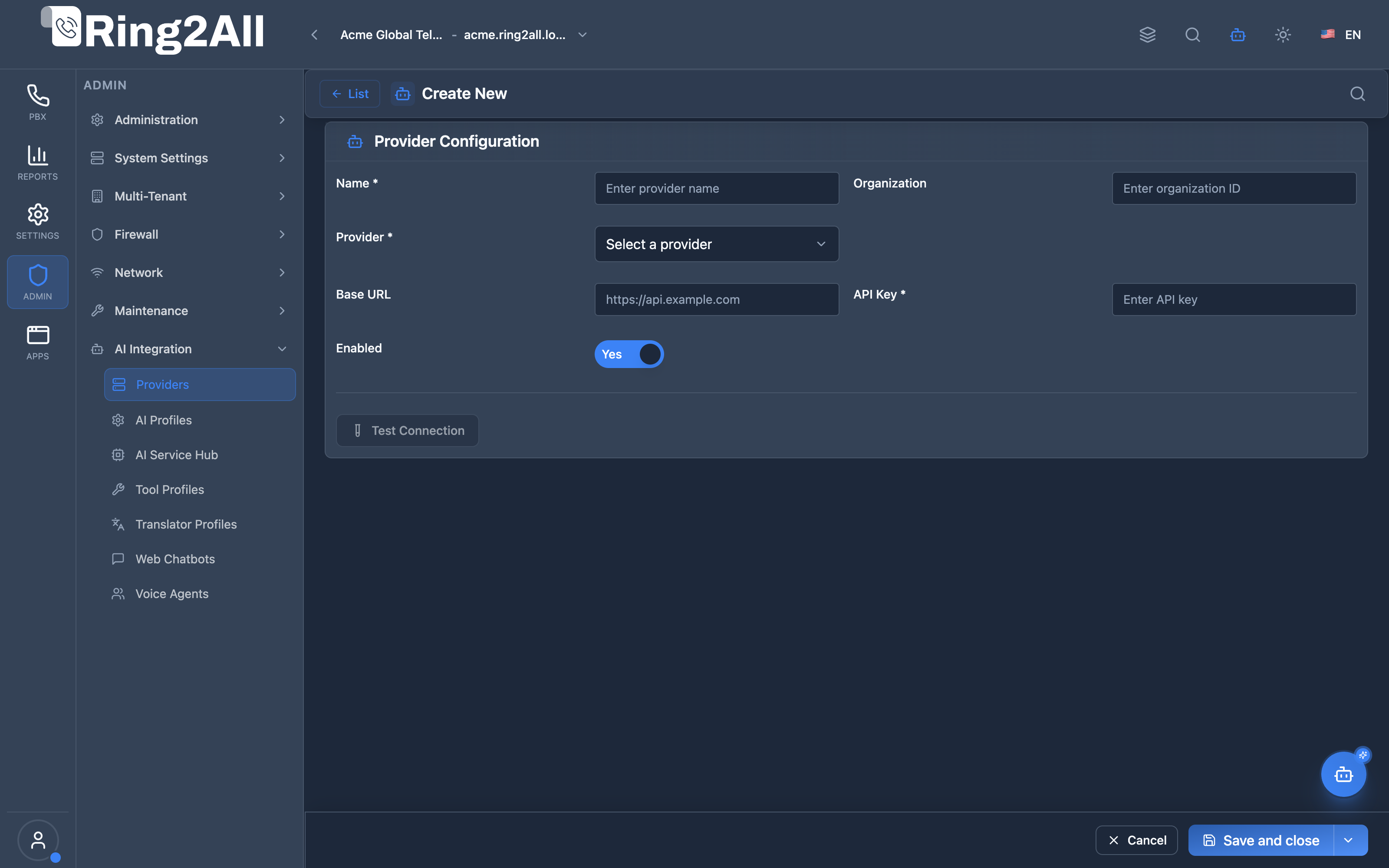
Create / Edit AI Provider Form
Section titled “Create / Edit AI Provider Form”Provider connection configuration form for selecting provider platform types (OpenAI, Anthropic, Azure OpenAI, LM Studio, Ollama, Custom), supplying base URLs, configuring API keys, and setting organization IDs.
🎯 User Roles & Key Capabilities
Section titled “🎯 User Roles & Key Capabilities”| Role | Access Level | Responsibilities & Capabilities |
|---|---|---|
| PBX Super Administrator | Full Access (RW) |
Register global and tenant AI credentials (OpenAI, Anthropic, Deepgram, ElevenLabs, Gemini), test provider endpoints, and manage API token quotas. |
| AI Solution Architect | Configuration (RW) |
Configure on-premises private LLM gateways (Ollama, LM Studio, vLLM), set custom model endpoints, and optimize token latency for Realtime voice agents. |
| Telephony Operations Lead | Monitoring (RO) |
Monitor provider health, test connectivity before peak calling hours, and inspect supported capability flags (LLM, STT, TTS, Embeddings). |
| AI Platform Copilot / MCP Agent | Telemetry & Audit (RO) |
Execute list_ai_providers and get_ai_provider_status to evaluate engine availability and recommend model failovers. |
1. Module Overview (Technical)
Section titled “1. Module Overview (Technical)”What Are AI Providers?
Section titled “What Are AI Providers?”AI Providers is a credential management module that stores API keys and configuration for AI services. These providers enable AI-powered features like TTS (Text-to-Speech), STT (Speech-to-Text), transcription, and intelligent assistants.
Architecture
Section titled “Architecture”┌─────────────────────────────────────────────────────────────────┐│ AI Providers Architecture │├─────────────────────────────────────────────────────────────────┤│ ││ AI Provider Credentials ││ ┌──────────────────────────────────────────────────────────┐ ││ │ │ ││ │ ┌─────────────┐ ┌─────────────┐ ┌─────────────┐ │ ││ │ │ OpenAI │ │ ElevenLabs │ │ Anthropic │ │ ││ │ │ GPT-4, TTS │ │ Voice Clone │ │ Claude │ │ ││ │ │ Whisper │ │ Natural TTS │ │ Analysis │ │ ││ │ └─────────────┘ └─────────────┘ └─────────────┘ │ ││ │ │ ││ │ ┌─────────────┐ ┌─────────────┐ │ ││ │ │ Google │ │ Azure OpenAI│ │ ││ │ │ Cloud TTS │ │ Enterprise │ │ ││ │ │ Vertex AI │ │ OpenAI │ │ ││ │ └─────────────┘ └─────────────┘ │ ││ │ │ ││ └──────────────────────────────────────────────────────────┘ ││ │ ││ ▼ Used by AI Features ││ ┌──────────────────────────────────────────────────────────┐ ││ │ │ ││ │ Recording TTS ──────────► OpenAI (GPT-4 TTS) │ ││ │ Call Transcription ─────► OpenAI (Whisper) │ ││ │ Voicemail Summary ──────► Anthropic (Claude) │ ││ │ Custom Voices ──────────► ElevenLabs │ ││ │ │ ││ └──────────────────────────────────────────────────────────┘ ││ │└─────────────────────────────────────────────────────────────────┘2. Module Overview (Commercial/Business)
Section titled “2. Module Overview (Commercial/Business)”Business Value
Section titled “Business Value”AI Providers provides centralized AI credential management:
| Without Module | With Module |
|---|---|
| Hardcoded keys | Web interface |
| Single provider | Multiple providers |
| No failover | Provider selection |
| No testing | Connection testing |
Use Cases
Section titled “Use Cases”-
Voice Generation
- TTS for recordings
- Custom voice cloning
-
Transcription
- Call transcription
- Voicemail to text
-
Analysis
- Sentiment analysis
- Call summarization
-
Assistants
- AI agents
- Interactive IVR
Feature Highlights
Section titled “Feature Highlights”| Feature | Benefit |
|---|---|
| Multiple Providers | OpenAI, ElevenLabs, etc. |
| API Key Storage | Secure credential vault |
| Custom URLs | Self-hosted models |
| Connection Test | Verify credentials |
| Enable/Disable | Toggle providers |
| Organization ID | Enterprise accounts |
3. Module Overview (End User/Administrator)
Section titled “3. Module Overview (End User/Administrator)”What Can You Do?
Section titled “What Can You Do?”- Add AI provider credentials
- Store API keys securely
- Configure custom endpoints
- Test connections
- Enable/disable providers
- Refresh capabilities
- Manage organization IDs
AI Providers - List View
Section titled “AI Providers - List View”┌─────────────────────────────────────────────────────────────────┐│ AI Providers │├─────────────────────────────────────────────────────────────────┤│ ││ Manage AI service providers and API keys ││ ││ [+ Create New] ││ ││ [🔍 Search providers...] ││ ││ ┌───────────────────────────────────────────────────────────┐ ││ │ Name │ Provider │ Base URL │ Status │ ││ ├───────────────┼────────────┼──────────────────┼──────────┤ ││ │ Main OpenAI │ OpenAI │ (default) │ ● Active │ ││ │ ElevenLabs │ ElevenLabs │ (default) │ ● Active │ ││ │ Claude API │ Anthropic │ (default) │ ● Active │ ││ │ Google Cloud │ Google │ (default) │ ○ Inactive│ ││ │ Azure OpenAI │ Azure │ my.openai.azure │ ● Active │ ││ └───────────────────────────────────────────────────────────┘ ││ ││ Actions: [🧪 Test] [✏️ Edit] [🗑️ Delete] ││ │└─────────────────────────────────────────────────────────────────┘Add/Edit AI Provider
Section titled “Add/Edit AI Provider”┌─────────────────────────────────────────────────────────────────┐│ Create AI Provider │├─────────────────────────────────────────────────────────────────┤│ ││ [Provider Config] [API Settings] [Organization] [Status] ││ ││ ▼ Provider Configuration ││ ││ ┌─────────────────────────────────────────────────────────────┐││ │ │││ │ Provider: [OpenAI ▼] │││ │ OpenAI | ElevenLabs | Anthropic | Google | Azure OpenAI │││ │ Choose which AI service this key belongs to │││ │ │││ │ Name: [Main OpenAI ] │││ │ Friendly name for identification │││ │ │││ └─────────────────────────────────────────────────────────────┘││ ││ ▼ API Settings ││ ││ ┌─────────────────────────────────────────────────────────────┐││ │ │││ │ API Key: [sk-xxxxxxxxxxxxxxxxxxxxxxxx ] │││ │ Enter the secret key for this provider │││ │ │││ │ Base URL: [https://api.openai.com ] │││ │ Optional custom API endpoint │││ │ (Leave empty for default provider URL) │││ │ │││ └─────────────────────────────────────────────────────────────┘││ ││ ▼ Organization Settings (OpenAI only) ││ ││ ┌─────────────────────────────────────────────────────────────┐││ │ │││ │ Organization: [org-xxxxxxxxxxxxxxxx ] │││ │ Optional organization ID for OpenAI accounts │││ │ │││ └─────────────────────────────────────────────────────────────┘││ ││ ▼ Status & Management ││ ││ ┌─────────────────────────────────────────────────────────────┐││ │ │││ │ Enabled: ✓ │││ │ Enable/disable this integration │││ │ │││ │ Created At: 2024-01-15 10:30:00 │││ │ Updated At: 2024-01-16 14:22:15 │││ │ │││ └─────────────────────────────────────────────────────────────┘││ ││ [Test Connection] [Refresh Capabilities] [Refresh Voices] ││ ││ [Save Provider] [Cancel] ││ │└─────────────────────────────────────────────────────────────────┘Quick Tips
Section titled “Quick Tips”[!TIP] Test First: Always test connection after adding API key.
[!TIP] Custom URL: Use Base URL for self-hosted or proxy endpoints.
[!WARNING] Keep Keys Secret: API keys are sensitive credentials.
4. Configuration Sections
Section titled “4. Configuration Sections”Provider Configuration
Section titled “Provider Configuration”| Field | Description |
|---|---|
| Provider | AI service type |
| Name | Friendly identifier |
API Settings
Section titled “API Settings”| Field | Description |
|---|---|
| API Key | Secret authentication key |
| Base URL | Custom endpoint (optional) |
Organization Settings
Section titled “Organization Settings”| Field | Description |
|---|---|
| Organization | OpenAI org ID (optional) |
Status & Management
Section titled “Status & Management”| Field | Description |
|---|---|
| Enabled | Active/Inactive |
| Created At | Creation timestamp |
| Updated At | Last modification |
5. Settings Reference
Section titled “5. Settings Reference”Supported Providers
Section titled “Supported Providers”| Provider | Services | Use Cases |
|---|---|---|
| OpenAI | GPT-4, TTS, Whisper | LLM, Voice, Transcription |
| ElevenLabs | Voice clone, TTS | Natural voice generation |
| Anthropic | Claude | Text analysis, summaries |
| Cloud TTS, Vertex AI | Enterprise TTS, ML | |
| Azure OpenAI | OpenAI on Azure | Enterprise OpenAI |
Provider-Specific Settings
Section titled “Provider-Specific Settings”| Provider | Extra Fields |
|---|---|
| OpenAI | Organization ID |
| Azure | Key Type (universal) |
| Key Type selection |
API Key Formats
Section titled “API Key Formats”| Provider | Format Example |
|---|---|
| OpenAI | sk-xxxxxxxxxxxxxxxx |
| ElevenLabs | xxxxxxxxxxxxxxxxxxxxxxx |
| Anthropic | sk-ant-xxxxxxxxxxxxxxxx |
| AIzaXXXXXXXXXXXXXXXXXXXXX | |
| Azure | xxxxxxxxxxxxxxxxxxxxxxxxxxxxxxxx |
Actions
Section titled “Actions”| Action | Description |
|---|---|
| Test Connection | Verify API key works |
| Refresh Capabilities | Update available models |
| Refresh Voices | Update TTS voice list |
Model Context Protocol (MCP) AI Integration
Section titled “Model Context Protocol (MCP) AI Integration”The AI Providers module connects directly to the Model Context Protocol (MCP), providing the Platform Copilot and autonomous operations agents with real-time visibility into active AI engines, credentials, and supported capabilities.
Available MCP Tools
Section titled “Available MCP Tools”| Tool Name | Scope | Description |
|---|---|---|
list_ai_providers |
Engine Registry (RO) |
List all configured AI Providers (OpenAI, Anthropic, Deepgram, ElevenLabs, Gemini, Azure) with their active status and capabilities. |
get_ai_provider_status |
Capability Audit (RO) |
Get configuration, supported capabilities (LLM, STT, TTS, Embeddings), and connection status of a specific AI Provider. |
Tool Schemas & Payloads
Section titled “Tool Schemas & Payloads”list_ai_providers
Section titled “list_ai_providers”{ "name": "list_ai_providers", "description": "List all configured AI Providers (OpenAI, Anthropic Claude, Deepgram, ElevenLabs, Google Gemini, Azure AI Speech) with their active status and capabilities.", "parameters": { "type": "object", "properties": { "search": { "type": "string", "description": "Filter by provider brand or name." } } }}Realistic Execution Response:
{ "success": true, "data": { "total": 3, "providers": [ { "id": 1, "name": "Primary OpenAI Account", "provider": "openai", "baseUrl": "https://api.openai.com/v1", "isActive": true, "capabilities": ["llm", "stt", "tts", "embeddings", "realtime"], "createdAt": "2026-08-15T12:00:00Z" }, { "id": 2, "name": "ElevenLabs Voice Cloud", "provider": "elevenlabs", "baseUrl": "https://api.elevenlabs.io/v1", "isActive": true, "capabilities": ["tts"], "createdAt": "2026-08-20T14:30:00Z" }, { "id": 3, "name": "Local Ollama Telephony LLM", "provider": "ollama", "baseUrl": "http://192.168.10.35:11434/v1", "isActive": true, "capabilities": ["llm", "embeddings"], "createdAt": "2026-09-01T09:00:00Z" } ] }}get_ai_provider_status
Section titled “get_ai_provider_status”{ "name": "get_ai_provider_status", "description": "Get configuration, supported capabilities (LLM, STT, TTS, Embeddings), and connection status of an AI Provider.", "parameters": { "type": "object", "properties": { "providerName": { "type": "string", "description": "Provider name or brand (e.g. \"OpenAI\", \"Deepgram\", \"Anthropic\")." } }, "required": ["providerName"] }}Realistic Execution Response:
{ "success": true, "data": { "provider": { "id": 1, "name": "Primary OpenAI Account", "provider": "openai", "baseUrl": "https://api.openai.com/v1", "status": "connected", "capabilities": ["llm", "stt", "tts", "embeddings", "realtime"], "hasApiKey": true, "supportedModels": [ "gpt-4o", "gpt-4o-mini", "gpt-4o-realtime-preview", "whisper-1", "tts-1", "tts-1-hd" ] } }}Bilingual Natural Language Prompt Examples
Section titled “Bilingual Natural Language Prompt Examples”English Prompts
Section titled “English Prompts”- “Copilot, list all configured AI providers and their supported modalities.”
- “Check if the OpenAI provider connection is healthy and what models are available.”
- “Verify if ElevenLabs is configured for high-fidelity voice synthesis.”
Spanish Prompts
Section titled “Spanish Prompts”- “Copilot, lista los proveedores de IA registrados y qué capacidades soportan (LLM, STT, TTS).”
- “Verifica el estado de conexión del proveedor OpenAI y qué modelos tiene habilitados.”
- “Comprueba si el servidor local de Ollama está activo y respondiendo.”
Enterprise Safeguards & Execution Boundaries
Section titled “Enterprise Safeguards & Execution Boundaries”- API Key Token Masking: API keys and organization secrets are securely encrypted at rest (
argon2/ symmetric AES) and NEVER returned in plain text via MCP responses. - Multi-Tenant Isolation: Provider configurations and associated model keys are strictly isolated by
tenant_id. Sub-tenant agents cannot view root platform AI accounts. - Protection Guards: AI Providers actively bound to live Voice Agents or Service Hub mappings cannot be deleted without reassigning active profiles.
6. Common Scenarios & Examples
Section titled “6. Common Scenarios & Examples”Scenario 1: Add OpenAI Provider
Section titled “Scenario 1: Add OpenAI Provider”- Click Create New
- Provider = OpenAI
- Name = “Main OpenAI”
- API Key = sk-xxxxxx (from OpenAI dashboard)
- Organization = (optional for teams)
- Enabled = ✓
- Test Connection
- Save Provider
Scenario 2: Add ElevenLabs for Voice
Section titled “Scenario 2: Add ElevenLabs for Voice”- Create New
- Provider = ElevenLabs
- Name = “ElevenLabs TTS”
- API Key = (from ElevenLabs dashboard)
- Test Connection
- Refresh Voices
- Save
Scenario 3: Configure Azure OpenAI
Section titled “Scenario 3: Configure Azure OpenAI”- Create New
- Provider = Azure OpenAI
- Name = “Enterprise OpenAI”
- API Key = (from Azure portal)
- Base URL = https://my-resource.openai.azure.com/
- Test Connection
- Save
Scenario 4: Self-Hosted Model
Section titled “Scenario 4: Self-Hosted Model”- Create New
- Provider = OpenAI (compatible API)
- Name = “Local LLM”
- API Key = (local key if required)
- Base URL = http://localhost:8000/v1
- Test Connection
- Save
7. Limitations & Important Notes
Section titled “7. Limitations & Important Notes”Technical Notes
Section titled “Technical Notes”[!NOTE] Single Provider Per Type: One active provider per type.
[!NOTE] Base URL: Override for proxies or self-hosted.
[!WARNING] API Key Security: Keys stored encrypted but treat carefully.
Best Practices
Section titled “Best Practices”- Test After Adding: Always verify with Test Connection
- Use Descriptive Names: “Production OpenAI” vs “Test”
- Rotate Keys: Update keys periodically
- Monitor Usage: Watch API billing
- Disable Unused: Disable inactive providers
Provider Capabilities
Section titled “Provider Capabilities”| Provider | TTS | STT | LLM | Voice Clone |
|---|---|---|---|---|
| OpenAI | ✓ | ✓ | ✓ | ✗ |
| ElevenLabs | ✓ | ✗ | ✗ | ✓ |
| Anthropic | ✗ | ✗ | ✓ | ✗ |
| ✓ | ✓ | ✓ | ✗ | |
| Azure | ✓ | ✓ | ✓ | ✗ |
8. Troubleshooting Tips
Section titled “8. Troubleshooting Tips”Common Issues
Section titled “Common Issues”| Symptom | Possible Cause | Solution |
|---|---|---|
| Test failed | Invalid key | Check API key |
| 401 error | Expired key | Regenerate key |
| 403 error | Wrong org ID | Verify organization |
| Timeout | Network issue | Check connectivity |
Test API Keys
Section titled “Test API Keys”# Test OpenAI keycurl https://api.openai.com/v1/models \ -H "Authorization: Bearer sk-xxxxxx"
# Test ElevenLabs keycurl https://api.elevenlabs.io/v1/voices \ -H "xi-api-key: xxxxxx"
# Test Anthropic keycurl https://api.anthropic.com/v1/messages \ -H "x-api-key: sk-ant-xxxxxx" \ -H "anthropic-version: 2023-06-01"Check Provider Status
Section titled “Check Provider Status”# OpenAI statuscurl https://status.openai.com/api/v2/status.json
# Check API responsecurl -v https://api.openai.com/v1/models \ -H "Authorization: Bearer $API_KEY"9. Glossary
Section titled “9. Glossary”| Term | Definition |
|---|---|
| API Key | Authentication credential |
| Provider | AI service vendor |
| Base URL | API endpoint |
| TTS | Text-to-Speech |
| STT | Speech-to-Text |
| LLM | Large Language Model |
Documentation last updated: January 2026