

Log Profiles Module Documentation
Table of Contents
Section titled “Table of Contents”- Module Overview (Technical)
- Module Overview (Commercial & Business Value)
- 🎯 User Roles & Key Capabilities
- Visual Interface & Form Structure
- Audit Logging Architecture & Retention Lifecycles
- Common Scenarios & Operational Playbooks
- Troubleshooting & Diagnostic Commands
- Model Context Protocol (MCP) AI Integration
- Glossary
1. Module Overview (Technical)
Section titled “1. Module Overview (Technical)”The Log Profiles module (public.log_profiles) defines operational and security audit logging policies within Ring2All Billing. By decoupling logging verbosity and retention timelines from individual user accounts, log profiles allow telecommunications organizations to systematically enforce data retention rules, regulatory audit controls, and real-time deletion alerting across their operational teams.
Data Model & Policy Representation
Section titled “Data Model & Policy Representation” ┌────────────────────────────────────────────────────────────────────────┐ │ Log Profile Entity (public.log_profiles) │ │ • id: bigint (Canonical Invariant Numeric Primary Key) │ │ • uuid: uuid (Public API Identifier) │ │ • name: VARCHAR(100) (e.g. "Default", "Security & Administration") │ │ • description: TEXT (Policy Intent & Compliance Scope) │ │ • retention_days: INTEGER (Historical Storage Window, e.g. 90, 180) │ │ • audit_level: 'minimal' | 'standard' | 'verbose' | 'debug' │ │ • events_config: JSONB (Trigger Switches for Create/Update/Delete) │ │ • is_system: BOOLEAN (Protected Profile Flag) │ │ • is_default: BOOLEAN (Auto-Assignment Flag) │ └───────────────────────────────────┬────────────────────────────────────┘ │ ▼ ┌────────────────────────────────────────────────────────────────────────┐ │ JSONB Event Configuration (`events_config`) │ │ { │ │ "logCreate": true, // Record insertion of new entities │ │ "logEdit": true, // Record mutations and diffs │ │ "logDelete": true, // Record deletions and record purges │ │ "notifyOnDelete": true // Dispatch immediate security webhook │ │ } │ └────────────────────────────────────────────────────────────────────────┘PostgreSQL Schema Architecture (public.log_profiles)
Section titled “PostgreSQL Schema Architecture (public.log_profiles)”- Primary Key: Numeric
idensures invariant referential linkage withpublic.users.log_profile_id. - Configurable Retention: The
retention_daysinteger dictates the automated lifecycle purge policy executed by the nightly maintenance worker againstpublic.audit_logs. - Tiered Audit Levels:
minimal: Captures only critical state transitions (logins, wallet balance changes, carrier route overrides).standard: Captures all normal CRUD operations across financial, rating, and customer records.verbose: Captures full request/response payloads, IP headers, and previous vs. new entity diffs.debug: Deep diagnostics capturing transient RPC calls and database query execution times.
2. Module Overview (Commercial & Business Value)
Section titled “2. Module Overview (Commercial & Business Value)”- Regulatory Compliance & Forensics: Meets SOX, SOC 2, HIPAA, and GDPR regulatory demands by maintaining an unbroken, tamper-evident record of all administrative operations.
- Storage Cost & Database Performance Optimization: Prevents audit log tables from bloating indefinitely by automatically enforcing data retention lifecycles based on profile tiers (e.g., 90 days for routine support vs. 365 days for financial controllers).
- Instant Breach & Tamper Detection: Triggers urgent administrative notifications when sensitive resources (such as active customer contracts, rate cards, or firewall rules) are deleted or voided.
3. 🎯 User Roles & Key Capabilities
Section titled “3. 🎯 User Roles & Key Capabilities”| User Role | Key Permissions | Core Responsibilities & Workflows |
|---|---|---|
| Super Administrator | Full Control (CRUD on Log Profiles) |
Configures global audit policies, sets retention periods, enables real-time deletion alerting triggers, and manages automated audit log purging jobs. |
| Compliance Officer / Auditor | Read & Verify | Evaluates active log profiles against corporate governance frameworks, verifies retention schedules, and inspects event capture settings. |
| NOC & Systems Engineer | Read-Only | Monitors system audit volume, analyzes database storage growth attributed to verbose logging, and configures external log forwarding. |
4. Visual Interface & Form Structure
Section titled “4. Visual Interface & Form Structure”Level 1 — Log Profiles List View
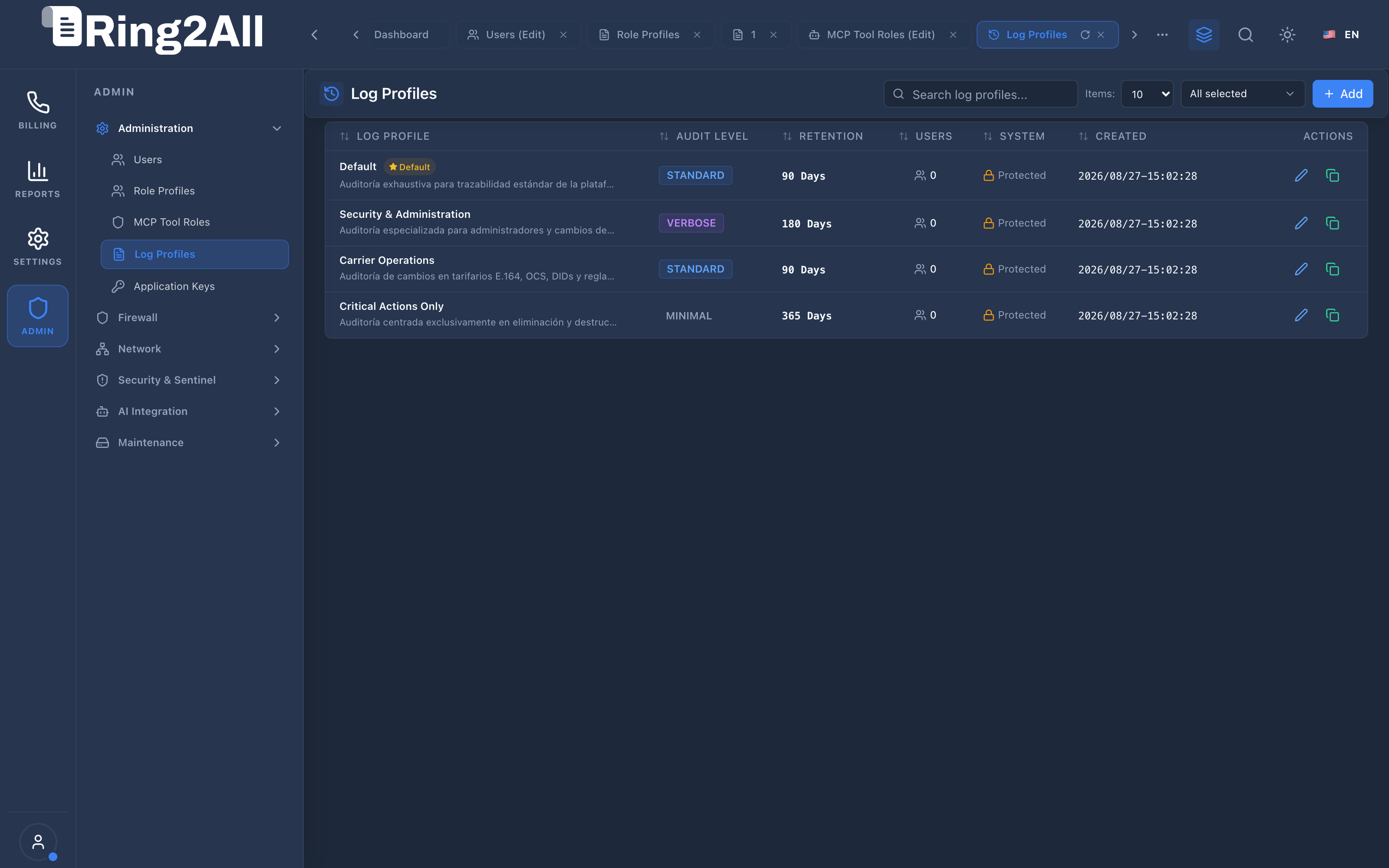
Section titled “Level 1 — Log Profiles List View”The list view summarizes all registered audit profiles, highlighting audit verbosity levels (Standard, Verbose, Minimal), retention day quotas, assigned user counts, and protection status.
Level 2 — Log Profile Creation & Edit Form
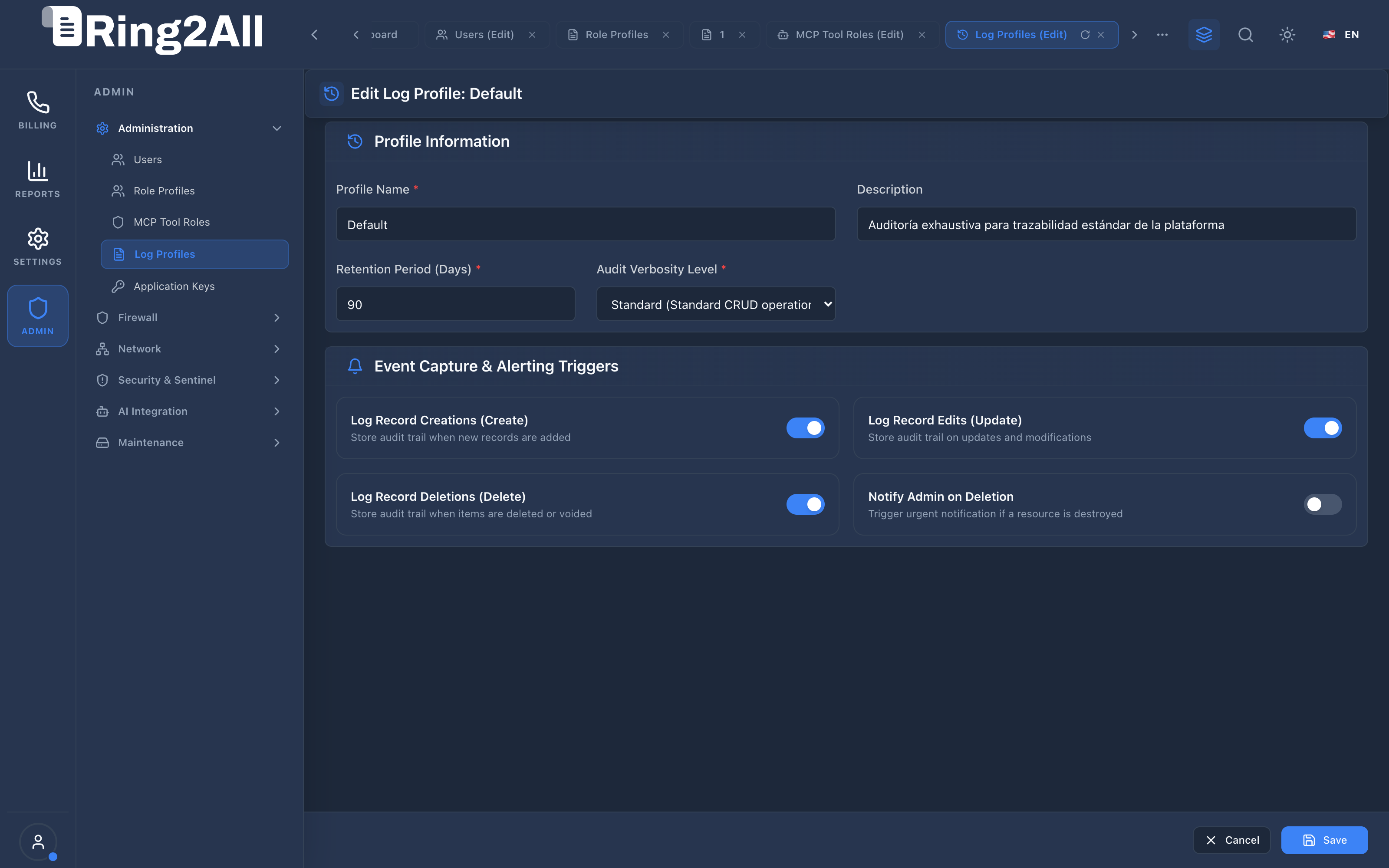
Section titled “Level 2 — Log Profile Creation & Edit Form”The form view is structured into Profile Information and Event Capture & Alerting Triggers, utilizing standardized inputs and accessible switches.
Parameters Reference
Section titled “Parameters Reference”- Profile Name: Descriptive label for the audit profile (e.g.,
Carrier Operations,Critical Actions Only). - Description: Details outlining the compliance or operational purpose of the profile.
- Retention Period (Days): Storage window after which audit log entries linked to this profile are eligible for automated archival or deletion.
- Audit Verbosity Level: Dropdown selector choosing between
Minimal,Standard,Verbose, andDebug. - Log Record Creations (Create): Toggle to record the creation of new customers, rate cards, invoices, or system rules.
- Log Record Edits (Update): Toggle to record field updates and before-and-after data comparisons.
- Log Record Deletions (Delete): Toggle to record entity removals and void operations.
- Notify Admin on Deletion: High-priority security toggle; dispatches immediate alerts when deletions occur.
5. Audit Logging Architecture & Retention Lifecycles
Section titled “5. Audit Logging Architecture & Retention Lifecycles” ┌────────────────────────────────────────────────────────┐ │ Administrative User Mutation Event │ │ (e.g., UPDATE public.customers SET balance = 500) │ └───────────────────────────┬────────────────────────────┘ │ ▼ ┌────────────────────────────────────────────────────────┐ │ Fastify 5 Audit Logging Hook │ │ • Identify authenticated user_id │ │ • Load user's public.log_profiles policy │ └───────────────────────────┬────────────────────────────┘ │ ┌─────────────────────┴─────────────────────┐ │ Evaluates logEdit & auditLevel │ ▼ ▼ ┌───────────────────────────┐ ┌───────────────────────────┐ │ If Enabled: │ │ If notifyOnDelete = true │ │ Write structured record to│ │ and event = DELETE: │ │ public.audit_logs: │ │ Dispatch security webhook │ │ • timestamp, user_id │ │ or high-priority email │ │ • ip_address, action │ └───────────────────────────┘ │ • entity_id, diff payload │ └─────────────┬─────────────┘ │ ▼ ┌────────────────────────────────────────────────────────┐ │ Nightly Cron Maintenance Worker │ │ • Reads retention_days from log_profiles │ │ • Purges or archives audit_logs older than threshold │ └────────────────────────────────────────────────────────┘6. Common Scenarios & Operational Playbooks
Section titled “6. Common Scenarios & Operational Playbooks”Playbook 1: Establishing a High-Security Audit Profile for Financial Staff
Section titled “Playbook 1: Establishing a High-Security Audit Profile for Financial Staff”- Navigate to ADMIN > Administration > Log Profiles.
- Click + Add.
- Set Profile Name to
Financial Compliance & SOX. - Enter Description:
Verbose audit logging with 365-day retention for accounting personnel handling invoice adjustments. - Set Retention Period (Days) to
365. - Select Audit Verbosity Level as
Verbose. - Enable Log Record Creations, Log Record Edits, and Log Record Deletions.
- Enable Notify Admin on Deletion.
- Click Save.
Playbook 2: Adjusting Retention for Routine Support Operations
Section titled “Playbook 2: Adjusting Retention for Routine Support Operations”- In the Log Profiles list, locate the
Defaultprofile. - Click the edit icon.
- Modify the Retention Period (Days) from
90to60to conserve NVMe storage. - Click Save.
- Result: The nightly cleanup job will automatically adapt to the 60-day window on its next scheduled run.
7. Troubleshooting & Diagnostic Commands
Section titled “7. Troubleshooting & Diagnostic Commands”Querying Log Profiles & Configured Rules
Section titled “Querying Log Profiles & Configured Rules”# Query all log profiles with audit levels and retention quotassu - postgres -c "psql -d ss_billing -c 'SELECT id, name, audit_level, retention_days, events_config, is_systemFROM public.log_profilesORDER BY id ASC;'"Inspecting Recent Audit Records by Profile
Section titled “Inspecting Recent Audit Records by Profile”# Query recent audit log volume grouped by user and log profilesu - postgres -c "psql -d ss_billing -c 'SELECT lp.name AS profile_name, u.username, COUNT(al.id) AS total_eventsFROM public.audit_logs alJOIN public.users u ON u.id = al.user_idJOIN public.log_profiles lp ON lp.id = u.log_profile_idGROUP BY lp.name, u.usernameORDER BY total_events DESC;'"8. Model Context Protocol (MCP) AI Integration
Section titled “8. Model Context Protocol (MCP) AI Integration”The Log Profiles and system audit trail connects directly to the Ring2All BSS MCP Server, empowering compliance agents and forensic investigators to query immutable audit event logs and track administrative actions.
Available MCP Tools
Section titled “Available MCP Tools”| Tool Name | Access Role | Description & Primary Function | Example Arguments |
|---|---|---|---|
list_audit_log_records |
Super Administrator |
Queries immutable system audit logs, administrative actions, and entity change diffs. | {"entity": "customer", "limit": 10} |
Sample MCP Tool Execution: list_audit_log_records
Section titled “Sample MCP Tool Execution: list_audit_log_records”Request Payload
Section titled “Request Payload”{ "name": "list_audit_log_records", "arguments": { "entity": "customer", "limit": 5 }}Response Payload
Section titled “Response Payload”[ { "id": 1042, "action": "UPDATE", "entity": "customer", "entityId": "1", "userId": 1, "username": "admin", "ipAddress": "192.168.10.5", "createdAt": "2026-09-09T04:30:15Z" }]Conversational AI Prompts for Copilot
Section titled “Conversational AI Prompts for Copilot”- “Show recent administrative modifications made to customer accounts.”
- “List audit records indicating manual balance adjustments in the last 48 hours.”
- “Who performed the last configuration update on the primary rate card?”
9. Glossary
Section titled “9. Glossary”- Audit Trail: Step-by-step chronological record providing documentary evidence of the sequence of activities that have affected a specific transaction or system state.
- Retention Days: Number of days an event record is retained in active storage before being purged or moved to cold archive.
- Diff Payload: JSON structure capturing the exact fields modified during an update operation, showing both the prior value and the new value.
- Dunning & Purging Worker: Background process responsible for scanning time-series audit records and pruning rows that exceed their retention quota.
- Model Context Protocol (MCP): Open protocol standard that enables secure, controlled integration between Large Language Models and external tools, databases, and telecom rating engines.