

API Keys Module Documentation
Table of Contents
Section titled “Table of Contents”- Navigation & Access
- Screenshots & Visual Interface
- 🎯 User Roles & Key Capabilities
- Module Overview (Technical)
- Module Overview (Commercial/Business)
- Module Overview (End User/Administrator)
- Configuration Sections
- Settings Reference
- Common Scenarios & Examples
- Model Context Protocol (MCP) AI Integration
- Limitations & Important Notes
- Troubleshooting Tips
- Glossary
Navigation & Access
Section titled “Navigation & Access”To access the Application Keys (API Keys) module:
- Log in to the Ring2All Web Portal (
https://<domain-or-ip>/login). - In the left navigation sidebar, expand Admin.
- Under Administration, click Application Keys (
/admin/admin/app-keys). - To generate a new application key, click the + Add Application Key button.
- To view, edit, regenerate, or revoke an existing key, click on the row or the action controls (
/admin/admin/app-keys/:id).
Screenshots & Visual Interface
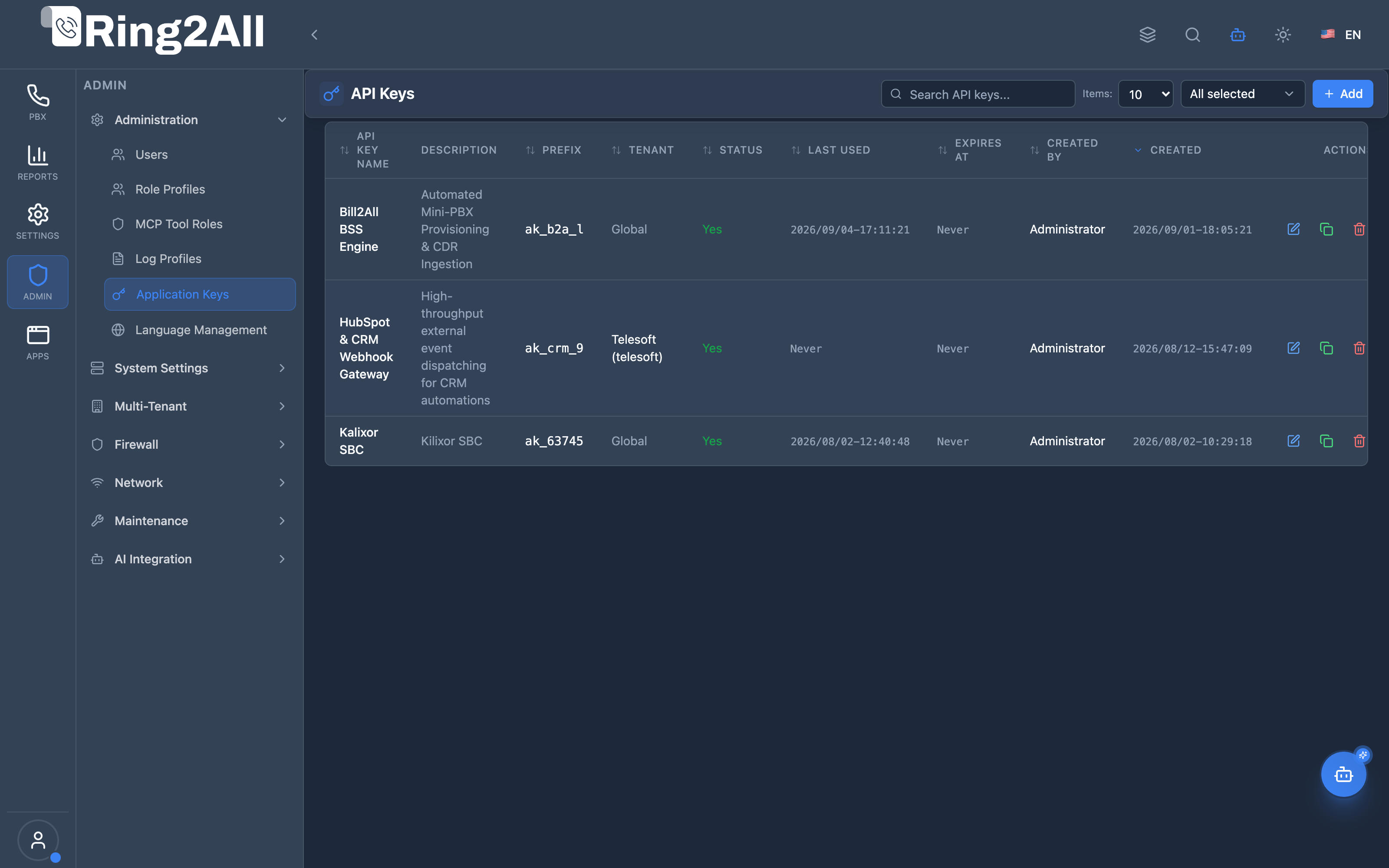
Section titled “Screenshots & Visual Interface”Application Keys List View
Section titled “Application Keys List View”The Application Keys overview lists all active and revoked service credentials with their key names, key prefixes, tenant assignments, domain scoping, creation dates, expiration timestamps, and status indicators.
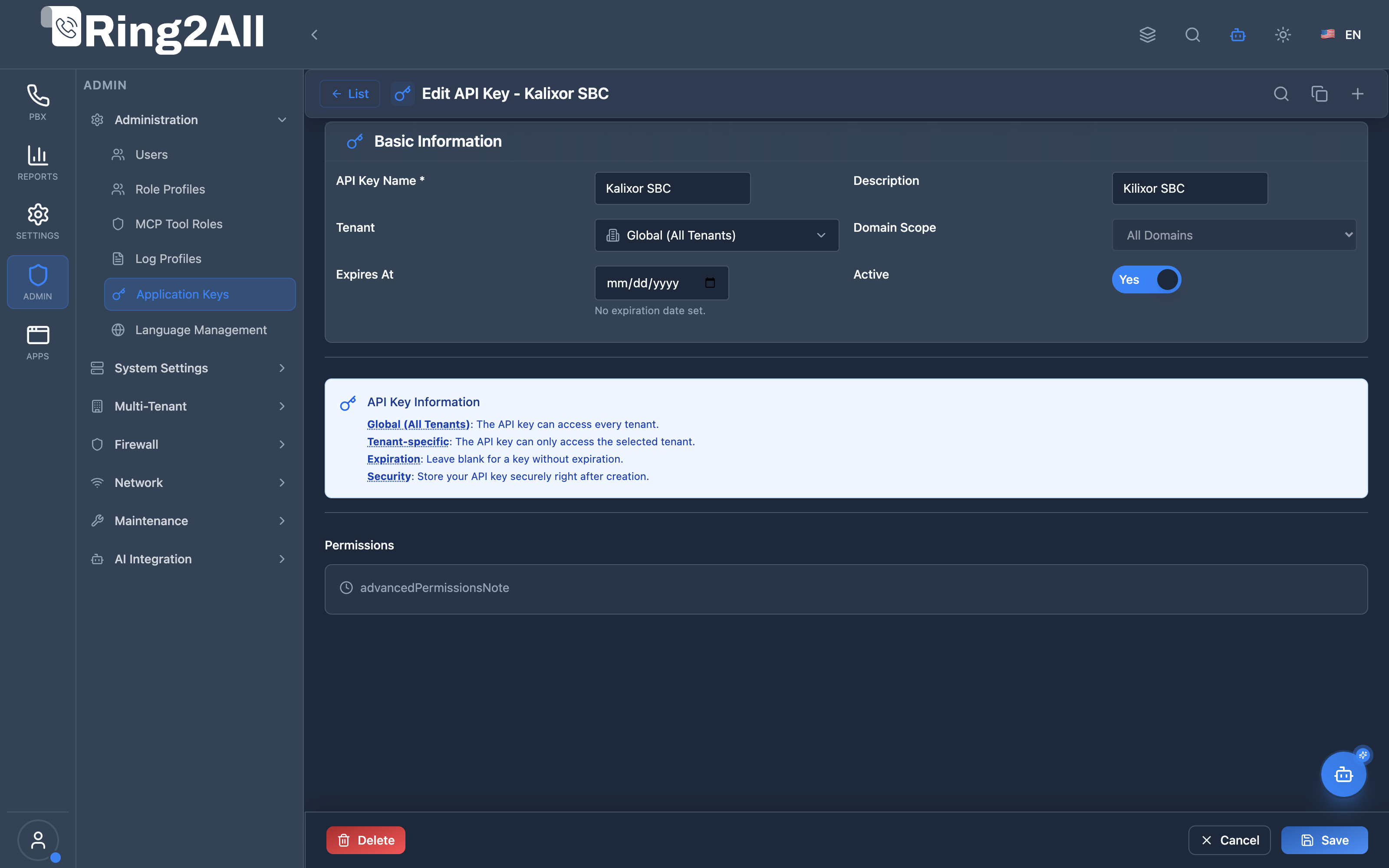
Application Key Generation & Scoping Form
Section titled “Application Key Generation & Scoping Form”The application key configuration form manages key name metadata, secret token generation, IP address whitelisting, tenant/domain boundaries, and granular API module permissions.
🎯 User Roles & Key Capabilities
Section titled “🎯 User Roles & Key Capabilities”The Application Keys module provisions and secures machine-to-machine integrations across enterprise systems:
| Role | Key Capabilities & Operational Scope |
|---|---|
| Super Administrator | Generates system-wide application keys, configures cross-tenant API scopes, sets global expiration guidelines, and revokes compromised tokens immediately. |
| Security & Compliance Officer | Audits active API tokens, inspects last-used timestamps to identify stale credentials, enforces 90-day key rotation, and verifies that key hashes meet modern standards. |
| Integration Developer / DevOps | Creates tenant-scoped API keys for CRM synchronization (Salesforce, HubSpot), automated billing hooks, webhook receivers, and custom telephony dialer integrations. |
| Telephony Auditor (Read-Only) | Reviews active API key inventories, key expiration schedules, and associated descriptions without accessing secret token values. |
1. Module Overview (Technical)
Section titled “1. Module Overview (Technical)”What Are API Keys?
Section titled “What Are API Keys?”API Keys is a REST API authentication module that manages tokens for programmatic access to the Ring2All API. Each key can be scoped to specific tenants/domains and optionally have an expiration date.
Architecture
Section titled “Architecture”┌─────────────────────────────────────────────────────────────────┐│ API Keys Architecture │├─────────────────────────────────────────────────────────────────┤│ ││ API Key Definition ││ ┌──────────────────────────────────────────────────────────┐ ││ │ API Key: CRM Integration │ ││ │ │ ││ │ Key: r2a_xxxx...xxxx (shown once) │ ││ │ Prefix: r2a_ │ ││ │ Scope: Tenant-specific (main) │ ││ │ Domain: All Domains │ ││ │ Expires: 2025-12-31 │ ││ │ Status: Active │ ││ │ │ ││ └──────────────────────────────────────────────────────────┘ ││ │ ││ ▼ Used in API requests ││ ┌──────────────────────────────────────────────────────────┐ ││ │ API Request │ ││ │ │ ││ │ GET /api/v1/extensions │ ││ │ Authorization: Bearer r2a_xxxx...xxxx │ ││ │ X-Tenant-Slug: main │ ││ │ │ ││ └──────────────────────────────────────────────────────────┘ ││ │ ││ ▼ Validated by ││ ┌──────────────────────────────────────────────────────────┐ ││ │ API Gateway │ ││ │ │ ││ │ Checks: │ ││ │ ├─ Key exists and active │ ││ │ ├─ Key not expired │ ││ │ ├─ Tenant scope matches request │ ││ │ └─ Domain scope matches (if restricted) │ ││ │ │ ││ │ Result: Allow or 401 Unauthorized │ ││ │ │ ││ └──────────────────────────────────────────────────────────┘ ││ │└─────────────────────────────────────────────────────────────────┘2. Module Overview (Commercial/Business)
Section titled “2. Module Overview (Commercial/Business)”Business Value
Section titled “Business Value”API Keys provides secure programmatic access:
| Without API Keys | With API Keys |
|---|---|
| No automation | Full API access |
| Manual operations | Scripted workflows |
| No integrations | CRM/ERP integration |
| Password sharing | Secure tokens |
Use Cases
Section titled “Use Cases”-
Third-party Integration
- CRM systems
- Billing platforms
- Custom dashboards
-
Automation
- Provisioning scripts
- Bulk operations
- Scheduled tasks
-
Multi-tenant Access
- Global keys for system integrations
- Tenant-specific for isolated access
-
Security Compliance
- Expiration policies
- Key rotation
- Audit trail
Feature Highlights
Section titled “Feature Highlights”| Feature | Benefit |
|---|---|
| Secure Keys | One-time reveal |
| Tenant Scope | Global or specific |
| Domain Scope | Granular access |
| Expiration | Auto-disable old keys |
| Status Toggle | Enable/disable |
| Prefix | Identify key type |
3. Module Overview (End User/Administrator)
Section titled “3. Module Overview (End User/Administrator)”What Can You Do?
Section titled “What Can You Do?”- Create API keys for integrations
- Set tenant scope (global or specific)
- Restrict to specific domains
- Set expiration dates
- Enable/disable keys
- Copy key on creation (one-time)
- Track last usage
API Keys Interface
Section titled “API Keys Interface”┌─────────────────────────────────────────────────────────────────┐│ API Keys │├─────────────────────────────────────────────────────────────────┤│ ││ [+ Create API Key] ││ ││ [🔍 Search API keys...] ││ ││ ┌───────────────────────────────────────────────────────────┐ ││ │ Name │ Prefix │ Scope │ Expires │ Status │ ││ ├─────────────────┼─────────┼──────────┼──────────┼────────┤ ││ │ CRM Integration │ r2a_abc │ main │ 2025-12 │ Active │ ││ │ Billing System │ r2a_def │ Global │ Never │ Active │ ││ │ Old Script │ r2a_ghi │ branch │ 2024-06 │ Expired│ ││ │ Test Key │ r2a_jkl │ main │ Never │ Inactive│ ││ └───────────────────────────────────────────────────────────┘ ││ │└─────────────────────────────────────────────────────────────────┘Create API Key
Section titled “Create API Key”┌─────────────────────────────────────────────────────────────────┐│ Create API Key │├─────────────────────────────────────────────────────────────────┤│ ││ ▼ Basic Information ││ ││ API Key Name: [CRM Integration ] ││ Unique name for identifying this API key ││ ││ Description: [Integration with Salesforce ] ││ Optional note describing the purpose ││ ││ ──────────────────────────────────────────────────────────────││ ││ Tenant: ││ ○ Global (All Tenants) ││ The API key can access every tenant. ││ ● Tenant-specific ││ The API key can only access the selected tenant. ││ ││ Select Tenant: [main ▼] ││ ││ Domain Scope: [All Domains ▼] ││ When a tenant is selected, you can further restrict ││ access to a specific domain. ││ ││ ──────────────────────────────────────────────────────────────││ ││ Expiration: [2025-12-31 ] ││ Leave blank for a key without expiration. ││ ││ Active: ✓ ││ Disabled keys are rejected by the API. ││ ││ [Create API Key] [Cancel] ││ │└─────────────────────────────────────────────────────────────────┘Generated Key (Shown Once)
Section titled “Generated Key (Shown Once)”┌─────────────────────────────────────────────────────────────────┐│ 🔒 Generated API Key │├─────────────────────────────────────────────────────────────────┤│ ││ 🔒 Your API Key (hover to reveal) ││ ││ ┌─────────────────────────────────────────────────────────────┐││ │ r2a_a1b2c3d4e5f6g7h8i9j0k1l2m3n4o5p6q7r8s9t0... [📋]│││ └─────────────────────────────────────────────────────────────┘││ ││ ⚠️ Important: This is the only time you will see this API key ││ in full. Store it securely! ││ ││ Usage: Authorization: Bearer r2a_a1b2c3d4e5f6g7h8... ││ ││ [Close] ││ │└─────────────────────────────────────────────────────────────────┘Quick Tips
Section titled “Quick Tips”[!TIP] Copy Immediately: Key is shown only once during creation.
[!TIP] Use Expiration: Enforce key rotation for security.
[!WARNING] Store Securely: Keys cannot be retrieved after creation.
4. Configuration Sections
Section titled “4. Configuration Sections”Basic Information
Section titled “Basic Information”| Field | Description |
|---|---|
| API Key Name | Unique identifier |
| Description | Purpose notes |
| Active | Enable/disable key |
Scope Settings
Section titled “Scope Settings”| Field | Description |
|---|---|
| Tenant | Global or specific tenant |
| Domain Scope | All domains or specific |
Security Settings
Section titled “Security Settings”| Field | Description |
|---|---|
| Expiration | Optional expiration date |
5. Settings Reference
Section titled “5. Settings Reference”Tenant Scope Options
Section titled “Tenant Scope Options”| Option | Description |
|---|---|
| Global | Access all tenants |
| Tenant-specific | Access one tenant only |
Status Values
Section titled “Status Values”| Status | Description |
|---|---|
| Active | Key is valid |
| Inactive | Manually disabled |
| Expired | Past expiration date |
API Usage
Section titled “API Usage”# Request with API keycurl -X GET "https://api.ring2all.com/v1/extensions" \ -H "Authorization: Bearer r2a_your_api_key_here" \ -H "X-Tenant-Slug: main"6. Common Scenarios & Examples
Section titled “6. Common Scenarios & Examples”Scenario 1: Create Integration Key
Section titled “Scenario 1: Create Integration Key”- Click “Create API Key”
- Name = “CRM Integration”
- Description = “Salesforce contact sync”
- Scope = Tenant-specific, select tenant
- Expiration = 1 year from now
- Click Create
- Copy the key immediately
- Configure in CRM
Scenario 2: Global System Key
Section titled “Scenario 2: Global System Key”- Click “Create API Key”
- Name = “System Automation”
- Scope = Global (All Tenants)
- Expiration = None
- Create and copy key
Scenario 3: Disable Old Key
Section titled “Scenario 3: Disable Old Key”- Find key in list
- Click Edit
- Uncheck “Active”
- Save
Scenario 4: Key Rotation
Section titled “Scenario 4: Key Rotation”- Create new key (same purpose)
- Update integration with new key
- Verify new key works
- Delete old key
Model Context Protocol (MCP) AI Integration
Section titled “Model Context Protocol (MCP) AI Integration”The Ring2All PBX platform provides Model Context Protocol (MCP) tools for programmatic inspection and audit of external Application Keys.
MCP Tools Reference
Section titled “MCP Tools Reference”| Tool Name | Operation | Description | Risk Level |
|---|---|---|---|
list_api_keys |
Read | Lists all Application Keys created for external integrations (secret tokens masked for security). | Low |
get_api_key_status |
Read | Retrieves metadata, key prefix, creation date, expiration, and last used timestamp for an API Key. | Low |
JSON Schema Definitions
Section titled “JSON Schema Definitions”list_api_keys
Section titled “list_api_keys”{ "name": "list_api_keys", "description": "Lists all Application Keys created for external machine-to-machine integrations.", "parameters": { "type": "object", "properties": { "search": { "type": "string", "description": "Filter by API key name or description" } } }}get_api_key_status
Section titled “get_api_key_status”{ "name": "get_api_key_status", "description": "Retrieves metadata and lifecycle details of a specific Application Key.", "parameters": { "type": "object", "properties": { "key_id": { "type": "number", "description": "Internal numeric API key identifier" }, "name": { "type": "string", "description": "Application key name or label" } } }}Natural Language Prompt Examples
Section titled “Natural Language Prompt Examples”English
Section titled “English”- “List all active application keys and their expiration dates.”
- “Check the last time the ‘CRM_Salesforce_Prod’ API key was used.”
- “Are there any API keys that have already expired or are expiring within 7 days?”
Spanish
Section titled “Spanish”- “Muestra todas las llaves de aplicación activas y sus fechas de vencimiento.”
- “Verifica cuándo fue el último uso de la llave de API ‘Integracion_Facturacion’.”
- “¿Hay alguna llave de aplicación expirada o inactiva en el sistema?”
Enterprise Safeguards & Guardrails
Section titled “Enterprise Safeguards & Guardrails”- Strict Token Masking: Full API secrets are shown once at creation and never exposed in MCP tool responses.
- Read-Only Inspection: AI tools allow inspection and auditing of key metadata without exposing capability to regenerate or leak credentials.
- Tenant Boundary Enforcement: Key listings are strictly partitioned by the requesting tenant ID.
7. Limitations & Important Notes
Section titled “7. Limitations & Important Notes”Technical Notes
Section titled “Technical Notes”[!NOTE] One-time Display: Key shown only at creation.
[!NOTE] Cannot Retrieve: Lost keys require new key creation.
[!WARNING] Secure Storage: Store keys in secure credential managers.
Best Practices
Section titled “Best Practices”- Unique Keys: One key per integration
- Descriptive Names: “CRM_Salesforce_Prod”
- Set Expiration: Enforce rotation
- Least Privilege: Tenant-specific when possible
- Rotate Regularly: Replace keys periodically
Security Recommendations
Section titled “Security Recommendations”| Practice | Description |
|---|---|
| Key Rotation | Replace keys every 90 days |
| Environment Vars | Don’t hardcode keys |
| Audit Usage | Monitor last used dates |
| Disable Unused | Deactivate unused keys |
8. Troubleshooting Tips
Section titled “8. Troubleshooting Tips”Common Issues
Section titled “Common Issues”| Symptom | Possible Cause | Solution |
|---|---|---|
| 401 Unauthorized | Key inactive | Check status |
| 401 Unauthorized | Key expired | Create new key |
| 403 Forbidden | Wrong tenant | Check scope |
| Key lost | Not saved | Create new key |
Test API Key
Section titled “Test API Key”# Verify key workscurl -I "https://api.ring2all.com/v1/health" \ -H "Authorization: Bearer r2a_your_key"
# Expected: HTTP 200 OKCheck Key in Database
Section titled “Check Key in Database”SELECT name, prefix, tenant_scope, is_active, expires_at, last_used_atFROM public.api_keysWHERE name = 'CRM Integration';9. Glossary
Section titled “9. Glossary”| Term | Definition |
|---|---|
| API Key | Authentication token |
| Bearer Token | Authorization header format |
| Tenant Scope | Access restriction |
| Prefix | Key identifier (r2a_) |
| Expiration | Auto-disable date |
| Key Rotation | Regular key replacement |
Documentation last updated: January 2026