

Queue Profiles Module Documentation
Table of Contents
Section titled “Table of Contents”- Navigation & Access
- Screenshots & Visual Interface
- Module Overview (Technical)
- Module Overview (Commercial/Business)
- Module Overview (End User/Administrator)
- User Roles & Key Capabilities
- Configuration Tabs
- Settings Reference
- Common Scenarios & Examples
- Limitations & Important Notes
- Troubleshooting Tips
- Glossary
- Model Context Protocol (MCP) AI Integration
Navigation & Access
Section titled “Navigation & Access”To access the Queue Profiles configuration module:
- Log in to the Ring2All Web Portal (
https://<domain-or-ip>/login). - In the left navigation sidebar, expand Settings.
- Under PBX, click Queues Profiles (
/settings/pbx/queue-profiles). - To create a new queue distribution policy template, click + Add Profile (
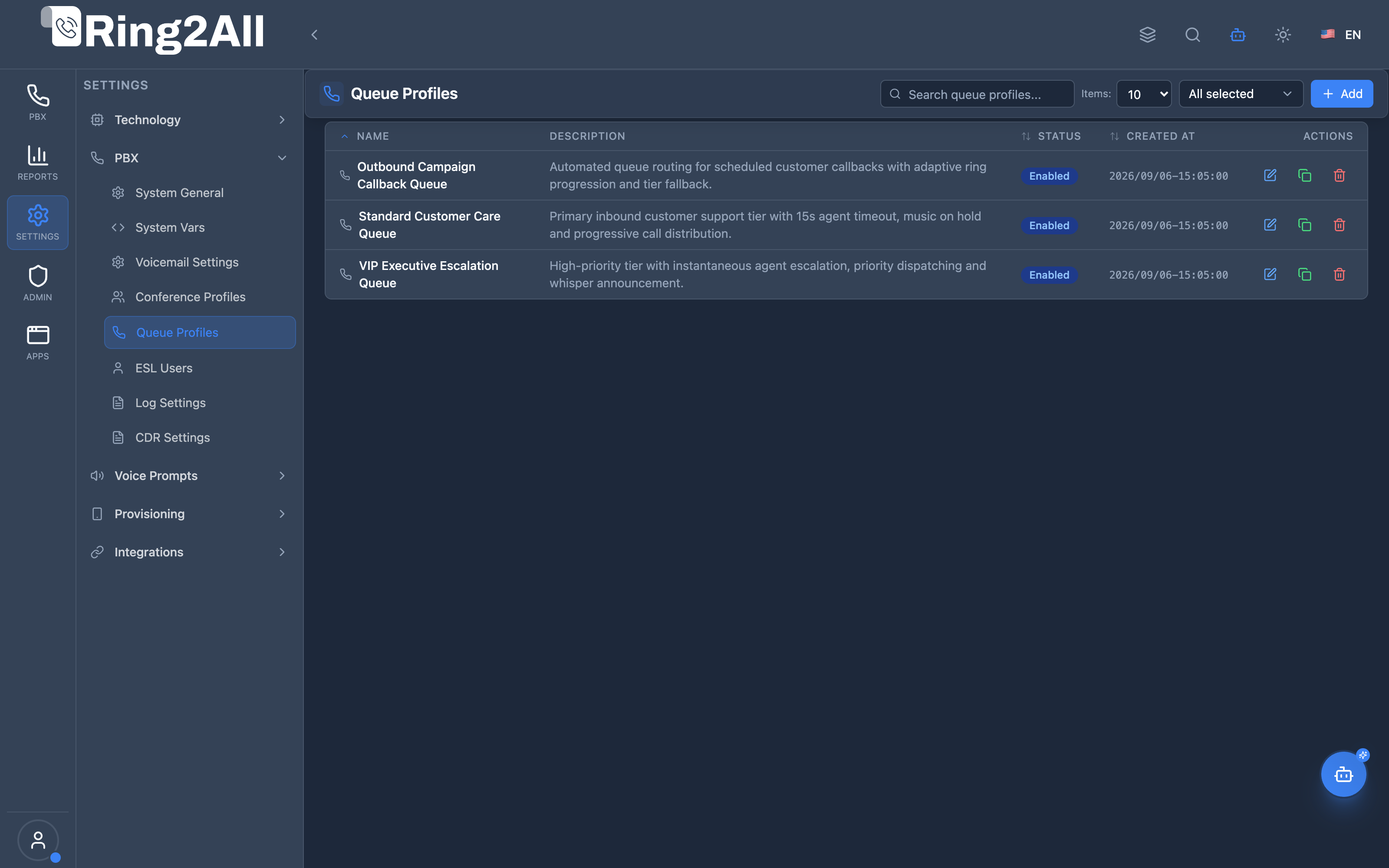
/settings/pbx/queue-profiles/new). To edit an existing profile, click on the profile row or the Edit action button.
Screenshots & Visual Interface
Section titled “Screenshots & Visual Interface”Queue Profiles Directory
Section titled “Queue Profiles Directory”Centralized inventory of contact center ACD queue behavior templates, detailing profile names, descriptions, associated tenant domain, and real-time operational status.
Queue Profile Configuration Form
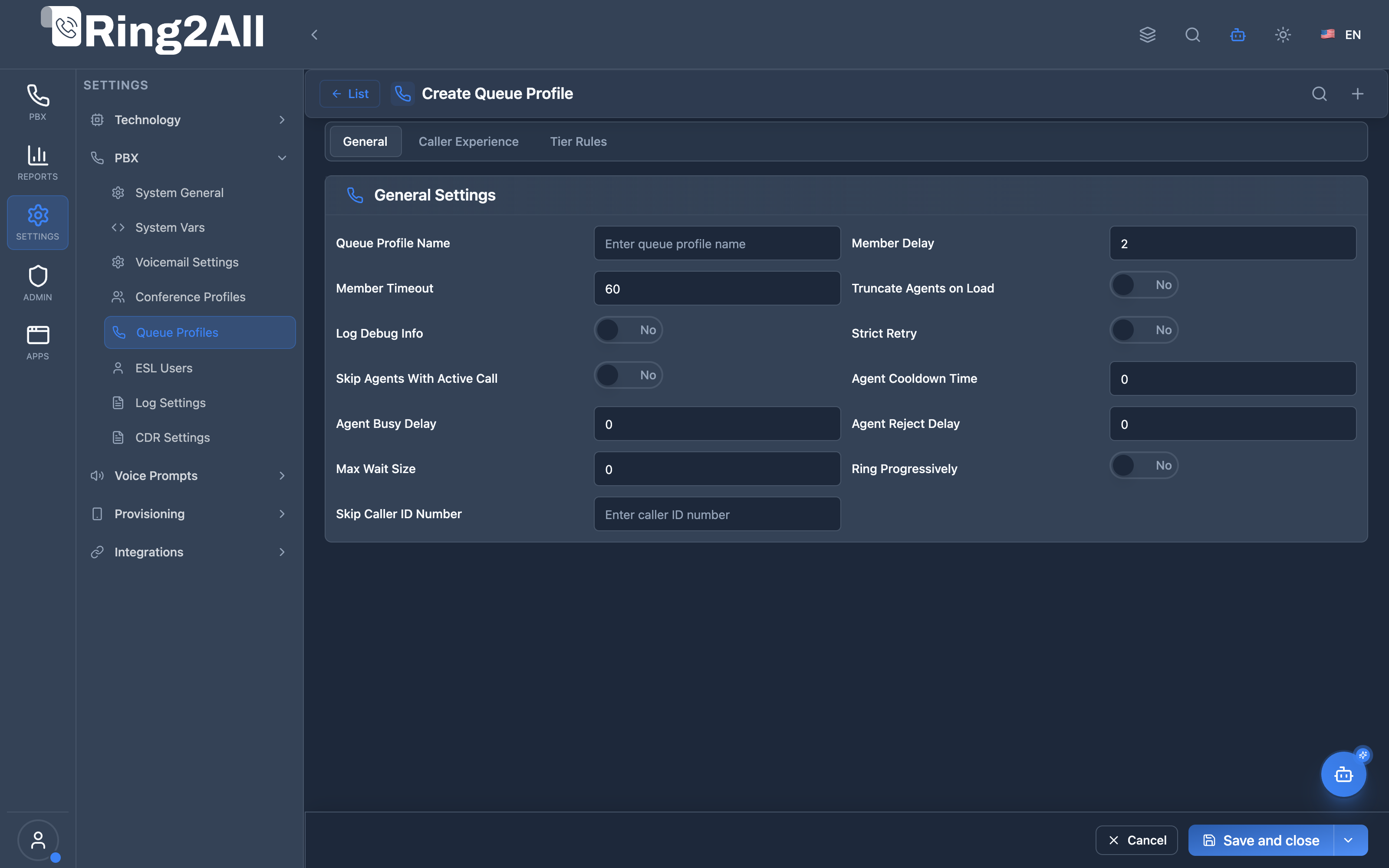
Section titled “Queue Profile Configuration Form”Granular policy editor defining agent hunt strategies, member timeouts, active call skipping, tier rules and level progression, wrap-up announcement sounds, and maximum wait thresholds.
1. Module Overview (Technical)
Section titled “1. Module Overview (Technical)”What Are Queue Profiles?
Section titled “What Are Queue Profiles?”Queue Profiles are call center configuration templates that define how queues handle calls, route to agents, manage tiers, and control caller experience. They are assigned to queues in the Queues module.
Architecture
Section titled “Architecture”┌─────────────────────────────────────────────────────────────────┐│ Queue Profiles Architecture │├─────────────────────────────────────────────────────────────────┤│ ││ Admin Panel ││ ┌──────────────────────────────────────────────────────────┐ ││ │ Queue Profiles │ ││ │ │ ││ │ Tabs: │ ││ │ ├─ General (max wait, no answer, queue size) │ ││ │ ├─ Caller Experience (sounds, announcements) │ ││ │ ├─ Tier Rules (escalation, wait times) │ ││ │ └─ Advanced (debug, agent cooldown) │ ││ │ │ ││ └──────────────────────────────────────────────────────────┘ ││ │ ││ ▼ Assigned to queues ││ ┌──────────────────────────────────────────────────────────┐ ││ │ Queues Module │ ││ │ │ ││ │ Sales Queue → Profile: aggressive-routing │ ││ │ Support Queue → Profile: tiered-escalation │ ││ │ VIP Queue → Profile: immediate-connect │ ││ │ │ ││ └──────────────────────────────────────────────────────────┘ ││ │ ││ ▼ Applied by queue handler ││ ┌──────────────────────────────────────────────────────────┐ ││ │ Queue Lua Handler │ ││ │ │ ││ │ Load profile settings → Apply to call │ ││ │ ├─ Tier rule wait times │ ││ │ ├─ Agent routing logic │ ││ │ ├─ Announcements and sounds │ ││ │ └─ Timeout and delay settings │ ││ │ │ ││ └──────────────────────────────────────────────────────────┘ ││ │└─────────────────────────────────────────────────────────────────┘2. Module Overview (Commercial/Business)
Section titled “2. Module Overview (Commercial/Business)”Business Value
Section titled “Business Value”Queue Profiles provides customized call center behavior:
| Without Profiles | With Profiles |
|---|---|
| Default handling | Custom routing |
| One-size-fits-all | Different strategies |
| Fixed escalation | Tiered escalation |
| No announcements | Full caller experience |
Use Cases
Section titled “Use Cases”-
Tiered Escalation
- Wait times per tier
- Automatic escalation
-
Caller Experience
- Position announcements
- Estimated wait time
-
Agent Optimization
- Skip busy agents
- Cooldown periods
-
High-Priority Queues
- Immediate routing
- VIP handling
Feature Highlights
Section titled “Feature Highlights”| Feature | Benefit |
|---|---|
| Tier Rules | Escalation control |
| Announcements | Caller experience |
| Agent Cooldown | Prevent burnout |
| Max Queue Size | Capacity control |
| Progressive Ring | Ring more agents |
| Whisper Tone | Agent notification |
3. Module Overview (End User/Administrator)
Section titled “3. Module Overview (End User/Administrator)”What Can You Do?
Section titled “What Can You Do?”- Create queue profile templates
- Configure tier escalation rules
- Set caller announcements
- Configure agent timeouts
- Set queue capacity limits
- Enable position/wait time announcements
- Configure progressive ringing
Queue Profiles Interface
Section titled “Queue Profiles Interface”┌─────────────────────────────────────────────────────────────────┐│ Queue Profiles │├─────────────────────────────────────────────────────────────────┤│ ││ Manage queue profile configurations for call center queues ││ ││ [+ Create Profile] ││ ││ ┌───────────────────────────────────────────────────────────┐ ││ │ Name │ Description │ Status │ ││ ├────────────────────┼─────────────────────┼──────────────┤ ││ │ default │ Standard queues │ ✓ Enabled │ ││ │ tiered-escalation │ Multi-tier routing │ ✓ Enabled │ ││ │ aggressive │ Fast routing │ ✓ Enabled │ ││ │ vip-priority │ VIP customers │ ✓ Enabled │ ││ └───────────────────────────────────────────────────────────┘ ││ │└─────────────────────────────────────────────────────────────────┘Profile Edit View
Section titled “Profile Edit View”┌─────────────────────────────────────────────────────────────────┐│ Edit Queue Profile │├─────────────────────────────────────────────────────────────────┤│ ││ [General] [Caller Experience] [Tier Rules] [Advanced] ││ ───────────────────────────────────────────────────────────── ││ ││ General Settings ││ ││ Queue Profile Name: [tiered-escalation ] ││ ││ Max Wait Agents: [5 ] ││ Maximum number of agents waiting in queue ││ ││ Max No Answer: [3 ] ││ Maximum unanswered calls before agent skip ││ ││ Queue Max Size: [50 ] ││ Maximum callers in queue (0 = unlimited) ││ ││ Agent No-Answer Delay: [10 ] ││ Delay before considering agent unavailable ││ ││ Member Delay: [2 ] ││ Delay before ringing member ││ ││ Member Timeout: [30 ] ││ Timeout for member to answer ││ ││ [Save] [Cancel] ││ │└─────────────────────────────────────────────────────────────────┘Quick Tips
Section titled “Quick Tips”[!TIP] Tier Rules: Enable for complex escalation scenarios.
[!TIP] Agent Cooldown: Give agents time between calls.
[!NOTE] Profile Assignment: Profiles are assigned in Queues module.
🎯 User Roles & Key Capabilities
Section titled “🎯 User Roles & Key Capabilities”| Role | Permissions | Key Capabilities |
|---|---|---|
| Super Administrator | Full Access (read, write, delete) |
Configure enterprise ACD queue profiles, define global escalation algorithms, and set agent dispatch thresholds. |
| Contact Center Supervisor | Domain Management (read, write) |
Customize agent cooldown wrap-up periods, configure caller queue position announcements, and adjust tier wait escalation times. |
| Support Specialist | Read & Diagnostic (read) |
Audit queue profile settings, diagnose tier escalation delays, and verify queue capacity limits. |
| Contact Center Agent | Operational | Receive routed calls according to queue profile policies, respect cooldown timers, and respond to whisper notifications. |
4. Configuration Tabs
Section titled “4. Configuration Tabs”General Tab
Section titled “General Tab”| Field | Description |
|---|---|
| Queue Profile Name | Unique identifier |
| Max Wait Agents | Agent limit in queue |
| Max No Answer | Unanswered calls before skip |
| Queue Max Size | Caller capacity limit |
| Agent No-Answer Delay | Time before unavailable |
| Member Delay | Pre-ring delay |
| Member Timeout | Answer timeout |
Caller Experience Tab
Section titled “Caller Experience Tab”| Field | Description |
|---|---|
| Announce Hold Time | Tell caller wait time |
| Announce Position | Tell caller queue position |
| Announce Estimated Hold Time | Estimated wait announcement |
| Welcome Sound | Played on queue entry |
| Exit Sound | Played on queue exit |
| Ringback Tone | Tone while waiting |
| Agent Whisper Tone | Agent notification sound |
| Play Ringback Before MOH | Ringback then music |
| Announce Wrap-up Message | Post-call message |
| Announce Resume Playback | Resume after announcement |
Tier Rules Tab
Section titled “Tier Rules Tab”| Field | Description |
|---|---|
| Tier Rules Apply | Enable tier escalation |
| Tier Rule Wait | Seconds per tier |
| Tier Rule Wait Multiply Level | Multiply wait by tier level |
| Tier Rule No Agent No Wait | Skip empty tiers |
| Tier Rule Max Wait | Maximum tier wait |
| Tier Skip Busy Agents | Skip busy agents |
| Tier Randomize Agents | Random agent selection |
| Tier No Wait | Immediate tier skip |
| Tier Wait Stop Sound | Sound between tiers |
| Reserve Agents | Reserve selected agents |
Advanced Tab
Section titled “Advanced Tab”| Field | Description |
|---|---|
| Skip Agents With Active Call | Skip busy agents |
| Agent Cooldown Time | Rest time between calls |
| Agent Busy Delay | Delay when busy |
| Agent Reject Delay | Delay after rejection |
| Strict Retry | Strict retry logic |
| Ring Progressively | Add agents over time |
| Log Debug Info | Enable debug logging |
| Truncate Agents on Load | Clear agents on reload |
5. Settings Reference
Section titled “5. Settings Reference”Common Profile Types
Section titled “Common Profile Types”| Profile | Settings |
|---|---|
| Default | Standard settings |
| Aggressive | Short timeouts, fast escalation |
| Tiered | Multi-tier with wait times |
| VIP | Immediate routing, short waits |
Tier Rule Logic
Section titled “Tier Rule Logic”Tier 1: Wait tier_rule_wait seconds ↓ (no answer)Tier 2: Wait tier_rule_wait × 2 seconds (if multiply enabled) ↓ (no answer)Tier 3: Wait tier_rule_wait × 3 seconds ↓ (max wait reached)Exit to destinationTiming Recommendations
Section titled “Timing Recommendations”| Setting | Typical Value |
|---|---|
| Member Timeout | 20-30 seconds |
| Agent No-Answer Delay | 5-10 seconds |
| Tier Rule Wait | 30-60 seconds |
| Agent Cooldown | 5-15 seconds |
6. Common Scenarios & Examples
Section titled “6. Common Scenarios & Examples”Scenario 1: Basic Queue Profile
Section titled “Scenario 1: Basic Queue Profile”- Create new profile
- Set Max No Answer = 3
- Set Member Timeout = 30
- Enable Announce Position
- Save
Scenario 2: Tiered Escalation
Section titled “Scenario 2: Tiered Escalation”- Create new profile
- Enable Tier Rules Apply
- Set Tier Rule Wait = 60 seconds
- Enable Tier Rule Wait Multiply Level
- Set Tier Rule No Agent No Wait = Yes
- Save
Scenario 3: VIP Priority
Section titled “Scenario 3: VIP Priority”- Create new profile
- Set Member Delay = 0
- Set Member Timeout = 15
- Set Tier Rule Wait = 15
- Enable Announce Estimated Hold Time
- Save
Scenario 4: Agent-Friendly
Section titled “Scenario 4: Agent-Friendly”- Create new profile
- Set Agent Cooldown Time = 10
- Set Max No Answer = 2
- Enable Skip Agents With Active Call
- Save
7. Limitations & Important Notes
Section titled “7. Limitations & Important Notes”Technical Notes
Section titled “Technical Notes”[!NOTE] Profile Assignment: Profiles are assigned in Queues module.
[!NOTE] Tier Rules: Require tiers to be configured in queue.
[!WARNING] High Thresholds: Very high member timeouts can frustrate callers.
Best Practices
Section titled “Best Practices”- Balance Wait Times: Not too long, not too short
- Enable Announcements: Keep callers informed
- Use Cooldowns: Prevent agent burnout
- Test Tier Rules: Verify escalation works
- Monitor Metrics: Adjust based on data
Tier Rule Behavior
Section titled “Tier Rule Behavior”| Flag | Effect |
|---|---|
| Multiply Level | Tier 2 waits 2x, Tier 3 waits 3x |
| No Agent No Wait | Skip tiers with no agents |
| Skip Busy Agents | Don’t offer to busy agents |
| Randomize Agents | Random within tier |
8. Troubleshooting Tips
Section titled “8. Troubleshooting Tips”Common Issues
Section titled “Common Issues”| Symptom | Possible Cause | Solution |
|---|---|---|
| Calls not escalating | Tier rules disabled | Enable Tier Rules Apply |
| Agent overloaded | No cooldown | Set Agent Cooldown Time |
| Queue full | Max size reached | Increase Queue Max Size |
| Long wait times | Slow escalation | Reduce Tier Rule Wait |
| No announcements | Not enabled | Enable Announce Position |
Check Profile Settings
Section titled “Check Profile Settings”SELECT name, settingsFROM public.queue_profilesWHERE name = 'profile-name';Debug Tier Escalation
Section titled “Debug Tier Escalation”- Enable Log Debug Info
- Monitor Telephony Server logs
- Check tier transitions
- Verify agent availability
9. Glossary
Section titled “9. Glossary”| Term | Definition |
|---|---|
| Queue Profile | Queue behavior template |
| Tier | Agent priority level |
| Tier Rule Wait | Time per tier level |
| Escalation | Moving to next tier |
| Cooldown | Rest time between calls |
| Member Timeout | Agent ring time |
| Whisper Tone | Agent notification |
Model Context Protocol (MCP) AI Integration
Section titled “Model Context Protocol (MCP) AI Integration”The Ring2All PBX platform integrates deep AI assistance via the Model Context Protocol (MCP). The Queue Profiles module provides comprehensive tools that allow the PBX AI Copilot to query ACD distribution templates, create or update queue policies, inspect tier escalation settings, and verify caller wait-time parameters.
Available MCP Tools
Section titled “Available MCP Tools”| Tool Name | Operation Type | RBAC Risk Level | Description |
|---|---|---|---|
list_queue_profiles |
Read / Query | low |
Lists all Queue Profiles in the PBX (call center configuration templates controlling queue timeouts, tier rules, and caller experience). |
get_queue_profile_status |
Read / Details | low |
Retrieves the detailed configuration, timers, and assigned queues of a specific Queue Profile by name or ID. |
create_queue_profile |
Write / Creation | medium |
Creates a new ACD queue profile template with customizable member delays, timeouts, and tier escalation rules. |
update_queue_profile |
Write / Update | medium |
Updates an existing Queue Profile template’s settings, timers, or enabled status. |
delete_queue_profile |
Delete | high |
Deletes a Queue Profile template after verifying no active call center queues are currently using it. |
Tool Input Schemas & Parameters
Section titled “Tool Input Schemas & Parameters”1. list_queue_profiles
Section titled “1. list_queue_profiles”{ "name": "list_queue_profiles", "description": "List all Queue Profiles in the PBX.", "inputSchema": { "type": "object", "properties": { "search": { "type": "string", "description": "Filter by profile name or description (e.g. 'Support Tier 1', 'VIP Escalation')." } } }}2. get_queue_profile_status
Section titled “2. get_queue_profile_status”{ "name": "get_queue_profile_status", "description": "Get configuration and settings of a Queue Profile by name or ID.", "inputSchema": { "type": "object", "properties": { "identifier": { "type": "string", "description": "The name or numeric ID of the queue profile (e.g. 'Default Profile' or '1')." } }, "required": ["identifier"] }}Natural Language Prompts
Section titled “Natural Language Prompts”| User Request | Invoked MCP Tool | Expected AI Response |
|---|---|---|
| “Show me all ACD queue profiles configured for our contact center.” | list_queue_profiles |
Returns table of queue profiles with member timeouts, tier escalation flags, and assigned queue counts. |
| “Inspect the escalation settings on the ‘Sales Aggressive’ queue profile.” | get_queue_profile_status({ identifier: "Sales Aggressive" }) |
Reports tier rule wait times, agent cooldown duration, and tier level progression. |
| “Create a new queue profile for Tier 2 Technical Support with a 20-second ring timeout.” | create_queue_profile({ name: "Tier 2 Tech Support", settings: { memberTimeout: 20, tierRuleWaitSec: 15 } }) |
Validates uniqueness and creates profile template, returning the created configuration. |
Multi-Tenant & Security Safeguards
Section titled “Multi-Tenant & Security Safeguards”- Domain Isolation: Queue profiles are isolated to the caller’s tenant domain (
domain_id), strictly separating ACD templates between organizations. - Unique Name Enforcement: Profile names are checked case-insensitively (
LOWER(name)) upon creation and update to prevent duplicate templates. - Reference Integrity Protection:
delete_queue_profileautomatically verifies whether any active call center queue is currently bound to the profile before allowing deletion. - Audit Logging: All creation, modification, and deletion events are permanently tracked in the PBX audit logs.
Documentation last updated: January 2026