

Audit Logs Module Documentation
Table of Contents
Section titled “Table of Contents”- Navigation & Access
- Screenshots & Visual Interface
- Module Overview (Technical)
- Module Overview (Commercial/Business)
- Module Overview (End User/Administrator)
- Log Fields Reference
- Common Scenarios & Examples
- Limitations & Important Notes
- Troubleshooting Tips
- Glossary
- Model Context Protocol (MCP) AI Integration
Navigation & Access
Section titled “Navigation & Access”To access the System Audit Logs module:
- Log in to the Ring2All Web Portal (
https://<domain-or-ip>/login). - In the left navigation sidebar, expand Reports.
- Under System Reports, click Audit Logs (
/reports/system/audit-logs). - Filter historical system activities by user, event type (CREATE, UPDATE, DELETE, AUTH), module category, or date window.
Screenshots & Visual Interface
Section titled “Screenshots & Visual Interface”System Audit Logs Repository
Section titled “System Audit Logs Repository”Granular platform event trail displaying timestamps, acting usernames, source IP addresses, targeted resource entities, action event types, and execution outcome statuses.
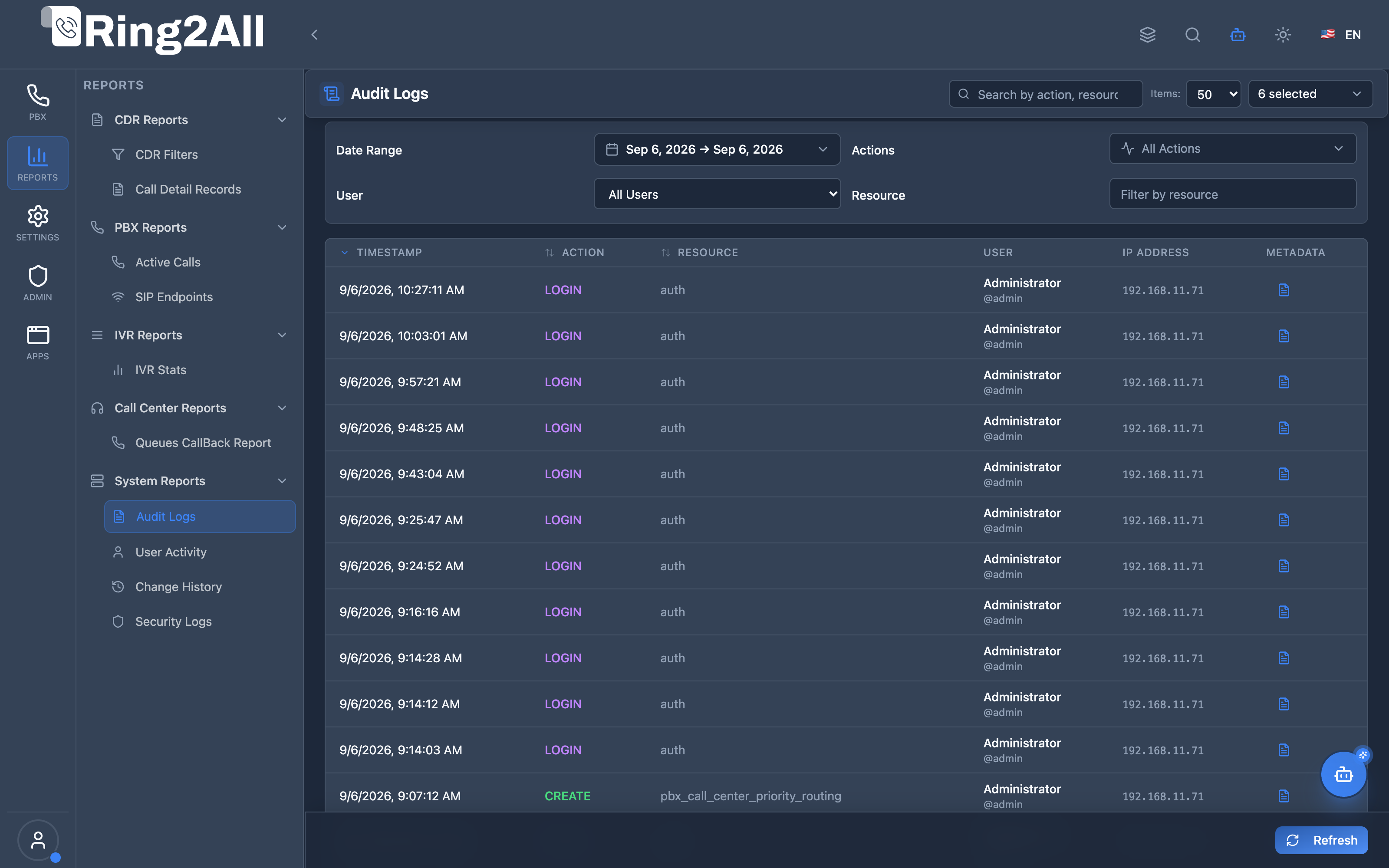
1. Module Overview (Technical)
Section titled “1. Module Overview (Technical)”What Are Audit Logs?
Section titled “What Are Audit Logs?”Audit Logs is a security and compliance module that records all administrative actions performed in the system. It tracks who did what, when, from where, and provides a complete audit trail for regulatory compliance and security monitoring.
Architecture
Section titled “Architecture”┌─────────────────────────────────────────────────────────────────┐│ Audit Logs Architecture │├─────────────────────────────────────────────────────────────────┤│ ││ Admin Performs Action ││ ┌──────────────────────────────────────────────────────────┐ ││ │ Any Module (Extensions, Users, Gateways, etc.) │ ││ │ │ ││ │ User clicks [Save] / [Delete] / [Create] │ ││ │ │ ││ └──────────────────────────────────────────────────────────┘ ││ │ ││ ▼ API Call with User Context ││ ┌──────────────────────────────────────────────────────────┐ ││ │ Backend Middleware │ ││ │ │ ││ │ Log entry created: │ ││ │ ├─ Action: CREATE / UPDATE / DELETE / LOGIN / etc. │ ││ │ ├─ Resource: extension / user / gateway / etc. │ ││ │ ├─ Resource ID: 123 │ ││ │ ├─ User: admin@example.com │ ││ │ ├─ IP Address: 192.168.1.100 │ ││ │ ├─ User Agent: Chrome/120.0 │ ││ │ └─ Metadata: JSON (old/new values) │ ││ │ │ ││ └──────────────────────────────────────────────────────────┘ ││ │ ││ ▼ ││ ┌──────────────────────────────────────────────────────────┐ ││ │ public.audit_logs │ ││ │ │ ││ │ id | action | resource | user | ip | timestamp | meta │ ││ │ │ ││ └──────────────────────────────────────────────────────────┘ ││ │ ││ ▼ Display in Viewer ││ ┌──────────────────────────────────────────────────────────┐ ││ │ Audit Logs Page │ ││ │ │ ││ │ [Filters: Date | Action | Resource | User] │ ││ │ │ ││ │ ┌─────────────────────────────────────────────────────┐ │ ││ │ │Time │Action │Resource│User │IP │...│ │ ││ │ ├──────────┼───────┼────────┼────────┼────────────┼───┤ │ ││ │ │10:30:45 │UPDATE │extens │admin │192.168.1.10│...│ │ ││ │ │10:25:12 │CREATE │user │admin │192.168.1.10│...│ │ ││ │ │10:20:00 │DELETE │gateway │admin │192.168.1.15│...│ │ ││ │ └─────────────────────────────────────────────────────┘ │ ││ │ │ ││ └──────────────────────────────────────────────────────────┘ ││ │└─────────────────────────────────────────────────────────────────┘2. Module Overview (Commercial/Business)
Section titled “2. Module Overview (Commercial/Business)”Business Value
Section titled “Business Value”Audit Logs provides complete accountability:
| Without Audit Logs | With Audit Logs |
|---|---|
| Unknown who changed | Full accountability |
| No change history | Complete trail |
| Compliance gaps | Regulatory compliance |
| Security blind spots | Activity visibility |
Use Cases
Section titled “Use Cases”-
Security Monitoring
- Track administrator activity
- Identify suspicious actions
-
Compliance
- SOC 2 requirements
- HIPAA audit trail
- PCI DSS logging
-
Troubleshooting
- “Who changed this?”
- Configuration change history
-
Investigation
- Security incident response
- Forensic analysis
Feature Highlights
Section titled “Feature Highlights”| Feature | Benefit |
|---|---|
| Action Tracking | What was done |
| User Identification | Who did it |
| IP Logging | Where from |
| Timestamp | When it happened |
| Metadata | What changed |
| Search/Filter | Find specific events |
3. Module Overview (End User/Administrator)
Section titled “3. Module Overview (End User/Administrator)”What Can You Do?
Section titled “What Can You Do?”- View all system activity
- Filter by date range
- Filter by action type
- Filter by resource
- Filter by user
- Search across logs
- Export for compliance
Audit Logs Interface
Section titled “Audit Logs Interface”┌─────────────────────────────────────────────────────────────────┐│ Audit Logs │├─────────────────────────────────────────────────────────────────┤│ ││ View and analyze system audit logs and user activity ││ ││ Filters: ││ ├─ Range: [Today ▼] [01/16/2026] to [01/16/2026] ││ ├─ Actions: [All Actions ▼] (CREATE, UPDATE, DELETE...) ││ ├─ Resource: [ ] ││ ├─ User: [All Users ▼] ││ └─ [🔄 Refresh] [Clear Filters] ││ ││ 🔍 [Search by action, resource, or user... ] ││ ││ ┌───────────────────────────────────────────────────────────┐ ││ │Timestamp │Action │Resource │Res ID│User │IP Address │ ││ ├─────────────┼───────┼──────────┼──────┼──────┼───────────┤ ││ │01/16 10:30 │UPDATE │extension │ 123 │admin │192.168.1.1│ ││ │01/16 10:28 │CREATE │user │ 456 │admin │192.168.1.1│ ││ │01/16 10:25 │DELETE │gateway │ 789 │super │10.0.0.5 │ ││ │01/16 10:20 │LOGIN │session │ - │admin │192.168.1.1│ ││ │01/16 10:15 │UPDATE │queue │ 101 │admin │192.168.1.1│ ││ └───────────────────────────────────────────────────────────┘ ││ ││ Showing 1-25 of 1,234 records ││ │└─────────────────────────────────────────────────────────────────┘Quick Tips
Section titled “Quick Tips”[!TIP] Quick Ranges: Use Today, 7 Days, 15 Days, 30 Days for fast filtering.
[!TIP] Multi-Action Filter: Select multiple action types to filter.
[!NOTE] Metadata: Click row to view full metadata with old/new values.
4. Log Fields Reference
Section titled “4. Log Fields Reference”Display Columns
Section titled “Display Columns”| Column | Description |
|---|---|
| ID | Unique log entry ID |
| Timestamp | When action occurred |
| Action | Type of action |
| Resource | What was affected |
| Resource ID | Specific item ID |
| User | Who performed action |
| IP Address | Source IP |
| User Agent | Browser/client info |
| Metadata | Additional details |
Common Actions
Section titled “Common Actions”| Action | Description |
|---|---|
| CREATE | New record created |
| UPDATE | Record modified |
| DELETE | Record removed |
| LOGIN | User logged in |
| LOGOUT | User logged out |
| EXPORT | Data exported |
| IMPORT | Data imported |
Common Resources
Section titled “Common Resources”| Resource | Description |
|---|---|
| extension | SIP extension |
| user | System user |
| gateway | SIP gateway |
| queue | Call queue |
| ivr | IVR menu |
| route | Inbound/outbound route |
| domain | Tenant domain |
| session | Login session |
5. Common Scenarios & Examples
Section titled “5. Common Scenarios & Examples”Scenario 1: Who Changed Extension 1001?
Section titled “Scenario 1: Who Changed Extension 1001?”- Filter Resource by “extension”
- Search for resource ID or number
- View action history
- Check metadata for changes
Scenario 2: Security Investigation
Section titled “Scenario 2: Security Investigation”- Filter by specific user
- Set date range for incident window
- Review all actions
- Export for report
Scenario 3: Login Audit
Section titled “Scenario 3: Login Audit”- Filter Action by “LOGIN”
- Review login times and IPs
- Identify unusual patterns
- Check for failed logins
Scenario 4: Compliance Report
Section titled “Scenario 4: Compliance Report”- Set date range for reporting period
- Apply relevant filters
- Export full log
- Submit for audit
6. Limitations & Important Notes
Section titled “6. Limitations & Important Notes”Technical Notes
Section titled “Technical Notes”[!NOTE] Automatic Logging: All admin actions are logged automatically.
[!NOTE] Read-Only: Audit logs cannot be modified or deleted.
[!WARNING] Storage: Long retention periods increase storage needs.
Retention
Section titled “Retention”| Setting | Description |
|---|---|
| Default Retention | Configured per system |
| Compliance Needs | May require 1-7 years |
Best Practices
Section titled “Best Practices”- Regular Review: Check logs weekly for anomalies
- Export Archives: Export and archive regularly
- Monitor Logins: Watch for unusual login patterns
- Track Deletions: Review all DELETE actions
- IP Awareness: Know your admin IPs
7. Troubleshooting Tips
Section titled “7. Troubleshooting Tips”Common Issues
Section titled “Common Issues”| Symptom | Possible Cause | Solution |
|---|---|---|
| No logs | Too restrictive filter | Clear filters |
| Missing action | Not logged | Check if action type is logged |
| Slow loading | Large date range | Reduce date range |
| User not found | User deleted | Search by user ID |
| No metadata | Not captured | Some actions have limited metadata |
Diagnostic SQL
Section titled “Diagnostic SQL”Recent audit entries:
SELECT timestamp, action, resource, resource_id, user_email, ip_addressFROM public.audit_logsORDER BY timestamp DESCLIMIT 50;Actions by user:
SELECT action, COUNT(*) as countFROM public.audit_logsWHERE user_email = 'admin@example.com' AND timestamp >= NOW() - INTERVAL '24 hours'GROUP BY actionORDER BY count DESC;8. Glossary
Section titled “8. Glossary”| Term | Definition |
|---|---|
| Audit Log | Record of system activity |
| Action | Type of operation performed |
| Resource | Type of object affected |
| Metadata | Additional change details |
| User Agent | Browser/client identification |
| Audit Trail | Complete history of actions |
9. Model Context Protocol (MCP) AI Integration
Section titled “9. Model Context Protocol (MCP) AI Integration”The Ring2All Platform Copilot connects directly with the dedicated audit database (ss_logs.audit_logs) via the Model Context Protocol (MCP). Security officers, compliance auditors, and system administrators can investigate configuration history, verify administrative actions, and review tenant activities through conversational natural language prompts.
Exposed MCP Tools
Section titled “Exposed MCP Tools”| Tool Name | Operation | Primary Parameters | Description |
|---|---|---|---|
query_audit_logs |
Audit Event Search | action (string, optional), resource (string, optional), search (string, optional), limit (number, default: 25) |
Queries system audit logs, displaying action type, affected resource, acting user or administrator, IP address, and metadata. |
get_audit_log_summary |
Administrative Audit Overview | None | Computes a 7-day breakdown of recent administrative operations, top modified resources, and most active administrators. |
Operational Safeguards & Security Compliance
Section titled “Operational Safeguards & Security Compliance”- Tenant Isolation: Audit queries strictly isolate records by
tenant_id(WHERE tenant_id = :tenant_id). Tenant administrators cannot inspect events generated by other tenant organizations. - Immutable Log Store: The audit trail in
ss_logs.audit_logsis strictly append-only. Copilot and external API clients cannot delete, overwrite, or redact recorded audit entries. - Credential Privacy: Sensitive data (SIP passwords, hashed user credentials, API keys) are masked or stripped from metadata before storage and cannot be viewed via MCP tools.
Example MCP Payloads
Section titled “Example MCP Payloads”1. Checking Recent Audit Events for Extensions (query_audit_logs)
Section titled “1. Checking Recent Audit Events for Extensions (query_audit_logs)”{ "resource": "sip_extensions", "limit": 10}Response:
{ "success": true, "data": { "total": 2, "auditLogs": [ { "id": "c92841ea-8821-4f11-9a20-dcba81710a91", "action": "UPDATE", "resource": "sip_extensions", "resourceId": "1002", "user": "Carlos Mendez (admin)", "ipAddress": "190.212.45.18", "details": { "field": "effective_caller_id_name", "old": "Support", "new": "Tech Support Lead" }, "timestamp": "2026-09-08T09:15:30.000Z" }, { "id": "a11945cb-1192-4f22-881b-ccdf91829f01", "action": "CREATE", "resource": "sip_extensions", "resourceId": "1005", "user": "Carlos Mendez (admin)", "ipAddress": "190.212.45.18", "details": { "extension": "1005", "name": "Maria Lopez" }, "timestamp": "2026-09-07T16:20:10.000Z" } ] }}2. Generating Audit Activity Summary (get_audit_log_summary)
Section titled “2. Generating Audit Activity Summary (get_audit_log_summary)”{}Copilot Natural Language Prompts
Section titled “Copilot Natural Language Prompts”- “Who modified extension 1002 this morning?”
- “Show me all configuration changes made in the PBX over the last 24 hours.”
- “What are the top 5 most active administrators this week?”
- “Were any inbound routes deleted or disabled during the weekend?”
Documentation last updated: January 2026