

Cron Profiles Module Documentation
Table of Contents
Section titled “Table of Contents”- Navigation & Access
- Screenshots & Visual Interface
- 🎯 User Roles & Key Capabilities
- Module Overview (Technical)
- Module Overview (Commercial/Business)
- Module Overview (End User/Administrator)
- Configuration Sections
- Settings Reference
- Model Context Protocol (MCP) AI Integration
- Common Scenarios & Examples
- Limitations & Important Notes
- Troubleshooting Tips
- Glossary
Navigation & Access
Section titled “Navigation & Access”To access the Cron Profiles module:
- Log in to the Ring2All Web Portal (
https://<domain-or-ip>/login). - In the left navigation sidebar, expand Administration.
- Under Maintenance, click Cron Profiles (
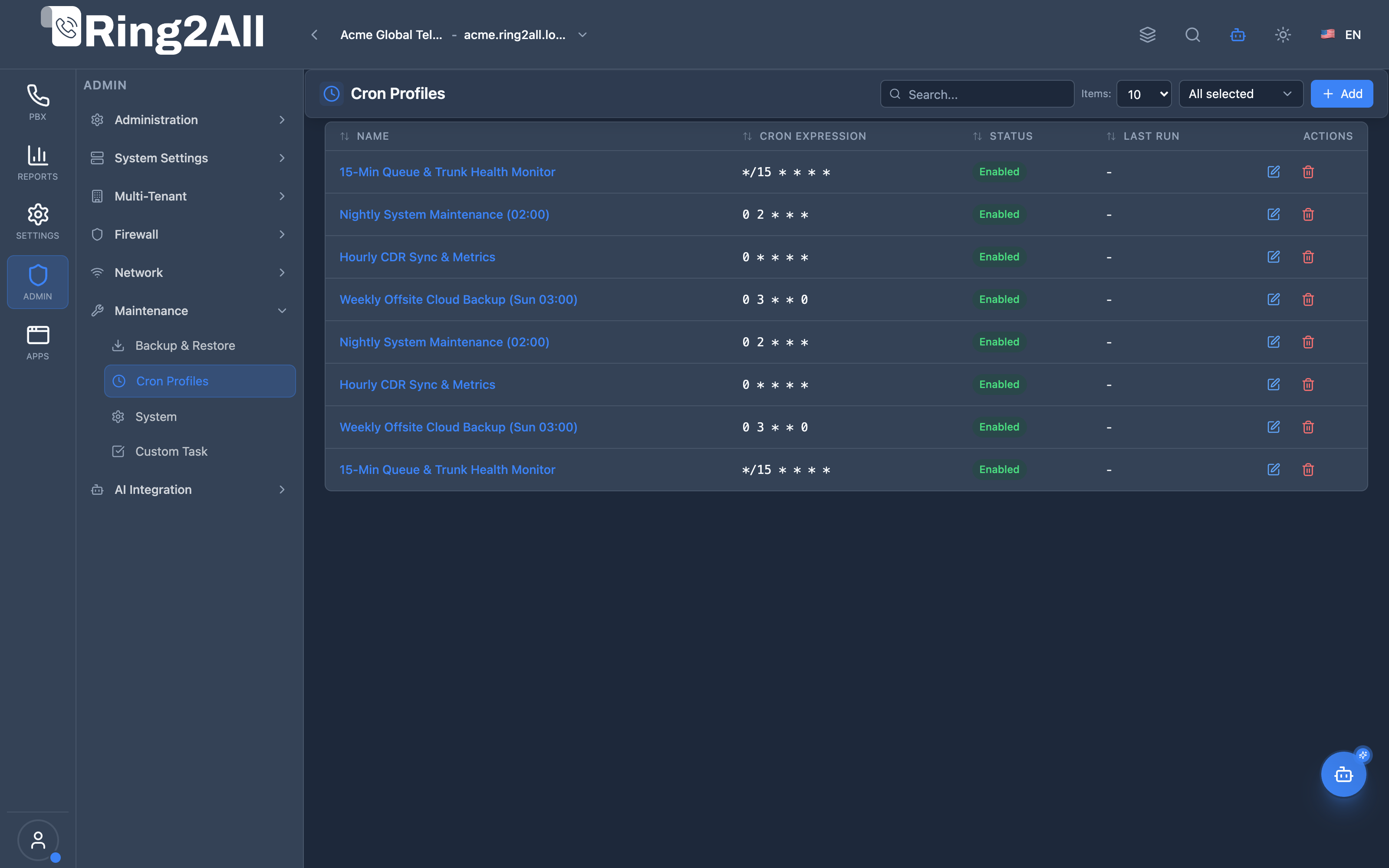
/admin/maintenance/cron-profiles). - Review reusable schedule definitions, standard 5-part cron expressions, enablement status, and latest trigger history.
- Click + Add to author a new cron profile (
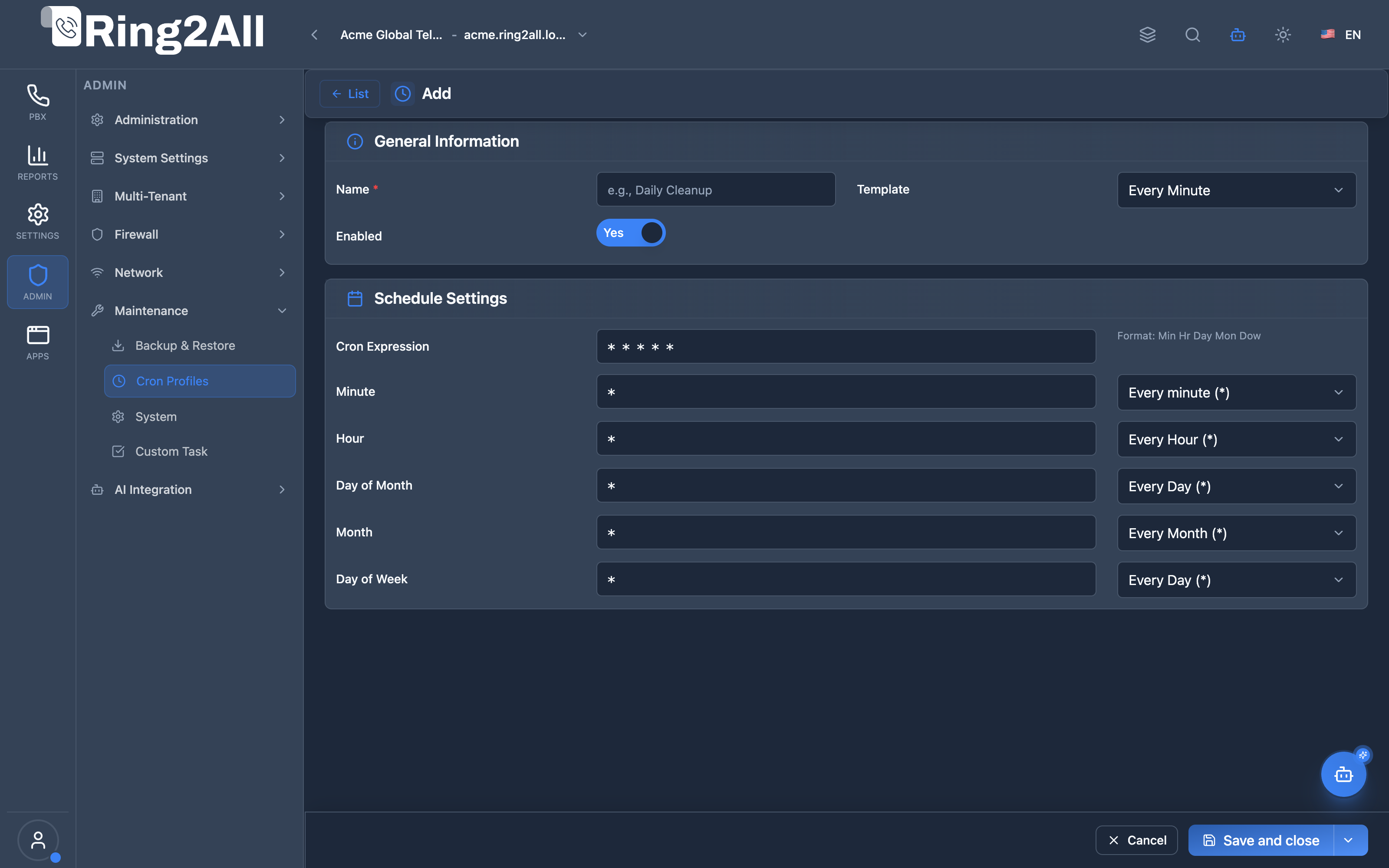
/admin/maintenance/cron-profiles/new) using visual builder selectors or standard cron expression templates.
Screenshots & Visual Interface
Section titled “Screenshots & Visual Interface”Time-Based Schedule Profiles Directory
Section titled “Time-Based Schedule Profiles Directory”Catalog of operational cron schedules powering automated backups, log rotations, CDR synchronization jobs, and health-check monitors across the softswitch cluster.
Cron Profile Schedule Editor & Expression Builder
Section titled “Cron Profile Schedule Editor & Expression Builder”Intuitive scheduling form featuring quick template presets (Every Minute, Hourly, Daily, Weekly, Monthly) alongside fine-grained selectors for minute, hour, day of month, month, and day of week.
🎯 User Roles & Key Capabilities
Section titled “🎯 User Roles & Key Capabilities”| Role | Access Level | Responsibilities & Capabilities |
|---|---|---|
| PBX Super Administrator | Full Access (RW) |
Create and maintain global system schedules, validate standard 5-part cron syntax, and link profiles to background batch workers. |
| DevOps & Platform Engineer | Full Operations (RW) |
Balance cron execution intervals across cluster nodes to prevent peak CPU and disk I/O bottlenecks during nocturnal backup cycles. |
| Tenant Administrator | Reusable Selection (RO) |
Select existing system-approved cron profiles to schedule tenant-specific backup jobs and custom data exports. |
| AI Platform Copilot / MCP Agent | Schedule Inspection (RO) |
Execute list_cron_profiles to analyze scheduled cron expressions, inspect intervals, and verify background task frequencies. |
1. Module Overview (Technical)
Section titled “1. Module Overview (Technical)”What Are Cron Profiles?
Section titled “What Are Cron Profiles?”Cron Profiles is a scheduling configuration module that creates reusable time-based schedules for automated tasks. Profiles define when recurring jobs like backups, reports, or maintenance tasks should run.
Architecture
Section titled “Architecture”┌─────────────────────────────────────────────────────────────────┐│ Cron Profiles Architecture │├─────────────────────────────────────────────────────────────────┤│ ││ Cron Profile Library ││ ┌──────────────────────────────────────────────────────────┐ ││ │ │ ││ │ Profile: Daily Midnight │ ││ │ ┌────────────────────────────────────────────────────┐ │ ││ │ │ Expression: 0 0 * * * │ │ ││ │ │ Template: Daily (Midnight) │ │ ││ │ │ Status: Enabled │ │ ││ │ └────────────────────────────────────────────────────┘ │ ││ │ │ ││ │ Profile: Hourly │ ││ │ ┌────────────────────────────────────────────────────┐ │ ││ │ │ Expression: 0 * * * * │ │ ││ │ │ Template: Hourly │ │ ││ │ │ Status: Enabled │ │ ││ │ └────────────────────────────────────────────────────┘ │ ││ │ │ ││ │ Profile: Business Hours │ ││ │ ┌────────────────────────────────────────────────────┐ │ ││ │ │ Expression: */15 9-17 * * 1-5 │ │ ││ │ │ Template: Custom │ │ ││ │ │ Status: Enabled │ │ ││ │ └────────────────────────────────────────────────────┘ │ ││ │ │ ││ └──────────────────────────────────────────────────────────┘ ││ │ ││ ▼ Used by scheduled tasks ││ ┌──────────────────────────────────────────────────────────┐ ││ │ │ ││ │ Backup Jobs ──────────────► "Daily Midnight" │ ││ │ Report Generation ───────► "Hourly" │ ││ │ Status Checks ───────────► "Every 5 Minutes" │ ││ │ │ ││ └──────────────────────────────────────────────────────────┘ ││ │└─────────────────────────────────────────────────────────────────┘2. Module Overview (Commercial/Business)
Section titled “2. Module Overview (Commercial/Business)”Business Value
Section titled “Business Value”Cron Profiles provides reusable scheduling:
| Without Profiles | With Profiles |
|---|---|
| Duplicate expressions | Define once, reuse |
| Error-prone syntax | Template presets |
| No standardization | Consistent schedules |
| Manual entry | Visual builder |
Use Cases
Section titled “Use Cases”-
Backup Scheduling
- Daily backups
- Weekly full backups
-
Report Generation
- Hourly reports
- End-of-day summaries
-
Maintenance Tasks
- Log rotation
- Cache cleanup
-
Monitoring
- Regular health checks
- Status updates
Feature Highlights
Section titled “Feature Highlights”| Feature | Benefit |
|---|---|
| Templates | Pre-built schedules |
| Presets | Quick selection |
| Custom | Full cron control |
| Reusable | Use across tasks |
| Enable/Disable | Toggle profiles |
3. Module Overview (End User/Administrator)
Section titled “3. Module Overview (End User/Administrator)”What Can You Do?
Section titled “What Can You Do?”- Create scheduling profiles
- Use quick templates
- Build custom expressions
- Enable/disable profiles
- Reuse across modules
- View last run times
Cron Profiles Interface
Section titled “Cron Profiles Interface”┌─────────────────────────────────────────────────────────────────┐│ Cron Profiles │├─────────────────────────────────────────────────────────────────┤│ ││ [+ Add] ││ ││ ┌───────────────────────────────────────────────────────────┐ ││ │ Name │ Cron Expression │ Template │ Status │ ││ ├─────────────────┼─────────────────┼───────────┼──────────┤ ││ │ Daily Midnight │ 0 0 * * * │ Daily │ ● Enabled │ ││ │ Hourly │ 0 * * * * │ Hourly │ ● Enabled │ ││ │ Every 5 Min │ */5 * * * * │ Every 5 │ ● Enabled │ ││ │ Weekly Sunday │ 0 0 * * 0 │ Weekly │ ● Enabled │ ││ │ Business Hours │ */15 9-17 * * 1-5│ Custom │ ○ Disabled│ ││ └───────────────────────────────────────────────────────────┘ ││ ││ Actions: [✏️ Edit] [🗑️ Delete] ││ │└─────────────────────────────────────────────────────────────────┘Add/Edit Cron Profile
Section titled “Add/Edit Cron Profile”┌─────────────────────────────────────────────────────────────────┐│ Edit Cron Profile │├─────────────────────────────────────────────────────────────────┤│ ││ ▼ General Information ││ ││ ┌─────────────────────────────────────────────────────────────┐││ │ │││ │ Name: [Daily Midnight ] │││ │ │││ │ Template: [Daily (Midnight) ▼] │││ │ Custom | Every Minute | Hourly | Daily | Weekly | Monthly│││ │ Every 5/15/30 Minutes │││ │ │││ │ Enabled: ✓ │││ │ │││ └─────────────────────────────────────────────────────────────┘││ ││ ▼ Schedule Settings ││ ││ ┌─────────────────────────────────────────────────────────────┐││ │ │││ │ Cron Expression: 0 0 * * * │││ │ Format: Min Hr Day Mon Dow │││ │ │││ │ ───────────────────────────────────────────── │││ │ │││ │ Minutes: [Every minute (*) ▼] │││ │ Every minute (*) | */2 | */5 | */10 | */15 | */30 │││ │ │││ │ Hours: [Midnight (0) ▼] │││ │ Every Hour | */2 | */4 | */6 | */12 | Midnight | Noon │││ │ Business Hours (9-17) │││ │ │││ │ Day of Month: [Every Day (*) ▼] │││ │ Every Day | */2 | 1st and 15th │││ │ │││ │ Month: [Every Month (*) ▼] │││ │ Every Month | Quarterly | Jan & July │││ │ │││ │ Day of Week: [Every Day (*) ▼] │││ │ Every Day | Mon-Fri | Weekend | Sunday | Monday │││ │ │││ └─────────────────────────────────────────────────────────────┘││ ││ [Save] [Cancel] ││ │└─────────────────────────────────────────────────────────────────┘Quick Tips
Section titled “Quick Tips”[!TIP] Templates: Start with a template, then customize.
[!TIP] Presets: Use dropdown presets for common intervals.
[!NOTE] Cron Format: Minute Hour Day Month Weekday
4. Configuration Sections
Section titled “4. Configuration Sections”General Information
Section titled “General Information”| Field | Description |
|---|---|
| Name | Profile identifier |
| Template | Quick schedule preset |
| Enabled | Active/Inactive |
Schedule Settings
Section titled “Schedule Settings”| Field | Description |
|---|---|
| Cron Expression | Full cron syntax |
| Minute | Minute preset |
| Hour | Hour preset |
| Day of Month | Day preset |
| Month | Month preset |
| Day of Week | Weekday preset |
5. Settings Reference
Section titled “5. Settings Reference”Quick Templates
Section titled “Quick Templates”| Template | Expression | Description |
|---|---|---|
| Every Minute | * * * * * | Run every minute |
| Every 5 Minutes | */5 * * * * | Every 5 min |
| Every 15 Minutes | */15 * * * * | Every 15 min |
| Every 30 Minutes | */30 * * * * | Every 30 min |
| Hourly | 0 * * * * | Top of each hour |
| Daily (Midnight) | 0 0 * * * | Midnight daily |
| Weekly (Sunday) | 0 0 * * 0 | Sunday midnight |
| Monthly (1st) | 0 0 1 * * | 1st of month |
Minute Presets
Section titled “Minute Presets”| Preset | Value | Description |
|---|---|---|
| Every minute | * | Run every minute |
| Every 2 | */2 | Every 2 minutes |
| Every 5 | */5 | Every 5 minutes |
| Every 10 | */10 | Every 10 minutes |
| Every 15 | */15 | Every 15 minutes |
| Every 30 | */30 | Every 30 minutes |
Hour Presets
Section titled “Hour Presets”| Preset | Value | Description |
|---|---|---|
| Every Hour | * | Every hour |
| Every 2 | */2 | Every 2 hours |
| Every 4 | */4 | Every 4 hours |
| Every 6 | */6 | Every 6 hours |
| Every 12 | */12 | Every 12 hours |
| Midnight | 0 | 12:00 AM |
| Noon | 12 | 12:00 PM |
| Business | 9-17 | 9 AM - 5 PM |
Day Presets
Section titled “Day Presets”| Preset | Value | Description |
|---|---|---|
| Every Day | * | Daily |
| Every Other | */2 | Every 2 days |
| 1st and 15th | 1,15 | Bi-monthly |
Weekday Presets
Section titled “Weekday Presets”| Preset | Value | Description |
|---|---|---|
| Every Day | * | All days |
| Mon-Fri | 1-5 | Weekdays |
| Weekend | 0,6 | Sat & Sun |
| Sunday | 0 | Sunday only |
| Monday | 1 | Monday only |
Cron Expression Format
Section titled “Cron Expression Format”┌───────────── minute (0-59)│ ┌───────────── hour (0-23)│ │ ┌───────────── day of month (1-31)│ │ │ ┌───────────── month (1-12)│ │ │ │ ┌───────────── day of week (0-6, 0=Sunday)│ │ │ │ │* * * * *Special Characters
Section titled “Special Characters”| Character | Meaning | Example |
|---|---|---|
| * | Any value | * = every |
| */n | Every n | */5 = every 5 |
| n-m | Range | 9-17 = 9 to 17 |
| n,m | List | 1,15 = 1 and 15 |
Model Context Protocol (MCP) AI Integration
Section titled “Model Context Protocol (MCP) AI Integration”The Cron Profiles module exposes typed scheduling queries to the Model Context Protocol (MCP), allowing the Platform Copilot and automated site-reliability agents to inspect active background schedules.
Available MCP Tools
Section titled “Available MCP Tools”| Tool Name | Scope | Description |
|---|---|---|
list_cron_profiles |
Schedule Registry (RO) |
Lists all scheduled cron profiles, interval expressions (e.g. “0 2 * * *”), execution frequencies, and associated tenant scopes. |
Tool Schemas & Payloads
Section titled “Tool Schemas & Payloads”list_cron_profiles
Section titled “list_cron_profiles”{ "name": "list_cron_profiles", "description": "Lists all scheduled cron profiles, interval expressions (e.g. \"0 2 * * *\"), execution frequencies, and associated tenant scopes.", "parameters": { "type": "object", "properties": { "search": { "type": "string", "description": "Filter by profile name or cron expression." } } }}Realistic Execution Response:
{ "success": true, "data": { "total": 3, "profiles": [ { "id": 1, "name": "Nightly Database Backup", "schedule": "0 2 * * *", "description": "Executes daily at 02:00 UTC during low call volume", "target": "system", "isActive": true, "lastRun": "2026-09-08T02:00:00Z" }, { "id": 2, "name": "Hourly CDR Archiver", "schedule": "0 * * * *", "description": "Flushes processed CDR partitions every hour", "target": "system", "isActive": true, "lastRun": "2026-09-08T10:00:00Z" }, { "id": 3, "name": "Weekly Cleanup Routine", "schedule": "0 3 * * 0", "description": "Purges temporary audio files every Sunday at 03:00 UTC", "target": "system", "isActive": true, "lastRun": "2026-09-06T03:00:00Z" } ] }}Bilingual Natural Language Prompt Examples
Section titled “Bilingual Natural Language Prompt Examples”English Prompts
Section titled “English Prompts”- “Copilot, list all configured cron profiles and show their schedule expressions.”
- “Find any cron profiles scheduled to execute more frequently than every 15 minutes.”
- “Verify when the nightly database backup cron profile last ran.”
Spanish Prompts
Section titled “Spanish Prompts”- “Copilot, lista todos los perfiles de cron configurados y sus expresiones temporales.”
- “¿Qué tareas o perfiles de cron se ejecutan durante la noche?”
- “Verifica la frecuencia y última ejecución del perfil de respaldo nocturno.”
Enterprise Safeguards & Execution Boundaries
Section titled “Enterprise Safeguards & Execution Boundaries”- Multi-Tenant Protection: Cron profiles created for specific tenants are filtered strictly by
tenant_id, preventing cross-tenant visibility. - Standard 5-Field Syntax Enforcement: The system strictly parses standard 5-part cron syntax (
minute hour day month day-of-week), preventing invalid or non-standard scheduling definitions. - Execution Rate Throttling: Profiles cannot be scheduled below 1-minute intervals, mitigating server denial-of-service risks.
6. Common Scenarios & Examples
Section titled “6. Common Scenarios & Examples”Scenario 1: Daily Backup at 2 AM
Section titled “Scenario 1: Daily Backup at 2 AM”- Add Profile
- Name = “Daily 2AM”
- Template = Custom
- Minute = 0
- Hour = 2
- Day/Month/Week = *
- Expression:
0 2 * * * - Save
Scenario 2: Every 5 Minutes
Section titled “Scenario 2: Every 5 Minutes”- Add Profile
- Name = “Every 5 Min”
- Template = Every 5 Minutes
- Save
- Expression auto-set:
*/5 * * * *
Scenario 3: Business Hours Only
Section titled “Scenario 3: Business Hours Only”- Add Profile
- Name = “Business Hours”
- Template = Custom
- Minute = */15 (every 15 min)
- Hour = 9-17 (business hours)
- Weekday = 1-5 (Mon-Fri)
- Expression:
*/15 9-17 * * 1-5 - Save
Scenario 4: Weekly Sunday Night
Section titled “Scenario 4: Weekly Sunday Night”- Add Profile
- Name = “Weekly Sunday”
- Template = Weekly (Sunday)
- Save
- Expression:
0 0 * * 0
7. Limitations & Important Notes
Section titled “7. Limitations & Important Notes”Technical Notes
Section titled “Technical Notes”[!NOTE] Timezone: Schedules run in server timezone.
[!NOTE] 5-Field Format: Standard cron format (no seconds).
[!WARNING] Test First: Verify expression before production use.
Best Practices
Section titled “Best Practices”- Use Templates: Start with presets
- Descriptive Names: Clear profile names
- Test Expression: Verify timing
- Off-Peak Hours: Schedule heavy tasks at night
- Monitor Runs: Check last run status
Common Expressions
Section titled “Common Expressions”| Use Case | Expression |
|---|---|
| Every hour | 0 * * * * |
| Daily at 3 AM | 0 3 * * * |
| Weekdays 9 AM | 0 9 * * 1-5 |
| First Monday | 0 0 1-7 * 1 |
| Every 10 min | */10 * * * * |
8. Troubleshooting Tips
Section titled “8. Troubleshooting Tips”Common Issues
Section titled “Common Issues”| Symptom | Possible Cause | Solution |
|---|---|---|
| Not running | Profile disabled | Enable profile |
| Wrong time | Timezone issue | Check server TZ |
| Too frequent | Wrong interval | Adjust expression |
| Never runs | Invalid cron | Verify syntax |
Verify Expression
Section titled “Verify Expression”# Install cron expression testerpip install croniter
# Test expression in Pythonpython -c "from croniter import croniter; from datetime import datetime; c = croniter('0 2 * * *', datetime.now()); print([c.get_next(datetime) for _ in range(5)])"Check Cron Jobs
Section titled “Check Cron Jobs”# List system cron jobscrontab -l
# View cron loggrep CRON /var/log/syslog9. Glossary
Section titled “9. Glossary”| Term | Definition |
|---|---|
| Cron | Time-based scheduler |
| Expression | Schedule syntax |
| Profile | Reusable schedule |
| Preset | Pre-defined value |
| Template | Quick schedule |
Documentation last updated: January 2026