

Conference Profiles Module Documentation
Table of Contents
Section titled “Table of Contents”- Navigation & Access
- Screenshots & Visual Interface
- Module Overview (Technical)
- Module Overview (Commercial/Business)
- Module Overview (End User/Administrator)
- User Roles & Key Capabilities
- Configuration Tabs
- Settings Reference
- Common Scenarios & Examples
- Limitations & Important Notes
- Troubleshooting Tips
- Glossary
- Model Context Protocol (MCP) AI Integration
Navigation & Access
Section titled “Navigation & Access”To access the Conference Profiles configuration module:
- Log in to the Ring2All Web Portal (
https://<domain-or-ip>/login). - In the left navigation sidebar, expand Settings.
- Under PBX, click Conference Profiles (
/settings/pbx/conference-profiles). - To create a new audio/video conference room template, click + Add Profile (
/settings/pbx/conference-profiles/new). To edit an existing template (e.g.default,wideband,premium), click on the row or the Edit action button.
Screenshots & Visual Interface
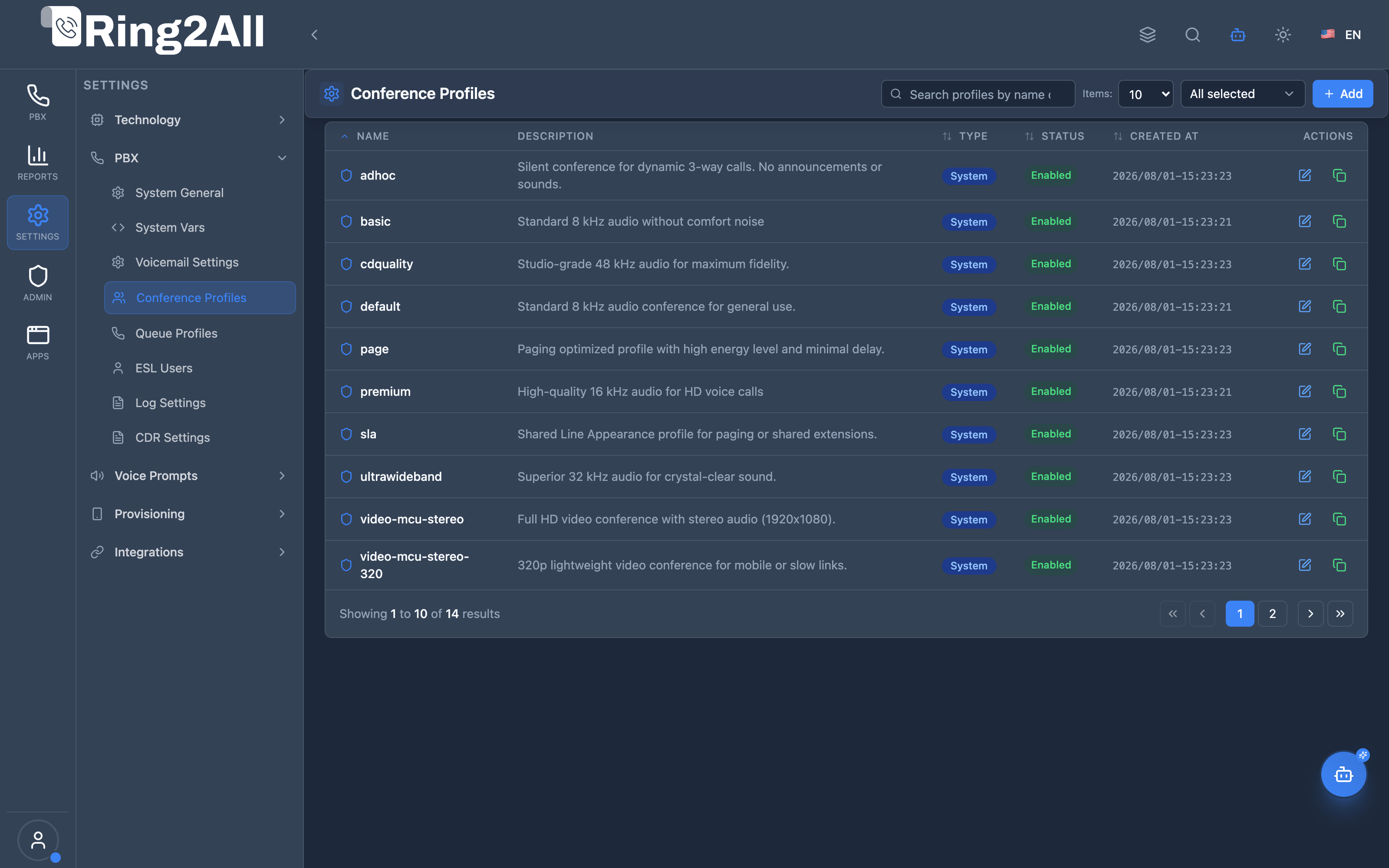
Section titled “Screenshots & Visual Interface”Conference Profiles Directory
Section titled “Conference Profiles Directory”Directory of Telephony Server mod_conference profiles showing profile names, sample audio rates (8kHz, 16kHz, 48kHz), energy level thresholds, caller interval timeouts, and active status.
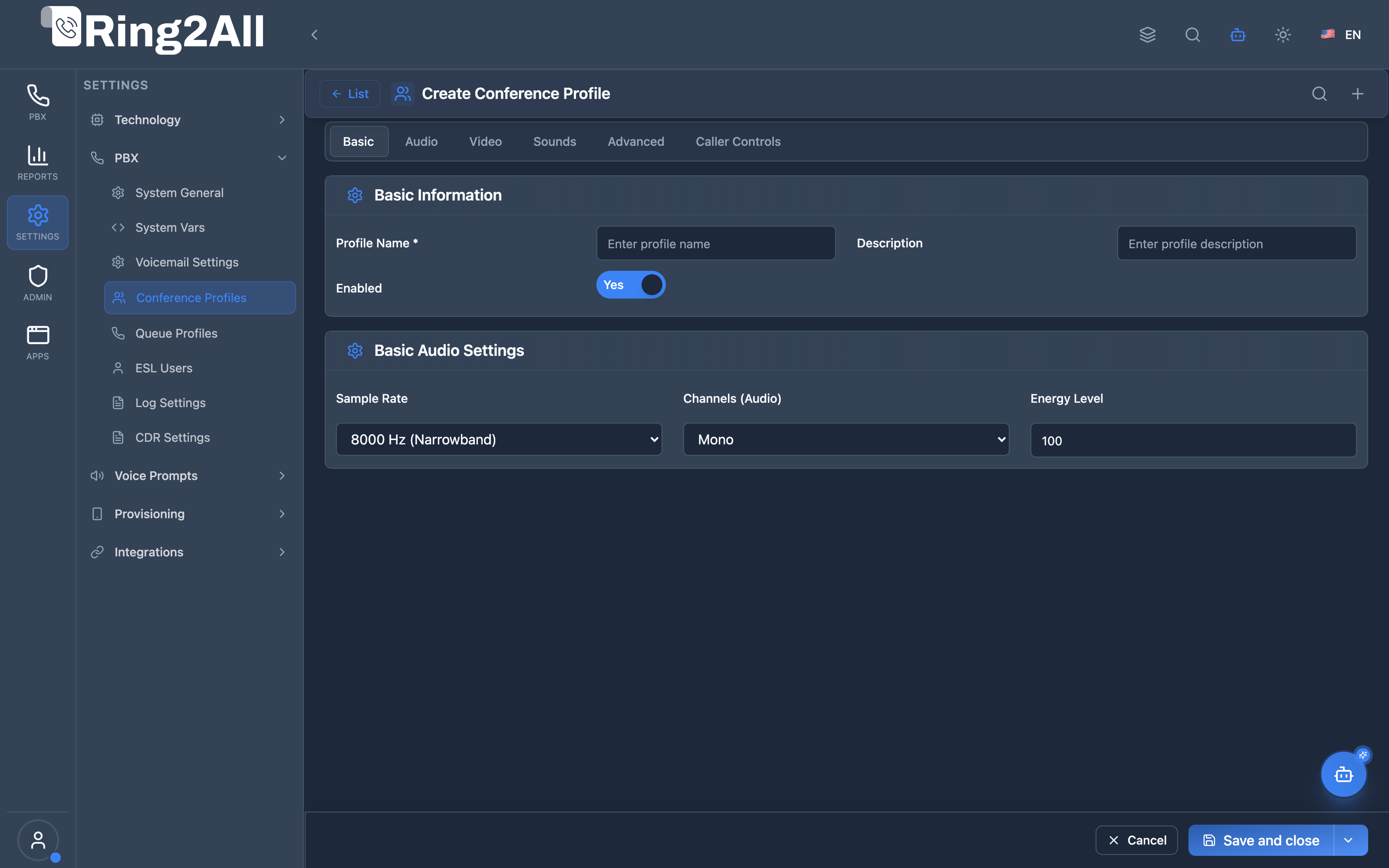
Conference Profile Configuration Form
Section titled “Conference Profile Configuration Form”Multi-tab configuration form for fine-tuning conference bridging parameters, participant entry/exit sound files, comfort noise generators, maximum attendees, video canvas layouts, and DTMF floor control bindings.
1. Module Overview (Technical)
Section titled “1. Module Overview (Technical)”What Are Conference Profiles?
Section titled “What Are Conference Profiles?”Conference Profiles are Telephony Server mod_conference configuration templates that define how conference rooms behave. They control audio quality, video settings, participant sounds, DTMF controls, and advanced conference flags.
Architecture
Section titled “Architecture”┌─────────────────────────────────────────────────────────────────┐│ Conference Profiles Architecture │├─────────────────────────────────────────────────────────────────┤│ ││ Admin Panel ││ ┌──────────────────────────────────────────────────────────┐ ││ │ Conference Profiles │ ││ │ │ ││ │ Tabs: │ ││ │ ├─ Basic (name, rate, channels, energy) │ ││ │ ├─ Audio (MOH, comfort noise) │ ││ │ ├─ Video (mode, layout, codec, max participants) │ ││ │ ├─ Sounds (enter, exit, mute, alone, kicked) │ ││ │ ├─ Advanced (flags, controls) │ ││ │ └─ Caller Controls (DTMF mappings) │ ││ │ │ ││ └──────────────────────────────────────────────────────────┘ ││ │ ││ ▼ Generates XML ││ ┌──────────────────────────────────────────────────────────┐ ││ │ conference.conf.xml │ ││ │ │ ││ │ <profile name="standard"> │ ││ │ <param name="rate" value="16000"/> │ ││ │ <param name="video-mode" value="mux"/> │ ││ │ <param name="caller-controls" value="default"/> │ ││ │ </profile> │ ││ │ │ ││ └──────────────────────────────────────────────────────────┘ ││ │ ││ ▼ Used by conferences ││ ┌──────────────────────────────────────────────────────────┐ ││ │ Conference Room (Conferences Module) │ ││ │ │ ││ │ Conference ABC → Profile: standard │ ││ │ Settings applied to all participants │ ││ │ │ ││ └──────────────────────────────────────────────────────────┘ ││ │└─────────────────────────────────────────────────────────────────┘2. Module Overview (Commercial/Business)
Section titled “2. Module Overview (Commercial/Business)”Business Value
Section titled “Business Value”Conference Profiles provides customized conferencing:
| Without Profiles | With Profiles |
|---|---|
| Default settings | Custom audio/video |
| One-size-fits-all | Different profiles |
| No control | Full customization |
| Fixed sounds | Branded sounds |
Use Cases
Section titled “Use Cases”-
High-Quality Audio
- HD audio (16kHz+)
- Stereo conferences
-
Video Conferencing
- Video layouts (2x2, 3x3)
- Codec selection
-
Branded Experience
- Custom entry/exit sounds
- Custom MOH
-
Moderated Conferences
- Wait for moderator
- Moderator controls
Feature Highlights
Section titled “Feature Highlights”| Feature | Benefit |
|---|---|
| Audio Quality | Sample rate, channels |
| Video Mode | Mux, bridge, transcode |
| Video Layout | Grid layouts |
| Custom Sounds | Branded experience |
| DTMF Controls | Participant self-service |
| Conference Flags | Fine-tune behavior |
3. Module Overview (End User/Administrator)
Section titled “3. Module Overview (End User/Administrator)”What Can You Do?
Section titled “What Can You Do?”- Create conference profile templates
- Configure audio sample rate and channels
- Set video mode and layout
- Customize entry/exit sounds
- Configure DTMF controls
- Set moderator controls
- Define conference flags
Conference Profiles Interface
Section titled “Conference Profiles Interface”┌─────────────────────────────────────────────────────────────────┐│ Conference Profiles │├─────────────────────────────────────────────────────────────────┤│ ││ Manage Telephony Server conference profiles ││ ││ [+ Create Profile] ││ ││ ┌───────────────────────────────────────────────────────────┐ ││ │ Name │ Description │ Type │ Status │ ││ ├───────────────┼─────────────────────┼────────┼───────────┤ ││ │ default │ Standard conferences│ System │ ✓ Enabled │ ││ │ hd-audio │ High-quality audio │ Custom │ ✓ Enabled │ ││ │ video-4x4 │ 4x4 video grid │ Custom │ ✓ Enabled │ ││ │ moderated │ Wait for moderator │ Custom │ ✓ Enabled │ ││ └───────────────────────────────────────────────────────────┘ ││ │└─────────────────────────────────────────────────────────────────┘Profile Edit View
Section titled “Profile Edit View”┌─────────────────────────────────────────────────────────────────┐│ Edit Conference Profile │├─────────────────────────────────────────────────────────────────┤│ ││ [Basic] [Audio] [Video] [Sounds] [Advanced] [Caller Controls] ││ ───────────────────────────────────────────────────────────── ││ ││ Basic Information ││ Profile Name: [hd-audio ] ││ Description: [High-quality audio conferencing] ││ Enabled: ✓ ││ ││ Basic Audio Settings ││ Sample Rate: [16000 ▼] ││ 8000 (Narrowband) / 16000 (Wideband) / 48000 (Fullband) ││ ││ Channels (Audio): [1 ▼] ││ 1 = Mono / 2 = Stereo ││ ││ Energy Level: [100 ] ││ Minimum audio energy (0-500). Higher = less background noise ││ ││ [Save] [View XML] [Cancel] ││ │└─────────────────────────────────────────────────────────────────┘Quick Tips
Section titled “Quick Tips”[!TIP] Sample Rate: Use 16000 for HD audio, 48000 for maximum quality.
[!TIP] Energy Level: Increase to reduce background noise pickup.
[!NOTE] System Profiles: Cannot be deleted but can be edited.
🎯 User Roles & Key Capabilities
Section titled “🎯 User Roles & Key Capabilities”| Role | Permissions | Key Capabilities |
|---|---|---|
| Super Administrator | Full Access (read, write, delete) |
Configure platform-wide wideband audio mixing profiles (48kHz), video canvas layouts, and system audio quality presets. |
| PBX / Tenant Administrator | Domain Management (read, write) |
Manage energy thresholds for background noise reduction, assign custom hold music to conference rooms, and bind DTMF caller controls. |
| Support Specialist | Read & Diagnostic (read) |
Check profile audio parameters (sample rates, mono vs stereo), view generated Telephony Server XML, and diagnose participant echo. |
| Conference Moderator | Operational | Control in-conference participants (mute, kick, lock room) via DTMF or web switchboard. |
4. Configuration Tabs
Section titled “4. Configuration Tabs”Basic Tab
Section titled “Basic Tab”| Field | Description |
|---|---|
| Profile Name | Unique identifier |
| Description | Purpose notes |
| Enabled | Active/inactive |
| Sample Rate | Audio quality (Hz) |
| Channels | Mono (1) or Stereo (2) |
| Energy Level | Voice detection threshold |
Audio Tab
Section titled “Audio Tab”| Field | Description |
|---|---|
| Music on Hold | Played when alone/on hold |
| Comfort Noise | Soft noise during silence |
Video Tab
Section titled “Video Tab”| Field | Description |
|---|---|
| Video Mode | mux, bridge, transcode |
| Video Layout | 1x1, 2x2, 3x3, 4x4, etc. |
| Video Codec | VP8, VP9, H.264, H.265 |
| Max Video Participants | Video stream limit |
Sounds Tab
Section titled “Sounds Tab”| Field | Description |
|---|---|
| Enter Sound | Played on join |
| Exit Sound | Played on leave |
| Muted Sound | When muted |
| Unmuted Sound | When unmuted |
| Alone Sound | When only participant |
| Kicked Sound | When removed |
Advanced Tab
Section titled “Advanced Tab”| Field | Description |
|---|---|
| Conference Flags | Behavior flags |
| Caller Controls | DTMF control group |
| Moderator Controls | Mod control group |
| Member Flags | Participant flags |
Caller Controls Tab
Section titled “Caller Controls Tab”| Control | Default | Description |
|---|---|---|
| Mute/Unmute | 0 | Toggle microphone |
| Deaf+Mute | * | Mute all audio |
| Energy Up | 9 | Less sensitive |
| Energy Reset | 8 | Default sensitivity |
| Energy Down | 7 | More sensitive |
| Mic Volume Up | 3 | Boost outgoing |
| Mic Volume Reset | 2 | Default mic |
| Mic Volume Down | 1 | Lower outgoing |
| Speaker Up | 6 | Boost incoming |
| Speaker Reset | 5 | Default speaker |
| Speaker Down | 4 | Lower incoming |
| Hangup | # | Leave conference |
5. Settings Reference
Section titled “5. Settings Reference”Sample Rates
Section titled “Sample Rates”| Rate | Quality | Use Case |
|---|---|---|
| 8000 | Narrowband | Basic calls |
| 16000 | Wideband | HD audio |
| 32000 | Ultra-wideband | High quality |
| 48000 | Fullband | Maximum |
Video MCU & Conference Mixing Parameters
Section titled “Video MCU & Conference Mixing Parameters”FreeSWITCH mod_conference profile templates dynamically generate XML configuration incorporating advanced Video MCU controls via conference_profiles.lua:
| Parameter | Technical Parameter (param name) |
Type / Options | Default | Description |
|---|---|---|---|---|
| Video Mode | video-mode |
none, passthrough, mux |
mux |
mux enables video mixing (grid MCU), passthrough forwards active speaker video without transcoding, none enforces audio-only. |
| Video Layout Name | video-layout-name |
1x1, 2x2, 3x3, 4x4, 1up_top_left, group:grid |
group:grid |
Grid layout template governing video participant cell positioning. |
| Canvas Resolution | video-canvas-size |
640x360, 1280x720, 1920x1080 |
1280x720 |
Output video canvas dimensions for the composite video stream. |
| Canvas Background Color | video-canvas-bg-color |
Hex Color (e.g. #000000) |
#000000 |
Background canvas color for unfilled grid regions. |
| Layout Background Color | video-layout-bg-color |
Hex Color (e.g. #1e1e1e) |
#1e1e1e |
Color of individual participant video window borders and padding. |
| Video Codec Bandwidth | video-codec-bandwidth |
512kb, 1mb, 2mb, 4mb |
2mb |
Maximum video bandwidth ceiling per connected video participant. |
| Video Frame Rate | video-fps |
15, 24, 30 |
30 |
Output video frames per second synthesized by the FreeSWITCH MCU mixer. |
| Auto Floor Delay (ms) | video-auto-floor-msec |
Milliseconds (e.g. 500, 1000) |
1000 |
Continuous audio speech threshold required before switching primary video floor focus. |
| Audio Channels | channels |
1 (Mono), 2 (Stereo) |
1 |
Number of audio mixing channels provisioned for the conference bridge. |
| Energy Level | energy-level |
0 - 1000 |
300 |
Audio energy gate threshold required to transmit participant microphone audio. |
Common Conference Flags
Section titled “Common Conference Flags”| Flag | Description |
|---|---|
| wait-mod | Wait for moderator before allowing unmuted discussion |
| audio-always | Continues mixing room audio even when participants are muted |
| video-floor-only | Restricts video layout display exclusively to the active talking floor |
| mintwo | Suppresses conference announcements until at least two callers join |
6. Common Scenarios & Examples
Section titled “6. Common Scenarios & Examples”Scenario 1: HD Audio Profile
Section titled “Scenario 1: HD Audio Profile”- Create new profile
- Set Sample Rate = 16000
- Set Channels = 1 (mono)
- Set Energy Level = 150
- Enable Comfort Noise
- Save
Scenario 2: Video Conference
Section titled “Scenario 2: Video Conference”- Create new profile
- Set Video Mode = mux
- Set Video Layout = 3x3
- Set Video Codec = VP8
- Set Max Video Participants = 9
- Save
Scenario 3: Moderated Conference
Section titled “Scenario 3: Moderated Conference”- Create new profile
- Add conference-flags = wait-mod
- Set Moderator Controls
- Customize announcements
- Save
Scenario 4: Branded Conference
Section titled “Scenario 4: Branded Conference”- Create new profile
- Set Enter Sound = custom/welcome.wav
- Set Exit Sound = custom/goodbye.wav
- Set MOH = local_stream://branded_moh
- Save
7. Limitations & Important Notes
Section titled “7. Limitations & Important Notes”Technical Notes
Section titled “Technical Notes”[!NOTE] Profile Assignment: Profiles are assigned in Conferences module.
[!NOTE] System Profiles: Cannot be deleted but can be edited.
[!WARNING] Video CPU: Higher video quality requires more CPU.
Best Practices
Section titled “Best Practices”- Start with Default: Clone system profile
- Test Audio Quality: Verify sample rate works
- Energy Level: 100-200 for typical rooms
- Video Layout: Match expected participant count
- Custom Sounds: Use professional recordings
Caller Control Defaults
Section titled “Caller Control Defaults”| Key | Action |
|---|---|
| 0 | Mute/unmute |
| 1-3 | Mic volume |
| 4-6 | Speaker volume |
| 7-9 | Energy level |
| * | Deaf+mute |
| # | Hangup |
8. Troubleshooting Tips
Section titled “8. Troubleshooting Tips”Common Issues
Section titled “Common Issues”| Symptom | Possible Cause | Solution |
|---|---|---|
| Bad audio | Low sample rate | Increase to 16000+ |
| Echo | Energy level low | Increase energy level |
| No video | Video mode off | Set video-mode = mux |
| Video lag | Too many participants | Lower max-video-participants |
| DTMF not working | Wrong controls | Check caller-controls |
XML Preview
Section titled “XML Preview”Use “View XML” to see generated configuration and verify settings.
Check Profile
Section titled “Check Profile”SELECT name, enabled, settingsFROM public.conference_profilesWHERE name = 'profile-name';9. Glossary
Section titled “9. Glossary”| Term | Definition |
|---|---|
| Conference Profile | Room behavior template |
| Sample Rate | Audio frequency (Hz) |
| Energy Level | Voice detection threshold |
| Video Mux | Video grid mixing |
| Comfort Noise | Background noise fill |
| Caller Controls | DTMF key mappings |
| Moderator | Conference leader |
Model Context Protocol (MCP) AI Integration
Section titled “Model Context Protocol (MCP) AI Integration”The Ring2All PBX platform integrates deep AI assistance via the Model Context Protocol (MCP). The Conference Profiles module allows the PBX AI Copilot to safely query conference bridging presets, inspect audio sample rates and energy detection thresholds, and recommend audio profiles for multi-party bridges.
Available MCP Tools
Section titled “Available MCP Tools”| Tool Name | Operation Type | RBAC Risk Level | Description |
|---|---|---|---|
list_conference_profiles |
Read / Query | low |
Lists Conference Profiles (audio bridge templates defining sample rate, energy levels, comfort noise, auto-record, and member controls) with domain isolation. |
Tool Input Schemas & Parameters
Section titled “Tool Input Schemas & Parameters”1. list_conference_profiles
Section titled “1. list_conference_profiles”{ "name": "list_conference_profiles", "description": "List Conference Profiles (audio bridge templates defining sample rate, energy levels, comfort noise, auto-record, and member controls).", "inputSchema": { "type": "object", "properties": { "search": { "type": "string", "description": "Filter conference profiles by name or description (e.g. 'default', 'wideband', 'executive')." } } }}Natural Language Prompts
Section titled “Natural Language Prompts”| User Request | Invoked MCP Tool | Expected AI Response |
|---|---|---|
| “Show me all conference profiles configured on our PBX.” | list_conference_profiles |
Returns profile list (default, wideband, ultra-hd) with sample rate and energy levels. |
| “Which conference profile supports HD wideband 16kHz audio?” | list_conference_profiles({ search: "wideband" }) |
Locates HD profile details, verifying 16000Hz sampling rate and comfort noise settings. |
| “What voice energy threshold is set on our default conference room profile?” | list_conference_profiles({ search: "default" }) |
Reports voice energy detection level (e.g. 100-300) to help diagnose background noise. |
Multi-Tenant & Security Safeguards
Section titled “Multi-Tenant & Security Safeguards”- Domain Isolation: Profiles are queried strictly within the requesting tenant’s domain scope or system-level templates (
is_system = true). - Anti-Collision Protection: Conference profile names are uniquely enforced upon creation to prevent collision across rooms.
- Protected System Profiles: Built-in system profiles cannot be deleted through automated AI tools.
- Audit Logging: Every conference profile inspection or administrative update is logged in the audit ledger.
Documentation last updated: January 2026