

SSL/TLS Certificates & Automated PKI Management
Table of Contents
Section titled “Table of Contents”- Overview & Architecture
- Business & Operational Significance
- 🎯 User Roles & Key Capabilities
- Visual Interface & Layout
- Field Reference & Certificate Parameters
- Certificate Types & Issuance Workflows
- Automated ACME Lifecycle & Kamailio TLS Binding
- Verification & Diagnostics
- Model Context Protocol (MCP) AI Integration
- Glossary
1. Overview & Architecture
Section titled “1. Overview & Architecture”In Ring2All SBC, the Certificates Manager module provides comprehensive Public Key Infrastructure (PKI) management for securing telecom signaling, WebRTC media channels, and administrative interfaces. The platform automates certificate generation, validation, storage, and renewal across multiple certificate authorities and formats.
┌────────────────────────────────────────────────────────────┐ │ RING2ALL SBC CERTIFICATE MANAGER │ │ (Stored in sbc_admin.certificates) │ └─────────────────────────────┬──────────────────────────────┘ │ ┌─────────────────────────┼─────────────────────────┐ ▼ ▼ ▼ ┌────────────────┐ ┌────────────────┐ ┌────────────────┐ │ SELF-SIGNED │ │ LET'S ENCRYPT │ │ CUSTOM UPLOAD │ │ CERTIFICATES │ │ (ACME HTTP01) │ │ (X.509 / PEM) │ ├────────────────┤ ├────────────────┤ ├────────────────┤ │ • Fast Lab Dev │ │ • Auto-Renew │ │ • Commercial CA│ │ • 2048/4096 RSA│ │ • Zero-Touch │ │ • Wildcard SSL │ │ • Testing PKI │ │ • 90-Day TTL │ │ • Org Validated│ └────────────────┘ └────────────────┘ └────────────────┘ │ │ │ └─────────────────────────┼─────────────────────────┘ ▼ ┌──────────────────────────────────────────────────┐ │ AUTOMATED SUBSYSTEM SERVICE BINDINGS │ ├─────────────────────────┬────────────────────────┤ │ NGINX Web Admin / API │ Kamailio SIP TLS 5061 │ │ (HTTPS Port 443) │ (tls.cfg / tls_mgm) │ └─────────────────────────┴────────────────────────┘The certificate lifecycle engine stores private keys, public certificates, and intermediate CA chains securely in PostgreSQL (sbc_admin.certificates), synchronizing runtime certificates to the host filesystem for consumption by NGINX and Kamailio.
2. Business & Operational Significance
Section titled “2. Business & Operational Significance”- Mandatory Telephony Encryption (SIPS / TLS): Modern Tier-1 telecommunications carriers require TLS 1.2/1.3 mutual authentication for SIP trunking to prevent eavesdropping, call spoofing, and man-in-the-middle attacks.
- Zero-Touch Automated Renewal: Integrates native ACME protocol automation with Let’s Encrypt, ensuring certificates renew automatically 30 days prior to expiration without administrator intervention.
- WebRTC & Browser Compliance: WebRTC endpoints require trusted, publicly valid certificates for DTLS-SRTP signaling and media relay negotiation; self-signed certificates are rejected by modern web browsers.
- Granular Expiration Monitoring: Visual expiration status indicators, days-remaining counters, and proactive warning alerts prevent unexpected telecom outages caused by expired credentials.
3. 🎯 User Roles & Key Capabilities
Section titled “3. 🎯 User Roles & Key Capabilities”| Role | Administrative Permissions | Operational Responsibilities |
|---|---|---|
| Security Administrator | Full Read & Write | Generates new certificates, configures ACME Let’s Encrypt accounts, and imports commercial CA bundles. |
| Telecom VoIP Engineer | Read & Manage | Binds certificates to SIP TLS profiles, configures cipher suites, and verifies carrier mutual TLS handshakes. |
| NOC Support Specialist | Read-Only | Audits certificate validity dates, tracks expiration alerts, and checks renewal job logs. |
| AI Cryptographic & PKI Auditor / Automation Copilot | Programmatic Audit & Discovery | Audits certificate validity dates, detects upcoming certificate expirations, inspects SAN coverage, and alerts operators programmatically via MCP. |
4. Visual Interface & Layout
Section titled “4. Visual Interface & Layout”Certificates Inventory Table
Section titled “Certificates Inventory Table”The main repository interface provides a searchable, filterable overview of all managed cryptographic certificates:
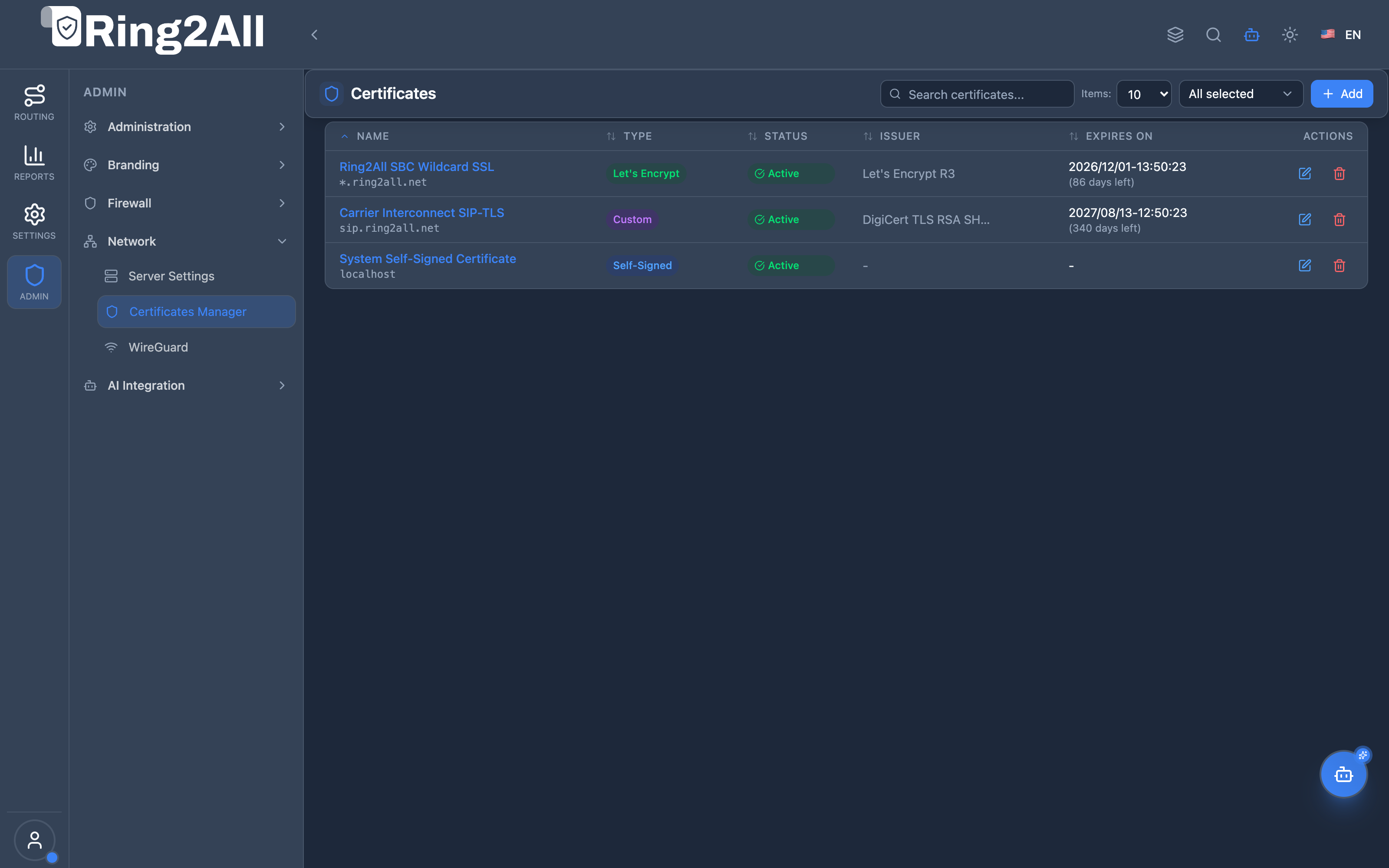
- Name & Domains: Displays friendly certificate names along with primary Common Names (CN) and Subject Alternative Names (SAN).
- Type Badge: Color-coded badges indicating
Let's Encrypt,Custom, orSelf-Signed. - Status & Expiration: Real-time status (
Active,Expired,Pending) and exact remaining validity in days. - Actions: One-click actions to edit, renew, or delete certificates.
Certificate Creation Form
Section titled “Certificate Creation Form”The creation modal guides operators through generating self-signed certificates, initiating ACME challenges, or pasting existing PEM bundles:
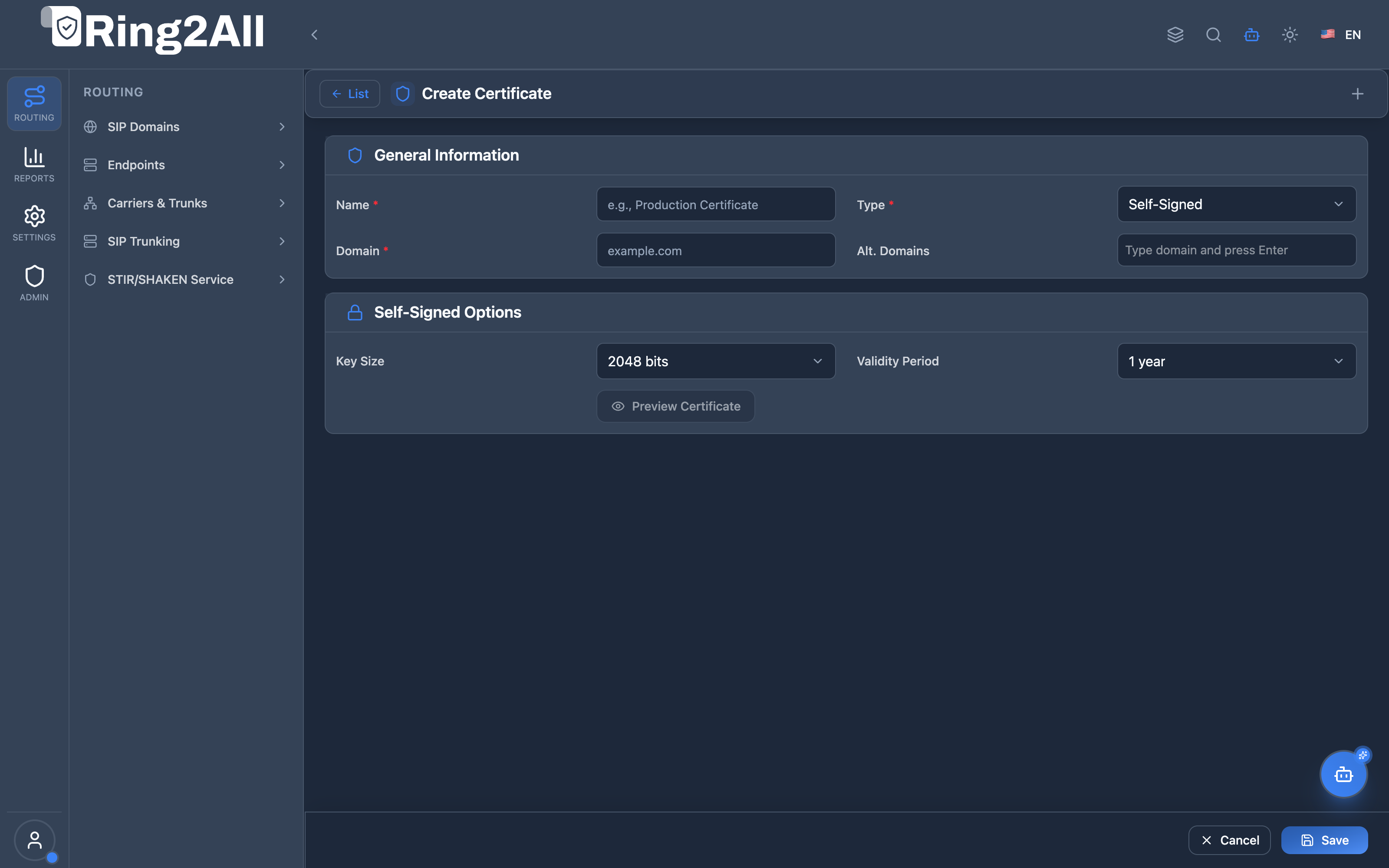
5. Field Reference & Certificate Parameters
Section titled “5. Field Reference & Certificate Parameters”| Field Name | Type | Constraints | Description |
|---|---|---|---|
| Name | string |
3–255 characters | Friendly descriptive identifier for the certificate (e.g., Ring2All SBC Wildcard SSL). |
| Type | select |
SELF_SIGNED, LETS_ENCRYPT, CUSTOM |
Issuance and management mechanism governing the certificate lifecycle. |
| Domain (Common Name) | string |
Valid FQDN or IP | Primary Fully Qualified Domain Name for which the certificate is issued (e.g., sbc.ring2all.net). |
| Alt. Domains (SAN) | string[] |
Array of FQDNs | Optional Subject Alternative Names covered by the single certificate (e.g., sip.ring2all.net). |
| Key Size | select |
2048, 4096 bits |
RSA private key cryptographic modulus length. |
| Validity Period | select |
90 days, 1 year, 2 years |
Expiration duration for self-signed certificates. |
| ACME Account Email | email |
Valid email format | Contact email address used for Let’s Encrypt registration and critical expiration notices. |
| Auto-Renew | boolean |
true / false |
Enables scheduled background jobs to automatically renew ACME certificates before expiration. |
| Certificate (PEM) | textarea |
Base64 X.509 PEM | The public certificate block starting with -----BEGIN CERTIFICATE-----. |
| Private Key (PEM) | textarea |
RSA/EC Private Key | The cryptographic private key starting with -----BEGIN PRIVATE KEY-----. Private keys are never exported in cleartext via API. |
| Certificate Chain (PEM) | textarea |
Intermediate CA PEMs | Complete chain of trust bundle linking the leaf certificate to the root certificate authority. |
6. Certificate Types & Issuance Workflows
Section titled “6. Certificate Types & Issuance Workflows”1. Let’s Encrypt (Automated ACME)
Section titled “1. Let’s Encrypt (Automated ACME)”- Operates via the automated HTTP-01 challenge protocol on port 80.
- Generates a 2048-bit or 4096-bit RSA key pair locally.
- Solicits validation challenges from the Let’s Encrypt directory, placing the token in the web server’s well-known directory (
/.well-known/acme-challenge/). - Receives the signed certificate and installs it directly into
sbc_admin.certificates.
2. Custom Upload (Commercial CA)
Section titled “2. Custom Upload (Commercial CA)”- Used for enterprise wildcard certificates (
*.domain.com), Extended Validation (EV) certificates, or internal private PKIs. - Requires uploading the public certificate, matching unencrypted private key, and intermediate bundle.
- The backend verifies key-pair mathematical matching via OpenSSL modulus checks before committing to storage.
3. Self-Signed Certificates
Section titled “3. Self-Signed Certificates”- Generated instantly on the host using native OpenSSL bindings.
- Recommended strictly for lab deployments, non-production SIP interconnect testing, or internal loopback communication.
7. Automated ACME Lifecycle & Kamailio TLS Binding
Section titled “7. Automated ACME Lifecycle & Kamailio TLS Binding”When a certificate is bound to Kamailio for SIP TLS:
- Storage to Filesystem Sync: The backend writes the certificate bundle and private key to
/etc/kamailio/certs/<uuid>.crtand/etc/kamailio/certs/<uuid>.key. - Kamailio
tls_mgmIntegration: The certificate profile is dynamically referenced in Kamailio’s TLS domain table. - Zero-Downtime Reload: Executes
kamcmd tls.reloadvia binary RPC (binrpc) over the local Unix socket, updating active TLS listener certificates without terminating existing SIP dialogs.
8. Verification & Diagnostics
Section titled “8. Verification & Diagnostics”Administrators can verify certificate validity, modulus matches, and active TLS listener bindings using the following commands:
# 1. Verify certificate details and expiration date from host fileopenssl x509 -in /etc/kamailio/certs/cert.pem -text -noout | grep -E '(Issuer|Subject:|Not After)'
# 2. Verify matching between public certificate and private keyCERT_MD5=$(openssl x509 -noout -modulus -in /etc/kamailio/certs/cert.pem | openssl md5)KEY_MD5=$(openssl rsa -noout -modulus -in /etc/kamailio/certs/key.pem | openssl md5)[ "$CERT_MD5" = "$KEY_MD5" ] && echo "KEY PAIR MATCH: OK" || echo "MISMATCH DETECTED"
# 3. Test active SIP TLS connection on port 5061openssl s_client -connect 192.168.10.32:5061 -showcerts
# 4. Trigger Kamailio zero-downtime TLS certificate reloadkamcmd tls.reload
9. Model Context Protocol (MCP) AI Integration
Section titled “9. Model Context Protocol (MCP) AI Integration”The Certificates Manager module is integrated into the Ring2All SBC Model Context Protocol (MCP) server, allowing autonomous AI agents and NOC copilots to audit cryptographic certificates, track expiration dates, and verify PKI chain completeness without exposing sensitive private keys.
9.1 MCP Tool Summary
Section titled “9.1 MCP Tool Summary”| Tool Name | Action | Risk Level | Purpose |
|---|---|---|---|
list_sbc_certificates |
Read | read |
List all X.509 certificates with domains, validity dates, issuers, and renewal statuses. |
get_sbc_certificate |
Read | read |
Get detailed metadata and public PEM certificate bundle for a specific certificate ID. |
9.2 Tool Schemas & Input Parameters
Section titled “9.2 Tool Schemas & Input Parameters”Schema: list_sbc_certificates
Section titled “Schema: list_sbc_certificates”{ "type": "object", "properties": {}, "additionalProperties": false}Schema: get_sbc_certificate
Section titled “Schema: get_sbc_certificate”{ "type": "object", "properties": { "id": { "type": "number", "description": "Unique integer ID of the cryptographic certificate" } }, "required": ["id"], "additionalProperties": false}9.3 Sample Tool Execution Payloads
Section titled “9.3 Sample Tool Execution Payloads”Example 1: Listing All Managed Certificates
Section titled “Example 1: Listing All Managed Certificates”Request Payload:
{ "tool": "list_sbc_certificates", "parameters": {}}Response Payload:
{ "success": true, "data": { "total": 2, "certificates": [ { "id": 1, "uuid": "4c8f2b7a-9a10-482a-bc91-e412d098a562", "name": "Let's Encrypt Wildcard", "type": "LETS_ENCRYPT", "domain": "sbc.ring2all.net", "altDomains": ["sip.ring2all.net", "webrtc.ring2all.net"], "issuer": "Let's Encrypt Authority X3", "validFrom": "2026-08-01T00:00:00Z", "validTo": "2026-11-01T00:00:00Z", "autoRenew": true, "status": "ACTIVE", "privateKeyConfigured": true }, { "id": 2, "uuid": "e812d4a1-b924-4f21-8302-3c1a89b4f711", "name": "Internal Self-Signed PKI", "type": "SELF_SIGNED", "domain": "sbc-internal.local", "altDomains": [], "issuer": "Ring2All Self-Signed Root", "validFrom": "2026-01-01T00:00:00Z", "validTo": "2027-01-01T00:00:00Z", "autoRenew": false, "status": "ACTIVE", "privateKeyConfigured": true } ] }}Example 2: Inspecting Certificate Metadata
Section titled “Example 2: Inspecting Certificate Metadata”Request Payload:
{ "tool": "get_sbc_certificate", "parameters": { "id": 1 }}Response Payload:
{ "success": true, "data": { "id": 1, "uuid": "4c8f2b7a-9a10-482a-bc91-e412d098a562", "name": "Let's Encrypt Wildcard", "type": "LETS_ENCRYPT", "domain": "sbc.ring2all.net", "altDomains": ["sip.ring2all.net", "webrtc.ring2all.net"], "issuer": "Let's Encrypt Authority X3", "validFrom": "2026-08-01T00:00:00Z", "validTo": "2026-11-01T00:00:00Z", "autoRenew": true, "status": "ACTIVE", "privateKeyConfigured": true, "certificateChainConfigured": true, "createdAt": "2026-08-01T02:15:33Z", "updatedAt": "2026-08-01T02:15:33Z" }}9.4 Bilingual Natural Language Copilot Prompts
Section titled “9.4 Bilingual Natural Language Copilot Prompts”English Prompts
Section titled “English Prompts”- “List all SSL/TLS certificates installed on the SBC and check if any are close to expiring.”
→ Agent invokes
list_sbc_certificates(). - “Inspect certificate ID 1 and verify whether its private key and full chain are properly configured.”
→ Agent invokes
get_sbc_certificate({"id": 1}).
Spanish Prompts (Español)
Section titled “Spanish Prompts (Español)”- “Lista todos los certificados SSL/TLS instalados en el SBC y verifica si alguno está próximo a vencer.”
→ Agente invoca
list_sbc_certificates(). - “Inspecciona el certificado con ID 1 y confirma si su clave privada y cadena intermedia están configuradas.”
→ Agente invoca
get_sbc_certificate({"id": 1}).
9.5 Enterprise Security & Execution Safeguards
Section titled “9.5 Enterprise Security & Execution Safeguards”- Private Key Masking: Cryptographic private keys are never returned across MCP tool invocations or API responses. The tools return boolean flags (
privateKeyConfigured: true) to confirm cryptographic integrity while eliminating key leakage risks. - Read-Only Discovery Guard: All MCP certificate tools are categorized as
readoperations, preventing unauthorized agents from mutating active TLS credentials or deleting trust roots without administrative intervention. - Automated Expiration Alerts: AI copilots cross-reference
validTotimestamps against the system clock to warn operators when certificates enter the critical 30-day renewal threshold.
10. Glossary
Section titled “10. Glossary”- ACME: Automated Certificate Management Environment protocol used by Let’s Encrypt for automated issuance and renewal.
- CA: Certificate Authority; a trusted entity that issues digital certificates validating domain ownership.
- PEM: Privacy Enhanced Mail format; Base64 encoded ASCII file structure commonly used to store certificates and keys.
- SAN: Subject Alternative Name; an X.509 extension allowing multiple domain names to be protected by a single certificate.
- SIPS: Session Initiation Protocol Secure; SIP signaling encapsulated within Transport Layer Security (TLS).
- Model Context Protocol (MCP): An open architectural standard allowing AI copilots to programmatically audit PKI security and certificate expiration lifecycles.