

Tenants Module Documentation
Table of Contents
Section titled “Table of Contents”- Navigation & Access
- Screenshots & Visual Interface
- Module Overview (Technical)
- Module Overview (Commercial/Business)
- Module Overview (End User/Administrator)
- User Roles & Key Capabilities
- Configuration Sections
- Settings Reference
- Common Scenarios & Examples
- Model Context Protocol (MCP) AI Integration
- Limitations & Important Notes
- Troubleshooting Tips
- Glossary
Navigation & Access
Section titled “Navigation & Access”To access the Tenants module:
- Log in to the Ring2All Web Portal (
https://<domain-or-ip>/login). - In the left navigation sidebar, expand Admin.
- Under Multi-Tenant, click Tenants (
/admin/multi-tenant/tenants). - To provision a new tenant organization, click the + Add Tenant button (
/admin/multi-tenant/tenants/new). - To view, edit, or manage an existing tenant, click on the tenant name or action controls in the table row (
/admin/multi-tenant/tenants/:id).
Screenshots & Visual Interface
Section titled “Screenshots & Visual Interface”Tenants List View
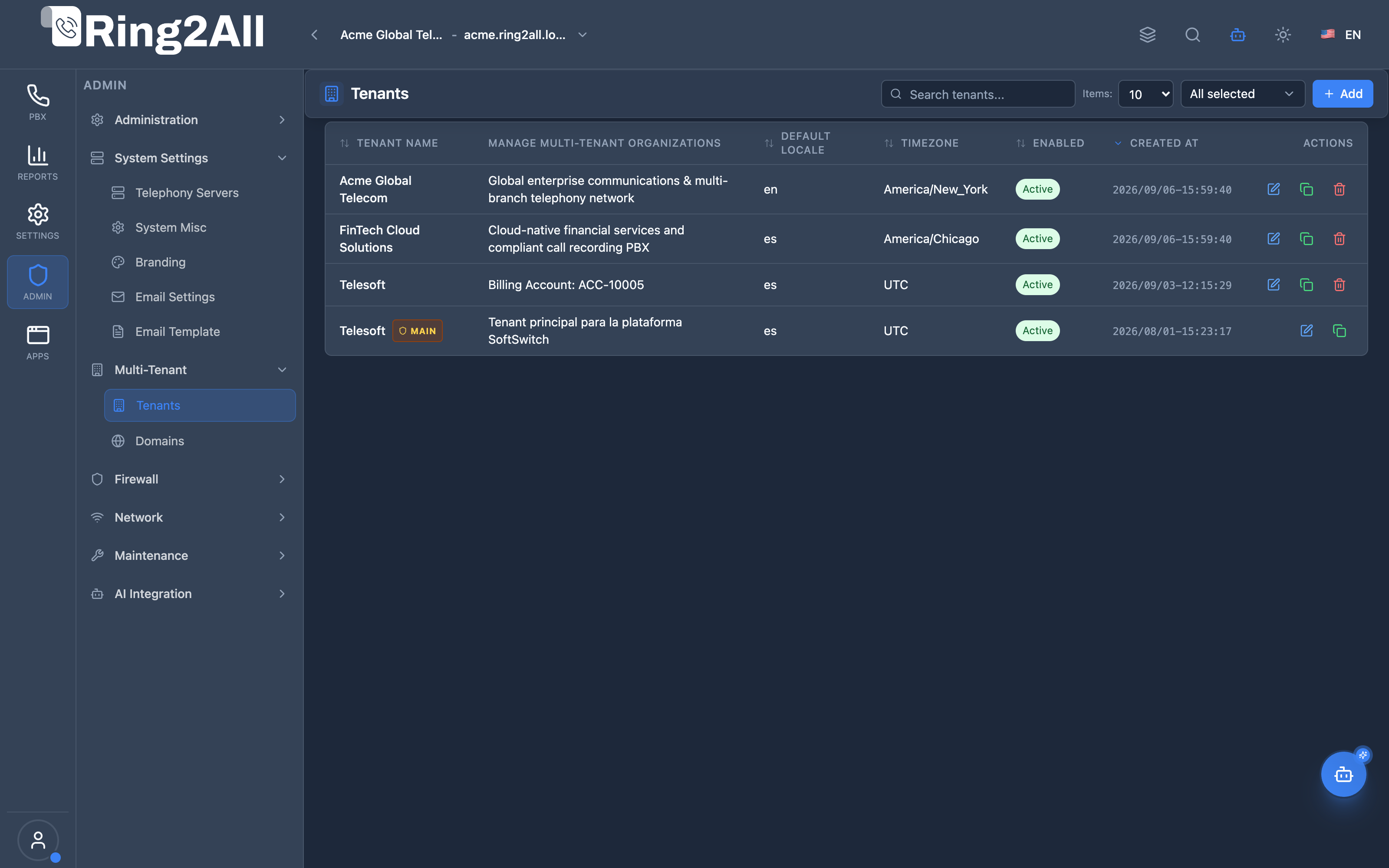
Section titled “Tenants List View”The Tenants management interface displays all provisioned tenant organizations, showing organization names, unique slug identifiers, assigned primary administrators, extension limits, active status badges, and action controls.
Tenant Configuration Form
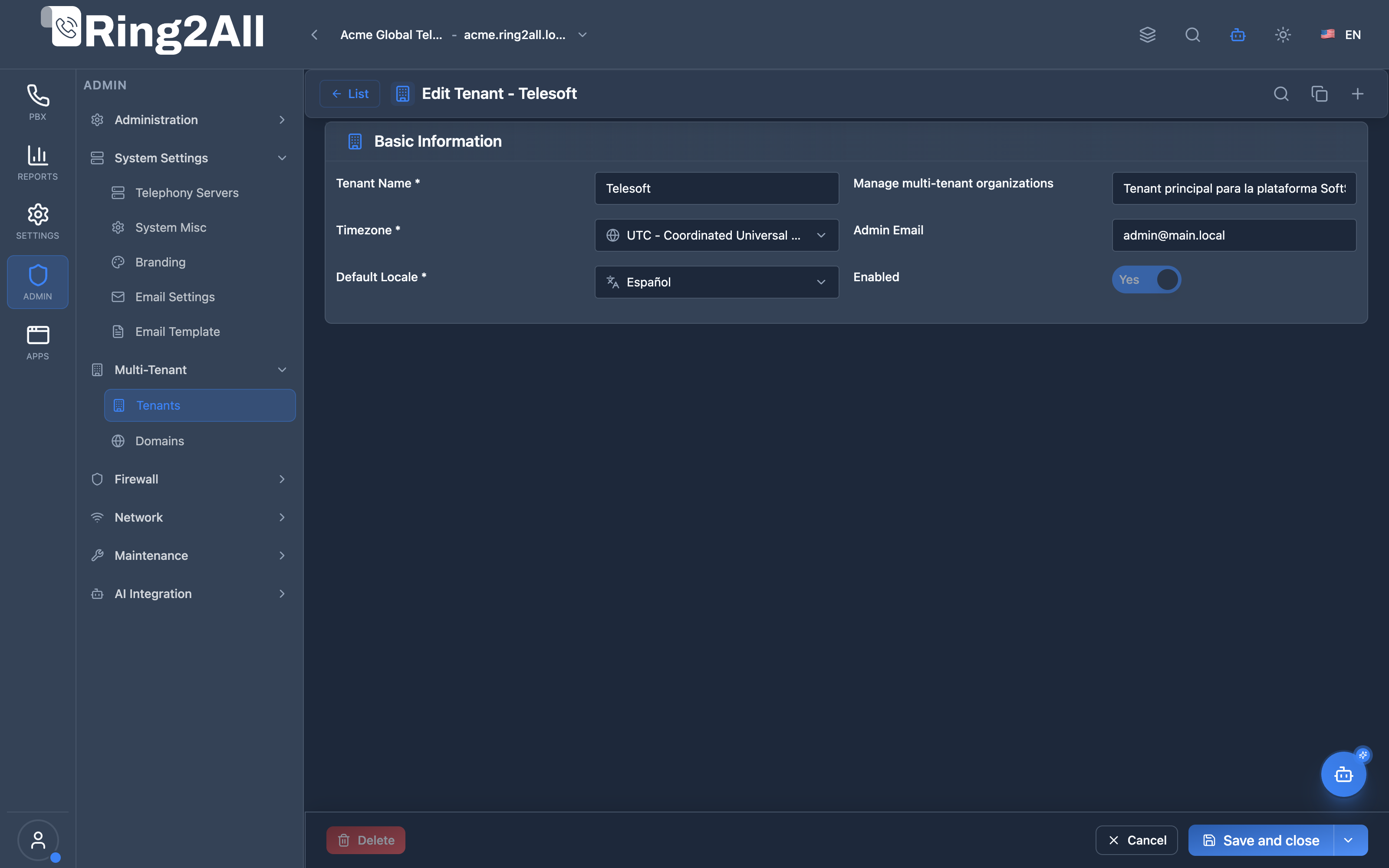
Section titled “Tenant Configuration Form”The tenant editor provides comprehensive organization controls, including corporate contact details, timezones, default locales, resource quotas (max extensions, queues, IVRs, conferences), billing currency, and automatic recording permissions.
1. Module Overview (Technical)
Section titled “1. Module Overview (Technical)”What Is the Tenants Module?
Section titled “What Is the Tenants Module?”Tenants is a multi-tenant management module that creates and manages isolated organizations within the platform. Each tenant has its own SIP domain, user access, resource limits, branding, and data retention policies.
Architecture
Section titled “Architecture”┌─────────────────────────────────────────────────────────────────┐│ Tenants Architecture │├─────────────────────────────────────────────────────────────────┤│ ││ Tenant Definition ││ ┌──────────────────────────────────────────────────────────┐ ││ │ Tenant: Acme Corporation │ ││ │ │ ││ │ Basic Info: │ ││ │ ├─ Name: Acme Corporation │ ││ │ ├─ Slug: acme-corp │ ││ │ ├─ Admin Email: admin@acme.com │ ││ │ └─ Status: Active │ ││ │ │ ││ │ Domain: │ ││ │ ├─ SIP Domain: acme.pbx.company.com │ ││ │ ├─ Voice Language: English │ ││ │ └─ Timezone: America/New_York │ ││ │ │ ││ │ Privileges: │ ││ │ ├─ Max Extensions: 100 │ ││ │ ├─ Max Trunks: 10 │ ││ │ ├─ Max Queues: 20 │ ││ │ └─ Recording: Allowed │ ││ │ │ ││ │ Retention: │ ││ │ ├─ Recordings: 90 days │ ││ │ ├─ Voicemails: 60 days │ ││ │ └─ CDR: 365 days │ ││ │ │ ││ └──────────────────────────────────────────────────────────┘ ││ │ ││ ▼ Creates isolated resources ││ ┌──────────────────────────────────────────────────────────┐ ││ │ Tenant Resources │ ││ │ │ ││ │ ├─ SIP Domain (Telephony Server) │ ││ │ ├─ Extensions, Ring Groups, Queues │ ││ │ ├─ Users, Roles │ ││ │ ├─ Routing (Inbound, Outbound, IVR) │ ││ │ ├─ Recordings, Voicemails, CDR │ ││ │ └─ Branding (Logo, Colors) │ ││ │ │ ││ └──────────────────────────────────────────────────────────┘ ││ │└─────────────────────────────────────────────────────────────────┘2. Module Overview (Commercial/Business)
Section titled “2. Module Overview (Commercial/Business)”Business Value
Section titled “Business Value”Tenants provides complete isolation:
| Without Tenants | With Tenants |
|---|---|
| Single organization | Multiple organizations |
| Shared resources | Isolated resources |
| No limits | Resource quotas |
| Single billing | Per-tenant capacity |
Use Cases
Section titled “Use Cases”-
Service Provider
- Multiple customers
- Per-customer billing
-
Enterprise Departments
- Separate divisions
- Isolated management
-
Reseller Model
- White-label tenants
- Customer self-management
-
Compliance
- Data isolation
- Separate retention
Feature Highlights
Section titled “Feature Highlights”| Feature | Benefit |
|---|---|
| Slug Identifier | Unique URL/API access |
| SIP Domain | Isolated telephony |
| Resource Limits | Capacity control |
| Retention Policies | Storage management |
| User Access | Admin assignment |
| Branding | Custom appearance |
3. Module Overview (End User/Administrator)
Section titled “3. Module Overview (End User/Administrator)”What Can You Do?
Section titled “What Can You Do?”- Create new tenants
- Configure SIP domains
- Set resource limits (extensions, trunks, queues)
- Assign tenant administrators
- Configure data retention
- Enable/disable tenants
- Duplicate existing tenants
Tenants Interface
Section titled “Tenants Interface”┌─────────────────────────────────────────────────────────────────┐│ Tenants │├─────────────────────────────────────────────────────────────────┤│ ││ Manage multi-tenant organizations ││ ││ [+ Add Tenant] ││ ││ [🔍 Search tenants...] ││ ││ ┌───────────────────────────────────────────────────────────┐ ││ │ Tenant Name │ Slug │ Users │ Status │ Created │ ││ ├─────────────────┼────────────┼───────┼─────────┼─────────┤ ││ │ Main ⭐ │ main │ 5 │ ● Active│ 2024-01 │ ││ │ Acme Corp │ acme-corp │ 25 │ ● Active│ 2024-06 │ ││ │ Beta Inc │ beta-inc │ 10 │ ● Active│ 2024-08 │ ││ │ Test Tenant │ test │ 2 │ ○ Inactive│ 2024-10│ ││ └───────────────────────────────────────────────────────────┘ ││ ││ ⭐ = Primary Tenant (cannot be deleted) ││ │└─────────────────────────────────────────────────────────────────┘Add/Edit Tenant - Tenant Information Tab
Section titled “Add/Edit Tenant - Tenant Information Tab”┌─────────────────────────────────────────────────────────────────┐│ Add Tenant │├─────────────────────────────────────────────────────────────────┤│ ││ [Tenant Information] [Domain Configuration] [User Access] ││ ││ ▼ Basic Information ││ ││ Tenant Name: [Acme Corporation ] ││ ││ Slug: [acme-corp ] ││ Lowercase letters, numbers, and hyphens only ││ ││ Admin Email: [admin@acme.com ] ││ ││ Enabled: ✓ ││ ││ ──────────────────────────────────────────────────────────────││ ││ ▼ Appearance ││ ││ Primary Color: [#3B82F6 ] [🎨] ││ Secondary Color: [#64748B ] [🎨] ││ Logo: [Upload...] ││ Favicon: [Upload...] ││ ││ ──────────────────────────────────────────────────────────────││ ││ ▼ Localization ││ ││ Default Locale: [English (US) ▼] ││ Timezone: [America/New_York ▼] ││ ││ ──────────────────────────────────────────────────────────────││ ││ ▼ Telephony Privileges ││ ││ Max Extensions: [100 ] Max Trunks: [10 ] ││ Max Queues: [20 ] Max IVR: [10 ] ││ Max Conferences: [5 ] Max Parking Lots: [5 ] ││ Allow Recording: ✓ ││ ││ ──────────────────────────────────────────────────────────────││ ││ ▼ Recording Retention ││ ││ Delete Oldest Recordings: [90 ] days ││ Delete Oldest Voicemails: [60 ] days ││ Delete Oldest CDR: [365 ] days ││ ││ [Next: Domain Configuration] ││ │└─────────────────────────────────────────────────────────────────┘Add/Edit Tenant - Domain Configuration Tab
Section titled “Add/Edit Tenant - Domain Configuration Tab”┌─────────────────────────────────────────────────────────────────┐│ Add Tenant │├─────────────────────────────────────────────────────────────────┤│ ││ [Tenant Information] [Domain Configuration] [User Access] ││ ││ Configure the telephony domain for this tenant ││ ││ Domain Name: [acme.pbx.company.com ] ││ Unique SIP domain (realm) for SIP registration ││ ││ Description: [Acme Corporation PBX ] ││ Brief description for identification ││ ││ Voice Language: [English ▼] ││ Language for voice prompts and announcements ││ ││ Default Timezone: [America/New_York ▼] ││ Sets the local timezone for voicemail and call logs ││ ││ Default Country Code: [+1 (US) ▼] ││ Used for caller ID normalization (E.164 format) ││ ││ [Back] [Next: User Access] ││ │└─────────────────────────────────────────────────────────────────┘Add/Edit Tenant - User Access Tab
Section titled “Add/Edit Tenant - User Access Tab”┌─────────────────────────────────────────────────────────────────┐│ Add Tenant │├─────────────────────────────────────────────────────────────────┤│ ││ [Tenant Information] [Domain Configuration] [User Access] ││ ││ Configure user access for this tenant ││ ││ ○ Use Current User ││ Use the current logged-in user as the tenant administrator ││ ││ ● Create New ││ ││ ──────────────────────────────────────────────────────────────││ ││ Username: [acme.admin ] ││ Email: [admin@acme.com ] ││ Password: [•••••••••• ] ││ Full Name: [John Smith ] ││ Department: [IT ] ││ ││ Locale: [English (US) ▼] ││ Timezone: [America/New_York ▼] ││ Startup Dialog: [Dashboard ▼] ││ ││ TOTP Enabled: ☐ Active: ✓ ││ ││ [Back] [Create Tenant] ││ │└─────────────────────────────────────────────────────────────────┘Quick Tips
Section titled “Quick Tips”[!TIP] Slug Format: Use lowercase, hyphens. Example:
acme-corp.
[!TIP] Domain Name: Must be unique SIP realm.
[!WARNING] Primary Tenant: The main tenant cannot be deleted.
🎯 User Roles & Key Capabilities
Section titled “🎯 User Roles & Key Capabilities”The Tenants module enforces strict multi-tenant access boundaries, aligning permissions according to administrative hierarchy:
| User Role | Key Permissions & Responsibilities | Common Tasks & Workflows |
|---|---|---|
| System Super Administrator | Full platform authority over all tenant organizations, licensing quotas, system-wide resource limits, and tenant provisioning. | Create new client organizations, set max extension/trunk limits, assign primary administrators, execute cross-tenant audits, delete inactive test tenants. |
| Tenant Administrator | Scoped administrative authority restricted exclusively to their assigned organization ID (tenant_id). |
Manage corporate users, configure organization branding, allocate extensions within assigned limits, supervise call recording retention, review department CDRs. |
| Telephony Operations Engineer | Multi-tenant telephony infrastructure management and SIP realm routing oversight. | Configure Telephony Server SIP domain bindings, verify carrier trunk allocations per organization, validate channel concurrency caps, monitor database partition health. |
| Security & Compliance Officer | Global audit trail inspection, data lifecycle enforcement, and tenant isolation compliance. | Validate recording and CDR retention rules, review tenant deletion logs, inspect MCP tool execution histories, verify zero cross-tenant data leakage. |
4. Configuration Sections
Section titled “4. Configuration Sections”Basic Information
Section titled “Basic Information”| Field | Description |
|---|---|
| Tenant Name | Display name |
| Slug | Unique URL identifier |
| Admin Email | Contact email |
| Enabled | Active/Inactive |
Appearance
Section titled “Appearance”| Field | Description |
|---|---|
| Primary Color | Main accent |
| Secondary Color | Background accent |
| Logo | Tenant logo |
| Favicon | Browser icon |
Localization
Section titled “Localization”| Field | Description |
|---|---|
| Default Locale | UI language |
| Timezone | Default timezone |
Telephony Privileges
Section titled “Telephony Privileges”| Field | Description |
|---|---|
| Max Extensions | Extension limit |
| Max Trunks | Trunk limit |
| Max Queues | Queue limit |
| Max IVR | IVR menu limit |
| Max Conferences | Conference limit |
| Max Parking Lots | Parking lot limit |
| Allow Recording | Enable/disable recording |
Recording Retention
Section titled “Recording Retention”| Field | Description |
|---|---|
| Delete Oldest Recordings | Days to keep recordings |
| Delete Oldest Voicemails | Days to keep voicemails |
| Delete Oldest CDR | Days to keep call records |
Domain Configuration
Section titled “Domain Configuration”| Field | Description |
|---|---|
| Domain Name | SIP domain (realm) |
| Description | Domain description |
| Voice Language | Prompt language |
| Default Timezone | Call log timezone |
| Default Country Code | E.164 normalization |
User Access
Section titled “User Access”| Field | Description |
|---|---|
| Use Current User | Assign current user |
| Create New | Create new admin |
| Username | Login username |
| User email | |
| Password | User password |
| Full Name | Display name |
5. Settings Reference
Section titled “5. Settings Reference”Resource Limit Guidelines
Section titled “Resource Limit Guidelines”| Resource | Small | Medium | Large |
|---|---|---|---|
| Extensions | 25 | 100 | 500+ |
| Trunks | 2 | 10 | 50+ |
| Queues | 5 | 20 | 100+ |
| IVR | 3 | 10 | 50+ |
| Conferences | 2 | 5 | 20+ |
Retention Guidelines
Section titled “Retention Guidelines”| Data Type | Minimum | Recommended | Maximum |
|---|---|---|---|
| Recordings | 30 days | 90 days | 365 days |
| Voicemails | 30 days | 60 days | 180 days |
| CDR | 90 days | 365 days | Unlimited |
Slug Requirements
Section titled “Slug Requirements”| Rule | Example |
|---|---|
| Lowercase | ✓ acme-corp |
| No spaces | ✗ acme corp |
| Hyphens allowed | ✓ acme-corp |
| Numbers allowed | ✓ acme123 |
| No special chars | ✗ acme_corp |
6. Common Scenarios & Examples
Section titled “6. Common Scenarios & Examples”Scenario 1: Create New Customer Tenant
Section titled “Scenario 1: Create New Customer Tenant”- Click Add Tenant
- Name = “Acme Corporation”
- Slug = “acme-corp”
- Set Enabled = ✓
- Configure limits (extensions, trunks)
- Set retention policies
- Next: Configure domain
- Next: Create admin user
- Save
Scenario 2: Duplicate Existing Tenant
Section titled “Scenario 2: Duplicate Existing Tenant”- Find similar tenant
- Click Duplicate
- Change name and slug
- Adjust limits as needed
- Save as new tenant
Scenario 3: Disable Tenant
Section titled “Scenario 3: Disable Tenant”- Edit tenant
- Enabled = ☐
- Save
- Users can’t access, data preserved
Scenario 4: Update Resource Limits
Section titled “Scenario 4: Update Resource Limits”- Edit tenant
- Increase Max Extensions
- Increase Max Trunks
- Save
- New limits apply immediately
7. Limitations & Important Notes
Section titled “7. Limitations & Important Notes”Technical Notes
Section titled “Technical Notes”[!NOTE] Primary Tenant: Cannot be deleted or disabled.
[!NOTE] Slug Immutable: Cannot change after creation.
[!WARNING] Domain Unique: Each tenant needs unique SIP domain.
Best Practices
Section titled “Best Practices”- Meaningful Slugs: Use company name
- Conservative Limits: Start small, increase as needed
- Retention Balance: Storage vs. compliance
- Admin Assignment: Always assign an admin
- Test First: Create test tenant before production
Multi-Tenant Isolation
Section titled “Multi-Tenant Isolation”| Isolated | Shared |
|---|---|
| Extensions | System settings |
| Routing | Templates |
| Users (per tenant) | Global users |
| CDR | Certificates |
| Recordings | HTTP server |
Model Context Protocol (MCP) AI Integration
Section titled “Model Context Protocol (MCP) AI Integration”The Tenants module connects directly to the Ring2All Platform Copilot MCP Server, enabling natural language organization management with automated multi-tenant RBAC enforcement:
🛠️ Available MCP Tools
Section titled “🛠️ Available MCP Tools”| Tool Name | Operation | Access Level | Description | Key Parameters |
|---|---|---|---|---|
list_tenants |
Read | SuperAdmin / Tenant Admin | Retrieves all tenant organizations accessible to the active user context with extension quotas and active statuses. | search (string, optional) |
get_tenant_status |
Read | SuperAdmin / Tenant Admin | Inspects comprehensive configuration for a specific organization, including contact details, quotas, and assigned domains. | tenantId (number, required) |
create_tenant |
Write | SuperAdmin Only | Provisions a new tenant organization with isolated database records, resource caps, and initial primary admin binding. | name (string), slug (string), email (string), maxExtensions (number), maxTrunks (number) |
update_tenant |
Write | SuperAdmin / Tenant Admin | Updates organization parameters, contact emails, resource quotas, or activation status. | tenantId (number), name (string), email (string), isEnabled (boolean), maxExtensions (number) |
delete_tenant |
Delete (Guarded) | SuperAdmin Only | Deletes a tenant organization and archives orphaned configuration (prohibits primary tenant deletion). | tenantId (number, required) |
📋 JSON Tool Schemas & Sample Executions
Section titled “📋 JSON Tool Schemas & Sample Executions”list_tenants
Section titled “list_tenants”{ "name": "list_tenants", "arguments": { "search": "Acme" }}Sample Successful Response:
{ "success": true, "data": { "total": 1, "tenants": [ { "id": 104, "name": "Acme Corporation", "slug": "acme-corp", "adminEmail": "admin@acme.com", "isEnabled": true, "isPrimary": false, "maxExtensions": 100, "maxTrunks": 10, "createdAt": "2026-03-15T09:30:00Z" } ] }}get_tenant_status
Section titled “get_tenant_status”{ "name": "get_tenant_status", "arguments": { "tenantId": 104 }}Sample Successful Response:
{ "success": true, "data": { "tenant": { "id": 104, "name": "Acme Corporation", "slug": "acme-corp", "adminEmail": "admin@acme.com", "timezone": "America/New_York", "voiceLanguage": "en", "isEnabled": true, "maxExtensions": 100, "maxTrunks": 10, "activeExtensions": 42, "associatedDomains": [ { "id": 28, "domainName": "acme.pbx.company.com", "enabled": true } ] } }}💬 Natural Language Prompt Examples
Section titled “💬 Natural Language Prompt Examples”English Prompts
Section titled “English Prompts”- “List all active tenants in the PBX and show their extension limits.”
- “Get detailed organization status and associated domains for tenant ID 104.”
- “Create a new tenant named ‘Global Logistics’ with slug ‘global-logistics’, admin email ‘noc@globallogistics.com’, and a cap of 50 extensions.”
- “Update the maximum extension limit for Acme Corporation to 150 extensions.”
- “Check if tenant ‘Beta Inc’ has exceeded its trunk or extension allocation.”
Ejemplos en Español (Spanish Prompts)
Section titled “Ejemplos en Español (Spanish Prompts)”- “Lista todas las empresas inquilinas (tenants) activas en la centralita con sus límites de extensiones.”
- “Obtén el estado detallado y dominios asociados para el tenant con ID 104.”
- “Crea una nueva organización llamada ‘Logística Global’ con slug ‘logistica-global’, correo ‘noc@logisticaglobal.com’ y límite de 50 extensiones.”
- “Actualiza el cupo máximo de extensiones de Acme Corporation a 150 extensiones.”
- “Verifica si el tenant ‘Beta Inc’ ha alcanzado su límite de troncales o extensiones.”
🛡️ Enterprise Safeguards & Best Practices
Section titled “🛡️ Enterprise Safeguards & Best Practices”- Primary Tenant Protection: The default primary organization (
id = 1oris_primary = true) can never be deleted or disabled via MCP or Web API, guaranteeing uninterrupted system services. - Strict Multi-Tenant Scoping: All queries executed by non-SuperAdmin users automatically inject
WHERE tenant_id = context.tenantIdinto SQL execution layers, preventing cross-tenant leakage. - Immutable Numeric Identifiers: Tool arguments and database transactions strictly utilize immutable numeric IDs (
tenantId: number), never mutable slugs or company names. - Quota Over-Allocation Prevention: When updating resource limits, the system verifies that newly requested limits are not lower than currently provisioned active resources.
8. Troubleshooting Tips
Section titled “8. Troubleshooting Tips”Common Issues
Section titled “Common Issues”| Symptom | Possible Cause | Solution |
|---|---|---|
| Slug exists | Duplicate slug | Use different slug |
| Domain exists | Duplicate domain | Use different domain |
| Can’t delete | Primary tenant | Cannot delete main |
| User can’t access | Tenant disabled | Enable tenant |
Check Tenant
Section titled “Check Tenant”SELECT name, slug, is_enabled, max_extensions, max_trunksFROM public.tenantsWHERE slug = 'acme-corp';Check Domain
Section titled “Check Domain”SELECT domain, description, languageFROM telephony.domainsWHERE tenant_id = 'tenant-uuid';9. Glossary
Section titled “9. Glossary”| Term | Definition |
|---|---|
| Tenant | Isolated organization |
| Slug | URL-safe identifier |
| SIP Domain | Telephony realm |
| Privileges | Resource limits |
| Retention | Data lifecycle |
| Multi-tenant | Multiple organizations |
Documentation last updated: January 2026