

CDR Filters Module Documentation
Table of Contents
Section titled “Table of Contents”- Navigation & Access
- Screenshots & Visual Interface
- Module Overview (Technical)
- Module Overview (Commercial/Business)
- Module Overview (End User/Administrator)
- Configuration Fields Reference
- Search Conditions
- Common Scenarios & Examples
- Limitations & Important Notes
- Troubleshooting Tips
- Glossary
- Model Context Protocol (MCP) AI Integration
Navigation & Access
Section titled “Navigation & Access”To access the CDR Filters configuration console:
- Log in to the Ring2All Web Portal (
https://<domain-or-ip>/login). - In the left navigation sidebar, expand Reports.
- Under CDR Reports, click CDR Filters (
/reports/cdr/filters). - To create a new reusable search filter template, click the + Add Filter button (
/reports/cdr/filters/new).
Screenshots & Visual Interface
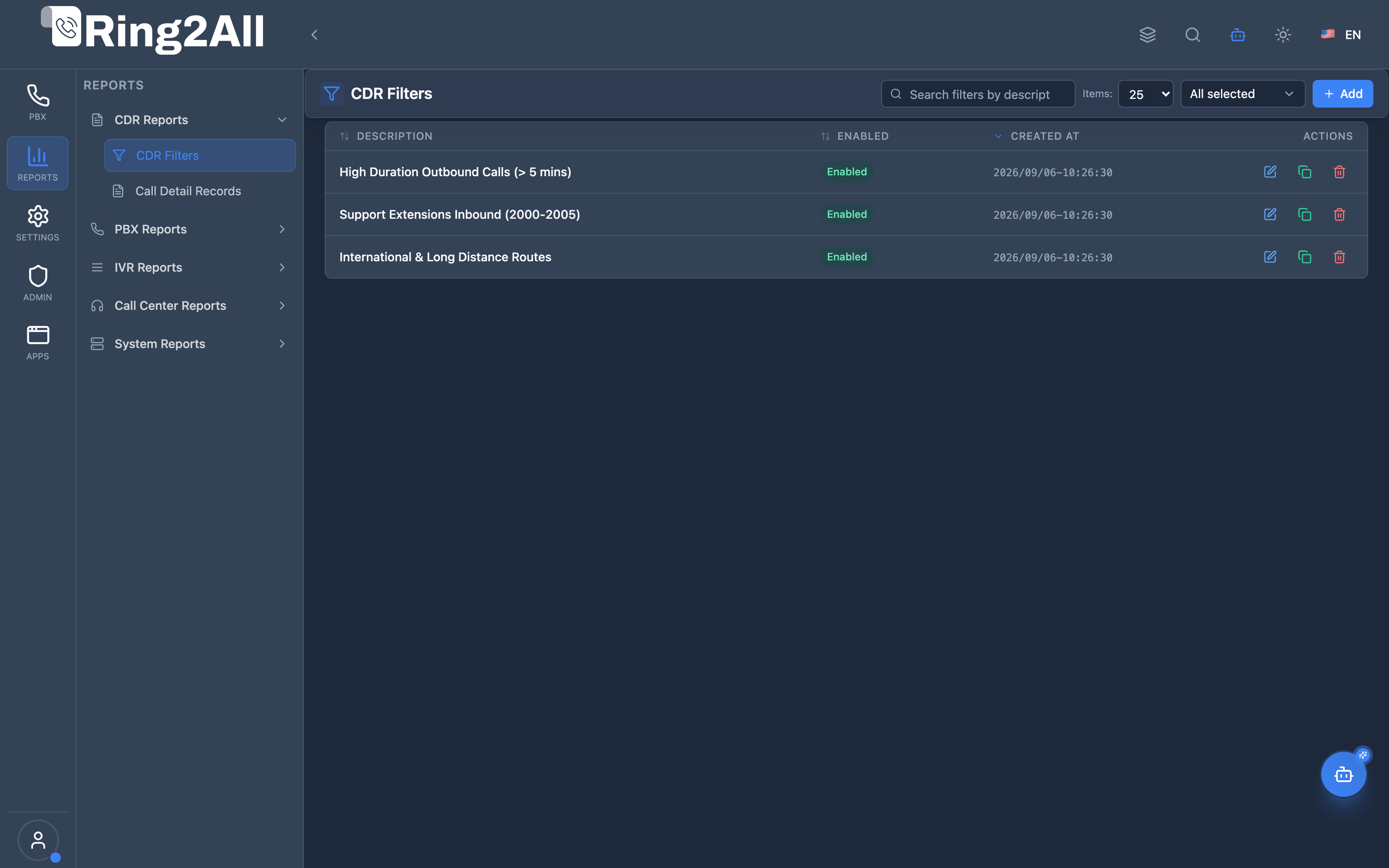
Section titled “Screenshots & Visual Interface”CDR Filters Management Directory
Section titled “CDR Filters Management Directory”Centralized repository displaying all saved search filter presets, detailed descriptions, match criteria rules, creation dates, and fast-action query links.
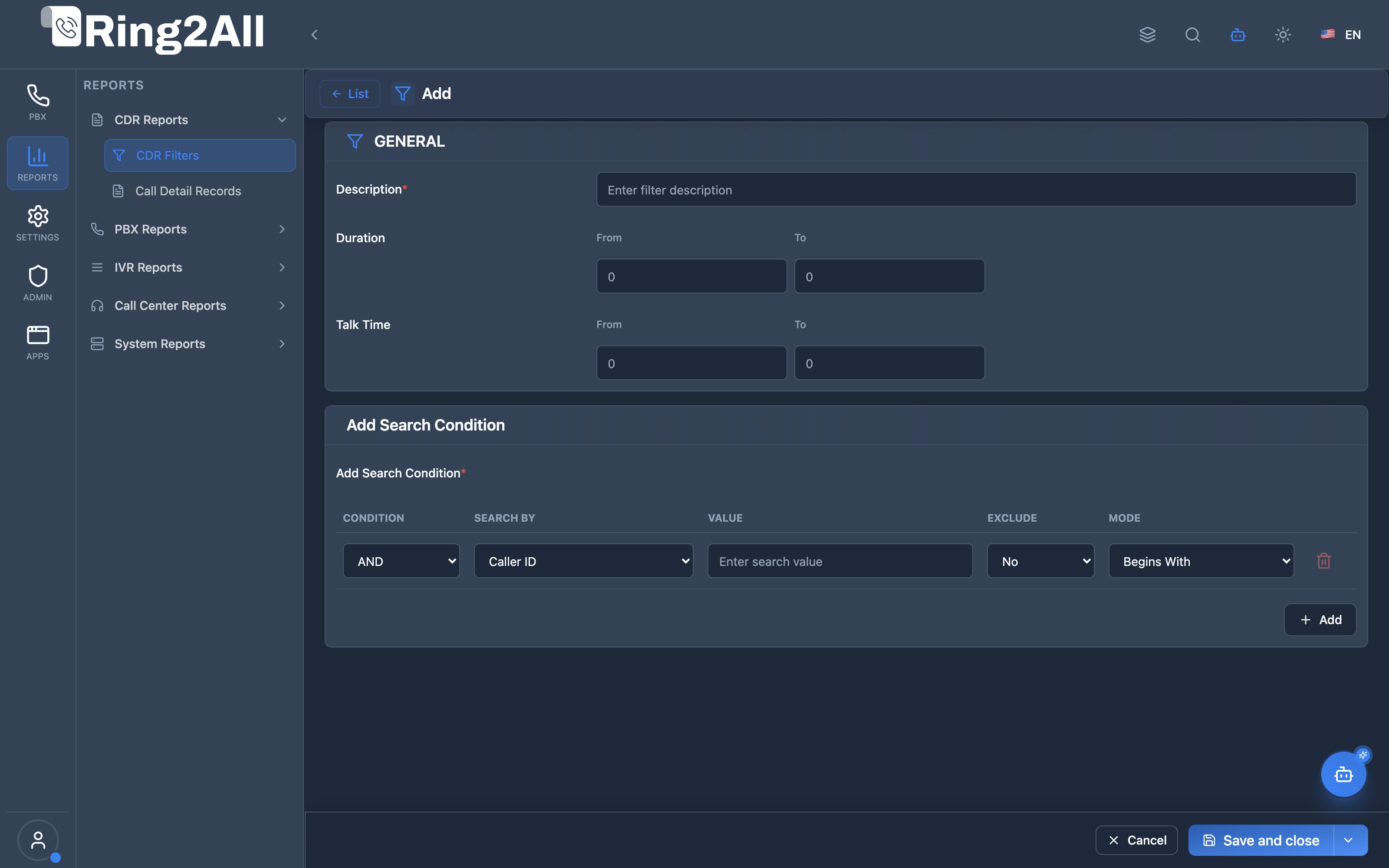
CDR Filter Definition & Rule Builder Form
Section titled “CDR Filter Definition & Rule Builder Form”Intuitive query builder interface allowing administrators to combine duration ranges, talk time boundaries, and multi-field logical operators (AND/OR, begins with, ends with, exactly matches).
1. Module Overview (Technical)
Section titled “1. Module Overview (Technical)”What Are CDR Filters?
Section titled “What Are CDR Filters?”CDR Filters are saved search configurations for querying Call Detail Records (CDR). They allow administrators to create reusable filter templates with multiple conditions that can be applied to CDR reports.
Architecture
Section titled “Architecture”┌─────────────────────────────────────────────────────────────────┐│ CDR Filters System │├─────────────────────────────────────────────────────────────────┤│ ││ Filter Definition ││ ┌──────────────────────────────────────────────────────────┐ ││ │ CDR Filter │ ││ │ │ ││ │ Description: "Failed Outbound Calls" │ ││ │ │ ││ │ Conditions: │ ││ │ ├─ call_type = "outbound" │ ││ │ ├─ AND hangup_cause != "NORMAL_CLEARING" │ ││ │ └─ AND duration > 0 │ ││ │ │ ││ └──────────────────────────────────────────────────────────┘ ││ │ ││ ▼ Applied to CDR Query ││ ┌──────────────────────────────────────────────────────────┐ ││ │ CDR Report │ ││ │ │ ││ │ SELECT * FROM cdr │ ││ │ WHERE call_type = 'outbound' │ ││ │ AND hangup_cause != 'NORMAL_CLEARING' │ ││ │ AND duration > 0 │ ││ │ │ ││ └──────────────────────────────────────────────────────────┘ ││ │└─────────────────────────────────────────────────────────────────┘2. Module Overview (Commercial/Business)
Section titled “2. Module Overview (Commercial/Business)”Business Value
Section titled “Business Value”CDR Filters provides reusable report templates:
| Without CDR Filters | With CDR Filters |
|---|---|
| Manual search each time | Saved filters |
| Complex queries | One-click apply |
| Error-prone | Consistent results |
| Time consuming | Quick access |
Use Cases
Section titled “Use Cases”-
Failed Call Analysis
- Filter by hangup cause
- Identify problem areas
-
Traffic Type Reports
- Outbound only
- Inbound only
-
Customer/Account Analysis
- Filter by account code
- Customer code reports
-
Compliance Auditing
- Duration thresholds
- Specific destinations
Feature Highlights
Section titled “Feature Highlights”| Feature | Benefit |
|---|---|
| Multiple Conditions | Complex filtering |
| AND/OR Logic | Flexible queries |
| Search Modes | Begins/Contains/Ends/Exact |
| Exclude Option | Negative matching |
| Saved Filters | Reusable templates |
| Duration/Talk Time | Time-based filters |
3. Module Overview (End User/Administrator)
Section titled “3. Module Overview (End User/Administrator)”What Can You Do?
Section titled “What Can You Do?”- Create saved CDR filters
- Add multiple search conditions
- Combine with AND/OR logic
- Filter by duration/talk time
- Exclude matching records
- Apply filters to CDR reports
CDR Filter Configuration
Section titled “CDR Filter Configuration”┌─────────────────────────────────────────────────────────────────┐│ Create CDR Filter │├─────────────────────────────────────────────────────────────────┤│ ││ Section: GENERAL ││ ├─ Description: Failed Outbound Calls ││ ├─ Duration From: [0 ] To: [ ] seconds ││ └─ Talk Time From: [ ] To: [ ] seconds ││ ││ Section: Add Search Condition ││ ┌──────────────────────────────────────────────────────────┐ ││ │ Condition │ Search By │ Mode │ Value │ Exclude │ ││ ├───────────┼──────────────┼─────────┼───────────┼─────────┤ ││ │ -- │ Call Type │ Exactly │ Outbound │ No │ ││ │ AND │ Hangup Cause │ Exactly │ NORMAL... │ Yes │ ││ └──────────────────────────────────────────────────────────┘ ││ ││ [+ Add] condition ││ ││ [Save] [Cancel] ││ │└─────────────────────────────────────────────────────────────────┘Quick Tips
Section titled “Quick Tips”[!TIP] Combine Conditions: Use AND for all conditions must match, OR for any match.
[!TIP] Exclude: Use exclude to filter OUT specific values.
[!CAUTION] At Least One: At least one search condition is required.
4. Configuration Fields Reference
Section titled “4. Configuration Fields Reference”General Settings
Section titled “General Settings”| Field | Description | Example |
|---|---|---|
| Description | Filter name | Failed Outbound |
| Duration From | Minimum duration (seconds) | 0 |
| Duration To | Maximum duration (seconds) | 300 |
| Talk Time From | Minimum talk time | 0 |
| Talk Time To | Maximum talk time | 60 |
Condition Fields
Section titled “Condition Fields”| Field | Description |
|---|---|
| Condition | AND or OR |
| Search By | Field to search |
| Mode | Match type |
| Value | Search value |
| Exclude | Exclude matches |
5. Search Conditions
Section titled “5. Search Conditions”Search By Options
Section titled “Search By Options”| Field | Description |
|---|---|
| Caller ID | Caller ID number |
| Source | Source number |
| Destination | Called number |
| DID | Inbound DID |
| Account Code | Account code |
| Customer Code | Customer code |
| Hangup Cause | Call termination reason |
| Call Type | Inbound/Outbound/Internal |
Call Types
Section titled “Call Types”| Type | Description |
|---|---|
| Inbound | Incoming calls |
| Outbound | Outgoing calls |
| Internal | Extension to extension |
| Transit | Pass-through calls |
Match Modes
Section titled “Match Modes”| Mode | Description | Example |
|---|---|---|
| Begins With | Starts with value | 555* |
| Contains | Contains value | *555* |
| Ends With | Ends with value | *555 |
| Exactly | Exact match | 555 |
Common Hangup Causes
Section titled “Common Hangup Causes”| Cause | Description |
|---|---|
| NORMAL_CLEARING | Normal call end |
| USER_BUSY | Busy signal |
| NO_ANSWER | No answer |
| CALL_REJECTED | Call rejected |
| ORIGINATOR_CANCEL | Caller hung up |
| USER_NOT_REGISTERED | Extension offline |
6. Common Scenarios & Examples
Section titled “6. Common Scenarios & Examples”Scenario 1: Failed Outbound Calls
Section titled “Scenario 1: Failed Outbound Calls”Filter:
| Setting | Value |
|---|---|
| Description | Failed Outbound Calls |
| Condition 1 | Call Type = Outbound |
| Condition 2 | AND Hangup Cause != NORMAL_CLEARING |
Scenario 2: Long Duration Calls
Section titled “Scenario 2: Long Duration Calls”Filter:
| Setting | Value |
|---|---|
| Description | Long Calls (>1 hour) |
| Duration From | 3600 |
| Condition | Call Type = Outbound |
Scenario 3: Specific Customer
Section titled “Scenario 3: Specific Customer”Filter:
| Setting | Value |
|---|---|
| Description | Customer ABC Calls |
| Condition | Customer Code = ABC |
Scenario 4: International Calls
Section titled “Scenario 4: International Calls”Filter:
| Setting | Value |
|---|---|
| Description | International Outbound |
| Condition 1 | Call Type = Outbound |
| Condition 2 | AND Destination Begins With 011 |
Scenario 5: Unanswered Calls
Section titled “Scenario 5: Unanswered Calls”Filter:
| Setting | Value |
|---|---|
| Description | Unanswered Inbound |
| Condition 1 | Call Type = Inbound |
| Condition 2 | AND Hangup Cause = NO_ANSWER |
7. Limitations & Important Notes
Section titled “7. Limitations & Important Notes”Technical Notes
Section titled “Technical Notes”[!NOTE] Filter Only: This module creates filters - apply them in CDR reports.
[!NOTE] Domain Scoped: Filters are per-domain.
[!WARNING] One Condition Minimum: At least one search condition required.
Best Practices
Section titled “Best Practices”- Descriptive Names: Clear filter descriptions
- Test Filters: Verify results before relying on
- Keep Simple: Start with few conditions
- Document Purpose: Note why filter was created
- Regular Review: Remove unused filters
8. Troubleshooting Tips
Section titled “8. Troubleshooting Tips”Common Issues
Section titled “Common Issues”| Symptom | Possible Cause | Solution |
|---|---|---|
| No results | Too restrictive | Loosen conditions |
| Too many results | Too broad | Add more conditions |
| Wrong data | Wrong field | Check search by field |
| Save fails | Missing description | Add description |
| Not working | Filter disabled | Enable filter |
Validation Errors
Section titled “Validation Errors”| Error | Meaning |
|---|---|
descriptionRequired |
Add a description |
atLeastOneCondition |
Add at least one condition |
Diagnostic SQL
Section titled “Diagnostic SQL”List CDR filters:
SELECT id, description, enabled, created_atFROM public.cdr_filtersWHERE domain_id = [domain_id]ORDER BY created_at DESC;9. Glossary
Section titled “9. Glossary”| Term | Definition |
|---|---|
| CDR | Call Detail Record |
| Filter | Saved search configuration |
| Condition | Single search criterion |
| AND/OR | Logical operators |
| Hangup Cause | Call termination reason |
| Call Type | Inbound/Outbound/Internal |
10. Model Context Protocol (MCP) AI Integration
Section titled “10. Model Context Protocol (MCP) AI Integration”The Ring2All Platform Copilot enables telecom supervisors and billing accountants to query saved CDR search filters, inspect configured filter criteria, and run automated call report audits via the Model Context Protocol (MCP).
Exposed MCP Tools
Section titled “Exposed MCP Tools”| Tool Name | Operation | Primary Parameters | Description |
|---|---|---|---|
list_cdr_saved_filters |
Saved Filters Inventory | None | Lists all saved CDR search filter presets in the active domain (description, enabled status, criteria conditions, and creation dates). |
query_cdrs |
Execute CDR Filter Query | search (string, optional), status (string, optional), direction (string, optional), limit (number) |
Runs dynamic call queries reflecting the saved filter parameters against ss_cdr.cdr. |
Operational Safeguards & Data Uniqueness
Section titled “Operational Safeguards & Data Uniqueness”- Domain Isolation: Filter configurations belong strictly to the authenticated
domain_id. Users cannot view or overwrite filters from other tenant organizations. - Collision Protection: Filter descriptions must be unique within the domain (
ILIKEuniqueness check incdrFilterService). Duplicate filter descriptions are rejected. - Read-Only Inspection: Copilot reads filter definitions and call records without modifying historical audit data.
Example MCP Payloads
Section titled “Example MCP Payloads”1. Listing Saved CDR Filters (list_cdr_saved_filters)
Section titled “1. Listing Saved CDR Filters (list_cdr_saved_filters)”{}Response:
{ "success": true, "data": { "total": 3, "filters": [ { "id": 14, "description": "Long Outbound Calls (> 30 min)", "enabled": true, "conditions": [ { "field": "direction", "operator": "equals", "value": "outbound" }, { "field": "billsec", "operator": "greater_than", "value": "1800" } ], "createdAt": "2026-08-15T10:20:00.000Z" }, { "id": 15, "description": "Failed International Calls", "enabled": true, "conditions": [ { "field": "hangup_cause", "operator": "not_equals", "value": "NORMAL_CLEARING" } ], "createdAt": "2026-08-20T14:45:00.000Z" } ] }}2. Running a Filtered Query Based on Saved Template (query_cdrs)
Section titled “2. Running a Filtered Query Based on Saved Template (query_cdrs)”{ "direction": "outbound", "status": "ANSWERED", "limit": 25}Copilot Natural Language Prompts
Section titled “Copilot Natural Language Prompts”- “What saved CDR search filters are currently available in this domain?”
- “Show me the criteria configured for the ‘Long Outbound Calls’ filter.”
- “Execute a query using our ‘Failed International Calls’ filter conditions.”
- “Are there any inactive CDR filters that should be reviewed?”
Documentation last updated: January 2026