

Fax Devices Module Documentation
Table of Contents
Section titled “Table of Contents”- Navigation & Access
- Screenshots & Visual Interface
- Module Overview (Technical)
- Module Overview (Commercial/Business)
- Module Overview (End User/Administrator)
- Configuration Fields Reference
- Device Types
- Common Scenarios & Examples
- Limitations & Important Notes
- Model Context Protocol (MCP) AI Integration
- Troubleshooting Tips
- Glossary
Navigation & Access
Section titled “Navigation & Access”To access the Fax Devices management module:
- Log in to the Ring2All Web Portal (
https://<domain-or-ip>/login). - In the left navigation sidebar, expand PBX Engine.
- Under Virtual Faxes, click Fax Devices (
/pbx/virtual-faxes/devices). - To provision a new virtual or physical fax endpoint, click the + Add Fax Device button (
/pbx/virtual-faxes/devices/new).
Screenshots & Visual Interface
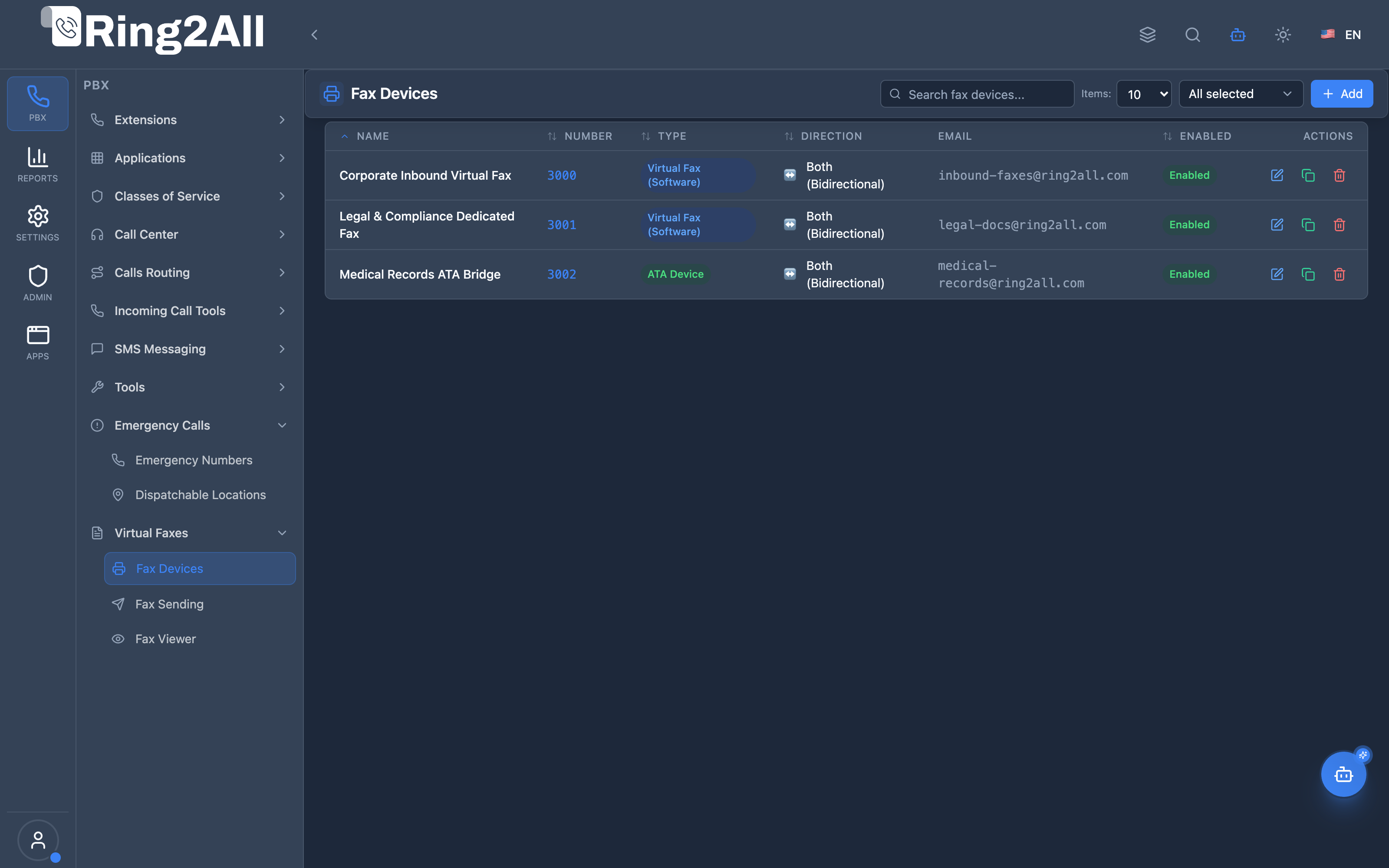
Section titled “Screenshots & Visual Interface”Fax Devices Management Directory
Section titled “Fax Devices Management Directory”Overview table displaying all configured virtual faxes and ATA hardware bridges, showing extension numbers, endpoints, protocol modes (T.38 / ECM), target email routing, and operational status.
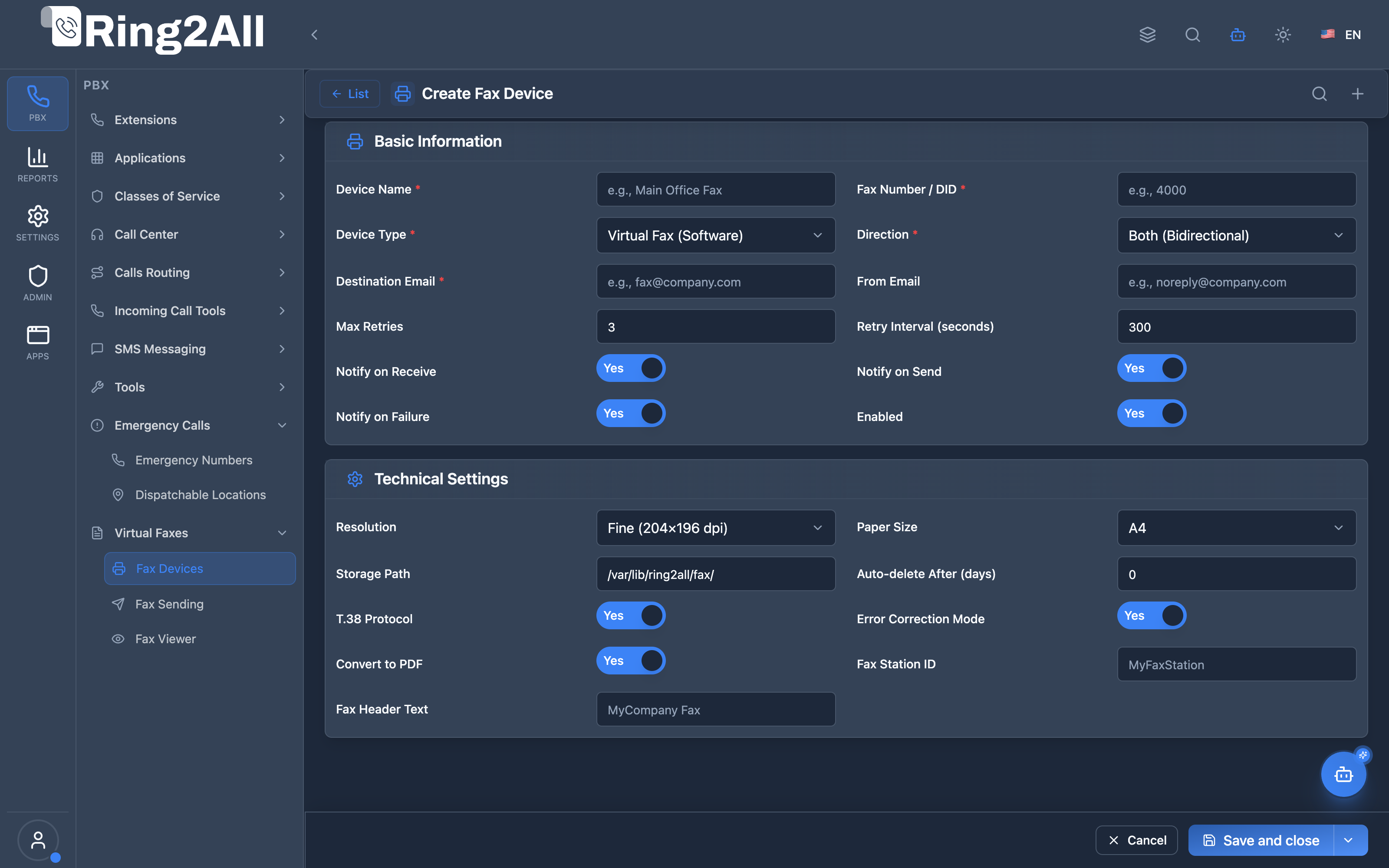
Fax Device Configuration & Provisioning Form
Section titled “Fax Device Configuration & Provisioning Form”Comprehensive endpoint configuration form covering SIP identification, transmission parameters, T.38 FoIP settings, automated PDF generation, retry thresholds, and notification routing.
1. Module Overview (Technical)
Section titled “1. Module Overview (Technical)”What Are Fax Devices?
Section titled “What Are Fax Devices?”Fax Devices are virtual or physical fax endpoints that handle inbound and outbound fax transmission using Telephony Server’s fax engine (mod_spandsp). Received faxes are stored, optionally converted to PDF, and can be emailed to recipients.
Architecture
Section titled “Architecture”┌─────────────────────────────────────────────────────────────────┐│ Fax System Architecture │├─────────────────────────────────────────────────────────────────┤│ ││ Inbound Fax Call ││ │ ││ ▼ ││ ┌──────────────────────────────────────────────────────────┐ ││ │ routing/fax.lua │ ││ │ │ ││ │ 1. Detect call context (inbound/internal) │ ││ │ 2. Get fax device number │ ││ │ 3. Route to fax_receive.lua │ ││ │ │ ││ └──────────────────────────────────────────────────────────┘ ││ │ ││ ▼ ││ ┌──────────────────────────────────────────────────────────┐ ││ │ fax/fax_receive.lua │ ││ │ │ ││ │ 1. Load fax device config from public.fax_devices │ ││ │ 2. Configure T.38 / ECM settings │ ││ │ 3. Answer call, receive fax (rxfax) │ ││ │ 4. Store TIFF file │ ││ │ 5. Convert to PDF (if enabled) │ ││ │ 6. Send email notification │ ││ │ 7. Log to public.fax_logs │ ││ │ │ ││ └──────────────────────────────────────────────────────────┘ ││ ││ Outbound Fax ││ ┌──────────────────────────────────────────────────────────┐ ││ │ fax/fax_send.lua │ ││ │ │ ││ │ 1. Load document to send │ ││ │ 2. Configure T.38 / retry settings │ ││ │ 3. Originate call, send fax (txfax) │ ││ │ 4. Log result, send notification │ ││ │ │ ││ └──────────────────────────────────────────────────────────┘ ││ │└─────────────────────────────────────────────────────────────────┘2. Module Overview (Commercial/Business)
Section titled “2. Module Overview (Commercial/Business)”Business Value
Section titled “Business Value”Fax Devices provides virtual fax capability:
| Without Fax Module | With Fax Module |
|---|---|
| Physical fax machines | Virtual software fax |
| Paper documents | PDF delivery |
| No email integration | Email to recipient |
| Manual monitoring | Automatic logging |
Use Cases
Section titled “Use Cases”-
Email-to-Fax
- Receive faxes as email attachments
- PDF format for easy viewing
-
Inbound Fax Lines
- Dedicated fax DIDs
- Multiple departments
-
Outbound Faxing
- Send from web interface
- Automatic retries
-
Fax Archive
- Storage and logging
- Compliance records
Feature Highlights
Section titled “Feature Highlights”| Feature | Benefit |
|---|---|
| T.38 Support | Reliable FoIP |
| ECM | Error correction |
| PDF Conversion | Easy viewing |
| Email Delivery | Paperless fax |
| Auto Retry | Reliable sending |
| Resolution Options | Quality control |
3. Module Overview (End User/Administrator)
Section titled “3. Module Overview (End User/Administrator)”What Can You Do?
Section titled “What Can You Do?”- Configure virtual fax devices
- Set up email delivery
- Enable T.38 and ECM
- Configure auto-retry
- View fax logs
- Send outbound faxes
Fax Device Configuration
Section titled “Fax Device Configuration”┌─────────────────────────────────────────────────────────────────┐│ Create Fax Device │├─────────────────────────────────────────────────────────────────┤│ ││ Tab: Basic ││ ├─ Device Name: Main Office Fax ││ ├─ Fax Number / DID: 4000 ││ ├─ Device Type: [Virtual Fax (Software) ▼] ││ ├─ Direction: [Both (Bidirectional) ▼] ││ └─ Enabled: ✓ ││ ││ Section: Email Configuration ││ ├─ Destination Email: fax@company.com ││ └─ From Email: noreply@company.com ││ ││ Tab: Technical Settings ││ ├─ T.38 Protocol: ✓ ││ ├─ Error Correction Mode: ✓ ││ ├─ Resolution: Fine (204×196 dpi) ││ ├─ Paper Size: Letter ││ ├─ Convert to PDF: ✓ ││ └─ Storage Path: /var/lib/ring2all/fax/ ││ ││ Section: Retry Configuration ││ ├─ Max Retries: 3 ││ └─ Retry Interval: 300 seconds ││ ││ Section: Notifications ││ ├─ Notify on Receive: ✓ ││ ├─ Notify on Send: ✓ ││ └─ Notify on Failure: ✓ ││ ││ [Save] [Cancel] ││ │└─────────────────────────────────────────────────────────────────┘Quick Tips
Section titled “Quick Tips”[!TIP] Enable T.38: T.38 provides more reliable fax over IP.
[!TIP] Convert to PDF: PDF is easier to view than TIFF.
[!CAUTION] Storage: Ensure adequate disk space for fax storage.
4. Configuration Fields Reference
Section titled “4. Configuration Fields Reference”Basic Information
Section titled “Basic Information”| Field | Description | Example |
|---|---|---|
| Device Name | Identifier | Main Office Fax |
| Fax Number / DID | Fax line number | 4000 |
| Device Type | Endpoint type | Virtual, ATA, Trunk |
| Direction | Inbound/Outbound/Both | Both |
| Enabled | Active status | On/Off |
Email Configuration
Section titled “Email Configuration”| Field | Description | Example |
|---|---|---|
| Destination Email | Where to send faxes | fax@company.com |
| From Email | Sender address | noreply@company.com |
Technical Settings
Section titled “Technical Settings”| Field | Description |
|---|---|
| T.38 Protocol | Enable T.38 FoIP |
| ECM | Error Correction Mode |
| Resolution | Standard/Fine/SuperFine |
| Paper Size | Letter/A4/Legal |
| Convert to PDF | Auto-convert TIFF to PDF |
| Storage Path | Fax file directory |
| Auto-delete After | Days to keep files |
Retry Configuration
Section titled “Retry Configuration”| Field | Description | Default |
|---|---|---|
| Max Retries | Retry attempts | 3 |
| Retry Interval | Seconds between retries | 300 |
Notifications
Section titled “Notifications”| Field | Description |
|---|---|
| Notify on Receive | Email when fax received |
| Notify on Send | Email on successful send |
| Notify on Failure | Email on failure |
5. Device Types
Section titled “5. Device Types”Virtual Fax (Software)
Section titled “Virtual Fax (Software)”| Property | Description |
|---|---|
| Engine | Telephony Server mod_spandsp |
| Protocol | T.38 or G.711 passthrough |
| Use Case | Pure software fax |
ATA Device
Section titled “ATA Device”| Property | Description |
|---|---|
| Engine | External ATA adapter |
| Connection | SIP to ATA |
| Use Case | Physical fax machine |
SIP Trunk
Section titled “SIP Trunk”| Property | Description |
|---|---|
| Engine | External fax service |
| Connection | SIP trunk |
| Use Case | Cloud fax service |
Resolutions
Section titled “Resolutions”| Resolution | DPI | Quality |
|---|---|---|
| Standard | 204×98 | Fast, lower quality |
| Fine | 204×196 | Recommended |
| SuperFine | 300 | Highest quality |
6. Common Scenarios & Examples
Section titled “6. Common Scenarios & Examples”Scenario 1: Department Fax Line
Section titled “Scenario 1: Department Fax Line”Device:
| Setting | Value |
|---|---|
| Name | Sales Fax |
| Number | 4001 |
| Type | Virtual |
| Direction | Both |
| Email To | sales@company.com |
| T.38 | ✓ |
| ✓ |
Scenario 2: Receive-Only Fax
Section titled “Scenario 2: Receive-Only Fax”Device:
| Setting | Value |
|---|---|
| Name | Reception Fax |
| Number | 4000 |
| Direction | Inbound Only |
| Email To | reception@company.com |
| Notify Receive | ✓ |
Scenario 3: High-Volume Fax
Section titled “Scenario 3: High-Volume Fax”Device:
| Setting | Value |
|---|---|
| Name | High Volume |
| Resolution | Standard (faster) |
| Max Retries | 5 |
| Auto-delete | 30 days |
7. Limitations & Important Notes
Section titled “7. Limitations & Important Notes”Technical Notes
Section titled “Technical Notes”[!NOTE] T.38 Support: Both endpoints must support T.38 for FoIP mode.
[!NOTE] G.711 Fallback: Falls back to audio mode if T.38 fails.
[!WARNING] Network Quality: Fax is sensitive to packet loss and jitter.
Best Practices
Section titled “Best Practices”- Enable T.38: More reliable than audio
- Enable ECM: Corrects transmission errors
- Use Fine Resolution: Good balance
- Enable PDF: Easier viewing
- Monitor Storage: Clean up old faxes
8. Model Context Protocol (MCP) AI Integration
Section titled “8. Model Context Protocol (MCP) AI Integration”The Ring2All Platform Copilot connects to the Virtual Fax engine via the Model Context Protocol (MCP), providing conversational provisioning, parameter updates, diagnostic status inspections, and number validation for Fax-to-Email endpoints.
Exposed MCP Tools
Section titled “Exposed MCP Tools”| Tool Name | Operation | Primary Parameters | Description |
|---|---|---|---|
list_fax_devices |
Directory Query | search (string, optional) |
Lists all Fax Devices in the active domain, including device type (VIRTUAL, ATA, TRUNK), fax number, direction, destination email, and T.38 status. |
get_fax_device_status |
Device Diagnostics | identifier (name or number) |
Inspects configuration parameters, PDF conversion settings, and destination email for a specific fax device. |
create_fax_device |
Endpoint Provisioning | name (string), number (string), emailTo (string), type (string), t38Enabled (boolean) |
Provisions a new virtual fax device. Enforces strict cross-telephony number uniqueness before creation. |
update_fax_device |
Settings Modification | identifier (string), emailTo (string), t38Enabled (boolean), enabled (boolean) |
Updates email routing, protocol switches, and operational state of an existing fax device. |
delete_fax_device |
Device Deletion | identifier (string) |
Safely deletes a fax device from the domain and synchronizes Telephony dialplan caches. |
query_fax_history |
Transmission Logs | direction (string), search (string), limit (number) |
Retrieves recent inbound and outbound fax transmission records, status codes, and page counts. |
Number Uniqueness & Telephony Collision Safeguards
Section titled “Number Uniqueness & Telephony Collision Safeguards”- Universal Dialplan Protection: The fax device
numberis validated through the centralextensionValidatorutility against all active telephony resources (dialplan_registry,sip_extensions,ring_groups,call_center_queues,call_flows,time_conditions,direct_routes). - Zero Number Collisions: If an administrator attempts to assign an internal extension number (e.g.
2099) that is already bound to a SIP user, conference, or queue, the creation or update request is rejected immediately with a user-friendly error message identifying the conflicting module.
Example MCP Payloads
Section titled “Example MCP Payloads”1. Creating a Virtual Fax-to-Email Endpoint (create_fax_device)
Section titled “1. Creating a Virtual Fax-to-Email Endpoint (create_fax_device)”{ "name": "Legal Department Virtual Fax", "number": "2090", "type": "VIRTUAL", "direction": "both", "emailTo": "legal-faxes@company.com", "t38Enabled": true, "convertToPdf": true}Response:
{ "success": true, "data": { "message": "Fax device \"Legal Department Virtual Fax\" created successfully!", "id": 12, "number": "2090", "emailTo": "legal-faxes@company.com" }}2. Checking Fax Device Status (get_fax_device_status)
Section titled “2. Checking Fax Device Status (get_fax_device_status)”{ "identifier": "2090"}Copilot Natural Language Prompts
Section titled “Copilot Natural Language Prompts”- “List all virtual fax devices and their destination email addresses.”
- “Create a new virtual fax device called ‘Accounting Fax’ on extension 2095 that sends PDFs to accounting@company.com.”
- “Check if extension 2090 is available or if it conflicts with an existing phone extension.”
- “Show me the last 5 faxes received on the Legal Virtual Fax.”
9. Troubleshooting Tips
Section titled “9. Troubleshooting Tips”Common Issues
Section titled “Common Issues”| Symptom | Possible Cause | Solution |
|---|---|---|
| Fax fails | T.38 not supported | Disable T.38 |
| Garbled pages | No ECM | Enable ECM |
| No email | Email not configured | Set email_to |
| Slow transfer | High resolution | Use Standard |
| Storage full | No cleanup | Set auto-delete |
Diagnostic SQL
Section titled “Diagnostic SQL”List fax devices:
SELECT id, name, number, type, direction, email_to, enabledFROM public.fax_devicesWHERE domain_id = [domain_id];View fax logs:
SELECT direction, remote_number, pages, success, result_text, created_atFROM public.fax_logsWHERE fax_device_id = [device_id]ORDER BY created_at DESCLIMIT 20;Telephony Server Logs
Section titled “Telephony Server Logs”# Check fax operationsgrep "INFO\] Fax" /var/log/freeswitch/freeswitch.loggrep "rxfax\|txfax" /var/log/freeswitch/freeswitch.log10. Glossary
Section titled “10. Glossary”| Term | Definition |
|---|---|
| T.38 | Fax over IP protocol |
| ECM | Error Correction Mode |
| FoIP | Fax over IP |
| TIFF | Tagged Image File Format |
| rxfax | Telephony Server receive fax |
| txfax | Telephony Server transmit fax |
| mod_spandsp | Telephony Server fax module |
Documentation last updated: January 2026