

Feature Categories Module Documentation
Table of Contents
Section titled “Table of Contents”- Module Overview (Technical)
- Module Overview (Commercial/Business)
- Module Overview (End User/Administrator)
- Configuration Fields Reference
- Common Scenarios & Examples
- Model Context Protocol (MCP) AI Integration
- Limitations & Important Notes
- Troubleshooting Tips
- Glossary
1. Module Overview (Technical)
Section titled “1. Module Overview (Technical)”What Are Feature Categories?
Section titled “What Are Feature Categories?”Feature Categories organize feature codes into logical groups that can be assigned to Class of Service. This provides a layer of abstraction between individual feature codes and CoS permissions, making it easier to manage feature access across the organization.
Architecture
Section titled “Architecture”┌─────────────────────────────────────────────────────────────────┐│ Feature Categories System │├─────────────────────────────────────────────────────────────────┤│ ││ ┌─────────────────────┐ ┌─────────────────────┐ ││ │ Feature Codes │ │ Feature Categories │ ││ ├─────────────────────┤ ├─────────────────────┤ ││ │ *67 - Block CallerID│───▶│ │ ││ │ *69 - Call Return │───▶│ "Basic Features" │ ││ │ *70 - Disable CW │───▶│ │ ││ └─────────────────────┘ └─────────────────────┘ ││ │ ││ ┌─────────────────────┐ │ ││ │ *72 - CF Activate │───▶ ▼ ││ │ *73 - CF Deactivate │───▶ ┌─────────────────────┐ ││ │ *74 - CFB Activate │───▶ │ "Advanced Features" │ ││ │ *92 - DND Toggle │───▶ └─────────────────────┘ ││ └─────────────────────┘ │ ││ │ ││ ▼ ││ ┌─────────────────────┐ ││ │ Class of Service │ ││ ├─────────────────────┤ ││ │ "Standard Employee" │ ││ │ └─ Basic Features │ ││ │ │ ││ │ "Manager" │ ││ │ └─ Basic Features │ ││ │ └─ Advanced Features│ ││ └─────────────────────┘ ││ │└─────────────────────────────────────────────────────────────────┘2. Module Overview (Commercial/Business)
Section titled “2. Module Overview (Commercial/Business)”Business Value
Section titled “Business Value”Feature Categories simplify feature access management:
| Without Feature Categories | With Feature Categories |
|---|---|
| Assign features individually | Assign groups of features |
| Repetitive per-CoS config | Reusable categories |
| Hard to track permissions | Clear groupings |
| Changes require per-CoS edits | Update category once |
Use Cases
Section titled “Use Cases”-
Basic vs. Advanced Features
- Basic: Call return, DND, call waiting
- Advanced: Call forwarding, conferencing
-
Role-Based Access
- Receptionist: All call handling features
- Executive: All features including spy modes
-
Tiered Service
- Bronze: Basic features
- Silver: Basic + forwarding
- Gold: All features
Feature Highlights
Section titled “Feature Highlights”| Feature | Benefit |
|---|---|
| Grouping | Organize related feature codes |
| Reusability | Assign same category to multiple CoS |
| Shuttle Control | Easy feature selection UI |
| Enable/Disable | Toggle category without deletion |
3. Module Overview (End User/Administrator)
Section titled “3. Module Overview (End User/Administrator)”What Can You Do?
Section titled “What Can You Do?”- Create categories grouping related feature codes
- Assign/remove feature codes to categories
- Enable/disable categories
- Assign categories to Class of Service
Navigation
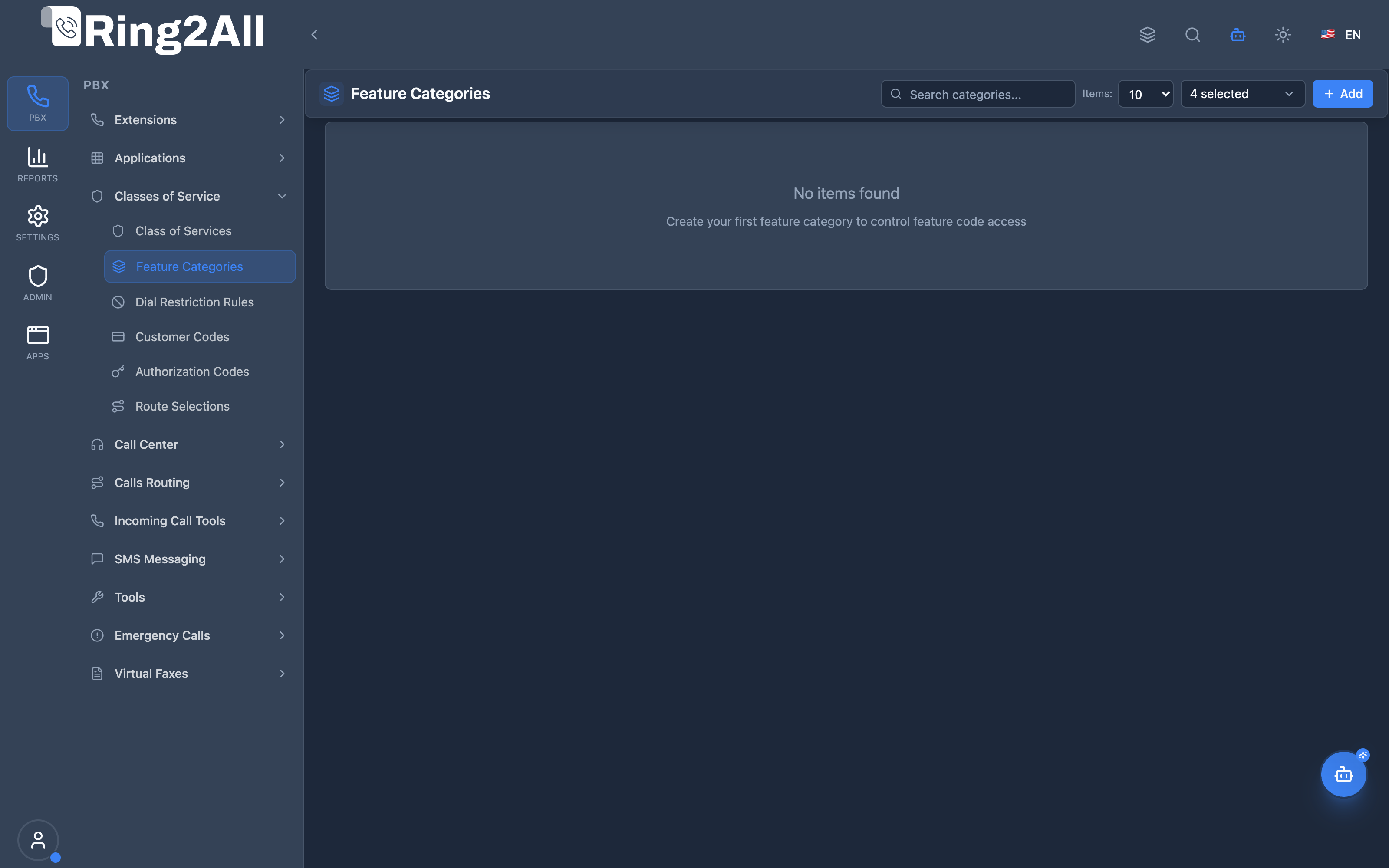
Section titled “Navigation”- Navigate to PBX Engine → Class of Services → Feature Categories in the main navigation menu.
- The list view displays all configured feature categories, including Name, Description, and active status.
- Click the + Add button in the top toolbar to create a new category.
- Click any category row or edit action to adjust name, description, or assigned feature codes using the dual shuttle list.
Administrator Workflow
Section titled “Administrator Workflow”┌─────────────────────────────────────────────────────────────────┐│ Creating a Feature Category │├─────────────────────────────────────────────────────────────────┤│ ││ Step 1: Basic Information ││ ├─ Name: "Basic Features" ││ ├─ Description: "Standard calling features for all users" ││ └─ Enabled: ✓ ││ ││ Step 2: Select Feature Codes ││ ││ ┌─────────────────────────────────────────────────────────┐ ││ │ Available Features │ Enabled Features │ ││ │ ┌─────────────────────┐ │ ┌─────────────────────┐ │ ││ │ │ *72 CF Activate │ │ │ *67 Block Caller ID │ │ ││ │ │ *73 CF Deactivate │──▶ │ *69 Call Return │ │ ││ │ │ *74 CFB Activate │ │ │ *70 Disable CW │ │ ││ │ │ ... │ │ │ *92 DND Toggle │ │ ││ │ └─────────────────────┘ │ └─────────────────────┘ │ ││ └─────────────────────────────────────────────────────────┘ ││ ││ Step 3: Save ││ ││ Step 4: Assign to Class of Service ││ └─ Edit CoS → Select Feature Category: "Basic Features" ││ │└─────────────────────────────────────────────────────────────────┘Quick Tips
Section titled “Quick Tips”[!TIP] Logical Grouping: Group features by operational function (call handling, forwarding, voicemail, executive spy).
[!TIP] Meaningful Names: Use descriptive names like “Executive Features”, “Call Center Agents”, or “Standard Office”.
4. Configuration Fields Reference
Section titled “4. Configuration Fields Reference”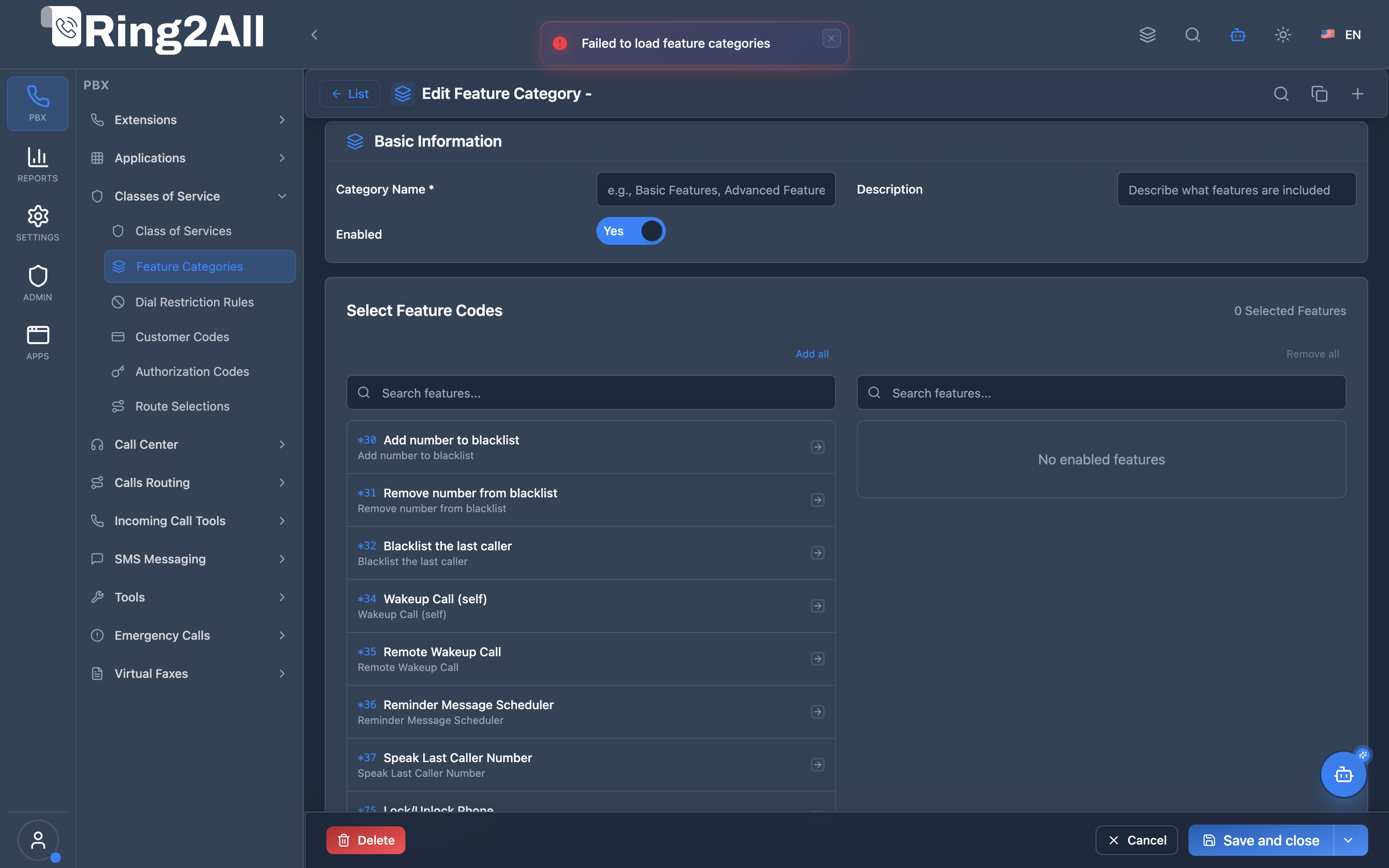
Basic Information Fields
Section titled “Basic Information Fields”| Field | Description | User-Friendly Tooltip | Example | Notes |
|---|---|---|---|---|
| Name * | Unique identifier for the feature category | A descriptive name for the feature code category | Basic Features, Executive Features |
Required. Unique per domain. |
| Description | Contextual notes and operational scope | Detailed description of this category’s intended use | Standard daily calling features for office extensions |
Optional. |
| Enabled * | Operational status of the category | Whether this feature category is currently active | Toggle (On/Off) |
If disabled, extensions cannot execute features linked via this category. |
Feature Code Shuttle (Dual-List Assignment)
Section titled “Feature Code Shuttle (Dual-List Assignment)”The dual-list transfer interface provides an intuitive mechanism to control feature code availability:
| Section | Description | Operation |
|---|---|---|
| Available Features | List of all system feature codes (*XX) not currently included in this category. | Click items or use arrows to select and move to Enabled. Includes search filter. |
| Enabled Features | List of feature codes (*XX) explicitly authorized for extensions under this category. | Selected codes can be moved back to Available to revoke access. Includes search filter. |
5. Common Scenarios & Examples
Section titled “5. Common Scenarios & Examples”Scenario 1: Tiered Feature Access
Section titled “Scenario 1: Tiered Feature Access”Categories:
| Category | Features |
|---|---|
| Basic | *67, *69, *70, *92 (Caller ID, Call Return, CW, DND) |
| Call Forwarding | *72, *73, *74, *75 (CF features) |
| Advanced | *80, *82, *83 (Conferencing, Spy modes) |
CoS Assignments:
| CoS | Categories |
|---|---|
| Bronze | Basic |
| Silver | Basic, Call Forwarding |
| Gold | Basic, Call Forwarding, Advanced |
Scenario 2: Department-Specific Features
Section titled “Scenario 2: Department-Specific Features”Categories:
| Category | Features |
|---|---|
| Reception Desk | All call handling, parking, paging |
| Sales Team | Call recording, conferencing |
| Support Team | Call queues, callback features |
Scenario 3: Security Levels
Section titled “Scenario 3: Security Levels”Categories:
| Category | Features |
|---|---|
| Standard | Basic calling features |
| Supervisor | + Spy modes, barge-in |
| Admin | + All system features |
6. Model Context Protocol (MCP) AI Integration
Section titled “6. Model Context Protocol (MCP) AI Integration”Ring2All exposes dedicated Model Context Protocol (MCP) tools for Feature Categories (Feature Code CoS), enabling AI agents and Copilots to query feature permission packages, inspect permitted dialpad star codes (*XX), and safely provision or update feature profiles while enforcing dependency validation against active Class of Service profiles.
Available MCP Tools
Section titled “Available MCP Tools”| Tool Name | Description | Key Parameters |
|---|---|---|
list_feature_categories |
Lists all feature code categories in the domain, including names, descriptions, and the count of permitted feature codes. | search (optional string) |
get_feature_category_status |
Retrieves full configuration and the list of permitted feature codes (names, default numbers, custom numbers) inside a specific category. | name (required) |
create_feature_category |
Provisions a new feature code category profile. | name, description, enabled |
update_feature_category |
Updates an existing feature category name, description, or active status. | name, newName, description, enabled |
delete_feature_category |
Deletes a feature category after verifying it is not referenced by any Class of Service (assertCanDeleteFeatureCategory). |
name (required) |
AI Agent Operational Examples
Section titled “AI Agent Operational Examples”Querying Permitted Features in a Category
Section titled “Querying Permitted Features in a Category”{ "tool": "get_feature_category_status", "arguments": { "name": "Standard Agent Features" }}Provisioning an Executive Feature Category
Section titled “Provisioning an Executive Feature Category”{ "tool": "create_feature_category", "arguments": { "name": "Executive Full Features", "description": "Full access to barge-in, call eavesdropping, recording toggle, and all star codes", "enabled": true }}Recommended Natural Language Prompts
Section titled “Recommended Natural Language Prompts”- “List all feature categories configured on this PBX and show how many star codes each allows.”
- “Show me which feature codes are enabled inside the ‘Reception Features’ category.”
- “Create a feature category called ‘Basic Callers’ with description ‘Only DND and Call Forwarding allowed’.”
7. Limitations & Important Notes
Section titled “7. Limitations & Important Notes”Technical Limitations
Section titled “Technical Limitations”[!WARNING] Category Assignment: Each CoS can only have one feature category assigned.
[!WARNING] Cascading Changes: Modifying a category affects all CoS using it.
Best Practices
Section titled “Best Practices”- Plan Categories: Design categories before creating
- Document Purpose: Use descriptions
- Test Changes: Verify after category modifications
- Minimize Overlap: Avoid duplicate features across categories
8. Troubleshooting Tips
Section titled “8. Troubleshooting Tips”Common Issues
Section titled “Common Issues”| Symptom | Possible Cause | Solution |
|---|---|---|
| Feature not working | Not in assigned category | Add to category |
| Category not visible | Category disabled | Enable category |
| Changes not applied | CoS not updated | Verify CoS assignment |
Diagnostic SQL
Section titled “Diagnostic SQL”List categories:
SELECT id, name, enabled, (SELECT COUNT(*) FROM public.feature_code_cos_members WHERE cos_id = c.id) as feature_countFROM public.feature_code_categories cWHERE domain_id = [domain_id];Check category features:
SELECT f.default_number, f.nameFROM public.feature_code_cos_members mJOIN public.feature_code_numbers f ON m.feature_code_id = f.idWHERE m.cos_id = [category_id]ORDER BY f.default_number;9. Glossary
Section titled “9. Glossary”| Term | Definition |
|---|---|
| Feature Category | Grouping of related feature codes |
| Feature Code | Dialpad code for PBX features (*67, *72, etc.) |
| Class of Service | Permission profile assigned to extensions |
| Shuttle Control | UI for moving items between lists |
Documentation last updated: January 2026