

Gateways Module Documentation
Table of Contents
Section titled “Table of Contents”- Navigation & Access
- Screenshots & Visual Interface
- Module Overview (Technical)
- Module Overview (Commercial/Business)
- Module Overview (End User/Administrator)
- Configuration Fields Reference
- Gateway SIP Profiles
- Common Scenarios & Examples
- Model Context Protocol (MCP) AI Integration
- Limitations & Important Notes
- Troubleshooting Tips
- Glossary
Navigation & Access
Section titled “Navigation & Access”To access the Gateways & SIP Trunks module:
- Log in to the Ring2All Web Portal.
- In the left navigation sidebar, expand PBX Engine.
- Under Call Routing, click Gateways / Trunks (
/pbx/calls-routing/gateways).
Screenshots & Visual Interface
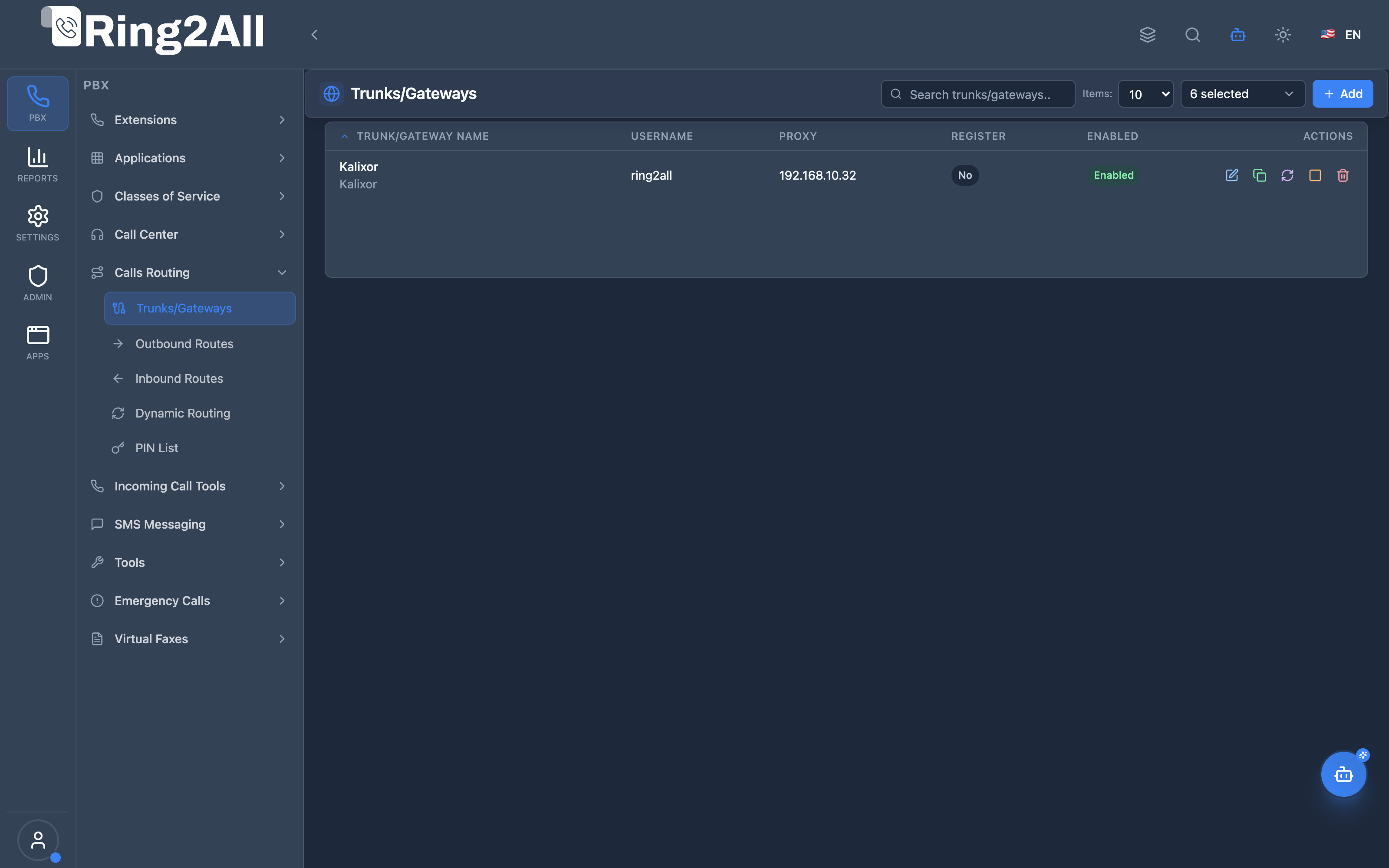
Section titled “Screenshots & Visual Interface”Gateways Management List View
Section titled “Gateways Management List View”Displays all configured SIP gateways, their registration status, host/proxy, profile, and action shortcuts.
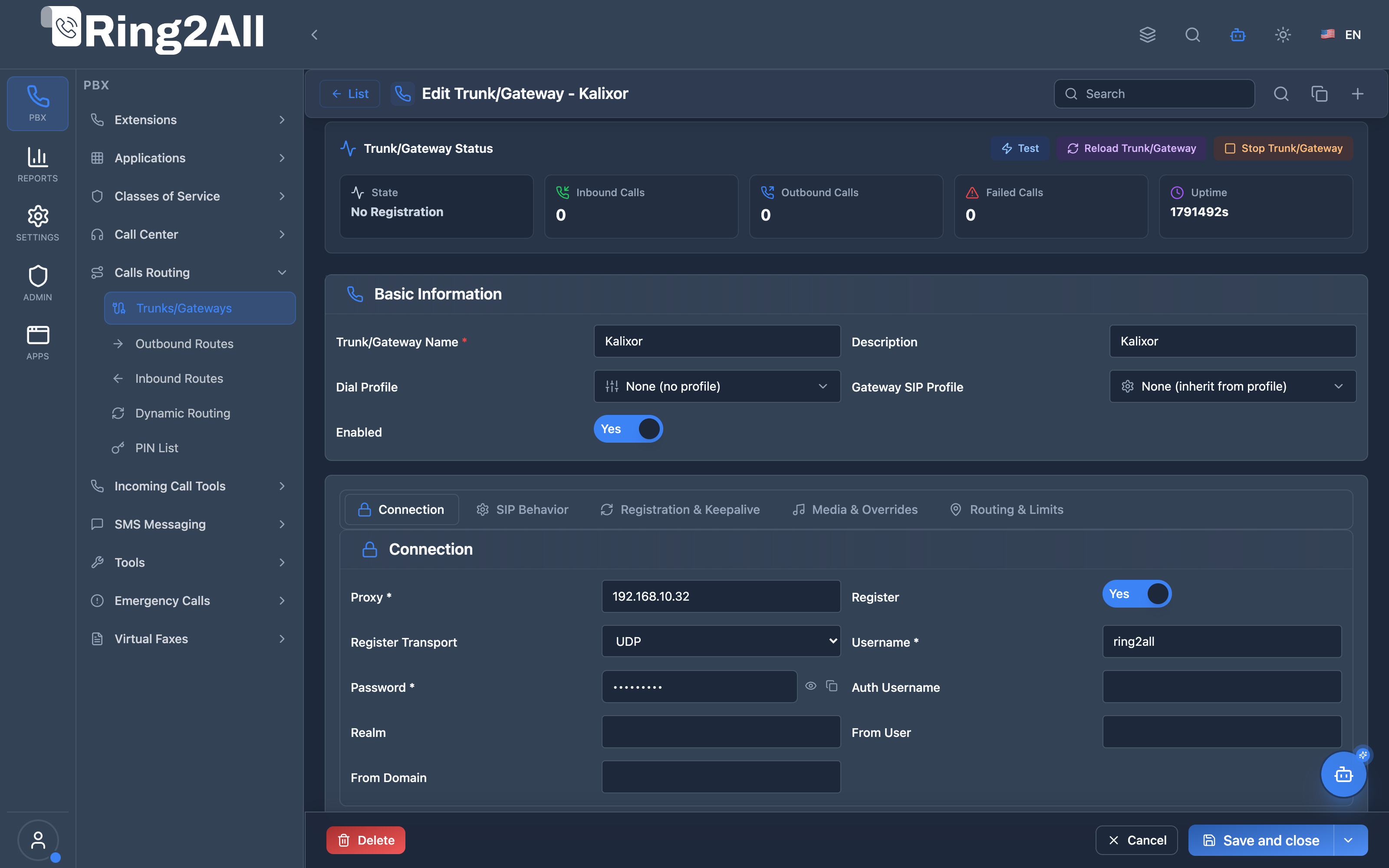
Gateway Configuration Form
Section titled “Gateway Configuration Form”Provides full configuration across Basic Information and granular tabs: Connection, SIP Behavior, Registration, Media, and Routing.
1. Module Overview (Technical)
Section titled “1. Module Overview (Technical)”What Are Gateways?
Section titled “What Are Gateways?”Gateways define SIP trunk connections to external carriers, ITSPs, or other PBX systems. Each gateway represents a configured connection with authentication, registration, and routing settings.
Architecture
Section titled “Architecture”┌─────────────────────────────────────────────────────────────────┐│ Gateway System │├─────────────────────────────────────────────────────────────────┤│ ││ Gateway SIP Profile: "Standard Carrier" ││ ┌────────────────────────────────────────────────────────────┐ ││ │ Transport: UDP │ DTMF: RFC2833 │ Codec: G711, G729 │ ││ │ NAT: Enabled │ TLS: Disabled │ Media: Proxy │ ││ └────────────────────────────────────────────────────────────┘ ││ │ ││ Assigned to Gateways: ││ │ ││ ┌──────────────────┐ │ ┌──────────────────┐ ││ │ Gateway: CarrierA│ │ │ Gateway: CarrierB│ ││ │ Proxy: sip.a.com │◄───┼────▶ Proxy: sip.b.com │ ││ │ Username: user1 │ │ │ Username: user2 │ ││ │ Register: Yes │ │ │ Register: Yes │ ││ │ Channels: 30 │ │ │ Channels: 20 │ ││ │ Failover: B │ │ │ Failover: None │ ││ └──────────────────┘ └──────────────────┘ ││ ││ Used by: ││ ├─ Outbound Routes (dial patterns → gateway selection) ││ ├─ Inbound Routes (gateway → destination1) ││ └─ ARS Profiles (time-based gateway selection) ││ │└─────────────────────────────────────────────────────────────────┘Integration with Telephony Server
Section titled “Integration with Telephony Server”Gateways are translated into Telephony Server XML configuration:
<gateway name="carrier_a"> <param name="username" value="user1"/> <param name="password" value="secret"/> <param name="proxy" value="sip.carrier-a.com"/> <param name="register" value="true"/> ...</gateway>2. Module Overview (Commercial/Business)
Section titled “2. Module Overview (Commercial/Business)”Business Value
Section titled “Business Value”Gateways enable external telephony connectivity:
| Without Gateways | With Gateways |
|---|---|
| Internal calls only | External PSTN/SIP calls |
| No carrier integration | Multiple carrier support |
| No failover | Automatic failover |
| Single path | Load balancing |
Use Cases
Section titled “Use Cases”-
PSTN Connectivity
- Connect to telco carriers
- Terminate calls to phone numbers
-
SIP Trunking
- Connect to VoIP providers
- Cost-effective calling
-
Multi-Carrier Routing
- Primary/backup carriers
- Least-cost routing
-
PBX Interconnection
- Connect branch offices
- Legacy system integration
Feature Highlights
Section titled “Feature Highlights”| Feature | Benefit |
|---|---|
| Gateway SIP Profiles | Reusable carrier settings |
| Registration | Dynamic registration with carriers |
| Authentication | Username/password, realm support |
| NAT Traversal | Works behind firewalls |
| Failover | Automatic backup gateway |
| Channel Limits | Concurrent call control |
| Codec Selection | Audio/video codec preference |
| TLS/SRTP | Secure signaling and media |
3. Module Overview (End User/Administrator)
Section titled “3. Module Overview (End User/Administrator)”What Can You Do?
Section titled “What Can You Do?”Gateways:
- Create SIP trunk connections
- Configure authentication
- Set registration parameters
- Define channel limits
- Configure failover cascades
Gateway SIP Profiles:
- Create reusable settings templates
- Configure transport and codecs
- Set NAT/security options
- Apply to multiple gateways
Administrator Workflow
Section titled “Administrator Workflow”┌─────────────────────────────────────────────────────────────────┐│ Creating a Gateway │├─────────────────────────────────────────────────────────────────┤│ ││ Basic Information ││ ├─ Gateway Name: "carrier_main" ││ ├─ Description: "Primary VoIP Carrier" ││ ├─ Gateway SIP Profile: Standard Carrier ││ └─ Enabled: ✓ ││ ││ Authentication & Connection ││ ├─ Proxy: sip.carrier.com ││ ├─ Username: account123 ││ ├─ Password: ●●●●●●●● ││ └─ Realm: carrier.com ││ ││ Registration & Keepalive ││ ├─ Register: ✓ ││ ├─ Expire Seconds: 3600 ││ ├─ Retry Seconds: 30 ││ └─ Ping Interval: 25 ││ ││ Routing & Limits ││ ├─ Context: public ││ ├─ Max Channels: 30 ││ └─ Failover Gateway: carrier_backup ││ │└─────────────────────────────────────────────────────────────────┘Quick Tips
Section titled “Quick Tips”[!TIP] Use SIP Profiles: Create profiles for common carrier types to reuse settings.
[!TIP] Set Failover: Always configure a backup gateway for reliability.
[!CAUTION] Channel Limits: Set realistic limits to prevent carrier billing surprises.
4. Configuration Fields Reference
Section titled “4. Configuration Fields Reference”Gateway Fields
Section titled “Gateway Fields”Basic Information
Section titled “Basic Information”| Field | Description | Example |
|---|---|---|
| Gateway Name | Unique identifier | carrier_main |
| Description | Optional description | Primary VoIP Carrier |
| Gateway SIP Profile | Inherited settings | Standard Carrier |
| Dial Profile | Reusable template to apply call variables and behaviors | Office Default |
| Enabled | Gateway active status | On/Off |
Authentication & Connection
Section titled “Authentication & Connection”| Field | Description | Example |
|---|---|---|
| Proxy | Carrier SIP address | sip.carrier.com |
| Username | SIP authentication user | account123 |
| Password | SIP password | ●●●●●●●● |
| Auth Username | Alternative auth user | (optional) |
| Realm | Authentication realm | carrier.com |
| Outbound Proxy | Separate signaling path | (optional) |
| Register Proxy | Separate registration | (optional) |
| Register Transport | UDP/TCP/TLS | UDP |
Registration & Keepalive
Section titled “Registration & Keepalive”| Field | Description | Default |
|---|---|---|
| Register | Enable registration | On |
| Expire Seconds | Registration period | 3600 |
| Retry Seconds | Retry on failure | 30 |
| Ping Interval | OPTIONS ping interval | 25 |
| Ping Min/Max | Up/down thresholds | 1/5 |
| Contact in Ping | Include Contact header | Off |
Media & Overrides
Section titled “Media & Overrides”| Field | Description |
|---|---|
| Audio Codecs | Preferred codec list |
| Video Codecs | Video codec list |
| Allow Video | Enable video calls |
| Packetization Time | RTP packet size |
| T.38 Support | Fax relay support |
Routing & Limits
Section titled “Routing & Limits”| Field | Description | Default |
|---|---|---|
| Context | Inbound dialplan context | public |
| Extension | Default inbound extension | - |
| Max Channels | Concurrent call limit | 0 (unlimited) |
| Failover Gateway | Backup gateway | None |
5. Gateway SIP Profiles
Section titled “5. Gateway SIP Profiles”Purpose
Section titled “Purpose”Gateway SIP Profiles are reusable configuration templates that define:
- Transport settings (UDP/TCP/TLS)
- DTMF mode
- Codec preferences
- NAT handling
- TLS/SRTP security
Profile Sections
Section titled “Profile Sections”Signaling & Transport
Section titled “Signaling & Transport”| Field | Options | Description |
|---|---|---|
| Transport | UDP, TCP, TLS | SIP transport |
| DTMF Mode | RFC2833, INFO, Inband | DTMF signaling |
| INVITE Format | user@domain, E.164 | URI format |
| Caller ID Policy | From, PAI, RPID | CID header |
| NAT Mapping | On/Off | Contact rewrite |
| Register Transport | UDP, TCP, TLS | Registration transport |
Media & Codecs
Section titled “Media & Codecs”| Field | Description |
|---|---|
| Audio Codecs | PCMU, PCMA, G729, G722, OPUS |
| Video Codecs | VP8, H264, H263, AV1 |
| Allow Video | Enable video negotiation |
| RTP Proxy | Force media through PBX |
| Packetization Time | 10, 20, 30, 40 ms |
| T.38 Support | Fax relay |
Security / TLS
Section titled “Security / TLS”| Field | Description |
|---|---|
| TLS Enabled | Enable TLS signaling |
| TLS Verify Policy | Certificate verification |
| TLS Version | Minimum TLS version |
| SRTP Mode | Always, Optional, Never |
| Require Secure Media | Reject non-SRTP |
6. Common Scenarios & Examples
Section titled “6. Common Scenarios & Examples”Scenario 1: Basic ITSP Connection
Section titled “Scenario 1: Basic ITSP Connection”Gateway: “voip_carrier”
| Setting | Value |
|---|---|
| Proxy | sip.voip-carrier.com |
| Username | 12345678 |
| Password | ●●●●●●●● |
| Register | Yes |
| Transport | UDP |
| Codecs | PCMU, PCMA, G729 |
Scenario 2: Primary + Backup Carriers
Section titled “Scenario 2: Primary + Backup Carriers”Gateway: “carrier_primary”
| Setting | Value |
|---|---|
| Proxy | sip.carrier-a.com |
| Max Channels | 30 |
| Failover | carrier_backup |
Gateway: “carrier_backup”
| Setting | Value |
|---|---|
| Proxy | sip.carrier-b.com |
| Max Channels | 20 |
| Failover | None |
Scenario 3: Secure TLS Trunk
Section titled “Scenario 3: Secure TLS Trunk”Gateway SIP Profile: “Secure Carrier”
| Setting | Value |
|---|---|
| Transport | TLS |
| TLS Version | 1.2 |
| TLS Verify | Peer |
| SRTP Mode | Always |
Gateway: “secure_trunk”
| Setting | Value |
|---|---|
| Gateway SIP Profile | Secure Carrier |
| Proxy | sips.carrier.com:5061 |
7. Model Context Protocol (MCP) AI Integration
Section titled “7. Model Context Protocol (MCP) AI Integration”Ring2All exposes native Model Context Protocol (MCP) tools for Gateways & SIP Trunks, enabling AI agents, NOC Copilots, and platform engineers to inspect live Telephony Server Sofia registrations, provision external carrier trunks, trigger dynamic non-disruptive gateway reloads, analyze SIP handshake failures, and troubleshoot trunk availability programmatically with domain-level isolation and relational integrity safeguards.
Available MCP Tools
Section titled “Available MCP Tools”| Tool Name | Description | Key Parameters |
|---|---|---|
list_gateways |
Lists all SIP gateways and trunks in the domain with their proxy, realm, registration status, enabled state, and failover targets. | search (optional string) |
get_gateway_status |
Retrieves complete database configuration and live Telephony Server Sofia registration state (ping status, state machine, registration IP, expiration) for a specific trunk. | name (required string) |
create_gateway |
Provisions a new SIP trunk or carrier connection with authentication credentials, proxy host, registration flags, and channel limits. Strictly enforces name uniqueness per domain. | name, proxy, realm, username, password, register, expireSeconds, fromDomain, description |
update_gateway |
Updates gateway connection parameters, SIP proxies, credentials, registration flags, or administrative state (enabled). |
name, newName, proxy, realm, username, password, register, enabled |
diagnose_gateway |
Conducts deep automated diagnostic analysis on a trunk: verifies DNS A/SRV resolution, queries Sofia registration state, tests live SIP OPTIONS ping latency, scans Telephony log buffers for SIP error codes (401, 403, 408, 503), and produces root-cause analysis with concrete remediation steps. | name (required string), linesCount (optional number, default: 300) |
diagnose_gateway_connection |
Legacy compatibility alias for diagnose_gateway. |
name (required string), linesCount (optional number) |
delete_gateway |
Safely removes a gateway trunk after verifying via assertCanDeleteGateway that no active outbound routes or inbound routes depend on it. |
name (required string) |
Protection Guards & Integrity
Section titled “Protection Guards & Integrity”- Name Uniqueness: Every gateway name must be unique within its tenant domain. Duplicate names are immediately rejected.
- Relational Integrity (
assertCanDeleteGateway): A gateway cannot be deleted if it is designated as primary or failover trunk in any Outbound Route, or if inbound DIDs route through it. The MCP server returns a descriptive rejection detailing the blocking routes. - Hot-Reload Telephony Server Isolation: Modifying or reloading a gateway executes targeted Sofia commands via ESL, preventing broad PBX service interruptions.
AI Agent Operational Examples
Section titled “AI Agent Operational Examples”Auditing Gateway Status & Live Registration
Section titled “Auditing Gateway Status & Live Registration”{ "tool": "get_gateway_status", "arguments": { "name": "Telnyx_Primary" }}Diagnosing Connection Failures with AI Log Parsing
Section titled “Diagnosing Connection Failures with AI Log Parsing”{ "tool": "diagnose_gateway_connection", "arguments": { "name": "Twilio_Outbound", "linesCount": 200 }}Provisioning an IP-Authentication SIP Trunk
Section titled “Provisioning an IP-Authentication SIP Trunk”{ "tool": "create_gateway", "arguments": { "name": "Flowroute_Direct", "proxy": "sip.flowroute.com", "realm": "sip.flowroute.com", "register": false, "description": "Direct IP-authenticated termination trunk" }}Recommended Natural Language Prompts
Section titled “Recommended Natural Language Prompts”- “Check the registration status of all SIP gateways in this domain.”
- “Why is the Twilio_Primary gateway failing to register? Run a diagnostic and check the recent SIP logs.”
- “Reload the Telnyx gateway in Telephony Server so the new credentials take effect.”
- “Create a new SIP trunk named ‘Bandwidth_US’ pointing to ‘sip.bandwidth.com’ with registration disabled.”
8. Limitations & Important Notes
Section titled “8. Limitations & Important Notes”Technical Notes
Section titled “Technical Notes”[!NOTE] Configuration Module: Gateways are configuration entities. Settings are translated to Telephony Server XML by the configuration generator.
[!WARNING] Reload Required: Gateway changes require Telephony Server sofia profile reload.
[!WARNING] NAT Considerations: Enable NAT mapping when PBX is behind firewall.
Best Practices
Section titled “Best Practices”- Use Profiles: Create profiles for common carrier types
- Set Channel Limits: Prevent unexpected charges
- Configure Failover: Always have a backup
- Test Registration: Verify gateway registers successfully
- Monitor Status: Check gateway status regularly
- Secure Credentials: Use strong passwords
9. Troubleshooting Tips
Section titled “9. Troubleshooting Tips”Common Issues
Section titled “Common Issues”| Symptom | Possible Cause | Solution |
|---|---|---|
| Not registered | Wrong credentials | Verify username/password |
| Registration timeout | Firewall blocking | Check ports 5060/5061 |
| Calls fail | Wrong proxy | Verify proxy address |
| One-way audio | NAT issue | Enable NAT mapping |
| No audio | Codec mismatch | Check codec preferences |
| TLS errors | Certificate issue | Verify TLS settings |
Telephony Server Commands
Section titled “Telephony Server Commands”# List all sofia profilessofia status
# Show gateway statussofia status gateway carrier_main
# Reload gatewaysofia profile external restart gateway carrier_main
# Kill gateway registrationsofia profile external killgw carrier_main
# Show registrationssofia status profile external regDiagnostic SQL
Section titled “Diagnostic SQL”List gateways:
SELECT id, name, proxy, username, enabled, registerFROM public.sip_gatewaysORDER BY name;Check gateway settings:
SELECT g.name, s.name as setting, s.valueFROM public.sip_gateways gJOIN public.gateway_settings s ON g.id = s.gateway_idWHERE g.name = 'carrier_main';10. Glossary
Section titled “10. Glossary”| Term | Definition |
|---|---|
| Gateway | SIP trunk connection to external carrier |
| SIP Profile | Reusable configuration template |
| Registration | Process of registering with carrier |
| Proxy | Carrier’s SIP server address |
| Realm | Authentication domain |
| Failover | Automatic switch to backup gateway |
| ITSP | Internet Telephony Service Provider |
| NAT | Network Address Translation |
| SRTP | Secure Real-time Transport Protocol |
Documentation last updated: January 2026