

OpenVPN Server Module Documentation
Table of Contents
Section titled “Table of Contents”- Navigation & Access
- Screenshots & Visual Interface
- 🎯 User Roles & Key Capabilities
- Module Overview (Technical)
- Module Overview (Commercial/Business)
- Module Overview (End User/Administrator)
- Configuration Sections
- Settings Reference
- Model Context Protocol (MCP) AI Integration
- Common Scenarios & Examples
- Limitations & Important Notes
- Troubleshooting Tips
- Glossary
Navigation & Access
Section titled “Navigation & Access”To access the OpenVPN Server module:
- Log in to the Ring2All Web Portal (
https://<domain-or-ip>/login). - In the left navigation sidebar, expand Administration.
- Under Network, click OpenVPN Server (
/admin/network/openvpn). - Review active client connections, remote endpoints, tunnel IP assignments, and transmission metrics in the client registry.
- Click the Configuration button in the top action bar to inspect and configure the OpenVPN daemon parameters, subnet ranges, encryption algorithms, and certificate authentication settings.
Screenshots & Visual Interface
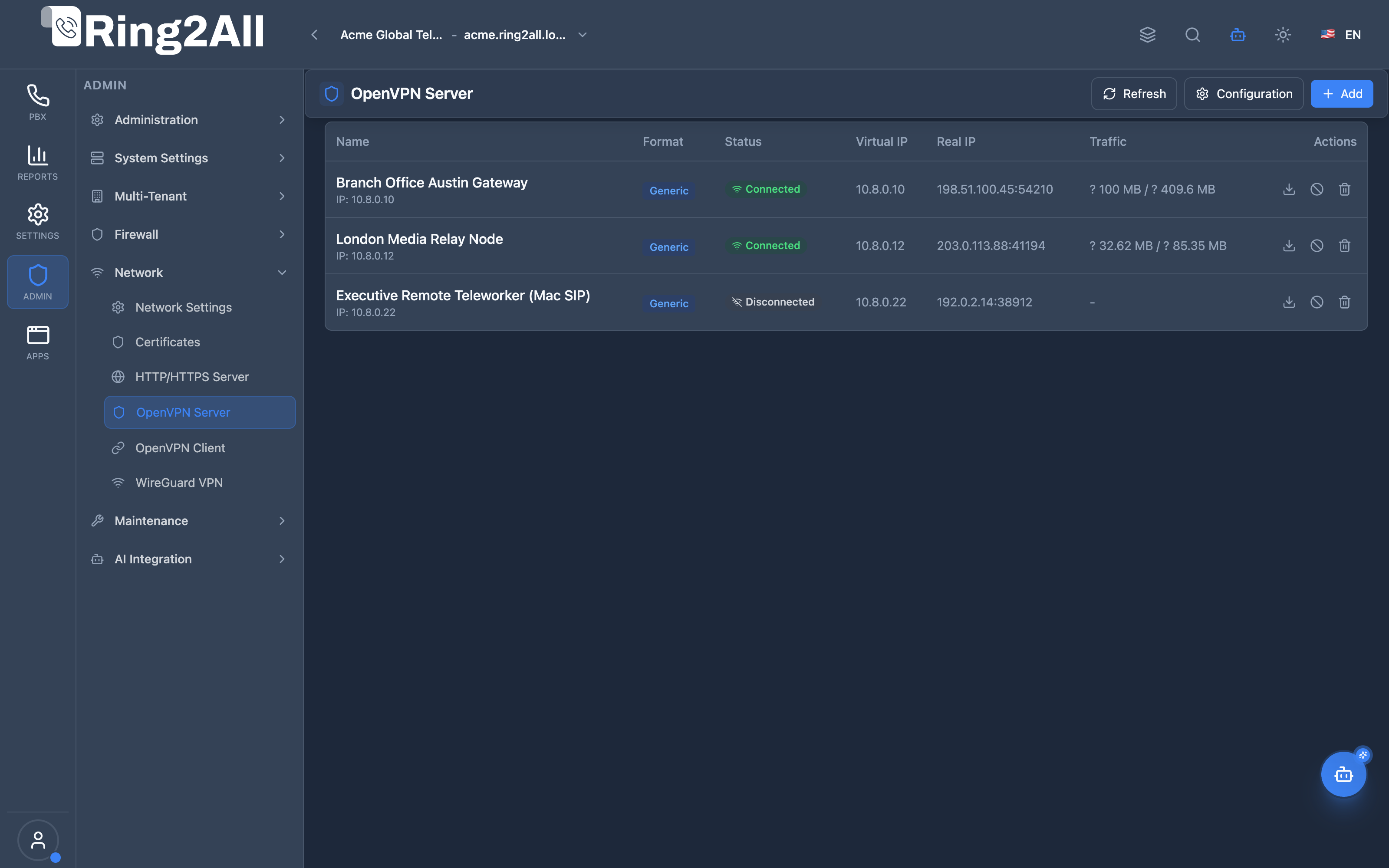
Section titled “Screenshots & Visual Interface”OpenVPN Connected Clients Registry
Section titled “OpenVPN Connected Clients Registry”Real-time VPN telemetry console displaying connected client endpoints (e.g. Branch Office Gateways, Remote Teleworkers), assigned tunnel IPv4 addresses, connection timestamps, and downloaded client profiles.
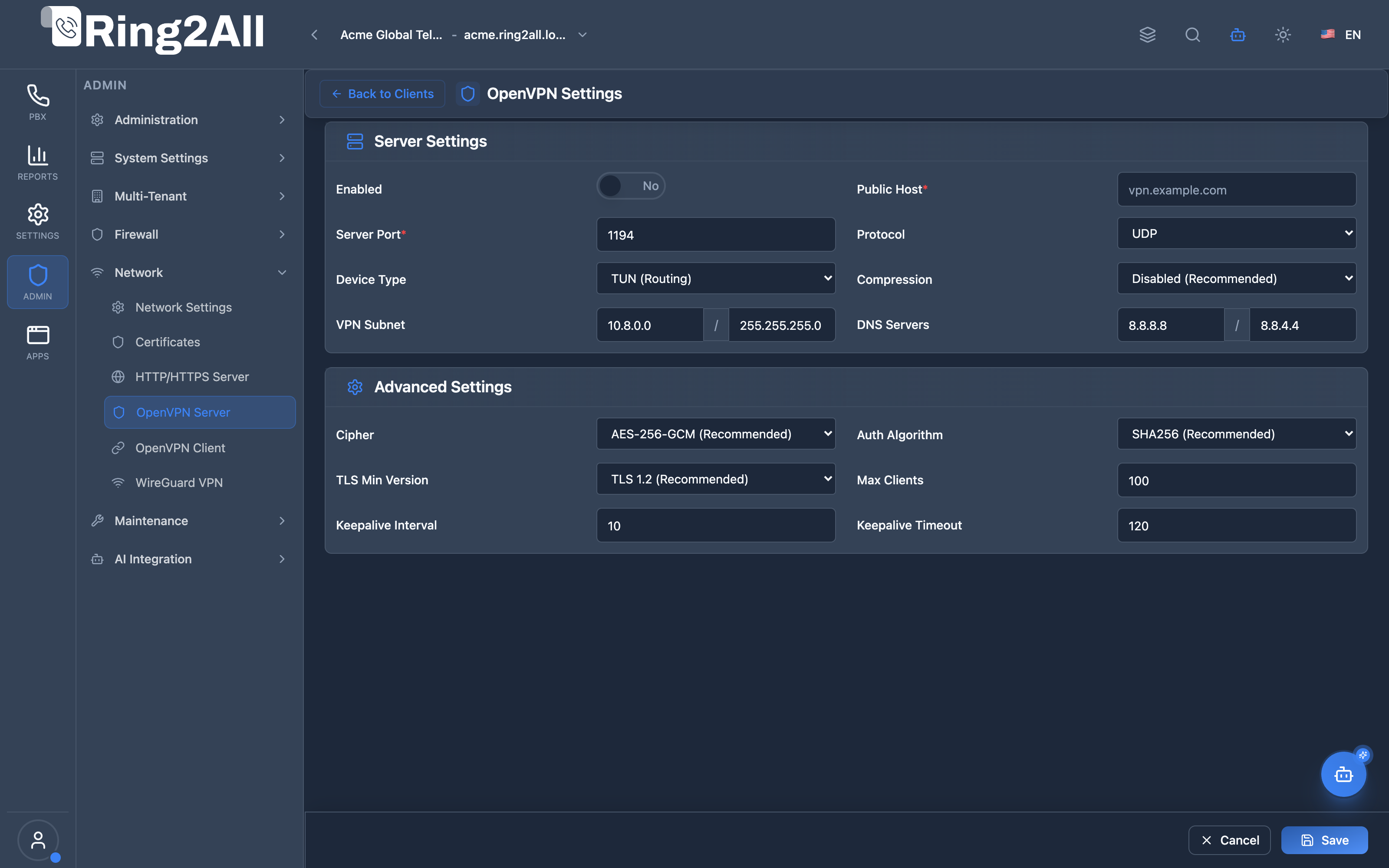
OpenVPN Server Engine & Cryptographic Configuration
Section titled “OpenVPN Server Engine & Cryptographic Configuration”Administrative daemon settings panel controlling public server hostname, listening port (1194), UDP/TCP protocol, TUN virtual interface mode, private VPN subnet (10.8.0.0/24), cipher strength (AES-256-GCM), and DNS push options.
🎯 User Roles & Key Capabilities
Section titled “🎯 User Roles & Key Capabilities”| Role | Access Level | Responsibilities & Capabilities |
|---|---|---|
| PBX Super Administrator | Full Access (RW) |
Configure OpenVPN daemon parameters, manage server public endpoints, issue and revoke client certificates, and toggle systemd service states. |
| Network & Security Engineer | Full Operations (RW) |
Provision secure VPN subnets (10.8.0.0/24), enforce TLS 1.3 cryptographic suites, manage Diffie-Hellman parameters, and review active client routes. |
| VoIP Device Provisioning Tech | Client Management (RW) |
Generate brand-specific VPN client profiles (Generic, Yealink, Grandstream, Fanvil), download bundled .tar archives, and assign static IP leases. |
| AI Platform Copilot / MCP Agent | Diagnostic & Telemetry (RO) |
Execute get_openvpn_server_status to audit VPN service health, inspect active client count, and verify cipher suites. |
1. Module Overview (Technical)
Section titled “1. Module Overview (Technical)”What Is OpenVPN Server?
Section titled “What Is OpenVPN Server?”OpenVPN Server is a VPN management module that configures the OpenVPN server and manages client certificates. It enables secure remote access for IP phones, softphones, and users connecting from outside the LAN.
Architecture
Section titled “Architecture”┌─────────────────────────────────────────────────────────────────┐│ OpenVPN Server Architecture │├─────────────────────────────────────────────────────────────────┤│ ││ OpenVPN Configuration ││ ┌──────────────────────────────────────────────────────────┐ ││ │ │ ││ │ Server Settings: │ ││ │ ├─ Public Host: vpn.company.com │ ││ │ ├─ Port: 1194 │ ││ │ ├─ Protocol: UDP │ ││ │ └─ Device: TUN │ ││ │ │ ││ │ Network: │ ││ │ ├─ VPN Subnet: 10.8.0.0 │ ││ │ ├─ Netmask: 255.255.255.0 │ ││ │ └─ DNS: 8.8.8.8, 8.8.4.4 │ ││ │ │ ││ │ Security: │ ││ │ ├─ Cipher: AES-256-GCM │ ││ │ ├─ Auth: SHA256 │ ││ │ └─ TLS Min: 1.2 │ ││ │ │ ││ └──────────────────────────────────────────────────────────┘ ││ │ ││ ▼ Generates client configs ││ ┌──────────────────────────────────────────────────────────┐ ││ │ VPN Clients │ ││ │ │ ││ │ ┌─────────────┐ ┌─────────────┐ ┌─────────────┐ │ ││ │ │ Phone-1 │ │ Yealink-T58│ │ User-Laptop │ │ ││ │ │ 10.8.0.2 │ │ 10.8.0.3 │ │ 10.8.0.50 │ │ ││ │ │ ● Connected │ │ ● Connected│ │ ○ Offline │ │ ││ │ └─────────────┘ └─────────────┘ └─────────────┘ │ ││ │ │ ││ └──────────────────────────────────────────────────────────┘ ││ │ ││ ▼ Remote phones connect ││ ┌──────────────────────────────────────────────────────────┐ ││ │ Remote Access │ ││ │ │ ││ │ Internet → VPN Tunnel → PBX → SIP Registration │ ││ │ │ ││ └──────────────────────────────────────────────────────────┘ ││ │└─────────────────────────────────────────────────────────────────┘2. Module Overview (Commercial/Business)
Section titled “2. Module Overview (Commercial/Business)”Business Value
Section titled “Business Value”OpenVPN Server provides secure remote access:
| Without VPN | With VPN |
|---|---|
| Port forward SIP | Encrypted tunnel |
| NAT issues | Direct access |
| Exposed ports | Secured network |
| SIP attacks | Protected |
Use Cases
Section titled “Use Cases”-
Remote Phones
- Home office phones
- Branch office devices
-
Softphone Access
- Mobile workers
- Traveling users
-
Secure Administration
- Remote management
- SSH over VPN
-
Phone Provisioning
- IP phones with VPN
- Grandstream, Yealink, Fanvil
Feature Highlights
Section titled “Feature Highlights”| Feature | Benefit |
|---|---|
| Easy Clients | One-click certificate generation |
| Phone Formats | Grandstream, Yealink, Fanvil support |
| Fixed IPs | Assign specific IPs to clients |
| Certificate Revocation | Instantly disable access |
| Traffic Encryption | AES-256 protection |
| Status Monitoring | See connected clients |
3. Module Overview (End User/Administrator)
Section titled “3. Module Overview (End User/Administrator)”What Can You Do?
Section titled “What Can You Do?”- Enable/disable VPN server
- Configure server settings
- Create client certificates
- Download client configurations
- Assign fixed IP addresses
- Monitor connected clients
- Revoke client certificates
- Choose phone-specific formats
OpenVPN Server - Global Settings Tab
Section titled “OpenVPN Server - Global Settings Tab”┌─────────────────────────────────────────────────────────────────┐│ OpenVPN Server │├─────────────────────────────────────────────────────────────────┤│ ││ Manage VPN server and client certificates ││ ││ [Global Settings] [Clients] ││ ││ ▼ Server Settings ││ Basic server configuration ││ ││ ┌─────────────────────────────────────────────────────────────┐││ │ │││ │ Enabled: ✓ │││ │ │││ │ Public Host: [vpn.company.com ] │││ │ Public IP or hostname that clients connect to │││ │ │││ │ Server Port: [1194 ] Protocol: [UDP ▼] │││ │ │││ │ Device Type: [TUN ▼] │││ │ TUN for routing, TAP for bridging │││ │ │││ └─────────────────────────────────────────────────────────────┘││ ││ ▼ Network Settings ││ VPN network configuration ││ ││ ┌─────────────────────────────────────────────────────────────┐││ │ │││ │ VPN Subnet: [10.8.0.0 ] │││ │ VPN Netmask: [255.255.255.0 ] │││ │ │││ │ DNS Server 1: [8.8.8.8 ] │││ │ DNS Server 2: [8.8.4.4 ] │││ │ │││ └─────────────────────────────────────────────────────────────┘││ ││ ▼ Security Settings ││ Encryption and authentication ││ ││ ┌─────────────────────────────────────────────────────────────┐││ │ │││ │ Cipher: [AES-256-GCM ▼] │││ │ Auth Algorithm: [SHA256 ▼] │││ │ TLS Min Version: [1.2 ▼] │││ │ │││ └─────────────────────────────────────────────────────────────┘││ ││ ▼ Advanced Settings ││ Performance and limits ││ ││ ┌─────────────────────────────────────────────────────────────┐││ │ │││ │ Keepalive Interval: [10 ] seconds │││ │ Keepalive Timeout: [120 ] seconds │││ │ Max Clients: [100 ] │││ │ Compression: [Disabled (Recommended) ▼] │││ │ │││ └─────────────────────────────────────────────────────────────┘││ ││ [Save Configuration] ││ │└─────────────────────────────────────────────────────────────────┘OpenVPN Server - Clients Tab
Section titled “OpenVPN Server - Clients Tab”┌─────────────────────────────────────────────────────────────────┐│ OpenVPN Server │├─────────────────────────────────────────────────────────────────┤│ ││ [Global Settings] [Clients] ││ ││ VPN Clients - Manage client certificates ││ ││ [+ Add Client] ││ ││ ┌───────────────────────────────────────────────────────────┐ ││ │ Name │ Format │ Virtual IP│ Real IP │ Status │ ││ ├───────────┼───────────┼───────────┼───────────┼─────────┤ ││ │ homephone │ Yealink │ 10.8.0.2 │ 74.x.x.12 │● Connected│ ││ │ office-gxp│ Grandstream│10.8.0.3 │ 98.x.x.44 │● Connected│ ││ │ user-vpn │ Generic │ 10.8.0.50 │ - │○ Offline │ ││ │ revoked-1 │ Generic │ - │ - │⊘ Revoked │ ││ └───────────────────────────────────────────────────────────┘ ││ ││ Actions: [⬇️ Download] [🔒 Revoke] [🗑️ Delete] ││ │└─────────────────────────────────────────────────────────────────┘Create VPN Client Modal
Section titled “Create VPN Client Modal”┌─────────────────────────────────────────────────────────────────┐│ Create VPN Client │├─────────────────────────────────────────────────────────────────┤│ ││ Client Name: [homephone ] ││ Letters, numbers, hyphens, and underscores only ││ ││ Format: [Yealink ▼] ││ Generic | Grandstream | Yealink | Fanvil ││ Select based on device type ││ ││ Fixed IP Address: [10.8.0.50 ] ││ (Optional) Leave empty for automatic assignment ││ ││ [Create] [Cancel] ││ │└─────────────────────────────────────────────────────────────────┘Quick Tips
Section titled “Quick Tips”[!TIP] Phone Format: Select the correct format for phone-specific configs.
[!TIP] Fixed IP: Assign fixed IPs for consistent firewall rules.
[!WARNING] Revoke is Permanent: Revoked certificates cannot be restored.
4. Configuration Sections
Section titled “4. Configuration Sections”Server Settings
Section titled “Server Settings”| Field | Description |
|---|---|
| Enabled | Server on/off |
| Public Host | External hostname/IP |
| Server Port | VPN port (default 1194) |
| Protocol | UDP (recommended) or TCP |
| Device Type | TUN (routing) or TAP (bridging) |
Network Settings
Section titled “Network Settings”| Field | Description |
|---|---|
| VPN Subnet | Client IP range |
| VPN Netmask | Subnet mask |
| DNS Server 1 | Primary DNS |
| DNS Server 2 | Secondary DNS |
Security Settings
Section titled “Security Settings”| Field | Description |
|---|---|
| Cipher | Encryption algorithm |
| Auth Algorithm | HMAC authentication |
| TLS Min Version | Minimum TLS version |
Advanced Settings
Section titled “Advanced Settings”| Field | Description |
|---|---|
| Keepalive Interval | Ping interval (seconds) |
| Keepalive Timeout | Connection timeout |
| Max Clients | Concurrent limit |
| Compression | Traffic compression |
5. Settings Reference
Section titled “5. Settings Reference”Protocols
Section titled “Protocols”| Protocol | Description | Use Case |
|---|---|---|
| UDP | Faster, recommended | Most deployments |
| TCP | Reliable, slower | Firewall restrictions |
Device Types
Section titled “Device Types”| Type | Description | Use Case |
|---|---|---|
| TUN | Layer 3, routing | Standard VPN |
| TAP | Layer 2, bridging | LAN extension |
Cipher Options
Section titled “Cipher Options”| Cipher | Security | Performance |
|---|---|---|
| AES-256-GCM | Highest | Good |
| AES-128-GCM | High | Better |
| AES-256-CBC | High | Good |
Compression Options
Section titled “Compression Options”| Option | Description |
|---|---|
| Disabled | Recommended (secure) |
| LZ4-v2 | Fast compression |
| LZ4 | Standard LZ4 |
| LZO | Legacy compression |
Client Formats
Section titled “Client Formats”| Format | Device | Notes |
|---|---|---|
| Generic | Standard clients | OpenVPN format |
| Grandstream | GXP, GRP phones | Phone-specific |
| Yealink | T4x, T5x phones | Phone-specific |
| Fanvil | X series phones | Phone-specific |
Model Context Protocol (MCP) AI Integration
Section titled “Model Context Protocol (MCP) AI Integration”The OpenVPN Server module interfaces with the Model Context Protocol (MCP), allowing operators and the Platform Copilot to programmatically audit VPN server daemon status, cipher strength, client capacity, and active tunnel sessions.
Available MCP Tools
Section titled “Available MCP Tools”| Tool Name | Scope | Description |
|---|---|---|
get_openvpn_server_status |
Daemon Telemetry (RO) |
Queries operational status of the OpenVPN Server daemon, listening port, tunnel subnet, cipher configuration, and connected client sessions. |
Tool Schemas & Payloads
Section titled “Tool Schemas & Payloads”get_openvpn_server_status
Section titled “get_openvpn_server_status”{ "name": "get_openvpn_server_status", "description": "Queries the operational status of the OpenVPN Server daemon, listening port, tunnel subnet, cipher configuration, and connected client sessions.", "parameters": { "type": "object", "properties": {} }}Realistic Execution Response:
{ "success": true, "data": { "service": { "running": true, "state": "active (running)", "serverAddress": "vpn.ring2all.com", "serverPort": 1194, "protocol": "udp", "deviceType": "tun", "vpnSubnet": "10.8.0.0", "vpnNetmask": "255.255.255.0", "dnsServer1": "10.8.0.1", "dnsServer2": "1.1.1.1", "cipher": "AES-256-GCM", "auth": "SHA256", "tlsVersionMin": "1.2", "maxClients": 100, "compress": "disabled" } }}Bilingual Natural Language Prompt Examples
Section titled “Bilingual Natural Language Prompt Examples”English Prompts
Section titled “English Prompts”- “Copilot, verify if the OpenVPN server service is currently running and check the assigned VPN subnet.”
- “What cipher suite and listening port are configured for the OpenVPN server?”
- “Check if the OpenVPN server has reached its maximum concurrent client capacity.”
Spanish Prompts
Section titled “Spanish Prompts”- “Copilot, verifica si el servicio de OpenVPN Server está activo y qué subred tiene asignada.”
- “¿Cuál es el puerto de escucha y el cifrado configurado para el servidor OpenVPN?”
- “Comprueba el estado del túnel OpenVPN y si el servicio systemd está corriendo correctamente.”
Enterprise Safeguards & Execution Boundaries
Section titled “Enterprise Safeguards & Execution Boundaries”- Multi-Tenant Configuration Isolation: OpenVPN configurations are scoped by numeric
tenant_id. Sub-tenant agents cannot view or alter configurations belonging to other organizations. - Cryptographic Secret Masking: Private server keys (
serverKey), CA private keys, and TLS authentication keys (taKey) are strictly decrypted only for daemon config generation and never exposed via MCP tool payloads. - Protected Service Lifecycle: Starting or stopping the OpenVPN daemon via MCP requires explicit administrative elevated credentials with full audit logging.
6. Common Scenarios & Examples
Section titled “6. Common Scenarios & Examples”Scenario 1: Enable VPN Server
Section titled “Scenario 1: Enable VPN Server”- Go to Global Settings
- Enable = ✓
- Public Host = vpn.company.com
- Port = 1194, Protocol = UDP
- VPN Subnet = 10.8.0.0
- Cipher = AES-256-GCM
- Save Configuration
Scenario 2: Create Phone Client
Section titled “Scenario 2: Create Phone Client”- Go to Clients tab
- Click Add Client
- Name = “homephone”
- Format = Yealink
- Fixed IP = (leave empty)
- Create
- Download configuration
- Upload to phone
Scenario 3: Assign Fixed IP
Section titled “Scenario 3: Assign Fixed IP”- Add Client
- Name = “admin-vpn”
- Format = Generic
- Fixed IP = 10.8.0.50
- Create
- Use for consistent access rules
Scenario 4: Revoke Compromised Client
Section titled “Scenario 4: Revoke Compromised Client”- Go to Clients tab
- Find compromised client
- Click Revoke
- Confirm action
- Client immediately disconnected
- Cannot reconnect
7. Limitations & Important Notes
Section titled “7. Limitations & Important Notes”Technical Notes
Section titled “Technical Notes”[!NOTE] Port 1194: Default OpenVPN port, open in firewall.
[!NOTE] Public Host: Must be accessible from internet.
[!WARNING] Compression: Disabled recommended for security (VORACLE attack).
Best Practices
Section titled “Best Practices”- Use UDP: Better performance for VoIP
- Strong Cipher: AES-256-GCM recommended
- Unique Names: Descriptive client names
- Revoke Promptly: Disable lost devices immediately
- Fixed IPs: For devices needing firewall rules
Client Name Rules
Section titled “Client Name Rules”| Rule | Valid | Invalid |
|---|---|---|
| Letters | homephone | home phone |
| Numbers | phone123 | - |
| Hyphens | home-phone | - |
| Underscores | home_phone | - |
| Spaces | - | home phone |
| Special | - | phone@home |
8. Troubleshooting Tips
Section titled “8. Troubleshooting Tips”Common Issues
Section titled “Common Issues”| Symptom | Possible Cause | Solution |
|---|---|---|
| Can’t connect | Port blocked | Open 1194/UDP |
| Connection drops | Timeout too short | Increase keepalive |
| Wrong format | Wrong phone type | Regenerate config |
| Access denied | Revoked cert | Create new client |
Check Server Status
Section titled “Check Server Status”# Check OpenVPN servicesystemctl status openvpn@server
# View connected clientscat /var/log/openvpn/openvpn-status.log
# Check server logtail -f /var/log/openvpn/openvpn.logTest Connection
Section titled “Test Connection”# Test port connectivitync -zvu vpn.company.com 1194
# Connect with clientopenvpn --config client.ovpn
# Check assigned IPip addr show tun09. Glossary
Section titled “9. Glossary”| Term | Definition |
|---|---|
| VPN | Virtual Private Network |
| TUN | Network tunnel device |
| TAP | Network tap device |
| PKI | Public Key Infrastructure |
| Certificate | Client identity |
| Revoke | Invalidate certificate |
Documentation last updated: January 2026