

Provisioning Security Settings Module Documentation
Table of Contents
Section titled “Table of Contents”- Navigation & Access
- Screenshots & Visual Interface
- Module Overview (Technical)
- Module Overview (Commercial/Business)
- Module Overview (End User/Administrator)
- User Roles & Key Capabilities
- Configuration Fields
- Common Scenarios & Examples
- Limitations & Important Notes
- Model Context Protocol (MCP) AI Integration
- Troubleshooting Tips
- Glossary
Navigation & Access
Section titled “Navigation & Access”To access the Provisioning Security Settings configuration module:
- Log in to the Ring2All Web Portal (
https://<domain-or-ip>/login). - In the left navigation sidebar, expand Settings.
- Under Provisioning, click Security Settings (
/settings/provisioning/provisioning-security-settings). - Configure authentication credentials, toggle HTTP Basic Auth enforcement, and click Save in the bottom action bar.
Screenshots & Visual Interface
Section titled “Screenshots & Visual Interface”Provisioning Security & HTTP Basic Authentication
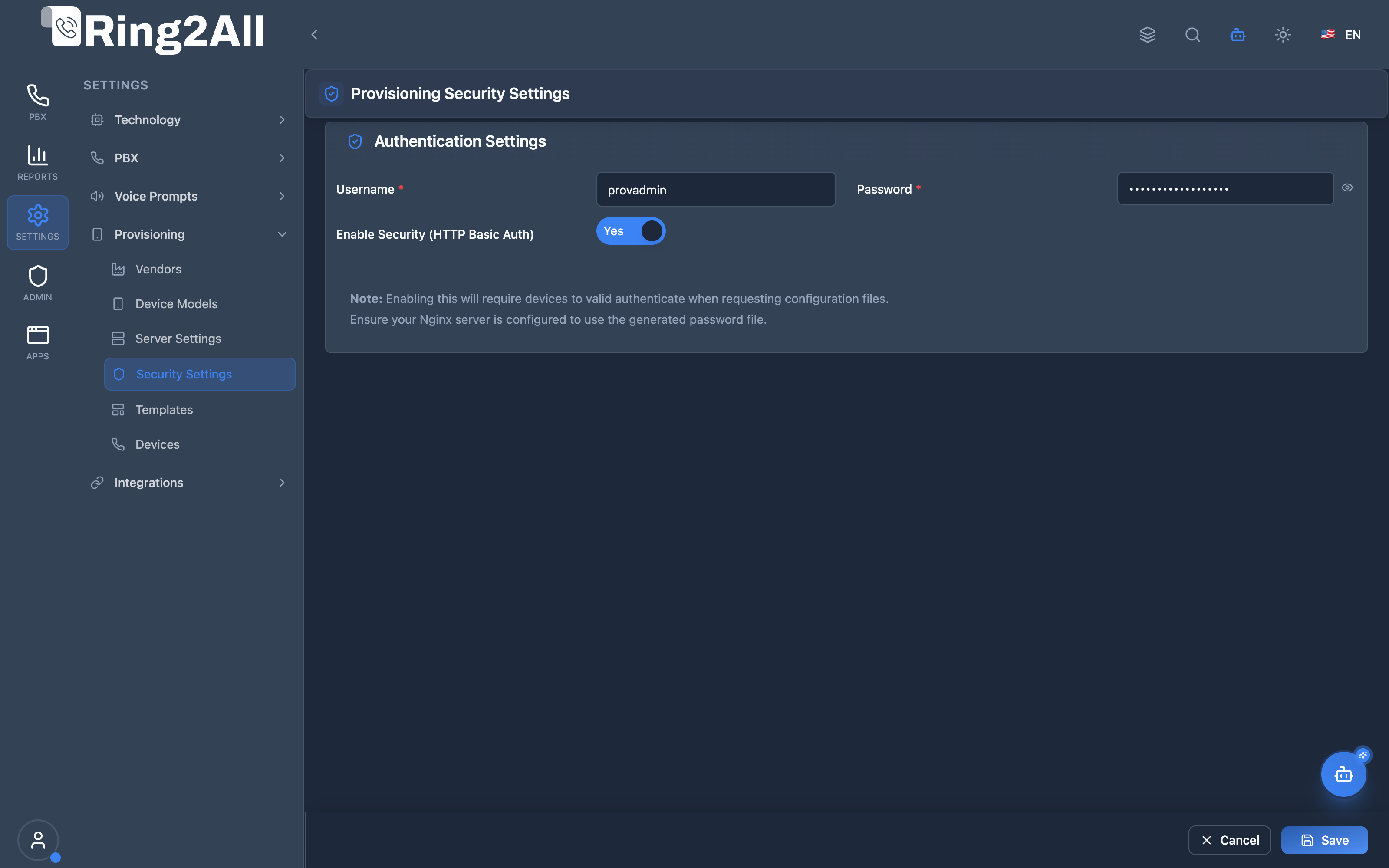
Section titled “Provisioning Security & HTTP Basic Authentication”Configuration view managing HTTP Basic Authentication credentials (username, password) and enforcement toggles to prevent unauthorized endpoint enumeration and safeguard SIP credentials during auto-provisioning.
1. Module Overview (Technical)
Section titled “1. Module Overview (Technical)”What Is Provisioning Security Settings?
Section titled “What Is Provisioning Security Settings?”Provisioning Security Settings is a provisioning authentication module that configures HTTP Basic Authentication for device configuration requests. It protects provisioning files from unauthorized access.
Architecture
Section titled “Architecture”┌─────────────────────────────────────────────────────────────────┐│ Provisioning Security Architecture │├─────────────────────────────────────────────────────────────────┤│ ││ IP Phone ││ ┌──────────────────────────────────────────────────────────┐ ││ │ Device Request │ ││ │ │ ││ │ GET /provisioning/AA-BB-CC-DD-EE-FF.cfg │ ││ │ Authorization: Basic dXNlcjpwYXNz │ ││ │ │ ││ └──────────────────────────────────────────────────────────┘ ││ │ ││ ▼ ││ ┌──────────────────────────────────────────────────────────┐ ││ │ Nginx Proxy │ ││ │ │ ││ │ Security Enabled? │ ││ │ ├─ Yes → Validate credentials │ ││ │ │ ├─ Valid → Serve config file │ ││ │ │ └─ Invalid → 401 Unauthorized │ ││ │ │ │ ││ │ └─ No → Serve config file directly │ ││ │ │ ││ └──────────────────────────────────────────────────────────┘ ││ │ ││ ▼ ││ ┌──────────────────────────────────────────────────────────┐ ││ │ Provisioning Files │ ││ │ │ ││ │ /var/www/provisioning/ │ ││ │ ├─ AA-BB-CC-DD-EE-FF.cfg │ ││ │ ├─ 11-22-33-44-55-66.cfg │ ││ │ └─ .htpasswd (generated credentials) │ ││ │ │ ││ └──────────────────────────────────────────────────────────┘ ││ │└─────────────────────────────────────────────────────────────────┘2. Module Overview (Commercial/Business)
Section titled “2. Module Overview (Commercial/Business)”Business Value
Section titled “Business Value”Provisioning Security provides configuration protection:
| Without Security | With Security |
|---|---|
| Open access | Auth required |
| Config exposure | Protected files |
| No credentials | Username/password |
| Security risk | Access control |
Use Cases
Section titled “Use Cases”-
Secure Deployments
- Protect device configs
- Prevent unauthorized access
-
Credential Protection
- Hide SIP passwords
- Secure extension data
-
Compliance
- Access control audit
- Security requirements
-
Multi-tenant Security
- Isolated configurations
- Per-domain credentials
Feature Highlights
Section titled “Feature Highlights”| Feature | Benefit |
|---|---|
| HTTP Basic Auth | Standard authentication |
| Enable/Disable | Toggle security |
| Username/Password | Simple credentials |
| Nginx Integration | Web server auth |
| Password File | Auto-generated htpasswd |
3. Module Overview (End User/Administrator)
Section titled “3. Module Overview (End User/Administrator)”What Can You Do?
Section titled “What Can You Do?”- Enable/disable provisioning security
- Set authentication username
- Set authentication password
- Generate htpasswd file
- Protect device configurations
Provisioning Security Interface
Section titled “Provisioning Security Interface”┌─────────────────────────────────────────────────────────────────┐│ Provisioning Security Settings │├─────────────────────────────────────────────────────────────────┤│ ││ Authentication Settings ││ ││ Enable Security (HTTP Basic Auth): ✓ ││ ││ Username: [provisioning ] ││ Username for provisioning authentication ││ ││ Password: [•••••••••••• ] ││ Password for provisioning authentication ││ ││ ──────────────────────────────────────────────────────────────││ ││ ⓘ Note: ││ • Enabling this will require devices to valid authenticate ││ when requesting configuration files. ││ • Ensure your Nginx server is configured to use the ││ generated password file. ││ ││ [Save] ││ │└─────────────────────────────────────────────────────────────────┘Quick Tips
Section titled “Quick Tips”[!TIP] Device Configuration: Configure matching credentials on phones.
[!TIP] Strong Password: Use complex passwords for security.
[!WARNING] Nginx Required: Ensure Nginx is configured to use the password file.
🎯 User Roles & Key Capabilities
Section titled “🎯 User Roles & Key Capabilities”| Role | Key Capabilities & Permissions | Operational Scope |
|---|---|---|
| PBX Super Administrator | • Global HTTP Basic Auth policy governance and enforcement toggles • Master provisioning username and password management • Automated .htpasswd credential generation and Nginx reverse proxy reload orchestration• Plaintext endpoint exposure mitigation and TLS encryption enforcement |
Platform-Wide |
| Tenant Administrator | • Read-only inspection of provisioning security enforcement status • Verification of authentication requirements for company device onboarding • Coordination with IT teams to distribute provisioning credentials to remote handsets |
Domain Scope |
| VoIP Security Officer | • Audit of provisioning credential complexity and rotation schedules • Inspection of reverse proxy HTTP authentication logs and 401 Unauthorized anomaly monitoring • Compliance verification ensuring MAC-based configuration URLs cannot be enumerated |
Platform / Security |
| AI Copilot / MCP Agent | • Diagnostic inspection of provisioning security configuration (get_provisioning_security_settings)• Autonomous verification of authentication requirements prior to generating device configs |
Autonomous Assistant |
4. Configuration Fields
Section titled “4. Configuration Fields”Authentication Settings
Section titled “Authentication Settings”| Field | Description |
|---|---|
| Enable Security | Toggle HTTP Basic Auth |
| Username | Auth username |
| Password | Auth password |
Generated Files
Section titled “Generated Files”| File | Purpose |
|---|---|
| .htpasswd | Apache/Nginx password file |
| Nginx config | Auth location directive |
5. Common Scenarios & Examples
Section titled “5. Common Scenarios & Examples”Scenario 1: Enable Security
Section titled “Scenario 1: Enable Security”- Navigate to Provisioning Security Settings
- Check “Enable Security (HTTP Basic Auth)”
- Enter username (e.g., “provisioning”)
- Enter strong password
- Click Save
- Configure Nginx to use password file
Scenario 2: Disable Security
Section titled “Scenario 2: Disable Security”- Navigate to Provisioning Security Settings
- Uncheck “Enable Security”
- Click Save
- Note: Configs now accessible without auth
Scenario 3: Change Credentials
Section titled “Scenario 3: Change Credentials”- Navigate to Provisioning Security Settings
- Update username and/or password
- Click Save
- Update credentials on all devices
Scenario 4: Configure Phones
Section titled “Scenario 4: Configure Phones”- Enable security in web interface
- On each phone, set provisioning credentials:
- Provisioning URL
- Username
- Password
- Reboot phones to apply
6. Limitations & Important Notes
Section titled “6. Limitations & Important Notes”Technical Notes
Section titled “Technical Notes”[!NOTE] Nginx Configuration: Manual Nginx setup may be required.
[!NOTE] Device Support: All modern IP phones support HTTP Basic Auth.
[!WARNING] Credential Update: Changing credentials requires updating all devices.
Best Practices
Section titled “Best Practices”- Enable in Production: Always enable for production deployments
- Strong Passwords: Use complex, unique passwords
- HTTPS Recommended: Use HTTPS to encrypt credentials in transit
- Document Credentials: Keep secure record of credentials
- Test After Changes: Verify devices can still provision
Nginx Configuration Example
Section titled “Nginx Configuration Example”location /provisioning { auth_basic "Provisioning"; auth_basic_user_file /path/to/.htpasswd;
root /var/www; autoindex off;}Phone Configuration
Section titled “Phone Configuration”| Vendor | Setting |
|---|---|
| Yealink | Provisioning → Authentication |
| Grandstream | Maintenance → Upgrade → Auth |
| Polycom | Config → Provisioning → User/Pass |
Model Context Protocol (MCP) AI Integration
Section titled “Model Context Protocol (MCP) AI Integration”The Provisioning Security Settings module provides Model Context Protocol (MCP) integration allowing AI Copilots, VoIP onboarding bots, and security compliance tools to audit whether HTTP Basic Authentication is actively enforced on device provisioning URLs.
Available MCP Telephony Tools
Section titled “Available MCP Telephony Tools”| Tool Name | Action Type | Access Level | Description |
|---|---|---|---|
get_provisioning_security_settings |
READ |
Read-Only |
Retrieves the global auto-provisioning security configuration (whether HTTP Basic Auth is enabled and the configured username). Passwords are permanently redacted for enterprise compliance. |
Tool Schemas & Input Parameters
Section titled “Tool Schemas & Input Parameters”get_provisioning_security_settings
Section titled “get_provisioning_security_settings”Audits the global HTTP Basic Auth enforcement status for IP phone provisioning endpoints.
{ "name": "get_provisioning_security_settings", "description": "Retrieves the global auto-provisioning security configuration (whether HTTP Basic Auth is enabled and the configured username). Passwords are redacted for security.", "parameters": { "type": "object", "properties": {}, "additionalProperties": false }}Natural Language Prompt Examples
Section titled “Natural Language Prompt Examples”English Prompts
Section titled “English Prompts”💬 “Is HTTP Basic Auth enabled for auto-provisioning?” 💬 “Check the provisioning security settings and show me the active authentication username.” 💬 “Audit the provisioning security status to ensure device configuration files are protected.”
Spanish Prompts (Español)
Section titled “Spanish Prompts (Español)”💬 “¿Está activada la autenticación HTTP Basic para el auto-aprovisionamiento?” 💬 “Verifica la configuración de seguridad de aprovisionamiento y muestra el usuario configurado.” 💬 “Audita el estado de seguridad para asegurar que los archivos de configuración estén protegidos.”
Enterprise Safeguards & Compliance
Section titled “Enterprise Safeguards & Compliance”- Credential Redaction: Plaintext passwords and cryptographic hashes are never returned by MCP tools or REST API responses.
- Role-Based Access Control: Executing
get_provisioning_security_settingsrequires administrative privileges under theauxiliary_devicesMCP permission scope. - Audit Logging: Any alteration to HTTP Basic Auth enforcement or credentials is permanently written to the PBX security audit trail with operator identity and source IP.
7. Troubleshooting Tips
Section titled “7. Troubleshooting Tips”Common Issues
Section titled “Common Issues”| Symptom | Possible Cause | Solution |
|---|---|---|
| 401 Unauthorized | Wrong credentials | Check username/password |
| Phones not provisioning | Auth not enabled on phone | Configure phone auth |
| htpasswd not found | Path incorrect | Check file location |
| Nginx error | Config not reloaded | Reload Nginx |
Test Authentication
Section titled “Test Authentication”# Test provisioning URL with authcurl -u username:password https://server/provisioning/test.cfg
# Test without auth (should fail if enabled)curl https://server/provisioning/test.cfgCheck htpasswd File
Section titled “Check htpasswd File”# View htpasswd filecat /path/to/.htpasswd
# Verify password (htpasswd tool)htpasswd -v /path/to/.htpasswd usernameReload Nginx
Section titled “Reload Nginx”# Test configurationnginx -t
# Reloadsystemctl reload nginx8. Glossary
Section titled “8. Glossary”| Term | Definition |
|---|---|
| HTTP Basic Auth | Standard web authentication |
| htpasswd | Apache/Nginx password file |
| Provisioning | Automatic device configuration |
| 401 Unauthorized | Authentication required/failed |
| Credentials | Username and password pair |
Documentation last updated: January 2026