

Firewall Services Module Documentation
Table of Contents
Section titled “Table of Contents”- Module Overview (Technical)
- Module Overview (Commercial & Business Value)
- 🎯 User Roles & Key Capabilities
- Visual Interface & Form Structure
- Architectural Flow & Security Governance
- Common Scenarios & Operational Playbooks
- Troubleshooting & Diagnostic Commands
- Model Context Protocol (MCP) AI Integration
- Glossary
1. Module Overview (Technical)
Section titled “1. Module Overview (Technical)”The Firewall Services module (public.firewall_services) defines standard named network services, protocols, and port definitions utilized across Ring2All Billing. In high-availability telecommunications and billing environments, exposing explicit TCP/UDP ports for web interfaces, REST APIs, database clustering, and caching must be governed through reusable service abstractions rather than hardcoded firewall port numbers.
Services created in this module can be directly referenced by higher-level firewall rules and access control policies. Each service maintains a protocol definition (TCP, UDP, or TCP/UDP), single or ranged port allocations (e.g., 80, 8443, 8000-8010), and an operational toggle that can disable access across all dependent firewall chains simultaneously.
Data Model & System Linkage
Section titled “Data Model & System Linkage” ┌────────────────────────────────────────────────────────────────────────┐ │ Firewall Service Entity (public.firewall_services) │ │ • id: bigint (Canonical Primary Key) │ │ • name: VARCHAR(100) (e.g., 'HTTPS Portal Web', 'Fastify Billing API')│ │ • protocol: 'TCP' | 'UDP' | 'BOTH' │ │ • port: VARCHAR(50) (Single '8443' or Port Range '8000-8010') │ │ • description: text (Functional Scope & Service Purpose) │ │ • is_system: boolean (Protects Core OS Services from Deletion) │ │ • enabled: boolean (State Toggle) │ └───────────────────────────────────┬────────────────────────────────────┘ │ ┌─────────────────────────┴─────────────────────────┐ ▼ ▼ ┌───────────────────────────────────┐ ┌───────────────────────────────────┐ │ Firewall Rules Linkage │ │ Linux Kernel Netfilter │ │ • Referenced by custom rules │ │ • Translates into nftables sets │ │ • Reusable across multiple subnets│ │ • Opens/closes ports in INPUT │ └───────────────────────────────────┘ └───────────────────────────────────┘PostgreSQL Schema Architecture
Section titled “PostgreSQL Schema Architecture”public.firewall_services:id: Numeric primary key (bigserial).name: Unique human-readable service identifier.protocol: Transport layer protocol ('TCP','UDP','BOTH').port: Comma-separated list or port range string (e.g.,'80','8443','3003','5060-5080').description: Explanatory context for operations and NOC teams.is_system: Boolean flag protecting critical services (SSH, HTTP redirect, Web Portal) from accidental deletion.enabled: Master switch controlling whether the port set is included in the active packet filter.
2. Module Overview (Commercial & Business Value)
Section titled “2. Module Overview (Commercial & Business Value)”- Simplified Security Governance: Reusable service definitions eliminate human error caused by mistyping port numbers when provisioning firewall policies across multiple environments.
- Rapid Emergency Isolation: If a specific microservice (e.g., a legacy API listener or unencrypted testing port) exhibits a vulnerability, disabling the service definition immediately closes the port across all firewall rules.
- Audit Transparency: Provides compliance auditors and telecommunications regulators with a clear, readable inventory of every listening port and its documented business justification.
3. 🎯 User Roles & Key Capabilities
Section titled “3. 🎯 User Roles & Key Capabilities”| User Role | Key Permissions | Core Responsibilities & Workflows |
|---|---|---|
| Super Administrator | Full Control (CRUD on Services) |
Configures core platform services, binds custom microservice ports, and toggles system service availability. |
| Security Officer / SecOps | Audit & Port Compliance | Audits listening service inventories, ensures non-TLS cleartext services remain disabled, and verifies port ranges. |
| DevOps / SysAdmin | Read & Create (Application Ports) | Registers new application endpoints, webhook ingress ports, and metrics exporters (e.g., Prometheus node exporter on port 9100). |
4. Visual Interface & Form Structure
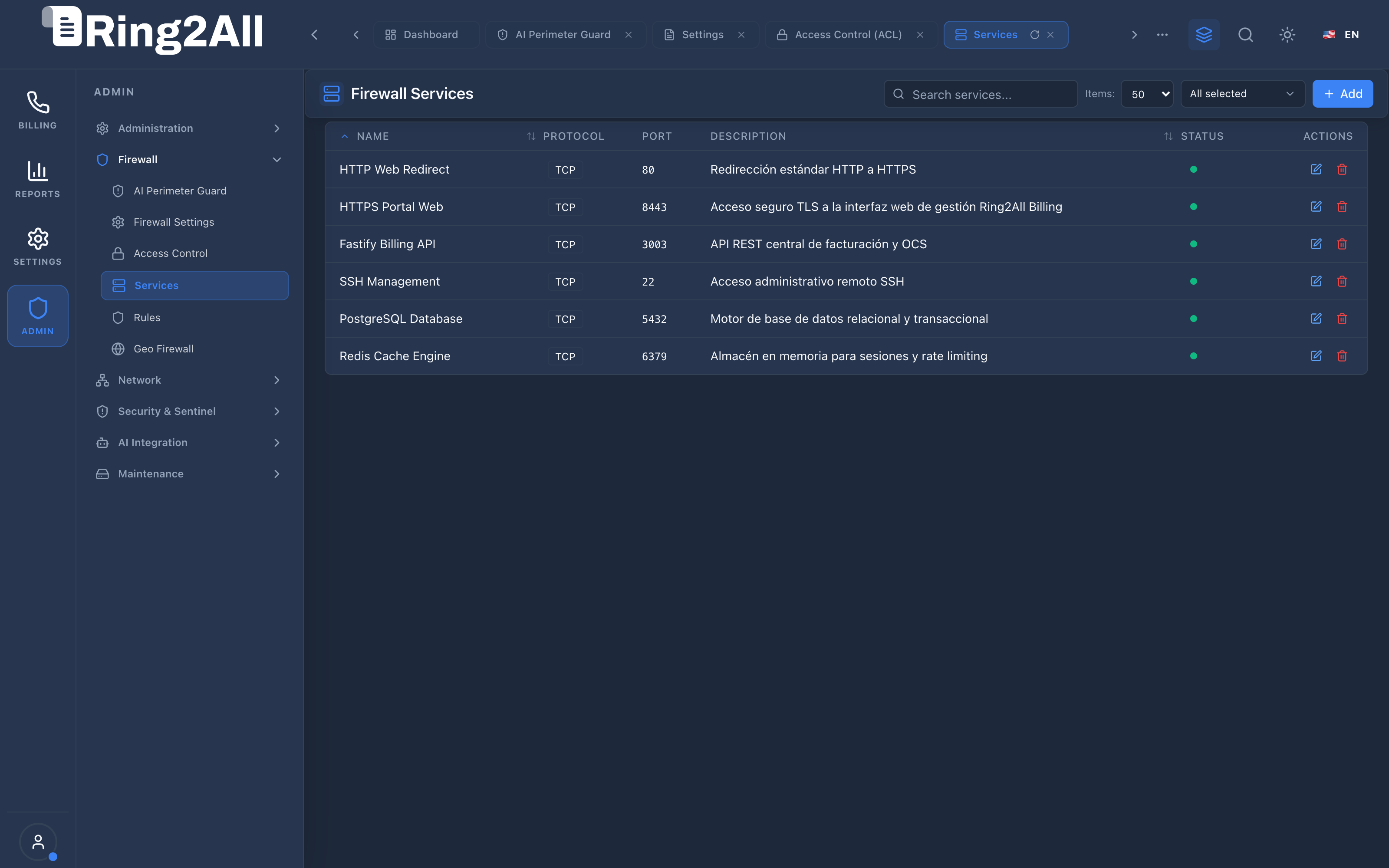
Section titled “4. Visual Interface & Form Structure”Level 1 — Firewall Services List View
Section titled “Level 1 — Firewall Services List View”The services inventory displays all configured network definitions, transport protocols, port assignments, descriptions, active status indicators, and action triggers.
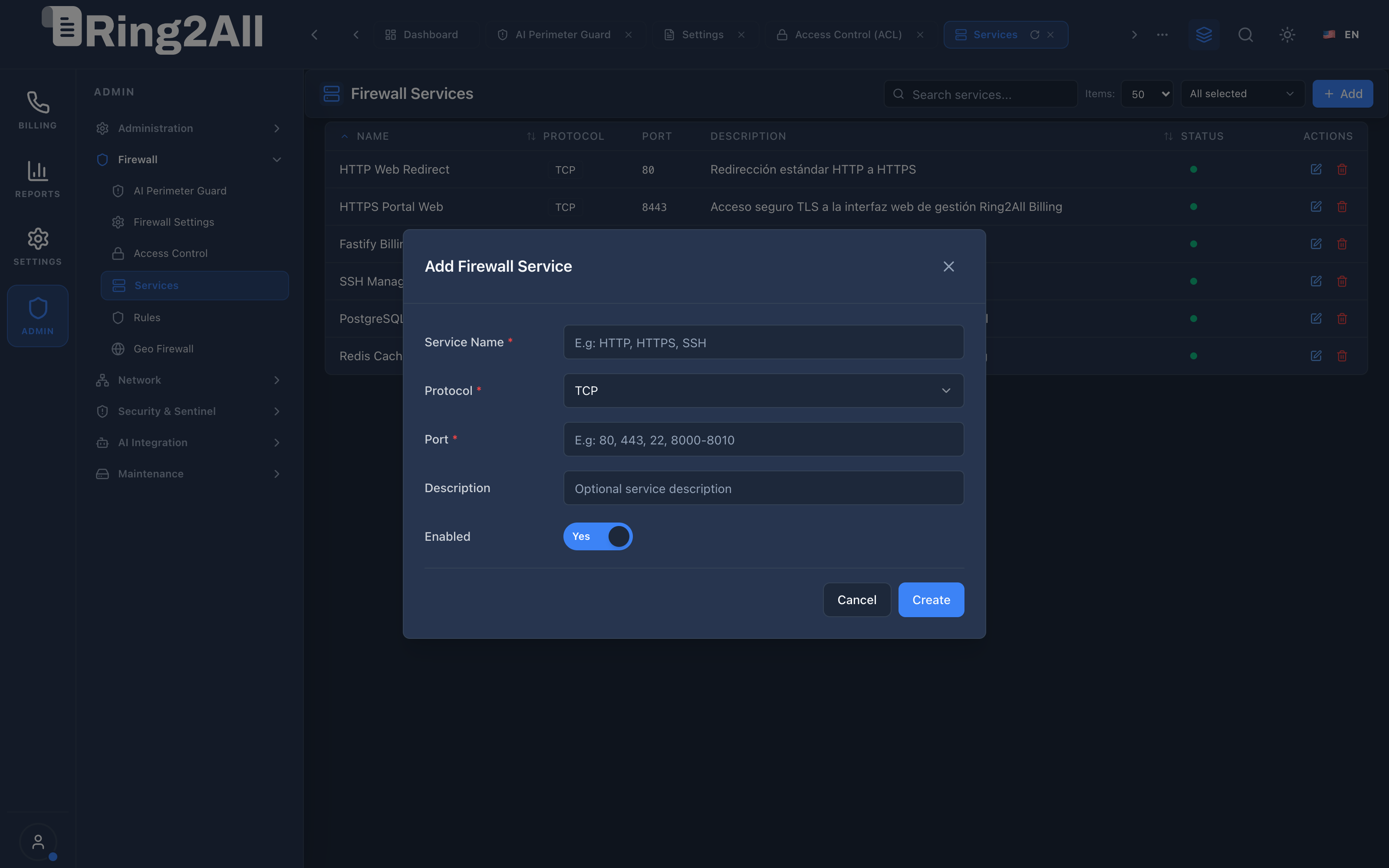
Level 2 — Add Firewall Service Modal
Section titled “Level 2 — Add Firewall Service Modal”The modal dialog provides a clean, validated form to create named network service definitions.
Fields & Parameters Reference
Section titled “Fields & Parameters Reference”- Service Name: Alphanumeric identifier (e.g.,
HTTPS Portal Web,Fastify Billing API,Prometheus Exporter). - Protocol: Transport layer selection (
TCP,UDP, orBoth). - Port: Target port number (e.g.,
8443) or port span (e.g.,8000-8010). - Description: Detailed explanation of the service purpose and underlying software daemon.
- Enabled: Operational toggle. When set to
Yes, the service is eligible for inclusion in active firewall chains.
5. Architectural Flow & Security Governance
Section titled “5. Architectural Flow & Security Governance” ┌──────────────┐ 1. POST /api/firewall/services ┌────────────────────────┐ │ System Admin ├───────────────────────────────────────────────►│ Fastify 5 API Route │ └──────────────┘ └───────────┬────────────┘ │ 2. Validate │ 3. Store in Port/Proto│ ss_billing ▼ ┌──────────────┐ 4. nftables / iptables Reload ┌────────────────────────┐ │ Linux Kernel ◄────────────────────────────────────────────────┤ Firewall Service Sync │ │ Filter │ └────────────────────────┘ └──────────────┘- Service Registration: The administrator inputs service parameters into the modal and clicks Create.
- Validation: The Fastify backend validates port ranges (1-65535) and prevents port collisions with reserved operating system processes.
- Storage: The record is inserted into
public.firewall_services. - Kernel Application: If the firewall is active, the service definition updates the kernel packet filtering sets to immediately open or close the specified port.
6. Common Scenarios & Operational Playbooks
Section titled “6. Common Scenarios & Operational Playbooks”Playbook 1: Registering a Metrics Monitoring Service (Prometheus)
Section titled “Playbook 1: Registering a Metrics Monitoring Service (Prometheus)”- Navigate to ADMIN > Firewall > Services.
- Click + Add in the top-right toolbar.
- Enter Service Name:
Prometheus Node Exporter. - Select Protocol:
TCP. - Enter Port:
9100. - Enter Description:
Telemetry metrics endpoint for internal Prometheus scrapers. - Set Enabled to
Yes. - Click Create.
- The service is now ready to be restricted to the monitoring subnet under Access Control or Rules.
Playbook 2: Deactivating an Unused Service Port
Section titled “Playbook 2: Deactivating an Unused Service Port”- Navigate to ADMIN > Firewall > Services.
- Locate the row for the service you wish to decommission (e.g.,
HTTP Web Redirecton port 80). - Click the Edit icon.
- Toggle Enabled to
No. - Click Save.
- The firewall immediately ceases accepting traffic on port 80, enforcing exclusive HTTPS on port 8443.
7. Troubleshooting & Diagnostic Commands
Section titled “7. Troubleshooting & Diagnostic Commands”Inspecting Configured Services in PostgreSQL
Section titled “Inspecting Configured Services in PostgreSQL”sudo -u postgres psql -d ss_billing -c \ "SELECT id, name, protocol, port, description, enabled FROM firewall_services ORDER BY id ASC;"Checking Listening Ports with Linux Utilities
Section titled “Checking Listening Ports with Linux Utilities”# Verify which applications are actively listening on the configured portsss -tulnp | grep -E ':(80|8443|3003|22|5432|6379)'
# Test socket reachability locallync -zv 127.0.0.1 30038. Model Context Protocol (MCP) AI Integration
Section titled “8. Model Context Protocol (MCP) AI Integration”The Firewall Services module connects directly to the Ring2All BSS MCP Server, enabling infrastructure management copilots to inspect named service abstractions and verify port bindings safely.
Available MCP Tools
Section titled “Available MCP Tools”| Tool Name | Access Role | Description & Primary Function | Example Arguments |
|---|---|---|---|
list_firewall_services |
Super Administrator |
Lists defined firewall network services with port definitions, transport protocols, and enabled status. | {} |
Sample MCP Tool Execution: list_firewall_services
Section titled “Sample MCP Tool Execution: list_firewall_services”Request Payload
Section titled “Request Payload”{ "name": "list_firewall_services", "arguments": {}}Response Payload
Section titled “Response Payload”[ { "id": 1, "name": "Billing HTTP/HTTPS", "protocol": "tcp", "port": "80,443", "description": "Public web portal and REST API", "enabled": true, "isSystem": true }, { "id": 2, "name": "SSH Management", "protocol": "tcp", "port": "22", "description": "Encrypted system shell management", "enabled": true, "isSystem": true }]Conversational AI Prompts for Copilot
Section titled “Conversational AI Prompts for Copilot”- “List all defined network services and their port assignments.”
- “Is SSH management enabled as a recognized firewall service?”
- “Show which ports are opened for the Billing API.”
9. Glossary
Section titled “9. Glossary”- Transport Protocol: The layer 4 communications protocol (typically TCP for reliable streams or UDP for low-latency datagrams) used by network packets.
- Port Range: A continuous block of sequential port numbers (e.g.,
10000-20000for RTP media relay) managed as a single logical entity. - System Service: A protected service entry marked
is_system = truethat cannot be deleted to prevent accidental administrative isolation. - Model Context Protocol (MCP): Open protocol standard that enables secure, controlled integration between Large Language Models and external tools, databases, and telecom rating engines.