

Certificates Module Documentation
Table of Contents
Section titled “Table of Contents”- Module Overview (Technical)
- Module Overview (Commercial & Business Value)
- 🎯 User Roles & Key Capabilities
- Visual Interface & Form Structure
- Architectural Flow & Security Governance
- Common Scenarios & Operational Playbooks
- Troubleshooting & Diagnostic Commands
- Model Context Protocol (MCP) AI Integration
- Glossary
1. Module Overview (Technical)
Section titled “1. Module Overview (Technical)”The Certificates module (public.certificates) manages public key infrastructure (PKI), TLS/SSL certificates, private key storage, and ACME automated renewals for Ring2All Billing. In modern telecommunications and billing architectures, robust cryptographic authentication is mandatory across customer self-care portals, carrier REST APIs, payment gateway webhooks, and secure SIP/WebRTC signaling.
This module supports three primary certificate acquisition models:
- Self-Signed Certificates: Generated dynamically on-server using OpenSSL with customizable RSA key sizes (2048/4096-bit) and validity periods for lab and private interconnect testing.
- Let’s Encrypt / ACME: Fully automated domain verification, certificate issuance, and recurring 60-day renewal via HTTP-01 challenges.
- Custom Commercial Certificates: Secure upload of third-party X.509 PEM certificates, intermediate CA bundles, and encrypted private keys issued by established Certificate Authorities (e.g., DigiCert, Sectigo).
Data Model & System Linkage
Section titled “Data Model & System Linkage” ┌────────────────────────────────────────────────────────────────────────┐ │ Certificate Entity (public.certificates) │ │ • id: bigint (Primary Key) │ │ • name: VARCHAR(100) (e.g., 'Billing Production TLS (*.ring2all.com)')│ │ • cert_type: 'SELF_SIGNED' | 'LETS_ENCRYPT' | 'CUSTOM' │ │ • common_name: VARCHAR(255) (e.g., 'bss.ring2all.com') │ │ • sans: text[] (Subject Alternative Names Array) │ │ • certificate_pem: text (Public X.509 Base64 Certificate) │ │ • private_key_pem: text (AES-256 Encrypted Private Key) │ │ • chain_pem: text (Intermediate CA Trust Bundle) │ │ • issuer: VARCHAR(255) (e.g., 'Lets Encrypt Authority R3') │ │ • valid_from: timestamptz │ │ • valid_until: timestamptz │ │ • auto_renew: boolean │ │ • status: 'active' | 'expired' | 'revoked' │ └───────────────────────────────────┬────────────────────────────────────┘ │ ┌─────────────────────────┼─────────────────────────┐ ▼ ▼ ▼ ┌───────────────────┐ ┌───────────────────┐ ┌───────────────────┐ │ NGINX SSL Binding │ │ OpenVPN Server CA │ │ Fastify HTTPS API │ │ • Web Admin UI │ │ • Root CA & Server│ │ • Client Webhooks │ │ • Customer Portal │ │ X.509 Cert │ │ • REST Endpoints │ └───────────────────┘ └───────────────────┘ └───────────────────┘PostgreSQL Schema Architecture
Section titled “PostgreSQL Schema Architecture”public.certificates:id: Numeric primary key (bigserial).name: Descriptive label indicating the domain scope and purpose.cert_type: Origin category ('SELF_SIGNED','LETS_ENCRYPT','CUSTOM').common_name: Primary Fully Qualified Domain Name (FQDN) or IP.sans: PostgreSQL array of alternative domain names (VARCHAR[]).certificate_pem: Standard ASCII PEM-encoded public certificate block (-----BEGIN CERTIFICATE-----).private_key_pem: Encrypted PEM private key block, secured using system master keys.issuer: Organization or authority that signed the certificate.valid_until: Expiration timestamp used for automated renewal triggering and proactive UI alerts.status: Operational state ('active','expired','revoked').
2. Module Overview (Commercial & Business Value)
Section titled “2. Module Overview (Commercial & Business Value)”- Elimination of Browser Security Warnings: Providing valid CA-signed TLS certificates ensures enterprise customers and prospective clients experience frictionless, trusted access without alarming browser warnings.
- PCI-DSS & SOC 2 Compliance: Enforces modern cryptographic ciphers (TLS 1.2 / TLS 1.3 with AES-256-GCM), protecting customer credit card numbers, billing addresses, and authentication tokens in transit.
- Automated Expiration Risk Mitigation: Proactive visual countdown badges (e.g., “81 days left”) and automated ACME renewal daemons prevent catastrophic service interruptions caused by forgotten SSL expirations.
3. 🎯 User Roles & Key Capabilities
Section titled “3. 🎯 User Roles & Key Capabilities”| User Role | Key Permissions | Core Responsibilities & Workflows |
|---|---|---|
| Super Administrator | Full Control (CRUD on Certificates & Keys) |
Issues new certificates, uploads commercial CA bundles, configures ACME automated renewals, and deletes deprecated certificates. |
| Security Officer / SecOps | Cryptographic Audit | Audits key lengths (ensuring minimum 2048-bit RSA or P-256 ECC), inspects certificate chains for weak hashing (SHA-1 deprecation), and tracks expiration dates. |
| DevOps / SysAdmin | Read & Binding | Binds active certificates to NGINX virtual hosts in Server Settings and configures OpenVPN server TLS parameters. |
4. Visual Interface & Form Structure
Section titled “4. Visual Interface & Form Structure”Level 1 — Certificates List View
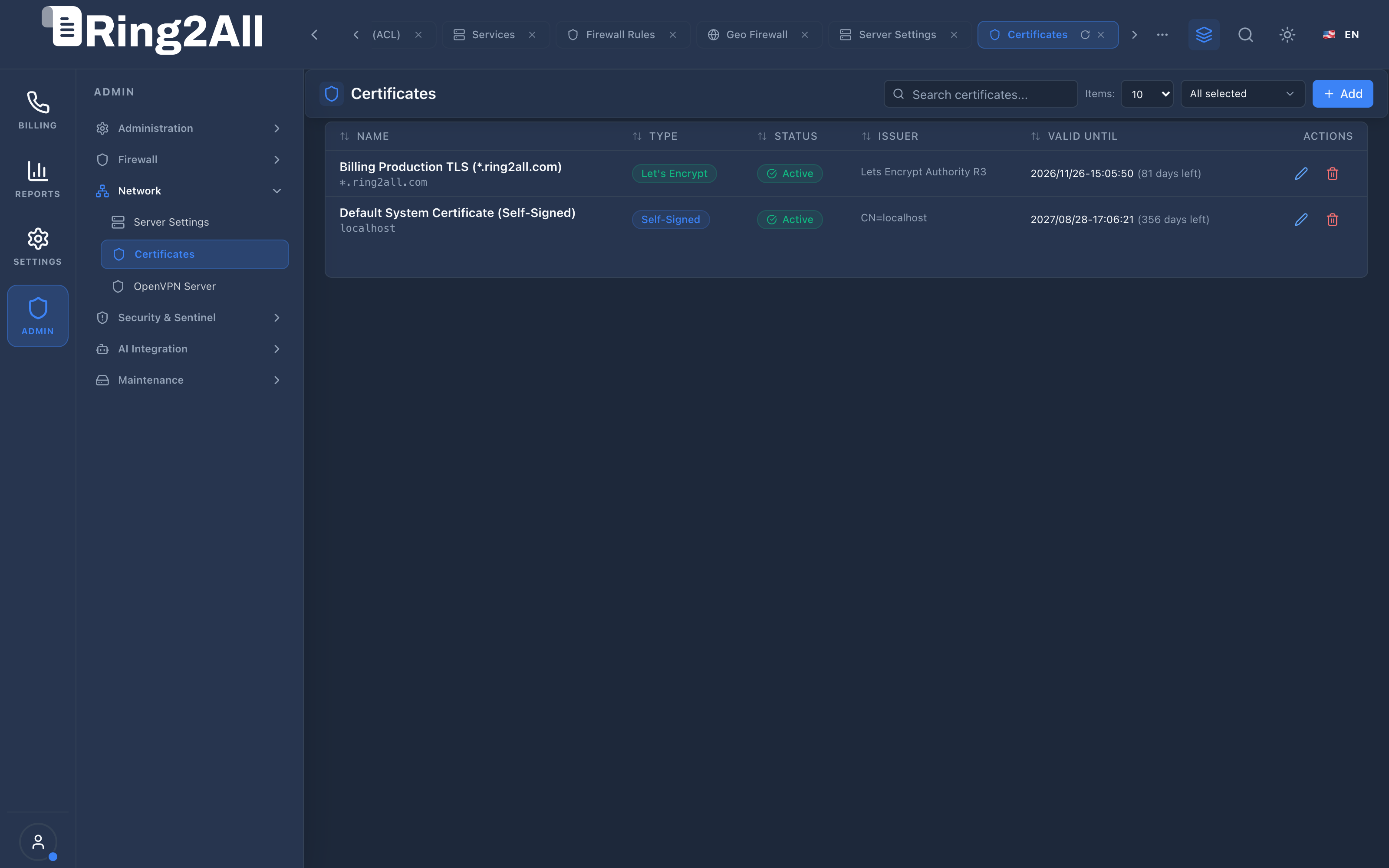
Section titled “Level 1 — Certificates List View”The catalog lists all installed SSL/TLS credentials, displaying certificate names, types (Let’s Encrypt, Self-Signed, Custom), status badges, issuers, and precise expiration dates with remaining day counters.
Level 2 — Certificate Provisioning Form
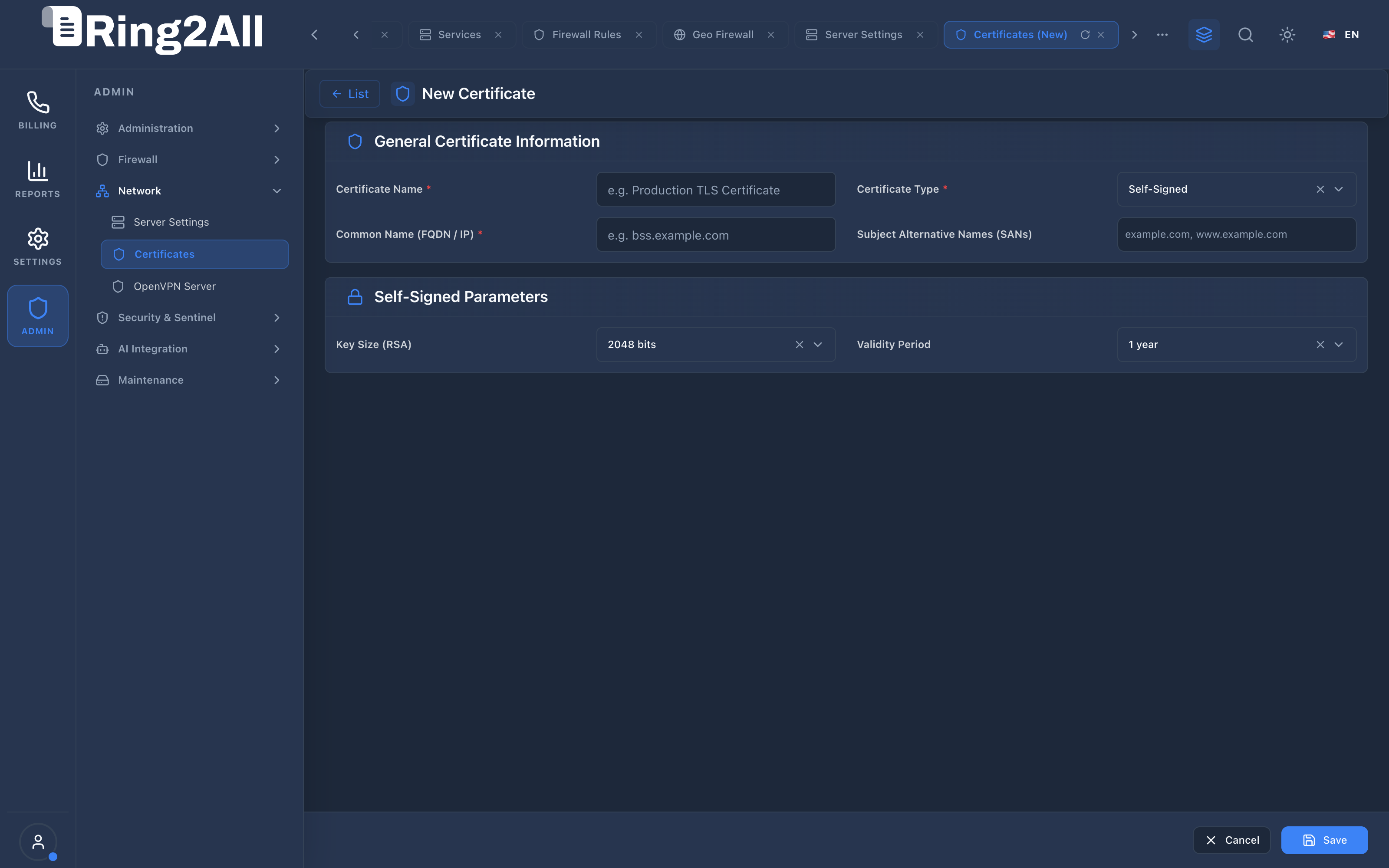
Section titled “Level 2 — Certificate Provisioning Form”The creation view features a clean 4-column layout ([Label 1] [Control 1] [Label 2] [Control 2]) organized into General Certificate Information and Self-Signed Parameters (or manual upload blocks).
Fields & Parameters Reference
Section titled “Fields & Parameters Reference”- General Certificate Information:
- Certificate Name: Meaningful label (e.g.,
Billing Production TLS (*.ring2all.com)). - Certificate Type: Dropdown selecting
Self-Signed,Let's Encrypt, orCustom (Upload). - Common Name (FQDN / IP): Target domain (e.g.,
bss.ring2all.com). - Subject Alternative Names (SANs): Comma-delimited additional hostnames (e.g.,
ring2all.com, *.ring2all.com).
- Certificate Name: Meaningful label (e.g.,
- Self-Signed Parameters:
- Key Size (RSA): Cryptographic key length (
2048 bitsor4096 bits). - Validity Period: Certificate lifespan (
1 year,2 years,5 years).
- Key Size (RSA): Cryptographic key length (
- Custom Certificate Parameters (when Custom is selected):
- Certificate PEM: Public certificate block.
- Private Key PEM: Matching private key block.
- CA Chain PEM: Optional intermediate and root CA bundle.
5. Architectural Flow & Security Governance
Section titled “5. Architectural Flow & Security Governance” ┌──────────────┐ 1. POST /api/v1/settings/certificates ┌────────────────────────┐ │ Administrator├───────────────────────────────────────────────►│ Fastify 5 API Route │ └──────────────┘ └───────────┬────────────┘ │ 2. Generate OpenSSL Key Pair │ 3. Store Encrypted in or Request ACME Challenge │ ss_billing ▼ ┌──────────────┐ 5. NGINX SSL Reload (Zero Downtime) ┌────────────────────────┐ │ NGINX Daemon ◄────────────────────────────────────────────────┤ Certificate Synchronizer│ └──────────────┘ └────────────────────────┘ │ 4. Write to File System: /etc/ssl/ring2all/- Initiation: The administrator selects the certificate type, enters domain parameters, and clicks Save.
- Generation / Verification:
- Self-Signed: OpenSSL generates the private key and self-signs the certificate directly.
- Let’s Encrypt: The ACME agent provisions an HTTP-01 challenge under
/.well-known/acme-challenge/, verifies domain ownership with Let’s Encrypt, and receives signed certificates. - Custom: The server validates that the public certificate matches the provided private key modulus.
- Database Storage: Certificate assets are written to
public.certificates. - File System Deployment: PEM files are written with strict
0600permissions to/etc/ssl/ring2all/certs/. - Web Server Reload: NGINX executes a seamless configuration reload.
6. Common Scenarios & Operational Playbooks
Section titled “6. Common Scenarios & Operational Playbooks”Playbook 1: Generating a Self-Signed Certificate for Lab Testing
Section titled “Playbook 1: Generating a Self-Signed Certificate for Lab Testing”- Navigate to ADMIN > Network > Certificates.
- Click + Add in the top-right toolbar.
- Enter Certificate Name:
Billing Lab Test TLS. - Select Certificate Type:
Self-Signed. - In Common Name (FQDN / IP), enter the server’s local IP or internal hostname:
192.168.10.29. - Select Key Size (RSA):
2048 bitsand Validity Period:1 year. - Click Save in the bottom-right action bar.
- Navigate to ADMIN > Network > Server Settings and bind the newly generated certificate to the web portal.
Playbook 2: Installing a Commercial Wildcard SSL Certificate
Section titled “Playbook 2: Installing a Commercial Wildcard SSL Certificate”- Procure a wildcard certificate (
*.yourdomain.com) from a trusted Certificate Authority. - Navigate to ADMIN > Network > Certificates and click + Add.
- Enter Certificate Name:
Commercial Wildcard TLS 2026. - Set Certificate Type:
Custom (Upload). - In Common Name, enter
*.yourdomain.com. - Paste the contents of your certificate into Certificate PEM, the private key into Private Key PEM, and the intermediate bundle into CA Chain PEM.
- Click Save.
- Verify in the list view that the status displays
Activeand the issuer matches your CA.
7. Troubleshooting & Diagnostic Commands
Section titled “7. Troubleshooting & Diagnostic Commands”Validating Certificate Modulus Match
Section titled “Validating Certificate Modulus Match”# Verify that a public certificate and private key match identicallyopenssl x509 -noout -modulus -in /etc/ssl/ring2all/certs/bundle.crt | openssl md5openssl rsa -noout -modulus -in /etc/ssl/ring2all/certs/private.key | openssl md5# Both MD5 checksums must be identicalInspecting Certificate Details from Database
Section titled “Inspecting Certificate Details from Database”sudo -u postgres psql -d ss_billing -c \ "SELECT id, name, cert_type, common_name, issuer, valid_until, status \ FROM certificates ORDER BY id DESC;"Verifying TLS Handshake from Remote Terminal
Section titled “Verifying TLS Handshake from Remote Terminal”# Test remote SSL connection and inspect served certificate chainopenssl s_client -connect 192.168.10.29:8443 -servername bss.example.com8. Model Context Protocol (MCP) AI Integration
Section titled “8. Model Context Protocol (MCP) AI Integration”The Certificates module connects directly to the Ring2All BSS MCP Server, providing SSL administrators and security automation agents with tools to audit TLS certificate expiration windows and common names programmatically.
Available MCP Tools
Section titled “Available MCP Tools”| Tool Name | Access Role | Description & Primary Function | Example Arguments |
|---|---|---|---|
list_ssl_certificates |
Super Administrator |
Lists SSL/TLS certificates, domain names, issuers, expiration dates, and active flags. | {} |
Sample MCP Tool Execution: list_ssl_certificates
Section titled “Sample MCP Tool Execution: list_ssl_certificates”Request Payload
Section titled “Request Payload”{ "name": "list_ssl_certificates", "arguments": {}}Response Payload
Section titled “Response Payload”[ { "id": 1, "name": "Production Wildcard SSL", "commonName": "*.ring2all.com", "certType": "custom", "issuer": "Let's Encrypt Authority X3", "validUntil": "2026-11-30T00:00:00Z", "status": "valid", "isActive": true }]Conversational AI Prompts for Copilot
Section titled “Conversational AI Prompts for Copilot”- “Check if any SSL/TLS certificates will expire in the next 30 days.”
- “List all active certificates and their associated domain names.”
- “Verify the issuer and expiration date of our wildcard certificate.”
9. Glossary
Section titled “9. Glossary”- ACME (Automated Certificate Management Environment): A communications protocol for automating interactions between certificate authorities and web servers.
- SAN (Subject Alternative Name): An extension to X.509 that allows multiple domain names to be protected by a single SSL certificate.
- Modulus: The mathematical product of two prime numbers used in RSA key generation; the certificate and private key must share the exact same modulus.
- Intermediate CA: A certificate issued by a root authority used to sign end-user certificates, establishing an unbroken chain of trust.
- Model Context Protocol (MCP): Open protocol standard that enables secure, controlled integration between Large Language Models and external tools, databases, and telecom rating engines.