

Parking Lots Module Documentation
Table of Contents
Section titled “Table of Contents”- Module Overview (Technical)
- Module Overview (Commercial/Business)
- Module Overview (End User/Administrator)
- Configuration Fields Reference
- Call Flow / Logic Explanation
- Common Scenarios & Examples
- Model Context Protocol (MCP) AI Integration
- Limitations & Important Notes
- Troubleshooting Tips
- Glossary
1. Module Overview (Technical)
Section titled “1. Module Overview (Technical)”What Are Parking Lots?
Section titled “What Are Parking Lots?”Parking Lots provide call holding zones where calls can be “parked” on numbered slots and retrieved by anyone who knows the slot number. Unlike regular hold, parked calls can be picked up from any phone in the system.
Architecture
Section titled “Architecture”┌─────────────────────────────────────────────────────────────────┐│ Parking Lot System │├─────────────────────────────────────────────────────────────────┤│ ││ PARKING A CALL ││ ───────────────── ││ User on call → Transfers to *70 (park) → Call parked ││ ││ ┌──────────────────────────────────────────────────────────┐ ││ │ Parking Lot "Main" (Extension 700) │ ││ │ │ ││ │ Slot 701: [Occupied] - Caller: +1-555-1234 (60s) │ ││ │ Slot 702: [Available] │ ││ │ Slot 703: [Available] │ ││ │ Slot 704: [Occupied] - Caller: +1-555-5678 (15s) │ ││ │ Slot 705: [Available] │ ││ │ │ ││ └──────────────────────────────────────────────────────────┘ ││ ││ RETRIEVING A CALL ││ ───────────────── ││ Any user → Dials 701 → Connected to parked caller ││ │└─────────────────────────────────────────────────────────────────┘Slot Numbering
Section titled “Slot Numbering”If lot extension is 700 with 5 positions:
- Slot 701, 702, 703, 704, 705
2. Module Overview (Commercial/Business)
Section titled “2. Module Overview (Commercial/Business)”Business Value
Section titled “Business Value”Parking Lots enable flexible call routing:
| Without Parking | With Parking |
|---|---|
| Transfer to specific person | Park and announce slot |
| Caller waits for specific person | Anyone can retrieve |
| Tied to one extension | Available system-wide |
Use Cases
Section titled “Use Cases”-
Reception Workflow
- “I have John Smith on line 701”
- Anyone can dial 701 to take the call
-
Warehouse/Retail
- Park call, page location over PA
- Employee picks up from nearest phone
-
Customer Service
- Park caller while researching answer
- Return to same caller easily
-
Multi-Location
- Park call at one location
- Retrieve at another location
Feature Highlights
Section titled “Feature Highlights”| Feature | Benefit |
|---|---|
| Multiple Slots | Handle many parked calls simultaneously |
| Timeout Callback | Parked call returns if not answered |
| Position Announcement | Caller hears their slot number |
| Music on Hold | Professional hold experience |
| Timeout Routing | Route to voicemail/IVR if not retrieved |
3. Module Overview (End User/Administrator)
Section titled “3. Module Overview (End User/Administrator)”What Can You Do?
Section titled “What Can You Do?”- Create parking lots with assigned extension ranges
- Configure parking behavior (timeout, music, announcements)
- Set timeout destinations (voicemail, IVR, extension)
- Monitor active parked calls
Navigation
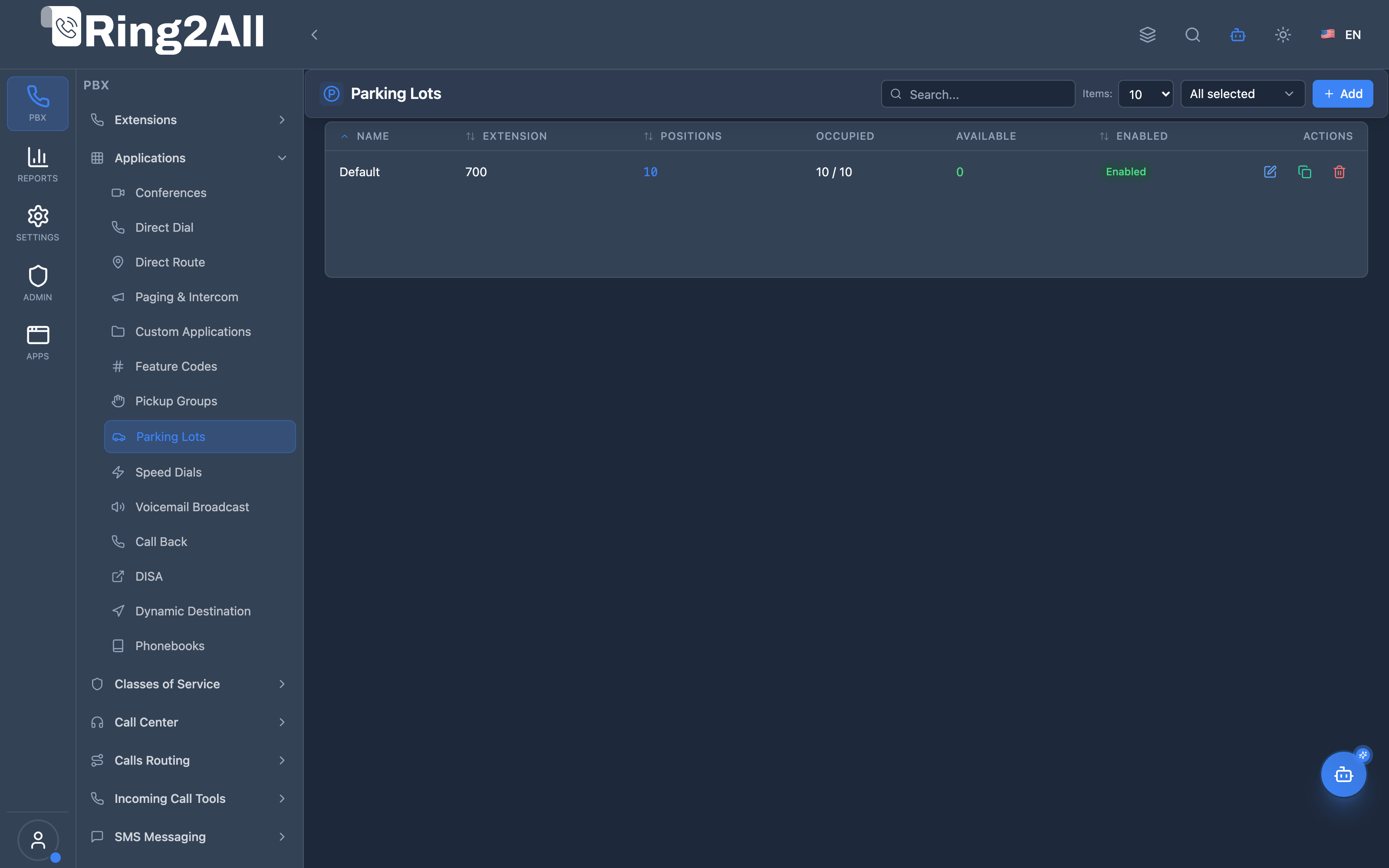
Section titled “Navigation”- Navigate to PBX → Applications → Parking Lots in the main sidebar.
- The list view shows all configured parking lots, detailing Name, Extension, Positions, Occupied slots, Available slots, active Status (
Enabled), and management actions (edit, duplicate, delete). - Click the + Add button in the top-right toolbar to create a new parking lot.
- Click any existing lot row or the edit icon to configure parking duration, comeback timers, or timeout routing destinations.
Administrator Workflow
Section titled “Administrator Workflow”┌─────────────────────────────────────────────────────────────────┐│ Creating a Parking Lot │├─────────────────────────────────────────────────────────────────┤│ ││ Step 1: General Tab ││ ├─ Name: "Main Parking" ││ ├─ Extension: 700 (slots will be 701-710) ││ └─ Total Positions: 10 ││ ││ Step 2: Behavior Tab ││ ├─ Parking Time: 120 seconds ││ ├─ Comeback Time: 30 seconds ││ ├─ Find Slot: Next Available ││ ├─ Announce Position: ✓ ││ └─ Music on Hold: Default ││ ││ Step 3: Advanced Tab ││ ├─ Return to Originator: ✓ ││ ├─ Timeout Module: Voicemail ││ └─ Timeout Destination: 1000 (operator voicemail) ││ ││ Step 4: Enable and Save ││ └─ Enabled: ✓ ││ ││ Result: Users can transfer to 700, slots 701-710 available ││ │└─────────────────────────────────────────────────────────────────┘User Workflow (Parking a Call)
Section titled “User Workflow (Parking a Call)”1. While on a call, user transfers to 7002. System announces: "Parked at slot 703"3. User hangs up (or is returned to call)4. User pages: "John Smith, you have a call on 703"5. John dials 703 → Connected to callerQuick Tips
Section titled “Quick Tips”[!TIP] Announce Position: Enable this so the parker knows which slot to communicate.
[!TIP] Return to Originator: Enable this to return timeout calls to the person who parked.
[!CAUTION] Parking Time: If too short, calls return before they can be retrieved.
4. Configuration Fields Reference
Section titled “4. Configuration Fields Reference”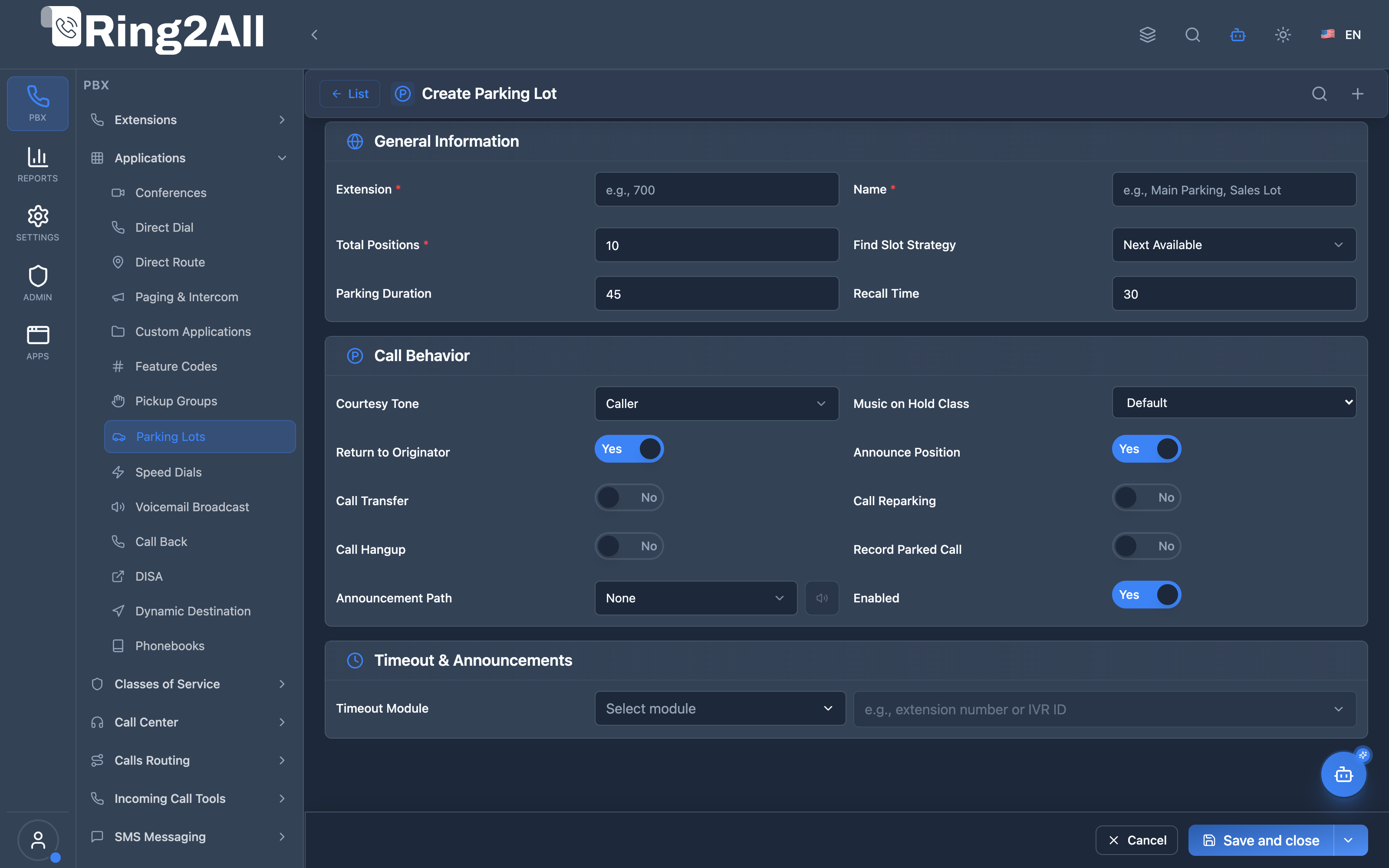
General Information Section
Section titled “General Information Section”| Field | Description | User-Friendly Tooltip | Example | Required |
|---|---|---|---|---|
| Extension * | Base dialable number for call parking | Base extension for the parking lot (e.g. 700) | 700 |
Yes |
| Name * | Unique name identifying the parking lot | Parking lot name must be unique within the domain | Corporate General Parking |
Yes |
| Total Positions * | Total number of parking slots allocated | Total positions (1-99). Slots will be generated starting from Extension + 1 | 10 (slots 701-710) |
Yes |
| Find Slot Strategy | Algorithm for assigning vacant slots | Find slot strategy | Next Available / Random |
Yes |
| Parking Duration | Max seconds call remains parked before timeout triggers (valet_parking_timeout) |
Parking duration (seconds) before callback triggers | 45, 120 (5-300s) |
Yes |
Call Behavior Section
Section titled “Call Behavior Section”| Field | Description | User-Friendly Tooltip | Options / Default |
|---|---|---|---|
| Music on Hold Class | Audio stream played while caller is parked | Select Music on Hold class | Default, custom MOH streams |
| Announcement Path | Voice prompt played before placing caller into parking slot | Voice guide file played prior to parking | Audio recording file / None |
| Announce Position | Play assigned slot number digits to the parking user | Announces parking slot number to the user | Yes / No (toggle) |
| Record Parked Call | Capture audio recording while held in parking slot (record_session) |
Record parked call audio | Yes / No (toggle) |
| Return to Originator | Recalls the originating extension via valet_parking_orbit_exten on timeout |
Returns timed-out call back to the extension who parked it | Yes / No (toggle) |
| Enabled | Master switch to activate or deactivate parking lot | Enable or disable this parking lot | Yes / No (toggle) |
Timeout Section
Section titled “Timeout Section”| Field | Description | User-Friendly Tooltip | Example |
|---|---|---|---|
| Timeout Module | Destination module if Return to Originator is disabled or caller extension is unavailable | Select module for timeout fallback | Voicemail, Extensions, IVR, Queues |
| Timeout Destination | Specific target value within chosen module | Select destination target | 1001, Sales IVR, Support Queue |
5. Call Flow / Logic Explanation
Section titled “5. Call Flow / Logic Explanation”Parking Flow
Section titled “Parking Flow”┌─────────────────────────────────────────────────────────────────┐│ Parking Flow │├─────────────────────────────────────────────────────────────────┤│ ││ 1. User transfers active call to 700 (parking lot extension) ││ │ ││ ▼ ││ 2. Find available slot ││ ├─ Next Available: Check 701, 702, 703... ││ └─ Random: Pick random available slot ││ │ ││ ▼ ││ 3. Found slot 703 ││ │ ││ ▼ ││ 4. If announcePosition = true: ││ → Play "Parked at slot 7-0-3" ││ │ ││ ▼ ││ 5. Place caller on hold at slot 703 ││ ├─ Play music on hold ││ └─ Start parking timer (120 seconds) ││ │ ││ ▼ ││ 6. Parker's call ends (they can work on other things) ││ │└─────────────────────────────────────────────────────────────────┘Retrieval Flow
Section titled “Retrieval Flow”┌─────────────────────────────────────────────────────────────────┐│ Retrieval Flow │├─────────────────────────────────────────────────────────────────┤│ ││ 1. Any user dials 703 (parked slot) ││ │ ││ ▼ ││ 2. Check if slot 703 is occupied ││ ├─ Yes → Continue ││ └─ No → "Slot empty" or dial tone ││ │ ││ ▼ ││ 3. Bridge user with parked caller ││ │ ││ ▼ ││ 4. Slot 703 marked as available ││ │└─────────────────────────────────────────────────────────────────┘Timeout Flow
Section titled “Timeout Flow”┌─────────────────────────────────────────────────────────────────┐│ Timeout Flow │├─────────────────────────────────────────────────────────────────┤│ ││ 1. Parking timer (valet_parking_timeout) expires ││ │ ││ ▼ ││ 2. Check returnToOriginator ││ ├─ Yes (and caller extension known) ││ │ └─ valet_parking_orbit_exten = caller_ext ││ │ → Rings originating user's phone ││ └─ No (or caller extension unavailable) ││ └─ valet_parking_orbit_exten = timeoutDestination ││ → Routes to configured timeout module & destination ││ │└─────────────────────────────────────────────────────────────────┘6. Common Scenarios & Examples
Section titled “6. Common Scenarios & Examples”Scenario 1: Reception Parking
Section titled “Scenario 1: Reception Parking”Setup:
| Setting | Value |
|---|---|
| Name | Main Parking |
| Extension | 700 |
| Total Positions | 5 |
| Parking Time | 180 seconds |
| Announce Position | ✓ |
| Return to Originator | ✓ |
| Timeout Module | Voicemail |
| Timeout Destination | 1000 (reception VM) |
Usage:
- Reception transfers caller to 700
- System: “Parked at slot 703”
- Reception pages: “John, call on 703”
- John dials 703 → Connected
Scenario 2: Department-Specific Lots
Section titled “Scenario 2: Department-Specific Lots”Setup multiple lots:
| Lot | Extension | Positions | Timeout Destination |
|---|---|---|---|
| Sales Parking | 710 | 5 | Sales VM |
| Support Parking | 720 | 10 | Support Queue |
| Executive Parking | 730 | 3 | Admin Assistant |
Scenario 3: Warehouse with PA System
Section titled “Scenario 3: Warehouse with PA System”Setup:
| Setting | Value |
|---|---|
| Name | Warehouse |
| Extension | 800 |
| Total Positions | 10 |
| Parking Time | 300 seconds (5 min) |
| Announce Position | ✓ |
| Return to Originator | ✗ |
| Timeout Module | IVR |
| Timeout Destination | main_menu |
Usage:
- Office parks call at 800
- System: “Parked at slot 805”
- PA announcement: “Shipping, line 805”
- Warehouse employee picks up nearest phone, dials 805
7. Model Context Protocol (MCP) AI Integration
Section titled “7. Model Context Protocol (MCP) AI Integration”Ring2All exposes native Model Context Protocol (MCP) tools for Parking Lots, allowing autonomous AI agents and Copilots to query parking lot topology, inspect real-time valet slot occupancy via Telephony Server CLI, provision new parking ranges, and adjust ringback comeback timers with domain-level isolation.
Available MCP Tools
Section titled “Available MCP Tools”| Tool Name | Description | Key Parameters |
|---|---|---|
list_parking_lots |
Lists all configured call parking lots in the domain, including base extensions, slot capacity, and timeout rules. | search (optional string) |
get_parking_lot_status |
Retrieves real-time configuration and live occupied vs. available slot positions directly from Telephony Server mod_valet_parking. | identifier (required, lot name or base extension) |
create_parking_lot |
Provisions a new valet parking lot with base extension, slot capacity, and recall timeout. | name, extension, totalPositions, timeout, description |
update_parking_lot |
Modifies parking lot parameters such as total positions, ringback timers, or base extension. | identifier, newName, newExtension, totalPositions, timeout, enabled |
delete_parking_lot |
Removes a parking lot and de-registers its extension from the dialplan. | identifier (required) |
Strict Domain Numbering Safeguards
Section titled “Strict Domain Numbering Safeguards”Whenever an AI agent executes create_parking_lot or update_parking_lot, Ring2All runs validateNumberUniqueness across sip_extensions, public.dialplan_registry, and public.direct_routes. An AI agent cannot assign a base extension or slot range that collides with existing extensions, feature codes, direct dials, or conference rooms within the same domain.
AI Agent Operational Examples
Section titled “AI Agent Operational Examples”Querying Live Parked Calls & Lot Status
Section titled “Querying Live Parked Calls & Lot Status”{ "tool": "get_parking_lot_status", "arguments": { "identifier": "700" }}Provisioning a Departmental Parking Lot
Section titled “Provisioning a Departmental Parking Lot”{ "tool": "create_parking_lot", "arguments": { "name": "Support Parking Lot", "extension": "720", "totalPositions": 5, "timeout": 60, "description": "Valet parking for Support team tier-2 transfers" }}Recommended Natural Language Prompts
Section titled “Recommended Natural Language Prompts”- “Show me all parking lots configured on this PBX and check if there are calls currently parked.”
- “Create a parking lot called ‘Sales Parking’ at extension 750 with 8 slots and a 90-second ringback timeout.”
- “What slot is caller +1-555-0199 currently parked on in the Main Parking lot?”
8. Limitations & Important Notes
Section titled “8. Limitations & Important Notes”Technical Limitations
Section titled “Technical Limitations”[!WARNING] Slot Range: Slots start at extension+1. Extension 700 = slots 701-710 (for 10 positions).
[!WARNING] Single Retrieval: Only one person can retrieve a parked call—first dial wins.
[!IMPORTANT] MOH Duration: Music on Hold loops if parking time exceeds MOH file length.
Best Practices
Section titled “Best Practices”- Plan Extension Ranges: Don’t overlap parking slots with real extensions
- Reasonable Timeouts: 2-3 minutes is typical; too short causes premature callbacks
- Enable Announcements: Users need to know which slot to communicate
- Return to Originator: Safer than sending to general queue on timeout
- Document Your Lots: Train staff on which lots to use for which purposes
Security Considerations
Section titled “Security Considerations”[!CAUTION] Anyone Can Retrieve: Any user who dials the slot can pick up the call. Consider this for sensitive calls.
9. Troubleshooting Tips
Section titled “9. Troubleshooting Tips”Common Issues
Section titled “Common Issues”| Symptom | Possible Cause | Solution |
|---|---|---|
| No available slots | All slots full | Increase totalPositions |
| Call returns immediately | Parking time too short | Increase parkingTime |
| Can’t retrieve call | Wrong slot number | Verify slot dialed |
| No slot announcement | announcePosition = false | Enable announcement |
| Call goes to wrong VM | Wrong timeout destination | Check destination config |
Diagnostic SQL
Section titled “Diagnostic SQL”List parking lots:
SELECT name, extension, total_positions, parking_time, enabledFROM public.parking_lotsWHERE domain_id = [domain_id]ORDER BY extension;Telephony Server Commands
Section titled “Telephony Server Commands”Check active parked calls:
fs_cli -x "valet_parking status"Check specific lot:
fs_cli -x "valet_parking list 700"Manually retrieve parked call:
fs_cli -x "valet_parking retrieve 703"10. Glossary
Section titled “10. Glossary”| Term | Definition |
|---|---|
| Parking Lot | A collection of hold slots for parking calls |
| Slot | An individual parking position (e.g., 701, 702) |
| Park | Place a call on hold in a numbered slot |
| Retrieve | Pick up a parked call by dialing its slot |
| Parking Time | How long before a parked call times out (valet_parking_timeout) |
| Return to Originator | Send timeout call back to the parker (valet_parking_orbit_exten) |
| Valet Parking | Telephony Server module that handles parking |
| MOH | Music on Hold played while parked |
| Position | Same as slot—a numbered parking space |
Documentation last updated: January 2026