

Callback System Module Documentation
Table of Contents
Section titled “Table of Contents”- Module Overview (Technical)
- Module Overview (Commercial/Business)
- Module Overview (End User/Administrator)
- Callback Rules Configuration
- Callback Profiles Configuration
- Call Flow / Logic Explanation
- Common Scenarios & Examples
- Model Context Protocol (MCP) AI Integration
- Limitations & Important Notes
- Troubleshooting Tips
- Glossary
1. Module Overview (Technical)
Section titled “1. Module Overview (Technical)”What Is the Callback System?
Section titled “What Is the Callback System?”The Callback System provides automated call-back functionality with two main components:
- Callback Rules: User-triggered callbacks via dial codes
- Callback Profiles: Queue-integrated callbacks (caller presses key to request callback instead of waiting)
Architecture
Section titled “Architecture”┌─────────────────────────────────────────────────────────────────┐│ Callback System Architecture │├─────────────────────────────────────────────────────────────────┤│ ││ ┌─────────────────────────────────────────────────────────┐ ││ │ CALLBACK RULES │ ││ │ (User-triggered callbacks via dial codes) │ ││ │ │ ││ │ User dials *88 → Schedule callback to destination │ ││ │ after configured delay │ ││ └─────────────────────────────────────────────────────────┘ ││ ││ ┌─────────────────────────────────────────────────────────┐ ││ │ CALLBACK PROFILES │ ││ │ (Queue-integrated callbacks) │ ││ │ │ ││ │ Caller in queue → Press 1 → Exit queue, schedule │ ││ │ callback when agent available │ ││ └─────────────────────────────────────────────────────────┘ ││ ││ ┌─────────────────────────────────────────────────────────┐ ││ │ CALLBACK DISPATCHER │ ││ │ (Scheduled task executor) │ ││ │ │ ││ │ Polls scheduled_calls table → Executes pending │ ││ │ callbacks via loopback originate │ ││ └─────────────────────────────────────────────────────────┘ ││ │└─────────────────────────────────────────────────────────────────┘2. Module Overview (Commercial/Business)
Section titled “2. Module Overview (Commercial/Business)”Business Value
Section titled “Business Value”Callbacks improve customer experience and operational efficiency:
| Without Callbacks | With Callbacks |
|---|---|
| Caller waits on hold | Caller can hang up and receive callback |
| Frustrating hold times | Free to do other things |
| High abandonment rates | Improved customer satisfaction |
| Wasted agent time | Efficient queue management |
Use Cases
Section titled “Use Cases”-
Queue Callbacks
- “Press 1 to receive a callback instead of waiting”
- Reduces hold times and abandonment
-
Scheduled Callbacks
- Sales team schedules follow-up calls
- Service reminders
-
Emergency Callbacks
- Quick dial to request immediate callback
- VIP customer service
-
External Integration
- Web form triggers callback
- CRM-initiated callbacks
Feature Highlights
Section titled “Feature Highlights”| Feature | Benefit |
|---|---|
| Delay Timer | Schedule callback after X seconds |
| Retry Logic | Automatic retry if no answer |
| CoS Restriction | Limit who can use callbacks |
| Notifications | Email/API confirmation |
| Queue Integration | Seamless queue callback option |
3. Module Overview (End User/Administrator)
Section titled “3. Module Overview (End User/Administrator)”What Can You Do?
Section titled “What Can You Do?”Callback Rules:
- Create dial codes that trigger callbacks
- Set delay before callback execution
- Configure retry attempts and timeouts
- Restrict usage by Class of Service
Callback Profiles:
- Create reusable callback policies for queues
- Configure DTMF key to request callback
- Set timeout and retry intervals
- Assign profiles to queues
Navigation
Section titled “Navigation”- Navigate to PBX Engine → Applications → Call Back in the sidebar (or visit
/pbx/applications/callback). - The list view displays all configured callback rules, including Name, Number, Destination, Class of Service, and Status (Enabled/Disabled).
- Click the + Add button in the top toolbar to configure a new callback trigger.
- Click any existing rule row or edit button to update its destinations, delays, or security settings.
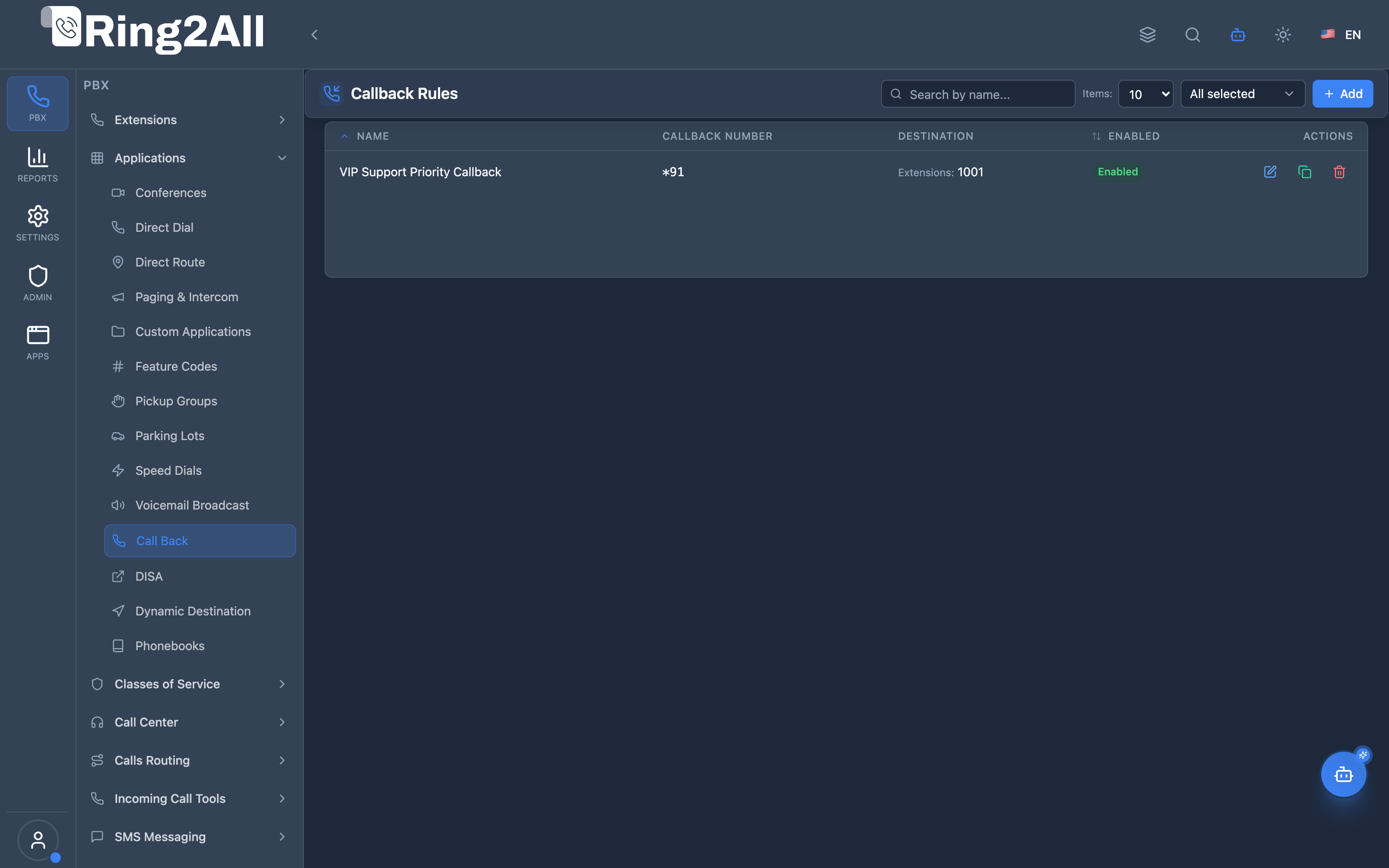
Administrator Workflow (Callback Rule)
Section titled “Administrator Workflow (Callback Rule)”┌─────────────────────────────────────────────────────────────────┐│ Creating a Callback Rule │├─────────────────────────────────────────────────────────────────┤│ ││ Step 1: General Information ││ ├─ Name: "VIP Support Priority Callback" ││ ├─ Callback Number: *91 (or blank to use caller ID) ││ ├─ Destination Module: Extensions ││ ├─ Destination Target: 1001 ││ ├─ Ask for Callback Number: Disabled (uses Caller ID) ││ └─ Enabled: Active ││ ││ Step 2: Settings & Execution ││ ├─ Delay Before Callback: 30 seconds ││ ├─ Retry Count: 3 attempts ││ ├─ Max Ring Wait Time: 45 seconds ││ ├─ Ringback Tone: US Ring ││ ├─ Record Call: Enabled ││ └─ Callback Strategy: Immediate ││ ││ Step 3: Save and Test ││ └─ Result: Inbound call triggers automatic scheduled callback ││ │└─────────────────────────────────────────────────────────────────┘Quick Tips
Section titled “Quick Tips”[!TIP] Ask for Callback Number: When enabled, the caller is prompted via interactive DTMF voice prompt to enter their preferred callback phone number rather than using automatic Caller ID.
[!TIP] Delay Seconds: Keep delays around 15–30 seconds to allow the initial caller sufficient time to disengage their handset before the PBX initiates the return leg.
[!CAUTION] Class of Service: Restrict permissions using Class of Service profiles if callbacks are permitted to dial external PSTN or international numbers.
4. Callback Rules Configuration
Section titled “4. Callback Rules Configuration”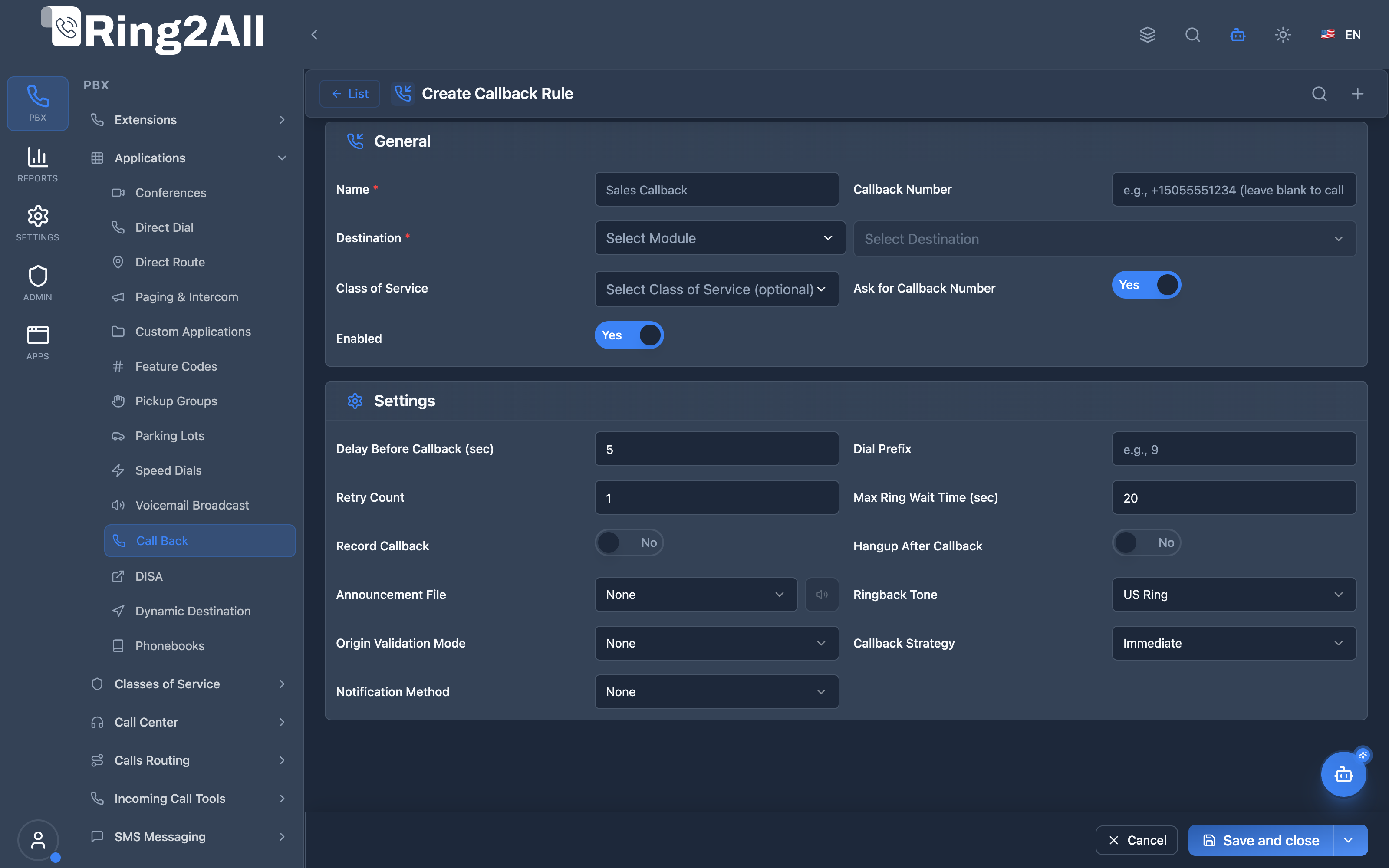
General Information Box
Section titled “General Information Box”| Field | Description | UI Tooltip | Example | Notes |
|---|---|---|---|---|
| Name * | Primary identification label | Friendly name identifying this callback rule | VIP Support Priority Callback |
Required. |
| Callback Number | Destination number or shortcode | Optional number or extension to call back (leave blank to use caller’s Caller ID) | *91, 18005550199 |
Optional. |
| Destination * | Target module and internal entity | Target destination that will be bridged once the caller answers the callback | Extensions → 1001 |
Required. Supports Extensions, Queues, Ring Groups, IVR, etc. |
| Class of Service | Calling permissions profile | Class of Service profile governing outbound dialing permissions | Standard Office |
Restricts dialed destination patterns. |
| Ask for Callback Number | Interactive prompt for phone number | When enabled, prompts the caller via DTMF to enter their target number instead of using Caller ID | Enabled / Disabled |
Toggle. Default: Disabled. |
| Enabled | Master rule status | Activate or deactivate this callback rule | Enabled / Disabled |
Toggle. Default: Enabled. |
Settings Box
Section titled “Settings Box”| Field | Description | UI Tooltip | Default | Options / Range |
|---|---|---|---|---|
| Delay Seconds | Pause duration before triggering return call | Number of seconds to wait before initiating the callback to the caller | 30 |
Integer: 0 to 600 seconds. |
| Dial Prefix | Digits prepended to callback number | Digits prepended to the dialed number when originating the outbound callback leg | None | String up to 16 characters (e.g., 9 for external trunk). |
| Retry Count | Maximum failed delivery attempts | Number of retry attempts if the caller does not answer or the line is busy | 3 |
Integer: 0 to 5. |
| Max Wait Time | Ring timeout duration per attempt | Maximum ring duration in seconds when calling the user before giving up | 45 |
Integer: 0 to 120 seconds. |
| Record Call | Two-way audio conversation recording | Record the entire two-way conversation once the callback leg bridges | Disabled |
Toggle. Stores in PBX recordings folder. |
| Hangup After Callback | Channel release behavior | Automatically hang up the call session once callback sequence is fulfilled | Enabled |
Toggle. Default: Enabled. |
| Announcement Path | Greeting played when caller answers | Audio prompt played to the caller as soon as they answer the return call | None | Dropdown selector from Audio Recordings library. |
| Ringback Tone | Audible ringing cadence played during bridge | Ringback tone frequency and pattern played while connecting to the destination | US Ring |
US Ring, UK Ring, FR Ring, None. |
| Origin Validation Mode | Security filter for incoming trigger calls | Verification mode used to validate if a caller is authorized to trigger callback | None |
None, Caller ID, CoS (Class of Service), List (Allowed Callers). |
| Allowed Callers | Authorized extensions/numbers (when mode is List) | Select specific extensions permitted to trigger this callback rule | None | Multi-select picker visible only when Origin Validation Mode is List. |
| Callback Strategy | Execution queue behavior | Processing strategy for executing the scheduled callback | Immediate |
Immediate (Directly after delay), Scheduled (Time-based dispatcher), Queue (Placed in queue). |
| Notification Method | Alert mechanism for callback completions | Notification mechanism sent after callback is completed or fails | None |
None, Email, API (Webhook), Event (System Bus). |
| Notification Target | Destination recipient address | Destination email address or HTTP webhook URL | None | Required when Notification Method is not None. |
5. Callback Profiles Configuration
Section titled “5. Callback Profiles Configuration”What Are Callback Profiles?
Section titled “What Are Callback Profiles?”Callback Profiles are reusable policies attached to queues. When enabled, callers in queue can press a DTMF key to request a callback instead of waiting.
Fields Reference
Section titled “Fields Reference”| Field | Description | Example |
|---|---|---|
| Profile Name | Identifier | Standard Callback |
| DTMF Key | Key to request callback | 1 |
| Confirm Sound | Confirmation audio | callback_confirm.wav |
| Thanks Sound | Acknowledgment audio | callback_thanks.wav |
| Timeout (seconds) | How long request is valid | 3600 |
| Retry Interval | Time between retries | 300 |
| Max Attempts | Maximum retry count | 3 |
| Strategy | Routing strategy | same-queue, overflow, any-agent |
| Announcement Sound | Pre-callback audio | callback_announce.wav |
| Enabled | Active status | On/Off |
Strategies
Section titled “Strategies”| Strategy | Description |
|---|---|
| same-queue | Return caller to the same queue |
| overflow | Use overflow queue if primary full |
| any-agent | Route to first available agent |
6. Call Flow / Logic Explanation
Section titled “6. Call Flow / Logic Explanation”Callback Rule Flow
Section titled “Callback Rule Flow”┌─────────────────────────────────────────────────────────────────┐│ Callback Rule Flow │├─────────────────────────────────────────────────────────────────┤│ ││ 1. User dials *88 (callback rule code) ││ │ ││ ▼ ││ 2. Look up callback rule ││ ├─ Found & enabled → Continue ││ └─ Not found → "Feature not available" ││ │ ││ ▼ ││ 3. Check access (CoS, allowed callers) ││ ├─ Allowed → Continue ││ └─ Denied → "Not authorized" ││ │ ││ ▼ ││ 4. Play announcement (if configured) ││ │ ││ ▼ ││ 5. Schedule callback in scheduled_calls table ││ ├─ Set execution time = NOW() + delay_seconds ││ └─ Store destination, retries, etc. ││ │ ││ ▼ ││ 6. Play "callback scheduled" confirmation ││ │ ││ ▼ ││ 7. Hang up initial call ││ │ ││ ▼ ││ 8. Dispatcher picks up scheduled callback ││ │ ││ ▼ ││ 9. Execute loopback call to destination ││ ├─ Answered → Call connected ││ └─ No answer → Retry (up to max retries) ││ │└─────────────────────────────────────────────────────────────────┘Queue Callback Flow
Section titled “Queue Callback Flow”┌─────────────────────────────────────────────────────────────────┐│ Queue Callback Flow │├─────────────────────────────────────────────────────────────────┤│ ││ 1. Caller enters queue, hears: "Press 1 for callback" ││ │ ││ ▼ ││ 2. Caller presses 1 ││ │ ││ ▼ ││ 3. Play confirmation: "You will receive a callback" ││ │ ││ ▼ ││ 4. Caller exits queue, callback request stored ││ │ ││ ▼ ││ 5. When agent becomes available: ││ ├─ Strategy: same-queue → Present to queue agent ││ ├─ Strategy: any-agent → First available ││ └─ Strategy: overflow → Try overflow queue ││ │ ││ ▼ ││ 6. Agent takes callback, system calls customer ││ │ ││ ▼ ││ 7. Customer answers → Connected to agent ││ │└─────────────────────────────────────────────────────────────────┘7. Common Scenarios & Examples
Section titled “7. Common Scenarios & Examples”Scenario 1: Sales Callback Request
Section titled “Scenario 1: Sales Callback Request”Callback Rule:
| Setting | Value |
|---|---|
| Callback Number | *88 |
| Name | Sales Callback |
| Destination | Queue: sales_queue |
| Delay | 30 seconds |
| Retry Count | 3 |
Result: Dial *88 → In 30 seconds, receive call from sales queue.
Scenario 2: Queue Callback Option
Section titled “Scenario 2: Queue Callback Option”Profile attached to support queue:
| Setting | Value |
|---|---|
| DTMF Key | 1 |
| Strategy | same-queue |
| Max Attempts | 3 |
| Retry Interval | 300 seconds |
Result: Callers in support queue can press 1 to exit and receive callback.
Scenario 3: VIP Callback Line
Section titled “Scenario 3: VIP Callback Line”Callback Rule with CoS restriction:
| Setting | Value |
|---|---|
| Callback Number | *99 |
| Name | VIP Callback |
| Destination | Extension: 5000 (VIP line) |
| Class of Service | VIP |
| Delay | 0 (immediate) |
Result: Only VIP extensions can trigger immediate callback to VIP line.
8. Model Context Protocol (MCP) AI Integration
Section titled “8. Model Context Protocol (MCP) AI Integration”Ring2All exposes native Model Context Protocol (MCP) tools for the Callback System covering both Callback Rules (dial-code triggered callbacks) and Callback Profiles (queue wait-time automated callbacks). AI agents can query configured rules, inspect profiles, and automate callback policies with domain isolation.
Available MCP Tools
Section titled “Available MCP Tools”Callback Rules Tools
Section titled “Callback Rules Tools”| Tool Name | Description | Key Parameters |
|---|---|---|
list_callback_rules |
Lists all dial-code triggered callback rules configured in the domain. | search (optional string) |
get_callback_rule_status |
Retrieves routing details, bridge destination module, delay timers, and retry parameters for a callback rule. | name (required) |
create_callback_rule |
Provisions a new automated callback rule bridging the caller to an IVR, Queue, Extension, or Ring Group. | name, destinationModule, destinationValue, askForCallbackNumber, delaySeconds |
update_callback_rule |
Modifies an existing callback rule’s destination, retry timers, or active status. | name, newName, destinationModule, destinationValue, askForCallbackNumber, enabled |
delete_callback_rule |
Deletes a callback rule from the domain. | name (required) |
Callback Profiles Tools
Section titled “Callback Profiles Tools”| Tool Name | Description | Key Parameters |
|---|---|---|
list_callback_profiles |
Lists all queue automated callback profiles in the domain. | search (optional string) |
get_callback_profile_status |
Retrieves DTMF callback key, retry intervals, max attempts, and prompt announcements for a queue profile. | name (required) |
create_callback_profile |
Provisions a new reusable queue callback policy for callers waiting in queues. | name, callbackKey, timeout, retryInterval, maxAttempts |
update_callback_profile |
Adjusts callback triggers, timeouts, or retry policies on an existing profile. | name, newName, callbackKey, timeout, retryInterval, maxAttempts |
delete_callback_profile |
Deletes a callback profile from the domain. | name (required) |
AI Agent Operational Examples
Section titled “AI Agent Operational Examples”Querying Callback Rules
Section titled “Querying Callback Rules”{ "tool": "list_callback_rules", "arguments": { "search": "Support" }}Provisioning an Automated Callback Rule to a Queue
Section titled “Provisioning an Automated Callback Rule to a Queue”{ "tool": "create_callback_rule", "arguments": { "name": "Website Callback Request", "destinationModule": "queue", "destinationValue": "support_tier1", "askForCallbackNumber": false }}Recommended Natural Language Prompts
Section titled “Recommended Natural Language Prompts”- “Show me all callback rules configured in this PBX and which destinations they bridge callers to.”
- “Create a callback profile called ‘High Volume Support’ that triggers when callers press key 1 after 90 seconds.”
- “List all pending or scheduled automated callbacks in the queue system.”
9. Limitations & Important Notes
Section titled “9. Limitations & Important Notes”Technical Limitations
Section titled “Technical Limitations”[!WARNING] Dispatcher Running: Callback dispatcher service must be running for scheduled callbacks to execute.
[!WARNING] External Costs: Callbacks to external numbers incur call costs—restrict with CoS if needed.
[!IMPORTANT] Retry Limits: After max retries, callback is marked as failed.
Best Practices
Section titled “Best Practices”- Reasonable Delays: 10-60 seconds for immediate, 300+ for scheduled
- Limit Retries: 2-3 retries is usually sufficient
- Restrict External: Use CoS for external number callbacks
- Monitor Failed: Check failed callbacks regularly
- Test Thoroughly: Verify callbacks work before production
10. Troubleshooting Tips
Section titled “10. Troubleshooting Tips”Common Issues
Section titled “Common Issues”| Symptom | Possible Cause | Solution |
|---|---|---|
| Callback not triggered | Rule disabled | Enable the rule |
| “Not authorized” | CoS mismatch | Check Class of Service |
| No callback received | Dispatcher not running | Start dispatcher service |
| Callback loops | Wrong destination | Verify destination config |
| All retries failed | Destination unreachable | Check destination availability |
Diagnostic SQL
Section titled “Diagnostic SQL”List callback rules:
SELECT callback_number, name, destination_module, destination_value, delay_seconds, enabledFROM public.callback_rulesWHERE domain_id = [domain_id];Check pending callbacks:
SELECT * FROM public.scheduled_callsWHERE executed = FALSE AND scheduled_time <= NOW()ORDER BY scheduled_time;11. Glossary
Section titled “11. Glossary”| Term | Definition |
|---|---|
| Callback Rule | Configuration that triggers callback when dial code is used |
| Callback Profile | Reusable callback policy for queues |
| Dispatcher | Service that executes scheduled callbacks |
| DTMF Key | Phone key pressed to request callback (1, 2, etc.) |
| Delay Seconds | Time to wait before executing callback |
| Retry Count | Number of callback attempts if no answer |
| Loopback | Telephony Server mechanism to originate internal calls |
| Scheduled Call | Callback request stored for future execution |
Documentation last updated: January 2026