

Callback Profiles Module Documentation
Table of Contents
Section titled “Table of Contents”- Module Overview (Technical)
- Module Overview (Commercial/Business)
- Module Overview (End User/Administrator)
- Configuration Fields Reference
- Callback Workflow
- Common Scenarios & Examples
- Model Context Protocol (MCP) AI Integration
- Limitations & Important Notes
- Troubleshooting Tips
- Glossary
1. Module Overview (Technical)
Section titled “1. Module Overview (Technical)”What Are Callback Profiles?
Section titled “What Are Callback Profiles?”Callback Profiles are reusable policies that define how queue callback (callback on hold) works. When a caller in a queue presses the designated DTMF key, they can request a callback instead of waiting on hold.
Architecture
Section titled “Architecture”┌─────────────────────────────────────────────────────────────────┐│ Callback Profile System │├─────────────────────────────────────────────────────────────────┤│ ││ Callback Profile: "Standard Queue Callback" ││ ┌────────────────────────────────────────────────────────────┐ ││ │ DTMF Key: 1 │ Max Attempts: 3 │ ││ │ Timeout: 3600s │ Retry Interval: 300s │ ││ │ Strategy: same-queue │ Confirm Sound: callback_confirm.wav │ ││ └────────────────────────────────────────────────────────────┘ ││ │ ││ Assigned to Queues: Support, Sales, Billing ││ │ ││ ▼ ││ ┌──────────────────────────────────────────────────────────┐ ││ │ Callback Capture Flow │ ││ │ │ ││ │ 1. Caller in queue presses "1" │ ││ │ 2. queue_callback_capture.lua handles DTMF │ ││ │ 3. Play confirm sound, collect callback number │ ││ │ 4. Validate and register callback request │ ││ │ 5. Play thanks sound, caller hangs up │ ││ │ │ ││ └──────────────────────────────────────────────────────────┘ ││ │ ││ ▼ ││ ┌──────────────────────────────────────────────────────────┐ ││ │ Callback Dispatcher │ ││ │ │ ││ │ 1. Periodic check for pending callbacks │ ││ │ 2. Originate call to callback number │ ││ │ 3. When answered, connect to queue or agent │ ││ │ 4. On failure, retry based on profile settings │ ││ │ │ ││ └──────────────────────────────────────────────────────────┘ ││ │└─────────────────────────────────────────────────────────────────┘2. Module Overview (Commercial/Business)
Section titled “2. Module Overview (Commercial/Business)”Business Value
Section titled “Business Value”Callback Profiles provide professional callback on hold:
| Without Callback | With Callback |
|---|---|
| Callers wait on hold | Option to hang up and be called back |
| High abandonment | Dramatically reduced abandonment |
| Frustrating customer experience | Premium, modern service experience |
| Manual callback attempts | Automatic retries and queue re-insertion |
Use Cases
Section titled “Use Cases”-
High-Volume Call Centers
- Reduce hold times and telecom minute costs
- Improve First Contact Resolution and CSAT ratings
-
Peak Hour Overflow
- Collect callback requests during traffic spikes
- Smooth call distribution during lower activity windows
-
VIP & Tier-1 Support
- Provide callers with instant callback reservations
- Eliminate hold fatigue without losing position in line
Feature Highlights
Section titled “Feature Highlights”| Feature | Benefit |
|---|---|
| DTMF Key | Configurable single-digit trigger (default: 1) |
| 4 Routing Strategies | Same Queue, Round Robin, Longest Idle Agent, External Number |
| Automatic Retry Logic | Automated re-attempts on busy or unanswered calls |
| Custom Audio Branding | Branded confirmation, thank you, and whisper connect announcements |
| Expiration Timeout | Prevents obsolete callback attempts outside operational windows |
3. Module Overview (End User/Administrator)
Section titled “3. Module Overview (End User/Administrator)”What Can You Do?
Section titled “What Can You Do?”- Create and manage reusable callback profiles
- Configure DTMF trigger keys for in-queue callers
- Set max retry attempts, retry delays, and global timeouts
- Select callback dispatch strategies
- Assign profiles directly to call queues
Navigation
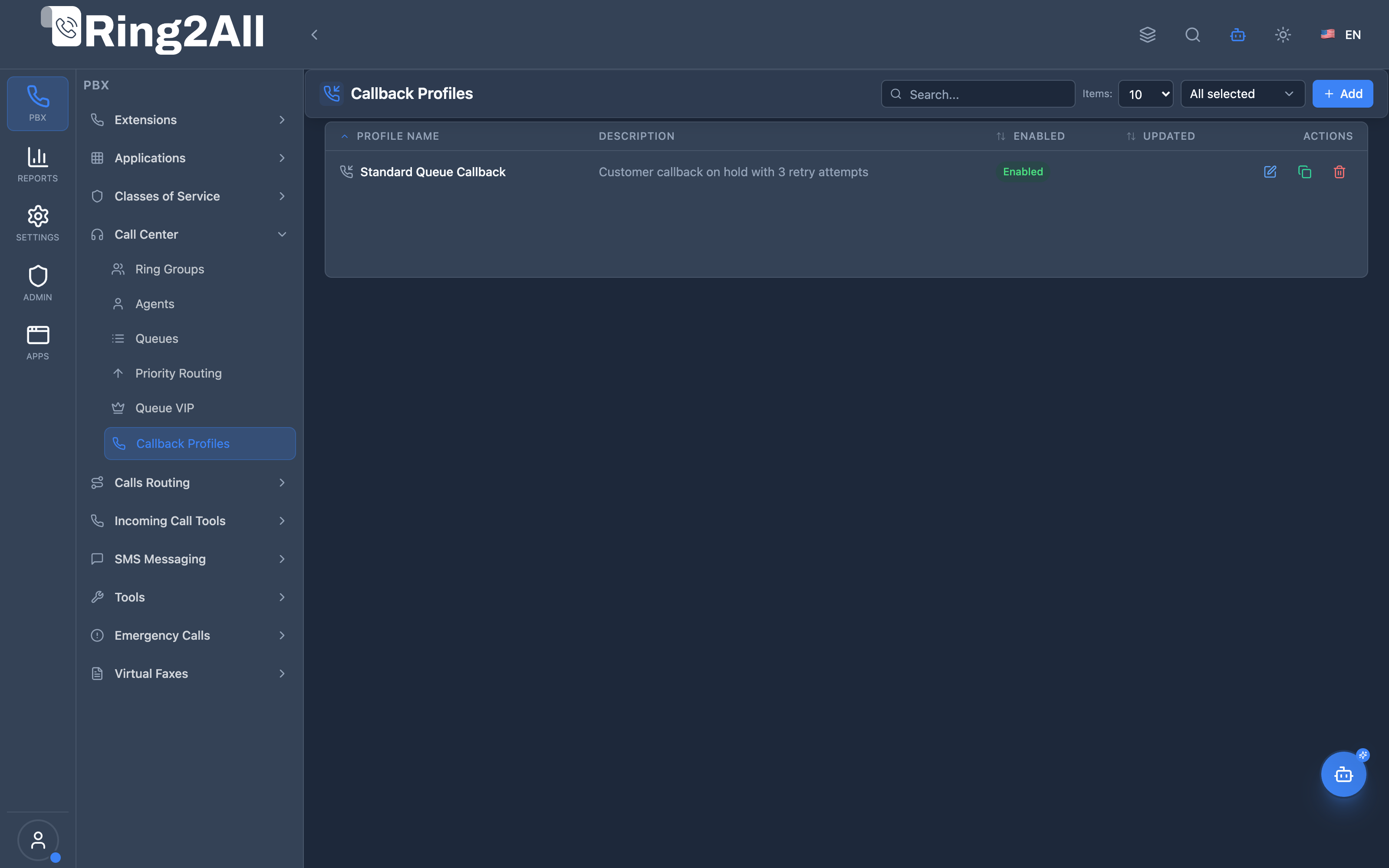
Section titled “Navigation”- Navigate to PBX Engine → Call Center → Callback Profiles in the main navigation menu.
- The list view displays all configured Callback Profiles with Name, Strategy, Max Attempts, Retry Interval, Timeout, and Enabled status.
- Click the + Add button in the top toolbar to configure a new callback profile.
- Click any profile row or edit action to configure callback audio prompts, retry intervals, and dispatch strategies.
Administrator Workflow
Section titled “Administrator Workflow”┌─────────────────────────────────────────────────────────────────┐│ Creating a Callback Profile │├─────────────────────────────────────────────────────────────────┤│ ││ General Settings ││ ├─ Profile Name: "Standard Queue Callback" ││ ├─ Strategy: Same Queue ││ ├─ Description: "Standard automated callback policy" ││ └─ Enabled: ✓ ││ ││ Audio Announcements ││ ├─ Confirm Sound: callback_confirm.wav ││ ├─ Thanks Sound: callback_thanks.wav ││ └─ Announcement Sound: callback_announcement.wav ││ ││ Timing & Retries ││ ├─ Max Attempts: 3 ││ ├─ Timeout: 3600 sec (1 hour) ││ ├─ Retry Interval: 300 sec (5 minutes) ││ └─ DTMF Callback Key: 1 ││ ││ Save → Assign to Queue in Queue Settings (General Tab) ││ │└─────────────────────────────────────────────────────────────────┘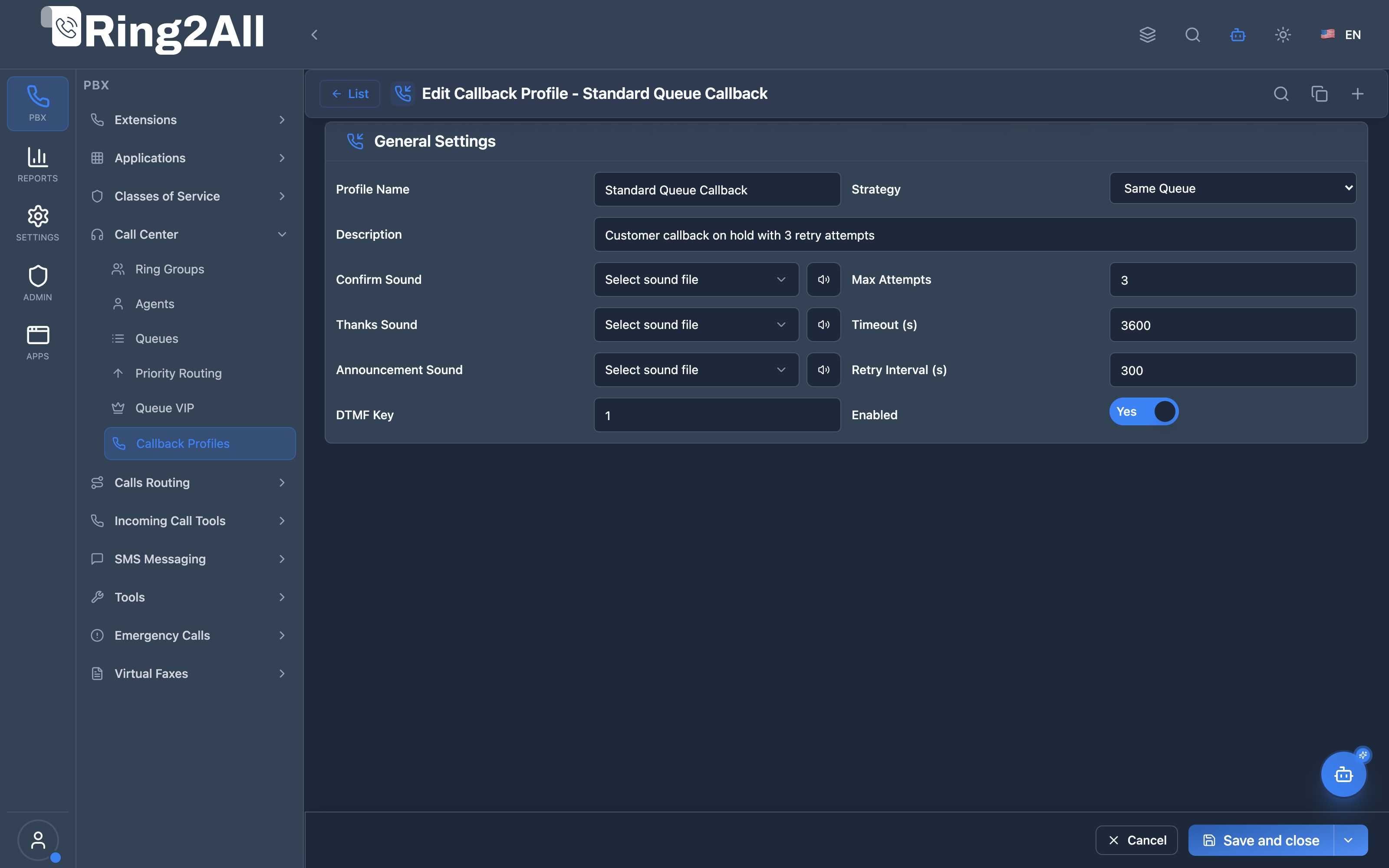
Queue Integration
Section titled “Queue Integration”In Queue settings, select Callback Profile:
Queue Settings → General Tab → Callback Profile → Select "Standard Queue Callback"Caller Experience
Section titled “Caller Experience”1. Caller enters queue, hears music on hold2. Announcement: "Press 1 to receive a callback without losing your position"3. Caller presses 14. System: "Please confirm your callback number..."5. Caller confirms caller ID or enters telephone number6. System: "Thank you, we will call you back when an agent is available"7. Caller hangs up8. When agent becomes available, system dials back and bridges the callQuick Tips
Section titled “Quick Tips”[!TIP] Retry Interval: 5 minutes (300s) is a proven default that balances responsiveness with agent availability.
[!TIP] Max Attempts: Setting 3 attempts prevents infinite loop dial-outs to unanswered numbers.
[!CAUTION] Timeout Expiration: Set an appropriate timeout (e.g. 3600s). Callbacks older than the timeout are automatically marked expired and will not be dialed.
4. Configuration Fields Reference
Section titled “4. Configuration Fields Reference”Callback Profile Fields
Section titled “Callback Profile Fields”| Field | Description | Type / Options | Default | Required |
|---|---|---|---|---|
| Name | Descriptive name identifying the callback profile | Text | None | Yes |
| Strategy | Routing strategy when the callback is answered | same-queue, round-robin, longest-idle-agent, external-number |
same-queue |
Yes |
| Description | Optional notes explaining the callback use case | Text | None | No |
| Confirm Sound | Prompt asking the caller to confirm or enter their callback number | Audio Recording Selector | None | No |
| Max Attempts | Maximum dial attempts before marking the callback failed | Number (1 - 10) | 3 |
Yes |
| Thanks Sound | Audio prompt confirming successful callback registration | Audio Recording Selector | None | No |
| Timeout Seconds | Total lifespan in seconds of a callback request before expiration | Number (seconds, min 1) | 3600 |
Yes |
| Announcement Sound | Audio played to the customer when they answer the callback | Audio Recording Selector | None | No |
| Retry Interval Seconds | Delay in seconds between failed dial attempts | Number (seconds, min 1) | 300 |
Yes |
| Callback Key | Single DTMF digit that activates the callback option | Single Character (0-9, *, #) |
1 |
Yes |
| Enabled | Master switch to activate or suspend this callback profile | Toggle (Boolean) | On | Yes |
Strategy Details
Section titled “Strategy Details”| Strategy | Behavior | Best Used For |
|---|---|---|
| same-queue | Returns the answered callback into the original queue with priority | General customer service |
| round-robin | Dispatches directly across available queue agents in rotation | Even load distribution |
| longest-idle-agent | Connects directly to the agent waiting idle the longest | Minimum connection delay |
| external-number | Routes the callback to an external contact center or backup team | Disaster recovery / overflow |
5. Callback Workflow
Section titled “5. Callback Workflow”Complete Flow Diagram
Section titled “Complete Flow Diagram”┌─────────────────────────────────────────────────────────────────┐│ Callback on Hold Flow │├─────────────────────────────────────────────────────────────────┤│ ││ CAPTURE PHASE (queue_callback_capture.lua) ││ ───────────────────────────────────────── ││ 1. Caller in queue presses DTMF key (e.g., "1") ││ 2. Break out of queue, play confirm sound ││ 3. Collect callback number (or use caller ID) ││ 4. Validate number (min 7 digits) ││ 5. Check rate limit (max 5/hour default) ││ 6. Register callback in public.call_center_callbacks ││ 7. Play thanks sound ││ 8. Hang up caller ││ ││ DISPATCH PHASE (queue_callback_dispatcher.lua) ││ ─────────────────────────────────────────── ││ 1. Periodic service checks for pending callbacks ││ 2. Lock record (FOR UPDATE SKIP LOCKED) ││ 3. Update status to 'calling' ││ 4. Originate call to callback number ││ 5. On answer → connect to queue or agent ││ 6. On no answer → schedule retry or mark failed ││ ││ ANSWER PHASE (queue_callback_answer_handler.lua) ││ ──────────────────────────────────────────── ││ 1. Play announcement to caller ││ 2. Connect to original queue / agent ││ 3. Wait for agent ││ 4. On completion → mark callback as completed ││ │└─────────────────────────────────────────────────────────────────┘6. Common Scenarios & Examples
Section titled “6. Common Scenarios & Examples”Scenario 1: Standard Customer Support Callback
Section titled “Scenario 1: Standard Customer Support Callback”Configuration:
| Parameter | Value |
|---|---|
| Strategy | same-queue |
| DTMF Key | 1 |
| Timeout | 3600 (1 hour) |
| Retry Interval | 300 (5 minutes) |
| Max Attempts | 3 |
Scenario 2: High-Urgency VIP Callback
Section titled “Scenario 2: High-Urgency VIP Callback”Configuration:
| Parameter | Value |
|---|---|
| Strategy | longest-idle-agent |
| DTMF Key | 1 |
| Timeout | 7200 (2 hours) |
| Retry Interval | 120 (2 minutes) |
| Max Attempts | 5 |
7. Model Context Protocol (MCP) AI Integration
Section titled “7. Model Context Protocol (MCP) AI Integration”Ring2All exposes native Model Context Protocol (MCP) tools for Callback Profiles and Queue Automated Callbacks, allowing AI copilots, customer retention bots, and workforce management agents to monitor queue callback volumes, adjust callback timeout policies, and manage active callback queues programmatically.
Available MCP Tools
Section titled “Available MCP Tools”| Tool Name | Description | Key Parameters |
|---|---|---|
list_callback_profiles |
Lists all Queue Callback Profiles configured in the domain, including DTMF capture key, timeout, retry intervals, and max retry attempts. | search (optional string) |
get_callback_profile_status |
Retrieves full configuration, strategy, wait thresholds, and retry policy for a specific callback profile. | name (required string) |
create_callback_profile |
Provisions a new Queue Callback Profile with DTMF request key, timeout, retry interval, and maximum call attempts. | name (required); description, callbackKey, timeoutSeconds, retryInterval, maxAttempts, enabled |
update_callback_profile |
Modifies DTMF capture key, retry interval, timeouts, or active status of an existing callback profile. | name (required); newName, description, callbackKey, timeoutSeconds, retryInterval, maxAttempts, enabled |
delete_callback_profile |
Safely removes a Callback Profile after verifying it is not currently bound to active queues. | name (required string) |
list_queue_callbacks |
Lists real-time queued callback requests (pending, calling, completed, failed) across domain queues. |
queueIdentifier, status (optional) |
cancel_queue_callback |
Cancels a pending automated callback request before it dials out. | callbackId (required number) |
AI Agent Operational Examples
Section titled “AI Agent Operational Examples”Querying Callback Profiles
Section titled “Querying Callback Profiles”{ "tool": "list_callback_profiles", "arguments": { "search": "Standard" }}Provisioning an Automated Callback Profile
Section titled “Provisioning an Automated Callback Profile”{ "tool": "create_callback_profile", "arguments": { "name": "Customer Support High-Volume Callback", "description": "Offers callers on hold callback when wait exceeds 60s", "callbackKey": "1", "timeoutSeconds": 3600, "retryInterval": 180, "maxAttempts": 3, "enabled": true }}Recommended Natural Language Prompts
Section titled “Recommended Natural Language Prompts”- “List all callback profiles and see which queues have automated callbacks enabled.”
- “Create a callback profile named ‘Weekend Support Callback’ with 2-minute retry interval and 3 maximum attempts.”
- “Check how many pending callbacks are currently waiting in queue 800.”
8. Limitations & Important Notes
Section titled “8. Limitations & Important Notes”Technical Limitations
Section titled “Technical Limitations”[!NOTE] Caller ID Required: Callers with blocked or anonymous caller ID must be prompted to manually enter their return telephone number.
[!WARNING] Dialer Resource Management: Excessive simultaneous automated callbacks can saturate outbound trunk capacity if max retry intervals are too short.
Best Practices
Section titled “Best Practices”- Set Realistic Timeouts: Ensure callbacks remain valid during customer business hours (1 to 2 hours).
- Limit Max Attempts: Setting between 2 and 3 attempts avoids spamming unreachable customer lines.
- Audio Confirmation: Always play an audio confirmation receipt before disconnecting the caller from the queue.
9. Troubleshooting Tips
Section titled “9. Troubleshooting Tips”Common Issues
Section titled “Common Issues”| Symptom | Cause | Resolution |
|---|---|---|
| DTMF key ignored | Key mismatch or profile unassigned | Verify callback profile assignment in Queue settings |
| Callback never dials | Callback dispatcher service paused | Check system background task queue_callback_dispatcher |
| Callbacks marked expired | High wait times exceeding timeout | Increase Timeout Seconds to 7200s or longer |
| Excessive retries | Unreachable mobile destinations | Keep Max Attempts between 2 and 4 |
Diagnostic SQL
Section titled “Diagnostic SQL”-- Inspect callback profile configurationSELECT id, name, strategy, max_attempts, retry_interval, timeout, enabledFROM public.call_center_callback_profilesWHERE domain_id = 1;
-- Check active pending callbacksSELECT id, queue_id, callback_number, status, attempt_count, next_attempt_at, expires_atFROM public.call_center_callbacksWHERE domain_id = 1 AND status = 'pending'ORDER BY next_attempt_at;10. Glossary
Section titled “10. Glossary”| Term | Definition |
|---|---|
| Callback Profile | Reusable policy defining queue callback capture and retry behavior |
| DTMF Key | Telephone keypad digit (e.g. 1) pressed by caller to request callback |
| Retry Interval | Delay in seconds between unsuccessful callback attempts |
| Max Attempts | Maximum outbound attempts to reach customer before expiring |
| Same-Queue | Strategy that places answered callback into original queue with priority |
Documentation verified for Ring2All PBX Engine & Call Center Subsystem.