

Queue Callback Report Module Documentation
Table of Contents
Section titled “Table of Contents”- Navigation & Access
- Screenshots & Visual Interface
- Module Overview (Technical)
- Module Overview (Commercial/Business)
- Module Overview (End User/Administrator)
- Report Fields Reference
- Callback Statuses
- Common Scenarios & Examples
- Limitations & Important Notes
- Troubleshooting Tips
- Glossary
- Model Context Protocol (MCP) AI Integration
Navigation & Access
Section titled “Navigation & Access”To access the Queue Callback Report management console:
- Log in to the Ring2All Web Portal (
https://<domain-or-ip>/login). - In the left navigation sidebar, expand Reports.
- Under Call Center Reports, click Queues CallBack Report (
/reports/call-center/queue-callback). - Review active callback queues, filter by customer or disposition status, cancel pending requests, or trigger manual retries.
Screenshots & Visual Interface
Section titled “Screenshots & Visual Interface”Queue Callback Supervision Ledger
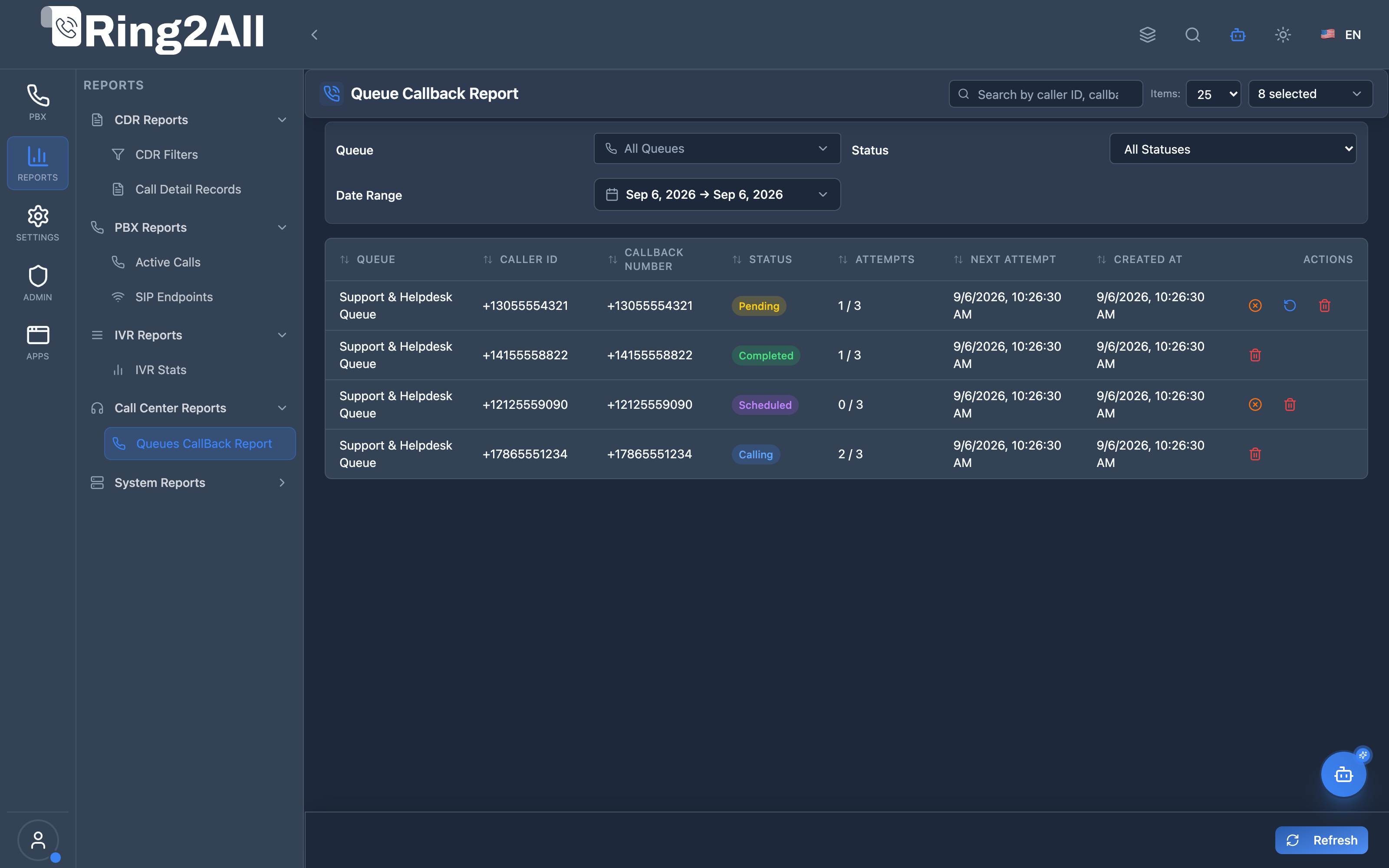
Section titled “Queue Callback Supervision Ledger”Supervisor queue callback dashboard displaying customer identifiers, requested callback phone numbers, origin queues, current status (pending, calling, completed, scheduled), retry attempts, and management controls.
1. Module Overview (Technical)
Section titled “1. Module Overview (Technical)”What Is Queue Callback Report?
Section titled “What Is Queue Callback Report?”Queue Callback Report is a management and reporting interface for queue callback requests. It displays all scheduled, pending, and completed callbacks, allowing supervisors to monitor callback status, cancel requests, force retries, and delete old records.
Architecture
Section titled “Architecture”┌─────────────────────────────────────────────────────────────────┐│ Queue Callback Report Architecture │├─────────────────────────────────────────────────────────────────┤│ ││ Queue ││ ┌──────────────────────────────────────────────────────────┐ ││ │ queue.lua │ ││ │ │ ││ │ Caller requests callback │ ││ │ ├─ Store in queue_callbacks table │ ││ │ ├─ Set status = pending │ ││ │ └─ Schedule next attempt │ ││ │ │ ││ └──────────────────────────────────────────────────────────┘ ││ │ ││ ▼ ││ ┌──────────────────────────────────────────────────────────┐ ││ │ queue_callback_dispatcher.lua │ ││ │ │ ││ │ Scheduled job attempts callback │ ││ │ ├─ Update status = calling │ ││ │ ├─ Originate call to caller │ ││ │ ├─ On answer: status = completed │ ││ │ ├─ On fail: increment attempts, reschedule │ ││ │ └─ On max attempts: status = failed │ ││ │ │ ││ └──────────────────────────────────────────────────────────┘ ││ │ ││ ▼ ││ ┌──────────────────────────────────────────────────────────┐ ││ │ public.queue_callbacks │ ││ │ │ ││ │ id | queue_id | callback_number | status | attempts │ ││ │ │ ││ └──────────────────────────────────────────────────────────┘ ││ │ ││ ▼ Displayed in Report ││ ┌──────────────────────────────────────────────────────────┐ ││ │ Queue Callback Report Page │ ││ │ │ ││ │ [Filters] [Refresh] │ ││ │ │ ││ │ ┌─────────────────────────────────────────────────────┐ │ ││ │ │Queue │Caller │Status │Attempts│Next │Actions │ │ ││ │ ├──────┼────────┼────────┼────────┼────────┼─────────┤ │ ││ │ │Sales │555-1234│Pending │ 0/3 │12:30:00│[Cancel] │ │ ││ │ │Supp │555-5678│Complete│ 1/3 │ - │[Delete] │ │ ││ │ └─────────────────────────────────────────────────────┘ │ ││ │ │ ││ └──────────────────────────────────────────────────────────┘ ││ │└─────────────────────────────────────────────────────────────────┘2. Module Overview (Commercial/Business)
Section titled “2. Module Overview (Commercial/Business)”Business Value
Section titled “Business Value”Queue Callback Report provides callback visibility and control:
| Without Report | With Report |
|---|---|
| Unknown callback status | Full visibility |
| No intervention | Cancel/retry control |
| Hidden failures | Track failed attempts |
| Manual tracking | Automated reporting |
Use Cases
Section titled “Use Cases”-
Callback Monitoring
- Track pending callbacks
- View completed callbacks
-
Intervention
- Cancel incorrect requests
- Force immediate retry
-
Failure Analysis
- Identify failed callbacks
- Review hangup causes
-
Cleanup
- Delete old records
- Manage queue capacity
Feature Highlights
Section titled “Feature Highlights”| Feature | Benefit |
|---|---|
| Status Tracking | See callback state |
| Attempt Counter | Monitor retry progress |
| Queue Filter | Filter by queue |
| Date Filter | Historical queries |
| Cancel Action | Stop unwanted callbacks |
| Retry Action | Force immediate retry |
| Delete Action | Remove old records |
3. Module Overview (End User/Administrator)
Section titled “3. Module Overview (End User/Administrator)”What Can You Do?
Section titled “What Can You Do?”- View all callback requests
- Filter by queue and status
- Filter by date range
- Monitor attempt progress
- Cancel pending callbacks
- Force immediate retry
- Delete old records
Queue Callback Report Interface
Section titled “Queue Callback Report Interface”┌─────────────────────────────────────────────────────────────────┐│ Queue Callback Report │├─────────────────────────────────────────────────────────────────┤│ ││ View and manage queue callback requests ││ ││ Filters: ││ ├─ Queue: [All Queues ▼] ││ ├─ Status: [All Statuses ▼] ││ ├─ From: [01/01/2026] To: [01/16/2026] ││ └─ [Apply Filters] [Clear Filters] [🔄 Refresh] ││ ││ ┌───────────────────────────────────────────────────────────┐ ││ │Queue │ Caller │ Status │Atts│ Next Att │ Actions │ ││ ├──────┼────────────┼──────────┼────┼──────────┼───────────┤ ││ │Sales │ 555-1234 │🟡Pending │ 0/3│ 12:30:00 │[⟲][🚫][🗑]│ ││ │Supp │ 555-5678 │📞Calling │ 1/3│ - │ │ ││ │Sales │ 555-9012 │✅Complete│ 1/3│ - │ [🗑] │ ││ │Supp │ 555-3456 │❌Failed │ 3/3│ - │ [⟲] [🗑]│ ││ │Sales │ 555-7890 │⏰Expired │ 2/3│ - │ [🗑] │ ││ └───────────────────────────────────────────────────────────┘ ││ ││ Actions: ⟲ = Retry | 🚫 = Cancel | 🗑 = Delete ││ │└─────────────────────────────────────────────────────────────────┘Quick Tips
Section titled “Quick Tips”[!TIP] Retry: Force immediate retry for failed callbacks.
[!TIP] Cancel: Cancel pending callbacks before they execute.
[!CAUTION] Delete: Deleting is permanent - use for cleanup only.
4. Report Fields Reference
Section titled “4. Report Fields Reference”Display Columns
Section titled “Display Columns”| Column | Description |
|---|---|
| ID | Unique callback ID |
| Queue | Queue name |
| Caller ID | Original caller number |
| Callback Number | Number to call back |
| Status | Current callback state |
| Attempts | Current/Max attempts |
| Next Attempt | Scheduled retry time |
| Expires At | When callback expires |
| Created At | Request creation time |
| Last Result | Last hangup cause |
| Actions | Available actions |
Available Actions
Section titled “Available Actions”| Action | Description | Available When |
|---|---|---|
| Retry | Force immediate retry | Failed, Expired |
| Cancel | Cancel callback | Pending, Scheduled |
| Delete | Delete record | Any completed state |
5. Callback Statuses
Section titled “5. Callback Statuses”Status Types
Section titled “Status Types”| Status | Icon | Description |
|---|---|---|
| Pending | 🟡 | Waiting for first attempt |
| Calling | 📞 | Currently calling caller |
| Scheduled | 📅 | Scheduled for retry |
| Completed | ✅ | Callback successful |
| Failed | ❌ | All attempts exhausted |
| Cancelled | 🚫 | Manually cancelled |
| Expired | ⏰ | Expired before completion |
Status Flow
Section titled “Status Flow”Pending → Calling → Completed ✅ │ │ │ └─→ Scheduled → Calling → ... │ │ │ └─→ Failed ❌ (max attempts) │ └─→ Expired ⏰ (time limit) │ └─→ Cancelled 🚫 (manual)6. Common Scenarios & Examples
Section titled “6. Common Scenarios & Examples”Scenario 1: Monitor Pending Callbacks
Section titled “Scenario 1: Monitor Pending Callbacks”- Set Status filter to “Pending”
- View pending queue
- Monitor for stuck callbacks
Scenario 2: Retry Failed Callback
Section titled “Scenario 2: Retry Failed Callback”- Filter by “Failed” status
- Find callback record
- Click Retry action
- Monitor new attempt
Scenario 3: Cancel Incorrect Request
Section titled “Scenario 3: Cancel Incorrect Request”- Search for caller number
- Find pending callback
- Click Cancel action
- Confirm cancellation
Scenario 4: Cleanup Old Records
Section titled “Scenario 4: Cleanup Old Records”- Set date filter to old range
- Filter by “Completed”
- Delete unneeded records
7. Limitations & Important Notes
Section titled “7. Limitations & Important Notes”Technical Notes
Section titled “Technical Notes”[!NOTE] Queue Dependency: Callbacks are tied to specific queues.
[!NOTE] Attempt Limits: Max attempts configured per queue.
[!WARNING] Timing: Callbacks respect scheduled times.
Best Practices
Section titled “Best Practices”- Regular Monitoring: Check for stuck callbacks
- Handle Failures: Retry or cancel failed callbacks
- Cleanup: Delete old completed records
- Watch Expiry: Monitor expired callbacks
- Check Last Result: Diagnose why callbacks fail
Common Hangup Causes
Section titled “Common Hangup Causes”| Cause | Meaning |
|---|---|
| NORMAL_CLEARING | Success |
| NO_ANSWER | No answer |
| USER_BUSY | Line busy |
| CALL_REJECTED | Rejected |
| ORIGINATOR_CANCEL | Caller hung up |
8. Troubleshooting Tips
Section titled “8. Troubleshooting Tips”Common Issues
Section titled “Common Issues”| Symptom | Possible Cause | Solution |
|---|---|---|
| Stuck pending | Dispatcher not running | Check dispatcher job |
| All failing | Bad number format | Check callback number |
| High failures | Network issues | Check trunks |
| Not retrying | Max attempts reached | Manually retry |
| Expired | Took too long | Adjust expiry settings |
Diagnostic SQL
Section titled “Diagnostic SQL”Callback summary by status:
SELECT status, COUNT(*) as countFROM public.queue_callbacksWHERE created_at >= NOW() - INTERVAL '24 hours'GROUP BY status;Failed callbacks with reason:
SELECT id, callback_number, attempt_count, last_hangup_cause, updated_atFROM public.queue_callbacksWHERE status = 'failed'ORDER BY updated_at DESCLIMIT 20;9. Glossary
Section titled “9. Glossary”| Term | Definition |
|---|---|
| Callback | Return call to waiting caller |
| Attempt | Single callback try |
| Pending | Waiting for first attempt |
| Scheduled | Queued for retry |
| Expired | Time limit exceeded |
| Hangup Cause | Call termination reason |
10. Model Context Protocol (MCP) AI Integration
Section titled “10. Model Context Protocol (MCP) AI Integration”The Ring2All Platform Copilot integrates with the Call Center Queue Callback engine via the Model Context Protocol (MCP). Contact center supervisors, dispatchers, and queue administrators can monitor pending callback queues, evaluate fulfillment success rates, re-trigger failed attempts, or cancel requests conversationally.
Exposed MCP Tools
Section titled “Exposed MCP Tools”| Tool Name | Operation | Primary Parameters | Description |
|---|---|---|---|
list_queue_callbacks |
Callback Queue Ledger | status (“pending”, “processing”, “completed”, “failed”, “cancelled”), queueId (number, optional) |
Queries queued callback requests, displaying caller phone number, target queue name, attempt counters, and current lifecycle state. |
get_queue_callback_status |
Detailed Request Inspection | callbackId (number) |
Retrieves complete diagnostic details for a specific callback request, including last hangup cause and retry schedule. |
get_queue_callback_metrics |
Aggregate Callback KPIs | queueId (number, optional), days (number, optional, default: 30) |
Computes overall callback performance: total requests, completion counts, pending volume, failed attempts, and success percentage. |
retry_queue_callback |
Immediate Callback Redial | callbackId (number) |
Re-queues a failed or stalled callback request for immediate Telephony Server dispatcher dialing. |
cancel_queue_callback |
Abort Callback | callbackId (number) |
Cancels a pending or scheduled callback so the system does not place further outbound calls. |
Operational Safeguards & Access Control
Section titled “Operational Safeguards & Access Control”- Domain Scope Isolation: Callback requests and metrics are strictly bounded to the active
domain_id(WHERE domain_id = :domain_id). Cross-tenant callback lists are isolated. - Controlled Re-dialing: The
retry_queue_callbacktool resets attempt timers safely without exceeding themax_attemptsthreshold configured on the callback profile. - Audit Logging: Manual retries and cancellations triggered via Copilot record user identifiers and operational timestamps into
ss_logs.audit_logs.
Example MCP Payloads
Section titled “Example MCP Payloads”1. Retrieving Callback Performance Metrics (get_queue_callback_metrics)
Section titled “1. Retrieving Callback Performance Metrics (get_queue_callback_metrics)”{ "days": 7}Response:
{ "success": true, "data": { "periodDays": 7, "queueId": null, "totalCallbacks": 154, "successRatePercent": 88, "statusBreakdown": { "pending": 8, "processing": 2, "completed": 135, "failed": 6, "cancelled": 3 } }}2. Triggering a Manual Callback Retry (retry_queue_callback)
Section titled “2. Triggering a Manual Callback Retry (retry_queue_callback)”{ "callbackId": 412}Response:
{ "success": true, "data": { "message": "Queue callback #412 was re-queued for immediate retry!", "callbackId": 412, "status": "pending" }}Copilot Natural Language Prompts
Section titled “Copilot Natural Language Prompts”- “How many customer callbacks are currently waiting in our Support queue?”
- “Show me the queue callback success rate for the past 7 days.”
- “Why did callback request #412 fail? Show me the last hangup cause.”
- “Retry the callback to customer #412 immediately.”
- “Cancel any pending callbacks for customer number +13055550188.”
Documentation last updated: January 2026