

Host Network, FQDN & System Integration Settings
Table of Contents
Section titled “Table of Contents”- Overview & Architecture
- Business & Operational Significance
- 🎯 User Roles & Key Capabilities
- Visual Interface & Layout
- Field Reference & Parameter Specification
- Dual-Homed Network & NGINX Web Reverse Proxy Architecture
- SIP Device Auto-Provisioning Reverse Proxy Security
- Verification & Diagnostics
- Model Context Protocol (MCP) AI Integration
- Glossary
1. Overview & Architecture
Section titled “1. Overview & Architecture”In Ring2All SBC, the Server Settings module governs system-level network identity, edge routing topologies, administrative web proxy bindings, and secure interconnectivity with core Ring2All PBX systems. It establishes the foundational operational boundary between external public networks (WAN) and trusted administrative networks (LAN/DMZ).
PUBLIC INTERNET (WAN) │ ┌───────────────────────┴───────────────────────┐ │ │ ▼ (SIP Signaling / RTP Media) ▼ (HTTPS Admin & Provisioning) ┌─────────────────┐ ┌─────────────────┐ │ Kamailio 6.x │ │ NGINX Reverse │ │ (Public IP) │ │ Proxy (443) │ └────────┬────────┘ └────────┬────────┘ │ │ │ ┌───────────────┴───────────────┐ │ ▼ ▼ │ ┌──────────────────┐ ┌──────────────────┐ │ │ SBC Admin Portal │ │ SIP Provisioning │ │ │ (Fastify REST / │ │ Security Filter │ │ │ React SPA) │ │ (User-Agent Reg) │ │ └──────────────────┘ └────────┬─────────┘ │ │ └───────────────────────────────┬──────────────────────────────┘ ▼ SECURE INTERNAL LAN / DMZ │ ┌──────────────────┐ │ Ring2All PBX │ │ (Core Cluster) │ └──────────────────┘The configuration is maintained in sbc_admin.server_settings and directly synchronizes with host services, NGINX upstream definitions, and Kamailio socket bindings.
2. Business & Operational Significance
Section titled “2. Business & Operational Significance”- Dual-Homed Edge Isolation: Explicit separation of Public IP and Internal IP addresses guarantees that administrative interfaces and core PBX interconnects remain invisible to public network vulnerability scanners.
- Unified Domain Routing: Supports multi-domain administrative routing, allowing operators to map canonical Fully Qualified Domain Names (FQDNs) and alternative subdomains (
admin_domain,admin_aliases) to the secure web console. - Automated Cryptographic Association: Seamlessly binds managed X.509 SSL/TLS certificates to the NGINX web server, eliminating manual configuration edits and certificate path errors.
- Hardened IP Phone Provisioning Proxy: Built-in reverse proxy forwarding allows external IP phones to securely retrieve provisioning XML/cfg templates from the PBX backend while actively rejecting unauthorized web browsers and bot scrapers via User-Agent enforcement.
3. 🎯 User Roles & Key Capabilities
Section titled “3. 🎯 User Roles & Key Capabilities”| Role | Administrative Permissions | Operational Responsibilities |
|---|---|---|
| System Administrator | Full Read & Write | Configures host networking, FQDNs, NGINX SSL certificates, and PBX provisioning bridge settings. |
| Network & Security Engineer | Read & Write | Audits public/internal IP assignments, validates reverse proxy cipher suites, and manages User-Agent filters. |
| Telecom NOC Operator | Read-Only | Inspects active host FQDNs, public IP bindings, and validates PBX provisioning connectivity status. |
| AI Host Network Engineer / Automation Copilot | Programmatic Audit & Governance | Inspects network bindings, validates host FQDN configuration, and coordinates dynamic reverse proxy parameter updates via MCP. |
4. Visual Interface & Layout
Section titled “4. Visual Interface & Layout”The Server Settings interface provides a streamlined, card-based configuration form organized into three logical operational sections:
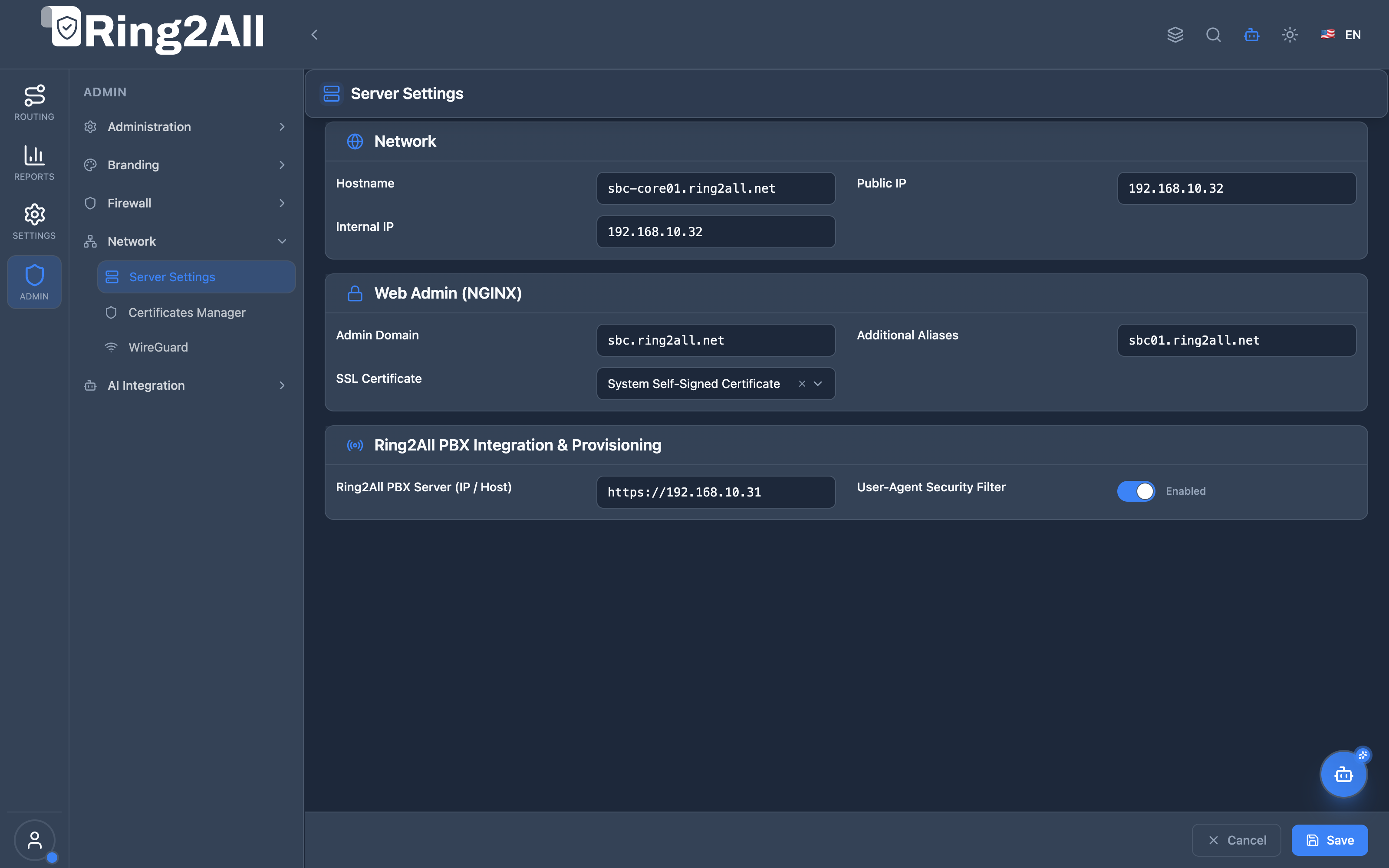
- Network Configuration: Hostname, Public IP, and Internal IP definitions.
- Web Admin (NGINX): Primary administrative domain, alternative aliases, and SSL certificate selector.
- Ring2All PBX Integration & Provisioning: Core PBX backend URL and User-Agent security filtering toggle.
5. Field Reference & Parameter Specification
Section titled “5. Field Reference & Parameter Specification”| Field Name | Type | Constraints | Description |
|---|---|---|---|
| Hostname | string |
FQDN or hostname format | System host identifier advertised in SIP Via headers, syslog messages, and administrative banners. |
| Public IP | IPv4/IPv6 |
Valid IP Address | External WAN address bound to Kamailio edge sockets, RTPEngine public interfaces, and public DNS records. |
| Internal IP | IPv4/IPv6 |
Valid IP Address | Private LAN/DMZ address used for intra-cluster communication, PBX trunking, and database access. |
| Admin Domain | string |
Valid FQDN | Primary canonical domain used to access the Ring2All SBC administrative portal (e.g., sbc.ring2all.net). |
| Additional Aliases | string |
Comma/space-separated FQDNs | Secondary domain aliases accepted by the NGINX server_name directive (e.g., sbc01.ring2all.net). |
| SSL Certificate | dropdown |
Active Certificate | Bound X.509 certificate used by NGINX for HTTPS administrative termination and SIP provisioning endpoints. |
| Ring2All PBX Server (IP / Host) | string |
Valid URL / FQDN | HTTPS endpoint of the core Ring2All PBX provisioning service (e.g., https://192.168.10.31). |
| User-Agent Security Filter | boolean |
true / false |
When enabled, NGINX restricts /provisioning/ requests strictly to recognized telecom manufacturer hardware. |
6. Dual-Homed Network & NGINX Web Reverse Proxy Architecture
Section titled “6. Dual-Homed Network & NGINX Web Reverse Proxy Architecture”The SBC operates as an edge boundary device, typically configured with two distinct network interfaces:
- Edge Interface (
eth0/ WAN): Assigned the Public IP. Terminates external SIP signaling (5060 UDP/TCP, 5061 TLS) and RTP media relay sessions (10000–20000 UDP). - Core Interface (
eth1/ LAN): Assigned the Internal IP. Establishes private connections with Ring2All PBX clusters, Telephony Server media servers, and internal PostgreSQL instances.
When changes are saved in the Server Settings module, the backend executes an atomic reconfiguration cycle:
- Re-generates
/etc/nginx/sites-enabled/sbc-admin.conf. - Validates configuration syntax via
nginx -t. - Performs a zero-downtime worker reload via
systemctl reload nginx.
7. SIP Device Auto-Provisioning Reverse Proxy Security
Section titled “7. SIP Device Auto-Provisioning Reverse Proxy Security”To protect PBX configuration files—which may contain extension passwords, SIP server addresses, and feature codes—the SBC acts as a hardened provisioning proxy:
location ~* "^/provisioning/(?<provpath>.+)$" { if ($http_user_agent !~* "(Yealink|Grandstream|Fanvil|Polycom|Cisco|Snom|Htek|Flyingvoice|Panasonic|Gigaset|curl|Wget)") { return 403 "Forbidden: Non-telephony device"; } proxy_pass https://pbx_provisioning_backend/api/apps/provisioning/devices/config/$provpath; proxy_ssl_verify off; proxy_set_header Host $host; proxy_set_header X-Real-IP $remote_addr;}- Header Inspection: Any request lacking a valid telecom manufacturer User-Agent string receives an immediate
403 Forbiddenresponse at the web server layer. - Direct WAN Isolation: Internal PBX provisioning ports and directories are never exposed directly to the public internet.
8. Verification & Diagnostics
Section titled “8. Verification & Diagnostics”To verify network bindings, NGINX reverse proxy status, and provisioning connectivity from the CLI:
# 1. Test NGINX configuration syntax and reload statusnginx -tsystemctl status nginx
# 2. Verify active listening ports on Public and Internal IPsss -tulpn | grep -E ':(80|443|5060|5061)'
# 3. Simulate authorized SIP phone provisioning requestcurl -k -I -A "Yealink SIP-T46U 66.86.0.15" https://192.168.10.32/provisioning/001565123456.cfg
# 4. Simulate blocked browser/scraper provisioning attemptcurl -k -I -A "Mozilla/5.0 (Windows NT 10.0; Win64; x64)" https://192.168.10.32/provisioning/001565123456.cfg# Expected response: HTTP/1.1 403 Forbidden
9. Model Context Protocol (MCP) AI Integration
Section titled “9. Model Context Protocol (MCP) AI Integration”The Server Settings module exposes standardized tools within the Model Context Protocol (MCP) ecosystem, enabling autonomous AI agents and NOC copilots to inspect host network bindings and securely manage edge routing configurations.
9.1 MCP Tool Summary
Section titled “9.1 MCP Tool Summary”| Tool Name | Action | Risk Level | Purpose |
|---|---|---|---|
get_sbc_server_settings |
Read | read |
Retrieve active host network parameters, public/internal IP assignments, FQDNs, and PBX proxy configuration. |
update_sbc_server_settings |
Write | operational |
Update host identity, admin domain, IP addresses, and PBX reverse proxy settings with atomic validation. |
9.2 Tool Schemas & Input Parameters
Section titled “9.2 Tool Schemas & Input Parameters”Schema: get_sbc_server_settings
Section titled “Schema: get_sbc_server_settings”{ "type": "object", "properties": {}, "additionalProperties": false}Schema: update_sbc_server_settings
Section titled “Schema: update_sbc_server_settings”{ "type": "object", "properties": { "hostname": { "type": "string", "description": "System host name identifier" }, "publicIp": { "type": "string", "description": "Public WAN IP address used for external SIP signaling and RTP media" }, "internalIp": { "type": "string", "description": "Internal LAN/DMZ IP address used for PBX cluster interconnectivity" }, "adminDomain": { "type": "string", "description": "Primary canonical FQDN for the SBC administrative web console" }, "adminAliases": { "type": "string", "description": "Alternative domain aliases separated by commas or spaces" }, "sslCertificateId": { "type": "number", "description": "ID of the managed X.509 SSL certificate bound to NGINX" }, "pbxServerUrl": { "type": "string", "description": "HTTPS URL of the Ring2All PBX core server for device auto-provisioning" }, "userAgentFilter": { "type": "boolean", "description": "Enforce telecom hardware manufacturer User-Agent whitelist on provisioning routes" } }, "additionalProperties": false}9.3 Sample Tool Execution Payloads
Section titled “9.3 Sample Tool Execution Payloads”Example 1: Inspecting Host Network & Provisioning Settings
Section titled “Example 1: Inspecting Host Network & Provisioning Settings”Request Payload:
{ "tool": "get_sbc_server_settings", "parameters": {}}Response Payload:
{ "success": true, "data": { "hostname": "sbc01.ring2all.net", "publicIp": "198.51.100.25", "internalIp": "192.168.10.32", "adminDomain": "sbc.ring2all.net", "adminAliases": "sbc-primary.ring2all.net, sbc-alt.ring2all.net", "sslCertificateId": 3, "pbxServerUrl": "https://192.168.10.31", "userAgentFilter": true }}Example 2: Updating Public IP and Provisioning Bridge URL
Section titled “Example 2: Updating Public IP and Provisioning Bridge URL”Request Payload:
{ "tool": "update_sbc_server_settings", "parameters": { "publicIp": "198.51.100.50", "pbxServerUrl": "https://pbx.ring2all.net" }}Response Payload:
{ "success": true, "data": { "message": "SBC server settings updated successfully", "settings": { "hostname": "sbc01.ring2all.net", "publicIp": "198.51.100.50", "internalIp": "192.168.10.32", "adminDomain": "sbc.ring2all.net", "adminAliases": "sbc-primary.ring2all.net, sbc-alt.ring2all.net", "sslCertificateId": 3, "pbxServerUrl": "https://pbx.ring2all.net", "userAgentFilter": true } }}9.4 Bilingual Natural Language Copilot Prompts
Section titled “9.4 Bilingual Natural Language Copilot Prompts”English Prompts
Section titled “English Prompts”- “Inspect the SBC host server settings and show me the active Public and Internal IPs.”
→ Agent invokes
get_sbc_server_settings(). - “Update the core PBX provisioning server URL to https://pbx.ring2all.net and ensure User-Agent filtering is active.”
→ Agent invokes
update_sbc_server_settings({"pbxServerUrl": "https://pbx.ring2all.net", "userAgentFilter": true}).
Spanish Prompts (Español)
Section titled “Spanish Prompts (Español)”- “Inspecciona la configuración del servidor SBC y muéstrame las IPs pública y privada configuradas.”
→ Agente invoca
get_sbc_server_settings(). - “Actualiza la URL del servidor PBX a https://pbx.ring2all.net y verifica que el filtro de User-Agent esté activo.”
→ Agente invoca
update_sbc_server_settings({"pbxServerUrl": "https://pbx.ring2all.net", "userAgentFilter": true}).
9.5 Enterprise Security & Execution Safeguards
Section titled “9.5 Enterprise Security & Execution Safeguards”- Strict Administrative Authorization: Updating server network parameters or domain bindings requires
superadminor explicitserver_settingswrite permission. - IP Address & FQDN Validation: The backend sanitizes and validates IPv4/IPv6 syntax and RFC 1035 hostnames prior to database write, preventing parameter injection into
/etc/nginx/configuration files. - Atomic NGINX Syntax Verification: Updates trigger an automated
nginx -tvalidation cycle. If any parameter generates an invalid configuration block, the transaction is rolled back and previous configurations are preserved.
10. Glossary
Section titled “10. Glossary”- Dual-Homed: A server architecture equipped with two separate network interfaces connecting to independent networks (e.g., WAN and LAN).
- FQDN: Fully Qualified Domain Name specifying an exact location in the DNS hierarchy (e.g.,
sbc-core01.ring2all.net). - Reverse Proxy: An intermediate proxy server that retrieves resources on behalf of a client from one or more internal upstream servers.
- User-Agent Filtering: Access control mechanism that evaluates HTTP client headers to block automated scrapers while admitting legitimate telephony hardware.
- Model Context Protocol (MCP): An open architectural standard allowing AI copilots to programmatically inspect server parameters and coordinate network reconfigurations.