

Custom Applications Module Documentation
Table of Contents
Section titled “Table of Contents”- Module Overview (Technical)
- Module Overview (Commercial/Business)
- Module Overview (End User/Administrator)
- User Roles & Key Capabilities
- Configuration Fields Reference
- Call Flow / Logic Explanation
- Common Scenarios & Examples
- Model Context Protocol (MCP) AI Integration
- Limitations & Important Notes
- Troubleshooting Tips
- Glossary
1. Module Overview (Technical)
Section titled “1. Module Overview (Technical)”What Are Custom Applications?
Section titled “What Are Custom Applications?”Custom Applications allow administrators to create programmable call logic using Lua scripts or XML dialplan entries. When routed to via IVR menus, inbound routes, or time conditions, FreeSWITCH executes the custom code before optionally routing to a final destination.
Two Application Types
Section titled “Two Application Types”| Type | Description | Use Case |
|---|---|---|
| Lua Script | Programmatic logic with Lua code | Complex logic, API calls, database queries |
| XML Dialplan | Declarative FreeSWITCH XML | Simple routing, variable setting |
Architecture
Section titled “Architecture”┌─────────────────────────────────────────────────────────────────┐│ Custom Applications Architecture │├─────────────────────────────────────────────────────────────────┤│ ││ User dials: *99 (trigger number) ││ │ ││ ▼ ││ ┌──────────────────────────────────────────────────────────┐ ││ │ Custom Application Lookup │ ││ │ SELECT * FROM custom_applications │ ││ │ WHERE trigger_number = '*99' AND enabled = true │ ││ └──────────────────────────────────────────────────────────┘ ││ │ ││ ▼ ││ ┌──────────────────────────────────────────────────────────┐ ││ │ Execute Script │ ││ │ │ ││ │ LUA SCRIPT: │ ││ │ ├─ Load script from file system │ ││ │ ├─ Execute Lua code (session:answer(), play, etc.) │ ││ │ └─ Access variables: caller_id, CUSTOM_APP_UUID, etc. │ ││ │ │ ││ │ XML DIALPLAN: │ ││ │ ├─ Parse XML content │ ││ │ └─ Execute as inline dialplan │ ││ │ │ ││ └──────────────────────────────────────────────────────────┘ ││ │ ││ ▼ ││ ┌──────────────────────────────────────────────────────────┐ ││ │ Final Destination (if not skipped) │ ││ │ │ ││ │ ├─ extension → Transfer to extension │ ││ │ ├─ queue → Send to call queue │ ││ │ ├─ ivr → Send to IVR menu │ ││ │ ├─ conference → Join conference │ ││ │ ├─ voicemail → Send to voicemail │ ││ │ ├─ announcement→ Play announcement │ ││ │ ├─ external → Dial external number │ ││ │ └─ hangup → End call │ ││ │ │ ││ └──────────────────────────────────────────────────────────┘ ││ │└─────────────────────────────────────────────────────────────────┘Script Storage
Section titled “Script Storage”Scripts are stored as files in Telephony Server:
/usr/share/freeswitch/scripts/custom_apps/[uuid].lua/usr/share/freeswitch/scripts/custom_apps/[uuid].xmlAvailable Variables
Section titled “Available Variables”| Variable | Description |
|---|---|
CUSTOM_APP_DOMAIN |
The domain/tenant the call is in |
CUSTOM_APP_UUID |
Unique ID of this application |
caller_id_number |
Caller’s phone number |
caller_id_name |
Caller’s name |
destination_number |
Number that was dialed |
2. Module Overview (Commercial/Business)
Section titled “2. Module Overview (Commercial/Business)”Business Value
Section titled “Business Value”Custom Applications provide extensibility without core modifications:
| Without Custom Apps | With Custom Apps |
|---|---|
| Hardcoded logic only | Dynamic programmable logic |
| Developer required | Admin can create via UI |
| System restart needed | Hot-deployed scripts |
| No customization | Unlimited flexibility |
Use Cases
Section titled “Use Cases”-
Custom IVR Logic
- Complex branching based on caller ID
- Database lookups for personalized greetings
- API integrations with external systems
-
Pre-Call Announcements
- “This call may be recorded”
- Holiday hour announcements
- Emergency notifications
-
Call Routing Logic
- Time-based routing with custom logic
- VIP caller detection
- Geographic routing
-
Integration Points
- CRM lookups before connecting
- Ticket creation on call start
- SMS notifications
Feature Highlights
Section titled “Feature Highlights”| Feature | Benefit |
|---|---|
| Lua Scripting | Full programming language for complex logic |
| XML Dialplan | Simple declarative routing |
| Final Destination | Route anywhere after script completes |
| Skip Destination | Script handles everything (hangup internally) |
| Hot Deploy | Changes apply immediately |
3. Module Overview (End User/Administrator)
Section titled “3. Module Overview (End User/Administrator)”What Can You Do?
Section titled “What Can You Do?”- Create custom applications with Lua or XML code
- Assign trigger numbers (extension or feature code)
- Define final destinations for post-script routing
- Enable/disable applications without deleting
Navigation
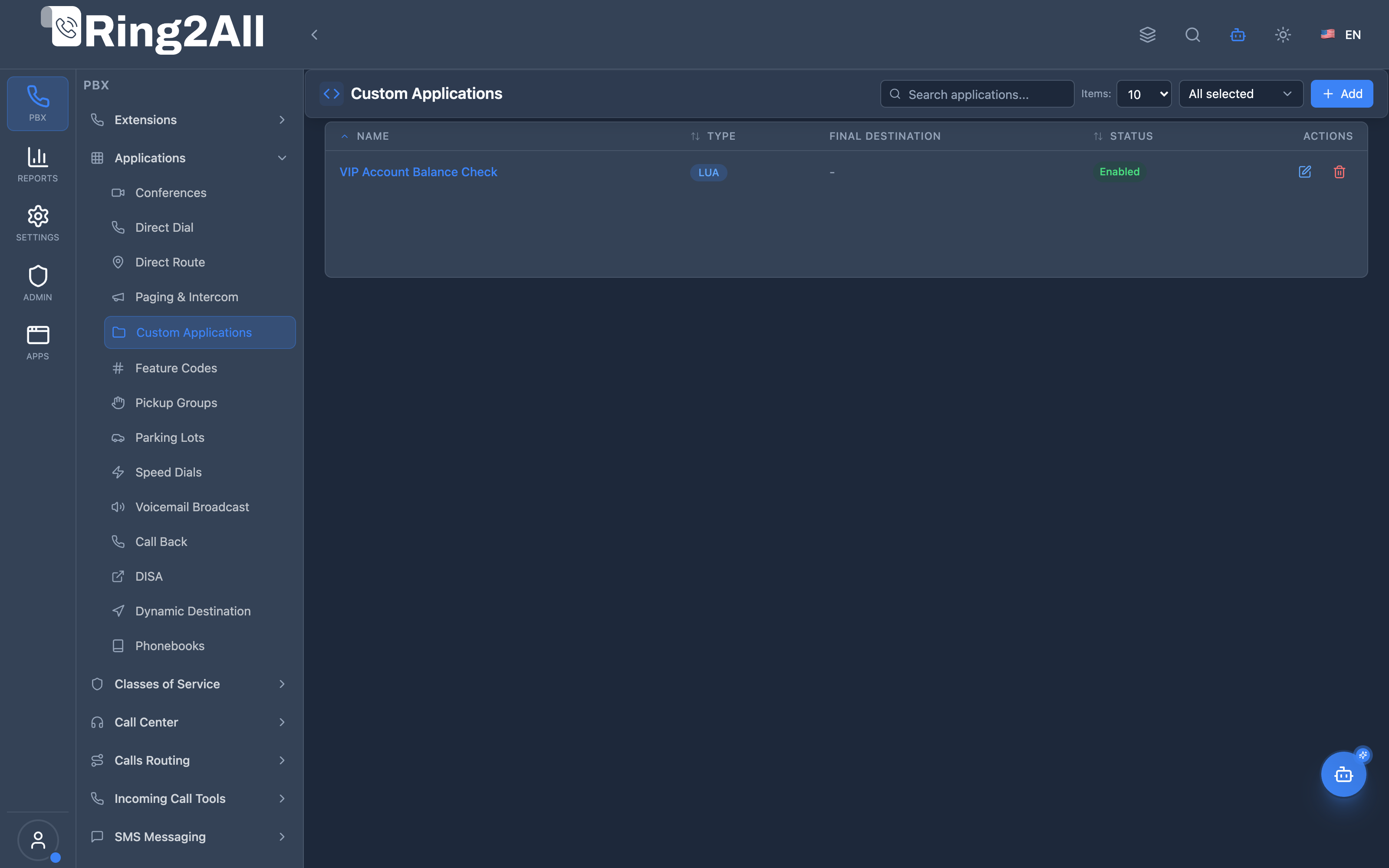
Section titled “Navigation”- Navigate to PBX → Applications → Custom Applications in the main sidebar.
- The list view displays all configured programmable applications, including Name, Type (
LUA/XML), Final Destination, Status (Enabled/Disabled), and quick actions to edit or delete. - Click the + Add button in the top-right toolbar to define a new Custom Application.
- Click any existing application row or its edit icon to modify its script logic, destination, or settings.
User Workflow
Section titled “User Workflow”┌─────────────────────────────────────────────────────────────────┐│ Creating a Custom Application │├─────────────────────────────────────────────────────────────────┤│ ││ Step 1: Basic Information (General Settings Tab) ││ ├─ Name: "Recording Disclaimer" ││ ├─ Trigger Number: *99 ││ ├─ Description: "Plays recording notice before transfer" ││ └─ Application Type: Lua Script ││ ││ Step 2: Script Content (Script Content Tab) ││ ├─ Write Lua code: ││ │ session:answer() ││ │ session:sleep(500) ││ │ session:streamFile("ivr/recording_disclaimer.wav") ││ │ -- Final destination handles the rest ││ │ ││ Step 3: Final Destination ││ ├─ Skip Final Destination: ✗ (transfer after script) ││ ├─ Destination Type: Queue ││ └─ Destination Value: support_queue ││ ││ Step 4: Enable and Save ││ └─ Enabled: ✓ ││ ││ Result: Dial *99 → Plays disclaimer → Transfers to queue ││ │└─────────────────────────────────────────────────────────────────┘Quick Tips
Section titled “Quick Tips”[!TIP] Start Simple: Begin with basic Lua scripts before attempting complex integrations.
[!TIP] Test Thoroughly: Always test custom applications in a development environment first.
[!CAUTION] Syntax Errors: Invalid Lua/XML will cause the application to fail. Check Telephony Server logs for errors.
🎯 User Roles & Key Capabilities
Section titled “🎯 User Roles & Key Capabilities”| Role | Key Capabilities | Best Practice / Limitations |
|---|---|---|
| Super Admin | Deploy, audit, and debug custom Lua and XML applications across tenants; inspect sandboxed execution logs and runtime safety. | Verify script paths and avoid infinite loops; ensure protected pcall execution in all custom logic. |
| PBX Administrator | Create and edit custom applications, select engine type (lua or xml), author inline code, and configure post-execution destination handoffs. |
Always test script syntax using Monaco editor and test with test calls before routing production traffic. |
| Branch Manager | View existing custom applications and check execution status for branch call flows. | Consult PBX Administrator or Super Admin to request custom logic or API webhook integration changes. |
| Agent / Extension User | Interact seamlessly with interactive custom applications (e.g. automated surveys, balance checkers, recording disclaimers). | Caller experience is completely transparent; execution occurs natively in FreeSWITCH. |
4. Configuration Fields Reference
Section titled “4. Configuration Fields Reference”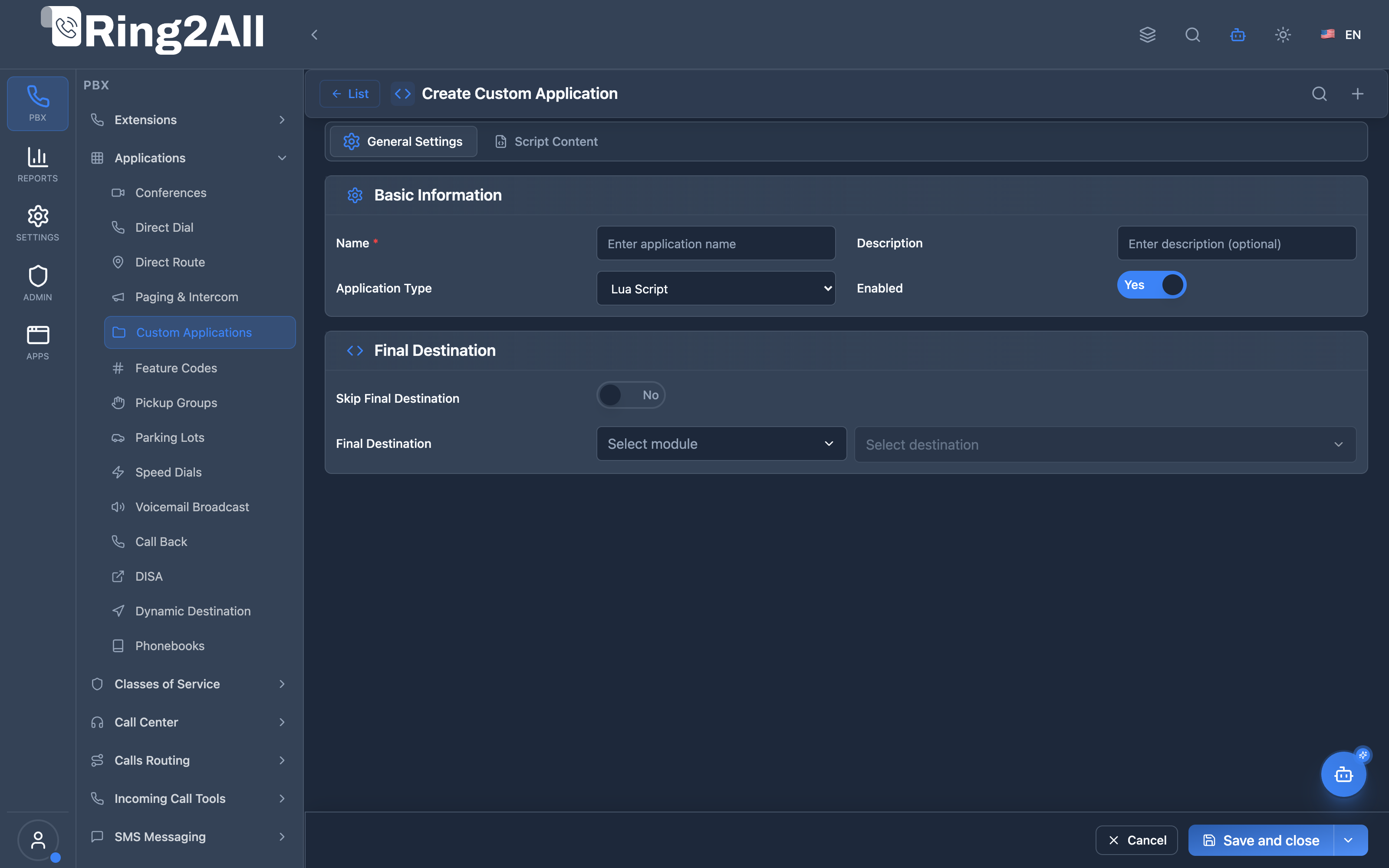
General Settings Tab
Section titled “General Settings Tab”| Field | Description | User-Friendly Tooltip | Example | Required |
|---|---|---|---|---|
| Name * | Unique identifier for the custom application | Enter application name | VIP Account Balance Check |
Yes |
| Description | Optional note explaining the script purpose | Enter description (optional) | Interactive Lua balance verification and CRM sync |
No |
| Application Type | Engine type executing the code | Select execution environment (Lua Script or XML Dialplan) |
Lua Script |
Yes |
| Enabled | Master switch to activate or deactivate the application | Enable or disable this application | Yes / No (toggle) |
Yes |
Destination Section
Section titled “Destination Section”| Field | Description | User-Friendly Tooltip | Example | Required |
|---|---|---|---|---|
| Skip Final Destination | Whether to stop execution after the script completes | If enabled, the application will not route to a final destination | Yes / No (toggle) |
No |
| Final Destination | Target destination module and specific value | Select where to route callers after the script successfully executes | Module: Extensions, Destination: 1001 |
Only if Skip Final Destination is No |
Script Content Tab
Section titled “Script Content Tab”| Field | Description | Notes |
|---|---|---|
| Script Content | Lua code or XML dialplan | Monaco editor with syntax highlighting |
Final Destination Section
Section titled “Final Destination Section”| Field | Description | Options |
|---|---|---|
| Skip Final Destination | Don’t route after script | On = script handles hangup |
| Destination Type | Where to route | Extension, Queue, IVR, Conference, Voicemail, Announcement, External, Hangup, Time Condition, Call Flow, Ring Group |
| Destination Value | Target identifier | Depends on type |
Destination Types
Section titled “Destination Types”| Type | Value Format | Example |
|---|---|---|
| Extension | Extension number | 1001 |
| Queue | Queue name | support_queue |
| Ring Group | Ring group ID | sales_group |
| IVR | IVR name | main_menu |
| Voicemail | Extension number | 1001 |
| Announcement | Announcement ID | holiday_hours |
| Conference | Conference extension | 8000 |
| Hangup | (none) | Ends call |
| External | Phone number | +15551234567 |
| Time Condition | Time condition ID | business_hours |
| Call Flow | Call flow ID | main_flow |
5. Call Flow / Logic Explanation
Section titled “5. Call Flow / Logic Explanation”Custom Application Execution Flow
Section titled “Custom Application Execution Flow”┌─────────────────────────────────────────────────────────────────┐│ Custom Application Execution Flow │├─────────────────────────────────────────────────────────────────┤│ ││ 1. User dials *99 (trigger number) ││ │ ││ ▼ ││ 2. Dialplan matches custom_application route ││ │ ││ ▼ ││ 3. Load application from database ││ ├─ Verify enabled = true ││ ├─ Get app_type (lua/xml) ││ └─ Get script_filename ││ │ ││ ▼ ││ 4. Set channel variables ││ ├─ CUSTOM_APP_DOMAIN = [domain] ││ ├─ CUSTOM_APP_UUID = [uuid] ││ └─ (other call variables available) ││ │ ││ ▼ ││ 5. Execute script ││ │ ││ ├─ LUA: ││ │ session:execute("lua", "custom_apps/[uuid].lua") ││ │ ││ └─ XML: ││ process inline dialplan from file ││ │ ││ ▼ ││ 6. Script completes ││ │ ││ ├─ skip_final_destination = true → DONE (call ends) ││ │ ││ └─ skip_final_destination = false → Step 7 ││ │ ││ ▼ ││ 7. Route to final destination ││ ├─ extension → transfer("1001 XML default") ││ ├─ queue → callcenter("support@...") ││ ├─ ivr → ivr("main_menu") ││ └─ etc. ││ │└─────────────────────────────────────────────────────────────────┘6. Common Scenarios & Examples
Section titled “6. Common Scenarios & Examples”Scenario 1: Recording Disclaimer
Section titled “Scenario 1: Recording Disclaimer”Purpose: Play “This call may be recorded” before connecting to support.
Configuration:
| Setting | Value |
|---|---|
| Name | Recording Disclaimer |
| Trigger | *99 |
| Type | Lua Script |
| Skip Destination | No |
| Final Destination | Queue: support_queue |
Script:
-- Recording Disclaimersession:answer()session:sleep(500)session:streamFile("ivr/this_call_may_be_recorded.wav")-- Final destination handles transfer to queueScenario 2: VIP Caller Detection
Section titled “Scenario 2: VIP Caller Detection”Purpose: Check if caller is VIP and route accordingly.
Configuration:
| Setting | Value |
|---|---|
| Name | VIP Router |
| Trigger | *77 |
| Type | Lua Script |
| Skip Destination | Yes (script handles routing) |
Script:
-- VIP Caller Detectionlocal caller = session:getVariable("caller_id_number")local vip_numbers = {"5551234567", "5559876543", "5551111111"}
local is_vip = falsefor _, num in ipairs(vip_numbers) do    if caller:find(num) then        is_vip = true        break    endend
session:answer()if is_vip then    session:streamFile("ivr/vip_welcome.wav")    session:transfer("1001", "XML", "default")  -- VIP extensionelse    session:transfer("5000", "XML", "default")  -- Regular queueend
Scenario 3: Emergency Announcement
Section titled “Scenario 3: Emergency Announcement”Purpose: Play emergency message and hang up.
Configuration:
| Setting | Value |
|---|---|
| Name | Emergency Notice |
| Trigger | *911 |
| Type | Lua Script |
| Skip Destination | Yes |
Script:
-- Emergency Announcementsession:answer()session:streamFile("emergency/building_evacuation.wav")session:hangup()Scenario 4: Simple XML Routing
Section titled “Scenario 4: Simple XML Routing”Purpose: Set a variable and transfer.
Configuration:
| Setting | Value |
|---|---|
| Name | Department Router |
| Trigger | *50 |
| Type | XML Dialplan |
| Skip Destination | Yes |
Script:
<extension name="custom_router"> <condition field="destination_number" expression=".*"> <action application="set" data="department=sales"/> <action application="transfer" data="1001 XML default"/> </condition></extension>7. Model Context Protocol (MCP) AI Integration
Section titled “7. Model Context Protocol (MCP) AI Integration”Custom Applications can be managed, generated, and diagnosed via the Model Context Protocol (MCP). AI assistants and engineers can review Lua logic, inspect dialplan XML configurations, and deploy programmable telephony workflows while respecting tenant isolation.
Available MCP Tools
Section titled “Available MCP Tools”| Tool Name | Operation | Description | Access Level |
|---|---|---|---|
list_custom_applications |
Query | List all custom Lua and XML applications, script types, and destination handoffs. | Read-Only |
get_custom_application_status |
Query | Retrieve full script source code, script filename, and execution settings for a specific application. | Read-Only |
create_custom_application |
Provisioning | Deploy a new programmable Lua script or XML dialplan application with optional post-execution destination. | Admin / Superadmin |
update_custom_application |
Management | Modify script contents, target destination, or active state of a custom application. | Admin / Superadmin |
delete_custom_application |
Deprovisioning | Remove a custom application and its associated script files. | Superadmin |
Tool Definitions & Parameter Reference
Section titled “Tool Definitions & Parameter Reference”create_custom_application
Section titled “create_custom_application”Deploys a custom Lua or XML application.
{ "name": "create_custom_application", "description": "Create a new custom programmable application executing Lua code or XML dialplan in Telephony Server.", "inputSchema": { "type": "object", "properties": { "name": { "type": "string", "description": "Application name (e.g. 'CRM Customer Balance Lookup')." }, "appType": { "type": "string", "enum": ["lua", "xml"], "description": "Script execution runtime: 'lua' or 'xml'." }, "scriptContent": { "type": "string", "description": "The raw Lua script code or XML dialplan snippet." }, "finalDestinationModule": { "type": "string", "description": "Optional destination module after script ends (e.g. 'extension', 'queue', 'ivr')." }, "finalDestinationValue": { "type": "string", "description": "Destination target ID or extension." }, "skipFinalDestination": { "type": "boolean", "description": "Whether the script handles call completion without PBX handoff." }, "description": { "type": "string", "description": "Optional notes or documentation." } }, "required": ["name", "appType", "scriptContent"] }}Safety Safeguards & Execution Bounds
Section titled “Safety Safeguards & Execution Bounds”- Domain Scoping: Custom applications execute within the tenant domain context. Global Telephony Server system commands that escape the tenant environment are restricted by the script sandbox.
- Auto Dialplan Reload: Once created or updated, changes automatically trigger a background
reloadxmlin Telephony Server so that modifications become live without restarting telephony services.
Example AI Assistant Prompts & Workflow
Section titled “Example AI Assistant Prompts & Workflow”Example 1: Creating a Custom Lua API Lookup Application
Section titled “Example 1: Creating a Custom Lua API Lookup Application”Admin Prompt:
“Create a Lua custom application named ‘Check Account Status’ that queries the external billing API and transfers to extension 1001 if active.”
AI Tool Execution:
{ "tool": "create_custom_application", "arguments": { "name": "Check Account Status", "appType": "lua", "scriptContent": "local caller_id = session:getVariable('caller_id_number')\nfreeswitch.consoleLog('INFO', 'Verifying caller: ' .. tostring(caller_id))\n-- Custom HTTP lookup logic here\nsession:execute('playback', 'ivr/ivr-please_wait.wav')", "finalDestinationModule": "extension", "finalDestinationValue": "1001", "skipFinalDestination": false }}MCP Response:
{ "success": true, "data": { "id": 5, "name": "Check Account Status", "appType": "lua", "message": "Custom Application created and loaded successfully." }}8. Limitations & Important Notes
Section titled “8. Limitations & Important Notes”Technical Limitations
Section titled “Technical Limitations”[!WARNING] Syntax Errors: Invalid Lua or XML will cause the application to fail silently. Always check logs.
[!WARNING] No Debugging UI: Script debugging must be done via Telephony Server console/logs.
[!IMPORTANT] Script Permissions: Scripts run with Telephony Server privileges. Be careful with file operations.
Best Practices
Section titled “Best Practices”- Keep Scripts Simple: Complex logic is harder to debug
- Use Logging: Add
freeswitch.consoleLog("INFO", message)for debugging - Handle Errors: Wrap critical code in pcall() for error handling
- Test Offline: Test Lua scripts in a Lua interpreter first
- Document Code: Add comments explaining what the script does
Security Considerations
Section titled “Security Considerations”[!CAUTION] Code Injection: Custom applications run arbitrary code. Restrict who can create them.
[!CAUTION] External API Calls: Be careful with API calls in scripts—they can slow down call setup.
9. Troubleshooting Tips
Section titled “9. Troubleshooting Tips”Common Issues
Section titled “Common Issues”| Symptom | Possible Cause | Solution |
|---|---|---|
| Application not triggered | Trigger number conflict | Check for duplicate extensions |
| Script error | Lua syntax error | Check Telephony Server console logs |
| No audio | session:answer() missing | Ensure call is answered first |
| Final destination ignored | skip_final_destination = true | Set to false if routing needed |
| Variables undefined | Wrong variable name | Check available variables |
Debugging in Telephony Server
Section titled “Debugging in Telephony Server”Enable Lua debugging:
fs_cli -x "console loglevel debug"Watch for custom app execution:
fs_cli -x "log 7" | grep -i custom_appDiagnostic SQL
Section titled “Diagnostic SQL”List custom applications:
SELECT name, trigger_number, app_type, enabled, final_destination_module, final_destination_valueFROM public.custom_applicationsWHERE domain_id = [domain_id]ORDER BY trigger_number;Check script file:
ls -la /usr/share/freeswitch/scripts/custom_apps/[uuid].lua10. Glossary
Section titled “10. Glossary”| Term | Definition |
|---|---|
| Custom Application | User-defined script that executes when a trigger number is dialed |
| Lua | Lightweight programming language used for Telephony Server scripting |
| XML Dialplan | Telephony Server’s declarative routing configuration format |
| Trigger Number | The extension or feature code that activates the application |
| Final Destination | Where the call is routed after the script completes |
| Skip Destination | Option to not route after script (script handles hangup) |
| Hot Deploy | Changes take effect immediately without restart |
| session | Lua object representing the active call/channel |
| Channel Variable | Named values attached to a call for data passing |
Documentation last updated: January 2026