

Ring Groups Module Documentation
Table of Contents
Section titled “Table of Contents”- Module Overview (Technical)
- Module Overview (Commercial/Business)
- Module Overview (End User/Administrator)
- Configuration Fields Reference
- Ring Strategies
- Member Configuration
- Common Scenarios & Examples
- Model Context Protocol (MCP) AI Integration
- Limitations & Important Notes
- Troubleshooting Tips
- Glossary
1. Module Overview (Technical)
Section titled “1. Module Overview (Technical)”What Are Ring Groups?
Section titled “What Are Ring Groups?”Ring Groups distribute incoming calls to multiple destinations based on configurable strategies. When a call reaches a ring group extension, the system rings members simultaneously, sequentially, or in other patterns until someone answers or timeout occurs.
Architecture
Section titled “Architecture”┌─────────────────────────────────────────────────────────────────┐│ Ring Group System │├─────────────────────────────────────────────────────────────────┤│ ││ Caller dials Ring Group extension (e.g., 2000) ││ │ ││ ▼ ││ ┌──────────────────────────────────────────────────────────┐ ││ │ Load Ring Group │ ││ │ SELECT * FROM public.ring_groups │ ││ │ WHERE extension = '2000' AND enabled = TRUE │ ││ └──────────────────────────────────────────────────────────┘ ││ │ ││ ▼ ││ ┌──────────────────────────────────────────────────────────┐ ││ │ Load Members │ ││ │ SELECT extension, delay, timeout │ ││ │ FROM public.ring_group_members │ ││ │ ORDER BY order_index │ ││ └──────────────────────────────────────────────────────────┘ ││ │ ││ ▼ ││ ┌──────────────────────────────────────────────────────────┐ ││ │ Apply Strategy │ ││ │ │ ││ │ Simultaneous: Ring all at once │ ││ │ Sequence: Ring one by one │ ││ │ Enterprise: Cascade with delays │ ││ │ Random: Random order │ ││ │ Rollover: First available │ ││ └──────────────────────────────────────────────────────────┘ ││ │ ││ ▼ ││ Member answers OR Timeout → Fallback Destination ││ │└─────────────────────────────────────────────────────────────────┘2. Module Overview (Commercial/Business)
Section titled “2. Module Overview (Commercial/Business)”Business Value
Section titled “Business Value”Ring Groups enable team-based call handling:
| Without Ring Groups | With Ring Groups |
|---|---|
| Single-line per person | Team shares one number |
| Missed calls frequent | Multiple coverage |
| No routing control | Flexible strategies |
| Manual call forwarding | Automatic distribution |
Use Cases
Section titled “Use Cases”-
Sales Teams
- All sales reps ring simultaneously
- First available takes the call
-
Support Departments
- Sequential ringing by priority
- Escalation through tiers
-
After-Hours Coverage
- Ring primary, then backup
- Fallback to voicemail
-
Reception Backup
- Reception rings first
- After 15 sec, add backup staff
Feature Highlights
Section titled “Feature Highlights”| Feature | Benefit |
|---|---|
| 5 Strategies | Simultaneous, Sequence, Enterprise, Random, Rollover |
| Skip Busy | Avoid disrupting calls in progress |
| Caller ID Prefix | Identify call source |
| Per-Member Delay/Timeout | Granular timing control |
| Call Screening | Require confirmation |
| Recording | Record all group calls |
| Follow-Me | Respect member forwarding |
| Fallback Destination | Route unanswered calls |
3. Module Overview (End User/Administrator)
Section titled “3. Module Overview (End User/Administrator)”What Can You Do?
Section titled “What Can You Do?”- Create ring groups with extensions
- Add members with individual timing
- Configure ring strategies
- Set caller ID prefixes
- Enable call recording
- Configure timeout destinations
Navigation
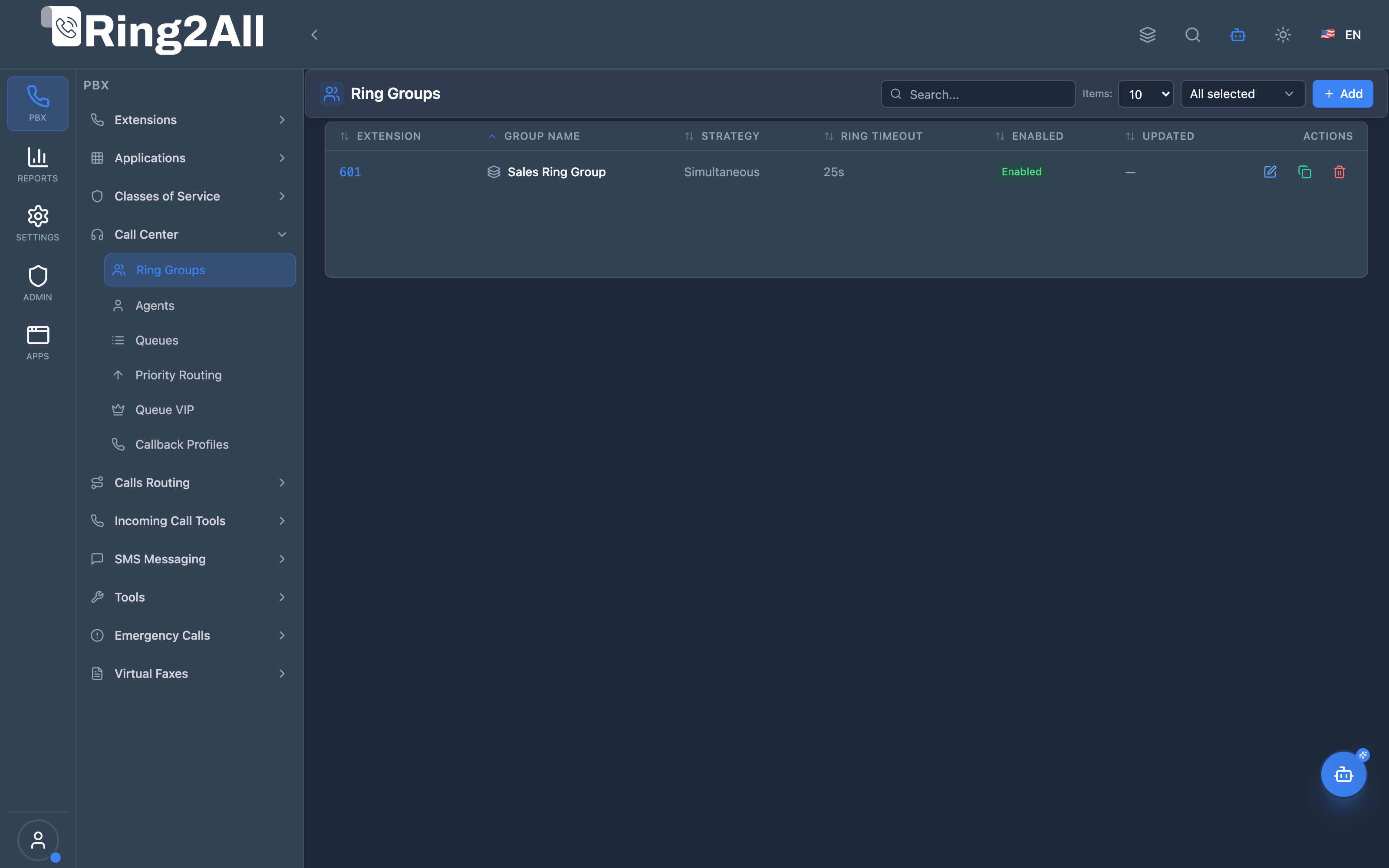
Section titled “Navigation”- Navigate to PBX Engine → Call Center → Ring Groups in the main navigation menu.
- The list view displays all configured Ring Groups with Name, Extension, Distribution Strategy, Ring Timeout, Fallback Destination, and Enabled status.
- Click the + Add button in the top toolbar to configure a new ring group.
- Click any ring group row or edit action to configure member extensions, ring sequences, and advanced audio behaviors.
Administrator Workflow
Section titled “Administrator Workflow”┌─────────────────────────────────────────────────────────────────┐│ Creating a Ring Group │├─────────────────────────────────────────────────────────────────┤│ ││ Step 1: Basic Information ││ ├─ Group Name: "Sales Ring Group" ││ ├─ Extension: 601 ││ └─ Strategy: Simultaneous ││ ││ Step 2: Members Configuration ││ ┌───────────────────────────────────────────────────────────┐ ││ │ Member 1: 2000 (Lead) | Delay: 0s | Timeout: 25s │ ││ │ Member 2: 2001 (Agent) | Delay: 5s | Timeout: 20s │ ││ │ Member 3: 2002 (Agent) | Delay: 5s | Timeout: 20s │ ││ └───────────────────────────────────────────────────────────┘ ││ ││ Step 3: Fallback Destination ││ └─ Module: Extensions | Target: 2000 (or Voicemail) ││ ││ Step 4: Save & Enable ││ │└─────────────────────────────────────────────────────────────────┘Quick Tips
Section titled “Quick Tips”[!TIP] Strategy Choice: Use Simultaneous for immediate broadcast across team extensions, or Sequence / Enterprise to cascade calls from primary to backup agents.
[!TIP] Member Delays: When using Enterprise strategy, assign incremental delay values (e.g., 0s, 10s, 20s) so additional extensions ring progressively.
[!CAUTION] Empty Groups: A ring group with zero active members will route immediately to the fallback destination or return fast busy.
4. Configuration Fields Reference
Section titled “4. Configuration Fields Reference”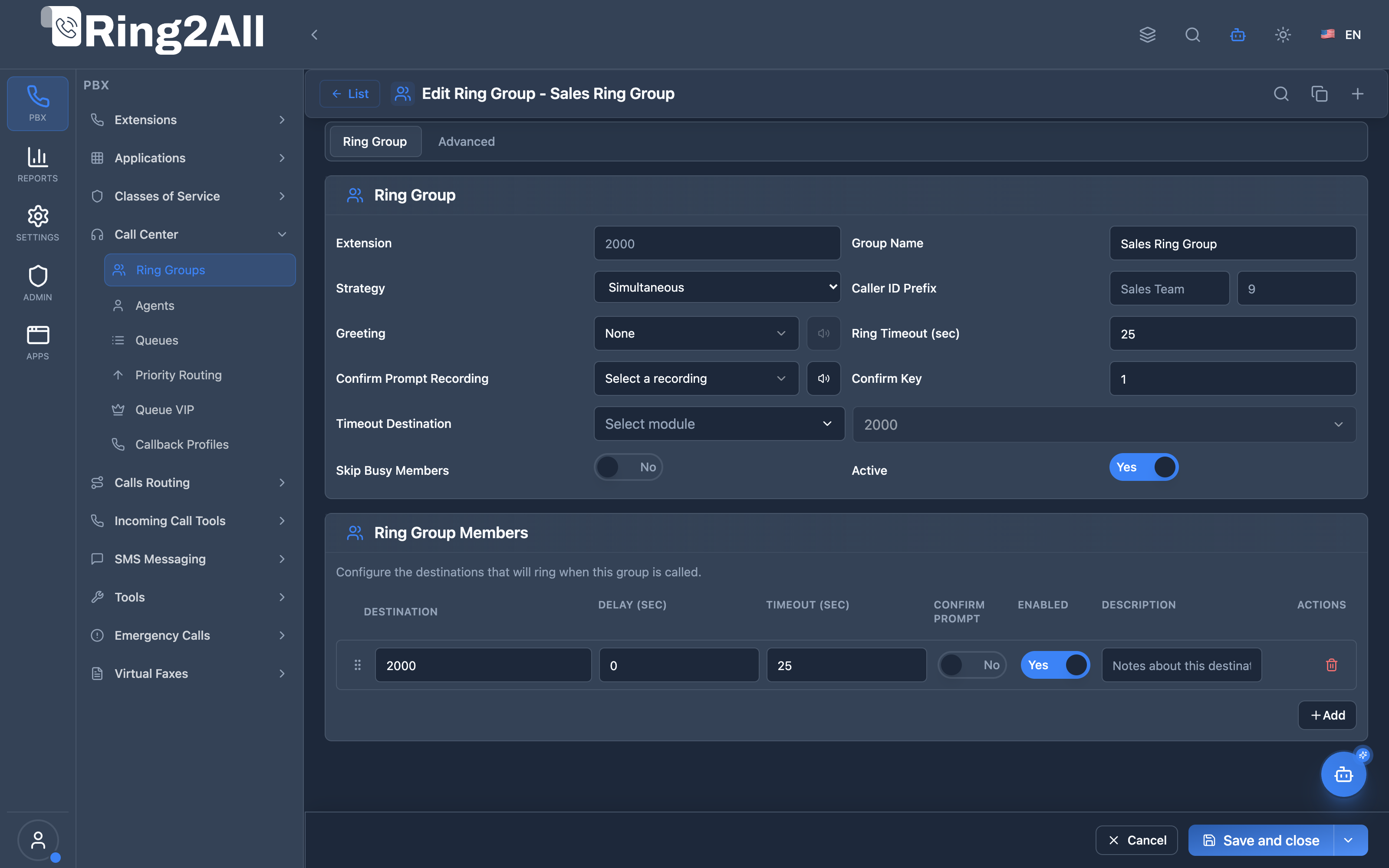
Main Tab — General Information
Section titled “Main Tab — General Information”| Field | Description | User-Friendly Tooltip | Example | Notes |
|---|---|---|---|---|
| Extension * | Dialable internal extension number | Extension dialed to reach this ring group | 601, 2000 |
Required. Unique dialplan extension. |
| Name * | Descriptive name for the ring group | Enter a unique name for the ring group | Sales Ring Group |
Required. Unique per domain. |
| Strategy * | Member call dispatch pattern | How calls are distributed among group members | Simultaneous, Sequence, Enterprise |
Options: simultaneous, sequence, enterprise, random, rollover. |
| Caller ID Prefix | Prefix prepended to caller ID name & number | Caller ID name and number prefixes | Sales:, 900 |
Identifies incoming ring group calls on deskphones. |
| Greeting * | Audio prompt played to caller before ringing | Audio recording played to caller before group members are dialed | welcome_sales.wav |
Select from Voice Recordings. |
| Ring Timeout (s) | Duration in seconds the group rings before failover | Total seconds to ring before executing fallback destination | 25, 30 |
Default: 30 seconds. |
| Confirm Prompt Recording | Audio played when member answers (screening) | Recording played to member prompting them to press key to accept | ivr/press_1_to_accept.wav |
Uses FreeSWITCH group_confirm_file. |
| Confirm Key | DTMF key required to accept call | Single DTMF digit to bridge the call | 1 |
Uses FreeSWITCH group_confirm_key. |
| Timeout Destination * | Telephony module & destination triggered when no member answers | Destination type and target for unanswered calls | Extensions → 2000, Voicemail → 1000 |
Dropdown module & destination selector. |
| Skip Busy Members | Skip members currently engaged in other calls | Do not send call to extensions with active channels | Toggle (On/Off) |
Sets FreeSWITCH per-leg variable skip_busy=true. |
| Enabled * | Operational status of the ring group | Toggle whether this ring group is active | Toggle (On/Off) |
If disabled, dialed calls route to fallback or fail. |
Main Tab — Member Extensions Table
Section titled “Main Tab — Member Extensions Table”| Column | Description | Control | Example | Notes |
|---|---|---|---|---|
| Extension * | Target phone extension to ring | Select dropdown | 2000 - Alice Morgan |
Select from domain extensions or external numbers. |
| Order | Ring sequence index | Drag & drop / number | 1, 2 |
Determines evaluation order in sequence/enterprise strategies. |
| Delay (s) | Delay before ringing this specific member | Number input | 0, 5, 10 |
Useful in enterprise cascade ringing (leg_delay_start). |
| Timeout (s) | Maximum ringing duration for this member | Number input | 20, 25 |
Overrides or caps ring duration for this leg (leg_timeout). |
| Prompt | Call screening audio prompt override | Select dropdown | None |
Audio played to member before connecting. |
| Enabled | Member active state in this group | Toggle (On/Off) | Enabled |
Temporarily exclude a member without deleting them. |
| Actions | Delete member row | Trash button | Remove |
Deletes member from the group. |
Advanced Tab — Advanced Settings
Section titled “Advanced Tab — Advanced Settings”| Field | Description | User-Friendly Tooltip | Example | Notes |
|---|---|---|---|---|
| Ring Back Tone | Ringing tone or music played to caller while waiting | Select standard ringback tone or custom stream | US Ring, UK Ring, Music Default |
Sets FreeSWITCH session variables ringback and transfer_ringback. |
| Distinctive Ring | Custom SIP ring tone / Alert-Info header | Custom Alert-Info header for unique phone ring melodies | http://.../ring.wav or info=ring2 |
Injected into SIP Alert-Info header for supported IP deskphones. |
| Record Calls | Capture full audio recording of bridged group calls | Enable call recording for bridged calls | Toggle (On/Off) |
Executes FreeSWITCH record_session. |
| Presence ID | SIP presence identifier for BLF subscription | Identifier used for Busy Lamp Field (BLF) status monitoring | sales@domain.com |
Manages extension BLF key lamps on IP phones. |
5. Ring Strategies
Section titled “5. Ring Strategies”Strategy Comparison
Section titled “Strategy Comparison”| Strategy | Behavior | Best For |
|---|---|---|
| Simultaneous | Ring all members at once | Small teams, fast answer |
| Sequence | Ring one at a time, in order | Escalation, priority |
| Enterprise | Cascade with configurable delays | Mixed availability |
| Random | Random member selection | Load balancing |
| Rollover | First available member | Simple backup |
Visual Comparison
Section titled “Visual Comparison”Simultaneous:───────────────────────────── 101 ▓▓▓▓▓▓▓▓▓▓▓▓▓▓▓▓▓▓▓▓▓ 102 ▓▓▓▓▓▓▓▓▓▓▓▓▓▓▓▓▓▓▓▓▓ 103 ▓▓▓▓▓▓▓▓▓▓▓▓▓▓▓▓▓▓▓▓▓ 0────────────────────→ time
Sequence:───────────────────────────── 101 ▓▓▓▓▓▓▓░░░░░░░░░░░░░░ 102 ░░░░░░░▓▓▓▓▓▓▓░░░░░░░ 103 ░░░░░░░░░░░░░░▓▓▓▓▓▓▓ 0────────────────────→ time
Enterprise (with delays):───────────────────────────── 101 ▓▓▓▓▓▓▓▓▓▓▓▓▓▓▓▓▓▓▓▓▓ 102 ░░░░▓▓▓▓▓▓▓▓▓▓▓▓▓▓▓▓▓ 103 ░░░░░░░░▓▓▓▓▓▓▓▓▓▓▓▓▓ 0────────────────────→ time6. Member Configuration
Section titled “6. Member Configuration”Member Fields
Section titled “Member Fields”| Field | Description | Example |
|---|---|---|
| Destination | Extension or dial string | 101 |
| Order | Sequence priority | 1, 2, 3… |
| Delay (sec) | Wait before ringing | 0, 5, 10 |
| Timeout (sec) | Per-member ring time | 20 |
| Confirm Prompt | Require key press | None/Confirm |
| Enabled | Member active status | On/Off |
Delay Examples
Section titled “Delay Examples”Immediate Ring All:
| Member | Delay | Effect |
|---|---|---|
| 101 | 0 | Rings immediately |
| 102 | 0 | Rings immediately |
| 103 | 0 | Rings immediately |
Cascading Ring:
| Member | Delay | Effect |
|---|---|---|
| 101 | 0 | Rings immediately |
| 102 | 5 | Joins after 5 sec |
| 103 | 10 | Joins after 10 sec |
7. Common Scenarios & Examples
Section titled “7. Common Scenarios & Examples”Scenario 1: Sales Team (Simultaneous)
Section titled “Scenario 1: Sales Team (Simultaneous)”Configuration:
- Extension: 5000
- Strategy: Simultaneous
- Timeout: 20 sec
Members:
| Order | Extension | Delay | Timeout |
|---|---|---|---|
| 1 | 201 | 0 | 20 |
| 2 | 202 | 0 | 20 |
| 3 | 203 | 0 | 20 |
Result: All 3 ring at once. First answer wins.
Scenario 2: Tiered Support (Sequence)
Section titled “Scenario 2: Tiered Support (Sequence)”Configuration:
- Extension: 5001
- Strategy: Sequence
- Timeout: 60 sec
Members:
| Order | Extension | Delay | Timeout | Description |
|---|---|---|---|---|
| 1 | 301 | 0 | 15 | Tier 1 |
| 2 | 302 | 0 | 15 | Tier 2 |
| 3 | 303 | 0 | 15 | Supervisor |
Result: Rings 301 for 15s, then 302 for 15s, then 303.
Scenario 3: Cascading Reception (Enterprise)
Section titled “Scenario 3: Cascading Reception (Enterprise)”Configuration:
- Extension: 5002
- Strategy: Enterprise
Members:
| Order | Extension | Delay | Timeout | Description |
|---|---|---|---|---|
| 1 | 100 | 0 | 30 | Primary Receptionist |
| 2 | 101 | 10 | 20 | Backup 1 |
| 3 | 102 | 15 | 15 | Backup 2 |
Result: 100 rings immediately. After 10s, 101 joins. After 15s, 102 joins.
8. Model Context Protocol (MCP) AI Integration
Section titled “8. Model Context Protocol (MCP) AI Integration”Ring2All exposes native Model Context Protocol (MCP) tools for Ring Groups, enabling autonomous AI agents, IVR Copilots, and operations bots to inspect group configurations, audit member extensions, adjust ringing strategies dynamically, and provision hunt groups with strict domain numbering isolation and deletion safeguards.
Available MCP Tools
Section titled “Available MCP Tools”| Tool Name | Description | Key Parameters |
|---|---|---|
list_ring_groups |
Lists all Ring Groups configured in the domain, including extension number, strategy (simultaneous, sequence, random, enterprise), timeout, and active status. |
search (optional string) |
get_ring_group_status |
Retrieves complete configuration, strategy, member extension lists (with delay and timeout offsets), and fallback routing for a specific group. | identifier (name or extension, required) |
create_ring_group |
Provisions a new Ring Group with ringing strategy, member extension list, ring timeout, and fallback destination. Validates domain number uniqueness across all telephony entities. | name, extension, members (required); strategy, ringTimeout, fallbackModule, fallbackDestination |
update_ring_group |
Modifies ringing strategy, member list, timeout, enabled state, or failover destinations of an existing group. | identifier (required); name, extension, strategy, members, ringTimeout, fallbackModule, fallbackDestination, enabled |
diagnose_ring_group |
Performs deep operational diagnostic on a Ring Group: verifies member extension readiness (live SIP registration state, DND status, call forwarding hijacking conflicts), checks ring timeout vs individual extension voicemail timeouts, validates fallback destination integrity, and inspects recent call bridge logs. | identifier (name or extension, required) |
delete_ring_group |
Safely removes a Ring Group after verifying it is not referenced in active inbound routes or queue fallbacks via assertCanDeleteRingGroup. |
identifier (required) |
Anti-Collision & Domain Numbering Integrity
Section titled “Anti-Collision & Domain Numbering Integrity”Every virtual extension assigned to a Ring Group undergoes strict atomic validation against dialplan_registry, public.sip_extensions, public.call_center_queues, public.conference_rooms, and all PBX applications. It is strictly impossible to assign a ring group extension that collides with any other dialable number in the same tenant domain.
AI Agent Operational Examples
Section titled “AI Agent Operational Examples”Querying Ring Group Configuration
Section titled “Querying Ring Group Configuration”{ "tool": "get_ring_group_status", "arguments": { "identifier": "Sales Team" }}Provisioning an Enterprise Cascading Ring Group
Section titled “Provisioning an Enterprise Cascading Ring Group”{ "tool": "create_ring_group", "arguments": { "name": "Tier 1 Support Cascade", "extension": "600", "strategy": "enterprise", "members": ["1001", "1002", "1003"], "ringTimeout": 30, "fallbackModule": "voicemail", "fallbackDestination": "1001" }}Diagnosing Ring Group Delivery & Member Readiness
Section titled “Diagnosing Ring Group Delivery & Member Readiness”{ "tool": "diagnose_ring_group", "arguments": { "identifier": "600" }}Recommended Natural Language Prompts
Section titled “Recommended Natural Language Prompts”- “Show me all ring groups configured in this domain and their ringing strategies.”
- “Create a simultaneous ring group named ‘Front Desk’ at extension 500 ringing extensions 101, 102, and 103 with a 25-second timeout to voicemail.”
- “Check if extension 650 is available before creating a new ring group.”
9. Limitations & Important Notes
Section titled “9. Limitations & Important Notes”Technical Limitations
Section titled “Technical Limitations”[!WARNING] Member Limit: Performance may degrade with 20+ simultaneous members.
[!WARNING] External Destinations: External numbers may have carrier delays.
Best Practices
Section titled “Best Practices”- Reasonable Timeouts: 15-30 sec per member
- Skip Busy: Enable to avoid disruption
- Fallback Required: Always set timeout destination
- Test Strategies: Verify behavior before production
- Monitor Usage: Check CDR for answer rates
10. Troubleshooting Tips
Section titled “10. Troubleshooting Tips”Common Issues
Section titled “Common Issues”| Symptom | Possible Cause | Solution |
|---|---|---|
| No ringing | No members | Add members |
| Fast busy | Group disabled | Enable group |
| Wrong order | Order not set | Reorder members |
| Caller hears silence | Ringback not set | Configure ringback |
| Calls not answered | Timeout too short | Increase timeout |
Diagnostic SQL
Section titled “Diagnostic SQL”List ring groups:
SELECT id, extension, name, strategy, ring_timeout, enabledFROM public.ring_groupsWHERE domain_id = [domain_id];Check members:
SELECT m.extension, m.order_index, m.delay, m.timeout, m.enabledFROM public.ring_group_members mWHERE m.ring_group_id = [ring_group_id]ORDER BY m.order_index;11. Glossary
Section titled “11. Glossary”| Term | Definition |
|---|---|
| Ring Group | Collection of extensions sharing calls |
| Strategy | Algorithm for distributing calls |
| Delay | Wait time before member starts ringing |
| Timeout | Max ring time per member |
| Fallback | Destination for unanswered calls |
| Skip Busy | Ignore members on other calls |
| Call Screen | Require member confirmation |
| Cascade | Gradually add ringing members |
Documentation last updated: January 2026