

Customer Codes Module Documentation
Table of Contents
Section titled “Table of Contents”- Module Overview (Technical)
- Module Overview (Commercial/Business)
- Module Overview (End User/Administrator)
- Configuration Fields Reference
- Usage Flow
- Import/Export Feature
- Common Scenarios & Examples
- Model Context Protocol (MCP) AI Integration
- Limitations & Important Notes
- Troubleshooting Tips
- Glossary
1. Module Overview (Technical)
Section titled “1. Module Overview (Technical)”What Are Customer Codes?
Section titled “What Are Customer Codes?”Customer Codes are billing/tracking identifiers that can be associated with calls. When a user enters a customer code before making a call, the code is recorded in the CDR (Call Detail Record) for billing, reporting, and cost allocation purposes.
Architecture
Section titled “Architecture”┌─────────────────────────────────────────────────────────────────┐│ Customer Code System │├─────────────────────────────────────────────────────────────────┤│ ││ User dials *78 (Customer Code feature) ││ │ ││ ▼ ││ ┌──────────────────────────────────────────────────────────┐ ││ │ Code Entry │ ││ │ Play: "Enter your customer code" │ ││ │ User enters: 12345# │ ││ └──────────────────────────────────────────────────────────┘ ││ │ ││ ▼ ││ ┌──────────────────────────────────────────────────────────┐ ││ │ Validation │ ││ │ SELECT code FROM public.customer_codes │ ││ │ WHERE code = '12345' AND active = TRUE │ ││ │ │ ││ │ ├─ Found → Store in channel variable │ ││ │ └─ Not found → Continue (or reject based on config) │ ││ └──────────────────────────────────────────────────────────┘ ││ │ ││ ▼ ││ Set channel variable: customer_code = "12345" ││ Return dial tone for outbound call ││ │ ││ ▼ ││ CDR includes customer_code for billing/reporting ││ │└─────────────────────────────────────────────────────────────────┘2. Module Overview (Commercial/Business)
Section titled “2. Module Overview (Commercial/Business)”Business Value
Section titled “Business Value”Customer Codes enable cost allocation and billing tracking:
| Without Customer Codes | With Customer Codes |
|---|---|
| All calls billed to department | Bill to specific clients/projects |
| No project tracking | Track calls by matter/case |
| Manual cost allocation | Automated reporting |
| No accountability | Per-client billing |
Use Cases
Section titled “Use Cases”-
Law Firms / Professional Services
- Associate calls with client matters
- Bill phone time to specific cases
-
Agencies / Consultants
- Track calls by project
- Client-specific billing
-
Cost Centers
- Allocate telecom costs to departments
- Project-based accounting
-
Sales Teams
- Track calls by opportunity
- Campaign attribution
Feature Highlights
Section titled “Feature Highlights”| Feature | Benefit |
|---|---|
| CDR Integration | Codes appear in call records |
| Import/Export | Bulk management via CSV |
| Active Toggle | Enable/disable without deletion |
| Multi-tenant | Separate codes per domain |
| Description Field | Associate meaning with codes |
3. Module Overview (End User/Administrator)
Section titled “3. Module Overview (End User/Administrator)”What Can You Do?
Section titled “What Can You Do?”- Create customer codes for billing purposes
- Add descriptions for code identification
- Import/export codes via CSV
- Enable/disable codes
Navigation
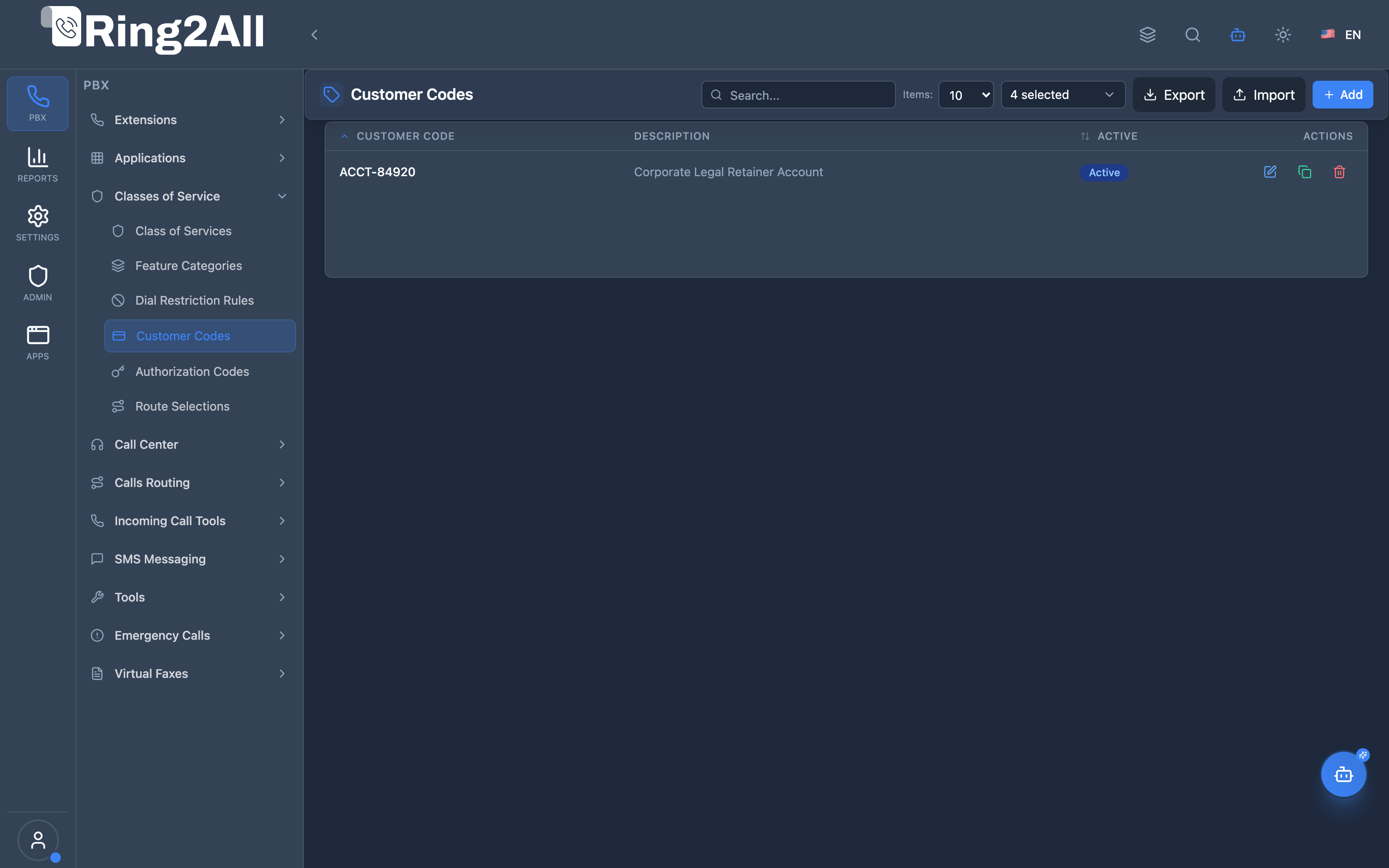
Section titled “Navigation”- Navigate to PBX Engine → Class of Services → Customer Codes in the main navigation menu.
- The list view displays all configured customer codes with Code, Description, and active status.
- Click the + Add button in the top toolbar to register a new billing/customer code.
- Click any code entry or edit icon to adjust the code value, description, or activation toggle.
Administrator Workflow
Section titled “Administrator Workflow”┌─────────────────────────────────────────────────────────────────┐│ Creating a Customer Code │├─────────────────────────────────────────────────────────────────┤│ ││ Step 1: Code Information ││ ├─ Customer Code: ACCT-84920 ││ ├─ Description: "Corporate Legal Retainer Account" ││ └─ Active: ✓ ││ ││ Step 2: Save ││ ││ Result: Code available for users to enter before calls ││ CDR will include "ACCT-84920" for billing ││ │└─────────────────────────────────────────────────────────────────┘User Workflow (Using Customer Code)
Section titled “User Workflow (Using Customer Code)”1. User dials *78 (Customer Code feature)2. System: "Enter your customer code"3. User enters: 84920#4. System: "Code accepted"5. User dials destination number6. Call proceeds normally7. CDR records customer_code = "ACCT-84920"Quick Tips
Section titled “Quick Tips”[!TIP] Meaningful Codes: Use codes that map directly to your accounting/ERP billing system (e.g., matter numbers, project IDs, customer account numbers).
[!TIP] Descriptions: Add clear descriptions explaining the project or client associated with the code for easier auditing.
4. Configuration Fields Reference
Section titled “4. Configuration Fields Reference”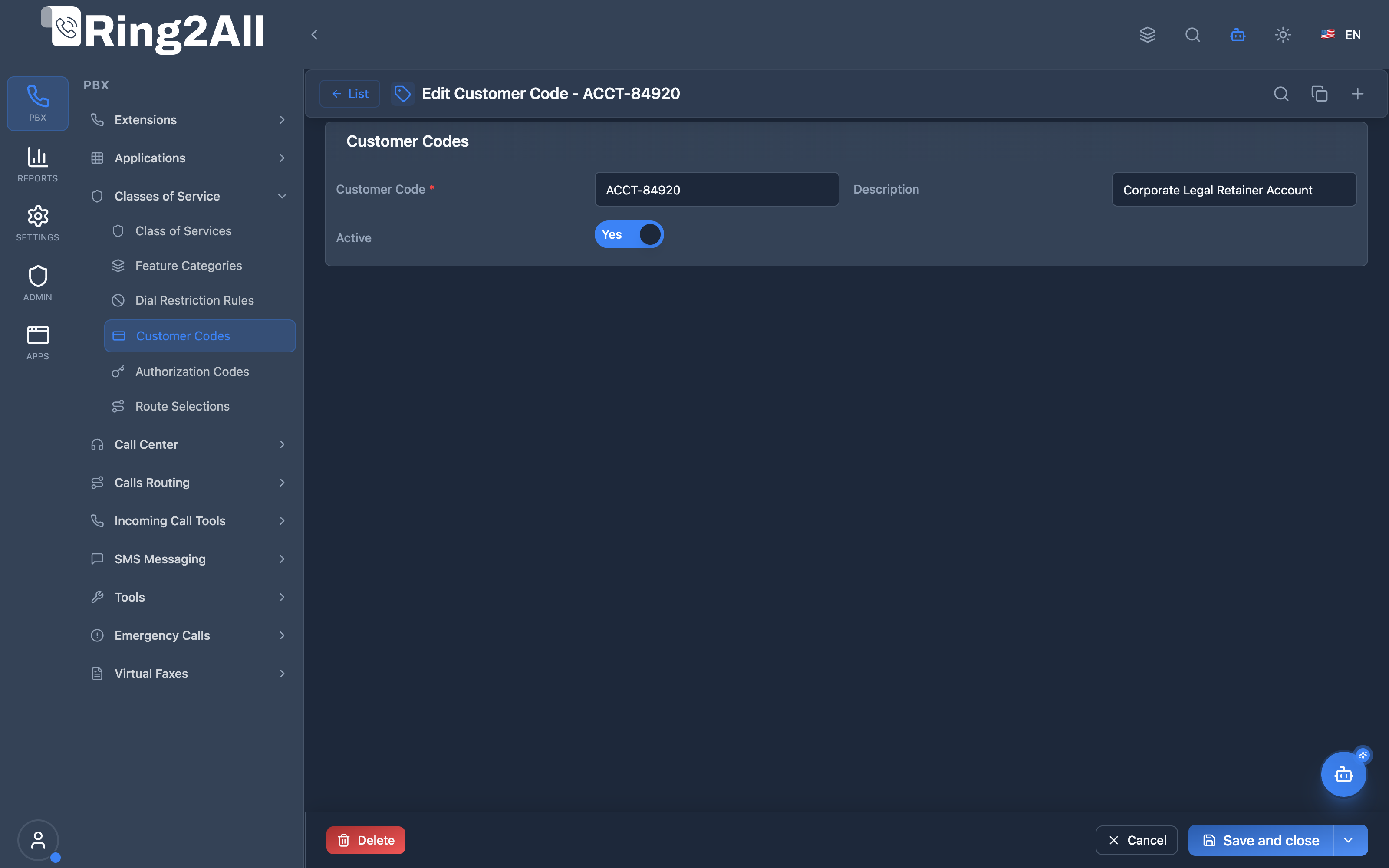
Basic Information Fields
Section titled “Basic Information Fields”| Field | Description | User-Friendly Tooltip | Example | Notes |
|---|---|---|---|---|
| Customer Code * | Unique alphanumeric billing or tracking code | Enter the unique customer or project code for call attribution | ACCT-84920, LEGAL-104 |
Required. Unique per domain. |
| Description | Contextual client or department notes | Detailed description of the client or accounting project | Corporate Legal Retainer Account |
Optional. |
| Active * | Operational status of the code | Toggle whether this code is currently accepted for call billing | Toggle (On/Off) |
If inactive, dialed attempts using this code will be rejected. |
Code Format
Section titled “Code Format”Customer codes can include:
- Alphanumeric characters (A-Z, 0-9)
- Hyphens and underscores
- Typically 4-20 characters
5. Usage Flow
Section titled “5. Usage Flow”Customer Code Entry Flow
Section titled “Customer Code Entry Flow”┌─────────────────────────────────────────────────────────────────┐│ Customer Code Flow │├─────────────────────────────────────────────────────────────────┤│ ││ 1. User dials *78 (or configured feature code) ││ │ ││ ▼ ││ 2. Prompt for customer code ││ │ ││ ▼ ││ 3. User enters code (e.g., ACME-001#) ││ │ ││ ▼ ││ 4. Validate code (if validation enabled) ││ ├─ Valid → Continue ││ └─ Invalid → Error or continue (based on config) ││ │ ││ ▼ ││ 5. Store code in channel variable ││ session:setVariable("customer_code", "ACME-001") ││ │ ││ ▼ ││ 6. User dials destination ││ │ ││ ▼ ││ 7. CDR includes customer_code field ││ │└─────────────────────────────────────────────────────────────────┘CDR Integration
Section titled “CDR Integration”When a call with a customer code is completed:
customer_codefield in CDR contains the entered code- Reports can filter/group by customer code
- Billing systems can use code for allocation
6. Import/Export Feature
Section titled “6. Import/Export Feature”CSV Export
Section titled “CSV Export”Purpose: Backup codes or migrate to another system.
Format:
code,description,activeACME-001,ACME Corp Main Account,trueBETA-002,Beta Inc Project Alpha,trueGAMMA-003,Gamma LLC Consulting,falseCSV Import
Section titled “CSV Import”Import Modes:
| Mode | Behavior |
|---|---|
| Skip existing | Keep current codes, skip duplicates |
| Update existing | Update description/active if code exists |
| Replace all | Delete all and import fresh |
Required Columns:
code- The customer codedescription- Optional notesactive- true/false
7. Common Scenarios & Examples
Section titled “7. Common Scenarios & Examples”Scenario 1: Law Firm Client Matters
Section titled “Scenario 1: Law Firm Client Matters”Codes:
| Code | Description |
|---|---|
| SMITH-2024-001 | Smith v. Jones Litigation |
| ACME-CORP-GEN | ACME Corp General Counsel |
| DOE-ESTATE-01 | Doe Estate Planning |
Usage: Attorneys enter matter code before client calls for billing.
Scenario 2: Consulting Project Tracking
Section titled “Scenario 2: Consulting Project Tracking”Codes:
| Code | Description |
|---|---|
| PROJ-ALPHA | Project Alpha - Deployment |
| PROJ-BETA | Project Beta - Assessment |
| INT-OVERHEAD | Internal / Non-billable |
Usage: Consultants tag calls to projects for time tracking.
Scenario 3: Sales Campaign Attribution
Section titled “Scenario 3: Sales Campaign Attribution”Codes:
| Code | Description |
|---|---|
| CAMP-Q1-WEB | Q1 Web Campaign Leads |
| CAMP-Q1-EMAIL | Q1 Email Campaign Leads |
| DIRECT-INBOUND | Direct Inbound Inquiries |
Usage: Sales reps tag calls by lead source for ROI analysis.
8. Model Context Protocol (MCP) AI Integration
Section titled “8. Model Context Protocol (MCP) AI Integration”Ring2All exposes native Model Context Protocol (MCP) tools for Customer Codes (Account/Billing Codes), allowing AI Copilots to query client project tags, audit CDR billing tracking codes, and programmatically provision or update customer codes with domain-level isolation and duplicate-code validation.
Available MCP Tools
Section titled “Available MCP Tools”| Tool Name | Description | Key Parameters |
|---|---|---|
list_customer_codes |
Lists all customer / account codes configured in the domain, including code values, descriptions, and active status. | search (optional string) |
get_customer_code_status |
Retrieves details and active billing status of a specific customer code. | code (required) |
create_customer_code |
Provisions a new customer code (numeric or alphanumeric) for client project tracking or matter billing. | code, description, active |
update_customer_code |
Modifies customer code identifier, project description, or active status. | code, newCode, description, active |
delete_customer_code |
Deletes a customer code from the domain. | code (required) |
AI Agent Operational Examples
Section titled “AI Agent Operational Examples”Querying Billing Codes by Project Name
Section titled “Querying Billing Codes by Project Name”{ "tool": "list_customer_codes", "arguments": { "search": "Acme" }}Provisioning a Legal Matter Billing Code
Section titled “Provisioning a Legal Matter Billing Code”{ "tool": "create_customer_code", "arguments": { "code": "LEG-2026-042", "description": "Acme Corp Intellectual Property Dispute", "active": true }}Recommended Natural Language Prompts
Section titled “Recommended Natural Language Prompts”- “List all customer billing codes active on this domain.”
- “Create a customer code ‘PROJ-772’ with description ‘Hospital Network Upgrade’.”
- “Check if customer code ‘CLI-ACME’ exists and show its description.”
9. Limitations & Important Notes
Section titled “9. Limitations & Important Notes”Technical Limitations
Section titled “Technical Limitations”[!WARNING] Pre-Call Entry: Customer codes must be entered before the call, not during.
[!WARNING] Single Code: Only one customer code per call.
Best Practices
Section titled “Best Practices”- Consistent Format: Use standardized code formats
- Meaningful Codes: Map to billing/CRM systems
- Regular Audits: Archive unused codes
- User Training: Ensure users know when to enter codes
10. Troubleshooting Tips
Section titled “10. Troubleshooting Tips”Common Issues
Section titled “Common Issues”| Symptom | Possible Cause | Solution |
|---|---|---|
| Code not in CDR | Code not entered/validated | Check call flow |
| “Invalid code” | Code not found/disabled | Verify code exists and is active |
| Users skip codes | Feature not enforced | Consider mandatory code policy |
Diagnostic SQL
Section titled “Diagnostic SQL”List customer codes:
SELECT code, description, active, created_atFROM public.customer_codesWHERE domain_id = [domain_id]ORDER BY code;Check code usage in CDR:
SELECT customer_code, COUNT(*) as call_countFROM public.cdrWHERE domain_id = [domain_id] AND customer_code IS NOT NULLGROUP BY customer_codeORDER BY call_count DESC;11. Glossary
Section titled “11. Glossary”| Term | Definition |
|---|---|
| Customer Code | Billing/tracking identifier for calls |
| CDR | Call Detail Record—contains call metadata |
| Matter Code | Legal industry term for client/case code |
| Account Code | Alternate term for customer code |
| Cost Center | Department/unit for expense allocation |
Documentation last updated: January 2026