

VIP Lists (Queues VIP) Module Documentation
Table of Contents
Section titled “Table of Contents”- Module Overview (Technical)
- Module Overview (Commercial/Business)
- Module Overview (End User/Administrator)
- Configuration Fields Reference
- Priority Scoring
- Common Scenarios & Examples
- Model Context Protocol (MCP) AI Integration
- Limitations & Important Notes
- Troubleshooting Tips
- Glossary
1. Module Overview (Technical)
Section titled “1. Module Overview (Technical)”What Are VIP Lists?
Section titled “What Are VIP Lists?”VIP Lists are reusable caller identification lists that boost queue priority for matching phone numbers. When a caller’s number matches a VIP list member, they receive priority treatment in the queue.
Architecture
Section titled “Architecture”┌─────────────────────────────────────────────────────────────────┐│ VIP List System │├─────────────────────────────────────────────────────────────────┤│ ││ VIP List: "Premium Customers" ││ ┌────────────────────────────────────────────────────────────┐ ││ │ Phone Number │ Weight │ Level │ Position │ Enabled │ ││ ├──────────────────┼────────┼───────┼──────────┼────────────┤ ││ │ +15551234567 │ 50 │ 1 │ - │ ✓ │ ││ │ +15559876543 │ 30 │ 1 │ - │ ✓ │ ││ │ +15555551212 │ 20 │ 2 │ 1 │ ✓ │ ││ └──────────────────┴────────┴───────┴──────────┴────────────┘ ││ ││ Assigned to Queues: ││ ├─ Sales Queue ││ └─ Support Queue ││ ││ When caller +15551234567 enters Sales Queue: ││ → Priority score increased by weight (50) ││ → Tier level forced to 1 (highest priority agents) ││ → Result: Caller answered faster by best agents ││ │└─────────────────────────────────────────────────────────────────┘2. Module Overview (Commercial/Business)
Section titled “2. Module Overview (Commercial/Business)”Business Value
Section titled “Business Value”VIP Lists provide differentiated customer experiences:
| Without VIP Lists | With VIP Lists |
|---|---|
| All callers equal priority | VIP callers prioritized |
| No caller recognition | Automatic identification |
| Manual escalation | Automatic queue boost |
| No tier forcing | Direct to best agents |
Use Cases
Section titled “Use Cases”-
Enterprise Customers
- Key account phone numbers
- Direct routing to senior agents
-
Premium Memberships
- Gold/Platinum member numbers
- Higher queue priority
-
Partner Programs
- Reseller/partner contacts
- Dedicated tier access
-
Account-Based Service
- Specific customer numbers
- Custom service levels
Feature Highlights
Section titled “Feature Highlights”| Feature | Benefit |
|---|---|
| Reusable Lists | One list, multiple queues |
| Weight Scoring | 1-100 priority boost |
| Level Override | Force specific tier |
| Position Override | Force queue position |
| Per-Member Enable | Individual control |
| Drag-and-Drop | Easy member ordering |
3. Module Overview (End User/Administrator)
Section titled “3. Module Overview (End User/Administrator)”What Can You Do?
Section titled “What Can You Do?”- Create named VIP lists
- Add phone numbers as members
- Set priority weights (1-100)
- Override tier levels (force to senior agents)
- Override queue positions (jump to front)
- Assign lists to multiple queues
Navigation
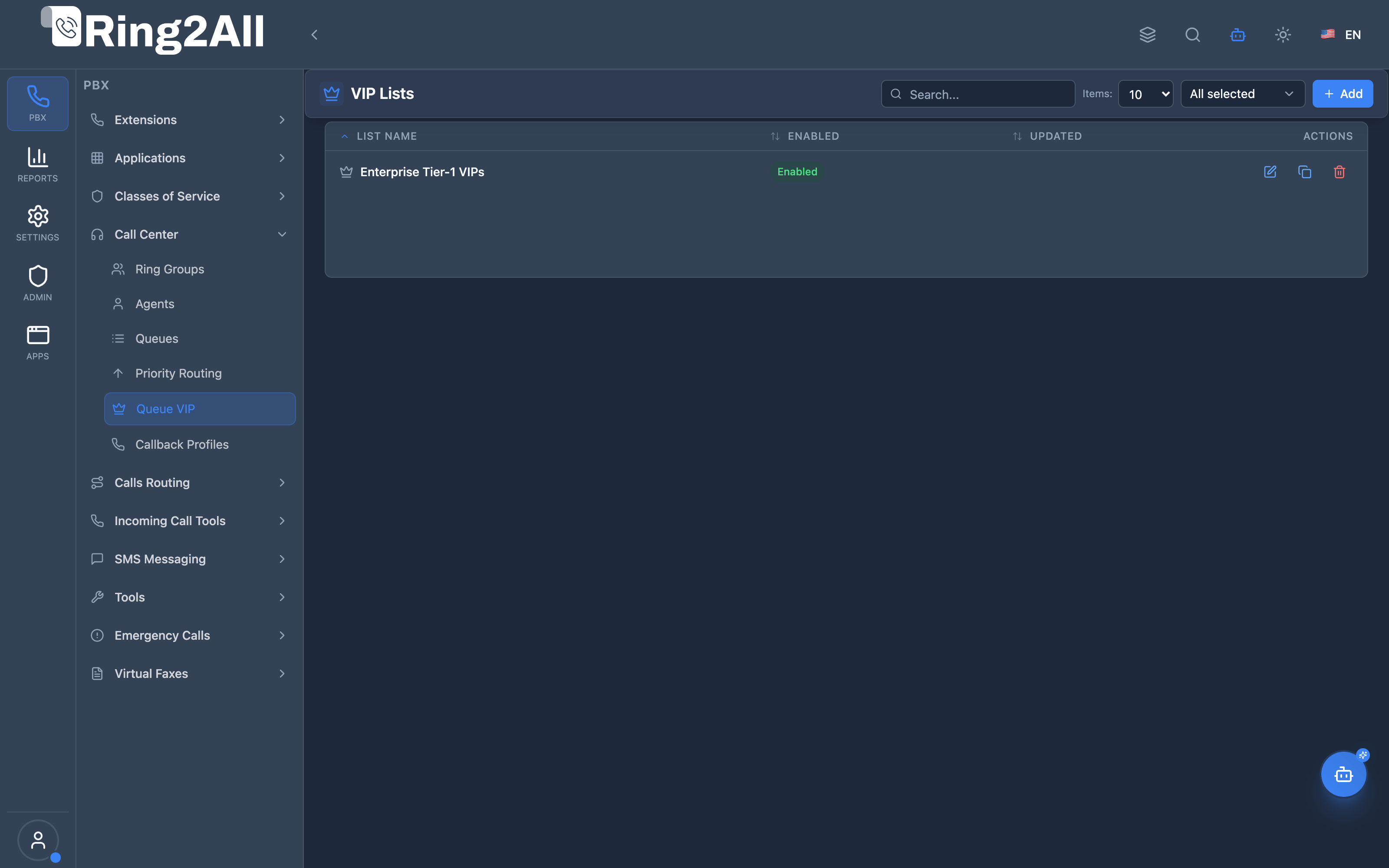
Section titled “Navigation”- Navigate to PBX Engine → Call Center → Queue VIP in the main navigation menu.
- The list view displays all configured VIP Lists with Name, Member Count, and Enabled status.
- Click the + Add button in the top toolbar to configure a new VIP List.
- Click any list row or edit action to manage member phone numbers, caller ID names, priorities, and notes with drag-and-drop reordering.
Administrator Workflow
Section titled “Administrator Workflow”┌─────────────────────────────────────────────────────────────────┐│ Creating a VIP List │├─────────────────────────────────────────────────────────────────┤│ ││ General Settings ││ ├─ List Name: "Enterprise Tier-1 VIPs" ││ └─ Enabled: ✓ ││ ││ VIP List Members ││ ┌───────────────────────────────────────────────────────────┐ ││ │ ≡ +13055550199 │ Chief Exec Office │ Priority: 100 │ ✓ │ ││ │ ≡ +13055550188 │ Global Director │ Priority: 80 │ ✓ │ ││ │ ≡ +13055550177 │ Regional Partner │ Priority: 50 │ ✓ │ ││ └───────────────────────────────────────────────────────────┘ ││ ││ [+ Add Member] ││ ││ Save → Then assign to Queues in Queue settings ││ │└─────────────────────────────────────────────────────────────────┘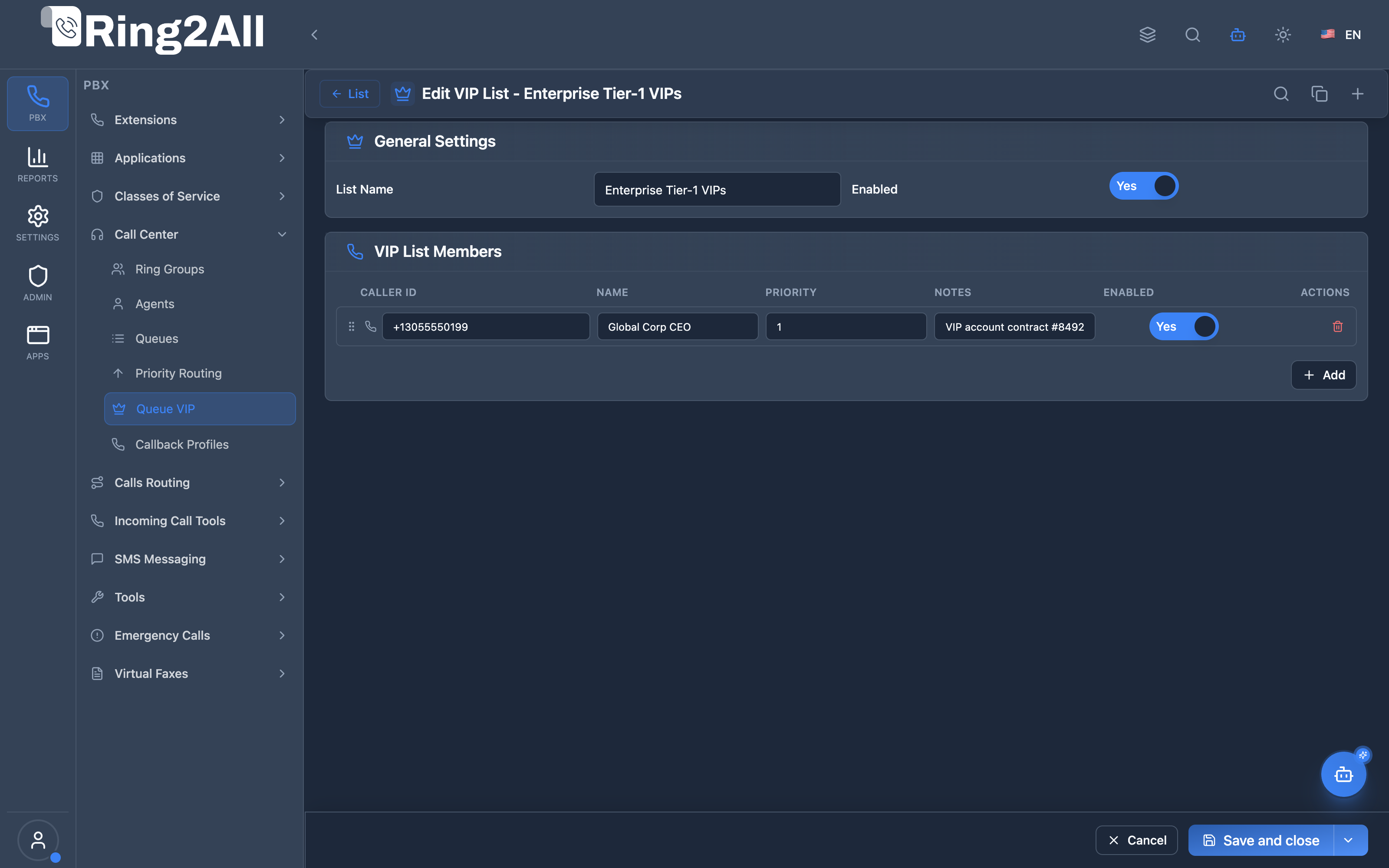
Queue Integration
Section titled “Queue Integration”In Queue settings, select VIP Lists to associate:
Queue Settings → General Tab → VIP List → Select "Enterprise Tier-1 VIPs"Quick Tips
Section titled “Quick Tips”[!TIP] Reusable Lists: Create unified VIP lists (e.g. “Enterprise Tier-1”) and link them to any number of sales and support queues.
[!TIP] Priority Weighting: Higher priority scores (up to 100) dynamically boost the caller’s position in the queue score calculation.
[!CAUTION] Caller ID Format: Always enter numbers matching the normalized incoming caller ID format (e.g., E.164 with country code or exact 10-digit format).
4. Configuration Fields Reference
Section titled “4. Configuration Fields Reference”VIP List General Settings
Section titled “VIP List General Settings”| Field | Description | Type / Options | Default | Required |
|---|---|---|---|---|
| List Name | Descriptive name identifying the VIP list | Text | None | Yes |
| Enabled | Master switch to activate or suspend the entire VIP list | Toggle (Boolean) | On | Yes |
VIP Member Fields
Section titled “VIP Member Fields”| Field | Description | Type / Range | Default | Required |
|---|---|---|---|---|
| Caller ID Number | Incoming phone number to match against inbound calls | Text (Phone Number) | None | Yes |
| Caller ID Name | Friendly contact name or title displayed in call center reports | Text | None | No |
| Priority | Priority boost score (1-100) applied to caller’s queue position calculation | Number (1 - 100) | 1 |
Yes |
| Notes | Optional administrative comments or account notes | Text | None | No |
| Enabled | Individual member toggle to enable/disable without deleting | Toggle (Boolean) | On | Yes |
| Reorder Handle | Drag-and-drop vertical grip to adjust prioritization order | Interactive Drag Control | None | No |
5. Priority Scoring
Section titled “5. Priority Scoring”How VIP Scoring Works
Section titled “How VIP Scoring Works”┌─────────────────────────────────────────────────────────────────┐│ VIP Priority Flow │├─────────────────────────────────────────────────────────────────┤│ ││ 1. Caller enters queue ││ Caller ID: +15551234567 ││ ││ 2. System checks VIP lists assigned to queue ││ → Match found in "Premium Customers" list ││ → Weight: 50, Level Override: 1 ││ ││ 3. Apply VIP settings ││ ├─ Base score: 0 (new caller) ││ ├─ + Weight: 50 ││ └─ = Final score: 50 ││ ││ 4. Queue position determined by score ││ → VIP caller (score 50) ahead of regular callers (score 0) ││ ││ 5. Tier routing ││ → Level Override: 1 → try tier 1 agents first ││ │└─────────────────────────────────────────────────────────────────┘Priority Matrix
Section titled “Priority Matrix”| Configuration | Effect |
|---|---|
| Weight only | Relative priority boost |
| Level Override only | Force to specific agent tier |
| Position Override only | Force to specific queue position |
| Weight + Level | Boost + tier forcing |
| All three | Maximum VIP treatment |
6. Common Scenarios & Examples
Section titled “6. Common Scenarios & Examples”Scenario 1: Enterprise Accounts
Section titled “Scenario 1: Enterprise Accounts”VIP List: “Enterprise”
| Phone | Weight | Level | Position |
|---|---|---|---|
| +15551234567 | 50 | 1 | - |
| +15559876543 | 50 | 1 | - |
| +15555551212 | 50 | 1 | - |
Effect: All enterprise callers get +50 priority and tier 1 agents.
Scenario 2: Tiered Service Levels
Section titled “Scenario 2: Tiered Service Levels”VIP List: “Premium Service”
| Phone | Weight | Level | Position | Description |
|---|---|---|---|---|
| +15551111111 | 100 | 1 | 1 | CEO |
| +15552222222 | 80 | 1 | - | CFO |
| +15553333333 | 50 | 2 | - | Directors |
Effect: CEO always first, executives to tier 1, directors to tier 2.
Scenario 3: Multi-Queue VIP
Section titled “Scenario 3: Multi-Queue VIP”VIP List: “Gold Members”
Assigned to:
- Sales Queue
- Support Queue
- Billing Queue
Effect: Gold members get priority across all three queues.
7. Model Context Protocol (MCP) AI Integration
Section titled “7. Model Context Protocol (MCP) AI Integration”Ring2All exposes native Model Context Protocol (MCP) tools for VIP Lists (Queues VIP), enabling CRM bots, account executive copilots, and VIP escalators to query VIP registries, enroll platinum clients, adjust queue priority weights, and remove expired entries automatically.
Available MCP Tools
Section titled “Available MCP Tools”| Tool Name | Description | Key Parameters |
|---|---|---|
list_vip_lists |
Lists all VIP Lists defined in the domain, displaying name, description, member count, and enabled state. | search (optional string) |
get_vip_list_status |
Retrieves full configuration, member phone numbers, assigned weights (1-100), notes, and linked queues. | name (required string) |
create_vip_list |
Provisions a new VIP List for call center queues. | name (required); description, enabled |
add_vip_member |
Enrolls a caller phone number into a VIP list with caller name, priority weight, and notes. | vipListName, phoneNumber (required); callerName, priority, notes |
remove_vip_member |
Removes a phone number entry from a specific VIP list. | vipListName, phoneNumber (required string) |
delete_vip_list |
Safely deletes a VIP list from the domain after verifying no active queues depend exclusively on it. | name (required string) |
AI Agent Operational Examples
Section titled “AI Agent Operational Examples”Querying VIP List Members
Section titled “Querying VIP List Members”{ "tool": "get_vip_list_status", "arguments": { "name": "Diamond VIP Clients" }}Enrolling a New VIP Caller
Section titled “Enrolling a New VIP Caller”{ "tool": "add_vip_member", "arguments": { "vipListName": "Diamond VIP Clients", "phoneNumber": "+15551234567", "callerName": "Acme Corp CEO", "priority": 90, "notes": "Direct escalation to senior tier" }}Recommended Natural Language Prompts
Section titled “Recommended Natural Language Prompts”- “List all VIP lists configured on this PBX and show their current member counts.”
- “Add customer phone number +15558889900 to the ‘Platinum Accounts’ VIP list with priority 85.”
- “Check if phone number +15551234567 is enrolled in any VIP lists.”
8. Limitations & Important Notes
Section titled “8. Limitations & Important Notes”Technical Notes
Section titled “Technical Notes”[!NOTE] Configuration Module: VIP Lists is a configuration module. List matching occurs during queue entry via mod_callcenter integration.
[!WARNING] Phone Format: Use consistent format (E.164 recommended: +15551234567).
Best Practices
Section titled “Best Practices”- Use E.164 Format: +[country][number] for consistent matching
- Meaningful Weights: Use ranges (10-30-50-80-100) for clear tiers
- Level Override Sparingly: Reserve for true VIP
- Position Override Rarely: Only for executive-level callers
- Name Lists Clearly: “Enterprise Accounts” not “VIP 1”
9. Troubleshooting Tips
Section titled “9. Troubleshooting Tips”Common Issues
Section titled “Common Issues”| Symptom | Possible Cause | Solution |
|---|---|---|
| VIP not recognized | Phone format mismatch | Use consistent E.164 format |
| No priority boost | List not assigned to queue | Assign in queue settings |
| Member not working | Member disabled | Enable the member |
| List not working | List disabled | Enable the list |
| Wrong tier | Level override conflict | Check override values |
Diagnostic SQL
Section titled “Diagnostic SQL”List VIP lists:
SELECT id, name, description, enabledFROM public.vip_listsWHERE domain_id = [domain_id];Check VIP members:
SELECT m.phone_number, m.weight, m.level_override, m.position_override, m.enabledFROM public.vip_list_members mJOIN public.vip_lists l ON m.vip_list_id = l.idWHERE l.domain_id = [domain_id]ORDER BY l.name, m.weight DESC;Check queue VIP list assignments:
SELECT q.name as queue, v.name as vip_listFROM public.call_center_queue_vip_lists qvJOIN public.call_center_queues q ON qv.queue_id = q.idJOIN public.vip_lists v ON qv.vip_list_id = v.idWHERE q.domain_id = [domain_id];10. Glossary
Section titled “10. Glossary”| Term | Definition |
|---|---|
| VIP List | Collection of priority caller phone numbers |
| Weight | Priority score boost (1-100) |
| Level Override | Forces caller to specific agent tier |
| Position Override | Forces caller to specific queue position |
| E.164 | International phone format (+[country][number]) |
Documentation last updated: January 2026