

Log File Viewer Module Documentation
Table of Contents
Section titled “Table of Contents”- Navigation & Access
- Screenshots & Visual Interface
- Module Overview (Technical)
- Module Overview (Commercial / Business)
- Module Overview (End User / Administrator)
- Supported Log Types & File Locations
- Log Levels & Severity Filtering
- Viewer Controls, Search & Actions
- Common Scenarios & Troubleshooting Workflows
- Limitations & Best Practices
- Model Context Protocol (MCP) AI Integration
- Troubleshooting Tips
- Glossary
Navigation & Access
Section titled “Navigation & Access”To access the Log File Viewer:
- Log in to the Ring2All Web Portal (
https://<domain-or-ip>/login). - In the left navigation sidebar, expand PBX Engine.
- Under PBX Tools, click Log File Viewer (
/pbx/tools/log-viewer). - Select the desired log source (Telephony Server or Fail2ban) and filter by severity or keyword.
Screenshots & Visual Interface
Section titled “Screenshots & Visual Interface”Log File Viewer Interface
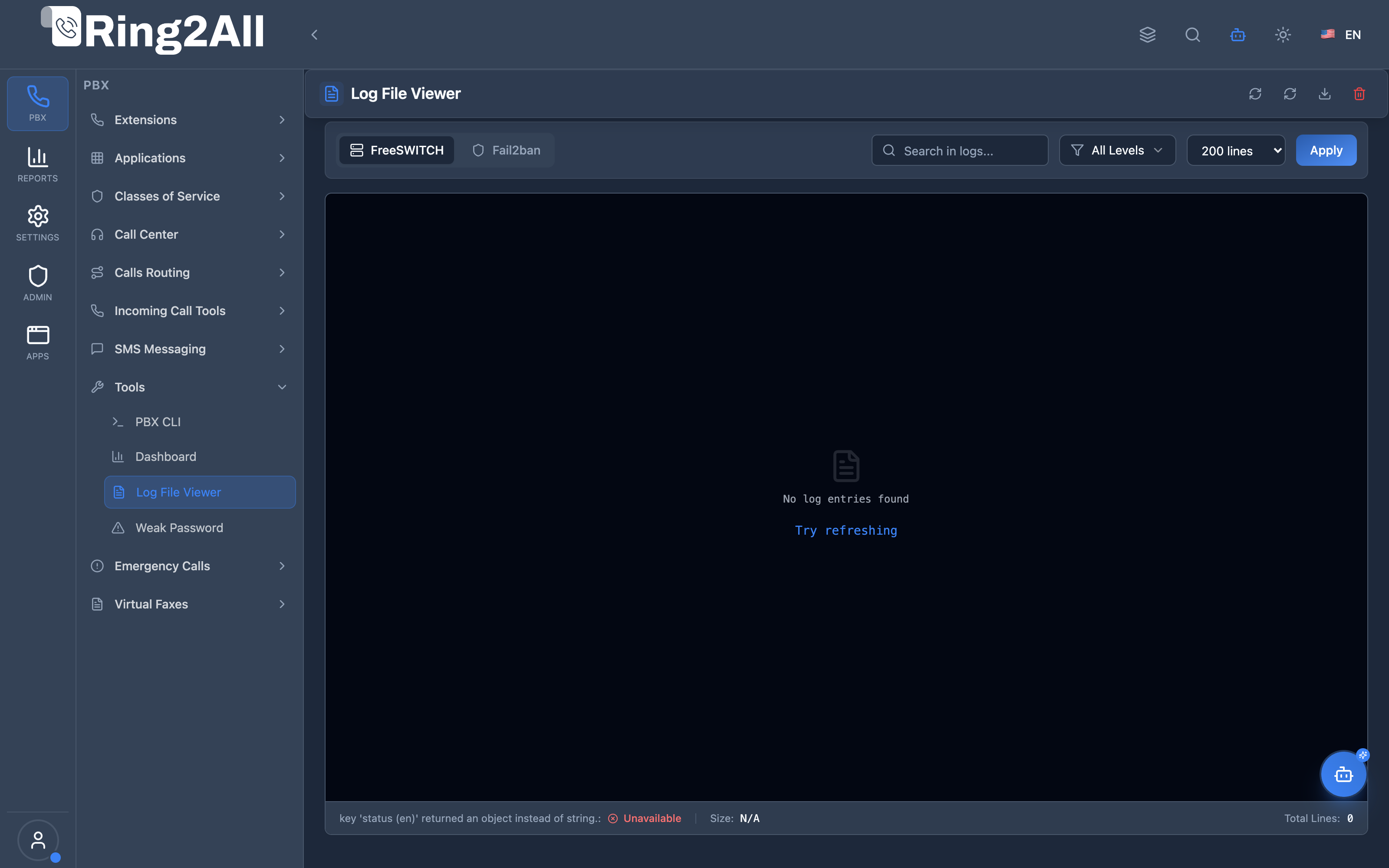
Section titled “Log File Viewer Interface”Web-based log stream reader featuring multi-log source selection (Telephony Server / Fail2ban), severity level filter badges, keyword search, line count limit selector, log download button, and clear log tool.
1. Module Overview (Technical)
Section titled “1. Module Overview (Technical)”What is the Log File Viewer?
Section titled “What is the Log File Viewer?”The Log File Viewer is a real-time, browser-native diagnostic tool that allows authorized system administrators to inspect, search, and download low-level daemon log files directly from the host operating system without opening an SSH terminal session.
Technical Architecture
Section titled “Technical Architecture”- Log Streaming Backend: The Fastify API endpoint (
GET /api/telephony/log-viewer/entries) accesses local system log files using buffered reverse-seeking file streams (reading the most recent lines from EOF backwards). - Log Parsing Engine: Each raw log line is parsed through regular expressions to extract timestamps, log levels (
DEBUG,INFO,NOTICE,WARNING,ERR,CRIT), thread IDs, source filenames, and message payloads. - Log Source Isolation: File access is strictly locked to an approved whitelist of server log paths (
/var/log/freeswitch/freeswitch.logand/var/log/fail2ban.log), completely eliminating Path Traversal vulnerabilities (CWE-22). - Client Rendering: Renders formatted log entries with syntax-colored level badges, monospace font for technical readability, and instant client-side text filtering.
┌─────────────────────────────────────────────────────────────────┐│ Log File Viewer Architecture │├─────────────────────────────────────────────────────────────────┤│ ││ Browser UI (LogViewerPage.tsx) ││ ┌──────────────────────────────────────────────────────────┐ ││ │ Filter Bar: [Telephony Server / Fail2ban] [Level: ERR] [Search]│ ││ │ Table: [Timestamp] [Level] [Source / Message Text] │ ││ └──────────────────────────────────────────────────────────┘ ││ ▲ ││ │ REST API / JSON ││ ▼ ││ Fastify Log Service (/api/telephony/log-viewer) ││ ┌──────────────────────────────────────────────────────────┐ ││ │ Buffered Reverse Reader (Tail N lines) │ ││ │ Whitelist Path Validation & RegEx Parser │ ││ └─────────────────────────────┬────────────────────────────┘ ││ │ Local OS Filesystem ││ ▼ ││ Host Log Files: ││ ├─ /var/log/freeswitch/freeswitch.log ││ └─ /var/log/fail2ban.log │└─────────────────────────────────────────────────────────────────┘2. Module Overview (Commercial / Business)
Section titled “2. Module Overview (Commercial / Business)”Business Value & Accelerated Support
Section titled “Business Value & Accelerated Support”- Rapid Time-to-Resolution (MTTR): Support engineers can diagnose SIP registration failures, codec negotiation mismatches, and call routing errors within seconds rather than opening support tickets for server shell access.
- Auditing & Compliance: Eliminates the security risk of sharing root SSH credentials among Tier-1 and Tier-2 support technicians.
- Security Awareness: Instant visibility into Fail2ban jail blocks reveals brute-force SIP attacks, helping teams proactively safeguard customer infrastructure.
3. Module Overview (End User / Administrator)
Section titled “3. Module Overview (End User / Administrator)”Administrator Experience
Section titled “Administrator Experience”- Select between Telephony Core and Fail2ban Security logs.
- Choose how many lines to fetch (100, 250, 500, or 1000 lines).
- Filter out verbose
DEBUGnoise to focus exclusively onWARNINGandERRevents. - Download complete unparsed log files with a single click for vendor escalation.
4. Supported Log Types & File Locations
Section titled “4. Supported Log Types & File Locations”| Log Source | Default Server Path | Description | Typical Use Case |
|---|---|---|---|
| Telephony Core | /var/log/freeswitch/freeswitch.log |
Core telephony engine, Sofia SIP signaling, media bridging, dialplan execution. | Investigating call drops, media errors, IVR issues, SIP gateway timeouts. |
| Fail2ban Security | /var/log/fail2ban.log |
Intrusion prevention daemon, IP ban and unban events across SIP and SSH jails. | Identifying malicious brute-force IP addresses and unbanning legitimate clients. |
5. Log Levels & Severity Filtering
Section titled “5. Log Levels & Severity Filtering”Entries are categorized and color-coded based on Telephony Server log levels:
| Level | Badge Style | Severity | Explanation |
|---|---|---|---|
| DEBUG | Gray | Low | High-frequency trace messages, variable evaluations, and internal state changes. |
| INFO | Blue | Normal | Routine events such as call setup, hangup, registration, and profile rescans. |
| NOTICE | Cyan | Normal | Important non-error milestones (e.g., XML reload completion). |
| WARNING | Yellow | Medium | Minor protocol anomalies, non-critical timeouts, or fallback route triggers. |
| ERR / ERROR | Red | High | Call failure, media stream failure, database query errors, or SIP 4xx/5xx responses. |
| CRIT | Dark Red | Critical | Subsystem crash or unrecoverable driver failure requiring immediate attention. |
6. Viewer Controls, Search & Actions
Section titled “6. Viewer Controls, Search & Actions”- Log Selector Tabs: Toggle effortlessly between Telephony Server and Fail2ban without losing page context.
- Level Filter: Dropdown menu allowing filtering by a specific severity (e.g., show only
ERRandWARNING). - Keyword Search: Type any string (e.g. extension number
2000, phone number+17863643150, or SIP call ID) to filter matching entries in real time. - Download Log: Downloads the active log file directly to your desktop for offline analysis.
- Clear Log: Truncates the active log file on disk after confirmation, helpful when clearing old noise prior to reproducing an issue.
- Auto-Refresh: Automatically re-fetches recent log entries at configurable intervals (5s, 10s, 30s).
7. Common Scenarios & Troubleshooting Workflows
Section titled “7. Common Scenarios & Troubleshooting Workflows”Scenario 1: Troubleshooting Failed Outbound Calls
Section titled “Scenario 1: Troubleshooting Failed Outbound Calls”- Open PBX Tools → Log File Viewer.
- Select Telephony Server log.
- In the search box, enter the destination number (e.g.,
18005550190). - Set the Level filter to WARNING or ERR.
- Inspect the SIP response code returned by the gateway (e.g.,
SIP/2.0 503 Service Unavailableor486 Busy Here).
Scenario 2: Verifying a Blocked Remote Worker IP
Section titled “Scenario 2: Verifying a Blocked Remote Worker IP”- Select Fail2ban log.
- Search for the remote worker’s public IP address.
- Check for lines reading
[freeswitch-ip] Ban <IP-Address>. - Proceed to the Firewall module to whitelist or unban the IP address.
8. Limitations & Best Practices
Section titled “8. Limitations & Best Practices”- Log File Rotation: Server log files are automatically rotated by
logrotatedaily. Historical logs from previous days reside in compressed files (.log.1,.log.2.gz) on the server. - Buffer Limit: The viewer displays up to the last 1,000 lines to preserve browser DOM rendering performance and memory efficiency.
- Truncate Caution: The Clear Log button permanently truncates the log file on disk. Ensure critical troubleshooting data has been downloaded first.
9. Model Context Protocol (MCP) AI Integration
Section titled “9. Model Context Protocol (MCP) AI Integration”The Ring2All Platform Copilot connects to system log streams via the Model Context Protocol (MCP), enabling rapid conversational log analysis, automated failure root-cause detection, and security audit log inspection.
Exposed MCP Tools
Section titled “Exposed MCP Tools”| Tool Name | Operation | Primary Parameters | Description |
|---|---|---|---|
view_telephony_logs |
Real-Time Telephony Log Stream | lines (number), level (string), search (string) |
Retrieves recent lines from the Telephony Server telephony log, with optional severity level (DEBUG, INFO, NOTICE, WARNING, ERR, CRIT) and text filtering. |
query_audit_logs |
Administrative Audit Logs | action (string), resource (string), search (string), limit (number) |
Searches administrative actions (logins, extension updates, dialplan changes, trunk additions) with timestamps and originating IP. |
execute_fs_cli_command |
Live Trace Execution | command (string) |
Runs diagnostic commands like sofia loglevel all 9 or show channels to generate targeted log output. |
AI Safety Safeguards & Privacy Rules
Section titled “AI Safety Safeguards & Privacy Rules”- PII & Credential Masking: Password hashes, SIP authentication nonces, and SIP digest passwords are redacted before log lines are sent to the AI Copilot.
- Buffer Bound: Returns a maximum of 200 lines per call to maintain sub-second response times.
- Read-Only Scope: The MCP log tools cannot truncate or alter log files on disk (the destructive “Clear Log” operation is restricted to authenticated Web UI users).
Example MCP Payloads
Section titled “Example MCP Payloads”1. Inspecting Recent Telephony Engine Errors (view_telephony_logs)
Section titled “1. Inspecting Recent Telephony Engine Errors (view_telephony_logs)”{ "lines": 25, "level": "ERR", "search": "gateway"}Response:
{ "success": true, "data": { "totalReturned": 1, "filter": { "level": "ERR", "search": "gateway" }, "logs": [ "[ERR] mod_sofia.c:5984 Gateway 'gw_telnyx' authentication failed (SIP/2.0 403 Forbidden)" ] }}2. Querying Administrative Change Logs (query_audit_logs)
Section titled “2. Querying Administrative Change Logs (query_audit_logs)”{ "resource": "sip_extensions", "action": "UPDATE", "limit": 5}Copilot Natural Language Prompts
Section titled “Copilot Natural Language Prompts”- “Check the telephony logs for any error messages during the last 10 minutes.”
- “Search the logs for SIP gateway errors related to gw_telnyx.”
- “Why did call to 18005550199 fail? Search the Telephony Server log for that number.”
- “Show me who modified extension 1004 in the audit logs.”
10. Troubleshooting Tips
Section titled “10. Troubleshooting Tips”| Symptom | Probable Cause | Corrective Action |
|---|---|---|
| Viewer displays “Log file not found” | File path does not exist on server | Verify Telephony Server logging path in switch.conf.xml. |
| Permission Denied error | Web API user cannot read log file | Ensure /var/log/freeswitch/ has read permissions (644) for user softswitch. |
| No new entries appear | Logging verbosity set too low | Increase Sofia SIP or Telephony Server loglevel in PBX CLI via fsctl loglevel 6. |
11. Glossary
Section titled “11. Glossary”- Fail2ban: Automated daemon that scans log files and blocks IP addresses exhibiting suspicious behavior.
- Logrotate: System utility designed to rotate, compress, and archive system log files.
- EOF: End of File.
- Sofia SIP Trace: Verbose logging of raw SIP packet headers transmitted and received over the wire.