

Server Settings Module Documentation
Table of Contents
Section titled “Table of Contents”- Navigation & Access
- Screenshots & Visual Interface
- Module Overview (Technical)
- Module Overview (Commercial/Business)
- Module Overview (End User/Administrator)
- User Roles & Key Capabilities
- Server Settings Fields Reference
- Common Scenarios & Examples
- Limitations & Important Notes
- Model Context Protocol (MCP) AI Integration
- Troubleshooting Tips
- Glossary
Navigation & Access
Section titled “Navigation & Access”To access the Server Settings configuration module:
- Log in to the Ring2All Web Portal (
https://<domain-or-ip>/login). - In the left navigation sidebar, expand Settings.
- Under Provisioning, click Server Settings (
/settings/provisioning/provisioning-server-settings). - To add a new provisioning server profile, click the + Add button. To view or edit an existing server configuration, click the Edit action button (
/settings/provisioning/provisioning-server-settings/:id).
Screenshots & Visual Interface
Section titled “Screenshots & Visual Interface”Provisioning Server Profiles Overview
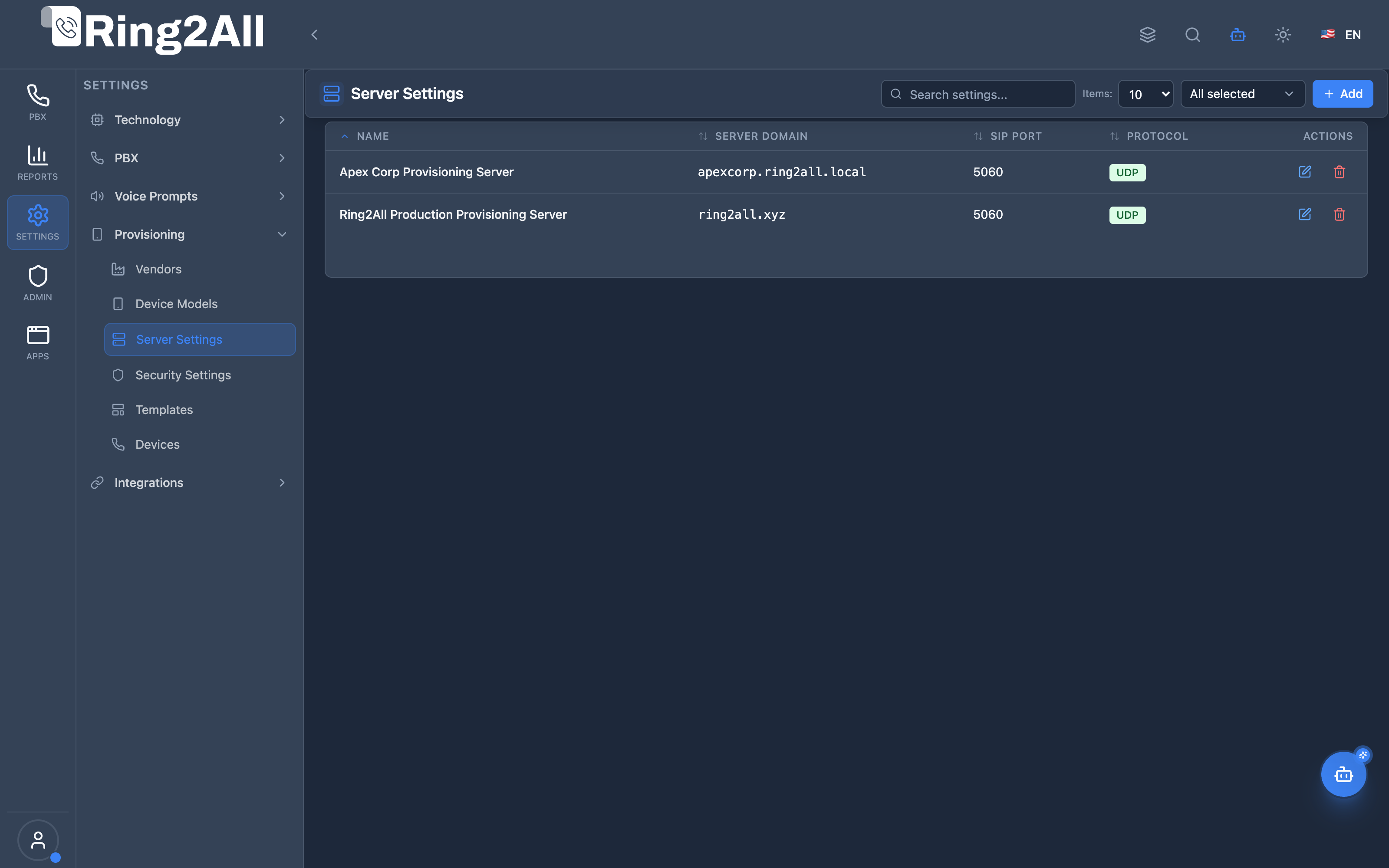
Section titled “Provisioning Server Profiles Overview”Global directory of provisioning endpoint servers, showing server profile names, domain FQDNs, primary SIP signaling ports, transport protocols (UDP/TCP/TLS), and management actions.
Provisioning Server Configuration & Proxy Mapping
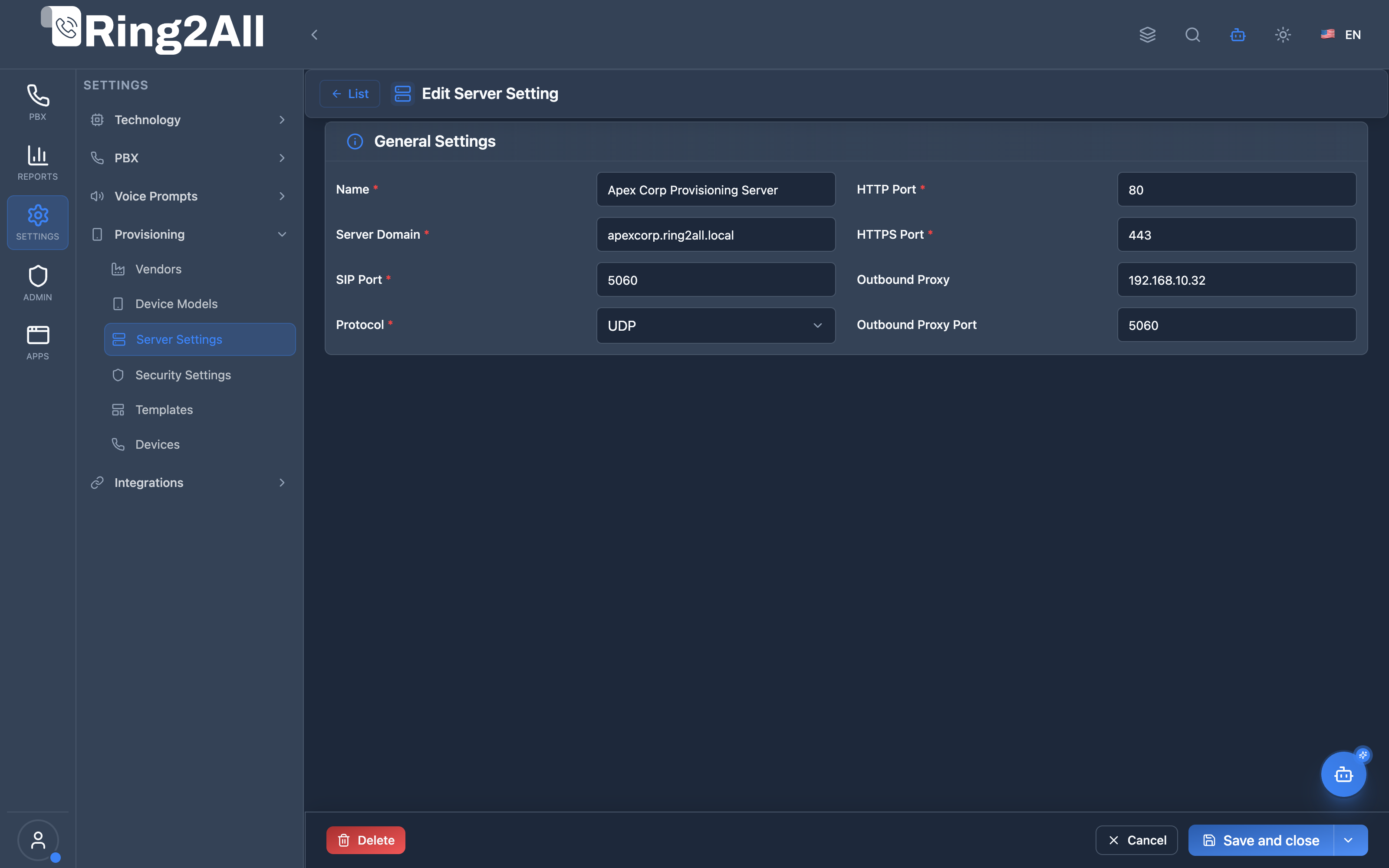
Section titled “Provisioning Server Configuration & Proxy Mapping”Granular configuration interface specifying the primary server domain name, SIP port, transport protocol, HTTP/HTTPS download ports, and upstream Session Border Controller (SBC) outbound proxy addresses.
1. Module Overview (Technical)
Section titled “1. Module Overview (Technical)”What Are Server Settings?
Section titled “What Are Server Settings?”Server Settings defines the core network endpoints, protocol parameters, and proxy routes delivered to IP phones during automatic provisioning. When an IP phone downloads its configuration file (e.g., via HTTP, HTTPS, TFTP, or PNP/Option 66), the template engine injects these server parameters to inform the device where to send SIP registrations and where to route outbound media and signaling.
Architecture
Section titled “Architecture”┌─────────────────────────────────────────────────────────────────────────┐│ Provisioning Server Architecture │├─────────────────────────────────────────────────────────────────────────┤│ ││ IP Phone / Endpoint ││ │ ││ │ 1. Boot / DHCP Option 66 Request ││ ▼ ││ ┌─────────────────────────────────────────────────────────────────┐ ││ │ HTTP / HTTPS Provisioning Service (Nginx / Fastify) │ ││ │ Endpoint: https://{serverDomain}:{httpsPort}/provision/ │ ││ └─────────────────────────────────────────────────────────────────┘ ││ │ ││ │ 2. Compiles Template + Server Settings Injection ││ ▼ ││ ┌─────────────────────────────────────────────────────────────────┐ ││ │ Injected Parameters: │ ││ │ - SIP Registrar / Proxy: {serverDomain}:{sipPort} │ ││ │ - Transport Protocol: UDP / TCP / TLS │ ││ │ - Outbound Proxy: {outboundProxy}:{outboundProxyPort} │ ││ │ - Provisioning Server URL: https://{serverDomain}:{httpsPort} │ ││ └─────────────────────────────────────────────────────────────────┘ ││ │ ││ │ 3. SIP REGISTER ││ ▼ ││ ┌─────────────────────────────────────────────────────────────────┐ ││ │ Session Border Controller (SBC / Kamailio) → Ring2All Telephony Server │ ││ └─────────────────────────────────────────────────────────────────┘ ││ │└─────────────────────────────────────────────────────────────────────────┘Database Schema
Section titled “Database Schema”Server settings are persisted in PostgreSQL table public.provision_server_settings:
| Column | Type | Description |
|---|---|---|
id |
INTEGER |
Primary key serial identifier |
uuid |
UUID |
Universally unique immutable identifier |
domain_id |
INTEGER |
Foreign key referencing public.domains(id) |
name |
TEXT |
Friendly display label for the provisioning profile |
server_domain |
TEXT |
FQDN or IP of the SIP registrar / PBX domain |
sip_port |
INTEGER |
Primary SIP signaling port (default: 5060, TLS: 5061) |
protocol |
TEXT |
Default transport protocol (UDP, TCP, TLS) |
http_port |
INTEGER |
HTTP provisioning port (default: 80) |
https_port |
INTEGER |
HTTPS secure provisioning port (default: 443) |
outbound_proxy |
TEXT |
Perimeter SBC or proxy IP address |
outbound_proxy_port |
INTEGER |
Perimeter SBC proxy port (default: 5060) |
created_at |
TIMESTAMPTZ |
Creation timestamp |
updated_at |
TIMESTAMPTZ |
Last modification timestamp |
2. Module Overview (Commercial/Business)
Section titled “2. Module Overview (Commercial/Business)”- Carrier & Multi-Tenant Segregation: Service providers can establish dedicated provisioning server profiles per tenant or brand, directing different client organizations to distinct FQDNs and dedicated SBC clusters.
- Seamless Perimeter Security: By separating the public registrar domain from internal PBX nodes using the Outbound Proxy configuration, enterprise communication is shielded behind Ring2All SBC security defenses.
- Automated Zero-Touch Provisioning (ZTP): Customers receive plug-and-play phones that self-configure on power-on without requiring manual technician visits or on-site IT deployment.
3. Module Overview (End User/Administrator)
Section titled “3. Module Overview (End User/Administrator)”System Administrators use this module to manage global and tenant-specific provisioning endpoints. When creating a phone template or assigning a physical IP terminal, selecting a Server Setting profile automatically binds all telephony endpoints to the appropriate network addresses, SIP ports, and encryption profiles.
🎯 User Roles & Key Capabilities
Section titled “🎯 User Roles & Key Capabilities”| Role | Key Capabilities & Permissions | Operational Scope |
|---|---|---|
| PBX Super Administrator | • Global provisioning endpoint governance and default SIP/TLS port baseline assignment • Perimeter Session Border Controller (Ring2All SBC) outbound proxy mapping • SSL/TLS certificate binding for secure HTTPS configuration distribution (port 443) • Multi-tenant server settings profile creation and domain delegation |
Platform-Wide |
| Tenant Administrator | • Domain-level provisioning server profile configuration and FQDN customization • Transport protocol selection (UDP, TCP, TLS) aligned with corporate security policies • Outbound proxy port and legacy HTTP port (80) auditing |
Domain Scope |
| VoIP Network Engineer | • Firewall port mapping validation (80, 443, 5060, 5061) across enterprise subnets • Media proxy route and NAT traversal testing through perimeter SBC addresses • SIP NOTIFY check-sync verification upon server endpoint migration |
Infrastructure / Domain |
| AI Copilot / MCP Agent | • Autonomous retrieval of active domain server settings (get_provisioning_server_settings)• Telephony network parameter verification prior to mass endpoint provisioning |
Autonomous Assistant |
4. Server Settings Fields Reference
Section titled “4. Server Settings Fields Reference”| Field | Label | Required | Description |
|---|---|---|---|
name |
Name | Yes | Descriptive title for the server configuration (e.g. Apex Corp Provisioning Server). |
server_domain |
Server Domain | Yes | Fully Qualified Domain Name (FQDN) or IP address of the SIP server (e.g. apexcorp.ring2all.local). |
sip_port |
SIP Port | Yes | SIP signaling port used for call registrations (typically 5060 for UDP/TCP, 5061 for TLS). |
protocol |
Protocol | Yes | Signaling transport protocol: UDP, TCP, or TLS (for SRTP encrypted communications). |
http_port |
HTTP Port | Yes | Plaintext HTTP port used by legacy devices for configuration retrieval (default: 80). |
https_port |
HTTPS Port | Yes | Secure TLS-encrypted port used for configuration download (default: 443). |
outbound_proxy |
Outbound Proxy | No | IP address or FQDN of the perimeter Session Border Controller (e.g. 192.168.10.32). |
outbound_proxy_port |
Outbound Proxy Port | No | Port used to reach the Outbound Proxy (default: 5060). |
5. Common Scenarios & Examples
Section titled “5. Common Scenarios & Examples”Scenario A: Standard Cloud PBX Deployment
Section titled “Scenario A: Standard Cloud PBX Deployment”- Name:
Cloud PBX Standard Server - Server Domain:
pbx.ring2all.com - SIP Port:
5060 - Protocol:
UDP - HTTP Port:
80 - HTTPS Port:
443 - Outbound Proxy: (None)
Scenario B: High-Security Enterprise with Perimeter SBC
Section titled “Scenario B: High-Security Enterprise with Perimeter SBC”- Name:
Enterprise SBC Cluster - Server Domain:
tenant1.voice.ring2all.com - SIP Port:
5061 - Protocol:
TLS - HTTP Port:
80 - HTTPS Port:
443 - Outbound Proxy:
sbc-primary.ring2all.com - Outbound Proxy Port:
5061
6. Limitations & Important Notes
Section titled “6. Limitations & Important Notes”[!IMPORTANT] When modifying the Server Domain or SIP Port, existing registered devices will not automatically migrate until they re-synchronize or reboot. Trigger a SIP NOTIFY
check-syncfrom the Devices list to force an immediate refresh.
[!NOTE] HTTPS provisioning requires that terminal devices have valid manufacturer root CA trust stores installed. For self-signed certificates, ensure device firmware allows certificate validation bypass or upload your private CA to the phone firmware.
Model Context Protocol (MCP) AI Integration
Section titled “Model Context Protocol (MCP) AI Integration”The Server Settings module provides Model Context Protocol (MCP) integration allowing AI Copilots, automated onboarding assistants, and network diagnostics bots to inspect provisioning server endpoints, SIP registrar FQDNs, transport protocols, and SBC outbound proxies.
Available MCP Telephony Tools
Section titled “Available MCP Telephony Tools”| Tool Name | Action Type | Access Level | Description |
|---|---|---|---|
get_provisioning_server_settings |
READ |
Read-Only |
Retrieves the active auto-provisioning server settings (SIP registrar, outbound proxy, HTTP/HTTPS ports, transport protocol) for the tenant domain. |
Tool Schemas & Input Parameters
Section titled “Tool Schemas & Input Parameters”get_provisioning_server_settings
Section titled “get_provisioning_server_settings”Inspects the active server provisioning profile applied to the current domain.
{ "name": "get_provisioning_server_settings", "description": "Retrieves the active auto-provisioning server settings (SIP registrar, outbound proxy, HTTP/HTTPS ports, transport protocol) for the PBX domain.", "parameters": { "type": "object", "properties": { "domain_id": { "type": "number", "description": "Optional domain ID (defaults to active tenant domain)" } }, "additionalProperties": false }}Natural Language Prompt Examples
Section titled “Natural Language Prompt Examples”English Prompts
Section titled “English Prompts”💬 “What are the current provisioning server settings for this domain?” 💬 “Show me the SIP registrar domain, port, and outbound proxy configured for auto-provisioning.” 💬 “Check whether HTTPS or HTTP provisioning is enabled and verify the transport protocol.”
Spanish Prompts (Español)
Section titled “Spanish Prompts (Español)”💬 “¿Cuáles son los parámetros actuales del servidor de aprovisionamiento para este dominio?” 💬 “Muestra el dominio registrar SIP, puerto y proxy de salida configurados para el auto-aprovisionamiento.” 💬 “Verifica si el aprovisionamiento está configurado con HTTPS o HTTP y el protocolo de transporte SIP.”
Enterprise Safeguards & Compliance
Section titled “Enterprise Safeguards & Compliance”- Domain Isolation: Server settings queries are strictly scoped to the authenticated tenant domain (
domain_id), preventing multi-tenant data leakage. - Role-Based Access Control: Calling
get_provisioning_server_settingsrequiresauxiliary_devicesMCP permission scope. - Zero Configuration Disruption: MCP inspection tools are read-only and cannot alter critical registrar FQDNs or signaling ports without explicit human admin action.
7. Troubleshooting Tips
Section titled “7. Troubleshooting Tips”- Device Fails to Download Configuration: Verify firewall policies allowing inbound traffic on
HTTP Port(80) orHTTPS Port(443) from device IP subnets. - Device Registers but No Audio: Confirm that
Outbound Proxyis correctly pointed to your Ring2All SBC or RTPEngine media relay node, resolving NAT traversal issues. - Registration Timeout (SIP 408): Check that the
Protocolmatches what is allowed in the Telephony Server SIP Profile (UDP vs TCP vs TLS) and that SIP port 5060/5061 is open on the network gateway.
8. Glossary
Section titled “8. Glossary”- DHCP Option 66: Network DHCP parameter informing VoIP hardware of the boot/provisioning server TFTP or HTTP URL.
- Outbound Proxy: An intermediary SIP server (usually an SBC) through which all client SIP requests are forced before hitting the core registrar.
- FQDN: Fully Qualified Domain Name (e.g.,
pbx.company.com), providing DNS flexibility over static IP addresses. - TLS (Transport Layer Security): Cryptographic protocol providing communication security and encryption for SIP signaling.