

Push Notifications Module Documentation
Table of Contents
Section titled “Table of Contents”- Navigation & Access
- Screenshots & Visual Interface
- Module Overview (Technical)
- Module Overview (Commercial/Business)
- Module Overview (End User/Administrator)
- User Roles & Key Capabilities
- Configuration Fields Reference
- Architecture & Push Wake-Up Flow
- Common Scenarios & Examples
- Limitations & Important Notes
- Troubleshooting Tips
- Glossary
- Model Context Protocol (MCP) AI Integration
Navigation & Access
Section titled “Navigation & Access”To access the Push Notifications configuration module:
- Log in to the Ring2All Web Portal (
https://<domain-or-ip>/login). - In the left navigation sidebar, expand Settings.
- Under Technology (or System), click Push Notifications (
/settings/system/push-notifications). - To register a new push notification provider gateway, click + Add Provider (
/settings/system/push-notifications/new). To edit or review an existing provider gateway (e.g. APNs or FCM), click on the provider card or row (/settings/system/push-notifications/:id).
Screenshots & Visual Interface
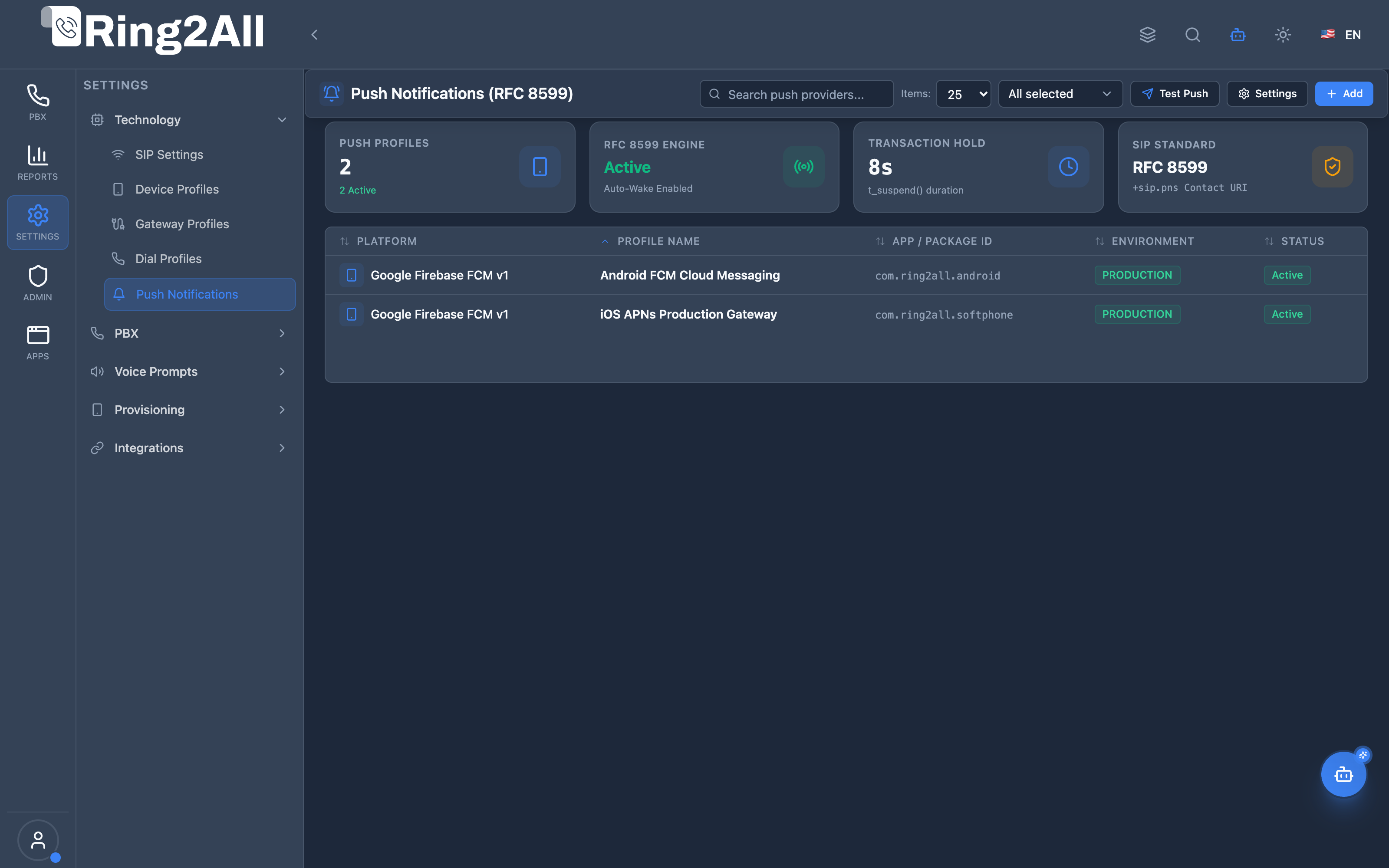
Section titled “Screenshots & Visual Interface”Push Notifications Provider Directory
Section titled “Push Notifications Provider Directory”Centralized inventory of mobile push notification gateways (Apple APNs and Google FCM), showing provider names, target platforms, active status, environment (Production vs Sandbox), and credentials health.
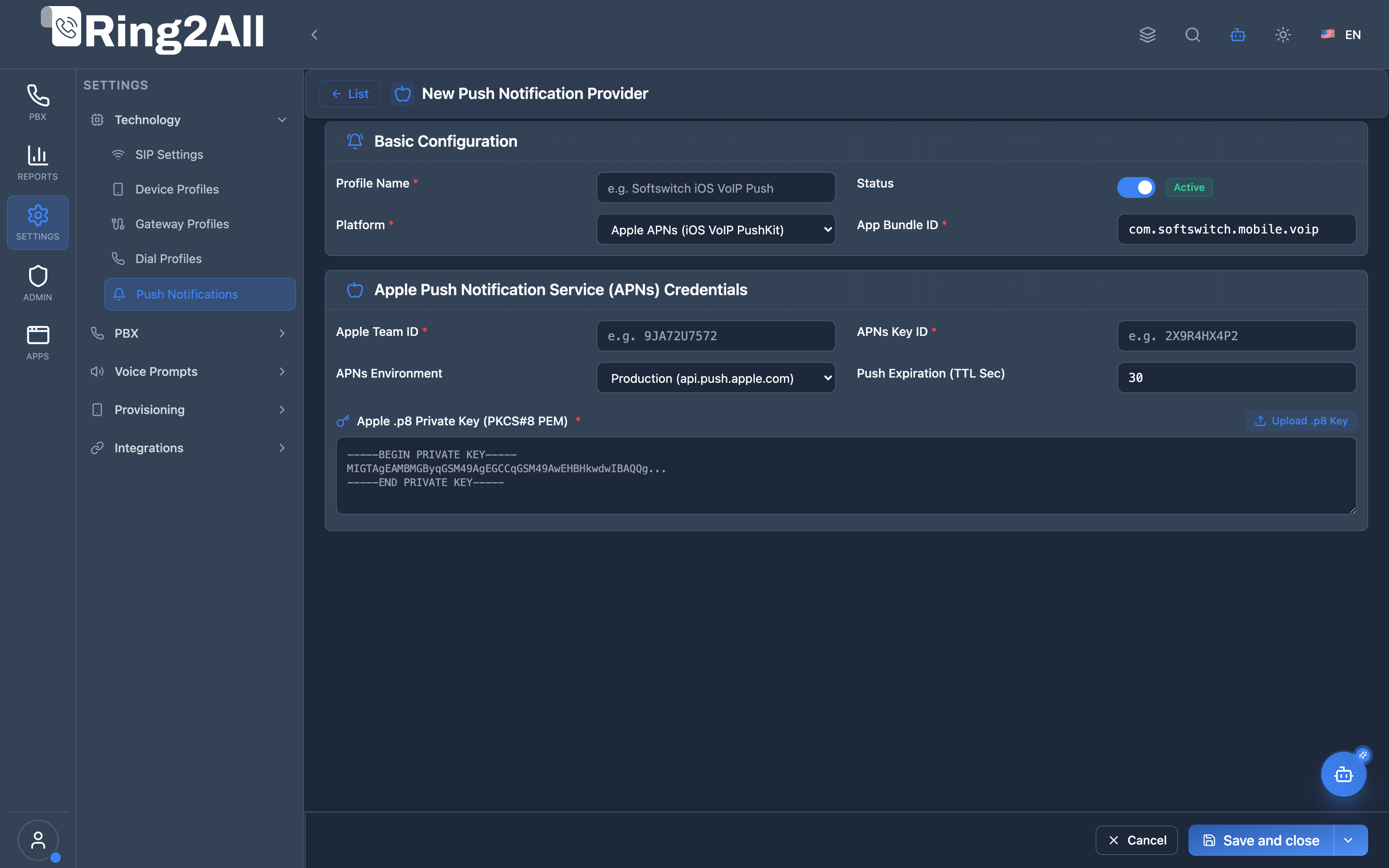
Push Notification Provider Configuration Form
Section titled “Push Notification Provider Configuration Form”Administrative setup form for configuring Apple APNs (Auth Key .p8, Key ID, Team ID, Bundle ID/Topic) and Google Firebase Cloud Messaging (Service Account Key, Project ID, Client Email), including custom VoIP payload options and wake-up timeout parameters.
1. Module Overview (Technical)
Section titled “1. Module Overview (Technical)”What Are Push Notifications in Ring2All?
Section titled “What Are Push Notifications in Ring2All?”The Push Notifications Module manages mobile wake-up gateways for iOS and Android softphones. Modern mobile operating systems (iOS CallKit and Android Background Execution Limits) suspend SIP background connections to preserve battery life and memory.
When an incoming call is routed to an extension associated with a mobile device:
- Telephony Server detects that the SIP endpoint is suspended or requires a wake-up push.
- The PBX triggers an out-of-band push notification via Apple APNs (VoIP push) or Google FCM (High-Priority Data Message).
- The mobile operating system wakes up the application in the background.
- The mobile app immediately re-registers with Telephony Server/Kamailio and receives the inbound SIP
INVITE, displaying the native call screen.
Architecture
Section titled “Architecture”┌─────────────────────────────────────────────────────────────────┐│ Mobile Push Notification Architecture │├─────────────────────────────────────────────────────────────────┤│ ││ Inbound Call (SIP INVITE) ││ │ ││ ▼ ││ ┌──────────────────────────────────────────────────────────┐ ││ │ Telephony Server Call Router │ ││ │ - Checks extension registration status │ ││ │ - Device is suspended/asleep with push token registered │ ││ └──────────────────────────────────────────────────────────┘ ││ │ ││ ▼ HTTP/2 REST API Call ││ ┌──────────────────────────────────────────────────────────┐ ││ │ Ring2All Push Notification Service │ ││ │ - Reads provider credentials (APNs / FCM) │ ││ │ - Formats CallKit VoIP payload (UUID, CID, expiration) │ ││ └──────────────────────────────────────────────────────────┘ ││ │ ││ ├────────────────────────────┬────────────────────────────┤│ ▼ ▼ ││ ┌─────────────────────────┐ ┌─────────────────────────┐ ││ │ Apple APNs Server │ │ Google FCM Server │ ││ │ (VoIP Background Push) │ │ (Data Message Priority)│ ││ └─────────────────────────┘ └─────────────────────────┘ ││ │ │ ││ ▼ ▼ ││ ┌─────────────────────────┐ ┌─────────────────────────┐ ││ │ iOS Mobile Device │ │ Android Mobile Device │ ││ │ - iOS CallKit awakens │ │ - Telecom Manager wakes│ ││ │ - Registers SIP via TLS│ │ - Registers SIP via TLS│ ││ └─────────────────────────┘ └─────────────────────────┘ ││ │ │ ││ ▼ ▼ ││ ┌──────────────────────────────────────────────────────────┐ ││ │ Call Established (RTP Audio Flowing) │ ││ └──────────────────────────────────────────────────────────┘ ││ │└─────────────────────────────────────────────────────────────────┘Key Database Tables
Section titled “Key Database Tables”| Table | Purpose |
|---|---|
ss_telephony.push_notification_providers |
Configured APNs and FCM gateways, API keys, tokens, and environments |
ss_telephony.push_notification_tokens |
Registered device tokens linked to extensions and mobile apps |
ss_telephony.push_notification_logs |
Audit trail of sent push notifications, delivery latencies, and HTTP response codes |
2. Module Overview (Commercial/Business)
Section titled “2. Module Overview (Commercial/Business)”Business Value
Section titled “Business Value”- 100% Reliable Mobile Reachability: Ensures mobile workforce users never miss customer calls, even when their smartphones are locked, pocketed, or on low-power mode.
- Battery & Resource Efficiency: Softphones do not need to maintain an active 24/7 TCP/UDP keep-alive socket, reducing smartphone battery drain by up to 80%.
- Native OS Integration: Integrates seamlessly with iOS CallKit and Android Telecom Framework, providing full-screen native ringing, Bluetooth headset answering, and lock-screen call controls.
- Cost Reduction: Replaces expensive cellular forwarding minutes with zero-cost VoIP push wake-ups over Wi-Fi and LTE/5G.
3. Module Overview (End User/Administrator)
Section titled “3. Module Overview (End User/Administrator)”Administrator Experience
Section titled “Administrator Experience”Administrators configure push gateways once:
- Download Apple APNs Auth Key (
.p8) from the Apple Developer Console or Firebase Service Account JSON from Google Cloud. - Enter Key ID, Team ID, and App Bundle Identifier in the Ring2All Web Portal.
- Test provider connectivity using the built-in diagnostic test button.
- Once active, all extensions using compatible mobile apps (Ring2All Communicator, Linphone, Groundwire, Acrobits) receive instant wake-up signals automatically.
🎯 User Roles & Key Capabilities
Section titled “🎯 User Roles & Key Capabilities”| Role | Permissions | Key Capabilities |
|---|---|---|
| Super Administrator | Full Access (read, write, delete, test) |
Register Apple APNs .p8 keys and Google FCM v1 service accounts, configure TLS HTTP/2 parameters, and execute live push delivery tests. |
| PBX Administrator | Domain Configuration (read, write) |
Enable/disable push notifications per tenant, adjust mobile wake-up ring timeouts (e.g. 8s), and set caller info display in push payloads. |
| Support Specialist | Diagnostic Access (read, test) |
Review push delivery success/failure logs, verify token registration health, and diagnose wake-up latency. |
| End User / Extension Owner | Operational (mobile app) |
Register mobile softphone device tokens automatically upon QR code scanning or extension login. |
4. Configuration Fields Reference
Section titled “4. Configuration Fields Reference”General Settings
Section titled “General Settings”| Field | Type | Description | Default |
|---|---|---|---|
Name |
Text | Descriptive identifier for the provider (e.g., iOS Production APNs) |
Required |
Provider Type |
Select | Target notification infrastructure: APNs (Apple) or FCM (Google Firebase) |
APNs |
Status |
Toggle | Enables or disables push dispatching through this gateway | Active |
Environment |
Select | Gateway endpoint environment: Production or Development / Sandbox |
Production |
Description |
Text | Internal administrative notes regarding app version or tenant deployment | Optional |
Apple APNs Configuration
Section titled “Apple APNs Configuration”| Field | Type | Description | Example |
|---|---|---|---|
Bundle ID / Topic |
Text | iOS App Bundle Identifier (must match app Info.plist) | com.ring2all.communicator.voip |
Team ID |
Text | 10-character Apple Developer Team ID | ABC1234XYZ |
Key ID |
Text | 10-character Key ID for the APNs Auth Key | DEF5678UVW |
Private Key (.p8) |
File / Text | Cryptographic Auth Key in PKCS#8 PEM format | -----BEGIN PRIVATE KEY-----... |
Push Type |
Select | Notification priority: voip (CallKit high-priority) or alert |
voip |
Google FCM (Firebase Cloud Messaging) Configuration
Section titled “Google FCM (Firebase Cloud Messaging) Configuration”| Field | Type | Description | Example |
|---|---|---|---|
Project ID |
Text | Google Cloud / Firebase Project ID | ring2all-voip-prod |
Client Email |
Text | Service Account client email address | firebase-adminsdk@ring2all.iam.gserviceaccount.com |
Private Key JSON |
File / Text | Firebase Admin SDK service account credentials JSON | { "type": "service_account", ... } |
Priority |
Select | Delivery urgency: high (immediate wake-up) or normal |
high |
Timeout & Retry Controls
Section titled “Timeout & Retry Controls”| Field | Type | Description | Default |
|---|---|---|---|
Wake-up Ring Delay |
Integer | Seconds Telephony Server pauses before bridging to allow device SIP registration | 3 seconds |
Max Retries |
Integer | Number of delivery re-attempts if the cloud gateway returns 500/503 | 2 |
TTL (Time To Live) |
Integer | Expiration duration in seconds for undelivered notifications | 60 seconds |
5. Architecture & Push Wake-Up Flow
Section titled “5. Architecture & Push Wake-Up Flow”Mobile Device Ring2All PBX Apple/Google Gateway │ │ │ │ 1. App Register Token │ │ ├────────────────────────────►│ │ │ │ │ │ (App goes to sleep / locked)│ │ │ │ │ │ │ 2. Inbound SIP INVITE arrives │ │ │ │ │ │ 3. Send HTTP/2 Push POST │ │ ├────────────────────────────────►│ │ │ │ │ 4. Native VoIP Wake-up │ │ │◄──────────────────────────────────────────────────────────────┤ │ │ │ │ 5. App wakes, sends SIP REG │ │ ├────────────────────────────►│ │ │ │ │ │ 6. PBX delivers SIP INVITE │ │ │◄────────────────────────────┤ │ │ │ │ │ 7. Native CallKit Rings │ │6. Common Scenarios & Examples
Section titled “6. Common Scenarios & Examples”Scenario 1: Enterprise iOS Softphone Fleet
Section titled “Scenario 1: Enterprise iOS Softphone Fleet”- Platform: Apple iOS 16/17/18.
- Requirement: Zero missed calls when iPhone is in Low Power Mode or Focus Mode.
- Solution: Configure APNs with
Push Type = voipand.p8token auth. Telephony Server holds the incoming call withpush_wake_delay=3000mswhile APNs delivers the VoIP push, initiating CallKit.
Scenario 2: Dual-Platform Hybrid Deployment
Section titled “Scenario 2: Dual-Platform Hybrid Deployment”- Platform: Heterogeneous corporate fleet (iPhones + Android Galaxy/Pixel).
- Solution: Create two provider profiles:
Apple APNs Productionwith bundle IDcom.ring2all.mobile.voip.Google FCM Productionwith service account JSON andpriority=high. The PBX automatically routes wake-ups based on the device platform tag stored during extension registration.
7. Limitations & Important Notes
Section titled “7. Limitations & Important Notes”[!IMPORTANT] Apple APNs requires HTTP/2 with TLS 1.2 or higher. The server running Ring2All must have outbound network access on TCP port
443toapi.push.apple.comandfcm.googleapis.com.
[!WARNING] On iOS 13 and newer, any incoming VoIP push notification that does not immediately report a call to CallKit via
reportNewIncomingCallwill be terminated by iOS, and Apple may revoke the application’s VoIP push entitlement. Ensure your mobile client complies with CallKit requirements.
8. Troubleshooting Tips
Section titled “8. Troubleshooting Tips”Issue: Push Notification Not Received on iPhone
Section titled “Issue: Push Notification Not Received on iPhone”- Check Provider Status: Verify the APNs provider card indicates
Activeand the environment matches (Productionfor App Store / TestFlight builds,Sandboxfor Xcode debug builds). - Examine APNs Response: Check
ss_telephony.push_notification_logs. A400 BadDeviceTokenindicates the device uninstalled the app or generated a new token. A403 InvalidProviderTokenindicates incorrect Key ID or Team ID. - Verify Outbound Port: Ensure firewall allows TCP port
443toapi.push.apple.com.
Issue: Call Drops Before Phone Starts Ringing
Section titled “Issue: Call Drops Before Phone Starts Ringing”- Root Cause: The caller hung up or the PBX ring timeout expired before the mobile device finished waking up and registering.
- Resolution: Increase the
Wake-up Ring Delayfrom 2s to 4s in Dial Profile / Inbound Route to give the cellular network sufficient latency margin.
9. Glossary
Section titled “9. Glossary”- APNs: Apple Push Notification service. Apple’s cloud messaging service for iOS, iPadOS, and macOS.
- CallKit: iOS framework that provides the native system in-call user interface.
- FCM: Firebase Cloud Messaging. Google’s multi-platform messaging solution for Android and web.
- VoIP Push: High-priority push message specifically reserved for incoming real-time audio/video calls that wakes an app immediately even when killed.
- Token: A unique cryptographic string generated by iOS/Android uniquely identifying an app installation on a physical device.
Model Context Protocol (MCP) AI Integration
Section titled “Model Context Protocol (MCP) AI Integration”The Ring2All PBX platform integrates deep AI assistance via the Model Context Protocol (MCP). The Push Notifications module provides tools allowing the PBX AI Copilot to query mobile gateway statuses, verify APNs/FCM credentials health, and diagnose wake-up timing for remote softphone fleets.
Available MCP Tools
Section titled “Available MCP Tools”| Tool Name | Operation Type | RBAC Risk Level | Description |
|---|---|---|---|
get_push_notification_config |
Read / Diagnostic | low |
Retrieves mobile push notification engine settings (Apple APNs & Google FCM v1) and lists registered providers for waking backgrounded softphones (RFC 8599). |
Tool Input Schemas & Parameters
Section titled “Tool Input Schemas & Parameters”1. get_push_notification_config
Section titled “1. get_push_notification_config”{ "name": "get_push_notification_config", "description": "Get mobile push notification engine settings (Apple APNs & Google FCM v1) for waking up backgrounded softphones (RFC 8599).", "inputSchema": { "type": "object", "properties": {} }}Natural Language Prompts
Section titled “Natural Language Prompts”| User Request | Invoked MCP Tool | Expected AI Response |
|---|---|---|
| “Is Apple APNs push notifications enabled on our system?” | get_push_notification_config |
Returns push settings, enabled status, wake-up ring delay, and active APNs provider details. |
| “Check our Google FCM mobile push gateway status.” | get_push_notification_config |
Lists registered providers, verifying that Google FCM v1 is active with valid service account credentials. |
| “Why are remote iPhone extensions not waking up on incoming calls?” | get_push_notification_config |
Analyzes push timeout settings, checks if APNs provider is in Production vs Sandbox mode, and verifies token status. |
Multi-Tenant & Security Safeguards
Section titled “Multi-Tenant & Security Safeguards”- Strict Tenant Partitioning: Push gateway credentials and settings are segregated by
tenant_id, guaranteeing multi-tenant cryptographic isolation. - Private Key Masking: Private keys (Apple
.p8keys and Google private keys) are never exposed via MCP or API responses; only credential presence (has_auth_key: true) is reported. - RFC 8599 Conformance: In-band SIP push parameters (
pn-provider,pn-prid,pn-param) are verified for standards compliance. - Audit Logging: All provider credential updates and test dispatches are recorded in the central audit trail.