

Pickup Groups Module Documentation
Table of Contents
Section titled “Table of Contents”- Module Overview (Technical)
- Module Overview (Commercial/Business)
- Module Overview (End User/Administrator)
- Configuration Fields Reference
- Call Flow / Logic Explanation
- Common Scenarios & Examples
- Model Context Protocol (MCP) AI Integration
- Limitations & Important Notes
- Troubleshooting Tips
- Glossary
1. Module Overview (Technical)
Section titled “1. Module Overview (Technical)”What Are Pickup Groups?
Section titled “What Are Pickup Groups?”Pickup Groups allow extensions to intercept (pick up) calls ringing at other extensions in the same group. When a call rings at extension 1001, extension 1002 can dial a pickup code to answer it.
Architecture
Section titled “Architecture”┌─────────────────────────────────────────────────────────────────┐│ Pickup Group System │├─────────────────────────────────────────────────────────────────┤│ ││ Incoming call rings at Extension 1001 ││ │ ││ ▼ ││ ┌──────────────────────────────────────────────────────────┐ ││ │ 1001 is ringing... │ ││ │ (part of "Sales" pickup group) │ ││ └──────────────────────────────────────────────────────────┘ ││ ││ Extension 1002 (also in "Sales" group) dials *8 ││ │ ││ ▼ ││ ┌──────────────────────────────────────────────────────────┐ ││ │ Pickup Logic │ ││ │ │ ││ │ 1. Find pickup groups where 1002 has allowPickup=true │ ││ │ 2. Check if any member in those groups is ringing │ ││ │ 3. Found: 1001 is ringing │ ││ │ 4. Check skipBusy, DND override, etc. │ ││ │ 5. Intercept call → Bridge to 1002 │ ││ │ │ ││ └──────────────────────────────────────────────────────────┘ ││ │ ││ ▼ ││ 1002 is now connected to the caller ││ │└─────────────────────────────────────────────────────────────────┘Member Permissions
Section titled “Member Permissions”| Permission | Description |
|---|---|
| isMember | Extension belongs to the group (calls can be picked up FROM this extension) |
| allowPickup | Extension can pick up calls FROM other group members |
🎯 User Roles & Key Capabilities
Section titled “🎯 User Roles & Key Capabilities”| User Role | Key Capabilities & Permissions |
|---|---|
| PBX Super Admin | Full access across all tenant domains to create pickup groups, assign priorities, configure tone settings, and audit member associations. |
| Domain Administrator | Create and manage department-level pickup groups (e.g. Sales, Support, Finance), defining which extensions can intercept calls (allowPickup) and which can be intercepted (isMember). |
| Team Supervisor | Monitor pickup group activity and ensure adequate team coverage so that unanswered ringing extensions are quickly handled. |
| Standard Extension User | Dial feature code *08 (group pickup) or *07<ext> (directed pickup) to intercept an incoming ringing call on a colleague’s phone without leaving their desk. |
2. Module Overview (Commercial/Business)
Section titled “2. Module Overview (Commercial/Business)”Business Value
Section titled “Business Value”Pickup Groups enable collaborative call handling:
| Without Pickup Groups | With Pickup Groups |
|---|---|
| Missed calls when away from desk | Coworker can answer |
| Need to forward to coworker | Simply pick up ringing call |
| Caller waits or hangs up | Faster response time |
Use Cases
Section titled “Use Cases”-
Team Coverage
- Sales team can pick up each other’s calls
- Support team covers during breaks
-
Reception Backup
- Any front desk staff can answer reception
-
Department Isolation
- Sales can only pick up Sales calls
- Support can only pick up Support calls
-
Manager Assistance
- Executive assistant can pick up boss’s calls
Feature Highlights
Section titled “Feature Highlights”| Feature | Benefit |
|---|---|
| Skip Busy | Don’t interrupt ongoing calls |
| DND Override | Pick up even if target is in DND |
| Pickup Tone | Audio confirmation of pickup |
| Confirmation | Require DTMF to confirm pickup |
| Priority | Control which group is checked first |
3. Module Overview (End User/Administrator)
Section titled “3. Module Overview (End User/Administrator)”What Can You Do?
Section titled “What Can You Do?”- Create pickup groups with member extensions
- Define who can pick up calls vs. who can only be picked up
- Configure pickup behavior (tones, timeout, confirmations)
- Set priority for conflict resolution
Navigation
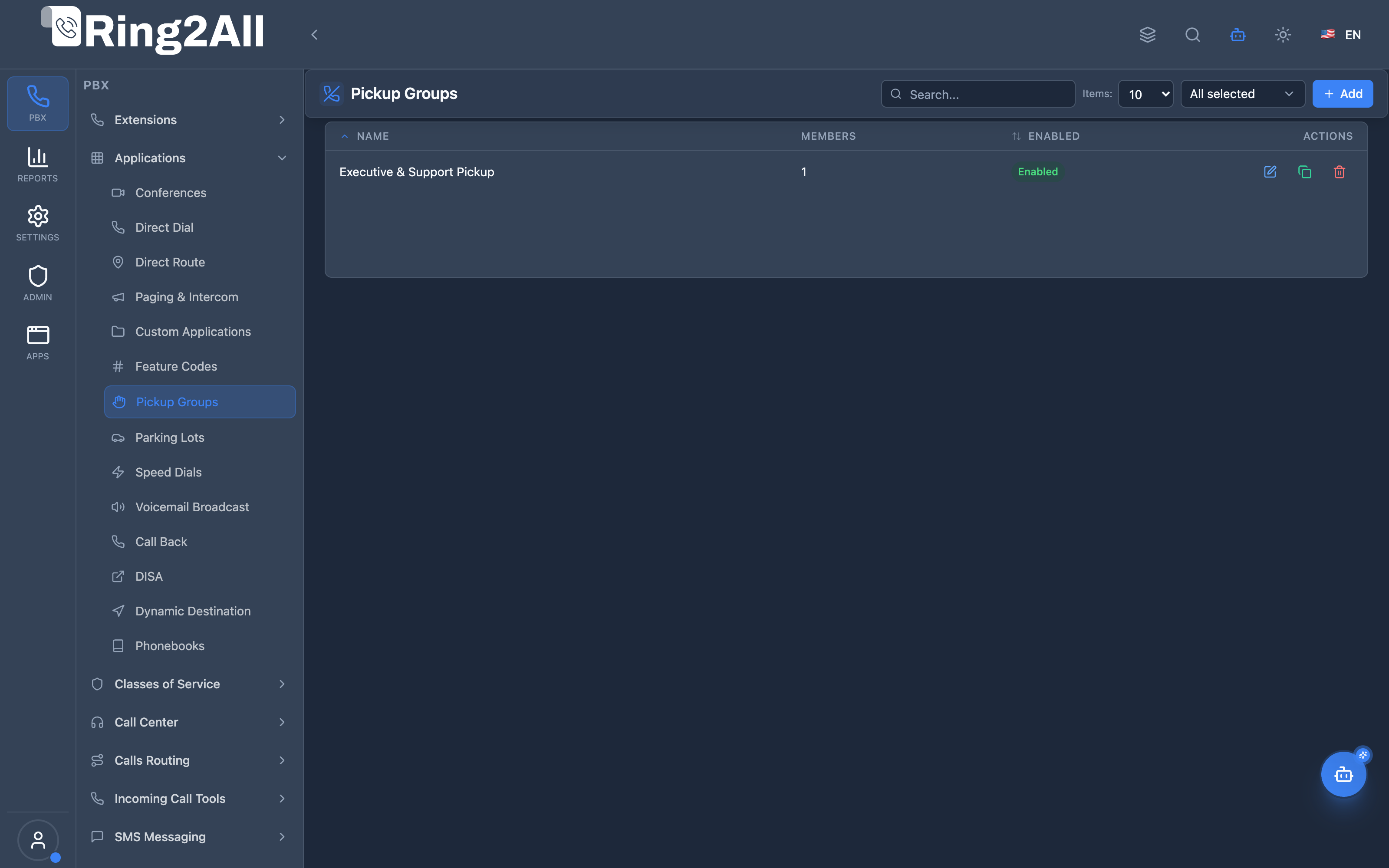
Section titled “Navigation”- Navigate to PBX → Applications → Pickup Groups in the main sidebar.
- The list view displays all configured pickup groups, detailing their Group Name, Members count, active Status (
Enabled/Disabled), and quick actions to edit, duplicate, or delete. - Click the + Add button in the top-right toolbar to create a new pickup group.
- Click any existing pickup group row or the edit icon to adjust member permissions, ringback tones, or timeouts.
Administrator Workflow
Section titled “Administrator Workflow”┌─────────────────────────────────────────────────────────────────┐│ Creating a Pickup Group │├─────────────────────────────────────────────────────────────────┤│ ││ Step 1: General Tab ││ ├─ Name: "Sales Team" ││ ├─ Description: "Sales department pickup group" ││ └─ Priority: 10 ││ ││ Step 2: Settings Tab ││ ├─ Skip Busy: ✓ (don't interrupt active calls) ││ ├─ DND Override: ✗ (respect DND settings) ││ ├─ Pickup Tone: Beep ││ └─ Pickup Timeout: 30 seconds ││ ││ Step 3: Members Tab ││ ├─ Extension 1001: isMember ✓, allowPickup ✓ ││ ├─ Extension 1002: isMember ✓, allowPickup ✓ ││ ├─ Extension 1003: isMember ✓, allowPickup ✓ ││ └─ Extension 1004: isMember ✓, allowPickup ✗ (pickup target) ││ ││ Step 4: Enable and Save ││ └─ Enabled: ✓ ││ ││ Result: 1001-1003 can pick up each other's calls + 1004's ││ 1004 can be picked up but cannot pick up others ││ │└─────────────────────────────────────────────────────────────────┘Quick Tips
Section titled “Quick Tips”[!TIP] allowPickup = false: Use this for extensions that should only be “pickup targets” (e.g., lobby phone that anyone can answer).
[!TIP] Skip Busy: Always enable unless you specifically want to interrupt active calls.
[!CAUTION] Multiple Groups: An extension can be in multiple groups. Priority determines which group is checked first.
4. Configuration Fields Reference
Section titled “4. Configuration Fields Reference”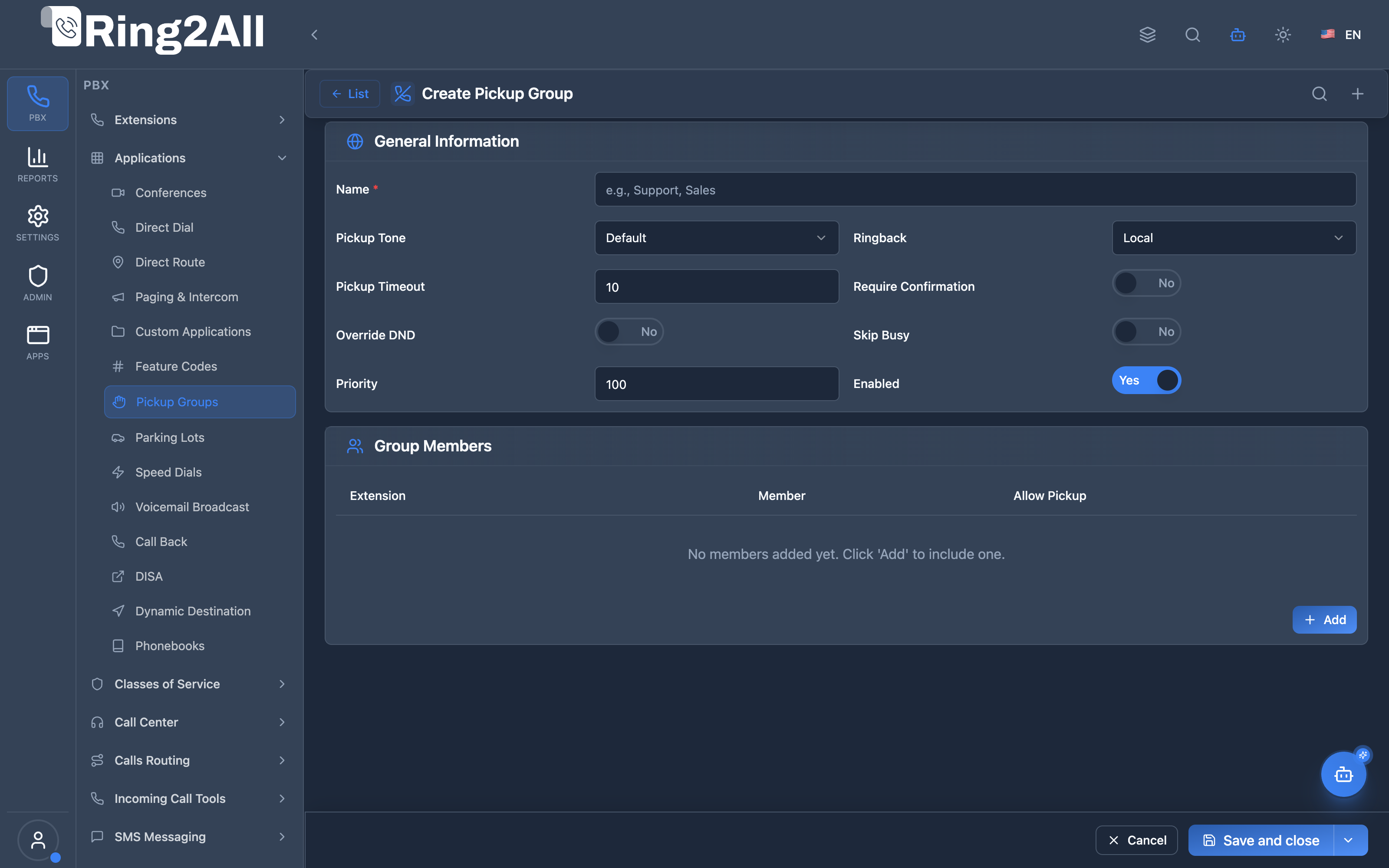
General Information Section
Section titled “General Information Section”| Field | Description | User-Friendly Tooltip | Example | Required |
|---|---|---|---|---|
| Name * | Name of the pickup group | Group name must be unique within the domain | Executive & Support Pickup |
Yes |
| Pickup Tone | Audio tone played when a call is picked up | Audio tone played to user when call is picked up | Default, Beep, Short Beep, None |
Yes |
| Ringback | Tone heard by caller during call transfer | Ringback tone heard by caller during transfer | Local, US Ring, UK Ring, None |
Yes |
| Pickup Timeout | Time allowed for answering before pickup cancels | Maximum time allowed to pick up call (seconds) | 10, 15 (5-120s) |
Yes |
| Require Confirmation | Require pressing a key to confirm pickup | Require pressing 1 to confirm pickup | Yes / No (toggle) |
No |
| Override DND | Allow pickup even if destination extension has DND active | Pick up calls even if extension has DND active | Yes / No (toggle) |
No |
| Skip Busy | Skip extensions that are already on a call | Skip extensions that are already on an active call | Yes / No (toggle) |
No |
| Priority | Priority when an extension belongs to multiple groups | Group priority (lower number = higher priority) | 100 (1-9999) |
Yes |
| Enabled | Master switch for activating or deactivating the group | Enable or disable this pickup group | Yes / No (toggle) |
Yes |
Group Members Section
Section titled “Group Members Section”| Field | Description | User-Friendly Tooltip | Notes |
|---|---|---|---|
| Extension | Extension assigned to the group | Select an extension from the domain | Must select an active extension |
Member (isMember) |
Calls to this extension can be picked up by group members | Enable to allow calls ringing on this extension to be picked up | Default: Yes |
Allow Pickup (allowPickup) |
This extension has permission to pick up group calls | Enable to grant this extension permission to intercept calls | Default: Yes |
| Actions | Remove extension from this pickup group | Removes row from table | Trash icon |
Member Permission Matrix
Section titled “Member Permission Matrix”| isMember | allowPickup | Result |
|---|---|---|
| ✓ | ✓ | Full participant—can pick up and be picked up |
| ✓ | ✗ | Target only—can be picked up but cannot pick up others |
| ✗ | ✓ | Picker only—can pick up but cannot be picked up |
| ✗ | ✗ | (Invalid—effectively not in the group) |
5. Call Flow / Logic Explanation
Section titled “5. Call Flow / Logic Explanation”Pickup Flow
Section titled “Pickup Flow”┌─────────────────────────────────────────────────────────────────┐│ Group Pickup Flow (*8) │├─────────────────────────────────────────────────────────────────┤│ ││ 1. User 1002 dials *8 (group pickup) ││ │ ││ ▼ ││ 2. Find pickup groups where 1002 has allowPickup = true ││ │ ││ ▼ ││ 3. For each group (in priority order): ││ ├─ Find members with isMember = true ││ ├─ Check if any member is currently ringing ││ ├─ If skipBusy = true, skip busy members ││ └─ If found ringing member → Step 4 ││ │ ││ ▼ ││ 4. Check additional conditions ││ ├─ If target has DND and dndOverride = false → Skip ││ └─ If confirmation required → Prompt DTMF ││ │ ││ ▼ ││ 5. Intercept the ringing call ││ ├─ Stop ringing at original extension ││ ├─ Play pickup tone ││ └─ Bridge caller to 1002 ││ │ ││ ▼ ││ 6. Call connected between caller and 1002 ││ │└─────────────────────────────────────────────────────────────────┘Direct Pickup Flow
Section titled “Direct Pickup Flow”┌─────────────────────────────────────────────────────────────────┐│ Direct Pickup Flow (**1001) │├─────────────────────────────────────────────────────────────────┤│ ││ 1. User 1002 dials **1001 (direct pickup) ││ │ ││ ▼ ││ 2. Check if 1002 is in a group where 1001 is also a member ││ ├─ Yes → Check if 1002 has allowPickup = true ││ └─ No → "Pickup not allowed" ││ │ ││ ▼ ││ 3. Check if 1001 is currently ringing ││ ├─ Yes → Intercept call ││ └─ No → "No call to pick up" ││ │ ││ ▼ ││ 4. Call connected ││ │└─────────────────────────────────────────────────────────────────┘6. Common Scenarios & Examples
Section titled “6. Common Scenarios & Examples”Scenario 1: Sales Team Full Coverage
Section titled “Scenario 1: Sales Team Full Coverage”Setup:
| Member | isMember | allowPickup |
|---|---|---|
| 1001 (Sales Rep 1) | ✓ | ✓ |
| 1002 (Sales Rep 2) | ✓ | ✓ |
| 1003 (Sales Rep 3) | ✓ | ✓ |
Result: All three can pick up each other’s calls.
Scenario 2: Reception Backup
Section titled “Scenario 2: Reception Backup”Setup:
| Member | isMember | allowPickup | Notes |
|---|---|---|---|
| 1000 (Reception) | ✓ | ✗ | Can be picked up but not pick up |
| 2001 (Admin 1) | ✓ | ✓ | Can pick up reception |
| 2002 (Admin 2) | ✓ | ✓ | Can pick up reception |
Result: Admins can answer reception calls; reception cannot pick up others.
Scenario 3: Executive Assistant
Section titled “Scenario 3: Executive Assistant”Setup:
| Member | isMember | allowPickup | Notes |
|---|---|---|---|
| 5000 (CEO) | ✓ | ✗ | CEO can be picked up |
| 5001 (Assistant) | ✗ | ✓ | Assistant can pick up CEO |
Result: Only the assistant can pick up the CEO’s calls; CEO’s calls don’t affect the assistant’s line.
Scenario 4: Priority Between Groups
Section titled “Scenario 4: Priority Between Groups”Problem: Extension 2000 is in both “Sales” (priority 10) and “Support” (priority 20) groups.
*When 2000 dials 8:
- Check “Sales” group first (priority 10)
- If no ringing calls, check “Support” group (priority 20)
- Pick up first ringing call found
7. Model Context Protocol (MCP) AI Integration
Section titled “7. Model Context Protocol (MCP) AI Integration”Call Pickup groups can be audited and provisioned via the Model Context Protocol (MCP). AI assistants and automated onboarding workflows can inspect group rosters, configure intercept permissions between departments, and verify that agents have reciprocal pickup capabilities.
Available MCP Tools
Section titled “Available MCP Tools”| Tool Name | Operation | Description | Access Level |
|---|---|---|---|
list_call_pickup_groups |
Query | List all call pickup groups, evaluation priorities, and member counts. | Read-Only |
get_call_pickup_group_status |
Query | Inspect detailed member lists, pickup permissions (allowPickup, isMember), and group parameters. |
Read-Only |
create_call_pickup_group |
Provisioning | Create a new call intercept group with assigned extensions and priority ranking. | Admin / Superadmin |
update_call_pickup_group |
Management | Modify members, evaluation priority, or active state of a pickup group. | Admin / Superadmin |
delete_call_pickup_group |
Deprovisioning | Remove a call pickup group from the PBX. | Superadmin |
Tool Definitions & Parameter Reference
Section titled “Tool Definitions & Parameter Reference”create_call_pickup_group
Section titled “create_call_pickup_group”Provisions a group enabling mutual call interception.
{ "name": "create_call_pickup_group", "description": "Create a new Call Pickup group allowing member extensions to intercept each other's ringing calls via *8.", "inputSchema": { "type": "object", "properties": { "name": { "type": "string", "description": "Group name (e.g. 'Support Desk Pickup')." }, "priority": { "type": "number", "description": "Evaluation order when an extension belongs to multiple groups (default: 10)." }, "members": { "type": "array", "items": { "type": "string" }, "description": "Extension numbers that belong to this pickup group." }, "description": { "type": "string", "description": "Optional notes or department details." } }, "required": ["name"] }}Safety Safeguards & Architectural Isolation
Section titled “Safety Safeguards & Architectural Isolation”- Domain Isolation: Pickup groups operate strictly within the tenant’s domain boundary. Extensions from other domains cannot intercept ringing calls across tenant partitions.
- Feature Code Coordination: Pickup groups work seamlessly with the universal Feature Code
*8(Group Call Pickup) and**<ext>(Directed Call Pickup) without requiring dedicated per-group star codes.
Example AI Assistant Prompts & Workflow
Section titled “Example AI Assistant Prompts & Workflow”Example 1: Creating a Customer Service Intercept Group
Section titled “Example 1: Creating a Customer Service Intercept Group”Admin Prompt:
“Create a pickup group named ‘Billing Team’ with priority 10 for extensions 2010, 2011, and 2012.”
AI Tool Execution:
{ "tool": "create_call_pickup_group", "arguments": { "name": "Billing Team", "priority": 10, "members": ["2010", "2011", "2012"], "description": "Allows billing agents to intercept ringing inbound calls" }}MCP Response:
{ "success": true, "data": { "id": 6, "name": "Billing Team", "priority": 10, "memberCount": 3, "message": "Call Pickup group 'Billing Team' created successfully." }}8. Limitations & Important Notes
Section titled “8. Limitations & Important Notes”Technical Limitations
Section titled “Technical Limitations”[!WARNING] Single Ringing Call: If multiple extensions are ringing, only one call is picked up per *8 dial.
[!WARNING] Priority Matters: Lower priority number = checked first. Plan your priorities carefully.
[!IMPORTANT] Pickup Codes: Default codes are *8 (group) and ** (direct). These are configured in Feature Codes.
Best Practices
Section titled “Best Practices”- Use Descriptive Names: “Sales Team” not “Group 1”
- Set Appropriate Priorities: Consider which groups should be checked first
- Enable Skip Busy: Unless you need to interrupt active calls
- Test Permissions: Verify who can pick up whom
- Review Regularly: Remove departed employees from groups
Security Considerations
Section titled “Security Considerations”[!CAUTION] Privacy: Pickup groups allow anyone in the group to intercept calls. Consider confidentiality needs.
9. Troubleshooting Tips
Section titled “9. Troubleshooting Tips”Common Issues
Section titled “Common Issues”| Symptom | Possible Cause | Solution |
|---|---|---|
| “No call to pick up” | No ringing call in group | Verify member is actually ringing |
| Can’t pick up specific ext | allowPickup = false | Check member permissions |
| Wrong call picked up | Priority order | Adjust group priorities |
| Pickup not working | Feature code disabled | Check *8 is enabled |
| DND blocking pickup | dndOverride = false | Enable DND override if needed |
Diagnostic SQL
Section titled “Diagnostic SQL”List pickup groups:
SELECT pg.name, pg.priority, pg.enabled, COUNT(m.id) as member_countFROM public.pickup_groups pgLEFT JOIN public.pickup_group_members m ON pg.id = m.pickup_group_idWHERE pg.domain_id = [domain_id]GROUP BY pg.idORDER BY pg.priority;Check extension’s groups:
SELECT pg.name, pgm.is_member, pgm.allow_pickupFROM public.pickup_group_members pgmJOIN public.pickup_groups pg ON pgm.pickup_group_id = pg.idWHERE pgm.extension = '1001' AND pg.domain_id = [domain_id];Find ringing extensions (runtime):
fs_cli -x "show channels" | grep RINGING10. Glossary
Section titled “10. Glossary”| Term | Definition |
|---|---|
| Pickup Group | A set of extensions that can intercept each other’s ringing calls |
| Group Pickup | Dialing *8 to pick up any ringing call in your groups |
| Direct Pickup | Dialing **1001 to pick up a specific extension’s call |
| isMember | Permission that allows calls TO this extension to be picked up |
| allowPickup | Permission that allows this extension to pick up others’ calls |
| Skip Busy | Don’t interrupt extensions on active calls |
| DND Override | Allow pickup even if target has Do Not Disturb enabled |
| Priority | Order in which groups are checked (lower = first) |
| Pickup Tone | Audio confirmation when pickup is successful |
| Intercept | Technical term for picking up another extension’s call |
Documentation last updated: January 2026