

Provisioning Templates Module Documentation
Table of Contents
Section titled “Table of Contents”- Navigation & Access
- Screenshots & Visual Interface
- Module Overview (Technical)
- Module Overview (Commercial/Business)
- Module Overview (End User/Administrator)
- User Roles & Key Capabilities
- Configuration Tabs
- Settings Reference
- Common Scenarios & Examples
- Limitations & Important Notes
- Model Context Protocol (MCP) AI Integration
- Troubleshooting Tips
- Glossary
Navigation & Access
Section titled “Navigation & Access”To access the Provisioning Templates configuration module:
- Log in to the Ring2All Web Portal (
https://<domain-or-ip>/login). - In the left navigation sidebar, expand Settings.
- Under Provisioning, click Templates (
/settings/provisioning/provisioning-templates). - To create a new provisioning template, click + Add (
/settings/provisioning/provisioning-templates/new). To edit an existing template or clone it, click the Edit or Clone icon on any template entry.
Screenshots & Visual Interface
Section titled “Screenshots & Visual Interface”Provisioning Templates Directory Overview
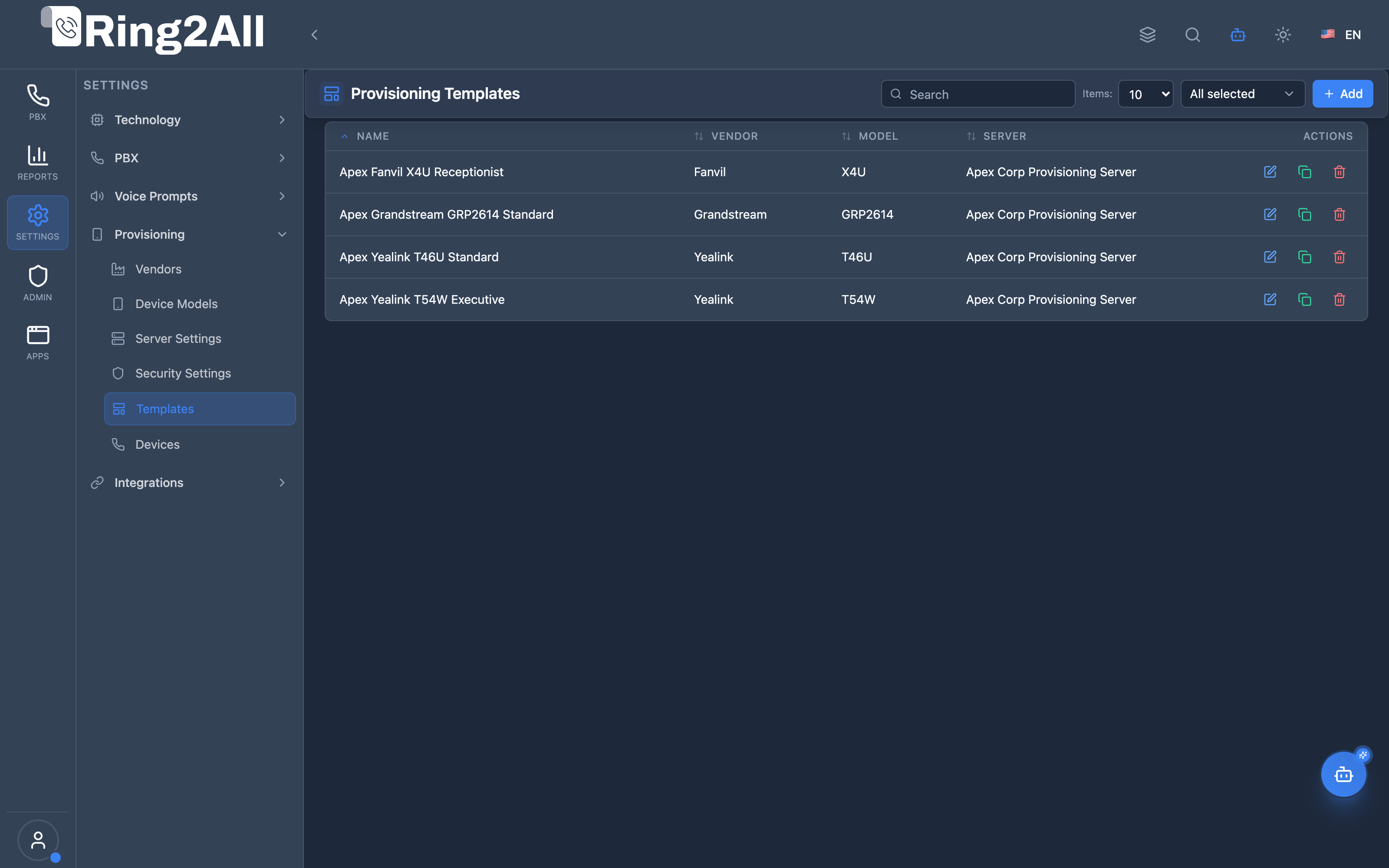
Section titled “Provisioning Templates Directory Overview”Overview of reusable device templates categorized by manufacturer, model, and provisioning server profile, with quick actions to edit, clone, or delete templates.
Provisioning Template Designer & Key Mapping
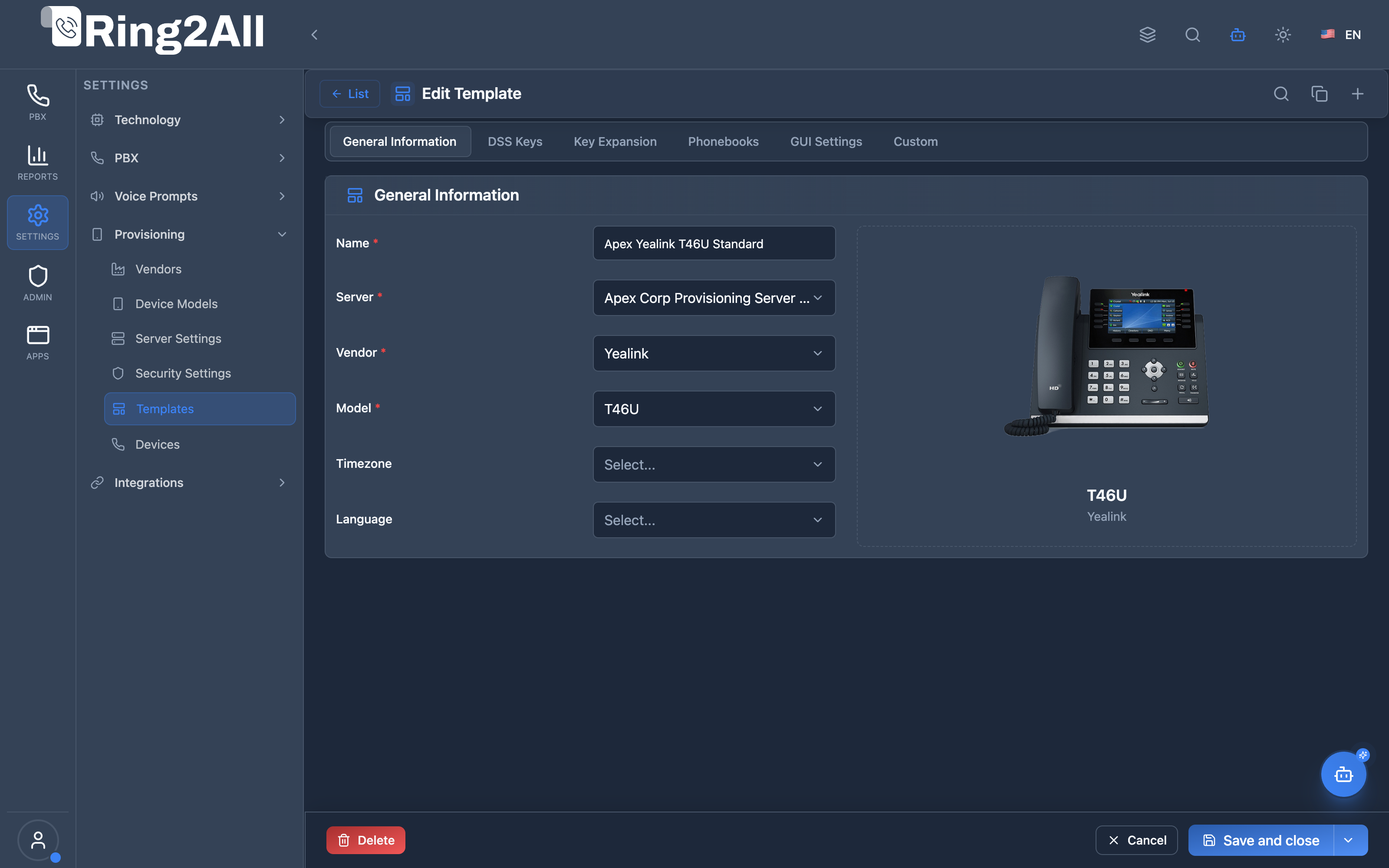
Section titled “Provisioning Template Designer & Key Mapping”Multi-tab configuration editor for defining general phone parameters, programmable DSS line keys, expansion sidecars, centralized phonebooks, GUI display settings, and custom Jinja2 overrides.
1. Module Overview (Technical)
Section titled “1. Module Overview (Technical)”What Are Provisioning Templates?
Section titled “What Are Provisioning Templates?”Provisioning Templates is a device configuration template module that creates reusable configurations for IP phones. Templates define DSS keys, expansion modules, phonebooks, GUI settings, and custom configuration using Jinja2 syntax.
Architecture
Section titled “Architecture”┌─────────────────────────────────────────────────────────────────┐│ Provisioning Templates Architecture │├─────────────────────────────────────────────────────────────────┤│ ││ Admin Panel ││ ┌──────────────────────────────────────────────────────────┐ ││ │ Provisioning Templates │ ││ │ │ ││ │ Template Settings: │ ││ │ ├─ Model Selection (Yealink T54W) │ ││ │ ├─ Server & Localization │ ││ │ ├─ DSS Keys (BLF, Speed Dial) │ ││ │ ├─ Expansion Modules │ ││ │ ├─ Phonebooks │ ││ │ ├─ GUI Settings (Wallpaper) │ ││ │ └─ Custom (Jinja2 Template) │ ││ │ │ ││ └──────────────────────────────────────────────────────────┘ ││ │ ││ ▼ Applied to devices ││ ┌──────────────────────────────────────────────────────────┐ ││ │ Provisioning Devices │ ││ │ │ ││ │ Device (MAC) → Template → Generated Config │ ││ │ │ ││ └──────────────────────────────────────────────────────────┘ ││ │ ││ ▼ Generates config files ││ ┌──────────────────────────────────────────────────────────┐ ││ │ Configuration Files │ ││ │ │ ││ │ /var/www/provisioning/ │ ││ │ ├─ AA-BB-CC-DD-EE-FF.cfg │ ││ │ │ (Template + Device variables) │ ││ │ └─ 11-22-33-44-55-66.cfg │ ││ │ │ ││ └──────────────────────────────────────────────────────────┘ ││ │└─────────────────────────────────────────────────────────────────┘2. Module Overview (Commercial/Business)
Section titled “2. Module Overview (Commercial/Business)”Business Value
Section titled “Business Value”Provisioning Templates provides standardized device configuration:
| Without Templates | With Templates |
|---|---|
| Manual config | Automated setup |
| Inconsistent | Standardized |
| Error-prone | Template-driven |
| Time-consuming | Rapid deployment |
Use Cases
Section titled “Use Cases”-
Bulk Deployment
- Deploy many phones quickly
- Consistent settings
-
Department Templates
- Sales phone setup
- Support desk config
-
DSS Key Programming
- BLF/Line keys
- Speed dial buttons
-
Custom Branding
- Wallpapers
- Display settings
Feature Highlights
Section titled “Feature Highlights”| Feature | Benefit |
|---|---|
| Model-Specific | Correct capabilities |
| DSS Keys | BLF, speed dial, line keys |
| Expansion Modules | Key attachment config |
| Phonebooks | Directory integration |
| GUI Settings | Wallpaper customization |
| Jinja2 Templates | Dynamic configuration |
3. Module Overview (End User/Administrator)
Section titled “3. Module Overview (End User/Administrator)”What Can You Do?
Section titled “What Can You Do?”- Create templates for phone models
- Configure DSS keys (BLF, speed dial, line)
- Set up expansion module keys
- Assign phonebooks
- Upload wallpapers
- Write custom Jinja2 configurations
- Set timezone and language
Provisioning Templates Interface
Section titled “Provisioning Templates Interface”┌─────────────────────────────────────────────────────────────────┐│ Provisioning Templates │├─────────────────────────────────────────────────────────────────┤│ ││ [+ Create Template] ││ ││ ┌───────────────────────────────────────────────────────────┐ ││ │ Name │ Vendor │ Model │ Devices │ │ ││ ├───────────────────┼─────────────┼─────────┼─────────┼─────┤ ││ │ Sales Team │ Yealink │ T54W │ 25 │ ✏️ │ ││ │ Support Desk │ Yealink │ T46U │ 12 │ ✏️ │ ││ │ Reception │ Grandstream │ GXP2170 │ 3 │ ✏️ │ ││ │ Conference Room │ Polycom │ VVX450 │ 5 │ ✏️ │ ││ └───────────────────────────────────────────────────────────┘ ││ │└─────────────────────────────────────────────────────────────────┘Create/Edit Template
Section titled “Create/Edit Template”┌─────────────────────────────────────────────────────────────────┐│ Create Template │├─────────────────────────────────────────────────────────────────┤│ ││ Template Name: [Sales Team ] ││ ││ Vendor: [Yealink ▼] Model: [T54W ▼] ││ ││ Server: [pbx.example.com ] ││ Timezone: [America/New_York ▼] ││ Language: [English ▼] ││ ││ Admin Password: [•••••••• ] ││ Time Format: [12-hour ▼] ││ Date Format: [MM/DD/YYYY ▼] ││ Daylight Savings: ✓ ││ ││ ──────────────────────────────────────────────────────────────││ ││ [DSS Keys] [Key Expansion] [Phonebooks] [GUI Settings] [Custom]││ │└─────────────────────────────────────────────────────────────────┘DSS Keys Tab
Section titled “DSS Keys Tab”┌─────────────────────────────────────────────────────────────────┐│ DSS Keys Configuration │├─────────────────────────────────────────────────────────────────┤│ ││ T54W supports 10 DSS Keys ││ ││ ┌─────────────────────────────────────────────────────────────┐││ │ Key │ Type │ Value │ Line │ │││ ├─────┼─────────────┼────────────────┼──────┼───────────────┤││ │ 1 │ BLF │ 1001 │ 1 │ ✏️ 🗑 │││ │ 2 │ BLF │ 1002 │ 1 │ ✏️ 🗑 │││ │ 3 │ BLF │ 1003 │ 1 │ ✏️ 🗑 │││ │ 4 │ Speed Dial │ 5551234567 │ - │ ✏️ 🗑 │││ │ 5 │ Line │ 2 │ 2 │ ✏️ 🗑 │││ │ 6 │ N/A │ - │ - │ ✏️ │││ │ ... │ ... │ ... │ ... │ ... │││ └─────────────────────────────────────────────────────────────┘││ │└─────────────────────────────────────────────────────────────────┘Custom Tab (Jinja2)
Section titled “Custom Tab (Jinja2)”┌─────────────────────────────────────────────────────────────────┐│ Custom Configuration Template │├─────────────────────────────────────────────────────────────────┤│ ││ Use Jinja2 syntax: {{ variable }} for dynamic values ││ ││ Available Variables: [mac] [extension] [password] [server] ││ ││ ┌─────────────────────────────────────────────────────────────┐││ │ # Custom Yealink Configuration │││ │ account.1.label = {{ extension }} │││ │ account.1.display_name = {{ name }} │││ │ account.1.user_name = {{ extension }} │││ │ account.1.password = {{ password }} │││ │ account.1.sip_server_host = {{ server }} │││ │ │││ │ local_time.time_zone = -5 │││ │ local_time.dst_time_type = 1 │││ └─────────────────────────────────────────────────────────────┘││ ││ 38 lines | 1,245 characters ││ ││ [Reset to original template] ││ │└─────────────────────────────────────────────────────────────────┘Quick Tips
Section titled “Quick Tips”[!TIP] Select Model First: Model determines available DSS keys.
[!TIP] Jinja2 Variables: Use
{{ mac }},{{ extension }},{{ password }}.
[!NOTE] Reset Available: Revert custom config to original template.
🎯 User Roles & Key Capabilities
Section titled “🎯 User Roles & Key Capabilities”| Role | Key Capabilities & Permissions | Operational Scope |
|---|---|---|
| PBX Super Administrator | • Master Jinja2 configuration template architecture and vendor syntax standards • Global template catalog governance and cross-tenant template replication • Provisioning server profile binding and network security baseline enforcement • Referential dependency protection preventing template removal while assigned to devices |
Platform-Wide |
| Tenant Administrator | • Domain-specific template creation, modification, and department-level cloning • DSS key layout design: BLF monitoring, speed dials, shared lines, transfer keys • Expansion module (sidecar) programming and centralized XML phonebook binding • Bulk template application to groups of provisioned IP handsets |
Domain Scope |
| VoIP Support Specialist | • DSS line key troubleshooting and Jinja2 variable substitution inspection • BLF lamp state verification and SIP event subscription validation • Custom configuration overrides testing and firmware-specific parameter tuning |
Domain Scope |
| AI Copilot / MCP Agent | • Autonomous template catalog querying (list_provisioning_templates)• Model compatibility and DSS key capacity validation ( list_provisioning_models)• Intelligent template recommendation based on user extension roles and department profiles |
Autonomous Assistant |
4. Configuration Tabs
Section titled “4. Configuration Tabs”DSS Keys Tab
Section titled “DSS Keys Tab”| Setting | Description |
|---|---|
| Key | Key number |
| Type | BLF, Speed Dial, Line, etc. |
| Value | Extension/number |
| Line | Associated SIP line |
Key Expansion Tab
Section titled “Key Expansion Tab”| Setting | Description |
|---|---|
| Module | Expansion module number |
| Keys per Module | Keys available |
| Key Configuration | Same as DSS keys |
Phonebooks Tab
Section titled “Phonebooks Tab”| Setting | Description |
|---|---|
| Phonebook | Select phonebook |
| Server Address | Remote phonebook URL |
| Authentication | User/password |
GUI Settings Tab
Section titled “GUI Settings Tab”| Setting | Description |
|---|---|
| Wallpaper | Phone background image |
Custom Tab
Section titled “Custom Tab”| Setting | Description |
|---|---|
| Template | Jinja2 configuration text |
5. Settings Reference
Section titled “5. Settings Reference”DSS Key Types
Section titled “DSS Key Types”| Type | Description |
|---|---|
| BLF | Busy Lamp Field (extension monitor) |
| Speed Dial | Quick dial number |
| Line | SIP line registration |
| Transfer | Call transfer button |
| Hold | Hold button |
| DND | Do Not Disturb toggle |
| Voicemail | Direct voicemail access |
Jinja2 Variables
Section titled “Jinja2 Variables”| Variable | Description |
|---|---|
{{ mac }} |
Device MAC address |
{{ extension }} |
SIP extension number |
{{ password }} |
SIP password |
{{ server }} |
SIP server address |
{{ name }} |
Display name |
{{ domain }} |
SIP domain |
Time Formats
Section titled “Time Formats”| Format | Example |
|---|---|
| 12-hour | 2:30 PM |
| 24-hour | 14:30 |
6. Common Scenarios & Examples
Section titled “6. Common Scenarios & Examples”Scenario 1: Create Basic Template
Section titled “Scenario 1: Create Basic Template”- Click “Create Template”
- Enter name
- Select vendor and model
- Set server and timezone
- Save
Scenario 2: Configure BLF Keys
Section titled “Scenario 2: Configure BLF Keys”- Open template
- Go to DSS Keys tab
- For each key:
- Type = BLF
- Value = extension number
- Line = 1
- Save
Scenario 3: Add Custom Config
Section titled “Scenario 3: Add Custom Config”- Open template
- Go to Custom tab
- Enter Jinja2 configuration
- Use available variables
- Save
Scenario 4: Set Up Phonebook
Section titled “Scenario 4: Set Up Phonebook”- Open template
- Go to Phonebooks tab
- Select phonebook
- Configure server if remote
- Save
7. Limitations & Important Notes
Section titled “7. Limitations & Important Notes”Technical Notes
Section titled “Technical Notes”[!NOTE] Model Selection: Template is model-specific.
[!NOTE] DSS Limits: Key count depends on model.
[!WARNING] Cannot Delete: Templates with devices cannot be deleted.
Best Practices
Section titled “Best Practices”- Name Clearly: “Sales Team Yealink T54W”
- Select Model First: Before configuring keys
- Test Template: Create test device first
- Document Keys: Keep record of BLF mappings
- Backup Custom: Save custom templates elsewhere
Jinja2 Tips
Section titled “Jinja2 Tips”{# Comment #}{{ variable }}
{# Conditional #}{% if extension %}account.1.user_name = {{ extension }}{% endif %}
{# Loop #}{% for i in range(1, 3) %}linekey.{{ i }}.type = 1{% endfor %}Model Context Protocol (MCP) AI Integration
Section titled “Model Context Protocol (MCP) AI Integration”The Provisioning Templates module provides Model Context Protocol (MCP) integration allowing AI Copilots, auto-provisioning bots, and helpdesk assistants to query reusable device templates, manufacturer associations, model compatibility, and server profile links in real time.
Available MCP Telephony Tools
Section titled “Available MCP Telephony Tools”| Tool Name | Action Type | Access Level | Description |
|---|---|---|---|
list_provisioning_templates |
READ |
Read-Only |
Lists all auto-provisioning device templates for the PBX domain, including manufacturer, model, and server profile associations. |
list_provisioning_models |
READ |
Read-Only |
Lists certified phone models to verify DSS key and line capacities prior to template configuration. |
list_provisioning_vendors |
READ |
Read-Only |
Lists hardware manufacturers to resolve vendor IDs for template filtering. |
Tool Schemas & Input Parameters
Section titled “Tool Schemas & Input Parameters”list_provisioning_templates
Section titled “list_provisioning_templates”Retrieves auto-provisioning templates configured within the active tenant domain.
{ "name": "list_provisioning_templates", "description": "Lists all auto-provisioning device templates for the PBX domain, including manufacturer, model, and server profile associations.", "parameters": { "type": "object", "properties": { "domain_id": { "type": "number", "description": "Optional domain ID (defaults to active tenant domain)" } }, "additionalProperties": false }}Natural Language Prompt Examples
Section titled “Natural Language Prompt Examples”English Prompts
Section titled “English Prompts”💬 “List all provisioning templates created in this tenant domain.” 💬 “Which templates are available for Yealink T54W and T46U phones?” 💬 “Show the template name, linked model, and server profile for each provisioning template.”
Spanish Prompts (Español)
Section titled “Spanish Prompts (Español)”💬 “Lista todas las plantillas de aprovisionamiento creadas en este dominio.” 💬 “¿Cuáles plantillas están disponibles para terminales Yealink T54W y T46U?” 💬 “Muestra el nombre de plantilla, modelo asociado y perfil de servidor configurado.”
Enterprise Safeguards & Compliance
Section titled “Enterprise Safeguards & Compliance”- Strict Domain Isolation: Queries automatically enforce domain boundaries (
domain_id), ensuring tenant templates remain confidential and isolated. - Role-Based Access Control: Executing
list_provisioning_templatesrequiresauxiliary_devicesMCP permission scope. - Referential Integrity Guards: Deletion of any template currently linked to active physical devices is blocked by foreign key constraints until devices are reassigned.
8. Troubleshooting Tips
Section titled “8. Troubleshooting Tips”Common Issues
Section titled “Common Issues”| Symptom | Possible Cause | Solution |
|---|---|---|
| Can’t delete template | Has devices | Remove devices first |
| Keys not working | Wrong type | Check key type |
| Config not applied | Template error | Check Jinja2 syntax |
| BLF not lighting | Wrong extension | Verify extension exists |
Check Template
Section titled “Check Template”SELECT t.name, m.model_name, t.settingsFROM public.provisioning_templates tJOIN public.provisioning_device_models m ON m.id = t.model_idWHERE t.name = 'template-name';Validate Jinja2
Section titled “Validate Jinja2”Test template rendering before deployment using the preview feature.
9. Glossary
Section titled “9. Glossary”| Term | Definition |
|---|---|
| Template | Reusable configuration |
| DSS Keys | Programmable phone buttons |
| BLF | Busy Lamp Field |
| Jinja2 | Template syntax |
| Expansion Module | Key attachment |
| Phonebook | Contact directory |
Documentation last updated: January 2026