

Agents (Call Center) Module Documentation
Table of Contents
Section titled “Table of Contents”- Module Overview (Technical)
- Module Overview (Commercial/Business)
- Module Overview (End User/Administrator)
- Configuration Fields Reference
- Agent States & Transitions
- Queue Membership
- Common Scenarios & Examples
- Model Context Protocol (MCP) AI Integration
- Limitations & Important Notes
- Troubleshooting Tips
- Glossary
1. Module Overview (Technical)
Section titled “1. Module Overview (Technical)”What Are Agents?
Section titled “What Are Agents?”Agents are call center operators who handle calls from queues. Each agent is linked to an extension and can log in/out of queues, pause for breaks, and have configurable timeouts and wrap-up times.
Architecture
Section titled “Architecture”┌─────────────────────────────────────────────────────────────────┐│ Agent System │├─────────────────────────────────────────────────────────────────┤│ ││ ┌───────────────────────────────────────────────────────────┐ ││ │ Agent │ ││ │ Name: "John Smith" │ ││ │ Extension: 101 │ ││ │ Status: Available │ ││ ├───────────────────────────────────────────────────────────┤ ││ │ │ ││ │ Behavior Settings: │ ││ │ ├─ Max No Answer: 3 │ ││ │ ├─ Ring Timeout: 20 sec │ ││ │ ├─ Wrap-Up Time: 10 sec │ ││ │ └─ Reject Delay: 90 sec │ ││ │ │ ││ │ Queue Membership: │ ││ │ ├─ Sales Queue (Level 1, Position 1) │ ││ │ └─ Support Queue (Level 2, Position 3) │ ││ │ │ ││ └───────────────────────────────────────────────────────────┘ ││ │ ││ ▼ ││ ┌───────────────────────────────────────────────────────────┐ ││ │ Telephony Server mod_callcenter │ ││ │ │ ││ │ Agent: 101@domain.com │ ││ │ Type: callback │ ││ │ Contact: user/101@domain.com │ ││ │ Status: Available │ ││ │ State: Waiting │ ││ │ │ ││ └───────────────────────────────────────────────────────────┘ ││ │└─────────────────────────────────────────────────────────────────┘2. Module Overview (Commercial/Business)
Section titled “2. Module Overview (Commercial/Business)”Business Value
Section titled “Business Value”Agents provide professional call center capabilities:
| Without Agents | With Agents |
|---|---|
| Manual call handling | Queue-based distribution |
| No status tracking | Real-time availability |
| No break management | Pause/unpause controls |
| No performance data | Agent metrics |
Use Cases
Section titled “Use Cases”-
Inbound Call Centers
- Customer support teams
- Technical help desks
- Order taking
-
Sales Teams
- Lead qualification
- Outbound campaigns
- Appointment setting
-
Multi-Queue Routing
- Tiered support levels
- Skills-based routing
- Overflow handling
Feature Highlights
Section titled “Feature Highlights”| Feature | Benefit |
|---|---|
| 4 Agent Statuses | Available, Available (On Demand), On Break, Logged Out |
| 3 Agent Types | Inbound, Outbound, Callback |
| Auto/Manual State | Control how status changes |
| Max No Answer | Auto-pause after missed calls |
| Wrap-Up Time | Post-call processing time |
| Ring Timeout | Per-agent ring duration |
| Recording | Per-agent call recording |
| BLF Support | Lamp status on phones |
3. Module Overview (End User/Administrator)
Section titled “3. Module Overview (End User/Administrator)”What Can You Do?
Section titled “What Can You Do?”- Create agents linked to extensions
- Configure behavior settings
- Set initial status and state mode
- Assign agents to queues via Tiers
- Enable/disable agents
Navigation
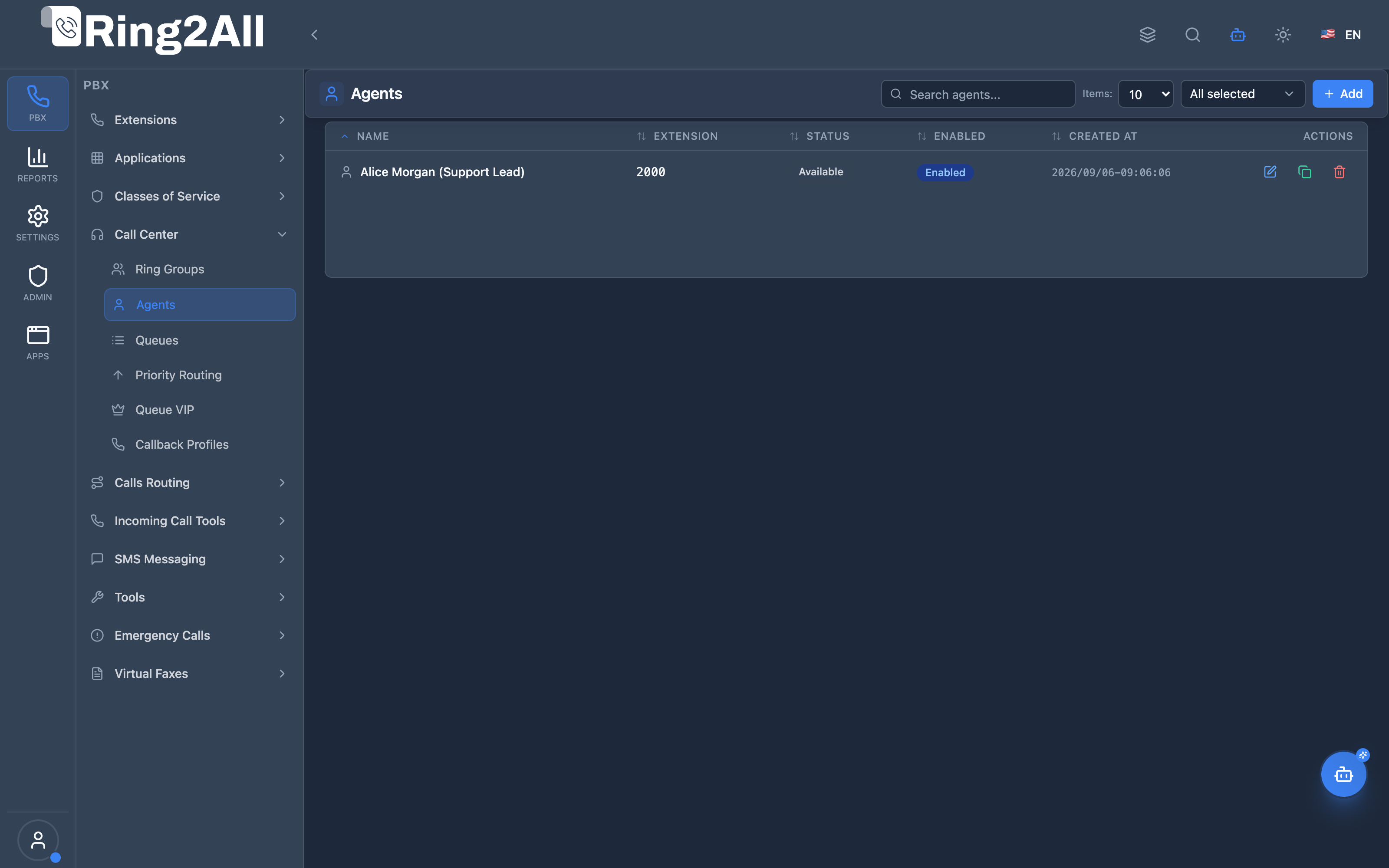
Section titled “Navigation”- Navigate to PBX Engine → Call Center → Agents in the main navigation menu.
- The list view displays all configured Call Center Agents with Agent Name, Extension, Status, State Mode, and Enabled status.
- Click the + Add button in the top toolbar to configure a new call center agent.
- Click any agent row or edit action to configure status, concurrency limits, and granular timing behaviors.
Administrator Workflow
Section titled “Administrator Workflow”┌─────────────────────────────────────────────────────────────────┐│ Creating an Agent │├─────────────────────────────────────────────────────────────────┤│ ││ Step 1: General Settings ││ ├─ Agent Name: "Alice Morgan (Support Lead)" ││ ├─ Extension: Select 2000 ││ ├─ Initial Status: Available ││ ├─ State Mode: Auto ││ ├─ Agent Type: callback ││ ├─ Record Calls: ✓ ││ ├─ Max Concurrent Calls: 1 ││ └─ Enabled: ✓ ││ ││ Step 2: Behavior Settings ││ ├─ Max No Answer: 3 ││ ├─ Busy Delay Time: 90 sec ││ ├─ Reject Delay Time: 90 sec ││ ├─ No Answer Delay Time: 30 sec ││ ├─ Contact Timeout: 20 sec ││ └─ Wrap-Up Time: 10 sec ││ ││ Step 3: Save, then assign to Queues via Tiers ││ │└─────────────────────────────────────────────────────────────────┘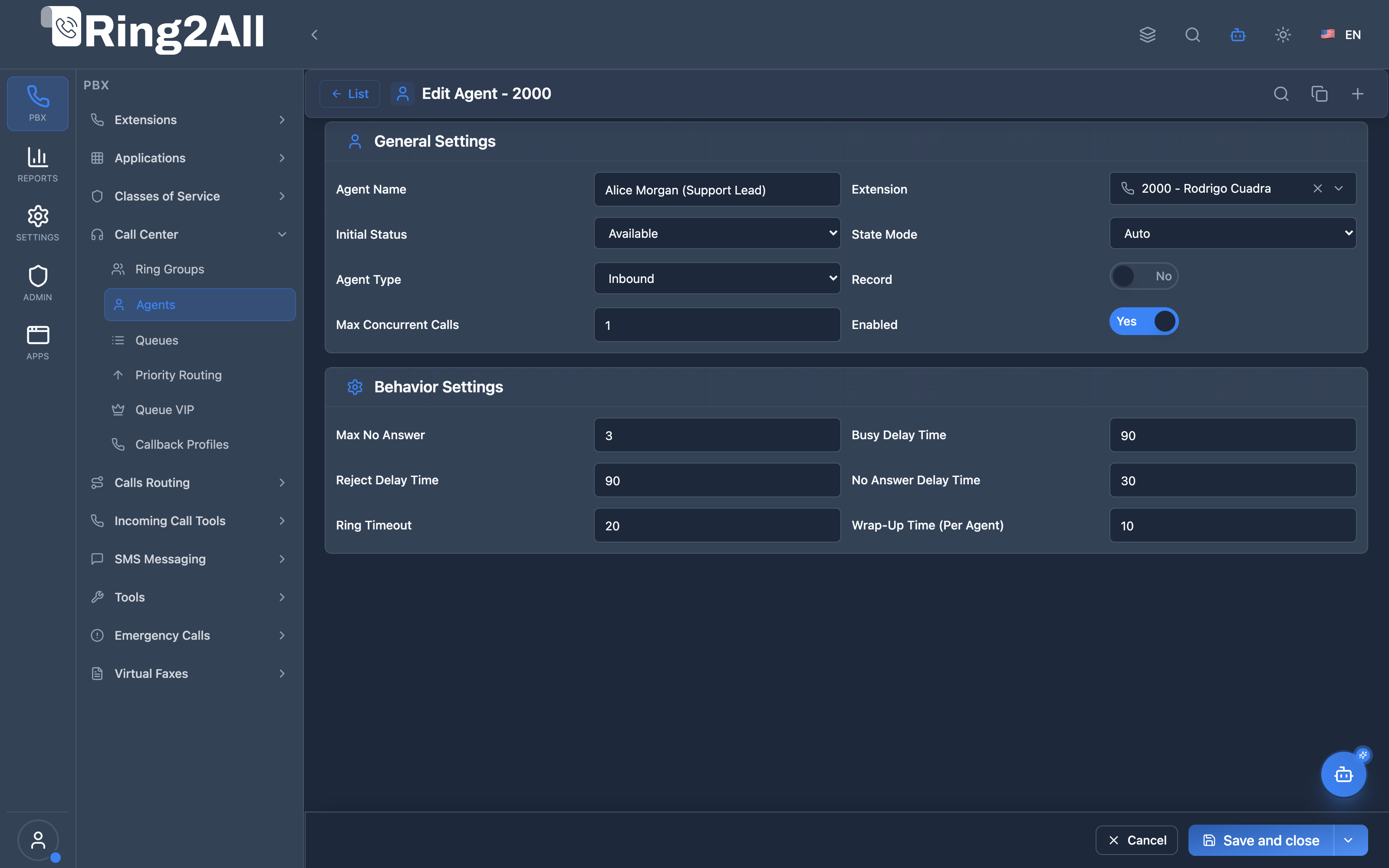
Agent Workflow (Using Feature Codes)
Section titled “Agent Workflow (Using Feature Codes)”Login to all assigned queues: Dial *91 → "Agent logged in"
Logout from all queues: Dial *92 → "Agent logged out"
Pause (all queues): Dial *93 → "Agent paused"
Unpause (resume): Dial *93 → "Agent resumed"
Login to specific queue: Dial *91 + queue number# → "Logged into queue"
Pause in specific queue: Dial *93 + queue number# → "Paused in queue"Quick Tips
Section titled “Quick Tips”[!TIP] State Mode Auto: System changes status based on phone state.
[!TIP] Max No Answer: Set to 3 to auto-pause after 3 missed calls.
[!CAUTION] Wrap-Up Time: Too short = missed calls; too long = idle agents.
4. Configuration Fields Reference
Section titled “4. Configuration Fields Reference”General Settings
Section titled “General Settings”| Field | Description | Type / Options | Default | Required |
|---|---|---|---|---|
| Agent Name | Display name identifying the agent | Text | None | Yes |
| Extension | Associated telephony extension | Extension Selector | None | Yes |
| Initial Status | Initial agent status upon creation or reload | Available, Available (On Demand), Logged Out, On Break |
Available |
Yes |
| State Mode | Automatic or manual state transitions | Auto, Manual |
Auto |
Yes |
| Agent Type | Agent dispatch mechanism in Telephony Server | callback, uuid-standby |
callback |
Yes |
| Record Calls | Whether to record calls answered by this agent | Toggle (Boolean) | Off | No |
| Max Concurrent Calls | Maximum simultaneous calls the agent can accept | Number (min 1) | 1 |
No |
| Enabled | Master switch to enable or disable the agent | Toggle (Boolean) | On | Yes |
Behavior Settings
Section titled “Behavior Settings”| Field | Description | Type / Range | Default | Required |
|---|---|---|---|---|
| Max No Answer | Number of unanswered calls before the system automatically pauses the agent | Number (min 0) | 3 |
No |
| Busy Delay Time | Delay in seconds before offering another call after the agent rejects due to busy | Number (seconds, min 0) | 90 |
No |
| Reject Delay Time | Delay in seconds before offering another call after explicit call rejection | Number (seconds, min 0) | 90 |
No |
| No Answer Delay Time | Delay in seconds before offering another call after agent rings out with no answer | Number (seconds, min 0) | 30 |
No |
| Contact Timeout | Seconds to ring the agent device before considering the attempt unanswered | Number (seconds, min 1) | 20 |
No |
| Wrap-Up Time | Post-call grace period in seconds allowing the agent to complete notes before next call | Number (seconds, min 0) | 10 |
No |
5. Agent States & Transitions
Section titled “5. Agent States & Transitions”Agent Statuses
Section titled “Agent Statuses”| Status | Description | Available for Calls |
|---|---|---|
| Available | Ready to receive calls | ✅ Yes |
| Available (On Demand) | Ready but rings only if no others | ⚡ On Demand |
| On Break | Paused, not receiving | ❌ No |
| Logged Out | Not in queues | ❌ No |
State Diagram
Section titled “State Diagram”┌─────────────────────────────────────────────────────────────────┐│ Agent State Flow │├─────────────────────────────────────────────────────────────────┤│ ││ ┌─────────────┐ ││ │ Logged Out │ ││ └──────┬──────┘ ││ │ *91 Login ││ ▼ ││ ┌─────────────┐ ││ ┌───────▶│ Available │◀───────┐ ││ │ └──────┬──────┘ │ ││ │ │ *93 Pause │ *93 Unpause ││ │ ▼ │ ││ │ ┌─────────────┐ │ ││ │ │ On Break │────────┘ ││ │ └─────────────┘ ││ │ ││ │ *92 Logout ││ │ ││ ┌──────┴──────┐ ││ │ Logged Out │ ││ └─────────────┘ ││ │└─────────────────────────────────────────────────────────────────┘State Mode
Section titled “State Mode”| Mode | Behavior |
|---|---|
| Auto | System changes state based on phone activity |
| Manual | Agent must change state via feature codes |
6. Queue Membership
Section titled “6. Queue Membership”Tier System
Section titled “Tier System”Agents are assigned to queues via Tiers with:
- Level: Priority tier (1 = highest)
- Position: Order within tier
Queue: Sales├─ Tier Level 1 (try first)│ ├─ Position 1: Agent Alice│ └─ Position 2: Agent Bob├─ Tier Level 2 (try if L1 unavailable)│ └─ Position 1: Agent Carol└─ Tier Level 3 (overflow) └─ Position 1: Agent DaveFeature Codes for Queue Control
Section titled “Feature Codes for Queue Control”| Code | Action |
|---|---|
| *91 | Global login (all assigned queues) |
| *92 | Global logout (all queues) |
| *93 | Global pause/unpause toggle |
| *91 + queue# | Login to specific queue |
| *93 + queue# | Pause in specific queue |
7. Common Scenarios & Examples
Section titled “7. Common Scenarios & Examples”Scenario 1: Basic Support Agent
Section titled “Scenario 1: Basic Support Agent”Configuration:
- Extension: 201
- Initial Status: Logged Out
- Max No Answer: 3
- Ring Timeout: 20 sec
- Wrap-Up Time: 10 sec
Workflow:
- Agent dials *91 at shift start
- Receives calls from Support queue
- Dials *93 for lunch break
- Dials *93 to resume
- Dials *92 at shift end
Scenario 2: Multi-Queue Agent
Section titled “Scenario 2: Multi-Queue Agent”Queues:
| Queue | Level | Position |
|---|---|---|
| Sales | 1 | 1 |
| Support | 2 | 3 |
| Billing | 1 | 2 |
Behavior: Gets Sales calls first, Support only when Sales quiet.
Scenario 3: Hotdesk + Agent Combo
Section titled “Scenario 3: Hotdesk + Agent Combo”Flow:
- Agent logs into hotdesk device
- Automatically logs into call center queues
- Device assignment + queue login in one step
8. Model Context Protocol (MCP) AI Integration
Section titled “8. Model Context Protocol (MCP) AI Integration”Ring2All exposes native Model Context Protocol (MCP) tools for Call Center Agents, allowing AI supervisors, scheduling systems, and operations bots to inspect agent availability, change operational states, audit assigned queue tiers, and provision call center agents dynamically with strict domain validation and deletion protection.
Available MCP Tools
Section titled “Available MCP Tools”| Tool Name | Description | Key Parameters |
|---|---|---|
list_call_center_agents |
Lists all Call Center Agents defined in the domain, displaying SIP extension, contact URI, operational status (Available, Logged Out, Available (On Demand), On Break), and ready state. |
search (optional string) |
get_call_center_agent_status |
Retrieves real-time agent status, assigned ACD queues, tier levels, positions, and wrap-up configurations. | extension (required string) |
create_call_center_agent |
Provisions a new Call Center Agent in the domain, validating extension uniqueness and contact mapping. | name, extension (required); status, ready |
update_call_center_agent_status |
Changes agent status (e.g. setting Available, On Break, Logged Out), ready state, or agent display name. |
extension (required); status, ready, name |
delete_call_center_agent |
Safely removes an agent after validating that they are not logged into active calls or required by locked queues via assertCanDeleteAgent. |
extension (required string) |
Anti-Collision & Agent Domain Uniqueness
Section titled “Anti-Collision & Agent Domain Uniqueness”Call center agent extensions are strictly validated within the tenant domain (public.call_center_agents). No two agents can share the same extension, and extensions cannot be accidentally overwritten or duplicated.
AI Agent Operational Examples
Section titled “AI Agent Operational Examples”Auditing Active Agent Status
Section titled “Auditing Active Agent Status”{ "tool": "get_call_center_agent_status", "arguments": { "extension": "2001" }}Updating Agent State to On Break
Section titled “Updating Agent State to On Break”{ "tool": "update_call_center_agent_status", "arguments": { "extension": "2001", "status": "On Break", "ready": false }}Recommended Natural Language Prompts
Section titled “Recommended Natural Language Prompts”- “List all agents in the call center and identify who is currently Available vs On Break.”
- “Set agent extension 2001 to Available state.”
- “Check which queues and tier levels agent 1002 is currently assigned to.”
9. Limitations & Important Notes
Section titled “9. Limitations & Important Notes”Technical Limitations
Section titled “Technical Limitations”[!WARNING] Single Extension: Each agent is linked to one extension.
[!WARNING] mod_callcenter Sync: Changes may take seconds to propagate.
Best Practices
Section titled “Best Practices”- Set Max No Answer: Prevent indefinite missed calls
- Appropriate Wrap-Up: Allow post-call work time
- Use Tiers: Organize skill-based routing
- Monitor BLF: Use lamp indicators
- Test State Changes: Verify feature codes work
10. Troubleshooting Tips
Section titled “10. Troubleshooting Tips”Common Issues
Section titled “Common Issues”| Symptom | Possible Cause | Solution |
|---|---|---|
| No calls received | Agent not Available | Check status via feature code |
| Immediate timeout | Ring timeout too short | Increase ring timeout |
| Stuck in queue | No available agents | Check agent availability |
| BLF not updating | Presence misconfigured | Verify BLF setup |
Diagnostic SQL
Section titled “Diagnostic SQL”List agents:
SELECT id, name, extension, status, enabledFROM public.call_center_agentsWHERE domain_id = [domain_id];Check agent queues (tiers):
SELECT a.name, q.name as queue, t.level, t.positionFROM public.call_center_tiers tJOIN public.call_center_agents a ON t.agent_id = a.idJOIN public.call_center_queues q ON t.queue_id = q.idWHERE a.domain_id = [domain_id];Telephony Server API Commands
Section titled “Telephony Server API Commands”# List all agentscallcenter_config agent list
# Get agent statuscallcenter_config agent get status 101@domain.com
# Set agent availablecallcenter_config agent set status 101@domain.com Available11. Glossary
Section titled “11. Glossary”| Term | Definition |
|---|---|
| Agent | Call center operator handling queue calls |
| Tier | Agent-Queue assignment with level/position |
| Level | Priority tier (lower = higher priority) |
| Position | Order within a tier |
| Wrap-Up Time | Post-call processing delay |
| State Mode | Auto or Manual status control |
| BLF | Busy Lamp Field (phone status lights) |
Documentation last updated: January 2026