

SIP Domains Management
Table of Contents
Section titled “Table of Contents”- Overview & Architecture
- Business & Operational Significance
- 🎯 User Roles & Key Capabilities
- Visual Interface & Form Layout
- Field & Configuration Reference
- Kamailio Core Engine & Multi-Tenant Mechanics
- Security Best Practices & Operational Hardening
- Zero-Touch SIP Registration & Multi-Tenant DNS Architecture (RFC 3263)
- Model Context Protocol (MCP) AI Integration
- Troubleshooting & Verification
- Glossary
1. Overview & Architecture
Section titled “1. Overview & Architecture”In Ring2All SBC, the SIP Domains module (public.domain and public.domain_attrs) acts as the primary multi-tenant ingress resolver for all inbound SIP sessions entering the carrier perimeter. When an external endpoint, carrier, or softphone submits a SIP INVITE or REGISTER request, the SBC inspects the Request-URI domain portion and matches it against the configured SIP Domains catalog.
┌─────────────────────────────────────────┐ │ Inbound SIP Request (INVITE) │ │ sip:1001@customer.ring2all.com │ └────────────────────┬────────────────────┘ │ ▼ ┌─────────────────────────────────────────┐ │ Kamailio SBC Domain Lookup Module │ │ is_domain_local("$rd") │ └────────────────────┬────────────────────┘ │ Match Found in Database Cache │ ┌───────────────────────────────┴───────────────────────────────┐ ▼ ▼┌───────────────────────────────┐ ┌───────────────────────────────┐│ Ring2All Native PBX │ │ External Passthru Trunk ││ • Dispatch Set (Telephony Server) │ │ • Direct Carrier Peering ││ • API Key Token Sync │ │ • TLS Profile Mutual Auth ││ • Tenant Channel Throttling │ │ • Outbound LCR Route Group │└───────────────────────────────┘ └───────────────────────────────┘The domain mapping directly informs the Kamailio routing script whether to:
- Dispatch traffic to an internal cluster of Ring2All PBX telephony engines (
ring2alltype). - Forward traffic downstream to an enterprise session controller or third-party softswitch (
passthrutype). - Enforce multi-tenant resource quotas including maximum concurrent channels and Calls Per Second (CPS) ceilings.
2. Business & Operational Significance
Section titled “2. Business & Operational Significance”- True Multi-Tenancy at Carrier Scale: Isolates distinct business customers onto unique domain namespaces (e.g.,
tenant1.ring2all.com,tenant2.ring2all.com) while operating over shared SBC hardware and IP interfaces. - Granular Resource Isolation (Fair-Share Guard): Guarantees that high call volume bursts or flash events on one domain cannot monopolize SIP signaling threads or media bandwidth needed by other tenants.
- Seamless Ring2All PBX Integration: Provides automated token-based API cross-authentication with backend Ring2All PBX nodes for dynamic extension registration and voicemail lookup.
- Carrier TLS Demarcation: Allows dedicated TLS certificates and domain-specific server names (
SNI) per tenant, satisfying strict compliance mandates for healthcare and financial organizations.
3. 🎯 User Roles & Key Capabilities
Section titled “3. 🎯 User Roles & Key Capabilities”| Role | Primary Use Case | Key Capabilities |
|---|---|---|
| SBC Administrator | Global Multi-Tenant Provisioning | Create, edit, and delete SIP domains; assign Dispatcher sets; configure CPS limits and TLS certificates; bind Ring2All PBX API keys. |
| Carrier NOC Engineer | Telephony Troubleshooting | Monitor domain routing state; verify Kamailio domain table synchronization; inspect live call traces filtered by domain FQDN. |
| Read-Only Auditor | Compliance Verification | Inspect tenant domain catalogs, assigned media encryption parameters, and tenant isolation policies without modification privileges. |
| AI Platform Copilot / NOC Diagnostic Agent | Autonomous Inspection & Provisioning | Execute list_sip_domains, get_sip_domain_status, create_sip_domain, delete_sip_domain, and reload_sip_domains to audit tenant domain routing, inspect CPS ceilings, and sync in-memory Kamailio state. |
4. Visual Interface & Form Layout
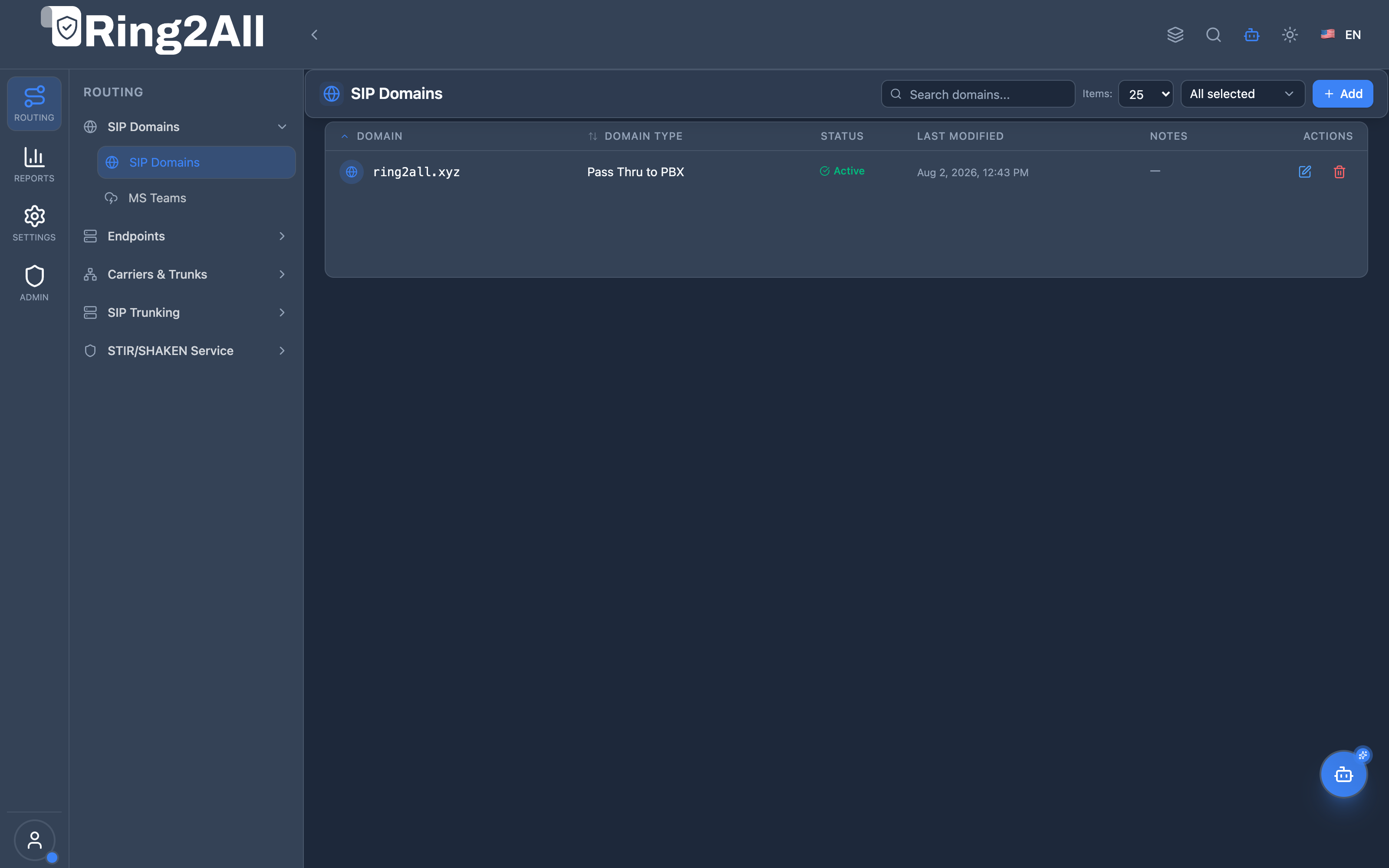
Section titled “4. Visual Interface & Form Layout”SIP Domains List View
Section titled “SIP Domains List View”The list view displays all configured domains along with their destination dispatch set, domain type, TLS profile, and active status.
SIP Domain Configuration Form
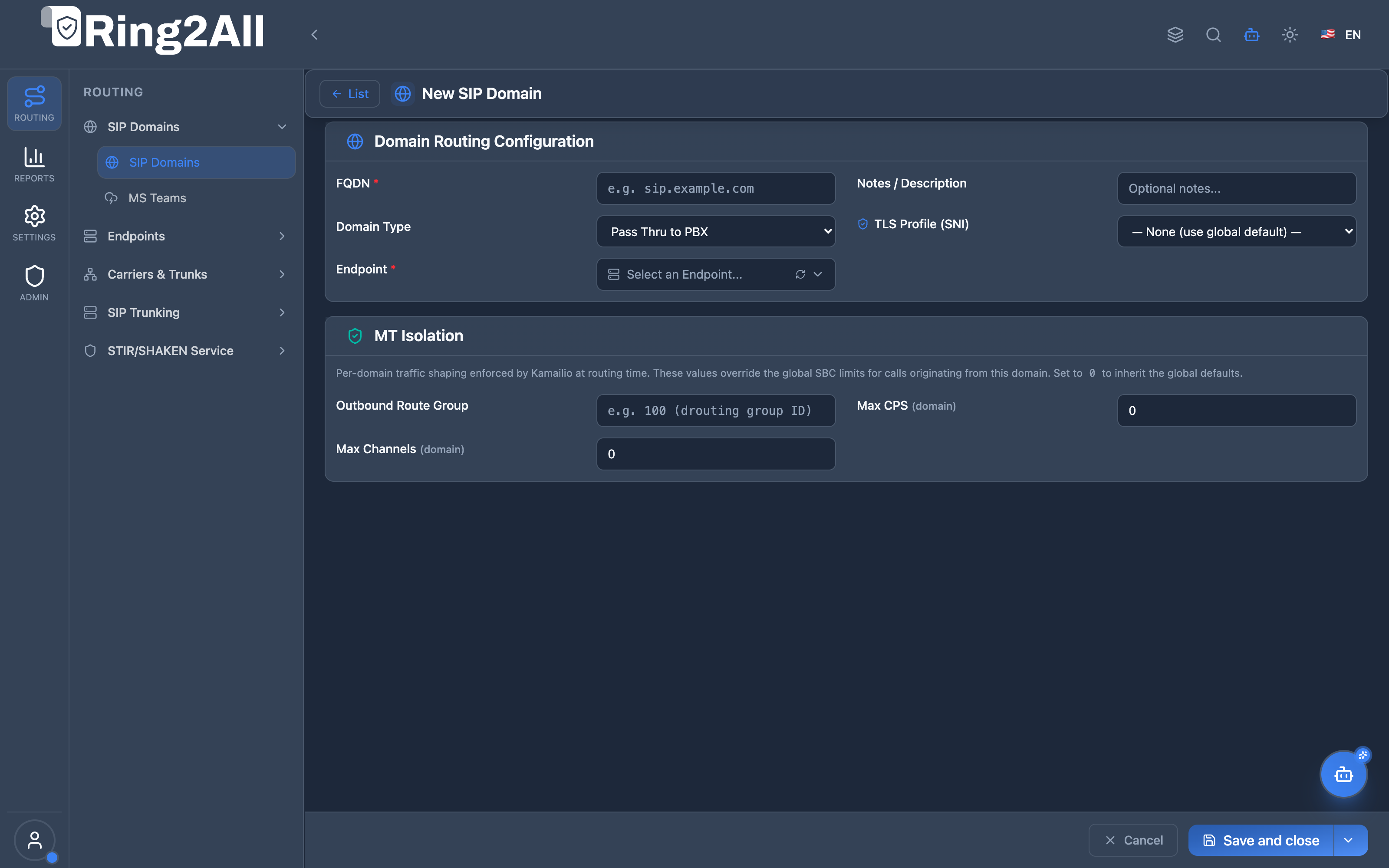
Section titled “SIP Domain Configuration Form”The domain configuration interface is organized into two primary sections: Domain Identity & Destination and Multi-Tenant Rate Limiting & Ring2All API Integration.
5. Field & Configuration Reference
Section titled “5. Field & Configuration Reference”Section 1: Domain Identity & Routing Destination
Section titled “Section 1: Domain Identity & Routing Destination”| Field | Type | Constraints / Format | Description |
|---|---|---|---|
| Domain FQDN * | Text | Valid FQDN (e.g., pbx.client.com) |
The unique SIP domain name expected in the Request-URI or To: header of inbound SIP messages. |
| Domain Type * | Dropdown | passthru, ring2all |
Determines how the SBC processes traffic. ring2all performs PBX token auth; passthru relays directly to downstream gateways. |
| PBX Endpoint Cluster * | Dropdown | Active Dispatcher Set IDs | The target dispatcher group representing the pool of backend Telephony Server or media servers that service this domain. |
| TLS Profile | Dropdown | Configured TLS Profiles | The cryptographic TLS certificate and ciphers suite used for secure SIP signaling (SIP-TLS on port 5061). |
| Description / Notes | Textarea | Max 255 characters | Free-form operational notes detailing client account ID, organization name, or peering ticketing references. |
Section 2: Multi-Tenant Rate Limiting & Integration
Section titled “Section 2: Multi-Tenant Rate Limiting & Integration”| Field | Type | Constraints / Format | Description |
|---|---|---|---|
| Outbound Route Group | Dropdown / Text | Numeric ID (e.g., 100) |
Overrides the default routing table group used when endpoints within this domain make outbound PSTN calls. |
| Max Concurrent Channels | Numeric | 0 to 10,000 (0 = unlimited) | Upper boundary for active calls across this domain. Kamailio rejects calls exceeding this quota with SIP 503. |
| Max Calls Per Second (CPS) | Numeric | 0 to 500 (0 = unlimited) | Ingress signaling burst limit enforced by Kamailio’s sliding-window rate limiter to protect downstream PBX cores. |
| Ring2All Core API URL | Text (Optional) | https://host:port/api |
Fastify API endpoint of the backend PBX node for real-time extension synchronization and live presence lookups. |
| Ring2All API Key | Password / Key | 64-character token | Shared secret token granting the SBC administrative access to PBX extension registers and call routing tables. |
6. Kamailio Core Engine & Multi-Tenant Mechanics
Section titled “6. Kamailio Core Engine & Multi-Tenant Mechanics”When a domain record is saved in the Ring2All SBC administration UI, the following database and kernel events occur:
- Database Persistence:
- The primary FQDN is stored in
kamailio.domain(id,domain,did). - Tenant isolation attributes and rate limits are stored in
kamailio.domain_attrs(did,name,type,value).
- The primary FQDN is stored in
- Kamailio Memory Cache Reload:
- The administrative daemon issues an asynchronous RPC call
kamcmd domain.reload. - Kamailio reconstructs its internal hash table of local domains in shared memory (
shm), ensuring microsecond lookup performance during call setup without disk I/O.
- The administrative daemon issues an asynchronous RPC call
- Signaling Routing Pipeline (
route[DISPATCH]):# Domain lookup in route[REQINIT]if (!is_domain_local("$rd")) {sl_send_reply("404", "Domain Not Serviced by SBC");exit;}# Fetch tenant attributes$var(max_cps) = @domain.attrs.mt_max_cps;if ($var(max_cps) > 0 && !sht_iterator_check("cps_window", "$rd", $var(max_cps))) {sl_send_reply("503", "Tenant Rate Limit Exceeded");exit;}
7. Security Best Practices & Operational Hardening
Section titled “7. Security Best Practices & Operational Hardening”- Enforce Strict FQDN Validation: Never configure IP addresses as SIP Domains unless dedicated exclusively to a static wholesale carrier trunk. Use fully qualified domain names with valid DNS SRV records.
- Mandate SIP-TLS for Cloud Tenants: When routing over public IP transit, bind a dedicated TLS profile with TLS 1.3 and forward secrecy ciphers (
ECDHE-RSA-AES256-GCM-SHA384). - Calibrate Rate Limits: Always configure both
Max ChannelsandMax CPSfor every customer domain to prevent rogue auto-dialers or SIP flood attacks from impacting adjacent tenants.
8. Zero-Touch SIP Registration & Multi-Tenant DNS Architecture (RFC 3263)
Section titled “8. Zero-Touch SIP Registration & Multi-Tenant DNS Architecture (RFC 3263)”In carrier ecosystems like Telnyx or Twilio, end-users do not configure an explicit Outbound Proxy or IP address inside their softphone (Zoiper, Grandstream Wave, Yealink, MicroSIP). Instead, users merely enter their Username, Password, and Domain (e.g., sip.ring2all.com or mycompany.ring2all.com).
Ring2All SBC implements full RFC 3263 (Locating SIP Servers) support, allowing zero-touch client registration and seamless coexistence of Web Administration (HTTPS 443) and SIP Telephony (UDP/TCP 5060, TLS 5061) across identical domain names.
8.1 The RFC 3263 Resolution Flow: How It Works
Section titled “8.1 The RFC 3263 Resolution Flow: How It Works”When a SIP client starts registration with user@domain.com and an empty Outbound Proxy:
- DNS SRV Lookup (
_sip._udp.domain.com/_sips._tcp.domain.com): The client queries public DNS for standard SRV locator records. The DNS server answers with the target hostname, priority, weight, and port (e.g.,5060or5061) of the Ring2All Kamailio SBC node. - DNS A / AAAA Fallback: If SRV records are absent, modern SIP stacks fall back to standard A records, sending SIP
REGISTERdatagrams directly to the SBC public IPv4/IPv6 address on default port 5060. - Kamailio Ingress Digest Authentication: Kamailio inspects the
$td(To-Domain) header, queriespublic.domain/public.domain_attrsfor the tenant binding, executes instantaneous HA1 authentication from in-memory RAM cache (htable), and relays authenticated bindings to FreeSWITCH PBX nodes via internal WireGuard VPN.
┌────────────────────────────────────────────────────────────────────────┐│ Zero-Touch Client Handshake │└───────────────────────────────────┬────────────────────────────────────┘ │ 1. DNS SRV (_sip._udp.mycompany.ring2all.com) ▼┌────────────────────────────────────────────────────────────────────────┐│ Public DNS Server (Cloudflare / Hostinger) ││ Returns: 10 10 5060 sip.ring2all.com (SBC IP) │└───────────────────────────────────┬────────────────────────────────────┘ │ 2. SIP REGISTER (No Outbound Proxy needed) ▼┌────────────────────────────────────────────────────────────────────────┐│ Ring2All SBC (Kamailio 6.1) ││ Port 5060 UDP/TCP / Port 5061 TLS ││ • Validates $td domain attribute ││ • Authenticates via RAM htable (0.005ms) ││ • Relays to FreeSWITCH Cluster │└────────────────────────────────────────────────────────────────────────┘8.2 Coexistence of Web & Telephony on the Same Subdomain
Section titled “8.2 Coexistence of Web & Telephony on the Same Subdomain”A common architectural question is whether a tenant subdomain such as mycompany.ring2all.com can simultaneously serve the Web Administration Portal and the SIP Phone Registration without IP address collisions.
Because internet protocols are strictly segregated by OSI Layer 4 Ports, both services coexist with zero interference:
| Protocol / Service | Destination Port | Processing Engine | Functional Purpose |
|---|---|---|---|
| Web Portal / HTTP | 80 TCP (Redirect 301) |
Nginx Reverse Proxy | Automatic upgrade to secure HTTPS connection. |
| Web Portal / HTTPS | 443 TCP (TLS 1.3) |
Nginx Reverse Proxy | Serves Ring2All PBX Web GUI and Fastify REST API. |
| SIP Signaling (Clear) | 5060 UDP/TCP |
Kamailio 6.1 SBC | Ingests SIP REGISTER, INVITE, and OPTIONS. |
| SIP Signaling (Secure) | 5061 TLS |
Kamailio 6.1 SBC | High-security encrypted SIP signaling via SNI. |
- When an administrator opens
https://mycompany.ring2all.comin Chrome, the browser connects to port 443 (Nginx). - When a softphone registers to
mycompany.ring2all.com, the SIP stack connects to port 5060 (Kamailio SBC).
8.3 Step-by-Step Operator Implementation Guide
Section titled “8.3 Step-by-Step Operator Implementation Guide”To enable zero-touch SIP domain resolution in your production environment:
Step 1: Configure Public DNS Records
Section titled “Step 1: Configure Public DNS Records”In your public DNS zone provider (e.g., Cloudflare, Hostinger, AWS Route 53), configure:
; Primary SBC A Recordsip.ring2all.com.         300 IN A     <SBC_PUBLIC_IP>
; Wildcard A Record (Routes all tenant subdomains to your cluster edge)*.ring2all.com.           300 IN A     <CLUSTER_PUBLIC_IP>
; RFC 3263 SIP Service Locators (SRV Records)_sip._udp.ring2all.com.   3600 IN SRV  10 10 5060 sip.ring2all.com._sip._tcp.ring2all.com.   3600 IN SRV  10 10 5060 sip.ring2all.com._sips._tcp.ring2all.com.  3600 IN SRV  10 10 5061 sip.ring2all.com.
Step 2: Register the Tenant Domain in Ring2All SBC
Section titled “Step 2: Register the Tenant Domain in Ring2All SBC”- Log in to Ring2All SBC Web (
/domains). - Click Create Domain.
- Set Domain FQDN:
mycompany.ring2all.com(orsip.ring2all.com). - Set Domain Type:
ring2all(for Mini-PBX multi-extension tenants) orpassthru(for external IP trunks). - Assign the target PBX Dispatcher Set (e.g., Set
1for FreeSWITCH telephony cluster). - Click Save Changes and Reload Domains.
Step 3: End-User Client Device Configuration
Section titled “Step 3: End-User Client Device Configuration”In any standard SIP device (Zoiper, Grandstream Wave, Yealink, MicroSIP, Bria):
- Account Name:
My Extension - Username / Extension:
1001(or allocated E.164 DID) - Password:
•••••••••••• - Domain / Registrar:
mycompany.ring2all.com(orsip.ring2all.com) - Outbound Proxy: (Leave Empty / Blank)
The softphone will immediately resolve DNS, establish contact with Kamailio SBC on port 5060, and authenticate without requiring technical assistance.
8.4 Cloudflare Production Architecture & Best Practices Guide
Section titled “8.4 Cloudflare Production Architecture & Best Practices Guide”Cloudflare is the recommended DNS management platform for Ring2All deployments due to its sub-second global propagation, built-in DDoS mitigation, and robust API automation.
[!WARNING] The Cloudflare Golden Rule for VoIP / SIP
Cloudflare’s HTTP Proxy (Orange Cloud ☁️🧡) is strictly limited to Layer 7 Web protocols (HTTP, HTTPS, WebSockets). It does not proxy standard UDP SIP traffic on port 5060.
Any DNS record pointing to your Ring2All SBC must be configured as DNS Only (Grey Cloud ☁️🩶). Enabling the Orange Cloud on SIP hostnames will block UDP datagrams and break softphone registration.
Recommended Cloudflare DNS Configuration Matrix
Section titled “Recommended Cloudflare DNS Configuration Matrix”To serve thousands of Mini-PBX tenants with automated SSL and direct, low-latency SIP connectivity:
| Record Type | Name / Host | Target / Value | Cloudflare Proxy Status | Architectural Purpose |
|---|---|---|---|---|
| A | sbc |
<SBC_PUBLIC_IP> (e.g. 149.28.107.48) |
☁️ DNS Only (Grey Cloud) ⚠️ | Direct, unproxied VoIP ingress for Kamailio 6.1 (Ports 5060/5061). |
| A | * (Wildcard) |
<WEB_PBX_PUBLIC_IP> |
☁️ Proxied (Orange Cloud) | Automatic WAF, DDoS shielding, and Universal SSL for all Mini-PBX portals. |
| A | @ (Root) |
<WEB_PBX_PUBLIC_IP> |
☁️ Proxied (Orange Cloud) | Root branding website and primary corporate portal. |
| SRV | @ (Root) |
_sip._udp → sbc.ring2all.com:5060 |
DNS Only (Native) | RFC 3263 SIP locator for softphones (UDP signaling). |
| SRV | @ (Root) |
_sips._tcp → sbc.ring2all.com:5061 |
DNS Only (Native) | RFC 3263 SIP locator for encrypted TLS softphones. |
Step-by-Step Cloudflare Setup
Section titled “Step-by-Step Cloudflare Setup”- Create the Dedicated SBC Hostname:
- Record:
A - Name:
sbc - IPv4 address:
<IP_DEL_SBC> - Proxy status: Toggle switch to DNS Only (Grey Cloud ☁️🩶).
- Record:
- Create the Web Wildcard for PBX Tenants:
- Record:
A - Name:
* - IPv4 address:
<IP_DEL_SERVIDOR_WEB> - Proxy status: Toggle switch to Proxied (Orange Cloud ☁️🧡).
- Record:
- Add the RFC 3263 SRV Records:
- Click Add record and choose
SRV. - UDP Locator:
- Name:
@ - Service:
_sip - Protocol:
UDP - Priority:
10, Weight:10, Port:5060 - Target:
sbc.ring2all.com
- Name:
- TLS Encrypted Locator:
- Name:
@ - Service:
_sips - Protocol:
TCP - Priority:
10, Weight:10, Port:5061 - Target:
sbc.ring2all.com
- Name:
- Click Add record and choose
Why This Hybrid Pattern Is Superior:
Section titled “Why This Hybrid Pattern Is Superior:”- Free Enterprise DDoS & WAF Protection: All web management portals (
mycompany.ring2all.com) benefit from Cloudflare’s global edge network, absorbing HTTP flood attacks, scraping attempts, and brute-force web intrusions before they ever reach your PBX Nginx server. - Zero SIP Latency: Voice signaling (SIP) and media (RTP) bypass the Cloudflare web proxy completely, connecting straight to Kamailio SBC and RTPEngine for pristine audio quality with zero jitter.
- Zero Configuration for End Users: A single domain name (
mycompany.ring2all.com) serves both the browser dashboard and the mobile/desktop softphone without requiring an Outbound Proxy or custom ports.
9. Model Context Protocol (MCP) AI Integration
Section titled “9. Model Context Protocol (MCP) AI Integration”The SIP Domains module integrates with the Ring2All SBC Model Context Protocol (MCP) server, allowing AI Copilots, NOC automation bots, and platform administrators to programmatically inspect domain catalogs, configure multi-tenant routing, and trigger zero-downtime cluster reloads.
MCP Tools Catalog
Section titled “MCP Tools Catalog”| Tool Name | Type | Access | Description |
|---|---|---|---|
list_sip_domains |
Query | sip_domains / Read |
List all SIP Domains configured in Kamailio (domain name, domain type, PBX dispatch set, TLS profile, and multi-tenant rate limits). |
get_sip_domain_status |
Query | sip_domains / Read |
Get detailed configuration, PBX dispatch cluster, TLS profile, and CPS quotas of a specific SIP domain. |
create_sip_domain |
Mutation | sip_domains / Write |
Register a new SIP domain in Kamailio with designated PBX dispatch cluster, TLS profile, and multi-tenant rate limits. |
delete_sip_domain |
Mutation | sip_domains / Delete |
Delete a SIP domain from Kamailio and reload the domain module across the cluster (protected by referential integrity guards). |
reload_sip_domains |
Operational | sip_domains / Exec |
Reload Kamailio domain routing tables from database into RAM memory across all cluster nodes. |
Tool Schemas & Execution Responses
Section titled “Tool Schemas & Execution Responses”list_sip_domains
Section titled “list_sip_domains”{ "name": "list_sip_domains", "description": "List all SIP Domains configured in Kamailio (domain name, domain type, PBX dispatch set, TLS profile, and multi-tenant rate limits).", "parameters": { "type": "object", "properties": { "search": { "type": "string", "description": "Filter by domain name (e.g. \"pbx.client.com\")." }, "domain_type": { "type": "string", "enum": ["ring2all", "passthru", "msteams"], "description": "Filter by domain type." } } }}Realistic Execution Response:
{ "success": true, "data": { "total": 3, "domains": [ { "id": 1, "domain": "tenant1.ring2all.com", "domainType": "ring2all", "dispatchSet": "1", "tlsProfileId": "tls_default", "maxCps": 50, "maxChannels": 200, "notes": "Acme Corp Core PBX", "lastModified": "2026-09-08T09:12:00Z" }, { "id": 2, "domain": "sip.globalcarrier.net", "domainType": "passthru", "dispatchSet": "2", "tlsProfileId": "tls_strict", "maxCps": 100, "maxChannels": 500, "notes": "Wholesale Interconnect Direct", "lastModified": "2026-09-07T14:30:00Z" }, { "id": 3, "domain": "teams.enterprise.org", "domainType": "msteams", "dispatchSet": "3", "tlsProfileId": "tls_msteams_cert", "maxCps": 20, "maxChannels": 100, "notes": "Microsoft Teams Direct Routing Domain", "lastModified": "2026-09-06T18:45:00Z" } ] }}get_sip_domain_status
Section titled “get_sip_domain_status”{ "name": "get_sip_domain_status", "description": "Get detailed configuration, PBX dispatch cluster, TLS profile, and CPS quotas of a specific SIP domain.", "parameters": { "type": "object", "properties": { "domain": { "type": "string", "description": "SIP domain name (e.g. \"pbx.client.com\") or numeric ID." } }, "required": ["domain"] }}Realistic Execution Response:
{ "success": true, "data": { "domain": { "id": 1, "domain": "tenant1.ring2all.com", "domainType": "ring2all", "dispatchSet": "1", "failoverPolicy": "cascade_next_node", "failoverCodes": "408,503,500", "tlsProfileId": "tls_default", "notes": "Acme Corp Core PBX", "maxCps": 50, "maxChannels": 200, "outboundRouteGroup": "100", "lastModified": "2026-09-08T09:12:00Z" } }}create_sip_domain
Section titled “create_sip_domain”{ "name": "create_sip_domain", "description": "Register a new SIP domain in Kamailio with designated PBX dispatch cluster, TLS profile, and multi-tenant rate limits.", "parameters": { "type": "object", "properties": { "domain": { "type": "string", "description": "Fully qualified SIP domain name." }, "domain_type": { "type": "string", "enum": ["ring2all", "passthru", "msteams"] }, "dispatch_set": { "type": "string", "description": "Target PBX Dispatcher Set ID." }, "tls_profile_id": { "type": "string", "description": "Optional TLS profile ID." }, "mt_max_cps": { "type": "number", "description": "Calls Per Second limit." }, "mt_max_channels": { "type": "number", "description": "Concurrent channel limit." } }, "required": ["domain"] }}Realistic Execution Response:
{ "success": true, "data": { "message": "SIP Domain \"voice.novacorp.com\" was created successfully.", "domainId": 4, "domain": "voice.novacorp.com", "reloaded": true }}reload_sip_domains
Section titled “reload_sip_domains”{ "name": "reload_sip_domains", "description": "Reload Kamailio domain routing tables from database into RAM memory across all cluster nodes.", "parameters": { "type": "object", "properties": {} }}Realistic Execution Response:
{ "success": true, "data": { "message": "Kamailio domain module reloaded in RAM across the cluster.", "report": { "command": "domain.reload", "totalNodes": 2, "successfulNodes": 2, "failedNodes": 0, "totalDurationMs": 14 } }}Bilingual Natural Language Prompt Examples
Section titled “Bilingual Natural Language Prompt Examples”English Prompts
Section titled “English Prompts”- “NOC Copilot, list all configured SIP domains and show their assigned PBX dispatch sets.”
- “Check the configuration and CPS rate limit for domain ‘tenant1.ring2all.com’.”
- “Register a new SIP domain ‘voice.healthcare.org’ mapped to dispatch set 1 with a 30 CPS ceiling.”
- “Reload the Kamailio domain module across the active SBC cluster.”
Spanish Prompts
Section titled “Spanish Prompts”- “Copilot NOC, lista todos los dominios SIP configurados y muestra sus grupos de despacho PBX asignados.”
- “Consulta la configuración y el límite de CPS del dominio ‘tenant1.ring2all.com’.”
- “Crea un nuevo dominio SIP ‘voice.healthcare.org’ asociado al dispatch set 1 con límite de 30 CPS.”
- “Recarga las tablas de dominios de Kamailio en la memoria RAM de todo el cluster de SBC.”
Enterprise Safeguards & Execution Boundaries
Section titled “Enterprise Safeguards & Execution Boundaries”- Multi-Tenant Namespace Scoping: Domains enforce clean subscriber isolation. Deletion is blocked via
assertCanDeleteSipDomainif active SIP Accounts, trunks, or DIDs are bound to the domain. - Cluster-Wide BinRPC Broadcast: Domain creations, deletions, and updates trigger asynchronous parallel
domain.reloadRPC across all cluster nodes (clusterBroadcastService). - Sliding-Window Rate Protection: Ingress signaling bursts are strictly governed by
mt_max_cpsandmt_max_channelsin Kamailiosht_iteratorshared memory, protecting downstream Telephony cores from DDoS.
8. Troubleshooting & Verification
Section titled “8. Troubleshooting & Verification”| Symptom / Issue | Potential Root Cause | Recommended Verification & Resolution |
|---|---|---|
Inbound calls rejected with 404 Domain Not Serviced |
Domain is missing or Kamailio memory cache is unsynchronized. | Check database via psql -d kamailio -c "SELECT * FROM domain;" and reload cache with kamcmd domain.reload. |
Calls dropped with 503 Tenant Rate Limit Exceeded |
The domain exceeded its configured Max Concurrent Channels or CPS. |
Inspect active calls in Reports > Active Calls and adjust the threshold in the domain configuration form. |
SIP Registration fails with 403 Forbidden |
Ring2All API Key mismatch or incorrect backend PBX API URL. | Click Test Connection in the domain form to verify network reachability and cryptographic token validity. |
9. Glossary
Section titled “9. Glossary”- FQDN (Fully Qualified Domain Name): Complete domain name specifying its exact location in the DNS hierarchy (e.g.,
voice.company.com). - Dispatch Set: A numeric identifier representing an active load-balanced group of PBX media servers managed by the Kamailio
dispatchermodule. - CPS (Calls Per Second): Telephony performance metric denoting the rate at which new call setups are initiated within a one-second sliding window.
- ASR (Answer-Seizure Ratio): Percentage of initiated telephone calls that are successfully answered by the remote party.