

Public Blacklists (APIBAN) Module Documentation
Table of Contents
Section titled “Table of Contents”- Navigation & Access
- Screenshots & Visual Interface
- Module Overview (Technical)
- Module Overview (Commercial/Business)
- Module Overview (End User/Administrator)
- User Roles & Key Capabilities
- Configuration Sections
- Model Context Protocol (MCP) AI Integration
- Common Scenarios & Examples
- Limitations & Important Notes
- Troubleshooting Tips & CLI Commands
- Glossary
Navigation & Access
Section titled “Navigation & Access”To access the Public Blacklists module:
- Log in to the Ring2All Web Portal (
https://<domain-or-ip>/login) with administrative credentials. - In the left navigation sidebar, locate and expand Admin.
- Under the Firewall section, click Public Blacklists (
/admin/firewall/voipbl). - Enter or update your APIBAN API Key and click Test & Save Key to validate connectivity.
- Toggle Module Status and Automatic Updates according to operational requirements.
- Click Sync Now in the bottom action bar to trigger an on-demand threat intelligence synchronization.
Screenshots & Visual Interface
Section titled “Screenshots & Visual Interface”Public Blacklists (APIBAN) Dashboard
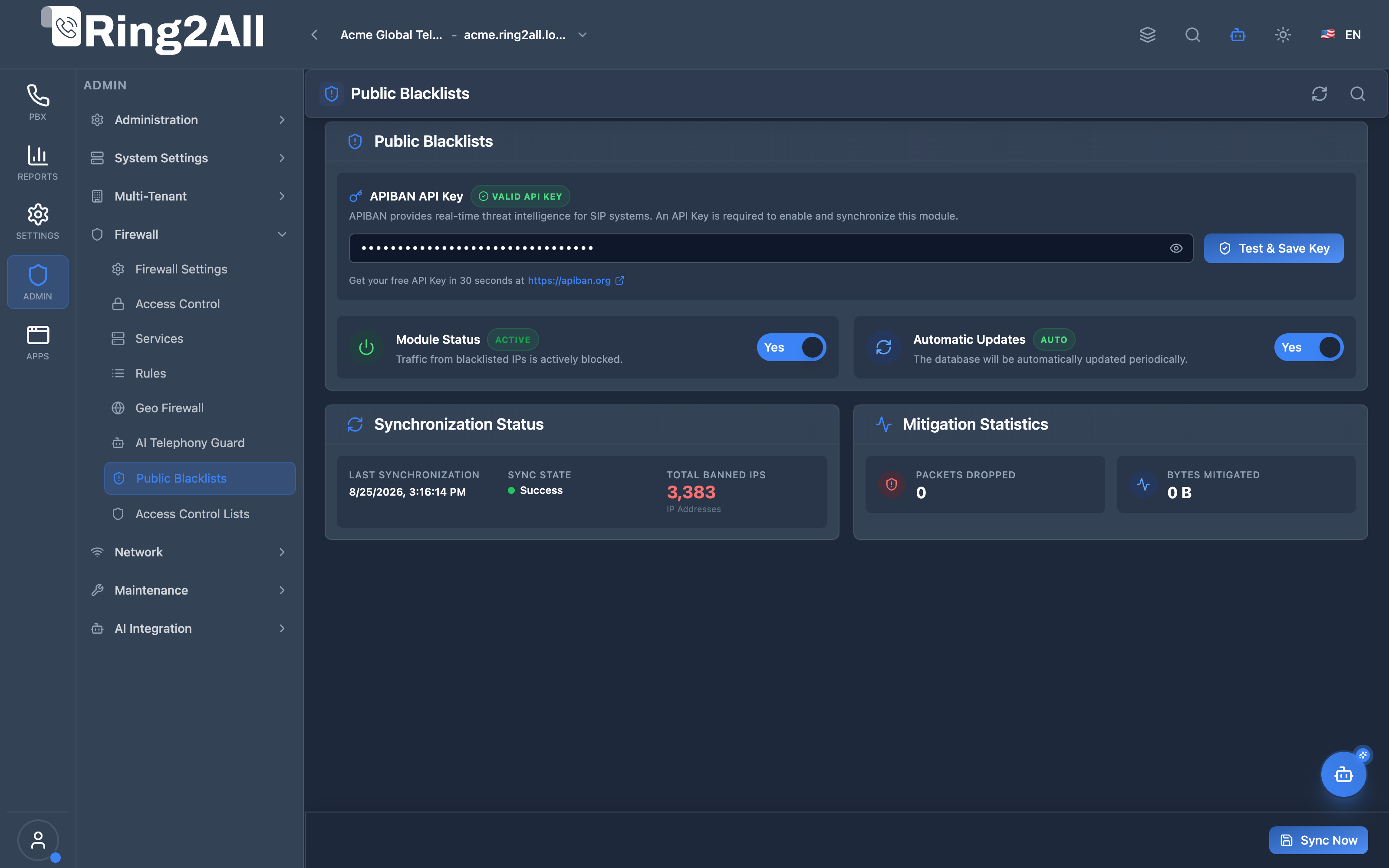
Section titled “Public Blacklists (APIBAN) Dashboard”The Public Blacklists interface manages real-time threat intelligence synchronization: verifying APIBAN API keys, enabling automated periodic updates, reporting last synchronization timestamps and total banned IPs (over 3,300 active malicious hosts), and tracking mitigation statistics (packets dropped and mitigated bandwidth).
1. Module Overview (Technical)
Section titled “1. Module Overview (Technical)”What Is the Public Blacklists Module?
Section titled “What Is the Public Blacklists Module?”The Public Blacklists module provides real-time distributed threat intelligence integration with APIBAN (an automated global honeypot network specifically designed for VoIP and SIP systems). It actively retrieves and enforces a curated, high-confidence list of known malicious IP addresses, protecting the Ring2All SBC and PBX from:
- Automated SIP scanners and credential brute-force attempts (Friendly-Scanner, SIPVicious, etc.).
- Toll fraud and unauthorized PSTN routing attempts.
- SIP Distributed Denial of Service (DDoS) and flood attacks.
Dual-Layer Protection Architecture
Section titled “Dual-Layer Protection Architecture”┌─────────────────────────────────────────────────────────────────┐│ Public Blacklists (APIBAN) Architecture │├─────────────────────────────────────────────────────────────────┤│ ││ Ring2All Platform UI / REST API / MCP AI Copilot ││ ┌──────────────────────────────────────────────────────────┐ ││ │ • API Key: [ ****************************** ] [Validated]│ ││ │ • Module Status: [Active] │ ││ │ • Auto-Update: [Enabled - Daily Cron] │ ││ │ • Threat Feed: [2,144+ Active Malicious IPs] │ ││ └──────────────────┬───────────────────────────────────────┘ ││ │ ││ ▼ [Paginated APIBAN Sync] ││ ┌──────────────────────────────────────────────────────────┐ ││ │ generate-nftables.sh / voipblService.ts │ ││ │ │ ││ │ 1. GET https://apiban.org/api/{KEY}/banned │ ││ │ 2. Loop batches of 250 IPs via cursor (ID) │ ││ │ 3. Save to /var/lib/voipbl/voipbl.txt │ ││ │ 4. Populate Linux nftables Set (voipbl_blocked_v4) │ ││ │ 5. Populate Kamailio in-memory htable (apiban) │ ││ └──────────┬─────────────────────────────┬─────────────────┘ ││ │ │ ││ ▼ [Kernel-Level Drop] ▼ [Application Drop] ││ ┌──────────────────────────────┐ ┌──────────────────────────┐ ││ │ nftables │ │ Kamailio Core │ ││ │ │ │ │ ││ │ table inet filter { │ │ request_route { │ ││ │ set voipbl_blocked_v4 { │ │ if ($sht(apiban=>$si)) │ ││ │ elements = { ... } │ │ { drop; exit; } │ ││ │ } │ │ } │ ││ │ chain input { │ │ │ ││ │ ip saddr @voipbl_... drop│ │ Silent drop before SIP │ ││ │ } │ │ parsing begins │ ││ │ } │ │ │ ││ └──────────────────────────────┘ └──────────────────────────┘ ││ │└─────────────────────────────────────────────────────────────────┘2. Module Overview (Commercial/Business)
Section titled “2. Module Overview (Commercial/Business)”Business Value: VoIPBL vs. APIBAN
Section titled “Business Value: VoIPBL vs. APIBAN”| Metric / Feature | Legacy VoIPBL | Ring2All APIBAN Integration |
|---|---|---|
| Data Freshness | Stale static dump (accumulates IPs for 10+ years). | Real-time Honeypots with strict 7-day TTL. |
| False Positive Rate | High: Blocks clean residential/carrier IPs. | Zero False Positives: Only active attackers. |
| Resource Efficiency | Requires loading 93,000+ flat entries. | Ultra-lightweight (~2,000 to 5,000 active threat IPs). |
| Cost | Free (Unmaintained). | 100% Free API Key generated in 30 seconds. |
| Kernel Performance | High memory overhead in packet filtering. | Instant lookup via nftables and Kamailio hash tables. |
Key Business Benefits
Section titled “Key Business Benefits”- Zero Downtime Toll Fraud Protection: Prevents unauthorized PBX trunk hijack before credentials can be guessed.
- Clean CDRs & Telephony Logs: Eliminates log noise caused by automated SIP port sniffers.
- Bandwidth & CPU Preservation: Drops malicious network packets at the kernel level without waking userland daemons.
3. Module Overview (End User/Administrator)
Section titled “3. Module Overview (End User/Administrator)”What Can You Do in This Module?
Section titled “What Can You Do in This Module?”- Configure APIBAN API Key:
- Enter your personal API Key obtained for free from https://apiban.org.
- Use the “Test & Save Key” button to validate communication with APIBAN servers.
- Built-in mask/unmask eye toggle for secure credentials display.
- Master Module Activation:
- Toggle Module Status (
Active/Inactive). Note: Requires a valid API Key to enable.
- Toggle Module Status (
- Automated Synchronization:
- Toggle Automatic Updates to keep the threat list refreshed on a recurring schedule.
- Manual On-Demand Sync:
- Click the bottom-right “Sync Now” button to immediately pull the newest threat intelligence feed.
- IP Threat Lookup:
- Use the header search button to verify if any specific IPv4 address is currently blocked.
- Mitigation Metrics:
- Real-time telemetry displaying total packets dropped and total bandwidth mitigated.
🎯 User Roles & Key Capabilities
Section titled “🎯 User Roles & Key Capabilities”The Public Blacklists (APIBAN) module distributes community threat intelligence responsibilities across platform operational roles:
| User Role | Key Permissions & Responsibilities | Common Tasks & Workflows |
|---|---|---|
| System Super Administrator / Security Director | Master API key management, scheduler configuration, and kernel mitigation oversight. | Register free APIBAN API key, test credentials connectivity, toggle automated background sync (every 4 hours), monitor dropped packet metrics. |
| NOC & Security Operations Engineer | Real-time IP threat verification, investigating reported false positives, and whitelist override administration. | Query IP reputation status via Copilot or UI search, determine if a blocked carrier/client IP was flagged for scanning, create high-priority firewall whitelist overrides. |
| Tenant Administrator | Read-only visibility into community threat mitigation metrics. | Review total blocked malicious hosts, inspect bandwidth and CPU cycles saved by kernel-level drops, verify platform protection status. |
| Cybersecurity Auditor | Verification of threat intelligence hygiene and compliance with data retention benchmarks. | Verify automated list aging (7-day TTL vs permanent legacy blocklists), validate near-zero false-positive rates on active attacker addresses. |
4. Configuration Sections
Section titled “4. Configuration Sections”1. APIBAN API Key Panel
Section titled “1. APIBAN API Key Panel”- API Key Input: Secure password/text field with instant validation badges:
VALID API KEY(Green): Key verified and active.INVALID KEY(Amber/Red): Key rejected by APIBAN authentication.NOT CONFIGURED(Slate): Module waiting for initial key setup.
- Link: Direct quick-link to https://apiban.org to obtain free keys.
2. Status & Automation Toggles
Section titled “2. Status & Automation Toggles”- Module Status: Master switch. When disabled, the
voipbl_blocked_v4set is cleared. - Automatic Updates: Enables background cron synchronization every 4 hours.
3. Synchronization & Mitigation Status
Section titled “3. Synchronization & Mitigation Status”- Last Synchronization: Timestamp of the most recent sync.
- Sync State: Real-time status (
Success,Syncing...,Failed, orIdle). - Total Banned IPs: Total number of active malicious IPs currently blocked in the firewall.
- Packets Dropped: Total network packets intercepted and discarded.
- Bytes Mitigated: Bandwidth saved by dropping malicious traffic at the kernel level.
Model Context Protocol (MCP) AI Integration
Section titled “Model Context Protocol (MCP) AI Integration”The Public Blacklists module is integrated with the Ring2All Platform Copilot MCP Server, enabling natural language threat intelligence querying, on-demand synchronization, and IP reputation lookups:
🛠️ Available MCP Tools
Section titled “🛠️ Available MCP Tools”| Tool Name | Operation | Access Level | Description | Key Parameters |
|---|---|---|---|---|
get_voipbl_status |
Read | SuperAdmin / Auditor | Returns the current APIBAN provider state, API Key validity, last sync timestamp, and total blocked malicious scanner IPs. | None |
sync_threat_intelligence |
Write (Guarded) | SuperAdmin Only | Triggers an immediate background synchronization with the APIBAN threat database and updates kernel nftables sets. | None |
check_ip_threat_status |
Read | SuperAdmin / Auditor | Queries whether a specific IPv4 address is actively flagged in the community threat intelligence database. | ipAddress (string, required) |
📋 JSON Tool Schemas & Sample Executions
Section titled “📋 JSON Tool Schemas & Sample Executions”get_voipbl_status
Section titled “get_voipbl_status”{ "name": "get_voipbl_status", "arguments": {}}Sample Successful Response:
{ "success": true, "data": { "provider": "APIBAN", "enabled": true, "autoUpdate": true, "syncStatus": "SUCCESS", "lastSyncAt": "2026-09-08T08:00:15Z", "hasApiKey": true, "totalBlockedMaliciousIps": 3412 }}check_ip_threat_status
Section titled “check_ip_threat_status”{ "name": "check_ip_threat_status", "arguments": { "ipAddress": "198.51.100.25" }}Sample Successful Response:
{ "success": true, "data": { "ipAddress": "198.51.100.25", "isBlocked": true, "provider": "APIBAN" }}💬 Natural Language Prompt Examples
Section titled “💬 Natural Language Prompt Examples”English Prompts
Section titled “English Prompts”- “What is the current status of the APIBAN threat intelligence feed?”
- “Check if IP ‘198.51.100.25’ is currently blocked in the public threat blacklist.”
- “Trigger an immediate background synchronization of the public blacklist.”
- “How many malicious scanner IPs are currently blocked by APIBAN?”
Ejemplos en Español (Spanish Prompts)
Section titled “Ejemplos en Español (Spanish Prompts)”- “¿Cuál es el estado actual de la sincronización de amenazas de APIBAN?”
- “Verifica si la IP ‘198.51.100.25’ está bloqueada en la lista negra pública.”
- “Ejecuta una sincronización inmediata de la lista de amenazas de APIBAN.”
- “¿Cuántas direcciones IP de escáners maliciosos están bloqueadas actualmente por APIBAN?”
🛡️ Enterprise Safeguards & Best Practices
Section titled “🛡️ Enterprise Safeguards & Best Practices”- Sync Cooldown & Anti-Flooding: Rapid manual sync calls are rate-limited to avoid APIBAN upstream HTTP 429 throttling and preserve local database connection pools.
- Strict 7-Day TTL: Unlike unmaintained legacy VoIPBL feeds that retain stale entries indefinitely, APIBAN enforces a rolling 7-day TTL, dramatically reducing false-positive rates on recycled residential IP pools.
- Emergency Whitelist Precedence: High-priority ACCEPT rules configured in the Firewall Rules module take precedence over APIBAN kernel sets, ensuring legitimate client or carrier traffic can be restored immediately.
6. Common Scenarios & Examples
Section titled “6. Common Scenarios & Examples”Scenario 1: First-Time Setup
Section titled “Scenario 1: First-Time Setup”- Visit https://apiban.org and register for a free API Key.
- Navigate to Admin -> Firewall -> Public Blacklists.
- Paste the API Key into the input field and click “Test & Save Key”.
- Once validated (green badge), toggle Module Status to Active.
- Enable Automatic Updates and click “Sync Now”.
- The system will download ~2,000+ active threat IPs into
nftablesand Kamailio.
Scenario 2: Verifying a Blocked Remote Worker
Section titled “Scenario 2: Verifying a Blocked Remote Worker”If a remote employee or trunk is having connectivity problems:
- Click the Search icon in the upper right header of the Public Blacklists module.
- Enter the remote worker’s public IP address (e.g.
198.51.100.44). - If the IP is listed in APIBAN (meaning it was flagged for attacking a honeypot in the last 7 days), you can:
- Add a high-priority ACCEPT rule in Firewall Rules to override the blacklist.
- Advise the user to release/renew their dynamic ISP IP.
7. Limitations & Important Notes
Section titled “7. Limitations & Important Notes”[!NOTE] Dynamic Pagination: The APIBAN REST API returns 250 IPs per call. Ring2All automatically loops through all cursors (
last_id) until the entire active feed is downloaded.
[!IMPORTANT] Kernel vs. Application Drops: Packets dropped by
nftableswill not appear insngrepcaptures because they are discarded at layer 3/4 before reaching the SIP socket.
8. Troubleshooting Tips & CLI Commands
Section titled “8. Troubleshooting Tips & CLI Commands”Verifying on the Server CLI
Section titled “Verifying on the Server CLI”# 1. Check the downloaded threat feed filewc -l /var/lib/voipbl/voipbl.txt
# 2. Inspect the populated nftables setnft list set inet filter voipbl_blocked_v4
# 3. Verify drop rules in the input chainnft list chain inet filter input | grep voipbl
# 4. (If Kamailio SBC is used) Inspect in-memory hash tablekamcmd htable.dump apibanCommon Issues and Solutions
Section titled “Common Issues and Solutions”| Symptom | Cause | Solution |
|---|---|---|
Invalid API Key on Test |
Typo or inactive key | Verify key on https://apiban.org or generate a new free key. |
| Sync downloads only 250 IPs | Old script version | Ensure generate-nftables.sh pagination loop is deployed. |
| Packets Dropped shows 0 | Fresh deployment or reboot | Counters accumulate over time as scanners hit the server. |
9. Glossary
Section titled “9. Glossary”| Term | Definition |
|---|---|
| APIBAN | Automated Public IP Blacklist for SIP & VoIP honeypots. |
| TTL (Time to Live) | 7-day expiration period for threat intelligence entries. |
| nftables | Linux kernel packet classification and firewall framework. |
| htable | Kamailio in-memory high-speed hash table module. |
Documentation last updated: August 2026