

Commercial Invoices & Billing Sweeps Module Documentation
Table of Contents
Section titled “Table of Contents”- Module Overview (Technical)
- Module Overview (Commercial & Business Value)
- 🎯 User Roles & Key Capabilities
- Visual Interface & Form Structure
- Architectural Flow & Multi-Tenant Invoicing Cycle
- Common Scenarios & Operational Playbooks
- Troubleshooting & Diagnostic Commands
- Model Context Protocol (MCP) AI Integration
- Glossary
1. Module Overview (Technical)
Section titled “1. Module Overview (Technical)”The Commercial Invoices & Billing Sweeps module (public.invoices and public.invoice_items) constitutes the primary accounts receivable, automated billing cycle, and payment settlement engine in Ring2All Billing. It aggregates recurring subscription fees, wholesale DID rental charges, metered voice call usage (CDRs), and SMS/MMS message costs (MDRs) into compliant, auditable PDF billing statements.
Data Model & Entity Relationships
Section titled “Data Model & Entity Relationships” ┌────────────────────────────────────────────────────────────────────────┐ │ Invoice Entity (public.invoices) │ │ • id: bigint (Canonical Invariant Numeric ID) │ │ • uuid: uuid (Cryptographic Public Resource ID) │ │ • invoice_number: VARCHAR(64) (e.g. "INV-2026-0001") │ │ • customer_id: bigint (Foreign Key -> public.customers.id) │ │ • status: 'draft' | 'unpaid' | 'paid' | 'past_due' | 'void' │ │ • total_amount: NUMERIC(12,2) | balance_due: NUMERIC(12,2) │ │ • period_start: TIMESTAMPTZ | period_end: TIMESTAMPTZ │ │ • due_date: TIMESTAMPTZ | paid_at: TIMESTAMPTZ │ └───────────────────────────────────┬────────────────────────────────────┘ │ 1 │ │ N ┌───────────────────────────────────┴────────────────────────────────────┐ │ Line Items (public.invoice_items) │ │ • id: bigint | invoice_id: bigint │ │ • item_type: 'subscription' | 'did_rental' | 'metered_calls' | 'sms' │ │ • description: VARCHAR(255) (e.g. "PBX Enterprise Plan - 50 Seats") │ │ • quantity: NUMERIC(10,2) | unit_price: NUMERIC(10,4) │ │ • subtotal: NUMERIC(12,2) | tax_amount: NUMERIC(12,2) │ └────────────────────────────────────────────────────────────────────────┘Key Subsystems & Workers
Section titled “Key Subsystems & Workers”- Billing Sweep Daemon (
billingSweepWorker): Automated background cron process that evaluates active customer billing dates, closes unbilled usage windows, sweeps unbilled rated CDRs and MDRs, rolls recurring subscription plan charges, and generates draft/finalized invoices. - Payment Gateway Integration: Direct orchestration with Stripe API and payment methods for automated charge attempts against customer credit cards upon invoice finalization.
- Dynamic PDF Renderer (
pdfInvoiceService): Generates print-ready, high-resolution PDF documents with corporate branding, tax breakdown, destination summaries, and remit payment instructions. - Email Dispatch Queue: Asynchronous SMTP worker that dispatches finalized PDF invoices to primary billing contacts with delivery tracking.
2. Module Overview (Commercial & Business Value)
Section titled “2. Module Overview (Commercial & Business Value)”- Zero Revenue Leakage: Ensures that all metered telecom minutes, SMS/MMS messages, and recurring PBX seats are accounted for, rated against contract tariffs, and billed without manual intervention.
- Predictable Cash Flow: Automated billing sweeps and automatic credit card charging reduce Days Sales Outstanding (DSO) and eliminate manual billing administration overhead.
- Dunning & Credit Risk Mitigation: Automatic transition of overdue invoices to
past_duetriggers configurable grace period reminders and automated service suspension before uncollectible debt accrues. - Institutional Audit Compliance: Every invoice generates an immutable ledger snapshot with balanced debit/credit journal entries ready for external ERP export (QuickBooks, Xero, Odoo, SAP).
3. 🎯 User Roles & Key Capabilities
Section titled “3. 🎯 User Roles & Key Capabilities”| User Role | Key Permissions | Core Responsibilities & Workflows |
|---|---|---|
| Super Administrator | Full Control (CRUD, Void, Manual Ledger Entry) |
Configures global billing sweep parameters, approves invoice adjustments, voids disputed invoices, and configures tax schedules. |
| Billing Analyst / Accountant | Manage Invoices, Payments, Refunds | Executes manual billing cycles, creates custom one-off invoices, applies manual offline payments (wire transfers, checks), and audits overdue balances. |
| NOC & Support Operator | Read-Only & Resend Statement | Inspects customer payment status during support escalations, views printable statements, and resends invoice notifications via email. |
| Customer (Self-Care Portal) | View & Pay Own Invoices | Inspects historical billing statements, downloads PDF receipts, and completes online credit card payments via Stripe Checkout. |
4. Visual Interface & Form Structure
Section titled “4. Visual Interface & Form Structure”4.1 Commercial Invoices (List View)
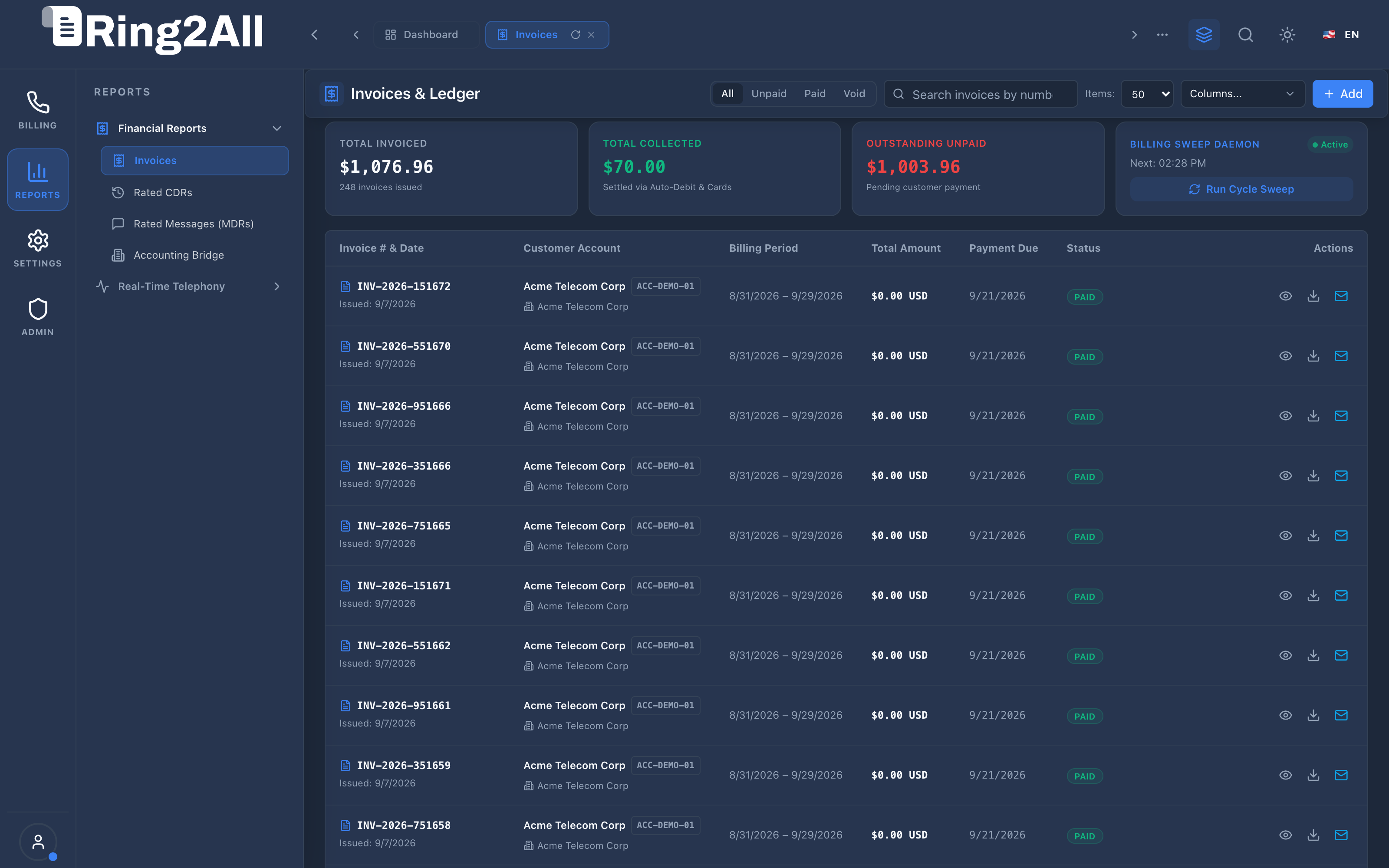
Section titled “4.1 Commercial Invoices (List View)”The Invoices Management view displays a comprehensive overview of all billing statements with real-time KPI metrics (Total Invoiced, Total Collected, Outstanding Unpaid, and Daemon Status), search filters, and status badges.
4.2 Printable PDF Invoice Modal
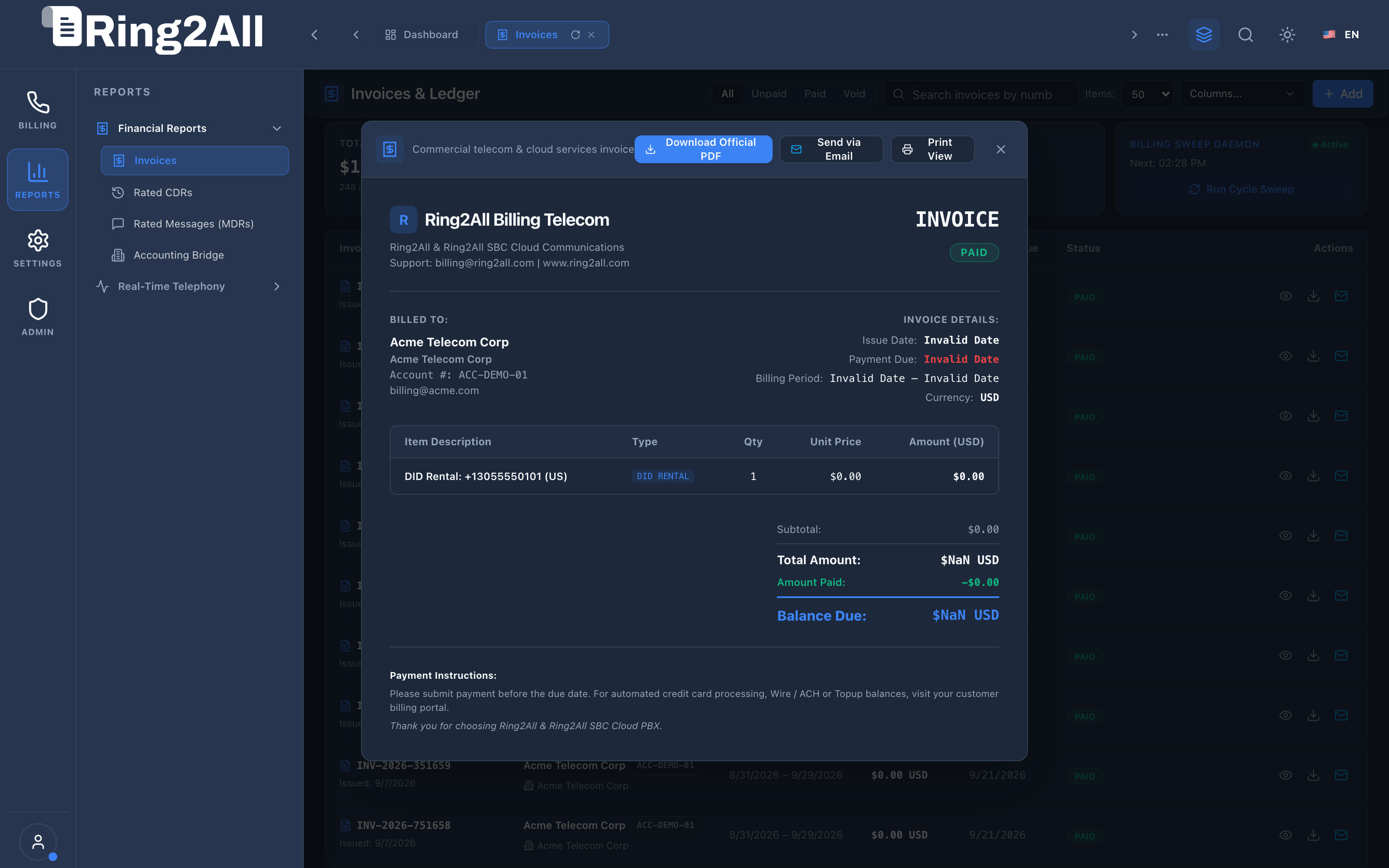
Section titled “4.2 Printable PDF Invoice Modal”Clicking the View icon on any invoice displays the institutional printable document preview complete with corporate branding, remit address, line item breakdown, and subtotal calculations.
4.3 Manual Invoice Creation Modal
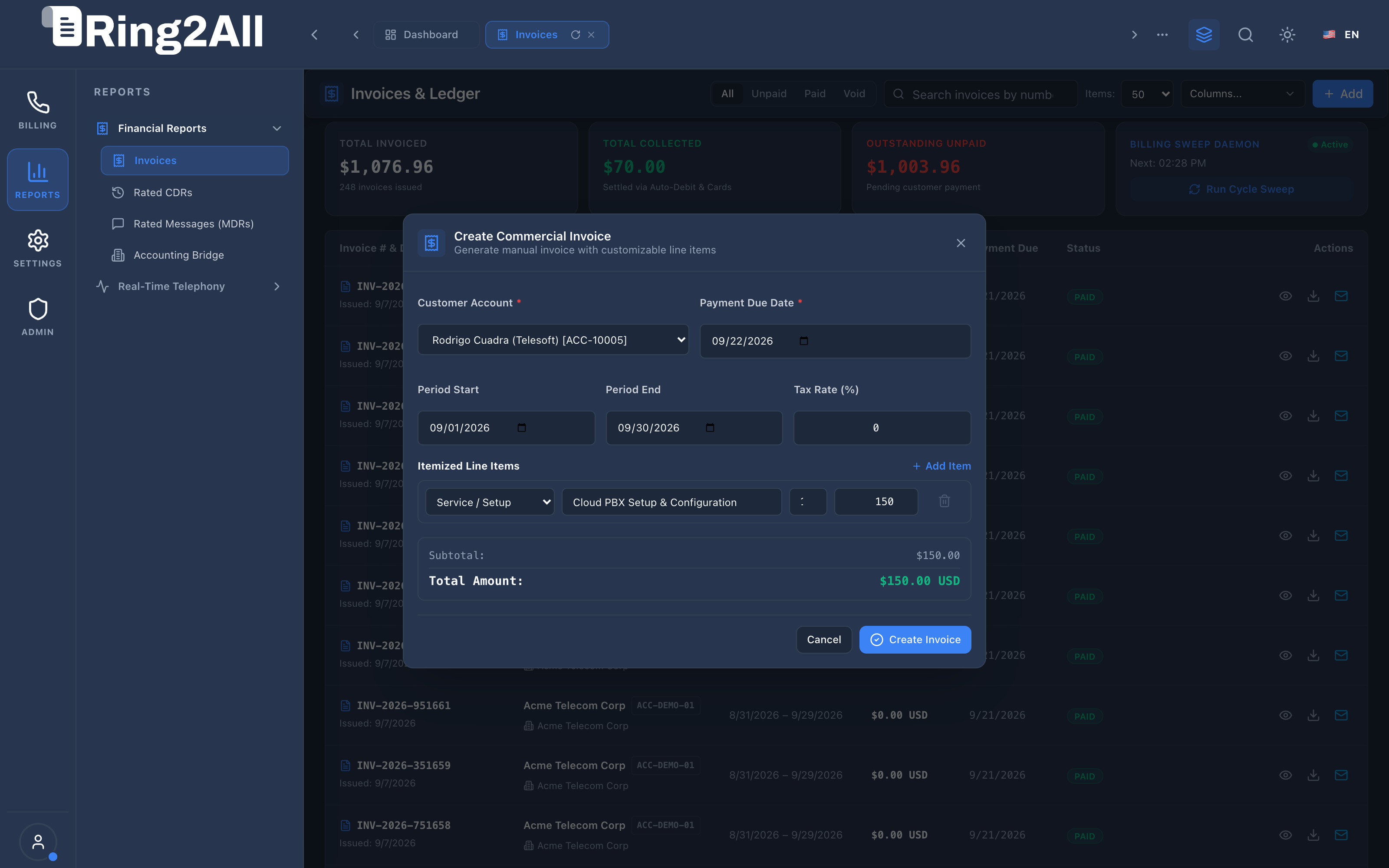
Section titled “4.3 Manual Invoice Creation Modal”Administrators can issue custom ad-hoc invoices for hardware purchases, setup fees, professional services, or manual credit adjustments.
4.4 Automated Billing Cycle Sweep Modal
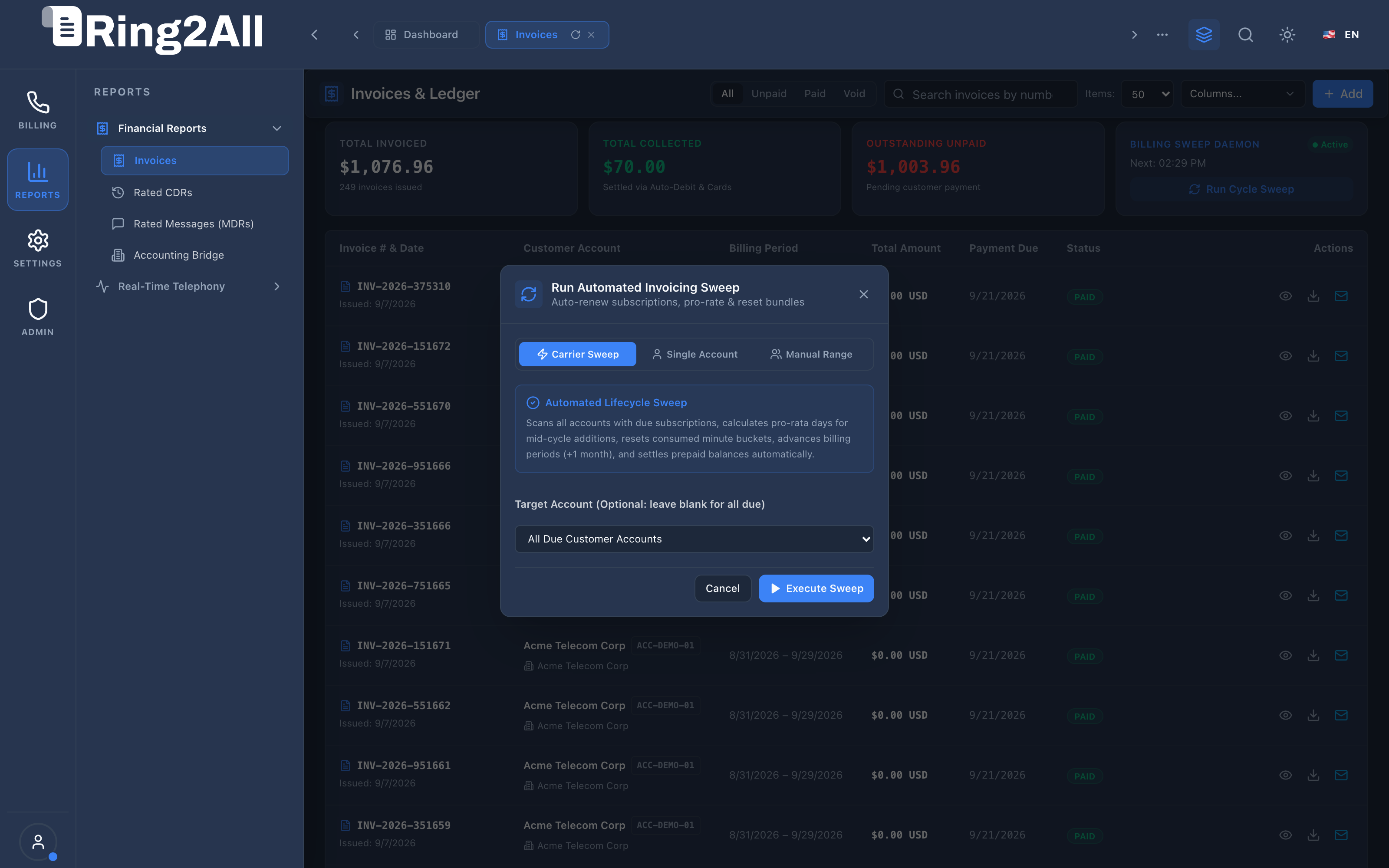
Section titled “4.4 Automated Billing Cycle Sweep Modal”The Run Billing Sweep modal enables operators to execute targeted billing cycles across all customers or specific accounts, previewing unbilled line items before locking statements.
4.5 Invoice Parameters Reference
Section titled “4.5 Invoice Parameters Reference”| Parameter Name | Data Type | Required | Default Value | Description & Business Rules |
|---|---|---|---|---|
| Customer Account | Select |
Yes | — | Target corporate client to receive the invoice and whose balance ledger will be debited. |
| Invoice Number | String |
Yes | Auto-generated | Sequential, unique invoice identifier formatted as INV-YYYY-XXXXX. |
| Billing Period Start / End | Date |
Yes | Current Month | The operational window covering all metered CDRs and recurring subscription services. |
| Due Date | Date |
Yes | Net + 15 / 30 | Payment deadline before late fees or automated dunning escalation kicks in. |
| Line Items | Array |
Yes | Minimum 1 | List of products, services, voice minutes, or DID fees with quantity and unit rates. |
| Tax Exemption | Boolean |
No | false |
When enabled, bypasses standard regional sales tax and telecom VAT calculations. |
5. Architectural Flow & Multi-Tenant Invoicing Cycle
Section titled “5. Architectural Flow & Multi-Tenant Invoicing Cycle” ┌────────────────────────────────────────────────────────────────────────┐ │ Automated Hourly / Monthly Billing Sweep │ └───────────────────────────────────┬────────────────────────────────────┘ │ ▼ ┌────────────────────────────────────────────────────────────────────────┐ │ Step 1: Usage Aggregation & Metering │ │ • Query unbilled CDRs (`cdrs_rated WHERE invoice_id IS NULL`) │ │ • Query unbilled MDRs (`mdrs_rated WHERE invoice_id IS NULL`) │ │ • Fetch recurring subscription plans & active DID inventory │ └───────────────────────────────────┬────────────────────────────────────┘ │ ▼ ┌────────────────────────────────────────────────────────────────────────┐ │ Step 2: Statement Assembly & Tax Calculation │ │ • Insert master record into `public.invoices` │ │ • Insert itemized rows into `public.invoice_items` │ │ • Calculate subtotal, tax rate, and final net payable balance │ └───────────────────────────────────┬────────────────────────────────────┘ │ ▼ ┌────────────────────────────────────────────────────────────────────────┐ │ Step 3: Settlement & Automated Collection │ │ • Prepaid Accounts: Deduct amount from customer wallet balance │ │ • Postpaid Accounts: Charge default credit card via Stripe Gateway │ │ • Render PDF & dispatch notification via email │ └────────────────────────────────────────────────────────────────────────┘6. Common Scenarios & Operational Playbooks
Section titled “6. Common Scenarios & Operational Playbooks”Scenario A: Running an End-of-Month Automated Billing Sweep
Section titled “Scenario A: Running an End-of-Month Automated Billing Sweep”- Navigate to REPORTS / Financial Reports / Invoice.
- Click Run Cycle Sweep in the top KPI summary ribbon.
- Select the billing cut-off date (e.g. last day of previous month).
- Select target scope: All Active Customers or choose specific enterprise accounts.
- Click Execute Sweep. The engine processes CDRs in streaming batches, generates invoice records, and outputs execution summary logs.
Scenario B: Applying a Manual Dispute Credit to an Invoice
Section titled “Scenario B: Applying a Manual Dispute Credit to an Invoice”- Open the target invoice via the View action.
- If the invoice is still
unpaidordraft, edit line items to append a negative credit item (e.g.,"SLA Service Credit - 20%"). - If already finalized, issue a Credit Note invoice linked to the customer account to adjust their balance.
7. Troubleshooting & Diagnostic Commands
Section titled “7. Troubleshooting & Diagnostic Commands”Inspect Unbilled CDR Count for Customer
Section titled “Inspect Unbilled CDR Count for Customer”SELECT customer_id, count(*) as unbilled_calls, sum(cost) as total_unbilled_spendFROM cdrs_ratedWHERE invoice_id IS NULLGROUP BY customer_id;Inspect Recent Failed Invoice Charge Attempts
Section titled “Inspect Recent Failed Invoice Charge Attempts”SELECT i.invoice_number, c.name, i.total_amount, i.status, i.created_atFROM invoices iJOIN customers c ON c.id = i.customer_idWHERE i.status IN ('unpaid', 'past_due')ORDER BY i.created_at DESCLIMIT 10;8. Model Context Protocol (MCP) AI Integration
Section titled “8. Model Context Protocol (MCP) AI Integration”The Commercial Invoices & Billing Sweeps module connects directly to the Ring2All BSS MCP Server, providing finance agents, operations teams, and billing copilots with real-time access to customer invoicing records, detailed statement items, and accounts receivable health.
Available MCP Tools
Section titled “Available MCP Tools”| Tool Name | Access Role | Description & Primary Function | Example Arguments |
|---|---|---|---|
list_invoices_summary |
Billing Operations / Admin |
Lists customer invoices with status, amounts, due dates, and customer details. | {"status": "unpaid", "limit": 10} |
get_invoice_details |
Billing Operations / Admin |
Retrieves comprehensive invoice details including line items, tax breakdowns, and customer profile. | {"invoiceId": 1} |
Sample MCP Tool Execution: get_invoice_details
Section titled “Sample MCP Tool Execution: get_invoice_details”Request Payload
Section titled “Request Payload”{ "name": "get_invoice_details", "arguments": { "invoiceId": 1 }}Response Payload
Section titled “Response Payload”{ "id": 1, "invoiceNumber": "INV-2026-0001", "status": "paid", "subtotal": 150.00, "taxAmount": 10.50, "totalAmount": 160.50, "currency": "USD", "issueDate": "2026-09-01T00:00:00Z", "dueDate": "2026-09-15T00:00:00Z", "customer": { "id": 1, "name": "Rodrigo Cuadra", "company": "Cuadra Telecom Corp" }, "items": [ { "id": 1, "description": "Hosted PBX Standard Plan - Monthly", "quantity": 1, "unitPrice": 49.99, "amount": 49.99 }, { "id": 2, "description": "Rated Inbound & Outbound Voice Usage", "quantity": 1, "unitPrice": 100.01, "amount": 100.01 } ]}Conversational AI Prompts for Copilot
Section titled “Conversational AI Prompts for Copilot”- “List all past due or unpaid invoices across all customer accounts.”
- “Get the detailed line items and payment status for invoice INV-2026-0001.”
- “What is the total accounts receivable outstanding for customer ID 1?”
9. Glossary
Section titled “9. Glossary”- Billing Sweep: An automated batch processing job that consolidates all unbilled CDRs, messaging MDRs, and monthly recurring charges into finalized customer statements.
- Dunning: The automated process of methodically communicating with customers to ensure the collection of accounts receivable before triggering traffic suspension.
- Line Item: A granular component of an invoice specifying a distinct product, rate, quantity, and extended monetary total.
- Void: An administrative state marking an invoice cancelled and nullified without destroying the historical audit record.
- Model Context Protocol (MCP): Open protocol standard that enables secure, controlled integration between Large Language Models and external tools, databases, and telecom rating engines.