

Access Control Module Documentation
Table of Contents
Section titled “Table of Contents”- Navigation & Access
- Screenshots & Visual Interface
- Module Overview (Technical)
- Module Overview (Commercial/Business)
- Module Overview (End User/Administrator)
- User Roles & Key Capabilities
- Configuration Sections
- Settings Reference
- Common Scenarios & Examples
- Model Context Protocol (MCP) AI Integration
- Limitations & Important Notes
- Troubleshooting Tips
- Glossary
Navigation & Access
Section titled “Navigation & Access”To access the Access Control module:
- Log in to the Ring2All Web Portal (
https://<domain-or-ip>/login) with administrative credentials. - In the left navigation sidebar, locate and expand Admin.
- Under the Firewall section, click Access Control (
/admin/firewall/access-control). - To add a new IP whitelist or blacklist entry, click the + Add button at the top right of the toolbar.
- To synchronize active bans directly from Fail2Ban, click the Sync Fail2Ban button.
- To push active whitelist and blacklist database entries into the system firewall runtime, click Apply Rules.
- To purge expired dynamic ban records, click Clear Expired.
Screenshots & Visual Interface
Section titled “Screenshots & Visual Interface”Access Control List View
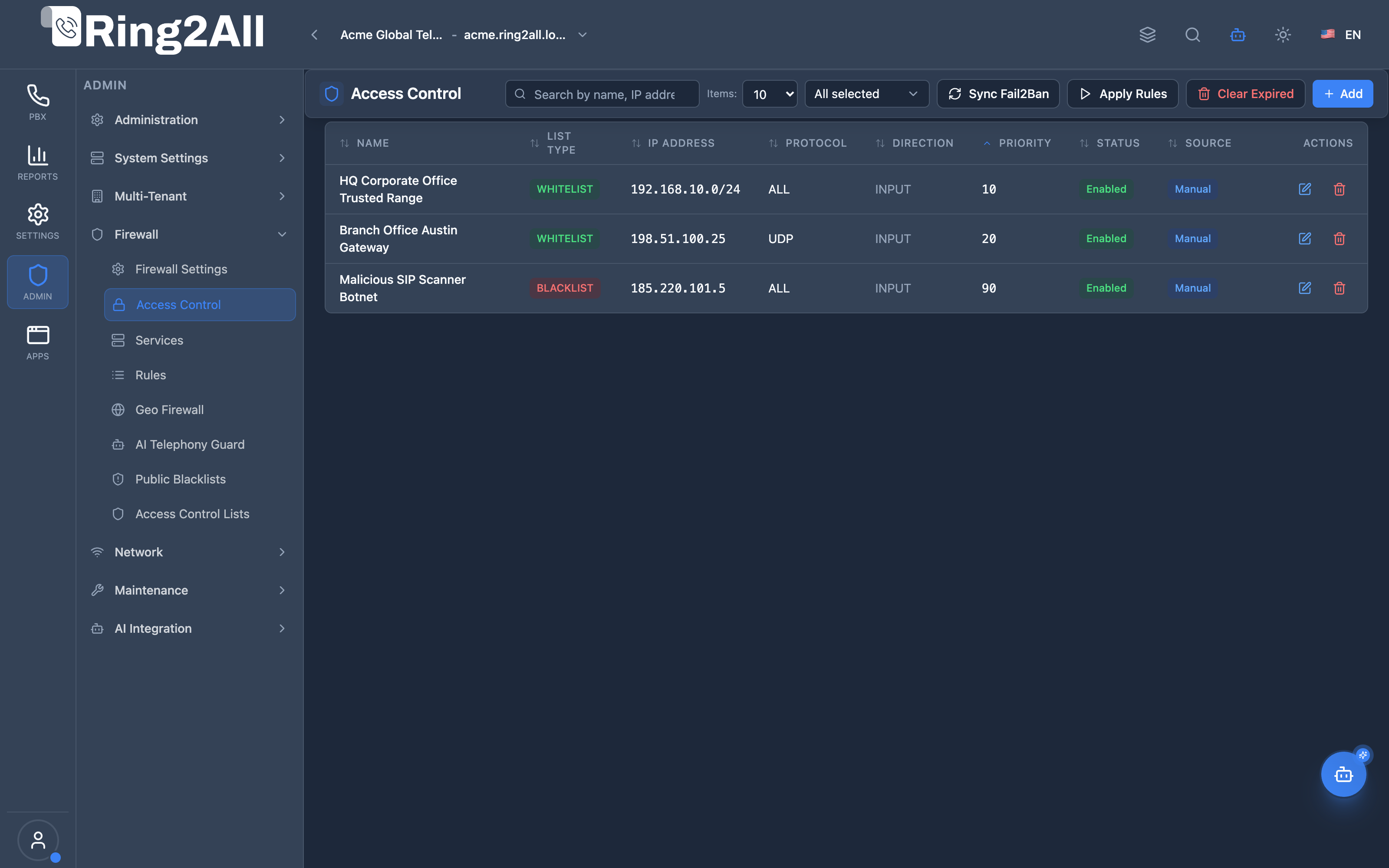
Section titled “Access Control List View”The Access Control list displays all explicit IP whitelist and blacklist rules with their rule type badges, IP addresses and CIDR subnets, protocol filters, traffic directions, numerical priorities, active statuses, and creation sources (Manual or Fail2Ban).
Add / Edit Access Control Entry Modal
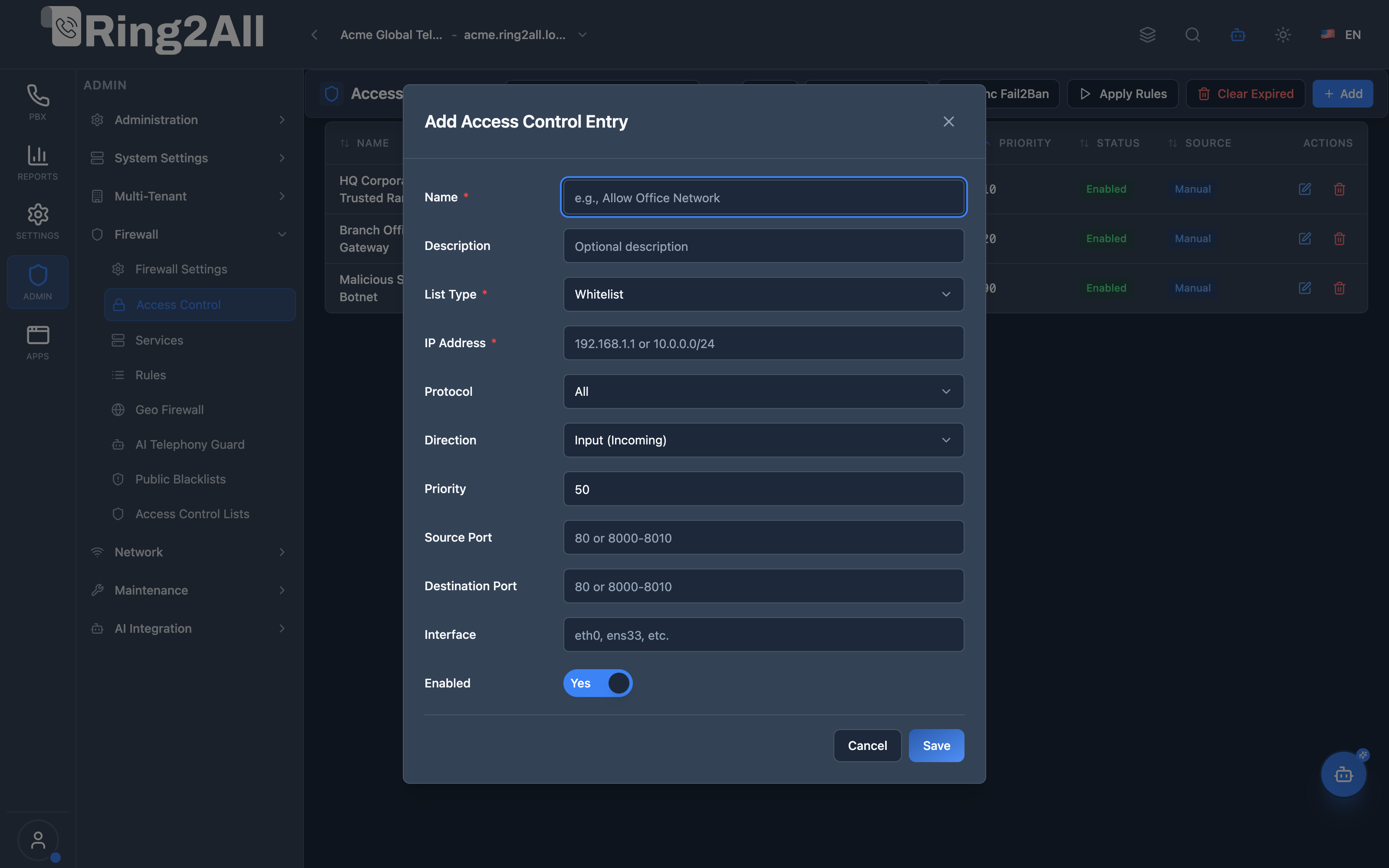
Section titled “Add / Edit Access Control Entry Modal”The entry modal enables administrators to configure rule names, descriptions, list types (Whitelist or Blacklist), IP addresses or CIDRs, protocols, traffic directions (Input or Forward), priority levels, optional source/destination port ranges, network interfaces, and activation toggles.
1. Module Overview (Technical)
Section titled “1. Module Overview (Technical)”What Is Access Control?
Section titled “What Is Access Control?”Access Control is an IP filtering module that manages whitelist and blacklist entries for network access. It integrates with nftables firewall and Fail2Ban for automatic ban synchronization and rule application.
Architecture
Section titled “Architecture”┌─────────────────────────────────────────────────────────────────┐│ Access Control Architecture │├─────────────────────────────────────────────────────────────────┤│ ││ Access Control Lists ││ ┌──────────────────────────────────────────────────────────┐ ││ │ │ ││ │ Whitelist Blacklist │ ││ │ ┌────────────────┐ ┌────────────────┐ │ ││ │ │ Office Network │ │ SIP Scanner │ │ ││ │ │ 192.168.1.0/24 │ │ 45.134.x.x │ │ ││ │ │ Priority: 10 │ │ Priority: 100 │ │ ││ │ │ Source: Manual │ │ Source: Fail2Ban│ │ ││ │ ├────────────────┤ ├────────────────┤ │ ││ │ │ Admin VPN │ │ Brute Force │ │ ││ │ │ 10.0.0.0/8 │ │ 185.x.x.x │ │ ││ │ │ Priority: 20 │ │ Source: Manual │ │ ││ │ └────────────────┘ └────────────────┘ │ ││ │ │ ││ └──────────────────────────────────────────────────────────┘ ││ │ ││ ▼ Sync & Apply ││ ┌──────────────────────────────────────────────────────────┐ ││ │ │ ││ │ [Sync Fail2Ban] [Apply Rules] [Unban IP] │ ││ │ │ │ │ │ ││ │ ▼ ▼ ▼ │ ││ │ Import auto-bans Apply to nftables Remove ban │ ││ │ │ ││ └──────────────────────────────────────────────────────────┘ ││ │ ││ ▼ Applied to system ││ ┌──────────────────────────────────────────────────────────┐ ││ │ Linux Firewall │ ││ │ │ ││ │ nftables: │ ││ │ ├─ Whitelist → Accept rules │ ││ │ └─ Blacklist → Drop rules │ ││ │ │ ││ │ Fail2Ban: │ ││ │ └─ Active jails with banned IPs │ ││ │ │ ││ └──────────────────────────────────────────────────────────┘ ││ │└─────────────────────────────────────────────────────────────────┘2. Module Overview (Commercial/Business)
Section titled “2. Module Overview (Commercial/Business)”Business Value
Section titled “Business Value”Access Control provides granular IP filtering:
| Without Access Control | With Access Control |
|---|---|
| No IP filtering | Whitelist/blacklist |
| Manual firewall edits | Web interface |
| No Fail2Ban visibility | Sync banned IPs |
| Complex nftables | Simple management |
Use Cases
Section titled “Use Cases”-
Office Access
- Whitelist office IPs
- Allow VPN ranges
-
Block Attackers
- Manual blacklist
- Import Fail2Ban bans
-
SIP Protection
- Block SIP scanners
- Allow trunk IPs
-
Regional Blocking
- Block country ranges
- Allow specific networks
Feature Highlights
Section titled “Feature Highlights”| Feature | Benefit |
|---|---|
| Whitelist | Guaranteed access |
| Blacklist | Block bad actors |
| Fail2Ban Sync | Import auto-bans |
| Priority | Ordered evaluation |
| Protocol Filter | Specific protocols |
| Unban | Quick unblock |
3. Module Overview (End User/Administrator)
Section titled “3. Module Overview (End User/Administrator)”What Can You Do?
Section titled “What Can You Do?”- Add whitelist entries
- Add blacklist entries
- Sync Fail2Ban banned IPs
- Unban specific IPs
- Apply rules to firewall
- Set priority order
- Filter by protocol/port
Access Control Interface
Section titled “Access Control Interface”┌─────────────────────────────────────────────────────────────────┐│ Access Control │├─────────────────────────────────────────────────────────────────┤│ ││ Manage IP address whitelist and blacklist ││ ││ [+ Add Entry] [Apply Rules] [Sync Fail2Ban] ││ ││ [Whitelist] [Blacklist] ││ ││ [🔍 Search by name, IP address, or description...] ││ ││ ┌───────────────────────────────────────────────────────────┐ ││ │ Name │ List │ IP Address │ Protocol│ Source│ ││ ├───────────────┼─────────┼──────────────┼─────────┼───────┤ ││ │ Office LAN │Whitelist│192.168.1.0/24│ All │Manual │ ││ │ Admin VPN │Whitelist│10.0.0.0/8 │ All │Manual │ ││ │ SIP Scanner 1 │Blacklist│45.134.88.12 │ UDP │Fail2Ban│ ││ │ Brute Force │Blacklist│185.220.101.5 │ All │Manual │ ││ │ SIP Scanner 2 │Blacklist│193.32.162.8 │ UDP │Fail2Ban│ ││ └───────────────────────────────────────────────────────────┘ ││ ││ Source: Manual = Added by admin, Fail2Ban = Auto-detected ││ │└─────────────────────────────────────────────────────────────────┘Add/Edit Entry
Section titled “Add/Edit Entry”┌─────────────────────────────────────────────────────────────────┐│ Add Access Control Entry │├─────────────────────────────────────────────────────────────────┤│ ││ Name: [Office Network ] ││ A descriptive name for this access control entry ││ ││ Description: [Main office IP range ] ││ Optional description for this entry ││ ││ List Type: [Whitelist ▼] ││ Whitelist allows traffic, Blacklist blocks traffic ││ ││ IP Address: [192.168.1.0/24 ] ││ IP address or CIDR network ││ ││ ──────────────────────────────────────────────────────────────││ ││ Protocol: [All ▼] ││ All | TCP | UDP | ICMP ││ ││ Direction: [Input (Incoming) ▼] ││ Input | Output | Forward ││ ││ Priority: [10 ] ││ Lower numbers = higher priority, executed first ││ ││ ──────────────────────────────────────────────────────────────││ ││ Source Port: [ ] ││ Optional source port or range ││ ││ Destination Port: [ ] ││ Optional destination port or range ││ ││ Interface: [eth0 ] ││ Optional network interface name ││ ││ ──────────────────────────────────────────────────────────────││ ││ Enabled: ✓ ││ ││ [Save] [Cancel] ││ │└─────────────────────────────────────────────────────────────────┘Quick Tips
Section titled “Quick Tips”[!TIP] Whitelist First: Add trusted IPs before blocking ranges.
[!TIP] Sync Fail2Ban: Import auto-detected attackers.
[!WARNING] Apply Rules: Changes don’t take effect until applied!
🎯 User Roles & Key Capabilities
Section titled “🎯 User Roles & Key Capabilities”The Access Control module allocates granular responsibilities for IP-level network filtering and intrusion synchronization:
| User Role | Key Permissions & Responsibilities | Common Tasks & Workflows |
|---|---|---|
| System Super Administrator / Security Lead | Comprehensive authority over global IP whitelists and blacklists, runtime firewall compilation, and Fail2Ban synchronization. | Define permanent corporate CIDR whitelists, push runtime nftables rulesets, clear expired temporary bans, authorize branch office subnets. |
| Tenant Administrator | Scoped inspection of whitelist and blacklist status applicable to the organization’s SIP endpoints and trunks. | Verify whether remote office public IPs are permitted, inspect temporary ban records, submit whitelisting requests to the NOC team. |
| NOC & Tier-2 Support Engineer | Operational troubleshooting of SIP registration lockouts and rapid mitigation of active threat actors. | Execute Fail2Ban sync (Sync Fail2Ban), diagnose remote user authentication failures, whitelist verified employee IPs, apply immediate blacklist blocks against abusive hosts. |
| Cybersecurity Auditor | Verification of perimeter access policies, review of static whitelist hygiene, and audit log analysis. | Audit whitelisted IP address ranges against least-privilege policies, verify that sensitive management interfaces (SSH/Web) reject unauthenticated public IPs. |
4. Configuration Sections
Section titled “4. Configuration Sections”Entry Fields
Section titled “Entry Fields”| Field | Description |
|---|---|
| Name | Entry identifier |
| Description | Optional notes |
| List Type | Whitelist or Blacklist |
| IP Address | IP or CIDR range |
| Protocol | All, TCP, UDP, ICMP |
| Direction | Input, Output, Forward |
| Priority | Order (lower = first) |
| Source Port | Optional port/range |
| Destination Port | Optional port/range |
| Interface | Optional interface |
| Enabled | Active/Inactive |
Entry Sources
Section titled “Entry Sources”| Source | Description |
|---|---|
| Manual | Added by administrator |
| Fail2Ban | Synced from Fail2Ban |
| NFTables | Synced from nftables |
5. Settings Reference
Section titled “5. Settings Reference”List Types
Section titled “List Types”| Type | Action | Use Case |
|---|---|---|
| Whitelist | Allow traffic | Trusted IPs |
| Blacklist | Block traffic | Bad actors |
Common Protocols
Section titled “Common Protocols”| Protocol | Description |
|---|---|
| All | All protocols |
| TCP | Web, SSH, SIP-TCP |
| UDP | SIP, RTP, DNS |
| ICMP | Ping |
Priority Guidelines
Section titled “Priority Guidelines”| Priority | Use |
|---|---|
| 1-50 | Critical whitelist (admin access) |
| 51-100 | Standard whitelist (office, VPN) |
| 101-200 | Standard blacklist |
| 201-500 | Broad blocks (countries, ranges) |
Common CIDR Ranges
Section titled “Common CIDR Ranges”| CIDR | IPs | Example Use |
|---|---|---|
| /32 | 1 IP | Single attacker |
| /24 | 256 IPs | Office network |
| /16 | 65,536 IPs | Large network |
| /8 | 16M IPs | VPN range |
6. Common Scenarios & Examples
Section titled “6. Common Scenarios & Examples”Scenario 1: Whitelist Office Network
Section titled “Scenario 1: Whitelist Office Network”- Click Add Entry
- Name = “Office Network”
- List Type = Whitelist
- IP = 192.168.1.0/24
- Protocol = All
- Direction = Input
- Priority = 10
- Enable = ✓
- Save
- Apply Rules
Scenario 2: Block Attacker IP
Section titled “Scenario 2: Block Attacker IP”- Add Entry
- Name = “SIP Scanner”
- List Type = Blacklist
- IP = 45.134.88.12
- Protocol = UDP
- Destination Port = 5060
- Priority = 100
- Save
- Apply Rules
Scenario 3: Sync Fail2Ban Bans
Section titled “Scenario 3: Sync Fail2Ban Bans”- Click “Sync Fail2Ban”
- Wait for sync
- Review new blacklist entries
- Source will show “Fail2Ban”
- Apply Rules if needed
Scenario 4: Unban False Positive
Section titled “Scenario 4: Unban False Positive”- Find banned IP in list
- Click Unban button
- Confirm unban
- IP is removed from blacklist
- Apply Rules
7. Limitations & Important Notes
Section titled “7. Limitations & Important Notes”Technical Notes
Section titled “Technical Notes”[!NOTE] Apply Required: Changes need “Apply Rules” to take effect.
[!NOTE] Priority: Lower numbers are processed first.
[!WARNING] Don’t Block Yourself: Always whitelist admin IPs first!
Best Practices
Section titled “Best Practices”- Whitelist Admin: Always whitelist your IP first
- Specific First: Specific IPs before broad ranges
- Use CIDR: Block ranges, not individual IPs
- Sync Regularly: Keep Fail2Ban entries updated
- Review Bans: Check for false positives
Whitelist vs. Firewall Rules
Section titled “Whitelist vs. Firewall Rules”| Access Control | Firewall Rules |
|---|---|
| IP-based only | Service-based |
| Simple allow/block | Complex rules |
| Quick entry | Full configuration |
| Fail2Ban sync | Manual only |
Model Context Protocol (MCP) AI Integration
Section titled “Model Context Protocol (MCP) AI Integration”The Access Control module connects directly with the Ring2All Platform Copilot MCP Server, enabling automated inspection of IP whitelist and blacklist policies:
🛠️ Available MCP Tools
Section titled “🛠️ Available MCP Tools”| Tool Name | Operation | Access Level | Description | Key Parameters |
|---|---|---|---|---|
list_access_control_entries |
Read | SuperAdmin / Auditor | Lists IP Access Control whitelist and blacklist entries (IPv4/CIDR, list type, direction, numerical priority). | search (string), listType (whitelist, blacklist), direction (inbound, outbound, both), enabled (boolean) |
list_firewall_rules |
Read | SuperAdmin / Auditor | Queries high-level network packet filtering policies matching specific IP subnets or destination ports. | search (string, optional) |
check_ip_threat_status |
Read | SuperAdmin / Auditor | Cross-references an IP address against APIBAN/VoIPBL active community threat feeds. | ipAddress (string, required) |
📋 JSON Tool Schemas & Sample Executions
Section titled “📋 JSON Tool Schemas & Sample Executions”list_access_control_entries
Section titled “list_access_control_entries”{ "name": "list_access_control_entries", "arguments": { "listType": "whitelist" }}Sample Successful Response:
{ "success": true, "data": { "total": 2, "entries": [ { "id": 12, "name": "Headquarters Primary WAN", "ipAddress": "198.51.100.25/32", "listType": "whitelist", "direction": "input", "priority": 10, "enabled": true, "description": "Executive office static IP" }, { "id": 15, "name": "Branch Office VPN Subnet", "ipAddress": "192.0.2.0/24", "listType": "whitelist", "direction": "input", "priority": 20, "enabled": true, "description": "Branch site inter-office trunk" } ] }}💬 Natural Language Prompt Examples
Section titled “💬 Natural Language Prompt Examples”English Prompts
Section titled “English Prompts”- “List all IP addresses currently whitelisted in the PBX access control table.”
- “Show all active blacklist entries and check if IP ‘203.0.113.88’ is blocked.”
- “Find all access control rules configured for inbound traffic with high priority (priority < 50).”
- “Verify if branch office subnet ‘192.0.2.0/24’ is present in the whitelist.”
Ejemplos en Español (Spanish Prompts)
Section titled “Ejemplos en Español (Spanish Prompts)”- “Lista todas las direcciones IP que están actualmente en la lista blanca (whitelist) de control de acceso.”
- “Muestra todas las entradas de lista negra activas y verifica si la IP ‘203.0.113.88’ está bloqueada.”
- “Encuentra todas las reglas de control de acceso para tráfico entrante con prioridad alta (prioridad < 50).”
- “Comprueba si la subred de la sucursal ‘192.0.2.0/24’ está registrada en la lista blanca.”
🛡️ Enterprise Safeguards & Best Practices
Section titled “🛡️ Enterprise Safeguards & Best Practices”- CIDR Mask Enforcement: The API validates that all inputs follow RFC 4632 IPv4 CIDR notation (e.g.
/32for single hosts or/24for subnets), preventing malformed packet filter rules. - Priority Resolution: In nftables, whitelist rules with lower numerical priority values are evaluated first, ensuring legitimate corporate traffic is accepted before broad blacklist or geo-blocking evaluations.
- Fail2Ban Synchronization: Automated sync jobs safely ingest dynamic bans without overriding permanent static whitelists.
8. Troubleshooting Tips
Section titled “8. Troubleshooting Tips”Common Issues
Section titled “Common Issues”| Symptom | Possible Cause | Solution |
|---|---|---|
| IP still blocked | Apply not clicked | Apply Rules |
| Can’t access | Blacklisted | Check entries |
| False positive | Fail2Ban strict | Unban IP |
| Not blocking | Entry disabled | Enable entry |
Check Entries
Section titled “Check Entries”SELECT name, list_type, ip_address, protocol, priority, source, is_enabledFROM public.access_controlORDER BY list_type, priority;Fail2Ban Commands
Section titled “Fail2Ban Commands”# Check banned IPsfail2ban-client status sshd
# Unban specific IPfail2ban-client set sshd unbanip 192.168.1.100
# View all jailsfail2ban-client statusnftables Commands
Section titled “nftables Commands”# List current rulesnft list ruleset
# Check specific chainnft list chain inet filter input9. Glossary
Section titled “9. Glossary”| Term | Definition |
|---|---|
| Whitelist | Allowed IP list |
| Blacklist | Blocked IP list |
| CIDR | IP range notation |
| Fail2Ban | Intrusion detection |
| nftables | Linux firewall |
| Priority | Rule order |
Documentation last updated: January 2026