

Email Settings & SMTP Notifications Module Documentation
Table of Contents
Section titled “Table of Contents”- Module Overview (Technical)
- Module Overview (Commercial & Business Value)
- 🎯 User Roles & Key Capabilities
- Visual Interface & Form Structure
- Architectural Flow & Purpose-Based Email Routing Engine
- Common Scenarios & Operational Playbooks
- Troubleshooting & Diagnostic Commands
- Model Context Protocol (MCP) AI Integration
- Glossary
1. Module Overview (Technical)
Section titled “1. Module Overview (Technical)”The Email Settings & SMTP Notifications module (public.email_configs, public.email_templates, and public.email_logs) serves as the institutional transactional messaging engine for Ring2All Billing. It orchestrates outgoing notification delivery across dedicated, specialized SMTP relays, custom HTML notification templates, and an exhaustive transmission audit log.
Core Data Structures & Entity Schema
Section titled “Core Data Structures & Entity Schema”-- SMTP Configurations TableCREATE TABLE public.email_configs ( id SERIAL PRIMARY KEY, name VARCHAR(100) NOT NULL, purpose VARCHAR(30) NOT NULL, -- 'billing' | 'payments' | 'dunning' | 'alerts' | 'general' host VARCHAR(255) NOT NULL, port INTEGER NOT NULL DEFAULT 587, secure BOOLEAN NOT NULL DEFAULT false, -- true for 465 SSL, false for 587 STARTTLS username VARCHAR(255), password_encrypted TEXT, from_email VARCHAR(255) NOT NULL, from_name VARCHAR(100) NOT NULL, reply_to VARCHAR(255), is_active BOOLEAN NOT NULL DEFAULT true, is_default BOOLEAN NOT NULL DEFAULT false, created_at TIMESTAMPTZ NOT NULL DEFAULT NOW(), updated_at TIMESTAMPTZ NOT NULL DEFAULT NOW());
-- Email Templates TableCREATE TABLE public.email_templates ( id SERIAL PRIMARY KEY, code VARCHAR(50) NOT NULL UNIQUE, name VARCHAR(100) NOT NULL, subject VARCHAR(255) NOT NULL, body_html TEXT NOT NULL, body_text TEXT NOT NULL, available_variables JSONB, updated_at TIMESTAMPTZ NOT NULL DEFAULT NOW());
-- Email Logs Audit TableCREATE TABLE public.email_logs ( id BIGSERIAL PRIMARY KEY, config_id INTEGER REFERENCES email_configs(id) ON DELETE SET NULL, recipient VARCHAR(255) NOT NULL, subject VARCHAR(255) NOT NULL, template_code VARCHAR(50), status VARCHAR(20) NOT NULL DEFAULT 'sent', -- 'sent' | 'failed' message_id VARCHAR(255), error_message TEXT, created_at TIMESTAMPTZ NOT NULL DEFAULT NOW());Purpose-Based SMTP Routing
Section titled “Purpose-Based SMTP Routing”Rather than routing all system traffic through a single generic mailbox, Ring2All Billing isolates email traffic into segregated sender reputations:
- Billing: Dispatches monthly commercial statements, PDF invoices, and invoice links.
- Payments: Delivers real-time credit card settlement receipts and wallet deposit confirmations.
- Dunning: Handles overdue notices, grace period expirations, and impending suspension warnings.
- Alerts: Dispatches high-priority engineering alerts (low carrier balance, toll fraud triggers).
2. Module Overview (Commercial & Business Value)
Section titled “2. Module Overview (Commercial & Business Value)”- Guaranteed Inbox Deliverability: Segregating marketing or dunning emails from billing statements prevents high-bounce dunning campaigns from damaging primary invoice delivery reputation.
- Audit-Proof Communication Records: Every dispatched email records the exact recipient address, timestamp, SMTP relay response, and unique
Message-IDfor legal dunning compliance. - Institutional Brand Cohesion: Fully responsive HTML templates styled with corporate brand assets, typography, and one-click payment buttons streamline customer settlements.
- Zero Disruption Redundancy: Automatic fallback to backup SMTP relays if a primary provider (e.g. SendGrid, Mailgun, AWS SES, Office 365) experiences rate limits or server outages.
3. 🎯 User Roles & Key Capabilities
Section titled “3. 🎯 User Roles & Key Capabilities”| User Role | Key Permissions | Core Responsibilities & Workflows |
|---|---|---|
| Super Administrator | Full Control & SMTP Credentials | Configures commercial SMTP relay endpoints, tests TLS handshake integrity, and assigns purpose routes. |
| Billing Operations Lead | Manage Templates & Resend | Modifies invoice dispatch template copy, audits dunning messaging timelines, and initiates manual resend jobs. |
| Customer Support Agent | Read Logs | Inspects the delivery log to confirm whether an invoice or payment receipt reached a customer’s mailbox. |
| Compliance Auditor | Read-Only Audit Access | Reviews timestamped records of dunning warnings prior to service disconnection. |
4. Visual Interface & Form Structure
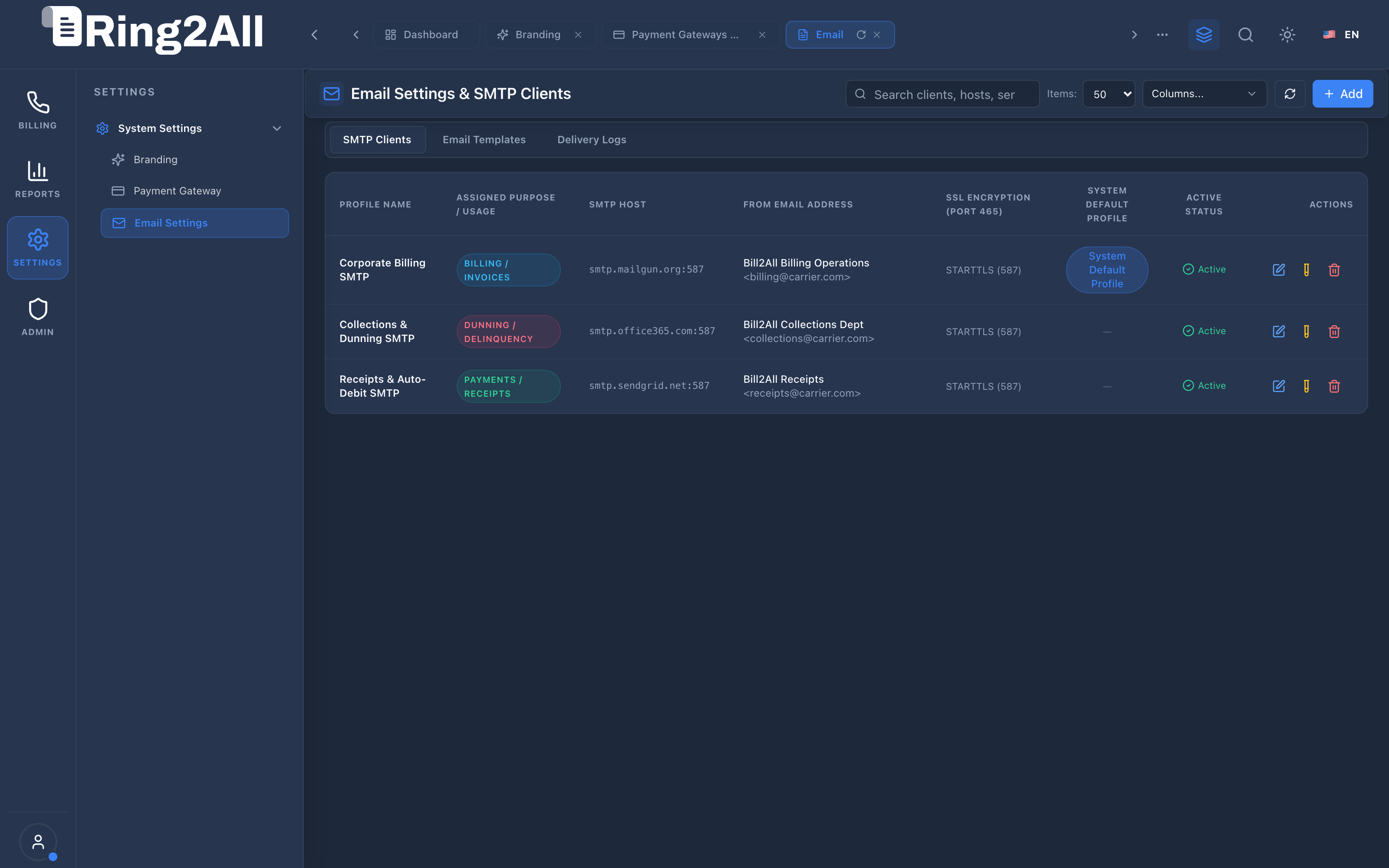
Section titled “4. Visual Interface & Form Structure”4.1 SMTP Clients Management (Tab 1)
Section titled “4.1 SMTP Clients Management (Tab 1)”The SMTP Clients tab lists all active mail delivery servers, displaying assigned functional purposes, server hostnames, port protocols, sender addresses, and connection testing buttons.
4.2 Notification Templates Management (Tab 2)
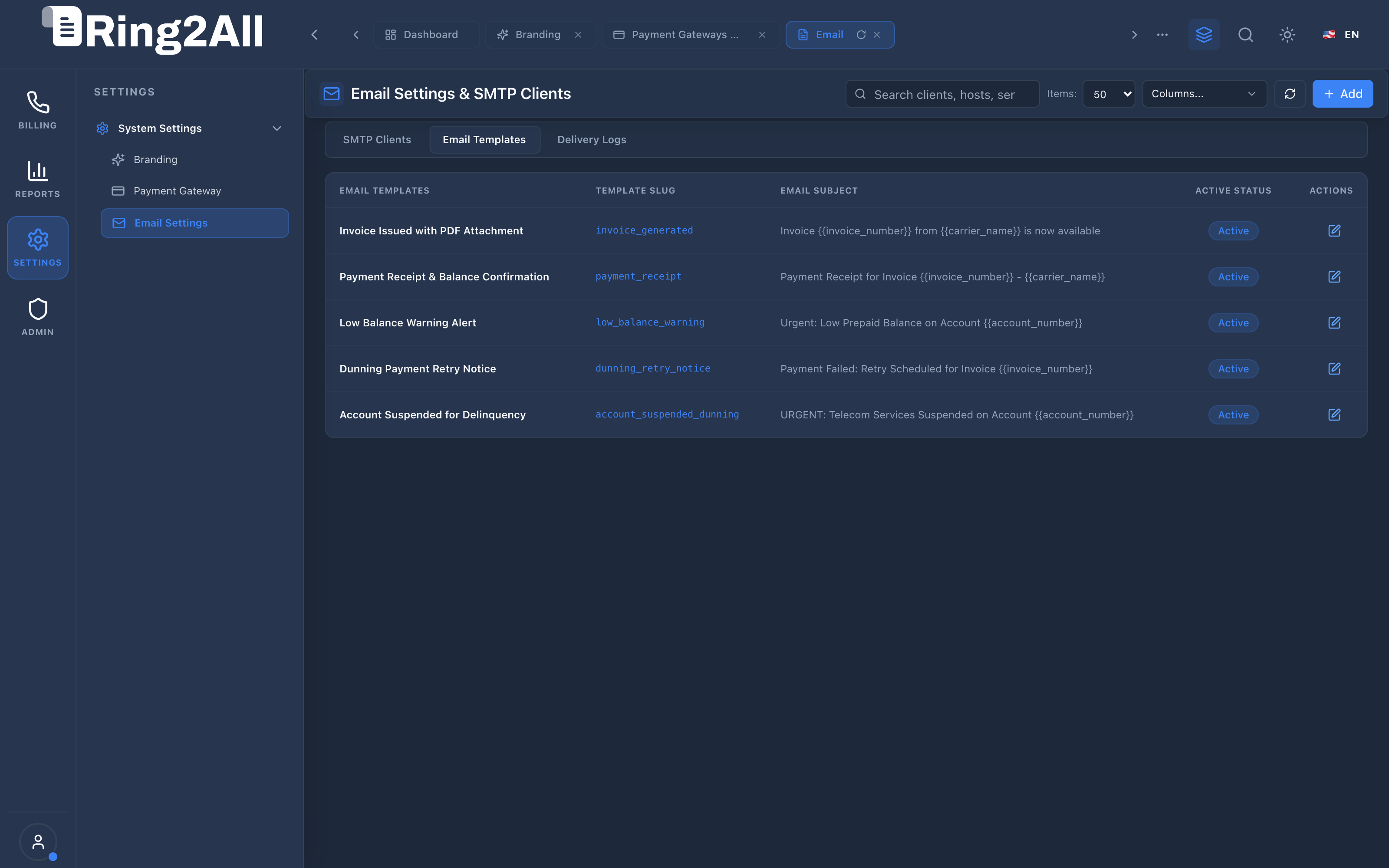
Section titled “4.2 Notification Templates Management (Tab 2)”The Notification Templates tab manages customizable templates for key business events (Invoice Issued, Payment Receipt, Dunning Escalation, Low Balance Warning) complete with variable syntax tokens.
4.3 Email Dispatch Delivery Logs (Tab 3)
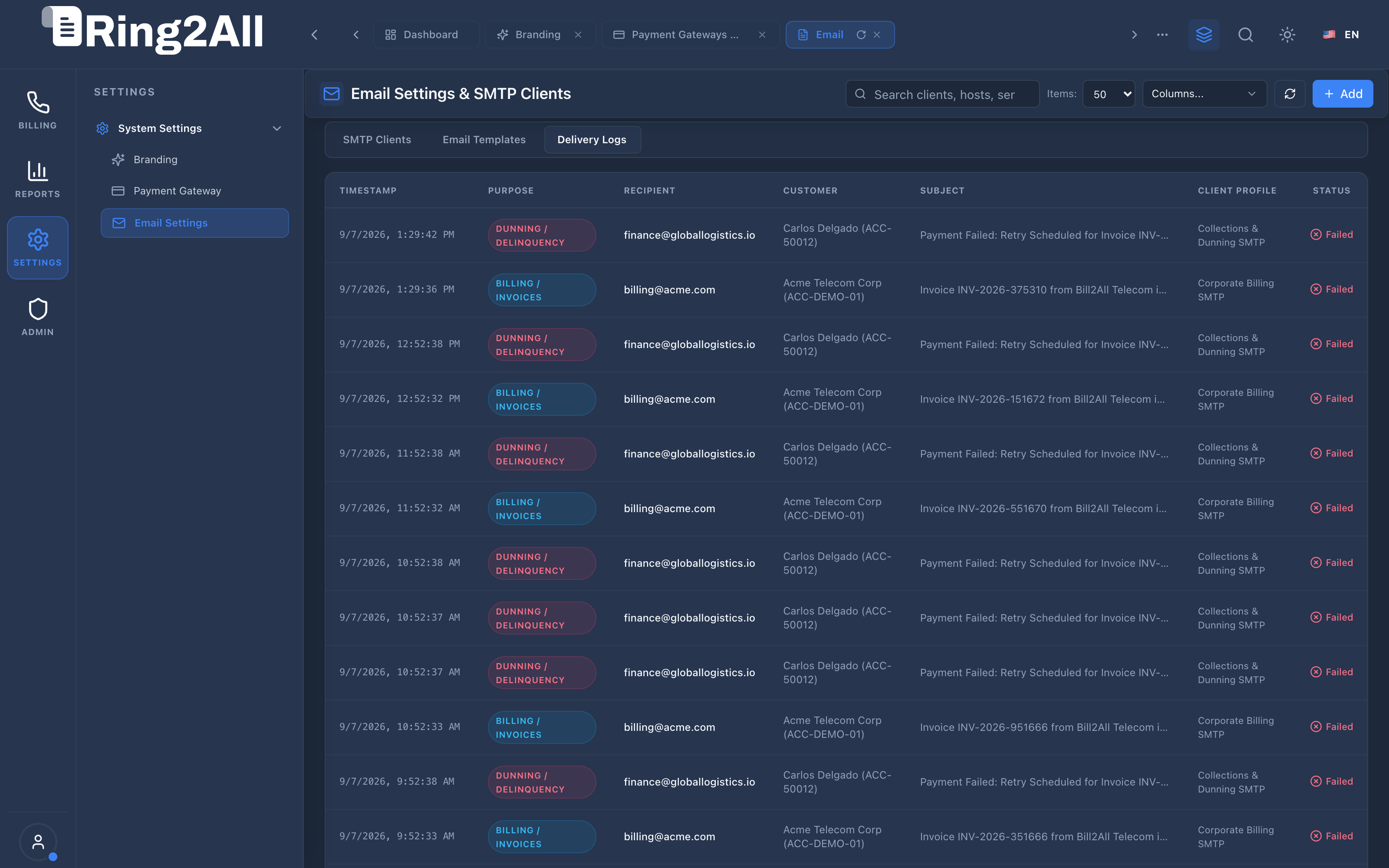
Section titled “4.3 Email Dispatch Delivery Logs (Tab 3)”The Delivery Logs tab provides an immutable real-time inspection ledger tracking all outgoing email events, recipient mailboxes, status badges, and server response codes.
4.4 SMTP Server Configuration Form
Section titled “4.4 SMTP Server Configuration Form”The SMTP Server Configuration form provides a standardized Level 2 interface for adding or modifying secure mail servers.
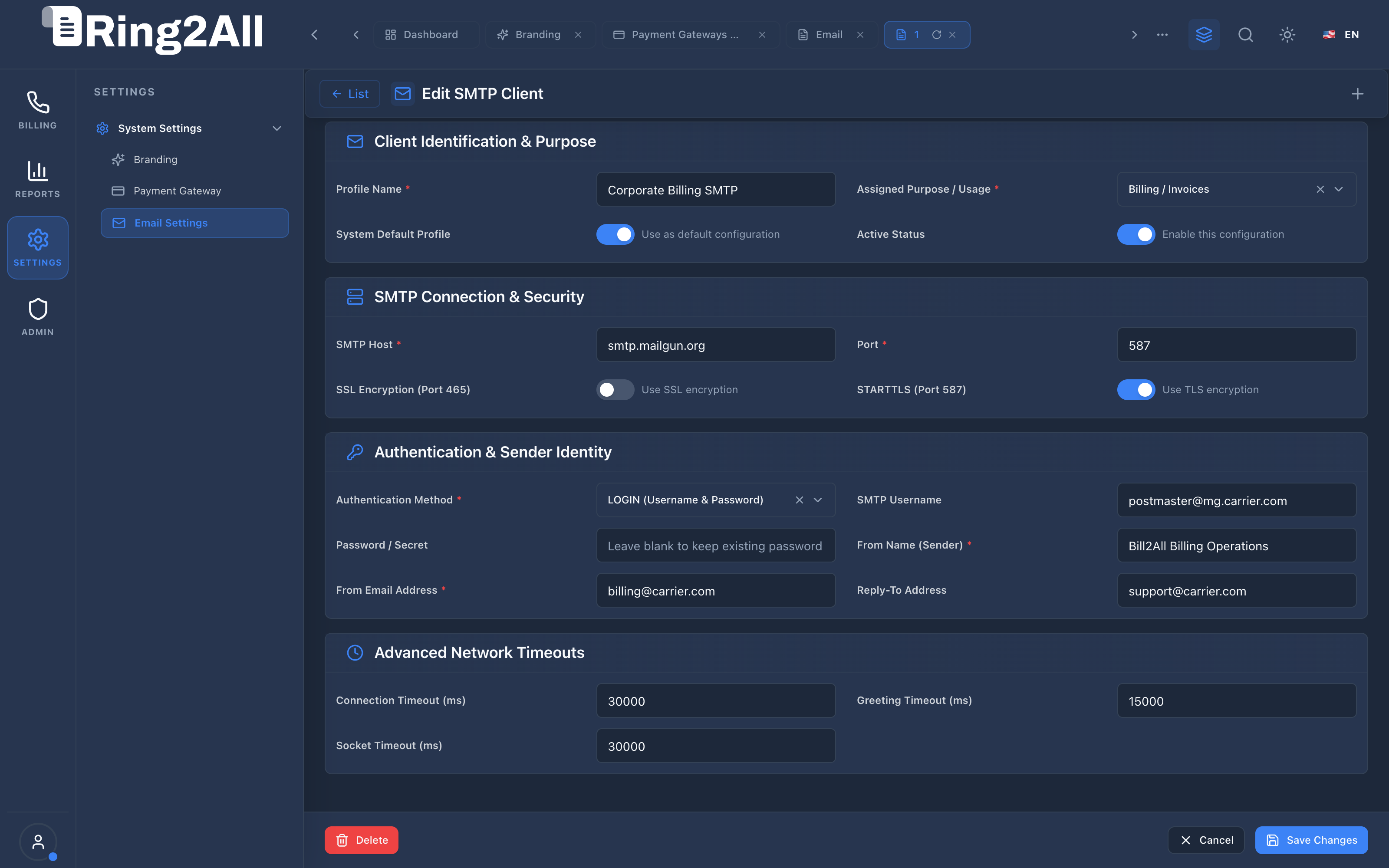
4.5 Configuration Parameters Reference
Section titled “4.5 Configuration Parameters Reference”| Parameter Name | Data Type | Required | Default Value | Description & Constraints |
|---|---|---|---|---|
| Configuration Name | String |
Yes | — | Friendly identifier (e.g. Corporate Billing SMTP, SendGrid Alerts Relay). |
| Functional Purpose | Select |
Yes | billing |
Assigned email category: billing, payments, dunning, alerts, or general. |
| SMTP Hostname | String |
Yes | — | Remote mail server FQDN (e.g. smtp.mailgun.org, smtp.sendgrid.net). |
| SMTP Port | Integer |
Yes | 587 |
Standard submission port: 587 (STARTTLS) or 465 (Implicit SSL/TLS). |
| Secure Connection (SSL/TLS) | Boolean |
Yes | false |
Enable for port 465 (SMTPS). Leave disabled for port 587 (opportunistic STARTTLS). |
| Username & Password | String |
Yes | — | Authentication credentials for the SMTP relay, encrypted at rest via AES-256. |
| From Email Address | Email |
Yes | — | Originating sender address appearing in the RFC 5322 From: header. |
| From Display Name | String |
Yes | — | Sender name displayed in email clients (e.g. Ring2All Billing Operations). |
5. Architectural Flow & Purpose-Based Email Routing Engine
Section titled “5. Architectural Flow & Purpose-Based Email Routing Engine” ┌────────────────────────────────────────────────────────────────────────┐ │ Trigger Event: Invoice Statement Finalized │ └───────────────────────────────────┬────────────────────────────────────┘ │ ▼ ┌────────────────────────────────────────────────────────────────────────┐ │ Step 1: Purpose Resolution & Relay Selection │ │ • Identify event category: `purpose = 'billing'` │ │ • Query active relay from `public.email_configs` │ │ • Load template: `invoice_issued` and populate variables (`{{...}}`) │ └───────────────────────────────────┬────────────────────────────────────┘ │ ▼ ┌────────────────────────────────────────────────────────────────────────┐ │ Step 2: PDF Attachment & SMTP Transmission │ │ • Attach rendered PDF invoice buffer │ │ • Establish TLS socket with remote SMTP host (port 587 / 465) │ │ • Transmit message and capture server response `Message-ID` │ └───────────────────────────────────┬────────────────────────────────────┘ │ ▼ ┌────────────────────────────────────────────────────────────────────────┐ │ Step 3: Audit Logging & Delivery Record │ │ • Insert transmission record into `public.email_logs` │ │ • If failed: log detailed SMTP error trace and trigger alert │ └────────────────────────────────────────────────────────────────────────┘6. Common Scenarios & Operational Playbooks
Section titled “6. Common Scenarios & Operational Playbooks”Scenario A: Adding an Enterprise SendGrid Relay for Invoicing
Section titled “Scenario A: Adding an Enterprise SendGrid Relay for Invoicing”- Navigate to SETTINGS / System Settings / Email Settings.
- Click Add SMTP Server in the top action toolbar.
- Enter Name:
SendGrid Invoicing Relay. - Select Purpose: Billing / Invoices.
- Set Host:
smtp.sendgrid.net, Port:587, Secure:false. - Enter Username:
apikey, Password:<SENDGRID_API_KEY>. - Set From Email:
invoicing@yourcompany.com, From Name:YourCompany Billing. - Click Test Connection. Once confirmed green, click Save Configuration.
Scenario B: Auditing a Bounced Dunning Notice
Section titled “Scenario B: Auditing a Bounced Dunning Notice”- Open the Delivery Logs tab.
- Filter search by the customer’s email address.
- Inspect rows with a red Failed status badge.
- Click on the error message to review the remote mail server bounce diagnostic (e.g.
550 5.1.1 User unknownor554 Message rejected). - Contact the client’s account manager to update their primary billing email.
7. Troubleshooting & Diagnostic Commands
Section titled “7. Troubleshooting & Diagnostic Commands”Query Failed Email Deliveries in the Last 24 Hours
Section titled “Query Failed Email Deliveries in the Last 24 Hours”SELECT l.id, l.recipient, l.subject, l.error_message, c.name as relay_used, l.created_atFROM email_logs lLEFT JOIN email_configs c ON c.id = l.config_idWHERE l.status = 'failed' AND l.created_at >= NOW() - INTERVAL '24 hours'ORDER BY l.created_at DESC;Check Active Relays by Functional Purpose
Section titled “Check Active Relays by Functional Purpose”SELECT purpose, name, host, port, from_email, is_activeFROM email_configsORDER BY purpose ASC;8. Model Context Protocol (MCP) AI Integration
Section titled “8. Model Context Protocol (MCP) AI Integration”The Email Settings & SMTP Notifications module connects directly to the Ring2All BSS MCP Server, providing systems administrators and autonomous maintenance copilots with tools to inspect active SMTP relay health and dispatch diagnostic test notifications.
Available MCP Tools
Section titled “Available MCP Tools”| Tool Name | Access Role | Description & Primary Function | Example Arguments |
|---|---|---|---|
get_email_settings_config |
Super Administrator |
Retrieves active SMTP configurations, relay hosts, and alert recipient settings. | {} |
test_email_notification |
Super Administrator |
Sends a test notification email through configured SMTP relay to verify deliverability. | {"recipientEmail": "admin@example.com"} |
Sample MCP Tool Execution: get_email_settings_config
Section titled “Sample MCP Tool Execution: get_email_settings_config”Request Payload
Section titled “Request Payload”{ "name": "get_email_settings_config", "arguments": {}}Response Payload
Section titled “Response Payload”{ "activeRelaysCount": 2, "relays": [ { "id": 1, "name": "Corporate Postmark Relay", "purpose": "transactional", "host": "smtp.postmarkapp.com", "port": 587, "fromEmail": "billing@ring2all.com", "isActive": true }, { "id": 2, "name": "Amazon SES Bulk Relay", "purpose": "marketing", "host": "email-smtp.us-east-1.amazonaws.com", "port": 587, "fromEmail": "notifications@ring2all.com", "isActive": true } ]}Conversational AI Prompts for Copilot
Section titled “Conversational AI Prompts for Copilot”- “Check which SMTP mail relays are currently active and their delivery ports.”
- “Send a test verification email to noc@ring2all.com.”
- “Review if the primary transactional SMTP configuration is functioning properly.”
9. Glossary
Section titled “9. Glossary”- Dunning Notice: Automated reminder email informing a subscriber of past-due balances and upcoming suspension deadlines.
- Message-ID: Globally unique identifier assigned to an email message by the transmitting mail server.
- SMTP (Simple Mail Transfer Protocol): Internet standard protocol for electronic mail transmission.
- STARTTLS: Protocol command allowing an insecure plaintext connection to be upgraded to a TLS-encrypted connection.
- Model Context Protocol (MCP): Open protocol standard that enables secure, controlled integration between Large Language Models and external tools, databases, and telecom rating engines.