Navigation & Access Screenshots & Visual Interface Module Overview (Technical) Module Overview (Commercial/Business) Module Overview (End User/Administrator) User Roles & Key Capabilities Configuration Sections Settings Reference Common Scenarios & Examples Limitations & Important Notes Troubleshooting Tips Glossary Model Context Protocol (MCP) AI Integration
To access the System General configuration module:
Log in to the Ring2All Web Portal (https://<domain-or-ip>/login).
In the left navigation sidebar, expand Settings .
Under PBX , click System General (/settings/pbx/system-general).
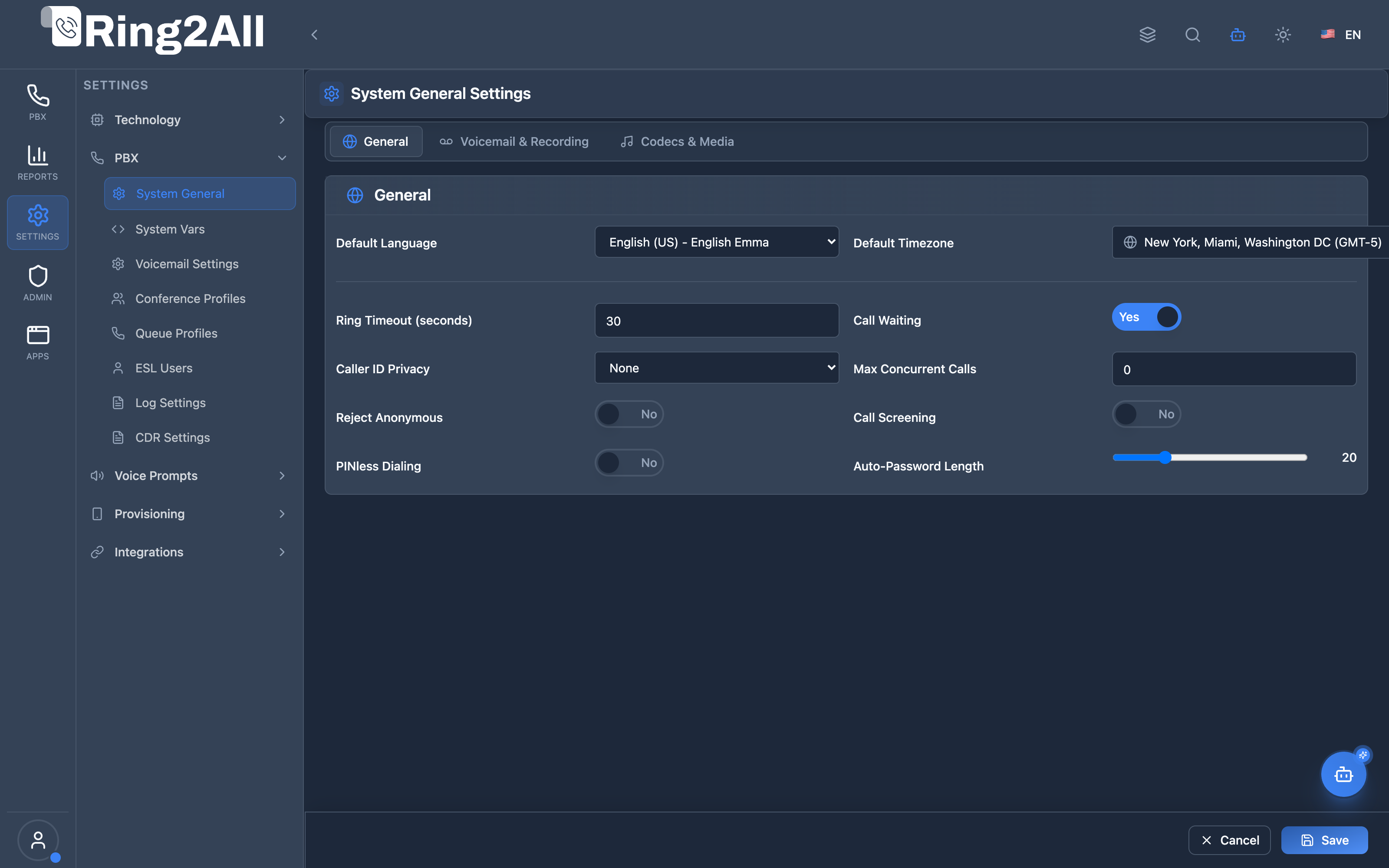
Configure domain-wide defaults across the General, Voicemail, and Codecs tabs, and click Save Changes in the bottom action bar.
Centralized domain defaults panel for setting system language, text-to-speech voice engines, default ringtones, music-on-hold audio streams, global voicemail thresholds, and inbound/outbound audio codec negotiation hierarchies.
System General Settings is a domain-wide configuration module that defines default values for new extensions. When creating a new extension, these settings are applied automatically, ensuring consistent configuration across the tenant.
┌─────────────────────────────────────────────────────────────────┐
│ System General Settings Architecture │
├─────────────────────────────────────────────────────────────────┤
│ ┌──────────────────────────────────────────────────────────┐ │
│ │ System General Settings │ │
│ │ ├─ General (Language, Timezone, SIP) │ │
│ │ ├─ Voicemail & Recording │ │
│ │ └─ Codecs & Media │ │
│ └──────────────────────────────────────────────────────────┘ │
│ ┌──────────────────────────────────────────────────────────┐ │
│ │ public.domain_settings │ │
│ │ domain_id | setting_key | setting_value │ │
│ └──────────────────────────────────────────────────────────┘ │
│ ▼ Applied to new extensions │
│ ┌──────────────────────────────────────────────────────────┐ │
│ │ Extension Creation │ │
│ │ New Extension 1010: │ │
│ │ ├─ Language = Default Language (es_MX) │ │
│ │ ├─ Timezone = Default Timezone (America/Chicago) │ │
│ │ ├─ Voicemail = Enabled (from defaults) │ │
│ │ ├─ Recording = Incoming (from defaults) │ │
│ │ └─ (other defaults applied) │ │
│ └──────────────────────────────────────────────────────────┘ │
└─────────────────────────────────────────────────────────────────┘
System General Settings provides consistent defaults :
Without System Defaults
With System Defaults
Configure each extension
Set once, apply always
Inconsistent settings
Standardized config
Time-consuming setup
Quick extension creation
Forgotten settings
Nothing overlooked
Standardized Extensions
All new extensions use same defaults
Consistent user experience
Regional Compliance
Set default language/timezone
Recording policies
Security Policies
Password length requirements
Call restrictions
Voicemail Defaults
Email notifications
Transcription settings
Feature
Benefit
Localization Language/timezone defaults
SIP Settings Max registrations, DTMF
Voicemail Enable/transcribe/email
Recording In/Out/Internal defaults
Call Behavior Ring timeout, call waiting
Media Hold music, ringtone
Set default language for new extensions
Configure default timezone
Set codec preferences
Configure voicemail defaults
Set recording policies
Configure call behavior
Set media preferences
┌─────────────────────────────────────────────────────────────────┐
│ System General Settings │
├─────────────────────────────────────────────────────────────────┤
│ Default configurations for extension creation │
│ [General] [Voicemail & Recording] [Codecs & Media] │
│ ───────────────────────────────────────────────────────────── │
│ ▼ Language & Localization │
│ ├─ Default Language: [Spanish (Mexico) ▼] │
│ ├─ Default Voice: [Polly - Mia ▼] │
│ └─ Default Timezone: [America/Chicago ▼] │
│ ▼ SIP Device Settings │
│ ├─ Max Registrations: [3 ] │
│ ├─ DTMF Mode: [RFC 2833 ▼] │
│ └─ Auto-Password Length: [20 ▼] │
│ ├─ Ring Timeout (seconds): [30 ] │
│ ├─ Caller ID Privacy: [Screen ▼] │
│ ├─ Max Concurrent Calls: [5 ] │
│ ├─ Reject Anonymous: ☐ │
│ └─ PINless Dialing: ☐ │
│ [Save Changes] [Reset to Default] │
└─────────────────────────────────────────────────────────────────┘
┌─────────────────────────────────────────────────────────────────┐
│ System General Settings │
├─────────────────────────────────────────────────────────────────┤
│ [General] [Voicemail & Recording] [Codecs & Media] │
│ ───────────────────────────────────────────────────────────── │
│ ├─ Voicemail Enabled: ✓ │
│ ├─ Max Messages: [50 ] │
│ ├─ Email Notifications: ✓ │
│ └─ Email Attachment: ✓ │
│ ▼ Call Recording Settings │
│ ├─ Record Incoming: ✓ │
│ ├─ Record Outgoing: ☐ │
│ ├─ Record Internal: ☐ │
│ ├─ Record On Demand: ✓ │
│ └─ Recording Format: [MP3 ▼] │
│ [Save Changes] [Reset to Default] │
└─────────────────────────────────────────────────────────────────┘
[!TIP]
Domain Selection : Select a domain from the header first.
[!TIP]
Reset to Default : Click reset icon next to any field.
[!NOTE]
New Extensions Only : Changes apply to new extensions, not existing ones.
Role
Permissions
Key Capabilities
Super Administrator Global Full Access (read, write)
Manage platform default timezones, global audio codec negotiation lists, and system-wide emergency caller ID defaults.
Tenant Administrator Domain Management (read, write)
Configure domain-specific language (English, Spanish), text-to-speech voice providers, voicemail inbox limits, and call recording formats.
Telecom / PBX Engineer Operational Configuration (read, write)
Set RTP media port ranges, configure DTMF signaling defaults, and fine-tune media bypass parameters.
Auditor / Support Specialist Read-Only (read)
Audit domain general settings, verify localization consistency, and check codec hierarchies.
Section
Settings
Language & Localization Default Language, Voice, Timezone
SIP Device Settings Max Registrations, DTMF, Password Length
Call Behavior Ring Timeout, Call Waiting, Privacy, etc.
Section
Settings
Voicemail Settings Enabled, Max Messages, Email, Transcription
Recording Settings In/Out/Internal, On Demand, Format
Section
Settings
Codecs Inbound/Outbound Preferences
Media Hold Music, Ringtone
Setting
Description
Default Language Language for prompts
Default Voice TTS voice (e.g., Polly)
Default Timezone For voicemail timestamps
Setting
Description
Max Registrations Max devices per extension
DTMF Mode RFC4733, RFC2833, INFO, Inband
Auto-Password Length Generated password length
Setting
Description
Ring Timeout Seconds before timeout
Call Waiting Allow call waiting
Caller ID Privacy Screen, Name, Number, Full
Max Concurrent Calls Per extension (0 = unlimited)
Reject Anonymous Block no-CID calls
PINless Dialing Allow without PIN
Setting
Description
Voicemail Enabled Enable by default
Max Messages Message limit
Email Notifications Send email alerts
Transcription Speech-to-text
Email Attachment Attach audio file
Setting
Description
Record Incoming Record inbound calls
Record Outgoing Record outbound calls
Record Internal Record ext-to-ext
Record On Demand Enable * to record
Recording Format WAV, MP3, GSM
Setting
Description
Inbound Codec Prefs Incoming codec order
Outbound Codec Prefs Outgoing codec order
Hold Music MOH source
Ringtone Default ringtone
Open System General Settings
Set Default Language = Spanish
Set Default Timezone = America/Mexico_City
Save changes
Go to Voicemail & Recording tab
Enable Record Incoming = Yes
Set Recording Format = MP3
Enable Record On Demand = Yes
Save changes
Set Auto-Password Length = 25
Set Max Registrations = 2
Enable Reject Anonymous = Yes
Disable PINless Dialing
Save changes
Go to Voicemail & Recording tab
Enable Voicemail Enabled = Yes
Set Max Messages = 50
Enable Email Notifications
Enable Email Attachment
Save changes
[!NOTE]
Domain-Scoped : Settings apply per domain/tenant.
[!NOTE]
New Extensions Only : Existing extensions keep their settings.
[!WARNING]
No Bulk Update : Changing defaults doesn’t update existing extensions.
Set Before Creating : Configure before creating extensionsDocument Policies : Note company recording policiesConsistent Language : Match user language preferencesTimezone Accuracy : Set correct timezone for voicemailSecurity First : Use strong password lengths
Option
Hidden From
Screen Name + Number on call
Name Name hidden
Number Number hidden
Full All hidden
Symptom
Possible Cause
Solution
Defaults not applied
Wrong domain
Check domain selection
Existing ext unchanged
By design
Update extensions manually
Wrong language
Not saved
Save changes
Recording not working
Recording disabled
Check recording settings
Voicemail off
Disabled in defaults
Enable voicemail
FROM public . domain_settings
WHERE domain_id = [domain_id]
Term
Definition
Domain Defaults Settings applied to new extensions
Localization Language and timezone settings
Max Registrations Device limit per extension
Transcription Voicemail speech-to-text
Recording Format Audio file format (MP3/WAV)
Privacy Caller ID visibility settings
The Ring2All PBX platform integrates deep AI assistance via the Model Context Protocol (MCP). The System General Settings module allows the PBX AI Copilot to safely query domain defaults, inspect active codecs and localization parameters, and verify platform operational readiness.
Tool Name
Operation Type
RBAC Risk Level
Description
get_system_general_settingsRead / Query
lowRetrieves global PBX System General Settings including default domain, timezone, language, emergency caller ID, RTP ports, and media parameters.
"name" : " get_system_general_settings " ,
"description" : " Get global PBX System General Settings including default domain, timezone, language, emergency caller ID, RTP ports, and media parameters. " ,
User Request
Invoked MCP Tool
Expected AI Response
“What is our system’s default timezone and language?” get_system_general_settingsReturns domain default timezone (e.g. America/Chicago), language (en-US), and currency settings.
“Check our default audio codecs configured for new extensions.” get_system_general_settingsLists default inbound/outbound codecs (e.g. OPUS, PCMU, PCMA, G729).
“Is call recording enabled by default on new extensions?” get_system_general_settingsReports default recording flags (record_inbound, record_outbound) and audio storage format (mp3/wav).
Strict Domain Isolation : Settings are resolved strictly for the requesting tenant’s primary domain (domain_id), ensuring settings cannot bleed across multi-tenant boundaries.Read-Only Inspection : Copilot access is read-only by default; altering tenant-wide defaults requires administrative authentication.Sensitive Key Masking : Any internal API tokens or integration secrets configured under general settings are redacted before AI delivery.Audit Logging : All configuration queries and updates are timestamped and logged with user credentials.
Documentation last updated: January 2026