

Provisioning Vendors Module Documentation
Table of Contents
Section titled “Table of Contents”- Navigation & Access
- Screenshots & Visual Interface
- Module Overview (Technical)
- Module Overview (Commercial/Business)
- Module Overview (End User/Administrator)
- User Roles & Key Capabilities
- Provisioning System Context
- Common Scenarios & Examples
- Limitations & Important Notes
- Model Context Protocol (MCP) AI Integration
- Troubleshooting Tips
- Glossary
Navigation & Access
Section titled “Navigation & Access”To access the Provisioning Vendors configuration module:
- Log in to the Ring2All Web Portal (
https://<domain-or-ip>/login). - In the left navigation sidebar, expand Settings.
- Under Provisioning, click Vendors (
/settings/provisioning/provisioning-vendors). - To view or edit hardware vendor specifications, click on any vendor row or click the Edit action button (
/settings/provisioning/provisioning-vendors/:id).
Screenshots & Visual Interface
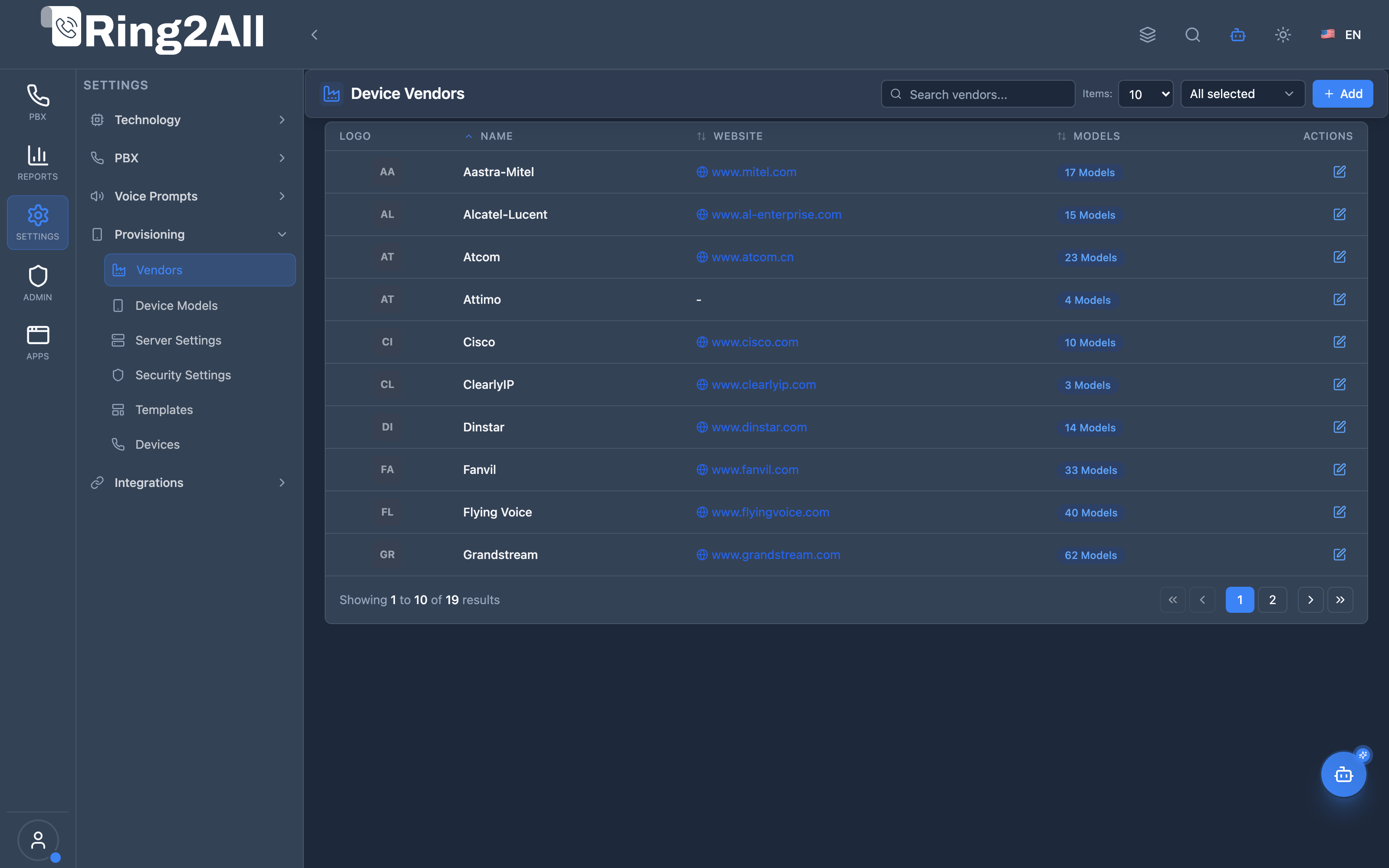
Section titled “Screenshots & Visual Interface”Provisioning Vendors Catalog Overview
Section titled “Provisioning Vendors Catalog Overview”Global inventory of certified VoIP hardware manufacturers, showing manufacturer brand names, official websites, linked device model counts, and configuration actions.
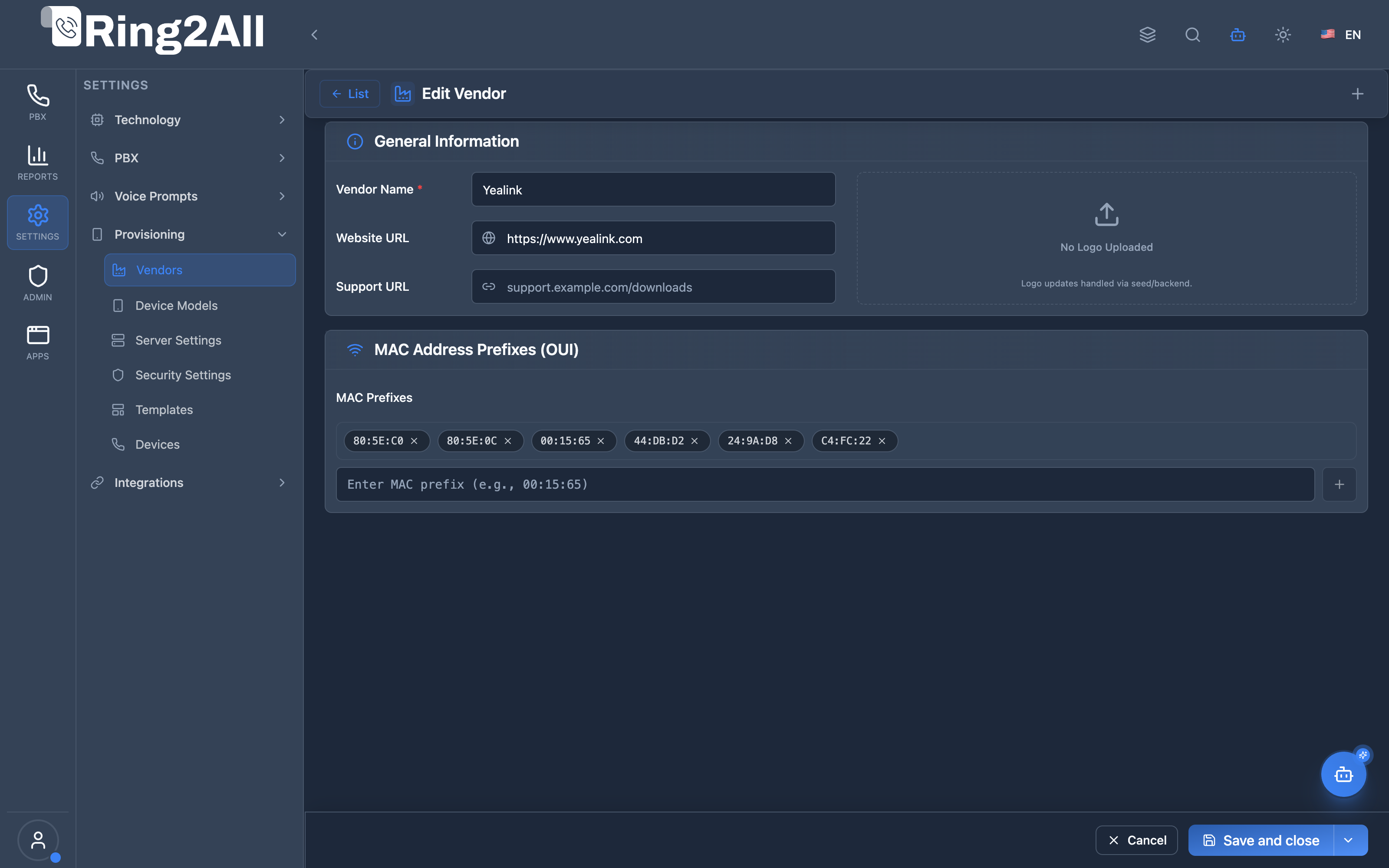
Provisioning Vendor Configuration & Protocol Management
Section titled “Provisioning Vendor Configuration & Protocol Management”Detailed vendor definition view managing brand identities, support URLs, MAC OUI prefixes, supported provisioning protocols (HTTP, HTTPS, TFTP, FTP), and redirection parameters.
1. Module Overview (Technical)
Section titled “1. Module Overview (Technical)”What Are Provisioning Vendors?
Section titled “What Are Provisioning Vendors?”Provisioning Vendors is a phone manufacturer management module that maintains the list of supported IP phone brands in the auto-provisioning system. Vendors are the top level of the device hierarchy.
Architecture
Section titled “Architecture”┌─────────────────────────────────────────────────────────────────┐│ Provisioning System Architecture │├─────────────────────────────────────────────────────────────────┤│ ││ Provisioning Hierarchy: ││ ││ ┌──────────────────────────────────────────────────────────┐ ││ │ Provisioning Vendors │ ││ │ │ ││ │ ├─ Yealink │ ││ │ ├─ Grandstream │ ││ │ ├─ Polycom │ ││ │ ├─ Cisco │ ││ │ ├─ Fanvil │ ││ │ └─ Snom │ ││ │ │ ││ └──────────────────────────────────────────────────────────┘ ││ │ ││ ▼ Has many models ││ ┌──────────────────────────────────────────────────────────┐ ││ │ Device Models │ ││ │ │ ││ │ ├─ Yealink T54W │ ││ │ ├─ Yealink T46U │ ││ │ ├─ Grandstream GXP2170 │ ││ │ └─ ... │ ││ │ │ ││ └──────────────────────────────────────────────────────────┘ ││ │ ││ ▼ Used in templates and devices ││ ┌──────────────────────────────────────────────────────────┐ ││ │ Templates → Devices │ ││ │ │ ││ │ Template (Yealink T54W) → Device (MAC: AA:BB:CC:...) │ ││ │ │ ││ └──────────────────────────────────────────────────────────┘ ││ │└─────────────────────────────────────────────────────────────────┘2. Module Overview (Commercial/Business)
Section titled “2. Module Overview (Commercial/Business)”Business Value
Section titled “Business Value”Provisioning Vendors provides manufacturer organization:
| Without Vendors | With Vendors |
|---|---|
| Flat device list | Organized hierarchy |
| No brand grouping | Vendor-based filtering |
| Manual tracking | Centralized catalog |
| No consistency | Standardized naming |
Use Cases
Section titled “Use Cases”-
Multi-vendor Deployments
- Support multiple phone brands
- Organize by manufacturer
-
Model Management
- Group models by vendor
- Consistent identification
-
Template Organization
- Filter templates by vendor
- Vendor-specific settings
-
Device Inventory
- Track devices by brand
- Reporting by vendor
Feature Highlights
Section titled “Feature Highlights”| Feature | Benefit |
|---|---|
| Vendor Catalog | Complete manufacturer list |
| Model Grouping | Organized by brand |
| CRUD Operations | Add/edit/delete vendors |
| Device Count | Track devices per vendor |
3. Module Overview (End User/Administrator)
Section titled “3. Module Overview (End User/Administrator)”What Can You Do?
Section titled “What Can You Do?”- View all supported phone vendors
- Add new vendors/manufacturers
- Edit vendor information
- Delete unused vendors
- See associated device models
Provisioning Vendors Interface
Section titled “Provisioning Vendors Interface”┌─────────────────────────────────────────────────────────────────┐│ Provisioning Vendors │├─────────────────────────────────────────────────────────────────┤│ ││ [+ Create Vendor] ││ ││ [🔍 Search vendors...] ││ ││ ┌───────────────────────────────────────────────────────────┐ ││ │ Vendor Name │ Models │ Devices │ Status │ Actions │ ││ ├─────────────────┼────────┼─────────┼─────────┼───────────┤ ││ │ Yealink │ 15 │ 45 │ ✓ Active│ ✏️ 🗑 │ ││ │ Grandstream │ 12 │ 30 │ ✓ Active│ ✏️ 🗑 │ ││ │ Polycom │ 8 │ 12 │ ✓ Active│ ✏️ 🗑 │ ││ │ Cisco │ 10 │ 8 │ ✓ Active│ ✏️ 🗑 │ ││ │ Fanvil │ 9 │ 20 │ ✓ Active│ ✏️ 🗑 │ ││ │ Snom │ 7 │ 5 │ ✓ Active│ ✏️ 🗑 │ ││ └───────────────────────────────────────────────────────────┘ ││ │└─────────────────────────────────────────────────────────────────┘Create/Edit Vendor
Section titled “Create/Edit Vendor”┌─────────────────────────────────────────────────────────────────┐│ Create Vendor │├─────────────────────────────────────────────────────────────────┤│ ││ Vendor Name: [Yealink ] ││ ││ Description: [Leading IP phone manufacturer] ││ ││ Website: [https://www.yealink.com ] ││ ││ Logo: [📤 Upload] ││ ││ Status: [Active ▼] ││ ││ [Save] [Cancel] ││ │└─────────────────────────────────────────────────────────────────┘Quick Tips
Section titled “Quick Tips”[!TIP] Pre-populated: Common vendors are typically pre-installed.
[!TIP] Add Custom: Create vendors for less common phone brands.
[!NOTE] Dependencies: Cannot delete vendors with associated models.
🎯 User Roles & Key Capabilities
Section titled “🎯 User Roles & Key Capabilities”| Role | Key Capabilities & Permissions | Operational Scope |
|---|---|---|
| PBX Super Administrator | • Global VoIP hardware vendor catalog administration and OUI prefix maintenance • Creation, update, and deletion of vendor brand profiles and support portal endpoints • Protocol compliance enforcement (HTTP, HTTPS, TFTP, FTP) and redirect service configuration • Dependency validation preventing accidental removal of vendors with active linked models |
Platform-Wide |
| Tenant Administrator | • Read-only catalog browsing of certified hardware manufacturers • Vendor compatibility audit for prospective IP phone procurement • Selection of preferred vendor hardware for tenant-wide device deployments |
Domain Scope |
| Field Engineer / VoIP Technician | • Review of certified manufacturer support URLs, firmware directories, and MAC OUI prefixes • On-site device hardware verification against the global vendor registry |
Platform / Field |
| AI Copilot / MCP Agent | • Autonomous hardware manufacturer discovery (list_provisioning_vendors)• Model compatibility validation during automated device onboarding workflows |
Autonomous Assistant |
4. Provisioning System Context
Section titled “4. Provisioning System Context”Related Modules
Section titled “Related Modules”| Module | Purpose |
|---|---|
| Provisioning Vendors | Phone manufacturers |
| Device Models | Specific phone models |
| Provisioning Templates | Configuration templates |
| Provisioning Devices | Individual phones |
| Provisioning Security | Auth settings |
Data Flow
Section titled “Data Flow”Vendor → Model → Template → Device │ │ │ │Yealink → T54W → Sales Phone → MAC: AA:BB:CC:DD:EE:FFSupported Vendors
Section titled “Supported Vendors”| Vendor | Common Models |
|---|---|
| Yealink | T54W, T46U, T42S, W60B |
| Grandstream | GXP2170, GXP2160, GRP2612 |
| Polycom | VVX450, VVX350, VVX150 |
| Cisco | 7861, 7841, 8851 |
| Fanvil | X6U, X5U, X4U |
| Snom | D385, D335, D715 |
5. Common Scenarios & Examples
Section titled “5. Common Scenarios & Examples”Scenario 1: View Vendors
Section titled “Scenario 1: View Vendors”- Navigate to Provisioning → Vendors
- Browse vendor list
- See models and device counts
Scenario 2: Add New Vendor
Section titled “Scenario 2: Add New Vendor”- Click “Create Vendor”
- Enter vendor name
- Add description (optional)
- Upload logo (optional)
- Save
Scenario 3: Edit Vendor
Section titled “Scenario 3: Edit Vendor”- Find vendor in list
- Click Edit
- Update information
- Save
Scenario 4: Delete Vendor
Section titled “Scenario 4: Delete Vendor”- Find unused vendor
- Verify no associated models
- Click Delete
- Confirm deletion
6. Limitations & Important Notes
Section titled “6. Limitations & Important Notes”Technical Notes
Section titled “Technical Notes”[!NOTE] System Vendors: Some vendors may be system-defined.
[!NOTE] Model Dependency: Vendors with models cannot be deleted.
[!WARNING] Careful Deletion: Ensure no dependencies before deleting.
Best Practices
Section titled “Best Practices”- Use Standard Names: Match official vendor names
- Add Logos: Visual identification in lists
- Keep Updated: Add new vendors as needed
- Don’t Duplicate: One entry per manufacturer
- Check Dependencies: Before deleting
Common Vendor Names
Section titled “Common Vendor Names”| Standard Name | Avoid |
|---|---|
| Yealink | YeaLink, YEALINK |
| Grandstream | GrandStream, Grand Stream |
| Polycom | PolycomInc, Poly |
| Cisco | CISCO, Cisco Systems |
Model Context Protocol (MCP) AI Integration
Section titled “Model Context Protocol (MCP) AI Integration”The Provisioning Vendors module provides Model Context Protocol (MCP) integration allowing AI Copilots, VoIP provisioning assistants, and automation bots to query certified hardware manufacturer catalogs in real time.
Available MCP Telephony Tools
Section titled “Available MCP Telephony Tools”| Tool Name | Action Type | Access Level | Description |
|---|---|---|---|
list_provisioning_vendors |
READ |
Read-Only |
Lists all supported VoIP hardware vendors/manufacturers, including brand name, description, and website URL. |
Tool Schemas & Input Parameters
Section titled “Tool Schemas & Input Parameters”list_provisioning_vendors
Section titled “list_provisioning_vendors”Lists all certified VoIP hardware manufacturers available in the auto-provisioning catalog.
{ "name": "list_provisioning_vendors", "description": "Lists all supported VoIP hardware vendors/manufacturers (e.g., Yealink, Grandstream, Cisco, Polycom, Fanvil) in Ring2All PBX.", "parameters": { "type": "object", "properties": {}, "additionalProperties": false }}Natural Language Prompt Examples
Section titled “Natural Language Prompt Examples”English Prompts
Section titled “English Prompts”💬 “List all supported IP phone vendors in the provisioning catalog.” 💬 “Which VoIP phone manufacturers are certified for auto-provisioning on Ring2All?” 💬 “Show me the manufacturer details and official website for Grandstream and Yealink.”
Spanish Prompts (Español)
Section titled “Spanish Prompts (Español)”💬 “Lista todos los fabricantes de teléfonos VoIP soportados en el catálogo de aprovisionamiento.” 💬 “¿Cuáles marcas de terminales SIP están certificadas para aprovisionamiento automático en Ring2All?” 💬 “Muestra los detalles de fabricantes y sitios oficiales registrados en la plataforma.”
Enterprise Safeguards & Compliance
Section titled “Enterprise Safeguards & Compliance”- Immutable Manufacturer Registry: Global vendor definitions are protected by referential integrity. Deleting a vendor is strictly prohibited if child models or active provisioned devices exist in the system.
- RBAC Enforcement: Calling
list_provisioning_vendorsrequires at least read-only administrative access (auxiliary_devicesMCP permission scope). - Audit Logging: All queries and manufacturer modifications are recorded in the PBX administrative audit log with caller ID, timestamp, and IP origin.
7. Troubleshooting Tips
Section titled “7. Troubleshooting Tips”Common Issues
Section titled “Common Issues”| Symptom | Possible Cause | Solution |
|---|---|---|
| Can’t delete | Has models | Remove models first |
| Duplicate vendor | Already exists | Edit existing |
| Logo not showing | Invalid format | Use PNG/JPG |
| Vendor not in list | Not created | Create vendor |
Check Vendor Data
Section titled “Check Vendor Data”SELECT id, name, description, enabledFROM public.provisioning_vendorsORDER BY name;Check Model Count
Section titled “Check Model Count”SELECT v.name AS vendor, COUNT(m.id) AS model_countFROM public.provisioning_vendors vLEFT JOIN public.provisioning_device_models m ON m.vendor_id = v.idGROUP BY v.id, v.nameORDER BY v.name;8. Glossary
Section titled “8. Glossary”| Term | Definition |
|---|---|
| Vendor | Phone manufacturer/brand |
| Model | Specific phone model |
| Template | Configuration template |
| Provisioning | Automatic phone configuration |
| MAC Address | Device hardware identifier |
Documentation last updated: January 2026