

Direct Dial Module Documentation
Table of Contents
Section titled “Table of Contents”- Module Overview (Technical)
- Module Overview (Commercial/Business)
- Module Overview (End User/Administrator)
- User Roles & Key Capabilities
- Configuration Fields Reference
- Call Flow / Logic Explanation
- Common Scenarios & Examples
- Model Context Protocol (MCP) AI Integration
- Limitations & Important Notes
- Troubleshooting Tips
- Glossary
1. Module Overview (Technical)
Section titled “1. Module Overview (Technical)”What Is Direct Dial?
Section titled “What Is Direct Dial?”Direct Dial is a routing shortcut mechanism that maps feature codes (like *8050 or 8050) to specific destinations in the PBX. It provides quick-access shortcuts to any module in the system without requiring users to remember complex extension numbers.
Architecture
Section titled “Architecture”┌─────────────────────────────────────────────────────────────────┐│ Direct Dial System │├─────────────────────────────────────────────────────────────────┤│ ││ User dials: *8050 ││ │ ││ ▼ ││ ┌──────────────────────────────────────────────────────────┐ ││ │ Direct Dial Dialplan Lookup │ ││ │ SELECT * FROM direct_dials WHERE code = '*8050' │ ││ └──────────────────────────────────────────────────────────┘ ││ │ ││ ▼ ││ ┌──────────────────────────────────────────────────────────┐ ││ │ Route Based on Module │ ││ │ │ ││ │ ├─ extension → Dial extension (e.g., 1001) │ ││ │ ├─ ivr → Send to IVR menu (e.g., main_menu) │ ││ │ ├─ queue → Send to call queue (e.g., support) │ ││ │ ├─ conference → Join conference room (e.g., 8000) │ ││ │ ├─ announcement → Play announcement │ ││ │ └─ transfer → Blind transfer to destination │ ││ │ │ ││ └──────────────────────────────────────────────────────────┘ ││ │ ││ ▼ ││ Call routed to destination ││ │└─────────────────────────────────────────────────────────────────┘Destination Modules
Section titled “Destination Modules”| Module | Description | Example Value |
|---|---|---|
extension |
Direct to an extension | 1001 |
ivr |
Send to IVR menu | main_menu |
queue |
Send to call queue | sales_queue |
conference |
Join conference room | 8000 |
announcement |
Play announcement | holiday_notice |
transfer |
Blind transfer | +15551234567 |
2. Module Overview (Commercial/Business)
Section titled “2. Module Overview (Commercial/Business)”Business Value
Section titled “Business Value”Direct Dial simplifies user experience with memorable shortcuts:
| Without Direct Dial | With Direct Dial |
|---|---|
| “Dial 9001235555 for support” | “Dial *5555 for support” |
| Users forget long numbers | Short memorable codes |
| Complex dialplan changes | Simple UI configuration |
Use Cases
Section titled “Use Cases”-
Feature Codes
*22→ Check voicemail*67→ Anonymous call*72→ Forward calls
-
Department Shortcuts
*100→ Reception desk*200→ IT Helpdesk*300→ HR Department
-
Emergency/Priority
*911→ Emergency services*99→ Security office*77→ Urgent support queue
-
External Services
*800→ Company hotline*411→ Directory services*555→ Conference bridge
Feature Highlights
Section titled “Feature Highlights”- Simple Mapping: Code → Destination in one setting
- Multiple Targets: Route to any module type
- Enable/Disable: Quickly toggle without deleting
- Context Aware: Different codes per domain/context
3. Module Overview (End User/Administrator)
Section titled “3. Module Overview (End User/Administrator)”What Can You Do?
Section titled “What Can You Do?”- Create feature codes that route to specific destinations
- Map codes to extensions, IVRs, queues, conferences, or announcements
- Enable/disable codes without deletion
- Organize shortcuts by descriptive names
Navigation
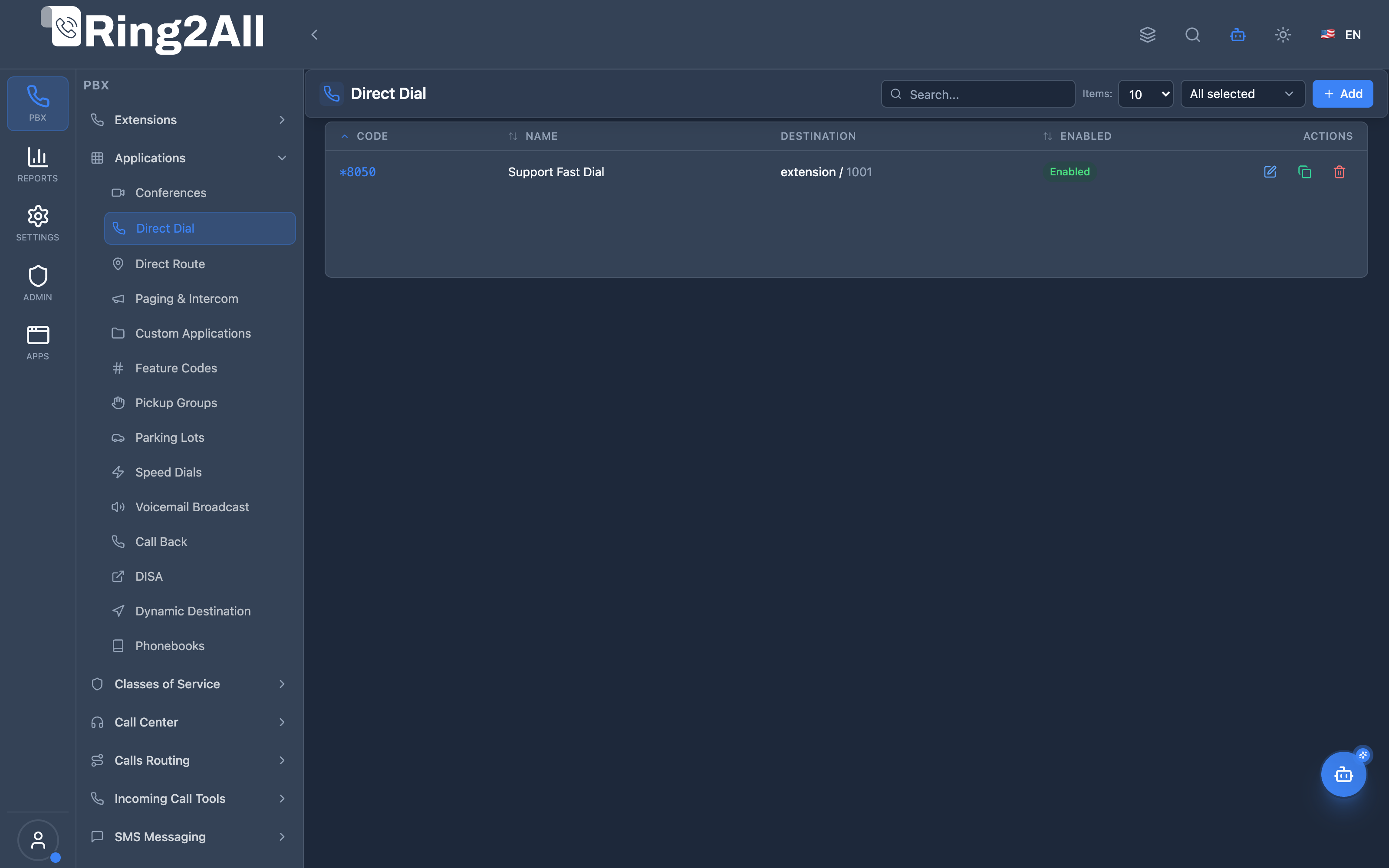
Section titled “Navigation”- Navigate to PBX → Applications → Direct Dial in the main sidebar.
- The list view displays all configured direct dial entries with their dial Code, Name, Destination target, and Enabled state.
- Click the + Add button in the upper toolbar to define a new direct dial shortcut.
- Click any row or the edit icon to adjust the destination target or toggle the feature.
User Workflow
Section titled “User Workflow”┌─────────────────────────────────────────────────────────────────┐│ Creating a Direct Dial │├─────────────────────────────────────────────────────────────────┤│ ││ 1. Basic Information ││ ├─ Code: *8050 ││ ├─ Name: "Support Fast Dial" ││ └─ Enabled: Yes ││ ││ 2. Destination Selection ││ ├─ Target Module: Extension ││ └─ Destination: 1001 ││ ││ 3. Save → Users can now dial *8050 from any device ││ │└─────────────────────────────────────────────────────────────────┘Quick Tips
Section titled “Quick Tips”[!TIP] Use Asterisk Prefix: Codes starting with
*(e.g.*8050) are easy to remember and reduce conflicts with standard internal extensions.
[!TIP] Descriptive Names: Use clear names like “Customer Support Line” instead of generic names for easier auditing and management.
[!CAUTION] Code Conflicts: Ensure your direct dial codes do not overlap with existing physical extensions or system feature codes.
🎯 User Roles & Key Capabilities
Section titled “🎯 User Roles & Key Capabilities”| Role | Permissions & Responsibilities | Key Capabilities |
|---|---|---|
| Tenant Administrator | Full write access to Direct Dial codes | Create, edit, and delete direct dial shortcuts; assign codes to any PBX destination (extensions, queues, IVRs, conferences, announcements); enable/disable rules |
| Call Center Supervisor / Operator | Read-only access | View configured direct dial shortcodes to guide agents and callers on shortcut dial strings |
| Platform / System Engineer | Telephony and FreeSWITCH engine access | Monitor FreeSWITCH Lua execution logs (direct_dial.lua), diagnose dialplan registry routing, and verify audio prompt/transfer executions |
4. Configuration Fields Reference
Section titled “4. Configuration Fields Reference”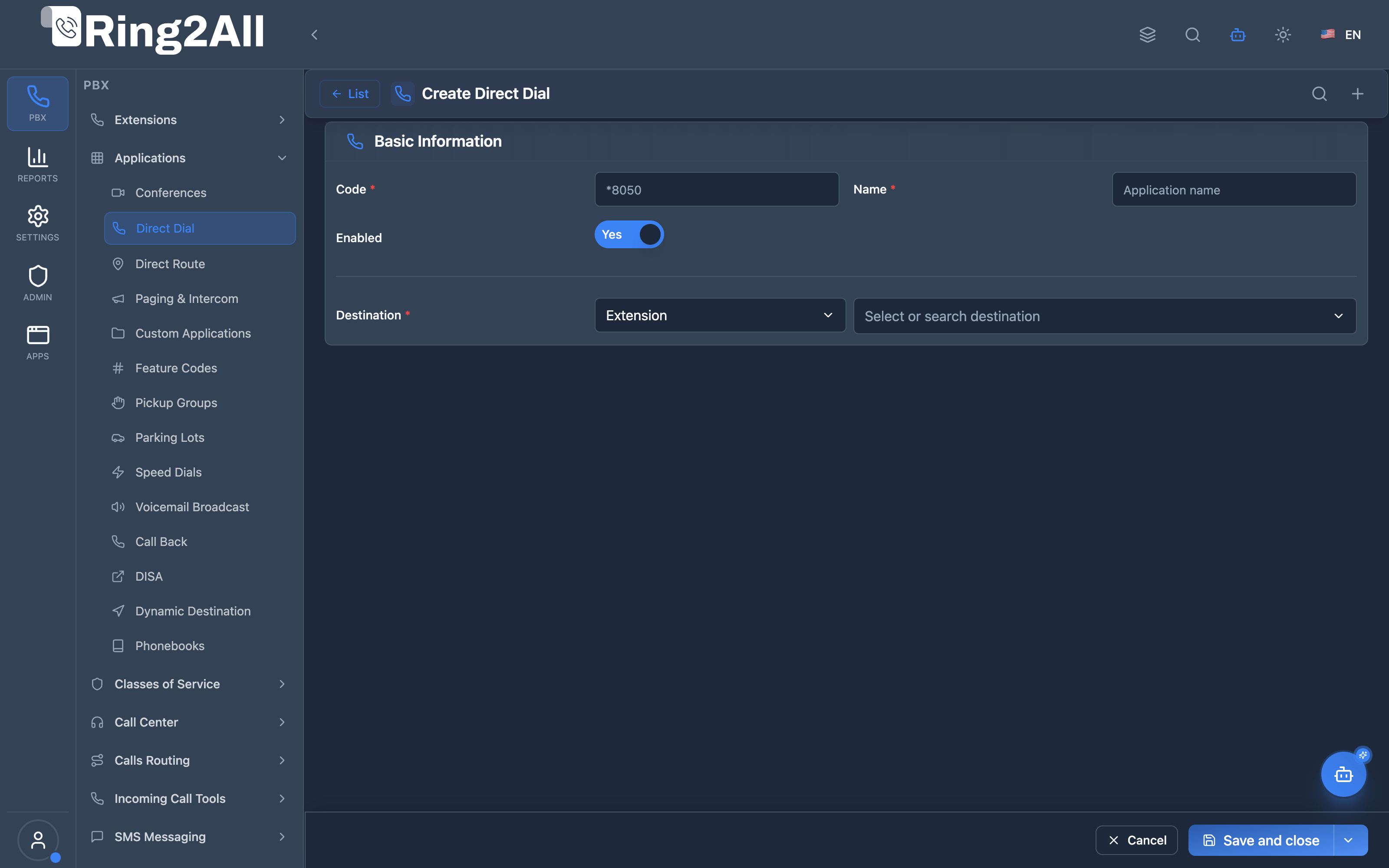
Basic Information
Section titled “Basic Information”| Field | Description | User-Friendly Tooltip | Example | Required |
|---|---|---|---|---|
| Code * | Dialable access code or star-code shortcut | The exact number or star-code callers dial to activate this shortcut | *8050, 8001 |
Yes |
| Name * | Human-readable shortcut name | Application identifier; the system automatically derives dialplan context and description from this name | Support Fast Dial, Billing Hotdesk |
Yes |
| Enabled | Master activation toggle | Instantly enable or disable this shortcut without removing the configuration | Yes / No (toggle) |
Default: Yes |
| Destination * | Target telephony application and destination entity | Select target module and specific destination from dropdown | Extension → 1001 |
Yes |
Supported Destination Modules
Section titled “Supported Destination Modules”| Module | Description | Example Selection |
|---|---|---|
| Extension | Directly rings a specific user or hardware extension | Extension 1001 |
| Conference | Bridges caller immediately into a conference room | Conference 3000 |
| IVR Menu | Connects to an automated interactive voice response attendant | IVR Main Auto Attendant |
| Call Queue | Routes call into an ACD contact center queue | Queue Support Tier 1 |
| Ring Group | Rings multiple extensions simultaneously or sequentially | Ring Group Sales Team |
| Paging & Intercom | Broadcasts one-way or two-way audio to a paging group | Paging Warehouse Paging |
| Time Condition | Evaluates current schedule before deciding final routing | Time Condition Office Business Hours |
| External Transfer | Forwards call out to an external PSTN / DID number | Number +15551234567 |
5. Call Flow / Logic Explanation
Section titled “5. Call Flow / Logic Explanation”Direct Dial Routing Flow
Section titled “Direct Dial Routing Flow”┌─────────────────────────────────────────────────────────────────┐│ Direct Dial Flow │├─────────────────────────────────────────────────────────────────┤│ ││ 1. User dials *5555 from their phone ││ │ ││ ▼ ││ 2. Telephony dialplan matches direct_dial application ││ │ ││ ▼ ││ 3. Lua handler queries database: ││ SELECT destination_module, destination_value ││ FROM direct_dials ││ WHERE code = '*5555' AND enabled = true ││ │ ││ ├─ Found → Continue ││ └─ Not Found → "Number not found" + hangup ││ │ ││ ▼ ││ 4. Based on destination_module: ││ ├─ extension → session:execute("transfer", "1001 XML") ││ ├─ ivr → session:execute("ivr", "main_menu") ││ ├─ queue → session:execute("callcenter", "queue@...") ││ ├─ conference → session:execute("conference", "8000@...") ││ ├─ announcement → play announcement, then hangup ││ └─ transfer → session:execute("bridge", "sofia/.../dest") ││ │ ││ ▼ ││ 5. Call proceeds to destination ││ │└─────────────────────────────────────────────────────────────────┘6. Common Scenarios & Examples
Section titled “6. Common Scenarios & Examples”Scenario 1: Department Hotlines
Section titled “Scenario 1: Department Hotlines”Create shortcuts for department access:
| Code | Name | Module | Value |
|---|---|---|---|
*100 |
Reception | extension | 1000 |
*200 |
IT Support | queue | it_support |
*300 |
HR Department | extension | 3000 |
*400 |
Sales | queue | sales_queue |
Scenario 2: IVR Access
Section titled “Scenario 2: IVR Access”Create shortcuts to IVR menus:
| Code | Name | Module | Value |
|---|---|---|---|
*0 |
Main Menu | ivr | main_menu |
*1 |
Sales Menu | ivr | sales_ivr |
*2 |
Support Menu | ivr | support_ivr |
Scenario 3: Conference Quick Access
Section titled “Scenario 3: Conference Quick Access”One-touch conference joining:
| Code | Name | Module | Value |
|---|---|---|---|
*8000 |
Daily Standup | conference | daily_standup |
*8001 |
Team Meeting | conference | team_room |
*8002 |
All Hands | conference | all_hands |
Scenario 4: External Transfer
Section titled “Scenario 4: External Transfer”Quick access to external numbers:
| Code | Name | Module | Value |
|---|---|---|---|
*911 |
Emergency | transfer | 911 |
*411 |
Directory | transfer | 411 |
*800 |
Company Toll-Free | transfer | +18005551234 |
7. Model Context Protocol (MCP) AI Integration
Section titled “7. Model Context Protocol (MCP) AI Integration”The Direct Dial subsystem is fully managed through the Model Context Protocol (MCP), enabling AI assistants and automation tools to inspect active dialing shortcuts, configure quick access codes, and ensure non-conflicting routing across tenant domains.
Available MCP Tools
Section titled “Available MCP Tools”| Tool Name | Operation | Description | Access Level |
|---|---|---|---|
list_direct_dials |
Query | List all direct dial shortcut codes, destination modules, and target values within the domain. | Read-Only |
get_direct_dial_status |
Query | Retrieve routing configuration and target destination for a specific shortcut code (e.g. *8050). |
Read-Only |
create_direct_dial |
Provisioning | Create a new shortcut code mapping directly to an extension, IVR, queue, conference, or external number. | Admin / Superadmin |
update_direct_dial |
Management | Update name, description, target module, or destination value for an existing direct dial code. | Admin / Superadmin |
delete_direct_dial |
Deprovisioning | Remove a direct dial shortcut code from the PBX. | Superadmin |
Tool Definitions & Parameter Reference
Section titled “Tool Definitions & Parameter Reference”create_direct_dial
Section titled “create_direct_dial”Registers a rapid dialing code within the domain.
{ "name": "create_direct_dial", "description": "Create a new Direct Dial quick shortcut code (e.g. '*8050' or '8050') mapped to any PBX destination.", "inputSchema": { "type": "object", "properties": { "code": { "type": "string", "description": "The dial shortcut code (e.g. '*8050' or '5555')." }, "name": { "type": "string", "description": "Friendly name for this shortcut." }, "destinationModule": { "type": "string", "description": "Target module (e.g. 'extension', 'queue', 'ivr', 'conference', 'ring_group', 'transfer')." }, "destinationValue": { "type": "string", "description": "Target extension, queue ID, IVR ID, or phone number." }, "description": { "type": "string", "description": "Optional notes or purpose." } }, "required": ["code", "name", "destinationModule", "destinationValue"] }}Safety Safeguards & Number Uniqueness
Section titled “Safety Safeguards & Number Uniqueness”- Domain Number Collision Prevention: Before committing any direct dial code, the platform invokes
validateNumberUniqueness(code, domainId, 'direct_dial'). If the code collides with an existing Extension, Conference Room, Parking Lot, Speed Dial, or Feature Code in the active domain, the operation fails with a detailed conflict error (e.g.,Number *8050 is already in use by Feature Code "*8050"). - Auto Dialplan Reload: Creating, updating, or deleting direct dials automatically triggers a non-blocking
reloadxmlin Telephony Server so that changes take effect immediately across all SIP endpoints.
Example AI Assistant Prompts & Workflow
Section titled “Example AI Assistant Prompts & Workflow”Example 1: Creating a Speed Shortcut to Helpdesk Queue
Section titled “Example 1: Creating a Speed Shortcut to Helpdesk Queue”Admin Prompt:
*“Create a direct dial shortcut code 4357 pointing to the Technical Support queue (ID 5).”
AI Tool Execution:
{ "tool": "create_direct_dial", "arguments": { "code": "*4357", "name": "Quick Helpdesk", "destinationModule": "queue", "destinationValue": "5", "description": "Quick shortcut for internal staff to reach Support Queue" }}MCP Response:
{ "success": true, "data": { "id": 12, "code": "*4357", "name": "Quick Helpdesk", "destinationModule": "queue", "destinationValue": "5", "message": "Direct Dial shortcut *4357 created successfully." }}8. Limitations & Important Notes
Section titled “8. Limitations & Important Notes”Technical Limitations
Section titled “Technical Limitations”[!WARNING] Code Uniqueness: Codes must be unique within a domain. Duplicate codes will cause routing failures.
[!WARNING] Asterisk Conflicts: Some
*codes are reserved by Telephony Server or telephony standards. Check for conflicts.
[!IMPORTANT] Dialplan Priority: Direct dial entries are processed in dialplan order. Ensure they don’t conflict with higher-priority routes.
Best Practices
Section titled “Best Practices”- Use Consistent Prefixes: All department codes with
*1xx, all queues with*2xx, etc. - Document Purpose: Use description field to explain why the code exists
- Test Before Deploy: Verify routing works before publishing codes to users
- Avoid Numeric-Only: Pure numbers may conflict with extensions
Reserved Codes (Commonly)
Section titled “Reserved Codes (Commonly)”| Code | Standard Use |
|---|---|
*67 |
Block Caller ID |
*69 |
Call Return |
*72 |
Call Forwarding |
*73 |
Cancel Forwarding |
*82 |
Unblock Caller ID |
*98 |
Voicemail Access |
9. Troubleshooting Tips
Section titled “9. Troubleshooting Tips”Common Issues
Section titled “Common Issues”| Symptom | Possible Cause | Solution |
|---|---|---|
| “Number not found” | Code not in database | Verify code exists and is enabled |
| Wrong destination | Module/value mismatch | Check destination module and value |
| Code not recognized | Dialplan not matching | Check context matches dialplan |
| Conflict with extension | Code overlaps | Use asterisk prefix or different range |
Diagnostic SQL
Section titled “Diagnostic SQL”List all direct dials:
SELECT code, name, destination_module, destination_value, enabledFROM public.direct_dialsWHERE domain_id = [domain_id]ORDER BY code;Check for code conflicts:
-- Check against extensionsSELECT 'CONFLICT' AS status, dd.code, e.extensionFROM public.direct_dials ddJOIN public.sip_extensions e ON dd.code = e.extensionWHERE dd.domain_id = [domain_id];Find disabled codes:
SELECT code, name, destination_moduleFROM public.direct_dialsWHERE enabled = false AND domain_id = [domain_id];10. Glossary
Section titled “10. Glossary”| Term | Definition |
|---|---|
| Direct Dial | A shortcut code that routes to a specific destination |
| Feature Code | A dialable code (usually starting with *) that triggers a feature |
| Destination Module | The type of target (extension, IVR, queue, etc.) |
| Destination Value | The specific target identifier |
| Context | Dialplan context for routing logic |
| Dialplan | Telephony Server routing configuration |
| IVR | Interactive Voice Response menu |
| Queue | Call queue for agent distribution |
| Announcement | Pre-recorded audio message |
| Transfer | Redirect call to external number |
Documentation last updated: January 2026