

Announcements Module Documentation
Table of Contents
Section titled “Table of Contents”- Navigation & Access
- Screenshots & Visual Interface
- Module Overview (Technical)
- Module Overview (Commercial/Business)
- Module Overview (End User/Administrator)
- Configuration Fields Reference
- Destination Routing
- Common Scenarios & Examples
- Model Context Protocol (MCP) AI Integration
- Limitations & Important Notes
- Troubleshooting Tips
- Glossary
Navigation & Access
Section titled “Navigation & Access”To access the Announcements module:
- Log in to the Ring2All Web Portal.
- In the left navigation sidebar, expand PBX Engine.
- Under Incoming Call Tools, click Announcements (
/pbx/incoming-tools/announcements).
Screenshots & Visual Interface
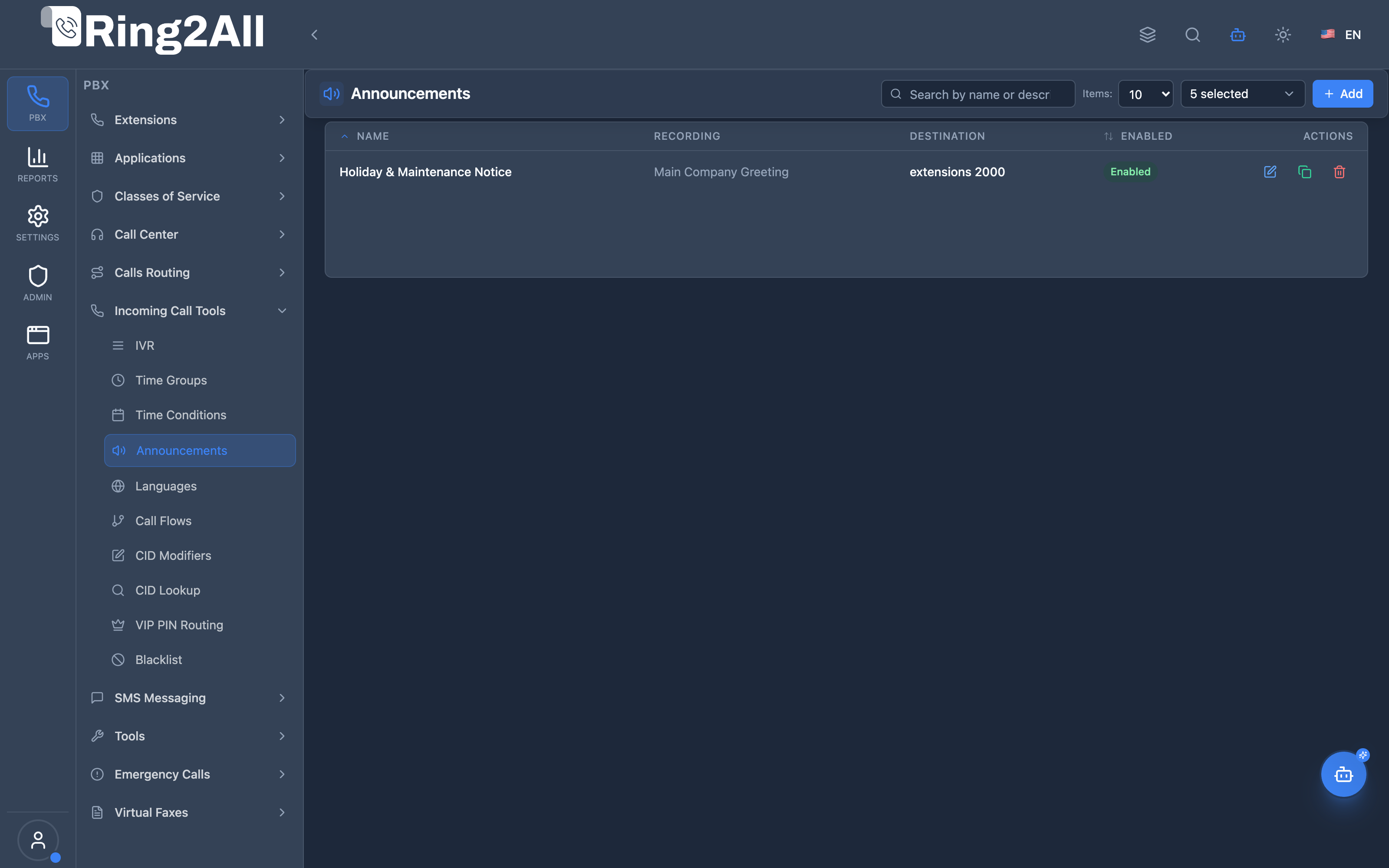
Section titled “Screenshots & Visual Interface”Announcements Overview
Section titled “Announcements Overview”Displays all defined system announcements, their associated voice recording file, post-playback destination, and active status.
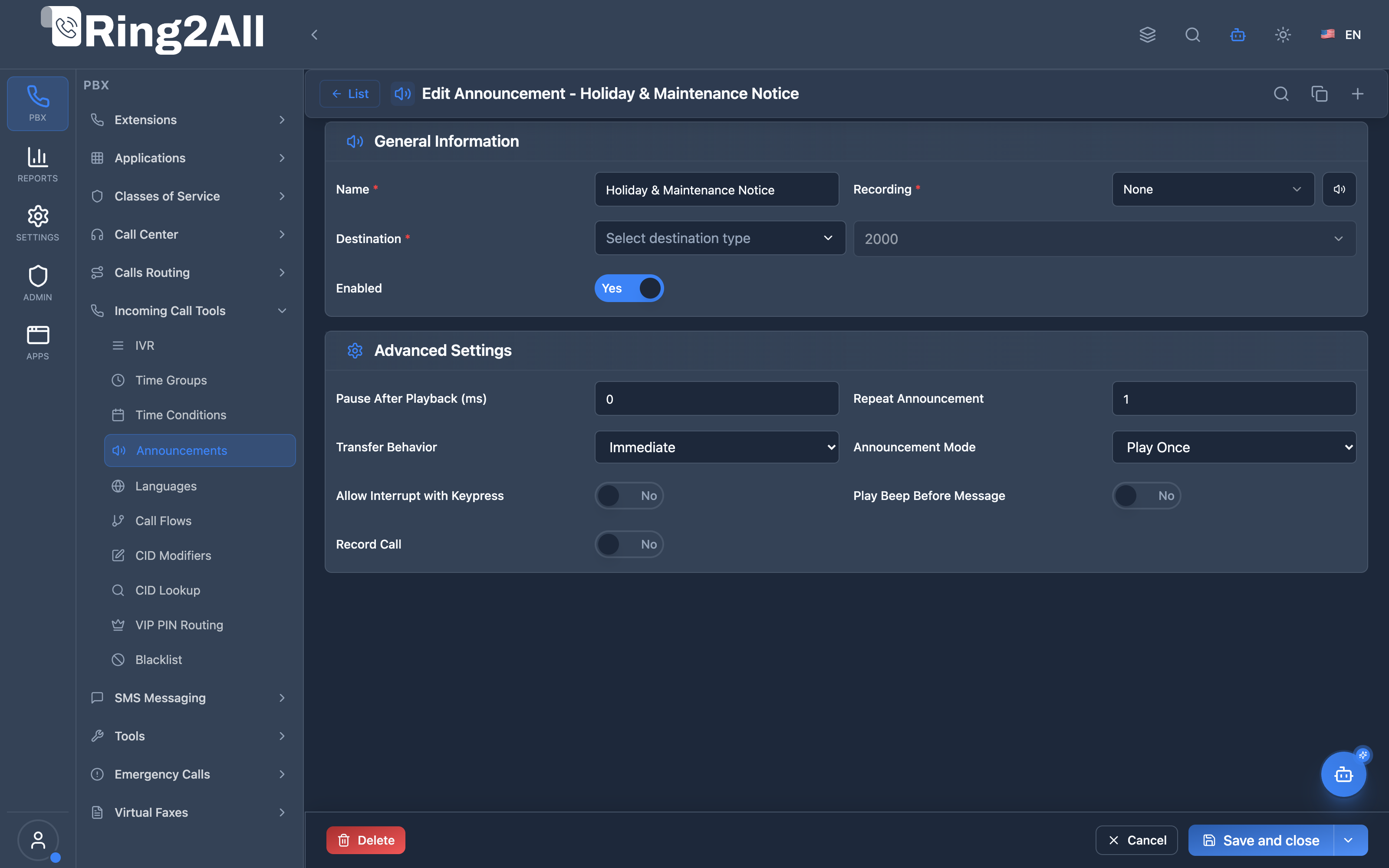
Announcement Configuration Form
Section titled “Announcement Configuration Form”Allows selecting audio recording prompts, post-playback destination module and target (e.g. extension, IVR, hangup), and enabled status.
1. Module Overview (Technical)
Section titled “1. Module Overview (Technical)”What Are Announcements?
Section titled “What Are Announcements?”Announcements are audio playback elements that play a recorded message to callers and then optionally route to a destination. They’re used for greetings, information messages, hold messages, or any pre-recorded content.
Architecture
Section titled “Architecture”┌─────────────────────────────────────────────────────────────────┐│ Announcement Flow │├─────────────────────────────────────────────────────────────────┤│ ││ Call enters (via inbound route, IVR, etc.) ││ │ ││ ▼ ││ ┌──────────────────────────────────────────────────────────┐ ││ │ announcement.lua │ ││ │ │ ││ │ 1. Lookup announcement in public.announcements │ ││ │ 2. Get recording path from public.voice_recordings │ ││ │ 3. Answer call │ ││ │ 4. Play audio (streamFile) │ ││ │ 5. Route to destination or hangup │ ││ │ │ ││ └──────────────────────────────────────────────────────────┘ ││ │ ││ ├── Has Destination? ────────────────────────────────► ││ │ Yes → Route to extension/IVR/queue/etc. ││ │ ││ └── No Destination ──────────────────────────────────► ││ Hangup (NORMAL_CLEARING) ││ │└─────────────────────────────────────────────────────────────────┘2. Module Overview (Commercial/Business)
Section titled “2. Module Overview (Commercial/Business)”Business Value
Section titled “Business Value”Announcements enable professional audio messaging:
| Without Announcements | With Announcements |
|---|---|
| No welcome message | Professional greeting |
| Manual information | Automated notices |
| No after-hours message | After-hours recording |
| Generic experience | Branded audio experience |
Use Cases
Section titled “Use Cases”-
Welcome Greeting
- “Thank you for calling ABC Company”
- Play before IVR or queue
-
After-Hours Message
- “Our office is closed. Leave a message…”
- Route to voicemail
-
Holiday Notice
- “We are closed for the holiday…”
- Hangup or route to on-call
-
Queue Position
- “You are caller #3 in line…”
- Continue to hold
-
Legal Disclaimers
- “This call may be recorded…”
- Route to agent
Feature Highlights
Section titled “Feature Highlights”| Feature | Benefit |
|---|---|
| Audio Playback | Play any recording |
| Optional Destination | Route after playback |
| Multiple Modules | Route to extension, IVR, queue, etc. |
| Repeat Option | Play multiple times |
| Interrupt Option | Allow DTMF skip |
| Post-Delay | Pause before routing |
3. Module Overview (End User/Administrator)
Section titled “3. Module Overview (End User/Administrator)”What Can You Do?
Section titled “What Can You Do?”- Create named announcements
- Link to audio recordings
- Configure optional destination
- Set playback options (repeat, interrupt)
- Add post-playback delay
- Choose transfer behavior
Administrator Workflow
Section titled “Administrator Workflow”┌─────────────────────────────────────────────────────────────────┐│ Creating an Announcement │├─────────────────────────────────────────────────────────────────┤│ ││ Tab: General ││ ├─ Name: "Welcome Message" ││ ├─ Description: "Main greeting for callers" ││ ├─ Recording: [Select] welcome.wav ││ ├─ Destination Type: IVR ││ ├─ Destination: Main Menu ││ └─ Enabled: ✓ ││ ││ Tab: Advanced Settings ││ ├─ Repeat Announcement: 1 ││ ├─ Pause After Playback (ms): 500 ││ ├─ Allow Interrupt with Keypress: Off ││ ├─ Terminator Key: # ││ ├─ Play Beep Before Message: Off ││ └─ Record Call: Off ││ │└─────────────────────────────────────────────────────────────────┘Quick Tips
Section titled “Quick Tips”[!TIP] Short Messages: Keep announcements under 30 seconds for best experience.
[!TIP] Allow Skip: Enable keypress interrupt for returning callers.
[!CAUTION] Recording Required: Announcement must have a linked audio file.
4. Configuration Fields Reference
Section titled “4. Configuration Fields Reference”General Fields
Section titled “General Fields”| Field | Description | Example |
|---|---|---|
| Name | Unique identifier | Welcome Message |
| Description | Optional notes | Main greeting |
| Recording | Audio file | welcome.wav |
| Enabled | Announcement active | On/Off |
Destination Fields
Section titled “Destination Fields”| Field | Description |
|---|---|
| Destination Type | Module to route to |
| Destination Value | Specific target |
Destination Types
Section titled “Destination Types”| Type | Description |
|---|---|
| Extension | Route to extension |
| Voicemail | Route to voicemail |
| IVR | Route to IVR menu |
| Conference | Route to conference |
| Queue | Route to call queue |
| Hangup | Terminate call |
| Park | Park the call |
Advanced Settings
Section titled “Advanced Settings”| Field | Description | Default |
|---|---|---|
| Repeat Announcement | Times to play before routing (1-5) | 1 |
| Pause After Playback (ms) | Delay in milliseconds before transfer | 0 |
| Allow Interrupt with Keypress | Allow caller to skip announcement via DTMF key | Off |
| Terminator Key | DTMF key to interrupt playback (# or *) | # |
| Play Beep Before Message | Play short alert beep prior to announcement | Off |
| Record Call | Record call session during announcement | Off |
5. Destination Routing
Section titled “5. Destination Routing”How Routing Works
Section titled “How Routing Works”After the announcement plays, the handler routes based on destination_module:
if destination_module == 'extension' then execute routing/extension.luaelseif destination_module == 'ivr' then transfer to IVRelseif destination_module == 'queue' then execute routing/queue.luaelseif destination_module == 'voicemail' then transfer to voicemail-- ... etcelse hangupendSupported Modules
Section titled “Supported Modules”| Module | Handler |
|---|---|
| extension | routing/extension.lua |
| ivr | Transfer to IVR |
| conference | routing/conference.lua |
| ring_group | routing/ring_group.lua |
| queue | routing/queue.lua |
| voicemail | Transfer |
| direct_route | Transfer (public) |
| announcement | routing/announcement.lua |
| call_flow | routing/call_flow.lua |
| time_condition | routing/time_condition.lua |
| language | routing/language.lua |
| direct_dial | routing/direct_dial.lua |
6. Common Scenarios & Examples
Section titled “6. Common Scenarios & Examples”Scenario 1: Welcome + IVR
Section titled “Scenario 1: Welcome + IVR”Announcement: “Welcome”
| Setting | Value |
|---|---|
| Recording | welcome.wav |
| Destination Type | IVR |
| Destination | Main Menu |
Flow:
- “Thank you for calling ABC Company”
- → Route to Main Menu IVR
Scenario 2: After-Hours + Voicemail
Section titled “Scenario 2: After-Hours + Voicemail”Announcement: “After Hours”
| Setting | Value |
|---|---|
| Recording | after-hours.wav |
| Destination Type | Voicemail |
| Destination | General Mailbox |
Flow:
- “Our office is closed. Please leave a message…”
- → Route to General Voicemail
Scenario 3: Holiday Closure (No Destination)
Section titled “Scenario 3: Holiday Closure (No Destination)”Announcement: “Holiday”
| Setting | Value |
|---|---|
| Recording | holiday.wav |
| Destination Type | Hangup |
| Destination | NORMAL_CLEARING |
Flow:
- “We are closed for the holiday…”
- → Hangup
Scenario 4: Legal Disclaimer + Queue
Section titled “Scenario 4: Legal Disclaimer + Queue”Announcement: “Recording Notice”
| Setting | Value |
|---|---|
| Recording | recording-notice.wav |
| Destination Type | Queue |
| Destination | Support Queue |
| Allow Interrupt | Off |
Flow:
- “This call may be recorded for quality assurance…”
- → Route to Support Queue
7. Model Context Protocol (MCP) AI Integration
Section titled “7. Model Context Protocol (MCP) AI Integration”Ring2All exposes native Model Context Protocol (MCP) tools for Announcements (Audio Playback & Post-Playback Routing), allowing AI Copilots and PBX automation engines to inspect pre-recorded greeting elements, configure chained destination targets (Extensions, Queues, IVRs, Voicemail), and provision or adjust informational announcements programmatically with domain-level isolation and dependency protection.
Available MCP Tools
Section titled “Available MCP Tools”| Tool Name | Description | Key Parameters |
|---|---|---|
list_announcements |
Lists all Announcements in the domain, displaying announcement name, linked recording file, post-playback destination, and enabled status. | search (optional string) |
get_announcement_status |
Retrieves full configuration and chained post-playback destination module and target value of a specific Announcement. | name (required string) |
create_announcement |
Provisions a new Announcement linking an audio prompt to a subsequent telephony destination. Enforces announcement name uniqueness per domain. | name, destinationModule (ivr, ring-group, queue, extension, voicemail, hangup), destinationData, recordingName |
update_announcement |
Updates an existing Announcement’s name, post-playback destination module/data, or enabled status. | name, newName, destinationModule, destinationData, enabled |
delete_announcement |
Safely removes an Announcement after verifying via assertCanDeleteAnnouncement that no Inbound Routes or IVR options route to it. |
name (required string) |
Protection Guards & Integrity
Section titled “Protection Guards & Integrity”- Name Uniqueness: Announcement names must be unique within each tenant domain.
- Relational Integrity (
assertCanDeleteAnnouncement): An Announcement cannot be deleted if any active Inbound Route, IVR branch, or Time Condition routes to it. - Immediate Playback Availability: Once created or updated, announcements stream immediately through Telephony Server
playbackapplications without requiring system service restarts.
AI Agent Operational Examples
Section titled “AI Agent Operational Examples”Querying Announcement Configuration
Section titled “Querying Announcement Configuration”{ "tool": "get_announcement_status", "arguments": { "name": "Holiday Closure Greeting" }}Provisioning an Informational Announcement with Failover to Voicemail
Section titled “Provisioning an Informational Announcement with Failover to Voicemail”{ "tool": "create_announcement", "arguments": { "name": "System Maintenance Notice", "recordingName": "maintenance_notice.wav", "destinationModule": "voicemail", "destinationData": "1001" }}Recommended Natural Language Prompts
Section titled “Recommended Natural Language Prompts”- “Show me all announcements configured in this domain and where they route after playback.”
- “Create an announcement named ‘Weather Advisory’ that plays ‘weather_delay.wav’ and then hangs up.”
- “Check if any Inbound Routes depend on ‘Summer Holiday Notice’ before I delete it.”
- “Update ‘Emergency Notice’ to transfer callers to Ring Group 600 after playing.”
8. Limitations & Important Notes
Section titled “8. Limitations & Important Notes”Technical Notes
Section titled “Technical Notes”[!NOTE] Case-Insensitive: Announcement lookup is case-insensitive.
[!WARNING] Recording Required: Without recording, playback is skipped.
[!WARNING] Call Must Be Answered: Audio requires answered call.
Best Practices
Section titled “Best Practices”- Short Audio: Keep under 30 seconds
- Professional Quality: Use clear, well-recorded audio
- Always Test: Verify playback works correctly
- Set Destination: Configure where to route after
- Use Categories: Organize by purpose (greeting, info, legal)
9. Troubleshooting Tips
Section titled “9. Troubleshooting Tips”Common Issues
Section titled “Common Issues”| Symptom | Possible Cause | Solution |
|---|---|---|
| No audio | Missing recording | Upload audio file |
| Wrong destination | Module misconfigured | Check destination settings |
| Audio cut off | Call not answered | Ensure call is answered |
| Not found | Name mismatch | Verify announcement name |
| No routing | Empty destination | Set destination or hangup |
Diagnostic SQL
Section titled “Diagnostic SQL”List announcements:
SELECT a.id, a.name, a.enabled, a.destination_module, a.destination_data, r.file_pathFROM public.announcements aLEFT JOIN public.voice_recordings r ON r.id = a.recording_idWHERE a.domain_id = [domain_id];Telephony Server Logs
Section titled “Telephony Server Logs”# Check announcement playbackgrep "announcement" /var/log/freeswitch/freeswitch.loggrep "streamFile" /var/log/freeswitch/freeswitch.log10. Glossary
Section titled “10. Glossary”| Term | Definition |
|---|---|
| Announcement | Audio message playback element |
| Recording | Audio file to play |
| Destination | Where to route after playback |
| Terminator | DTMF key to skip audio |
| Post-Delay | Pause after playback |
| Loop Mode | Continuous repeat |
Documentation last updated: January 2026